What's New in Zoho Inventory | June 2026

What's New in Zoho Inventory | June 2026

Hello users,

June 2026 introduces a range of exciting enhancements to Zoho Inventory. With the full rollout of the Zoho Inventory Windows application, the launch of Terminal Payments, and new tracking combinations in Advanced Inventory Tracking, you can manage inventory more efficiently, streamline fulfillment operations, and gain greater control over your business.


Inventory & Sales Management

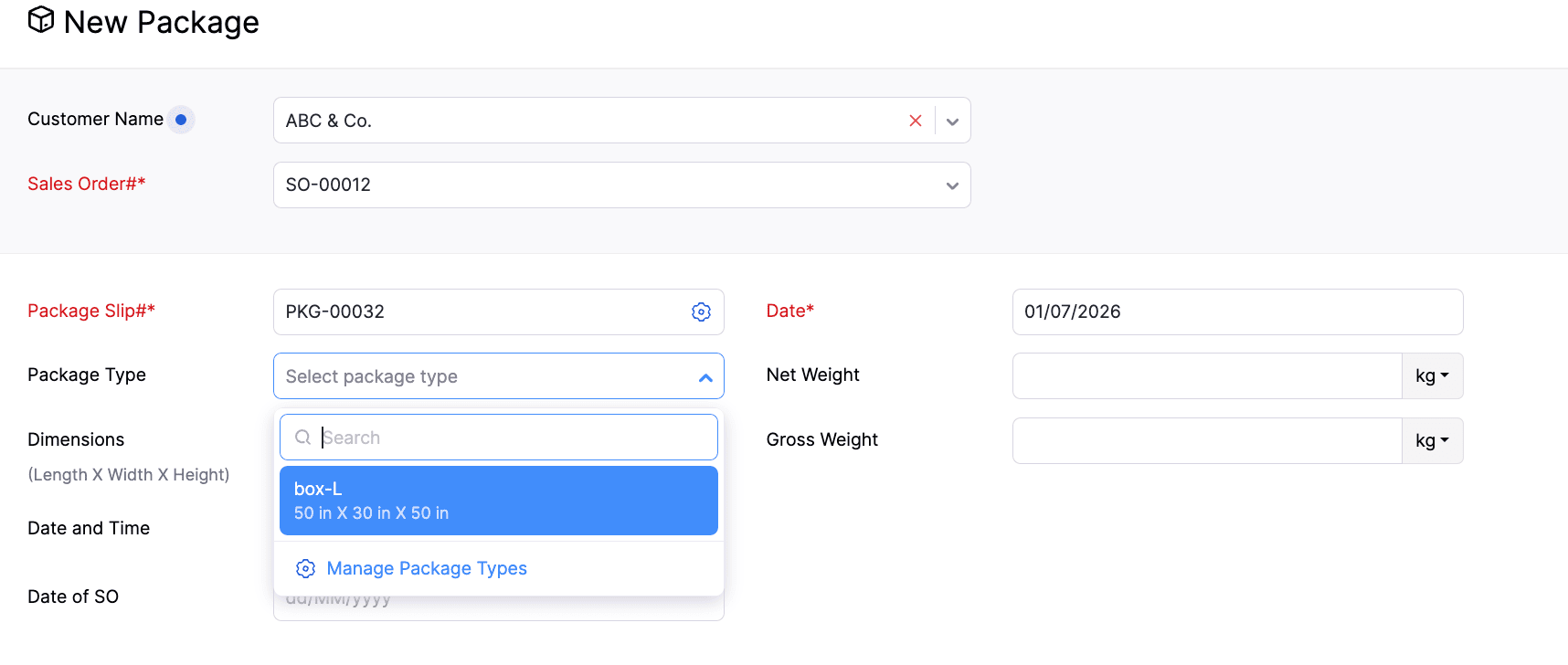
Introducing Package Types

Package Types are now available in Zoho Inventory, making it easier to standardize packaging during creation. You can create predefined package types with dimensions and weight, and associate them with packages as you create them. You can also edit, delete, mark as active, and inactive the package types directly from the package creation page.

We've also enhanced package weight tracking by splitting the existing Weight field into Net Weight and Gross Weight, providing more accurate weight information for your packages and shipments.

To select package type > Go to Packages > Click +New > Select the Customer and Sales Order > Navigate to the Package Type field

Payment and Compliance

Collect Invoice Payments Using Payment Terminals (IN, US & CA)

Invoice payments can now be collected through payment terminals and dynamic QR codes across the web, Windows, and mobile apps. Once configured, payments can be initiated directly from the Invoice Details page using the Pay with Terminal option. The app will automatically track the payment and update the transaction status.

To configure the payment gateway, go to Settings > Online Payments > Customer Payments > Enter your credentials for the gateway.


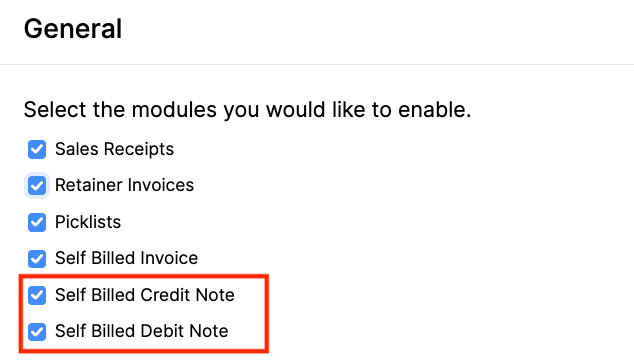
Self-Billed Credit Notes and Debit Notes [Global Edition]

Introducing Self-Billed Credit Notes (SBCNs) and Self-Billed Debit Notes (SBDNs) for organizations complying with Malaysia's E-Invoicing regulations.

A Self-Billed Credit Note can be created by the buyer when the payable amount decreases or when a supplier invoice needs to be cancelled. A Self-Billed Debit Note can be created when the payable amount increases. They are also included in the relevant reports, with SBCNs appearing in Vendor Credit Reports and SBDNs in Bills Reports.

To enable the options > Go to Settings > Setup & Configurations > General > Enable Self-Billed Credit Note and Self-Billed Debit Note
                                             

Applications

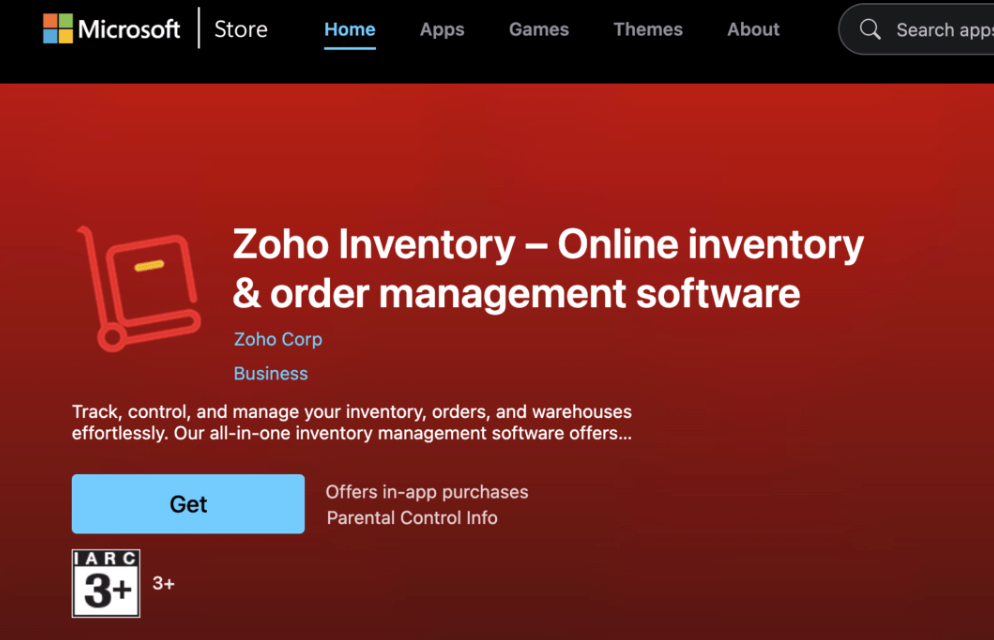
Introducing Zoho Inventory Windows Application

The dedicated Windows application for Zoho Inventory is now available on the Microsoft Store. It offers built-in support for Warehouse Management, Batch Tracking, Serial Number Tracking, Bin Tracking, and Barcode Scanning across the relevant modules, enabling a seamless desktop inventory management experience.


Enhancements in
Advanced Inventory Tracking

Manage Serial-Tracked Items with UOM

Unit of Measurement (UOM) conversion is now available for Serial Tracked Items. You can transact serial-tracked items in your preferred unit of measurement. The batch and bin allocation screen displays available quantities in the selected transaction unit.

Enhancements in Batches List View

You can now use Custom Views, Column Customization, and Advanced Search for batch-tracked items. These options give you more control over how you organize and filter batch records.

Note: The enhancements are available in Advanced Inventory Tracking-supported plans.

Export Bin Details in Transactions
You can now export bin details for the transactions and entities, including Bills, Packages, Purchase Receives, Sales Returns, Items, Opening Balance, Credit Notes, Vendor Credits, and Invoices.


Reports & Insights

Introducing the Weighted Average Costing Valuation Transactions Report

We have introduced the Weighted Average Costing (WAC) Valuation Transactions report, providing greater visibility into item valuation over time. It also displays the opening and closing Weighted Average Costing (WAC) values for items within a selected date range. You can drill down into an item to view its transaction history and see how the WAC is recalculated after each transaction.

Additionally, it also includes Stock Availability filtering, Multi-Level Group By, Advanced Filters, and Show/Hide Columns, making it easier to analyze inventory valuation based on your business needs.

Enhancement in Picklist Details Report

The Picklist Details Report now includes both Bin details and Batch details, giving warehouse teams a more comprehensive view of item locations and batch information during the picking process.


Workflow & Automation

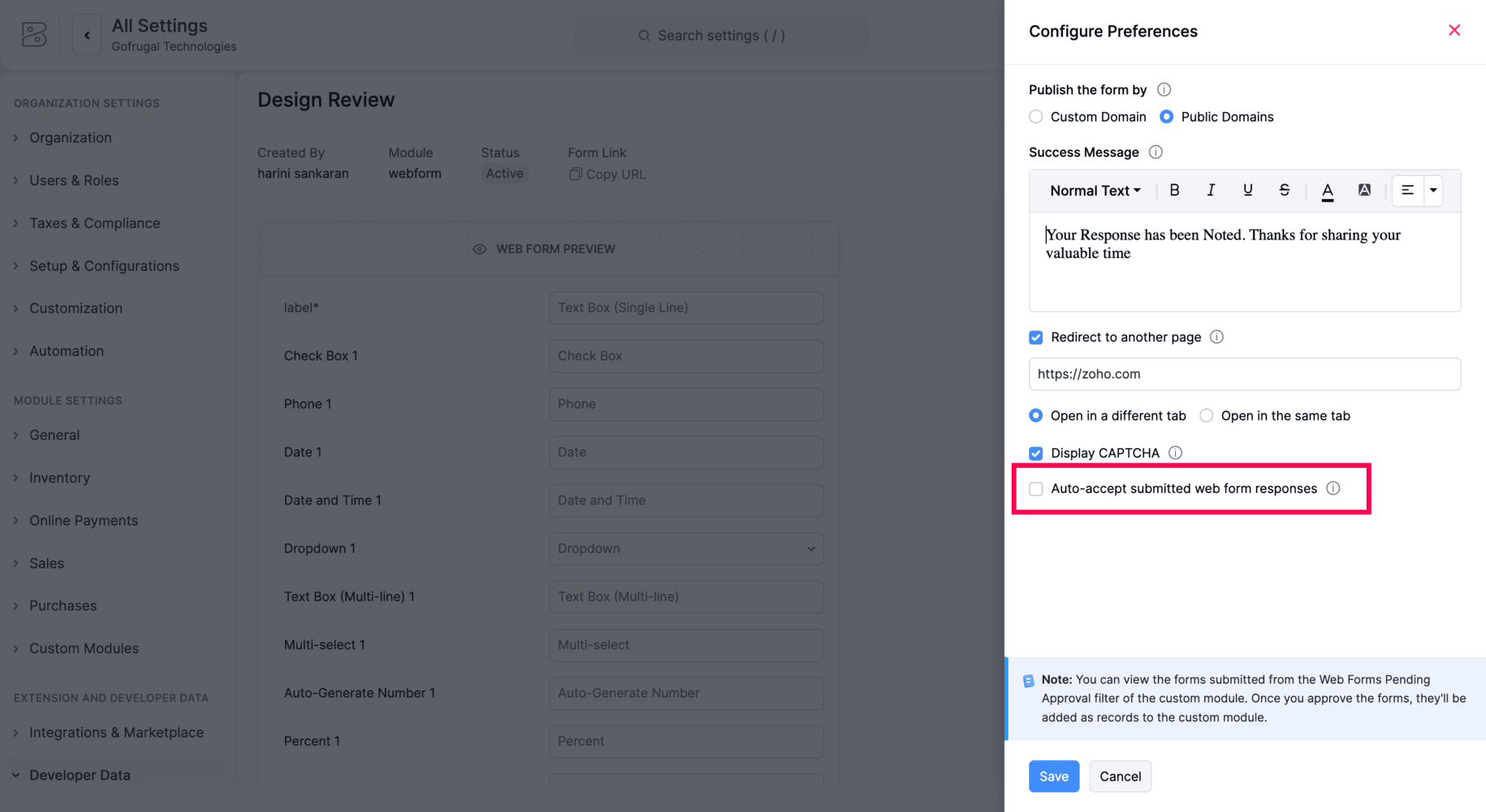
Automatic Acceptance for Web Form Submissions

Zoho Inventory now includes an Auto-accept submitted web form responses option for Web Forms. When enabled, incoming submissions are automatically accepted and created as records in the associated custom module, eliminating the need for manual review before record creation.
             

Early Access Features

Introducing Material Requests & Material Issues

We're introducing two new modules that help businesses manage internal material movement more efficiently.

  • Material Requests

  • Material Issues

Users can create a material request by specifying the required items, quantities, expected date, and location. Once the request is approved, the warehouse can fulfill it through a material issue, either fully or partially, with the issued quantity automatically deducted from available stock. If unused materials are returned, they can be recorded using the Material Returns option. After approval, the returned quantity is added back to the available stock.

These modules support Projects, Reporting Tags, Batch Tracking, Serial Number Tracking, Bin Locations, and Item-Level Accounts, and are compatible with both simple and multi-level approval workflows.

To enable it, go to Settings > Setup & Configurations> General > Enable Material Requests and Material Issues 
Note: This feature is available in Early Access. Contact support@zohoinventory.com to enable it for your organization.


Enhanced Inventory Tracking with Batch and Serial Combinations

Advanced Inventory Tracking now allows you to enable both batch and serial tracking for an item, along with bin tracking. For outward transactions, users can select serial numbers directly or filter them by batch for easier inventory allocation.

For inward transactions, serial numbers can be entered directly, with the serial number count linked to the batch quantity. Additionally, the Serial Number Details report now includes batch information for each serial number, improving inventory traceability.

Note: This feature is available for plans that support Advanced Inventory Tracking. Contact support@zohoinventory.com to enable it for your organization.

Introducing the New Networking Flow[India Edition]

The new version of Networking in Zoho Inventory enables your businesses to exchange transactions with their partners using Network Keys. To establish a connection, both businesses must exchange and verify their Network Keys. Once connected, a Push via Network option is available on supported transactions, allowing users to send them directly to their partners. Incoming transactions are displayed in a dedicated Received tab and are not imported automatically. Users can review each transaction and choose to accept or reject it. When a transaction is accepted, a co-creation page opens with the transaction details pre-filled, making it easy to review and complete. The sender is notified of the recipient's decision and can re-push the transaction if required.

Note: This feature is currently available in the India Edition. Contact support@zohoinventory.com to enable it for your organization.

Integrate Zoho Inventory with Mercado Libre

Zoho Inventory now integrates with Mercado Libre, enabling you to streamline order fulfillment and inventory management across one of Latin America's leading marketplaces. Sync products, orders, invoices, payments, shipments, and inventory automatically, with configurable sync schedules, customer mapping preferences, tax persistence, and comprehensive sync history reports.

Note: This feature is available in Early Access. Contact support@zohoinventory.com to enable it for your organization.


Introducing Myntra Integration

We’ve introduced the Myntra integration in Zoho Inventory, allowing you to manage your marketplace operations from a single platform. Automatically sync products, sales orders, invoices, payments, shipments, and stock updates while configuring sync preferences, customer mapping, location mapping, and tax persistence. The integration also includes detailed sync history reports for easier monitoring.

Note: This feature is available in Early Access. Contact support@zohoinventory.com to enable it for your organization.


Minor Enhancements

  • Bulk Actions in Inventory Adjustments: You can now submit, approve, and convert inventory adjustments to the Adjusted status in bulk, with support for up to 25 adjustments at a time.

  • Comments in Stock Counts: Comments are now available in Stock Counts, allowing users to add or delete comments directly within a stock count.

  • Add Items Using Identifiers - Search and add the item to a transaction using any of its identifiers.

Mobile Updates

Updates for Both Android and iOS

  • Comments in Stock Counts: The Stock Counts module now supports comments, allowing you to add and manage comments during stock count activities.

  • Custom Fields for Batch Items: Custom fields are now available for batch-tracked items and can be viewed directly within transactions for better visibility of batch-specific information.


Android Specific Updates

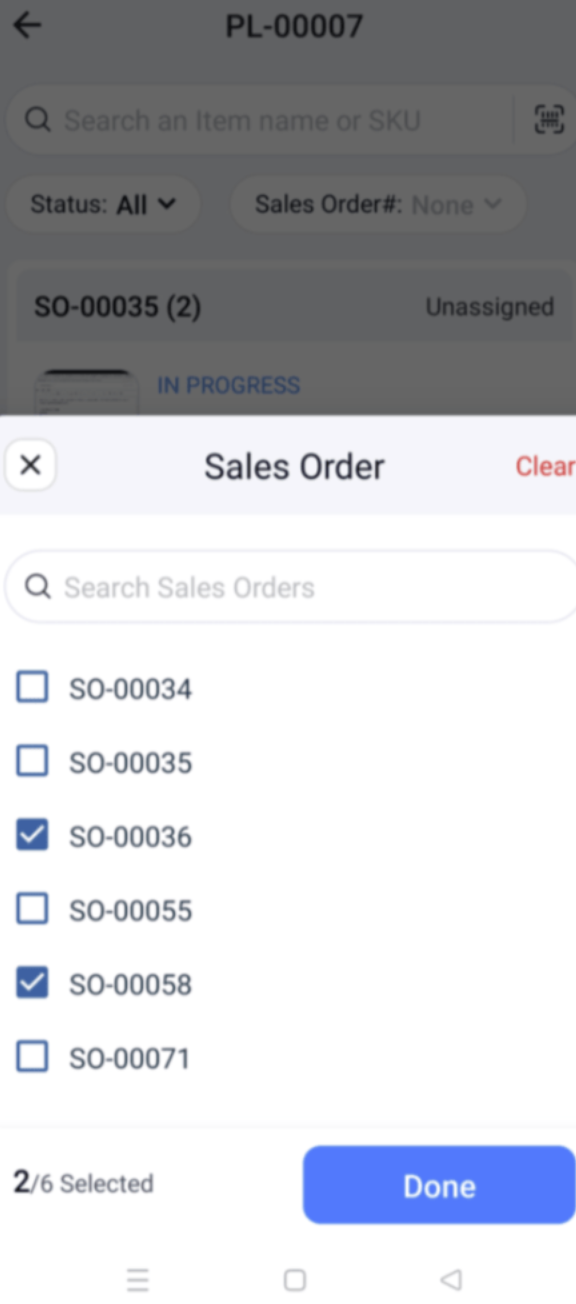
  • Multi Sales Orders in Picklists: Picklists now allow you to select multiple sales orders during creation, making it easier to pick items from multiple orders in a single picklist
                                             

  • Bin Location Details Report: View item-wise quantities across bins within a location using the Bin Location Details Report for improved inventory visibility.


iOS Specific Updates

  • Default Price List for Locations: Assign a default price list to each location, ensuring the appropriate pricing is applied automatically during transactions.

  • Multi-Dated Price Lists: Create and manage multiple price lists with different effective dates, allowing pricing changes to take effect automatically as scheduled.


That's a wrap for now! We hope these updates make your inventory management smoother and more powerful. If you have any questions or would like to learn more, feel free to reach out to us at support@zohoinventory.com. We'll be back soon with more updates from Zoho Inventory!

Best regards,

The Zoho Inventory Team.


    • Recent Topics

    • How do I get to "Admin Panel"

      I just started a Cliq account. I am the sole administrator. As I read the documentation, I keep seeing reference to an "Admin Panel". I see no way to access this from my Cliq account. How do I access this panel?
    • 【初開催! オンライン】Zoho Campaigns メール配信の基礎・活用勉強会を開催します! 10/15 参加無料

      ユーザーの皆さま、こんにちは。 Zoho コミュニティグループの中野です。 Zoho ユーザーコミュニティ初となる、メールマーケティングをテーマにしたオンライン勉強会を開催します! ▶︎イベント詳細・参加登録はこちら 今回取り上げるサービスは「Zoho Campaigns」です。 「Zoho CRMとZoho Campaignsのどちらからメールを配信すればよいか分からない」 「一斉配信はできるようになったけれど、現在のリスト管理や設定が正しいか不安」 「メールを送るだけで終わり、配信後の改善につなげられていない」
    • Marketing Tip #46: Run flash sales the right way

      A flash sale can do a lot for your store. It can clear slow-moving inventory, spike revenue on a slow day, or reward your most loyal customers. But if done carelessly, flash sales can backfire. Customers start expecting discounts, stop buying at full
    • Introducing Smart Fields in Zoho Forms

      Hello form builders! We are excited to introduce Smart Fields in Zoho Forms - a faster way to add calculations to your forms without writing formulas. Instead of creating multiple fields and configuring complex calculations yourself, you can now drag
    • Checkbox not displaying correctly in subform

      Greetings: I have shared my app (wv) with support.  I am having problems with a checkbox field not displaying correctly in a subform.  The main form is called volunteers and the subform is called volunteers_subform.  The field in question is called roles. When you access the subform by itself the checkbox lookup displays as checkboxes.  But when you view it in the main volunteers form, it displays as a multi-select dropdown instead.   I have attached jpegs showing the difference.   Any thoughts?
    • Unbundle feature for composite items

      We receive composite items from our vendors and sell them either individually or create other composite items out of them. So, there is a lot of bundling and unbundling involved with our composite items. Previously, this feature was supported in form
    • Valid characters for use in email addresses using Zoho's apps/APIs

      We have found an issue with the + sign character in zoho subs - we are allowed to create a customer with an email address that has a plus sign but the API doesn't allow the + so the billing portal is not created. We are going to prevent users from using
    • Expand Zoho Analytics Spatial Capabitlities

      Dear Analytics team Thanks for the great product - I'm a big fan on Analytics and the monthly release highlights is one of my favourite emails to receive. I'd like to request expansion and improvement of Zoho Analytics spatial data capabilities, namely:
    • Automate customer follow-ups with Sequences in Bigin

      Greetings, We hope you're all doing well! We're happy to announce a new feature that we've added to Bigin. Following up with every lead at the right time can be challenging, especially when your team is managing multiple conversations across emails, calls,
    • Displaying only unread tickets in ticket view

      Hello, I was wondering if someone might be able to help me with this one. We use filters to display our ticket list, typically using a saved filter which displays the tickets which are overdue or due today. What I'd really like is another filter that
    • Can we have an automated TDS Receivable Recon with Form 26AS of Income Tax Portal ?

      Can we have an automated TDS Receivable Recon with Form 26AS of Income Tax Portal ?
    • Customers would like to add tips when paying in Client Portal

      I am happy with the clean interface of the Client Portal. However, I am running into a challenge: my customers would like to be able to add tips/gratuities when making payments. Currently, this is very clunky because they have to 1) manually over-pay,
    • Tag Limi?

      is there any way to create more than 20 tags? 
    • prefill_data for Creator + Merge & Sign

      Hello, Is there an option to use prefill_data for signer fields from creator? I see the option for CRM but it will not work with creator? I have tried passing the value in the signer data, and that also does not work. Alternatively, is there a way to
    • Delug script

      I have been looking at auto-update a amount (home currency) field from another module. Zoho native multicurrency was used in the other module (we have 4 here). Custom script was input with no error, but the field was not updated on trigger. Script as
    • Can I Build a Gaming Website Using Zoho? Need a Quick Roadmap

      Hi Dear Members, I want to create a gaming website using Zoho. Is it possible? My goal is to build a sleek, unique, easy-to-navigate, and fast-loading website for a gaming project. I want the site to look professional, user-friendly, and optimized for
    • Remove Due Date from Statements

      Is it possible to remove the Due Date on the Invoice transation line on statements? I have figured work arounds to get the Invoice detail on the Statement but cannot work out haw to simplify the stament by removing the "- due on xx/xx/2026" - it really
    • What Should an Agent-Native Project Workspace Look Like

      AI is moving beyond assistants that simply answer questions. With tools like MCP, agents can now interact directly with project data and perform actions. That makes me wonder: what should an agent-native project workspace actually look like? For me, it
    • unable to join meeting due to speaker issue

      unable to join meeting due to speaker issue
    • How to add formatting in zoho.cliq.postToUser(...) message?

      In a CRM Deluge function, I'm trying to use the message formatting guidelines given here: https://www.zoho.com/deluge/help/cliq/posting-to-zoho-cliq.html#message-formats My message is: message: #Title text. The result in Cliq is: #Title text. (no large
    • Marketing Tip #50: Sell digital products and use them to grow your store

      Physical products need packaging, shipping, and stock management. Digital products need none of that. Once created, they can be sold an unlimited number of times, delivered instantly, and never go out of stock. What counts as a digital product? A digital
    • Turn off Mobile Optimize

      Hello is it possible to stop the automatic mobile optimization of my site as it looks much better on a mobile in full site format rather than mobile format. Thanks
    • How to select from pricebook when creating a salesorder or quote

      I am creating a sales order and when selecting the Products I do not see any where to select from pricebooks. How do i associate this to my orders?
    • API - Available Stock Definitions

      Okay, Zoho team... your copywriters fell down on the job for this one :) I think these warrant a bit more explanation as to what they include and what they don't.
    • Cross-application Deluge calls fail when application link name starts with a number

      I encountered an issue when calling a custom function in another Zoho Creator application within the same account. The target application’s URL/application link name began with a number, similar to: 27_example_application The following cross-application
    • Transformez vos webinaires en opérations automatisées

      Organiser un webinaire, c’est bien plus que passer en direct. Il faut gérer les inscriptions, suivre les participants, envoyer les enregistrements, mettre à jour le CRM… et s’assurer que chaque étape se déroule au bon moment. L’automatisation des workflows
    • Cash Basis VAT RETURN REPORT Required in Saudi Arabia

      Zoho Books in Saudi Arabia not showing TAX RETURNS report on CASH Basis.. It only showing accrual basis. Oforur requirement is both reports (Cash Basis and Accrual Basis ) , same like indian Edition of Zoho Books showing. CASH BASIS RETURN is our Basic
    • Marketing Tip #1: Optimize item titles for SEO

      Your item title is the first thing both Google and shoppers notice. Instead of a generic “Leather Bag,” go for something detailed like “Handcrafted Leather Laptop Bag – Durable & Stylish.” This helps your items rank better in search results and instantly
    • How can I filter inactive/disable agent tickets?

      Hello, We have an user-agent that left the company and we inactive/disabled his agent. So, now I can no longer filter or search tickets that he is the current owner, or even create a rule to reassign tickets to another person when the ticket is reopen.
    • How do i move multiple tickets to a different department?

      Hello, i have several tickets that have been assigned to the wrong department.  I am talking about hundreds of automatically generated ones that come from a separate system. How can i select them all at once to move them to another department in one go? I can select them in "unsassigned open tickets view" but i can't find a "move to another department" option. I also can't seem to assign multiple tickets to the same agent in that same view. Could somebody advice?
    • Add Reauthentication Option for Zoho Bug Tracker Integration in Zoho Desk

      Hello Zoho Desk Team, We hope you're doing well. We would like to request an enhancement to the Zoho Bug Tracker integration within Zoho Desk. Current Limitation: At the moment, there is no option to reauthenticate the Zoho Bug Tracker integration in
    • Create Package From A Picklist

      Dear Zoho, Can it be made possible to create a package from a picklist? The reason our company makes a picklist is for that to become a package Our sales orders have 600-1000 items I hope that makes it clear that it's hard to delete 990 items when we
    • Migrating from Zoho Checkout to Zoho Billing

      I have an active Zoho Checkout account where I'm charging customers for subscriptions. Now I'm looking to upgrade and only use Zoho BIlling, in which my account in on read only mode at the moment. I can see is also tracking the customers and its payments.
    • Step up your lead generation game with online forms

      Hello fellow form builders,   Generating leads for your sales team gets easier when you integrate your CRM with online forms. To help show you how to use forms as part of your lead generation strategy, we have exclusive tips and tricks on how to collect, update and prioritize lead information in Zoho CRM based on form responses.  1. Create new leads If CRM software is designed to help you handle your business easily, that means getting data into it should also be easy. Check out the article on how
    • API - Bank Accounts | Reconciliation Discrepancy

      Unless I'm reading it wrong, the documentation for the Bank Reconciliations API is inconsistent with itself. https://www.zoho.com/books/api/v3/bank-accounts/#create-a-bank-reconciliation The text definition says that the transaction_id should be a string,
    • another little issue

      So to get over showing prices with VAT we used the price lists and made the prices inclusive. The problem is now on the items it wants to show the orginal retail value which makes no sense. Ideas please
    • Request to update VAT registration date for Brikz And Bolt Technical Services L.L.C S.O.C

      Dear Zoho Books Support Team, I am writing to request assistance with updating the VAT registration date to 01 June 2026 in our Zoho Books account (Organization: Brikz And Bolt Technical Services L.L.C S.O.C, TRN: 105420963800003). Currently, the system
    • Handle Leading Zeros in a Number Field

      Hi, If I use a Number Field, set with Min 7 Digits and Max 7 Digits, and enter 0000001, it will result in 1 and an error as it removes the leading zeros, the same with entering 0012340 will result in 12340 and error. So I have to use a Text Field and
    • HTML PDF Templates / Build From Scratch option not visible for Custom Modules

      Hi everyone, I am working with Zoho Books Custom Modules and trying to create a custom 4x4 package label PDF template using HTML/CSS. According to the official Zoho Books documentation for HTML PDF Templates, there should be an option like: Settings →
    • Virtual Option for Fields

      Hi, I would like to be able to choose another option other than Read-Only or Disabled, such as Virtual. And with Virtual, the field is shown on the form and avilable in rules, but NOT saved to the Database. A use case is having multiple Large Lists of
    • Next Page