What's New in Zoho Inventory | April & May 2026
Hello users,
We're excited to roll out the latest Zoho Inventory updates for April and May 2026. These enhancements are designed to make your daily operations smoother and more efficient, from advanced inventory management and flexible pricing to automated tax compliance and useful mobile features. These updates help you save time, reduce costs, and manage your inventory more effectively.
Items & Locations Enhancements
Default Inventory Valuation Method
You can now configure a default inventory valuation method (FIFO or WAC) for your items. Once configured, the selected method will be automatically filled when creating new items, ensuring consistency across your inventory records.
The configured method will also be applied when:
-
Importing items without specifying an inventory valuation method.
-
Creating items through API requests without providing the inventory_valuation_method node.
To configure a default inventory valuation method: Settings > General > Items > Default Inventory Valuation Method> Select your preferred inventory valuation method and save the changes.

Similar to customers, price lists can now be associated with business locations for more flexible pricing. When creating a transaction, the price list assigned to the customer is applied automatically. If no price list is assigned to the customer, the price list associated with the selected business location is used.
To configure, go to Settings > Organization > Locations> create or select the location, and associate a price list with the required business location.

Alias Name in Items List View
The Alias Name column is now available in the items list view page. You can enable this in the settings and add it through Column Customization to display in the Items List View page. It makes it easier to identify items by their alternative names.
To enable this, Settings > General> Items> Field Customization > Enable Alias Name
Purchase & Warehouse Operations
Introducing Purchase Returns
We have introduced the Purchase Returns module to manage returns to vendors more efficiently. Purchase Returns helps you initiate return requests, commit stock for return, update inventory, and adjust vendor payables. Once a purchase return is confirmed, you can create picklists, packages, shipments, and vendor credits directly from it. Learn More
To enable Purchase Returns: Settings > General> Purchase Returns
Note: This feature is available in the India, US, and Global editions of Zoho Inventory for Enterprise plans. To enable it, contact support@zohoinventory.com
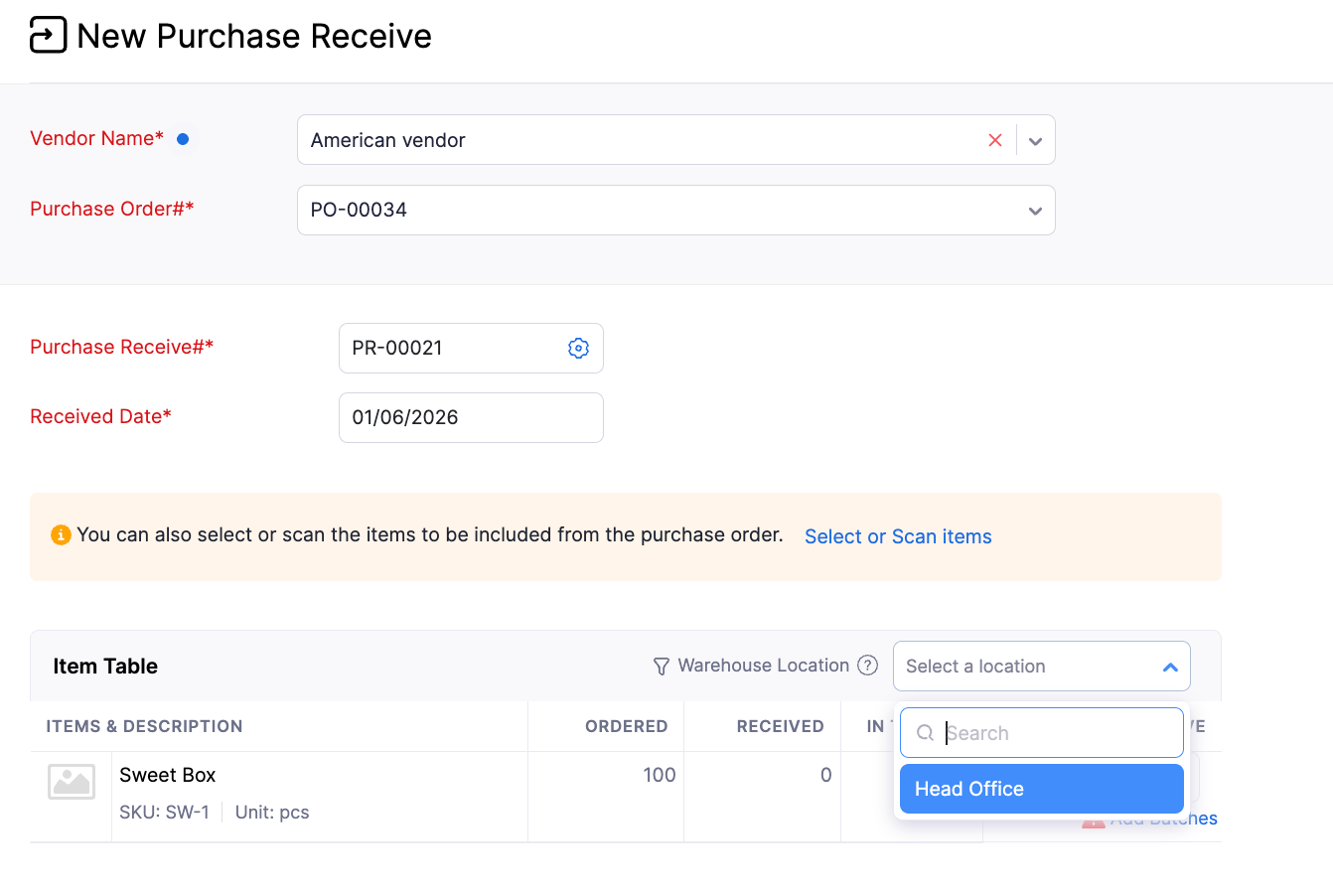
Filter Items by Warehouse Location in Purchase Receives
When creating a purchase receive from a purchase order that contains items in multiple warehouses for the selected location, you can now filter line items by warehouse location. This makes it easier to identify and receive items for a specific warehouse without manually reviewing and removing unrelated line items. The filter displays only the warehouses associated with the selected purchase order, helping streamline the receiving process and improve efficiency when managing inventory across multiple warehouses.
Partial Replenishments
The Replenishments module now allows partial replenishments. This makes it easier to fully restock items when the order quantity parameter Maximum Order Quantity is applied. If an order created from a replenishment task does not fulfill the entire required quantity, the system automatically creates a new replenishment task for the remaining quantity. The new task retains the original replenishment details and provides visibility into the quantities that have already been replenished.
Invoice and Sales Channels Management
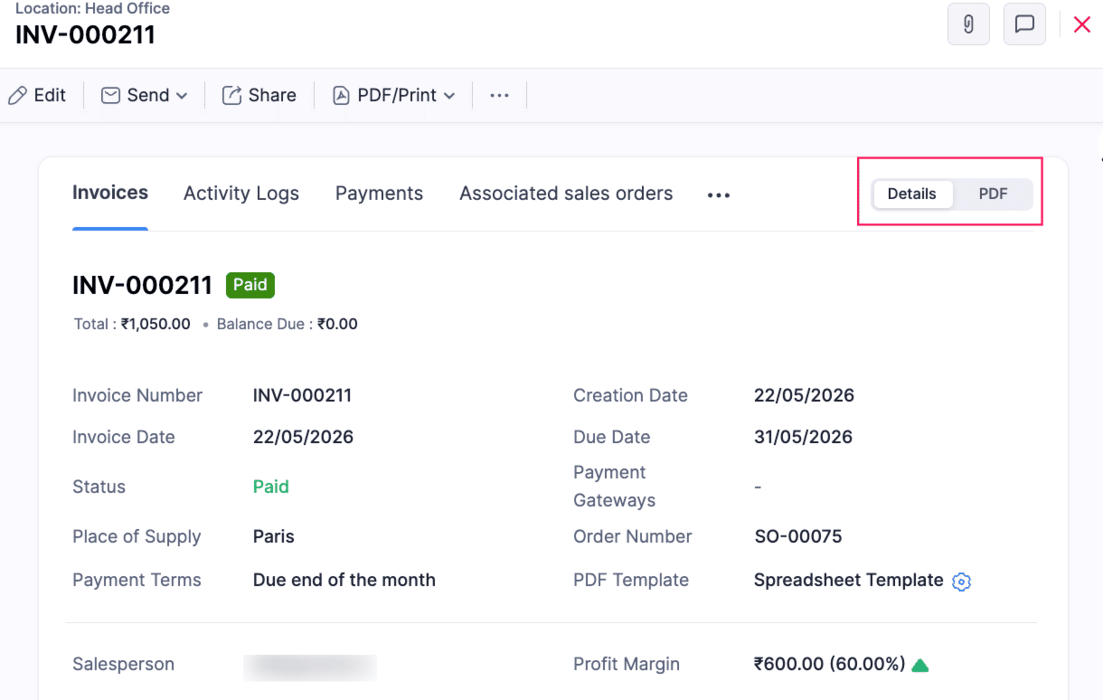
Revamped Invoice Details Page
The Invoice details page now opens in a non-PDF view by default, with associated transactions organized into separate tabs. It also displays invoice details, customer information, custom fields, line items, email receipts, and transaction-level reporting tags in a structured layout.
Note: This update is currently available for the France Edition and newly created organizations. It will be rolled out gradually to existing organizations.
Sync Sales Order and Invoice Numbers from Sales Channels
Two new configuration options have been introduced in the Sales Channel preference page to help maintain the same transaction numbering between sales channels and Zoho Inventory.
-
When the Sync Sales Order Number option is enabled, sales orders synced from will retain the same sales order number from the sales channel instead of using the auto-generated number series in Zoho Inventory.
-
When the Sync Invoice Number option is enabled, Invoices synced from Sales Channels will retain the same Invoice number from the sales channel instead of using the auto-generated number series in Zoho Inventory.
Sales Return Sync in Shopify Integration
Sales Return Sync in Shopify is now available across all editions. Once enabled in the Shopify integration preferences, sales returns and their associated inventory updates are automatically synced to Zoho Inventory. This helps streamline returns management, maintain accurate stock levels, and reduce manual effort in keeping return transactions synchronized across both platforms.
Walmart Integration [US Edition]
You can connect your Walmart seller account with Zoho Inventory either through the Walmart Seller Center or directly from Zoho Inventory. Once connected, items, orders, inventory levels, and shipment updates are synced automatically between the two platforms. Items are mapped based on whether they are single or variant items, while orders are created as Sales Orders in Zoho Inventory. With configurable sync frequency, stock update controls, and customer mapping options, businesses can efficiently manage Walmart sales and fulfillment from a single platform.
To integrate in Zoho Inventory: Go to Settings > Integrations & Marketplace > eCommerce > click Set Up Now under Walmart Integration.
Reporting & Analytics
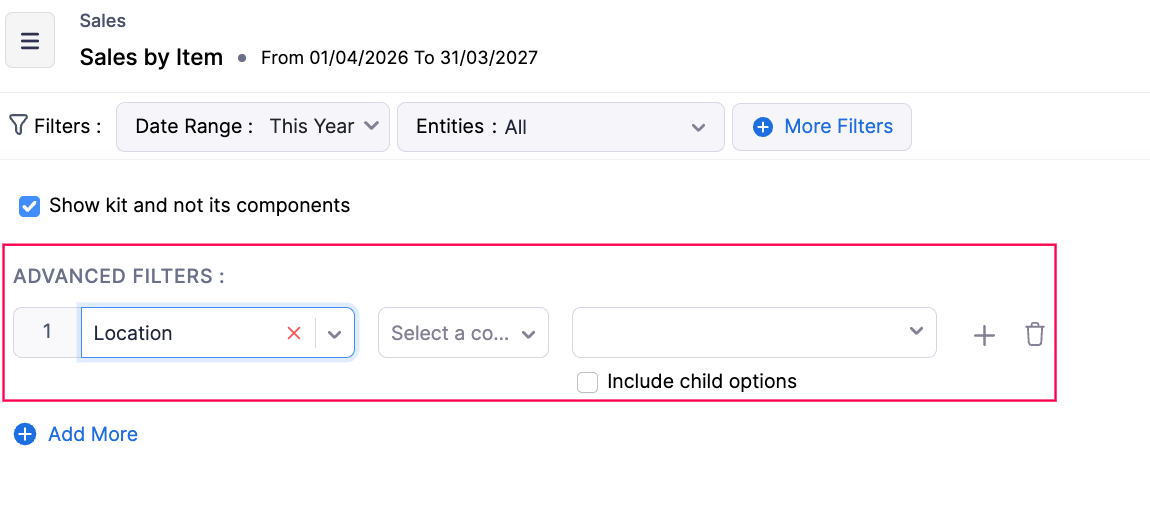
Include Child Options in Reporting Tag Filters
Advanced Filters in Reports now support Include Child Options for reporting tags. When you select a parent option and enable Include Child Options, the report automatically includes all associated child options. This makes it easier to filter hierarchical reporting tag data without manually selecting each child option.
Export reports and custom reports along with organization details by enabling the Organization Details option under Configure Report Layout before exporting.
To enable this, Reports> Category> More icon > Configure Report > Choose Details to Display > Enable Organization Details

Custom Report Enhancements
Custom Report permissions have been enhanced for admin users. Admins can now access, edit, clone, and delete all Custom Reports in the organization, including reports created by other users in the organization. Additionally, admins can now filter custom reports by date ranges directly from the report page without editing the report preferences.
To do this, go to Reports> Select the custom report > Click the dropdown > Select the action
Taxes & Compliance
Introducing Withholding Tax for Customers and Vendors [Kenya]
We have introduced the Withholding Tax preference for customers and vendors. Withholding tax is a direct tax deducted at source on specific payments such as interest, dividends, royalties, and management fees made to residents or non-residents. After enabling this preference for a customer or vendor, you can apply withholding tax at the line-item level in invoices and bills, and record payments after deducting the withheld amount.
To enable this, go to Settings >Organization Settings> Taxes and Compliance >Withholding Tax > Withholding Tax Settings >Slide the toggle to enable Withholding Tax > Select the Customers, Vendors, or both you want to enable withholding tax settings. Learn More

Sales Tax Automation [US & Canada Edition]
Sales Tax Automation is now enabled for the US and Canada editions. This feature automatically calculates accurate sales tax in real time based on where you're registered, what you sell, and where you sell. The system applies the correct tax on every sale, automatically identifies whether an item is taxable, zero-rated, or exempt, and ensures compliance as you expand sales across states. Tax rates update automatically with changing tax rules. You can configure address preferences, verify customer addresses, switch tax modes, recalculate tax, and view detailed tax calculation breakdowns. Check out the help docs available for the US and CA editions to learn more.
Supply Date and Service Period Support in Credit Notes [Germany Edition]
Credit Notes now support Supply Date, Service Start Date, Service End Date, and Transaction Posting Date as system custom fields. These four date fields can be configured from Settings to help businesses capture and manage legally relevant dates more accurately across credit note workflows.
To enable this: Go to Settings > Sales > Credit Notes > Field Customization > Select field > Mark as Active
View Total Amount Before TDS Deduction [India & Singapore]
The Total Amount Excluding TDS option has been added to the invoice details page to show the invoice amount before TDS deduction. This helps clearly view the original total for sharing invoices and accounting reference.
To enable this option: Go to Settings > Customization > PDF Template > Choose the Invoice template > Total > Enable Total Amount Excluding TDS
TDS Columns in Applied Excess Payment Import
You can now import TDS details while importing Applied Excess Vendor Payments. This enhancement helps you accurately apply excess vendor payments to bills along with the associated tax deductions.
Supported columns:
-
India: Bill TDS Amount
-
Global: Bill TDS Amount, TDS Account
-
Australia: Bill PAYG Withholding Amount, PAYG Withholding Account
Early Access Features
Track Record Participants and Non-Participants
The Record Participants and Non-Participants feature helps you track the users associated with a transaction record. Users automatically become participants when they create, edit, add comments, get mentioned in comments, or approve a record. Based on these actions, the system automatically categorizes users as Participants and Non-Participants for better visibility. This feature is currently supported for modules such as Items, Invoices, Inventory Adjustment, Packages, Shipment, Customers, Sales Orders, Delivery Challans, Sales Returns, Vendors, Purchase Receives, and Vendor Credits.
To track the record Participants and Non-Participants in the comment: Go to the module that supports this feature> Details Page> Comment icon > Enter "@" in the message box > You can view the Record Participants and Non-Participant users
Note: This feature is available by default for new organizations. For existing organizations, it is in Early Access. Contact support@zohoinventory.com to enable it
Auto Batch Assignment with FIFO, FEFO, and LIFO Strategies
The Auto Batch Assignment feature automatically identifies and allocates inventory batches for batch-tracked items during outward transactions based on a configured assignment strategy. Businesses can choose from the following allocation methods:
-
FIFO (First In, First Out) – Moves the oldest available stock first.
-
FEFO (First Expiry, First Out) – Prioritizes batches that are closest to expiry.
-
LIFO (Last In, First Out) – Consumes the most recently received stock first.
The system automatically handles batch allocation in the background during sales orders, invoices, picklists, and other outward transactions, eliminating repetitive manual batch selection. This helps improve inventory rotation, reduce stock aging and expiry-related losses, accelerate fulfillment workflows, and ensure consistent inventory handling across warehouse operations.
Note: This feature is available in Early Access for Enterprise plans. Contact support@zohoinventory.com to enable it for your organization.
Other Enhancements & Availability
Feature Availability
-
The Unit of Measurement feature is now enabled by default for all organizations in the Premium and Enterprise plans.
-
The Items Unified Flow has been enabled for all plans except the US and India editions. For the US and India editions, it is currently available for Free Plans.
-
Sales Return and Receive sync functionality in Shopify is now available for all editions.
Minor Enhancements
-
Barcode scanning is now supported in Custom Tables for easier item entry and management.
-
The Packing History Report now supports show/hide columns, advanced filters, custom reports, and current view export.
-
The Profit by Item Report now includes category filters.
-
The Batch Details Report has been enhanced with additional inward, outward, and price-related columns, along with Transaction Date filters.
-
Bulk Update support for Reporting Tags is now available.
Mobile App Updates
Updates for Both Android and iOS
-
Preferred Bin Locations in Picklists
Preferred bin locations are now displayed while adding items in Picklists, helping users pick items faster and more accurately.

-
Sales Return Status Update
Sales Return status now displays as Accepted instead of Approved for clearer tracking. -
Mobile Number with Country Code Selection
Mobile number fields now include country code selection for better global formatting.

-
Custom Fields in Assemblies Module
Custom fields are now supported in the Assemblies module, allowing additional information to be captured during assembly creation. -
Line Item Custom Fields in Purchase Receives & Picklists
Purchase Receives and Picklists now support custom fields at the line item level for more detailed tracking. -
Draft Status in Payments Received
The Payments Received module now supports Draft status, allowing users to save and edit before final submission. -
Tap to Pay Support
Tap to Pay support has been introduced in Australia, Austria, Belgium, Denmark, Finland, France, Germany, Ireland, Italy, Malaysia, the Netherlands, New Zealand, Poland, Singapore, Sweden, Switzerland, and the United Kingdom for faster in-person contactless payments. Payments can be accepted using cards and digital wallets without additional hardware
Android Specific Updates
-
Faster Stock Counts Experience
Users can now start Stock Counts immediately while data loads in the background for improved speed. -
Purchase Receives Enhancements
Purchase Receives now supports editing and simple approval workflows for smoother processing. -
Transfer Order Approvals
Transfer Orders now support simple approval workflows for better control and validation. -
Image Upload in Custom Fields
Custom fields now support image uploads for richer data capture. -
Custom Buttons for Customer & Vendor Modules
Custom buttons are now supported for the Customer and Vendor modules to enable quick actions. -
Revamped Custom Modules UI
Custom Modules now come with a refreshed and improved user interface. -
Sales Returns Draft Support
Sales Returns now support Draft status for flexible editing before finalization. -
Default Inventory Valuation Method at Item Creation
Default inventory valuation methods can now be set during item creation for consistent costing. -
Customer View Status in Documents
Customer view status is now displayed in Invoices and Retainer Invoices to track customer visibility.
iOS Specific Updates
-
Multi-Select Lookup Fields Support
Multi-select lookup custom fields are now supported across all modules that support custom fields. -
Tap to Pay via Stripe Integration
Tap to Pay is now available for organizations integrated with Stripe. Digital payments can be accepted directly on an iPhone using debit cards, credit cards, Apple Pay, and other digital wallets without additional hardware.
We hope these updates empower you to manage your inventory more effectively and deliver exceptional value to your customers. As always, we're committed to continuously improving Zoho Inventory based on your feedback and evolving business needs. If you have any queries, feel free to reach out to us at support@zohoinventory.com. Stay tuned for more updates from Zoho Inventory!
Best regards,
The Zoho Inventory Team