Zoho Analytics - Pivot: Lookup Column is showing IDs instead of their actual names
Hi,
I'm new to Zoho and have no prior experience with the platform. Has anyone encountered a similar issue in a pivot table, where the values in the columns are showing as IDs instead of the actual names? See image: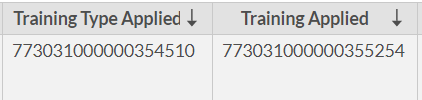
I am pulling these fields from a module called Applications which I believe was originally Leads and got renamed. In the crm, these fields are displaying the actual names. See image:

Troubleshooting Steps Performed so far:
-Attempt to change the Data Type format from the pivot settings. The settings won't allow it.
-Resync from Data Source.
-Re-Authenticate from Data Source.
-Remove/add the data source. Made sure that the affected fields are selected and included in the sync.
-Used Data Pipeline. Was able to change the data type from there to Text. But the values still show as IDs.
-Double-checked in the crm that the affected columns are lookup fields in Applications.
-Found a related link: Lookup Column based on ID and not name
Is there a way to fix these values to show the actual names? Thank you in advance for your help!