📣📣 Zoho Bookings - Feature Roadmap 2024

📣📣 Zoho Bookings - Feature Roadmap 2024

Hi Everyone,

Thank you for all the support you have been showing Zoho Bookings. We had a fabulous 2023, with a bunch of new features and over 60K new users. In 2024, our prime focus will be on user experience, and we have a few vital features coming in as well.

Below is our projection for the year so far (we'll be adding more items once they're prioritized and slotted for release).

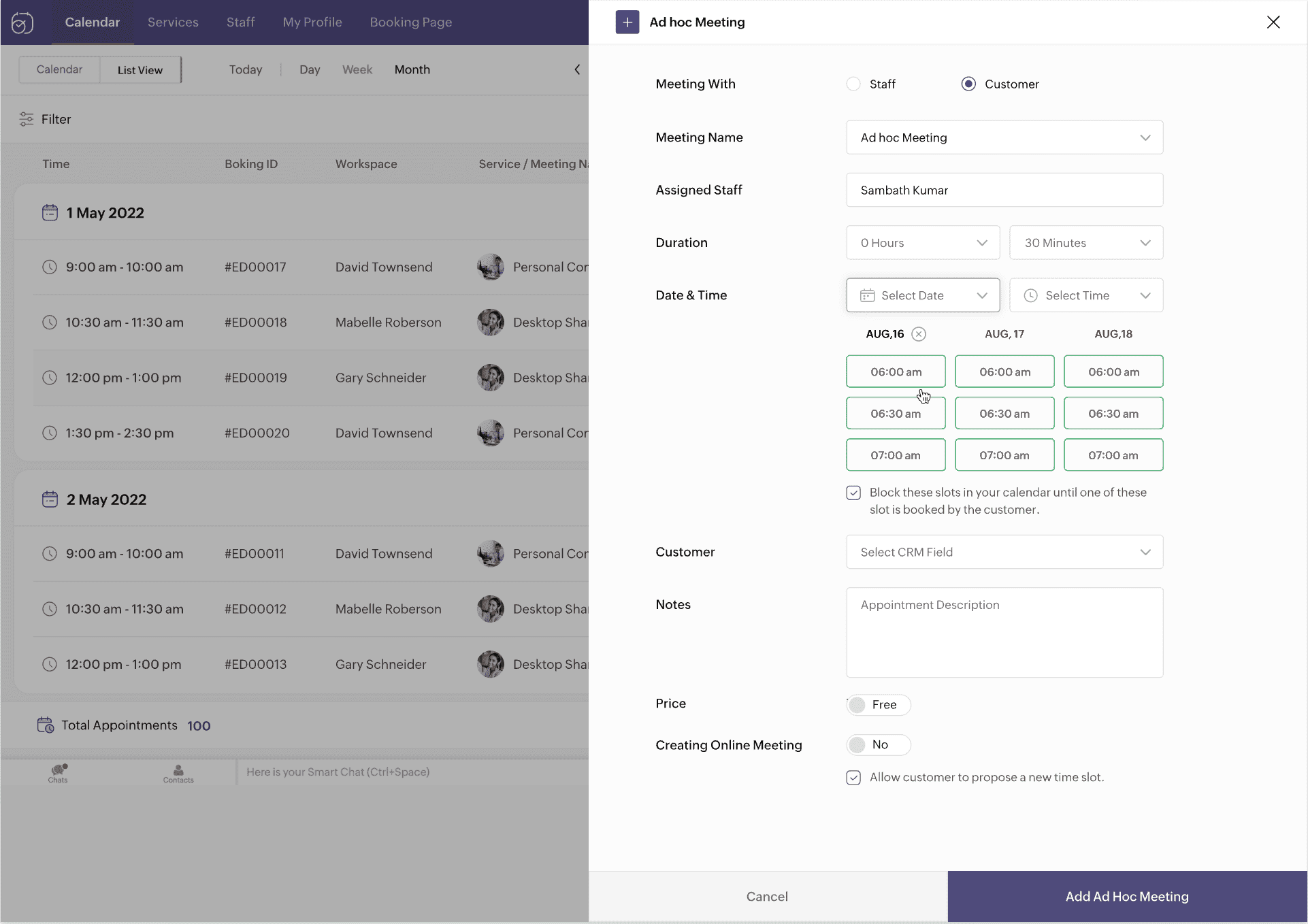
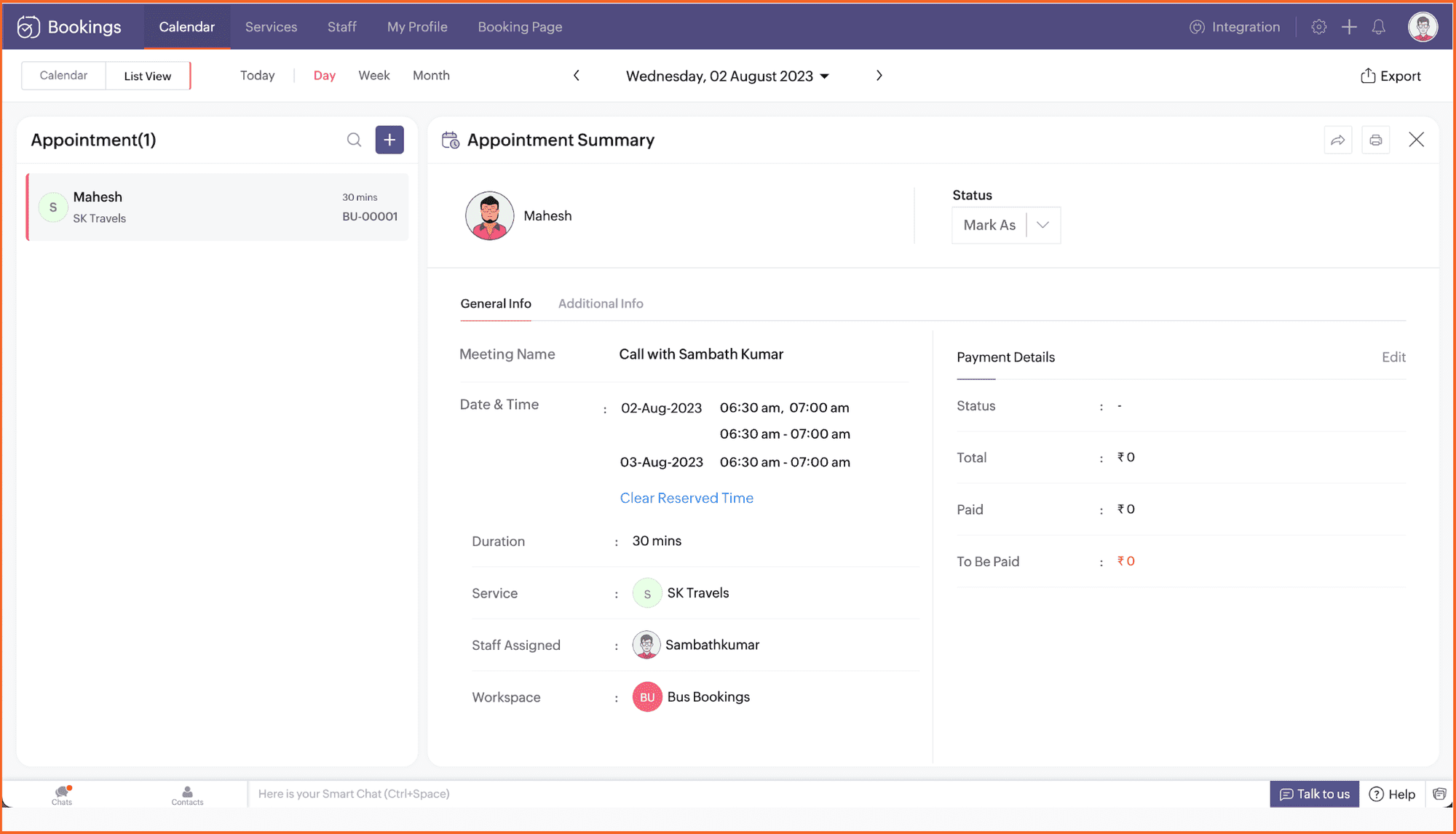
1. Ad-hoc meetings

It's common to get meeting requests outside your schedule. Ad-hoc meetings allow you to reserve time slots and share them with specific clients or prospects you want to meet with.

Not just clients—you can book internal meetings with your own staff too. Plus, keep time slots hidden from the person you're sharing your availability with.


2. Recurring one-on-one meetings

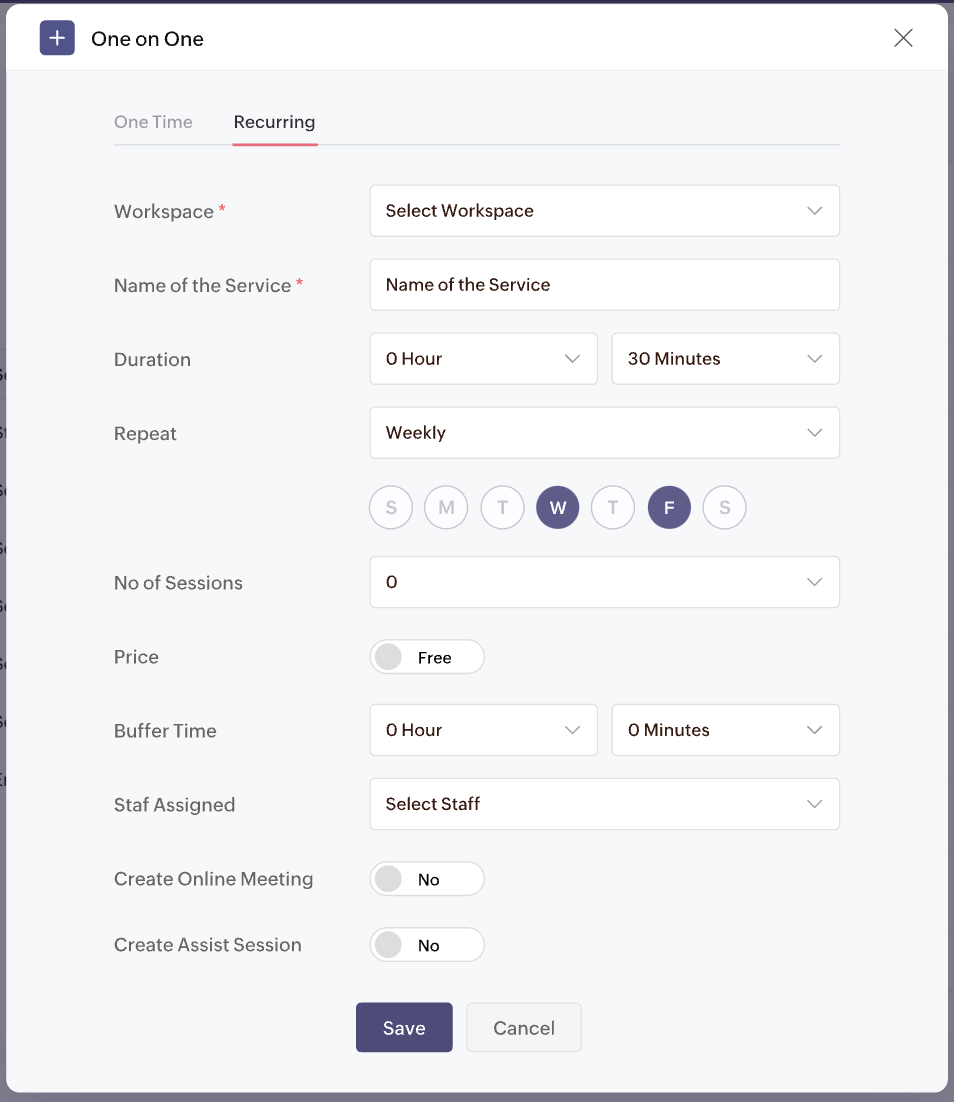
Looking to offer one-on-one meetings on repeat for your clients? Don't book separate appointments.

Set up a package and let your clients choose the desired time slots with recurring one-one-one meetings. 
Customize meetings to recur on desired days and times. Collect payments for all the sessions upfront and have clients show up during the set schedule.


3. Appointment restrictions

Too many appointments a day can really decrease the quality of your work. Take control of your time with appointment restrictions. Restrict the number of appointments you receive for any staff, service, or resource, right down to the customer (using their email address).

Limit appointments for:
  • One-on-one services
  • Collective booking services
  • Group booking services
  • Resource booking services

4. Enhanced browser extension

We recently launched our free Chrome extension so you can book appointments, check your schedule, and book time off right from the browser. Now, we're extending its capabilities to:

  • Copy desired time slots into your Gmail messages
  • Share booking links inside LinkedIn

You can extend your outreach to clients over social media and email with the upcoming features.

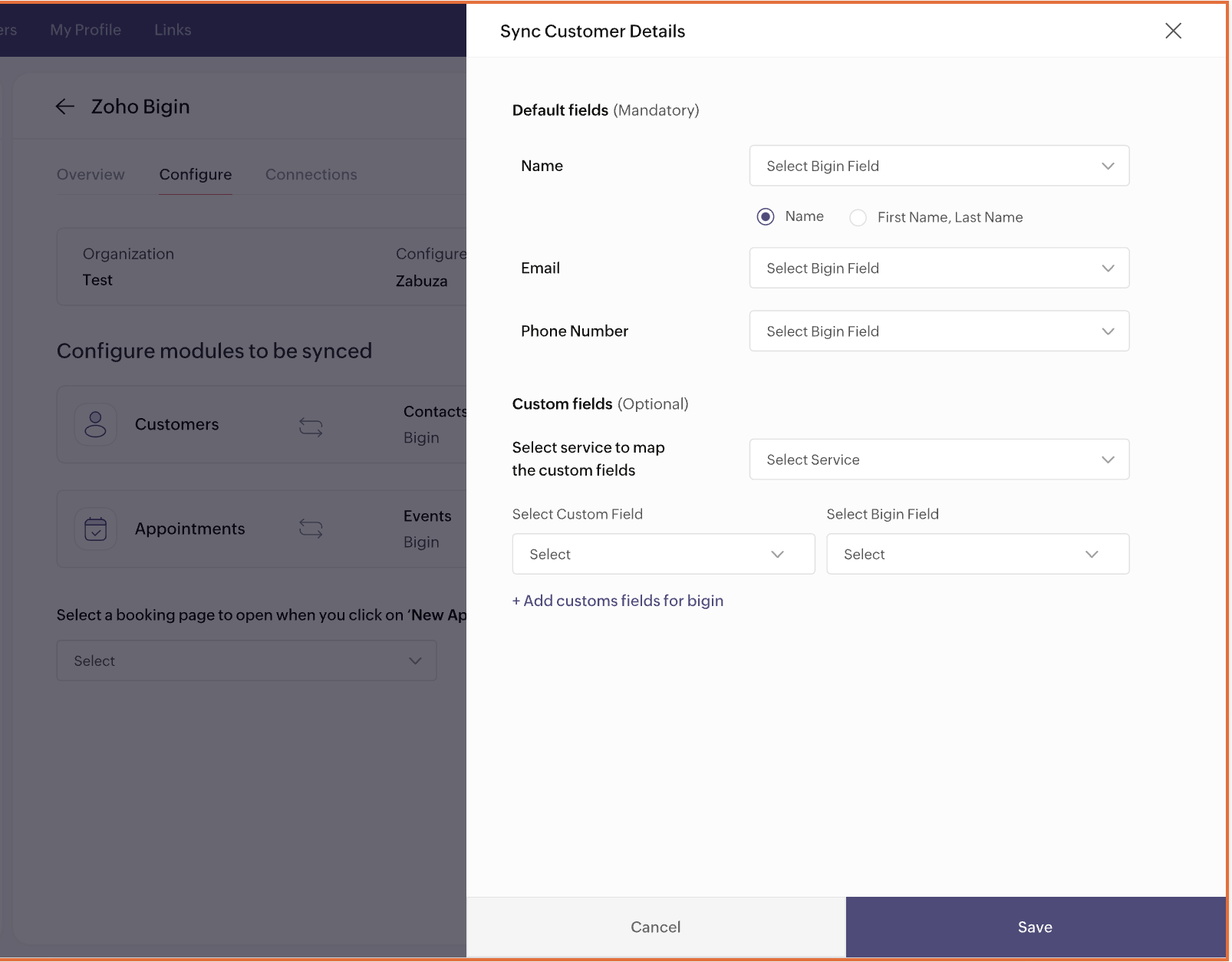
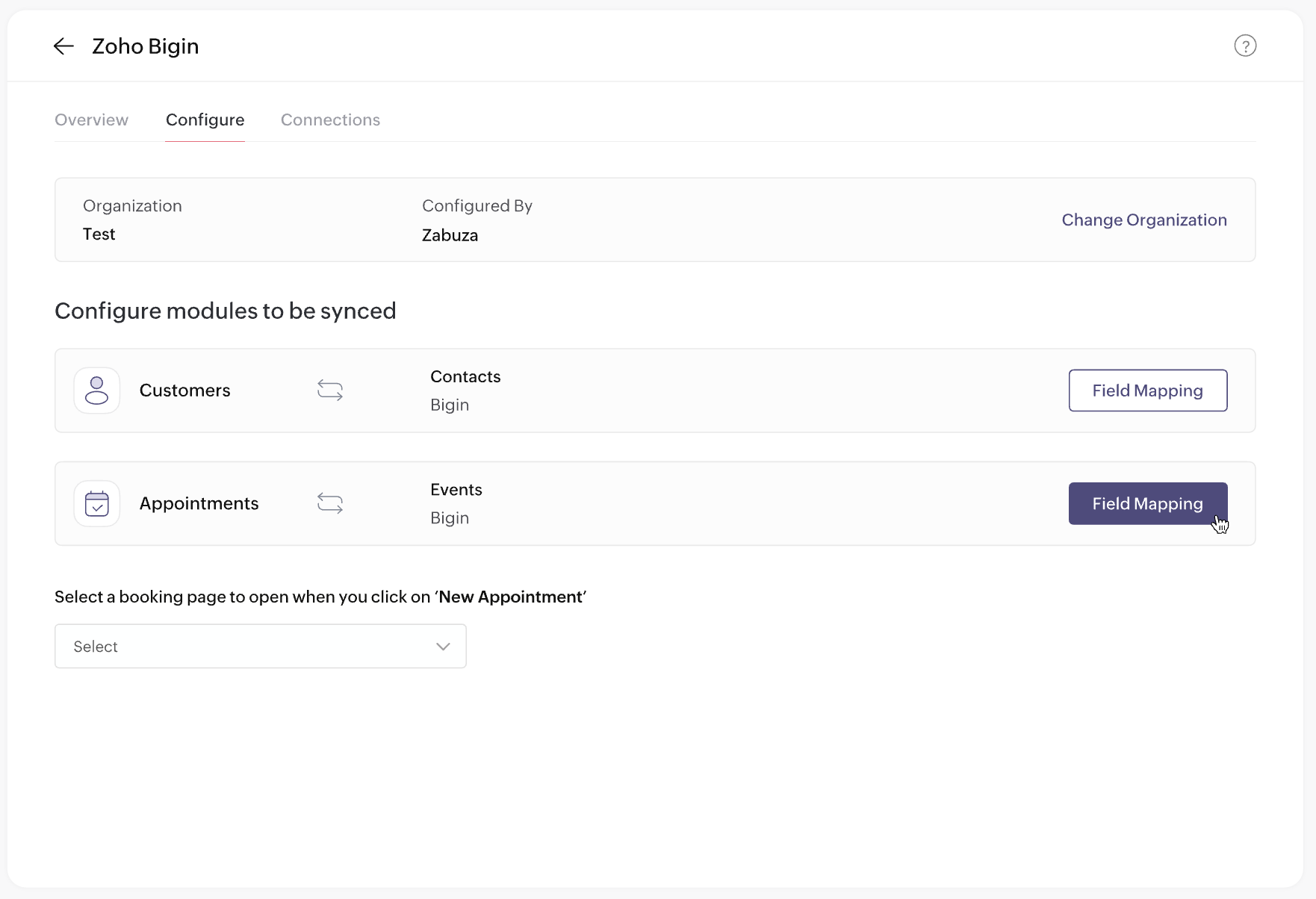
5. Integration with Bigin


Love 
Bigin? You'll love Zoho Bookings too. Automatically collect qualified leads when they schedule with you in Zoho Bookings, and manage those leads using Bigin—the perfect lead-gen and sales machinery for your business!

Plus, book appointments right inside Bigin and manage all your customers from one place.


6. Preview email templates

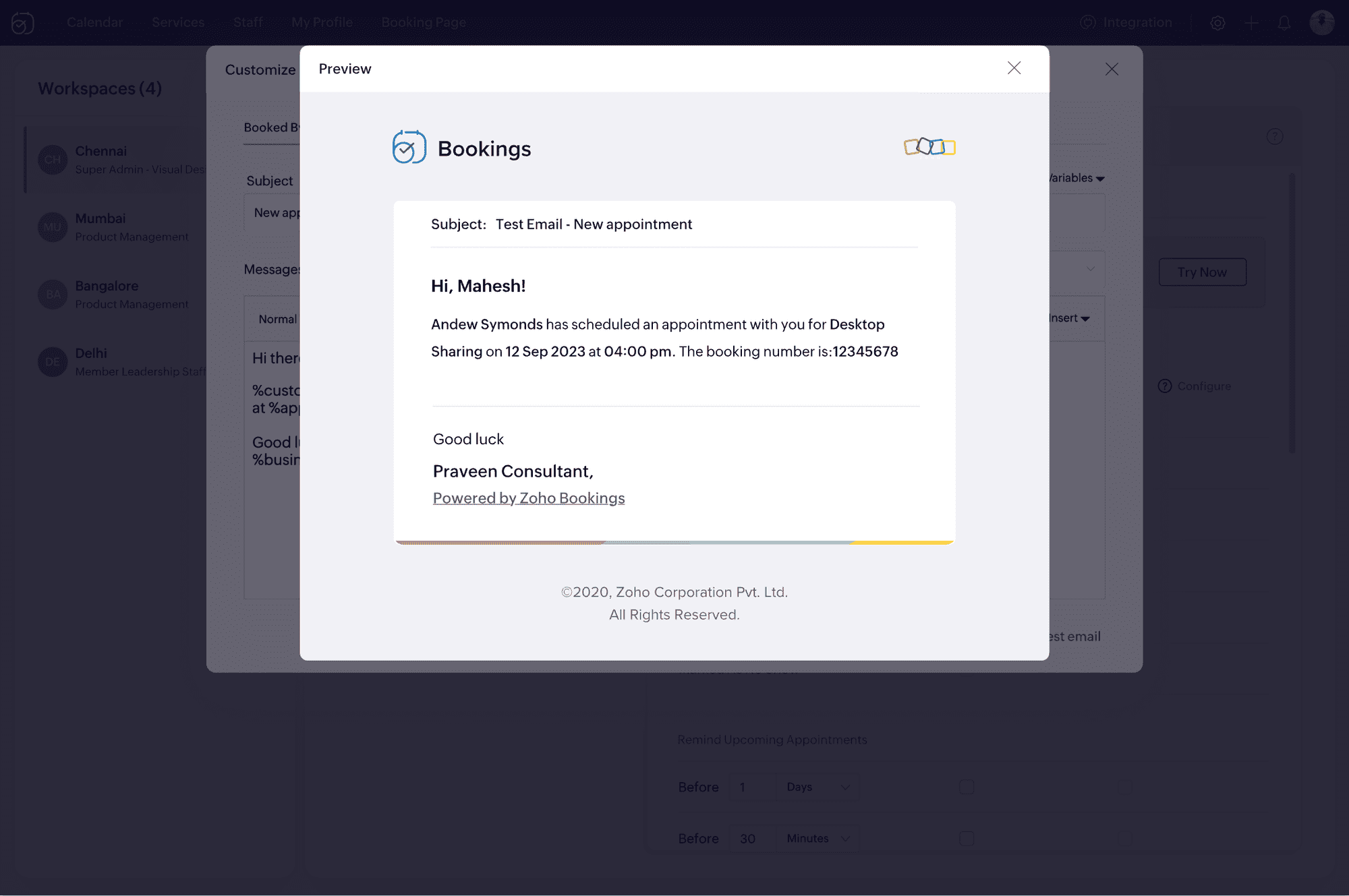
It's important to ensure your email notifications load well with all visual elements in place. Now, you can upload your HTML content and preview your email notifications before sending them to your clients.

No more broken emails!


7. Event title customization


We've heard your requests for customizable event titles on calendar invites. Now, you can use placeholders to add dynamic values like the event name, time, and host in titles. This is expected to be released before March 15, 2024.

8. Extended custom functions


There's a lot you can do with Zoho Bookings when you use custom functions:
  • Create a Cliq notification when an appointment is rescheduled.
  • Send Zoho WorkDrive documents to clients when you mark an appointment as complete.
How do you do it?
  • Pick the Zoho app to integrate with (e.g., Zoho Books, Zoho Cliq)
  • Decide on the desired result (e.g., create an invoice, send a message)
  • Choose a trigger (e.g., booked, canceled, rescheduled)

With custom functions, connecting Zoho Bookings with other Zoho apps will be a breeze. Below is the list of apps you can connect to through custom functions.

Zoho CRM
Zoho Invoice
Zoho Books
Zoho Docs
Zoho Sign
Zoho Recruit
Zoho Cliq

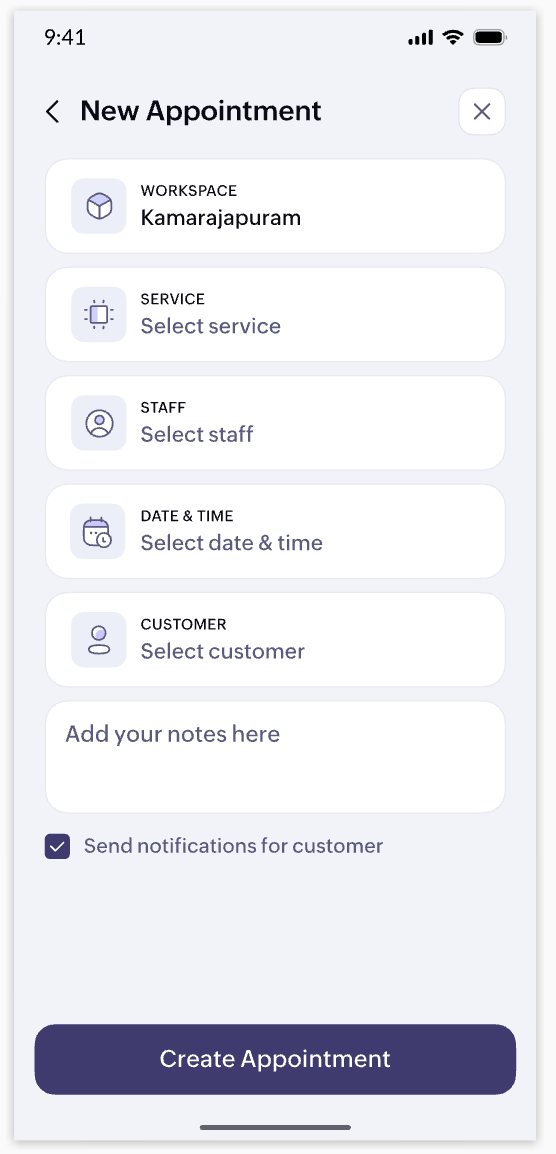
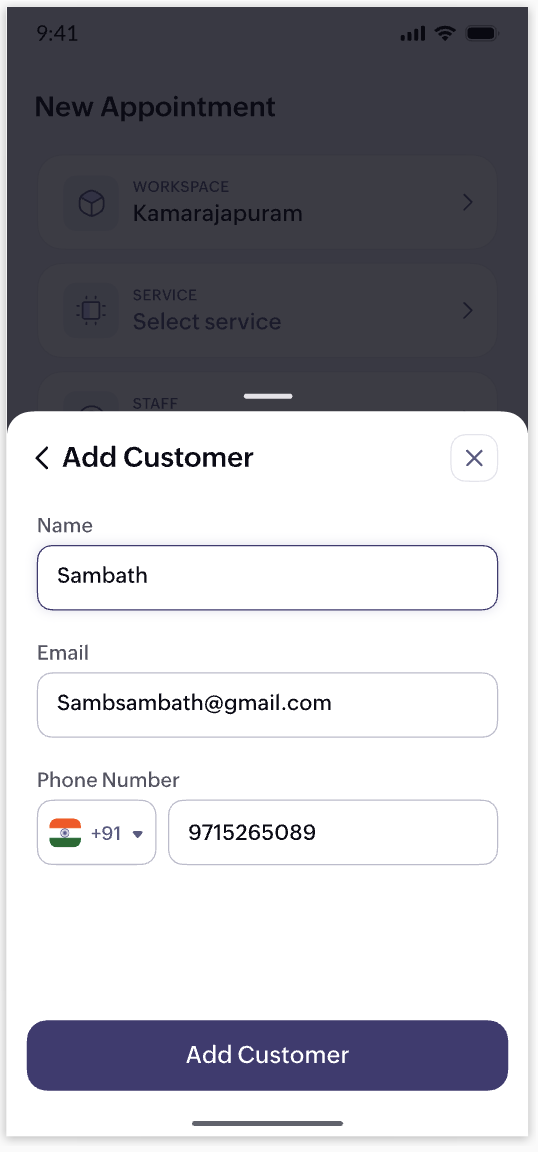
9. Mobile app revamp


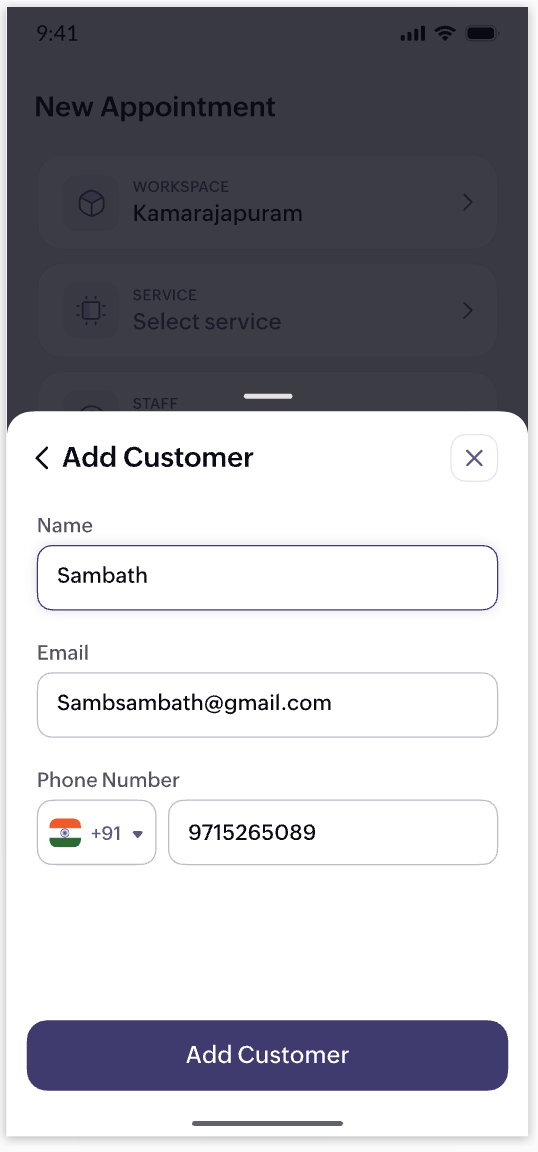
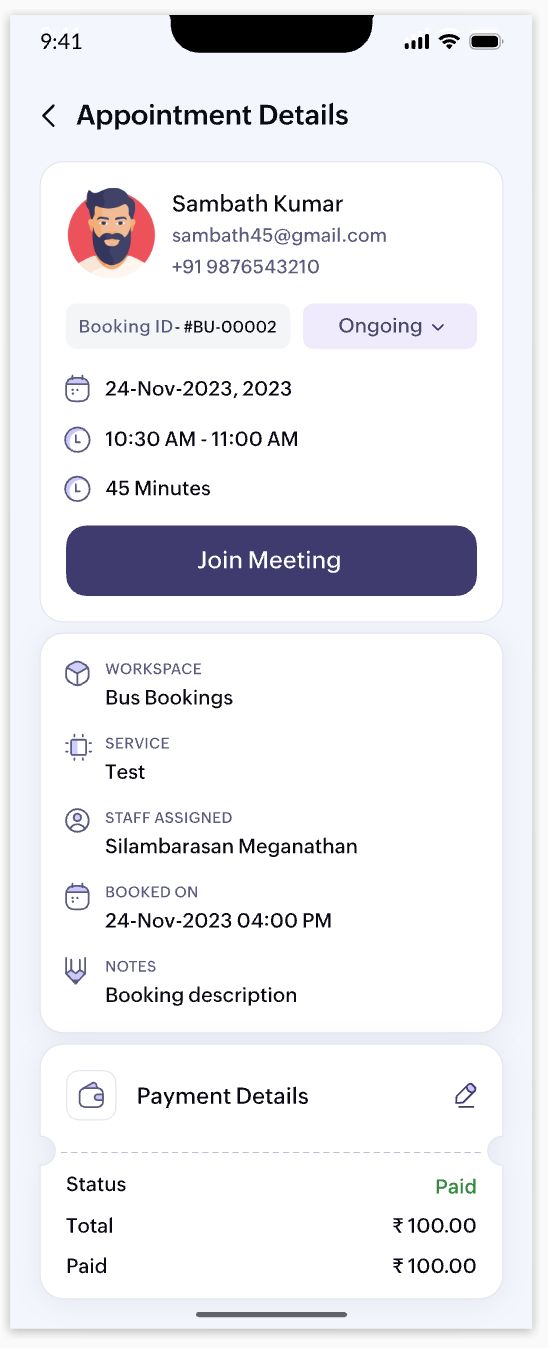
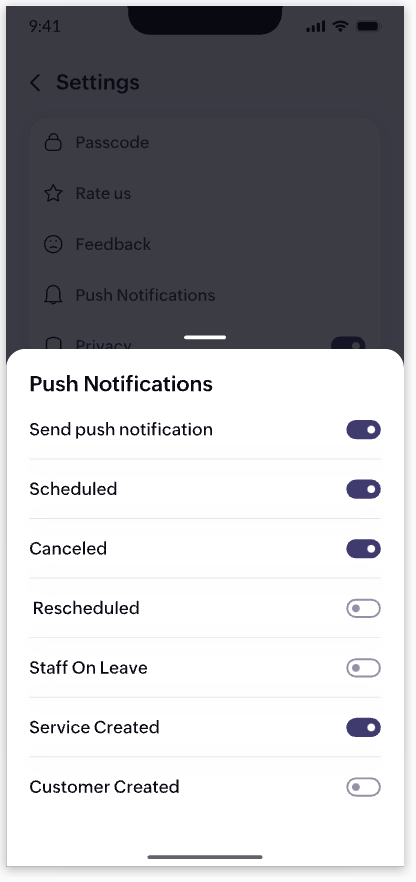
Your business staff should be able to access appointment details, check availability, and book time-offs on the go. That's why we're launching a completely revamped Zoho Bookings app (both iOS and Android) with a fresh UI and enhanced user experience. Here's a teaser of some of the screens.


10. UI/UX enhancements


We've identified areas in the web app where we can elevate your user experience. We are doing a major revamp of the look and feel of the web app to complement the changes we're bringing to our mobile app.

Note that the items listed above are in no particular order for our projected roadmap, 2024. We'll make announcements when they're live and when there are new additions to our planned updates. Have a great year ahead!

Cheers,
The Zoho Bookings Team

    • Sticky Posts

    • New feature: Invite additional guests for your bookings

      Hello everyone, Greetings from Zoho Bookings! We are happy to announce the much-awaited feature Guest Invite, which enhances your booking experience like never before. This feature allows additional participants to be invited for the bookings to make
    • 📣📣 Zoho Bookings Schedulathon 2025 is here!

      Hey Zoho Bookings fam, We're excited to invite you to our first-ever hackathon: Yes, Zoho Bookings Schedulathon 2025 is live now. This is a virtual event and you can participate anywhere from the world. Businesses should be able to set up meetings from
    • 📣 [Webinar] Spikra shows how businesses leverage Zoho Bookings to increase revenue

      [Webinar] Spikra shows how businesses leverage Zoho Bookings to increase revenue Hi all, Service-based businesses need to be on top of their client experience game to stay ahead. Spikra, one of our Advanced Zoho Partners, has been helping businesses deliver
    • 📣📣 Zoho Bookings - Feature Roadmap 2024

      Hi Everyone, Thank you for all the support you have been showing Zoho Bookings. We had a fabulous 2023, with a bunch of new features and over 60K new users. In 2024, our prime focus will be on user experience, and we have a few vital features coming in
    • Attention: Important updates to the payment gateway integrations

      Greetings from the Zoho Bookings team! We have a few important updates to the payment gateway integrations that allow you to collect online payments for your appointments. The following payment gateways will be updated, and we encourage you to make the
    • Recent Topics

    • Edit a previous reconciliation

      I realized that during my March bank reconciliation, I chose the wrong check to reconcile (they were for the same amount on the same date, I just chose the wrong check to reconcile). So now, the incorrect check is showing as un-reconciled. Is there any way I can edit a previous reconciliation (this is 7 months ago) so I can adjust the check that was reconciled? The amounts are exactly the same and it won't change my ending balance.
    • Approval Workflow for Purchase Orders Abrir

      The requirement is , that all purchase orders greater than or equal to 5000 go through an approval process from certain people, but within books I only see that the approvers can be by levels or any approver but we cannot enter a rule like these. Can
    • Unable to create new finance account in Zoho Books Android app due to missing account number field.

      Free plan I have enabled a setting via the website requiring unique account codes to be specified for all accounts. When using the android app, go to expenses, new expense, select account, new account. Promoted to enter the Account name and description.
    • How to Fetch data from Sales Order and Insert into Purchase Order with Deluge

      Hello, I am wanting to write a Deluge script that would take the shipping address on a Sales Order and upon conversion to a Sales Order automatically insert it into that corresponding PO. I am new to Deluge but understand that it has great capabilities.
    • Google Drive shared folder

      My deluge script has stopped working, no longer collecting files from Google Drive - have these connections finally been deprecated ?? They seem to be active but errors occur when updating them ?
    • Can't add attachment on email template

      The attachment does show up. This is my template. Hi ${Cases.Assigned Programmers}, Please be reminded about the following task that has been assigned to you. Subject : ${Cases.Subject} Description : ${Cases.Description} Ticket # : ${Cases.Request Id}
    • Zoho Desk: Mobile Updates | Q1 2026

      Hello everyone, Greetings! As we gear up for the end of Q1, we are excited to share a quick journey into all that released in the first quarter of 2026. We have brought in a few enhancements in the mobile apps that improve overall user experience and
    • CRM x WorkDrive: We're rolling out the WorkDrive-powered file storage experience for existing users

      Release plan: Gradual rollout to customers without file storage add-ons, in this order: 1. Standalone CRM 2. CRM Plus and Zoho One DCs: All | Editions: All Available now for: - Standalone CRM accounts in Free and Standard editions without file storage
    • Additional Address - Company Name

      It would be very helpful to have a "Company Name" field in the Additional Address shipping section.  In a situation where you drop-ship orders to a different address or different company entirely, it may be necessary to list the company name of the receiver. I understand that the Attention field can be used for that purpose, but that's not really the intended purpose of that field.
    • All new Address Field in Zoho CRM: maintain structured and accurate address inputs

      Availability Update: 29 September 2025: It's currently available for all new sign-ups and for existing Zoho CRM orgs which are in the Professional edition exclusively for IN DC users. 2 March 2026: Available to users in all DCs except US and EU DC. 24
    • Zoho Payroll's Kuwait, Oman, Qatar, Bahrain and Canada edition is available in Zoho One

      Great news for Zoho One users! Zoho Payroll has expanded to five new regions: Kuwait, Oman, Qatar, Bahrain, and Canada. And the best part? These new editions are fully integrated with Zoho One, just like our existing editions in India, the UAE, Saudi
    • Does Zoho Creator support multilingual translation for user-entered data?

      I understand that Zoho Creator provides localization support for UI elements such as field labels and static text. I would like to know: Does Zoho Creator support automatic translation of user-entered data (for example, form inputs or stored records)
    • Upload field on tasks module

      Hello, Why I cannot add an upload field to a Task? Or maybe when creating the task make attachements visible, so you can add an attachement while creating the task? Looking forward to your response!
    • Seeking a WhatsApp Business App (not API) Zoho CRM integration

      We have a business need to integrated WhatsApp Business App (not API) into Zoho CRM to centrally manage communications between our Sales team and Leads & Contact. Is there a reputable integration available for this scenario of ours? Core features we would
    • WhatsApp phone number migration

      Hi @Gowri V and @Pheranda Nongpiur, Thanks for implementing the promised enhancements to the integration between Zoho CRM and WhatsApp. The previous discussion has been locked, so I'm opening this new one. I am copying below a specific
    • How to let club members update their own profile data

      Our club has about 200 members. We keep names, addresses, phones, emails, payment records, etc. for each, recently migrated to Creator. Once a year I send email to each member to confirm or correct their info on file with us, as well as ask for payment
    • Document retention in Zoho Sign

      Document management doesn’t end at signing. It extends to how long you retain agreements—and how securely you dispose of them. With the document retention option in Zoho Sign, you can define structured, policy-driven timelines for managing completed documents.
    • Sales Allowed Beyond Available Stock and Payment Recorded Without Restriction

      Hi, While testing in Zoho Inventory, I noticed that a sales order can be created with a quantity exceeding the available stock in the selected warehouse. In my case: Available stock: 5 units Ordered quantity: 6 units Despite this: I was able to convert
    • Deleting, Adding and Changing a Zoho Books Entry

      Zoho Books Community & Support, If a bulk upload of entries were added to an account, what is the process to: - Delete an entry - Change the amount of an entry - Is there a means to manually add an entry other than upload?
    • Zoho Commerce in multiple languages

      When will you be able to offer Zoho Commerce in more languages? We sell in multiple markets and want to be able to offer a local version of our webshop. What does the roadmap look like?
    • Zoho CRM - Feature Request - Analytics Components Group By Week Alternative Formats

      On the Zoho CRM Analytics Components, please consider adding an option to allow group by week format to be changed to other formats such as Week Commencing or Week Ending dates, rather than the current Week Number. This would provide improved usability
    • The Social Playbook March edition: Myth vs Facts

      We’ve all heard a lot of myths growing up. Some sound convincing, some feel believable, and over time they start to feel like facts. But the truth is, a myth is still a myth until it’s backed by real facts. Marketing is no different. Over time, many ideas
    • Updating Analytical Fields Data

      Dear Zoho team, I'm having an issue with the recently added fields in both Analytical Desk and Analytical. How can I generate the data in Analytical when new fields are added? https://analytics.zoho.com/workspace/2436819000000007005/edit/24368190000
    • Marketing Tip #26: Optimize product images for SEO

      Product images can do more than make your store look good. They can also help customers discover your products through search. Since search engines can’t "see" images, they rely on text signals to understand what an image is about. Two small actions make
    • What's New in Zoho Analytics - February 2026

      Hello Users! We're back with another round of updates for Zoho Analytics. This month's release focuses on giving you greater flexibility in how you visualize, manage, and act on your data - with new features like custom visualizations, remote MCP server,
    • Clone a Module??

      I am giong to repurpose the Vendors module but would like to have a separate but very similar module for another group of contacts called Buyers. I have already repurposed Contacts to Sellers. Is it possible to clone (make a duplicate) module of Vendors
    • [Webinar] Solving business challenges: Secure, real-time, and external collaboration

      Hi Zoho Writer users, We are excited to announce Zoho Writer's webinar for March 2026: Solving business challenges: Secure, real-time, and external collaboration. Zoho Writer supports real-time collaboration by allowing teams to work together in documents.
    • Realtime Translations of Video via OnAir

      It would be an amazing feature to have a drop down selector in the On Air video area for attendees to select a language to convert the original language to.
    • can change deal colors in bigin?

      can be super useful if we can change colors deals process any way to do it?
    • You have reached the maximum limit of bank accounts that can be connected to Zoho Books through token.

      I can no longer connect to my bank account to download transactions into Zoho Books. I egt the error message: "You have reached the maximum limit of bank accounts that can be connected to Zoho Books through token. To connect more accounts, write to us
    • Assign emails to lead

      I have some contacts who refers leads but there is no away to manually assign emails to lead.   
    • Separate Items & Services

      Hi, please separate items and services into different categories. Thank you
    • Page variable not receiving URL parameter in Creator 6 HTML snippet Deluge — Canada DC

      I have a Creator 6 app on Canada DC. I'm trying to pass a URL parameter to an HTML snippet page via Deluge but the variable always returns empty. Setup: Page: MYC_Meeting_Tool Page variable declared: submission_id, type Text Page Script tab contains:
    • Can I import MSG files into Microsoft 365 without Outlook?

      Yes, absolutely. You do not need Outlook installed to import MSG files into Microsoft 365. Aryson MSG file Converter is a dedicated tool that eliminates the Outlook dependency entirely, making the migration process simple and efficient for all users.
    • Print Sales Orders, Purchase Orders or Invoices from API

      Hello, Is it possible to use the print option that is available in Sales Orders Purchase Orders and Invoices with the API?. I don't see any information in the docs about this. Thanks
    • Connectivity issues with Google Calendar and third-party integrations

      Description: We are currently experiencing a critical failure with Zoho CRM third-party connections. This issue is heavily affecting our primary workflow. Symptoms: Sync Failure: Existing Zoho CRM to Google Calendar connections have been failing for approximately
    • How are you syncing CRM, Inventory & orders in Zoho without issues?

      Hi everyone, While working with Zoho One, I noticed syncing CRM, Inventory, and orders can get tricky as operations grow. Issues I’ve seen: Inventory mismatches Delayed order updates Too much manual intervention For those using Zoho at scale — How are
    • Auto-sync field of lookup value

      This feature has been requested many times in the discussion Field of Lookup Announcement and this post aims to track it separately. At the moment the value of a 'field of lookup' is a snapshot but once the parent lookup field is updated the values diverge.
    • Specifying time increments on a Date/Time field

      Hi all, Im using a Date/Time field in my CRM module. At the moment the increments are 30 minutes. How can I change these to be 15 minutes? Thanks
    • Push Forms to CRM

      Hello, I created a Form but forgot to integrate to CRM before many of the Forms were filled out. Is it possible to push those entries to CRM or should I just export a CSV then upload to CRM?
    • Next Page