Zoho Writer's WordPress extensions

Zoho Writer's WordPress extensions

Hey Zoho Writer users!
 
Say goodbye to all your WordPress content publishing woes with Zoho Writer's WordPress extensions. Publish content with all your formatting and images, republish content when you update a document, and more—from a single window in Zoho Writer.
 
Before we dive into how to post your content to WordPress easily, here's a quick overview of the two types of WordPress blogs and their purposes.

WordPress.com 

WordPress.org 
Simple option for individuals to set up a blog for personal use
 
More complex option suited for organizations and professionals
 
Managed hosting is built-in
You must find and pay for a hosting provider yourself
Individuals can easily create blogs and post content
 
Admins need to add users to the self-hosted blog
 
Not dependent on any external plugin for posting content
 
Dependent on external plugins to set up and post content
 

Zoho Writer offers extensions for both types of WordPress blogs. You can install the extensions for WordPress and WordPress.org from Zoho Marketplace.

How to integrate and post documents to WordPress.org with Zoho Writer

To integrate Zoho Writer with your self-hosted WordPress blog, you need a plugin. You can use our Zoho Flow plugin for a simple, seamless process.
 
Steps to integrate WordPress.org with Zoho Writer:

1. Install the Zoho Flow plugin in your WordPress.org account.
2. Install the WordPress.org extension in Zoho Writer and complete the authentication process.

Installing the Zoho Flow plugin in WordPress.org account
 
  • To install it from the Plugins menu:
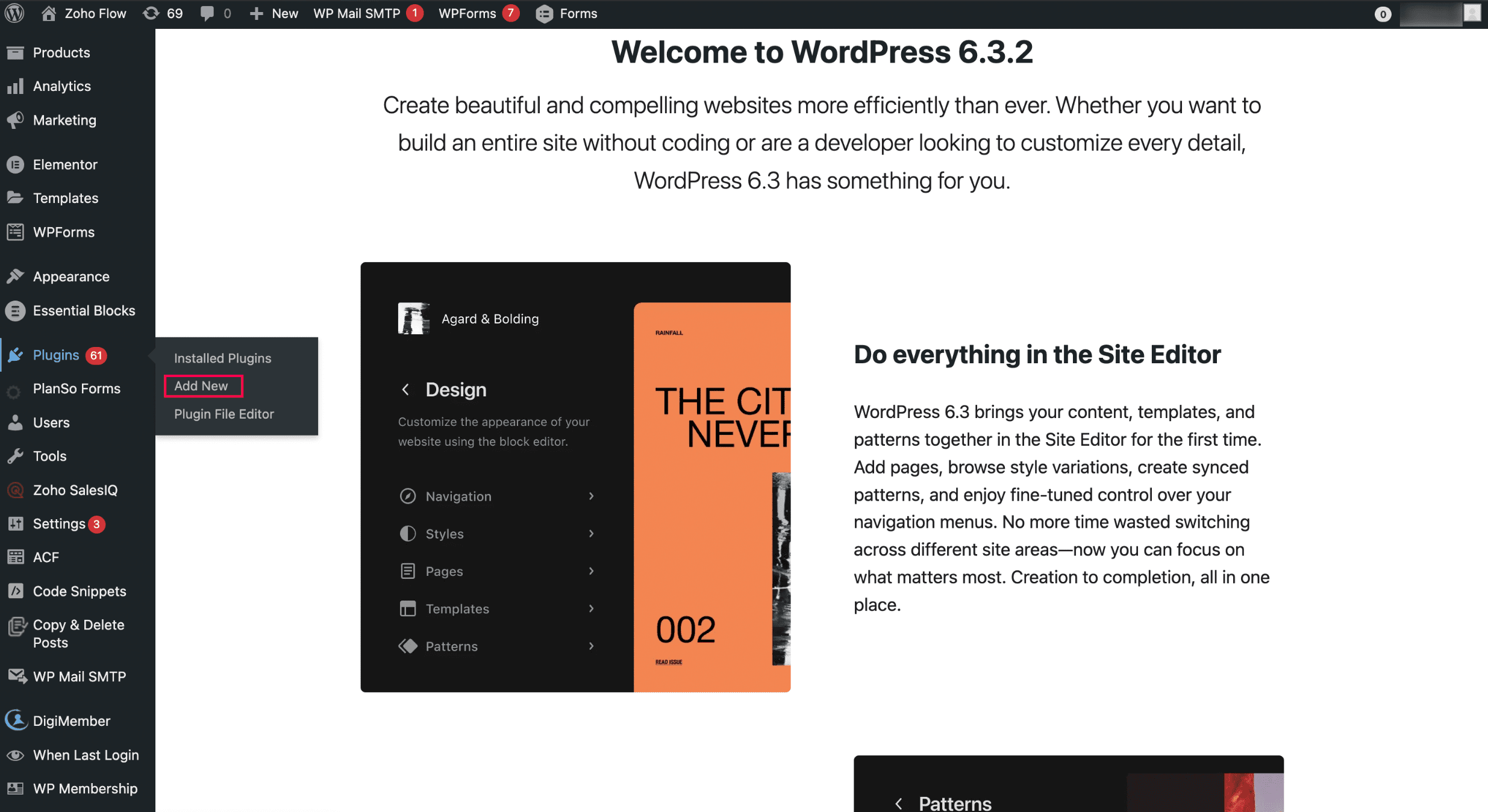
i. Open WordPress and click Add New in the Plugins menu.
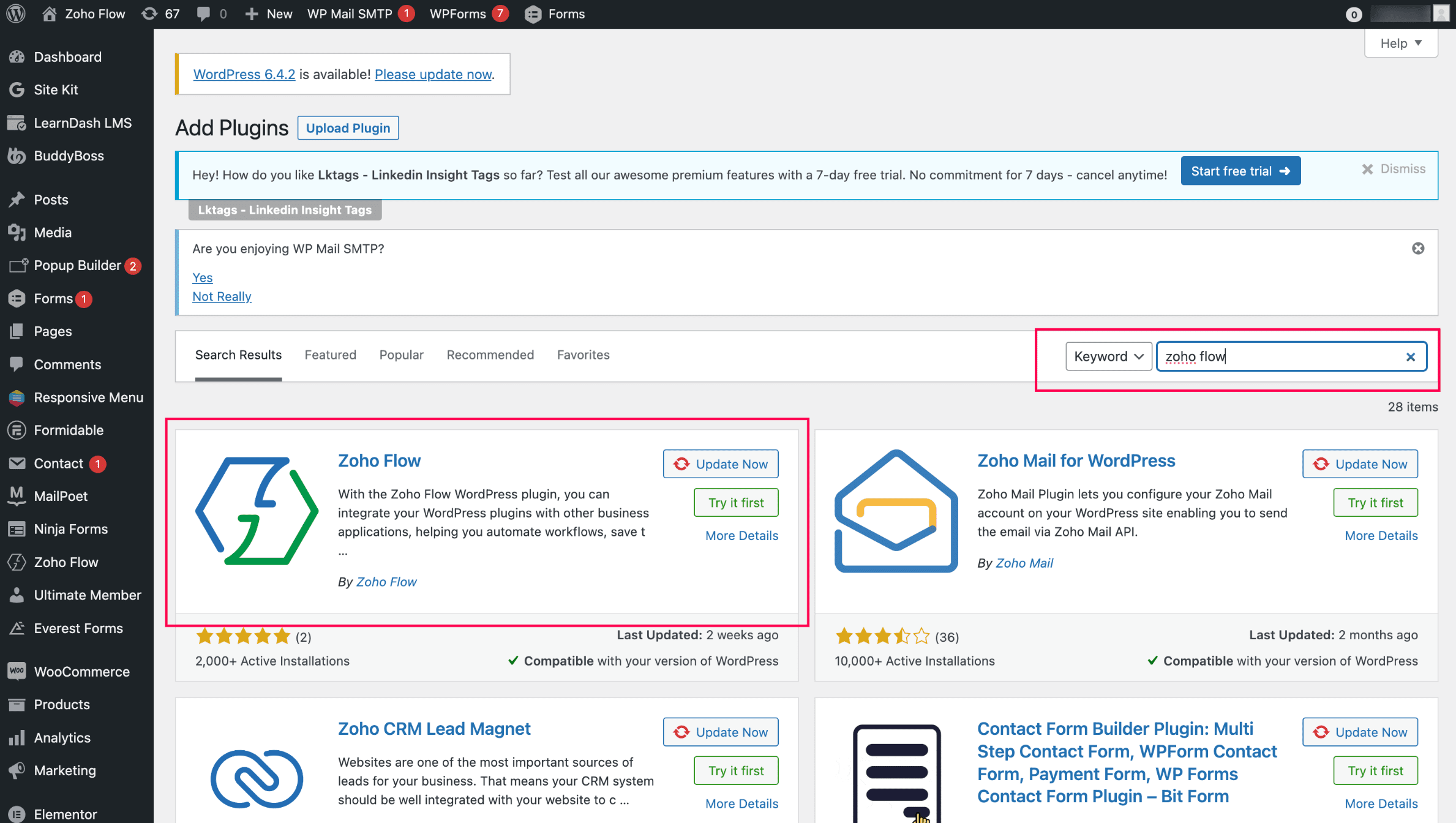
ii. Search for Zoho Flow and click Zoho Flow plugin to initiate the installation.

Installing the WordPress.org extension in Zoho Writer and completing the authentication: 
  1. Install the WordPress.org extension from Zoho Marketplace in Zoho Writer. (By default, it'll be pre-installed for all Zoho Writer users)
  2. Authenticate the extension with your base URL and API key(Note: You can authenticate only one WordPress site at a time)
  3. To generate the base URL and API key, click Zoho Flow in your WordPress site and choose WordPress.org.
Posting content from Zoho Writer: 
  1. Open the WordPress.org extension from the right pane of your document in Zoho Writer.
  2. Add important metadata to your blog posts, such as title, description, and tags, and choose from a list of categories.
  3. Click Publish to publish the content. 
When posting content from Zoho Writer, SEO-friendly image names will help increase visibility in search engines.
You can customize and change the theme of your WordPress blog from Appearance > Themes in the right side of your WordPress blog. Choose a new design or customize the existing design by clicking the Customize button.


Updating blog content from Zoho Writer: 
  1. Click View Published History in the WordPress.org extension in your Writer document.
  2. Choose the document version you want to update the content to from the list of options displayed and click Republish Current Version.

Switch to the Zoho Flow plugin from Jetpack and continue posting to your WordPress.org from Zoho Writer. 


Try Zoho Writer's WordPress and WordPress.org extension and let us know your suggestions and feedback in the comments or email us at support@zohowriter.com or support@eu.zohowriter.com. You can also add your feedback about the Zoho Flow plugin here. It will help us improve the plugin and smoothen your experience.


Regards,

Team Writer

    • Sticky Posts

    • Easily perform calculations using dates with the new DATEDIF function

      Hey Zoho Writer users! We've enhanced Zoho Writer's formula capabilities with the new DATEDIF function. This allows you to calculate the difference between dates in days, months, and years. Function syntax: =DATEDIF(start_date, end_date, unit) Inputs:
    • Zoho Writer's WordPress extensions

      Hey Zoho Writer users! Say goodbye to all your WordPress content publishing woes with Zoho Writer's WordPress extensions. Publish content with all your formatting and images, republish content when you update a document, and more—from a single window
    • Date-based conditions and filters

      Configure conditions with date  Hi everyone! We are excited to announce that you can now compare and filter data with date-based conditions. This update lets you compare date fields in a document to a reference date and display a text or value if the
    • Introducing group by, aggregation, and repeating regions in mail merge templates

      Display data exactly the way you want and highlight key insights with Zoho Writer's enhanced merge templates. We've supercharged Zoho Writer's merge templates with the capability to dynamically group, aggregate, and repeat data as blocks. You can now
    • Say hello to an improved way to merge documents!

      Automating all your documents from start to finish is now easier than ever with Writer's new merge tools.   If you haven't seen it yet, you can read the main announcement here. Here is the full list of the features we've rolled out: 1. Dynamic Table Headers
    • Recent Topics

    • Maximum incoming email (attachment size) limit

      I see that the maximum size of received emails can now be set to 20MB, however I'd still like to see it be larger. It's embarrassing when a client sends me an email with a large attachment and I can't receive it. 50, even 100 MB seems reasonable these
    • [Free Webinar] Learning Table Series - Multi-currency management in Zoho Creator

      Hello everyone, We’re excited to invite you to another edition of the Learning Table Series webinar. As you may already know, we've moved to a purpose-based approach in the Learning Table Series this year. Each session now focuses on how a Zoho Creator
    • LESS_THAN_MIN_OCCURANCE - code 2945

      Hi I'm trying to post a customer record to creator API and getting this error message. So cryptic. Can someone please help? Thanks Varun
    • Ranking by group in report

      Dears, I am new to Zoho Analytics and I would like to ask you guys help to creating a ranking column. Report type: Pivot Matter: I want to create a ranking column on the right of Percentage. This ranking is group by column Type, and ranking by Final Score/Percent.
    • How do I add a project template to a pre-existing project?

      Help....How do I add a project template to a pre-existing project? Right now I have to delete the old project, make a new one and add the project template at the time of creating the new project.
    • How to add line breaks in zoho.cliq.postToUser(...) message?

      In a CRM function using Deluge I'm sending this message and attempting to add some line breaks but they are ignored. Is there another way to add these breaks? My message: message: New urgent task\nDescription \nThis is a fake description.\n A new line?
    • Passing the image/file uploaded in form to openai api

      I'm trying to use the OpenAI's new vision feature where we can send image through Api. What I want is the user to upload an image in the form and send this image to OpenAI. But I can't access this image properly in deluge script. There are also some constraints
    • Users may not pick the fields to be shown as columns in the Choose Account window when creating a new Deal record

      Hi there, by talking with other users I found out that I, as an Admin, am the only one who can pick fields to be shown as columns in the Choose Account window when creating a new Deal record. In fact, if other users click on the "Add Column" symbol on
    • {Action Required} Re-authenticate your Google Accounts to Continue Data Sync

      Hello Users! To align with Google’s latest updates on how apps access files in Google Drive, we’ve enhanced our integration to comply with the updated security and privacy standards, ensuring safer and more reliable access to your data. With this update,
    • Why is the ability Customize Calls module so limited?

      Why can't I add additional sections? why can't I add other field types than the very limited subset that zoho allows? Why can I only add fields to the outbound/inbound call sections and not to the Call Information section?
    • Report Template - How to remove page break after each record?

      Hi, We have report template for a list report. It looks good at screen. But when printing, it creates a page break after each record. How to remove the it? So we can print multiple records in same page. Please look at the attached screenshots. Report Template Report Print Preview
    • Calendar report with order options and more quick view templates

      I think many of us regularly work with calendar-style reports. It would be great to be able to customize the quick view with new templates and have options to sort the entries for each day of the calendar by different criteria. I think this is an interesting
    • Sender Email Configuration Error.

      Hello Team, Hope you are all doing well. We are in the process of creating the Zoho FSM environment in the UAE. When we try to add the sender email address “techsupportuae@stryker.com”, we receive the error message: “Error occurred while sending mail
    • Shall we play a game?

      Presenting the very first game created using ZOHO Creator: Tic-Tac-Toe (or noughts and crosses) I made this to challenge myself and employ some of the new features of ZOHO Creator. I must admit that the code is very literal and not too elegant. There are plans to improve on the machine AI and streamline the code over time. Currently the code makes extensive use of functions for the machine "AI" - there are 12 of these.   The machine AI can be tricked, so to counteract that I made it exceedingly arrogant
    • Career site URL - Suggestion to modify URL of non-english job posting

      Hi, I would like to suggest making a few modification to career sites that are not in english. Currently, the URL are a mix of different languages and are very long. It makes for very unprofessional looking URLs... Here is an example of one of our URL
    • CRM notes

      I want to be able to add notes to a task that do not necessarily get rolled up into an account or contact.   For example, I tasks to work on a Court Order for John Doe divorce account.  There might be lots of updates (in the form of notes) that employees
    • Confluence export to zoho learn

      Hello Is there any known way to export Confluence spaces to zoho learn ?
    • Zoho People API, Inactive users

      Hi, I would like to export using the Zoho People API using Fetch Leave Records API V2 | Zoho People API. However it only pulls active user's leaves. I want all users, active and former employees records.
    • Empty folders are now appearing in the sidebar...

      ...and the folder list is now auto-collapsed by default with no way to change. Neither of these recent updates are useful or user-friendly. ==================== Powered by Haiku https://www.haiku.co.uk ====================
    • Client Script | Update - Client Script Support For Custom Buttons

      Hello everyone! We are excited to announce one of the most requested features - Client Script support for Custom Buttons. This enhancement lets you run custom logic on button actions, giving you greater flexibility and control over your user interactions.
    • Zoho CRM for Everyone's NextGen UI Gets an Upgrade

      Hello Everyone We've made improvements to Zoho CRM for Everyone's Nextgen UI. These changes are the result of valuable feedback from you where we’ve focused on improving usability, providing wider screen space, and making navigation smoother so everything
    • Create custom rollup summary fields in Zoho CRM

      Hello everyone, In Zoho CRM, rollup summary fields have been essential tools for summarizing data across related records and enabling users to gain quick insights without having to jump across modules. Previously, only predefined summary functions were
    • Monthly Webinar - Getting Started with Zoho LandingPage

      Are you building your first landing page and want a little guidance? Join our monthly Getting Started with Zoho LandingPage webinar and learn how landing pages fit into your marketing strategy, drive lead generation, and improve conversions. Here’s what
    • View all email threads directly from record's History and Interactions

      Greetings all, We've introduced the ability to view complete email thread conversations directly from records' History and Interactions sections, along with email delivery status and sentiment insights on the Interactions page—which makes it easier for
    • Marketing Tip #22: Check website and navigation for broken links

      Do you inspect your online store frequently? If not, here's your reminder to do it now. Broken links frustrate customers and make your store feel unreliable. Whether it’s a missing product page, an outdated menu item, social media accounts, or a broken
    • Is there a way to show contact emails in the Account?

      I know I can see the emails I have sent and received on a Contact detail view, but I want to be able to see all the emails that have been sent and received between all an Accounts Contacts on the Account Detail view. That way when I see the Account detail
    • Custom function return type

      Hi, How do I create a custom deluge function in Zoho CRM that returns a string? e.g. Setup->Workflow->Custom Functions->Configure->Write own During create or edit of the function I don't see a way to change the default 'void' to anything else. Adding
    • push notification to Cliq when user is @mentioned in CRM notes

      push notification to Cliq when user is @mentioned in CRM notes. Currently users that is @mentioned gets an email to be notified. User/s that is @mentioned should get a Cliq notification.
    • How to make entries for restaurant sales in Zoho Books?

      Hello, I'm new to Zoho Books. I need to understand how to record our restaurant sales in Zoho Books. We can't raise invoices for each bill from the daily sales report generated by our POS (duplicated effort). We need a means of entering cumulative sales
    • Creating Restaurant Inventory Management on Zoho

      Hi,  We run a small cloud kitchen and are interested to use Zoho for Inventory and Composite Item tracking for our food served and supplied procured to make food items.  Our model is basically like subway where the customer can choose breads, veggies,
    • Sending emails via Books

      Anyone else getting similar problems recently ??..... Hi, Your message to the following recipient was not delivered. Please find the details below.  Bounce Details: Bounced Address : someone@google.com Bounce Reason : other ; Status : 5.0.0 (undefined status) ; Daignostic-Code : smtp;542 someone@google.com Rejected ; Bounced Time : Sep 05, 2017 06:37 PM BST Regards, Zoho Team The email addresses were fine only a few days ago but are now being rejected ?
    • Integrate with WooCommerce using Wordpress Plugin

      We’re thrilled to announce a powerful update to the Zoho Marketing Automation WordPress plugin with WooCommerce integration! This enhancement enables new possibilities for businesses running online stores using WooCommerce, empowering them to merge seamless
    • Zoho Subscriptions -- Zoho Commerce integration

      Is there integration between Zoho Subscriptions and Zoho Commerce? I would like to create subscription plans in Zoho Subscritpions and list them for on my Zoho Commerce store.
    • Need help with importing expenses

      I'm using the template downloaded from the application. When I try to import my expenses, I get the message: Duplicate entry in the Expense Date column. Ensure it contains unique values. None of the rows will import. There are duplicate dates, but they
    • Select forwarding

      For Zoho mail online on PC in web browser: I had forwarding enabled in section "Mail accounts / Forwards", and I also have some filters that send emails from some unwanted senders to Archive. But it doesn't work as intended, it forwards everything (obviously
    • Cliq iOS can't see shared screen

      Hello, I had this morning a video call with a colleague. She is using Cliq Desktop MacOS and wanted to share her screen with me. I'm on iPad. I noticed, while she shared her screen, I could only see her video, but not the shared screen... Does Cliq iOS is able to display shared screen, or is it somewhere else to be found ? Regards
    • system not picking my default custom service report template

      Can you tell me why when we create a service report always pick the (standard old) template? Even when I have a custom service report selected as Default.
    • Restrict Appointment Booking to Approved Clients

      Dear Zoho Bookings Support Team, We'd like to propose a feature enhancement for managing appointments within Zoho Bookings. This feature would ensure only pre-approved clients can schedule meetings. Desired Functionality: We propose the introduction of
    • Automate Credit Card Surcharge

      Is there a way to create an automation that will add a 3.0% credit card surcharge to a subscription whenever a customer pays via credit card?
    • Product Request: Send email to Secondary email

      Guys, we should be able to send the campaign to the secondary email too.  Is this on the plans for Zoho Campaign? It looks like I can map the secondary email from the CRM to the Campaigs, but can not send the message.  
    • Next Page