A/B Testing Idea #2: Make your headlines sound super cool.
Hello everyone,
We're back with our second post in the CRO testing idea series. If you missed the first post, please check it out here: "Place irresistible and clear CTAs." In today's post, we'll look at how to effectively A/B test your headline content.
Some people say "you only get one chance to make a first impression" while others contend that it only takes seven seconds to make an impression about someone or something. Well, the same concept applies to your website.
A good first impression on your website is crucial for making visitors trust in your products/services and keeping them tied to your business forever. Creating this first impression depends on many factors like structure, colors, spacing, symmetry, amount of text, and fonts. But, of everything else, a good headline plays a major role in the success of your website.
Your headline is the first thing that readers see as soon as they land on your site; it holds the power to make or break a deal at first visit. Even if your content is truly unique and innovative, a weak headline can ruin its chances of being super successful in terms of conversions. So how do you create a strong headline that drives more traffic and clicks on your website?
Here are a few aspects to consider as you A/B test your site's headline content:
A good first impression on your website is crucial for making visitors trust in your products/services and keeping them tied to your business forever. Creating this first impression depends on many factors like structure, colors, spacing, symmetry, amount of text, and fonts. But, of everything else, a good headline plays a major role in the success of your website.
Your headline is the first thing that readers see as soon as they land on your site; it holds the power to make or break a deal at first visit. Even if your content is truly unique and innovative, a weak headline can ruin its chances of being super successful in terms of conversions. So how do you create a strong headline that drives more traffic and clicks on your website?
Here are a few aspects to consider as you A/B test your site's headline content:
Communicate your brand's purpose
Often we just assume that the visitors fully understand everything about our website and its product offerings. However, that’s not always the case, especially for new visitors. With hundreds of websites selling products/services online, it's important to make sure that the primary headline on your homepage tells visitors what your website has to offer and how it aligns with their expectations—all in a few short seconds. Tweaking and testing headline copy that clearly communicates your brand's purpose and differentiates yourself from the competitors can encourage your visitors to take the desired action without another thought.
Example:
Say you own a website testing and analytics software solution that offers a set of tools to grow an online business. Take a look below at the old and new versions of the same headline message. Notice that while the first tells people what the product is, the second tells people what the product will actually help them do.
Say you own a website testing and analytics software solution that offers a set of tools to grow an online business. Take a look below at the old and new versions of the same headline message. Notice that while the first tells people what the product is, the second tells people what the product will actually help them do.

Extra tip: The easiest way to determine if your brand message is clear to your visitors is by assuming your audience knows nothing about the business you're running.
Try different headlines for different set of target audiences
Each website caters to a specific type of audience. So understanding which audience group you cater to, where they come from, what their interests are, and what information they are hoping to find on your site is another major parameter to consider before starting to test your headline content. Testing and optimizing your headline copy based on a particular set of audience segments like demographics (such as location, gender, age, etc), personal interests, and past engagements with your site can help you deliver personalized content for each category of visitors, which is more likely to generate conversions.
Example:
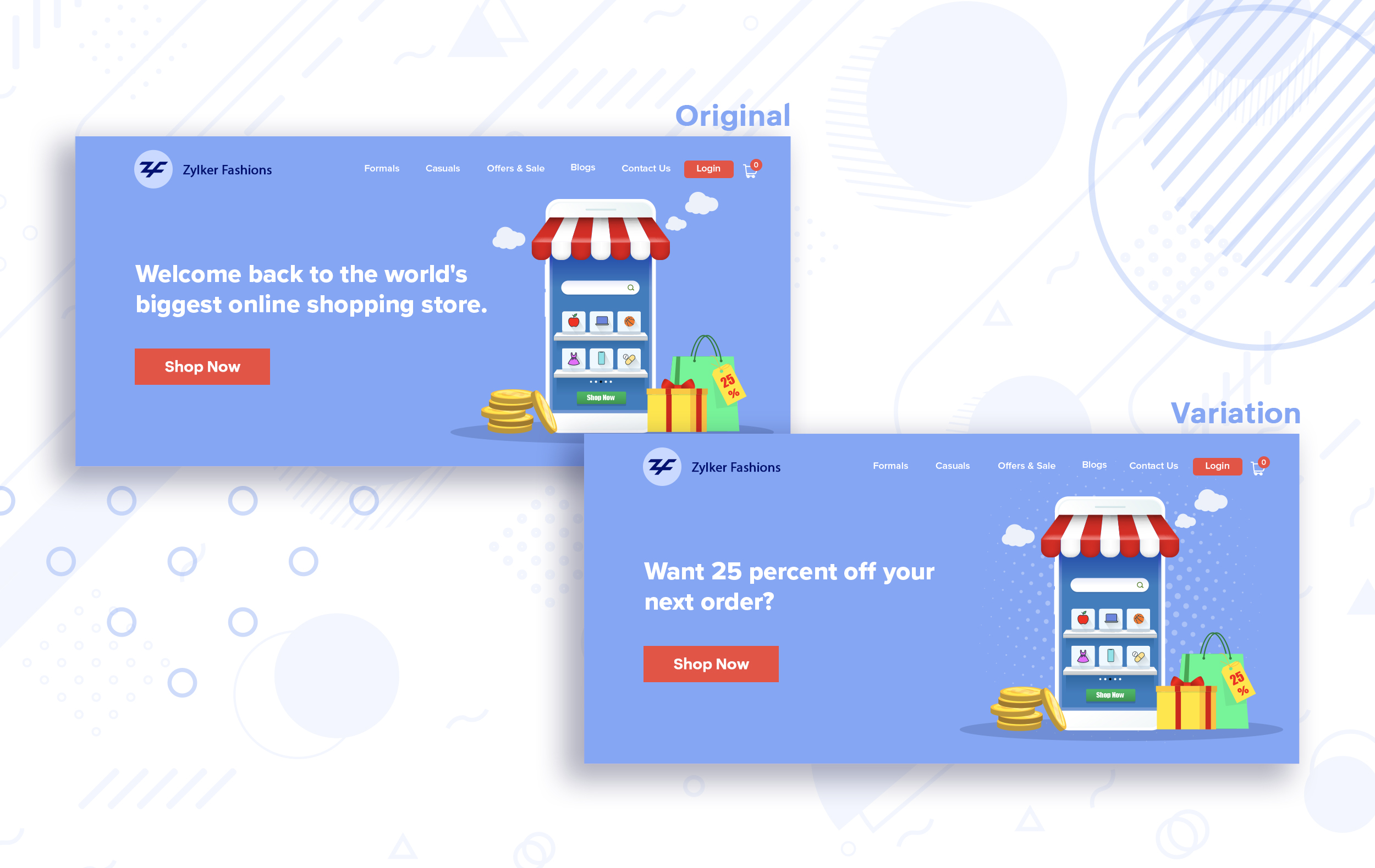
Say you run an ecommerce business and want to A/B test your headline copy with enticing offers for returning visitors to see which one convinces them to fulfill your conversion goals.
Say you run an ecommerce business and want to A/B test your headline copy with enticing offers for returning visitors to see which one convinces them to fulfill your conversion goals.
Extra tip:
- You can target your A/B test in PageSense using a variety of audience segments such as visitor type, device used, JS variable, day of the week, and more to learn which version grabs your audience's attention immediately and performs best for each segment.
- To know your target audience better, you can set up polls on your website using PageSense and learn your visitor’s business (or personal) needs and how your product can help achieve them. Later, you can use this feedback to test and optimize your website content.
Match your headline with your ad copy
When a visitor clicks on an ad, it's of the utmost importance to match the message on that ad to the headline content on your post-click landing page. If your headline doesn't match the offers and features that you promised in your ad copy, you're wasting all your marketing investment and conversion opportunities. A/B testing your headline by incorporating relevant keywords that resonate with your ad copy can help you reassure people that they've come to the right place. It can also later persuade them to take the desired action on your site more quickly. Further, this type of testing is more likely to generate increased clickthrough rates, conversions, and revenue for your website.
When a visitor clicks on an ad, it's of the utmost importance to match the message on that ad to the headline content on your post-click landing page. If your headline doesn't match the offers and features that you promised in your ad copy, you're wasting all your marketing investment and conversion opportunities. A/B testing your headline by incorporating relevant keywords that resonate with your ad copy can help you reassure people that they've come to the right place. It can also later persuade them to take the desired action on your site more quickly. Further, this type of testing is more likely to generate increased clickthrough rates, conversions, and revenue for your website.
Example:
Say you're running a Facebook Ad for older travelers, and the post-click landing page shows the most relevant tourist packages, flights, and hotel stays based on their interests. Now compare the old and new headline messages below to see which version of the message sounds better.
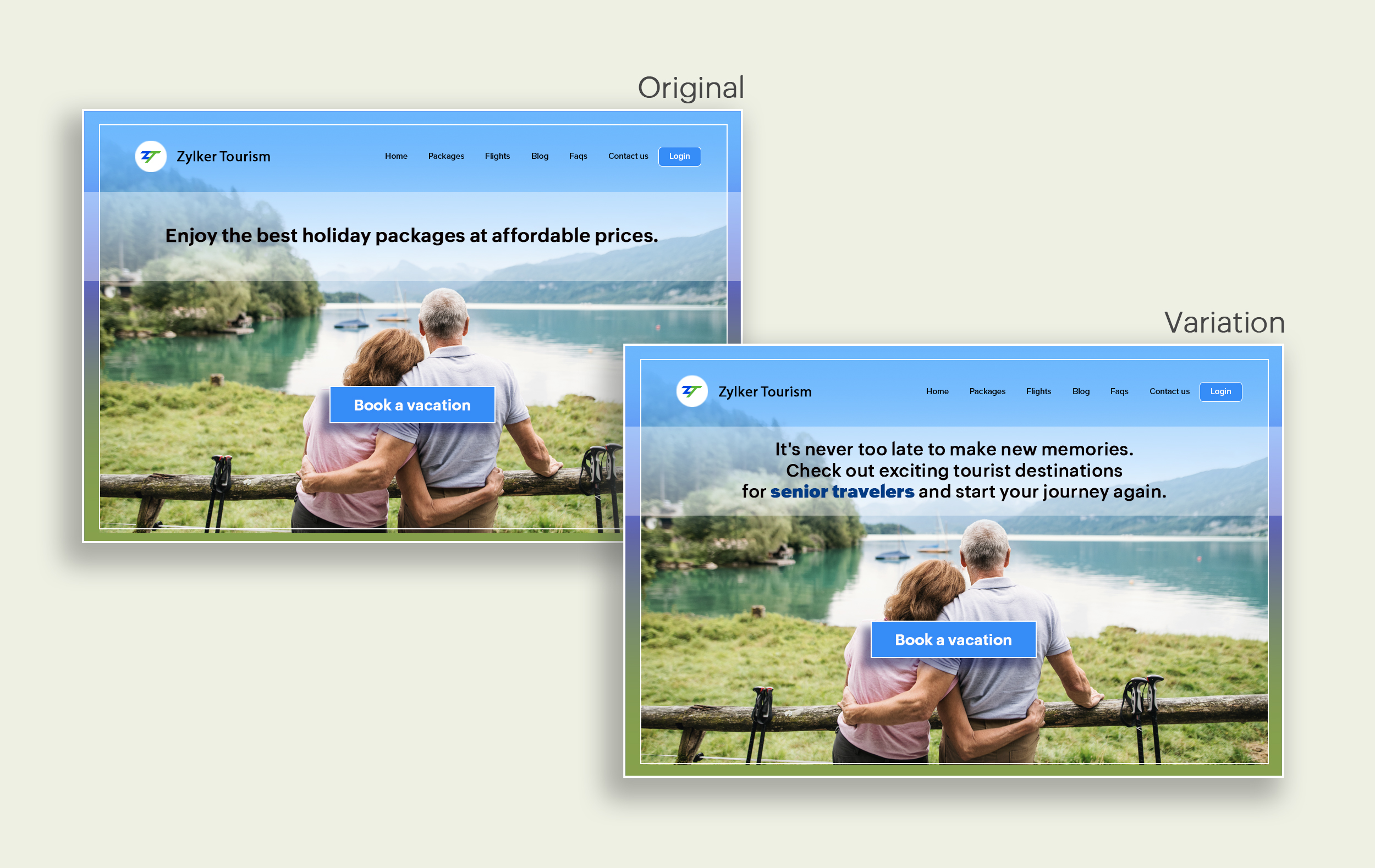
Say you're running a Facebook Ad for older travelers, and the post-click landing page shows the most relevant tourist packages, flights, and hotel stays based on their interests. Now compare the old and new headline messages below to see which version of the message sounds better.
Include stats and numbers
Numbers in your headlines are a great way to grab attention by spontaneously triggering curiosity in your targeted audience. When you use symbols like %, $, or digits instead of words to express percentages, dollars, or numbers in your headlines, it creates specificity around the duration, size, value, etc. of what you're offering customers, which is more attractive than a generic offering. This is a powerful psychological tactic that spotlights your headlines and immediately hooks the reader's interest, which results in more traffic.
Example:
Consider the pricing page of your website and see how adding a number to the headline can increase reader engagement.

Follow the problem-solving methodology
Solving your customers' problem is the easiest and fastest way to reach their heart. Crafting a headline that addresses an issue and provides a cutting-edge solution to solve the problem can make optimizing your website easier. Intriguing your readers like this can make them look for more information on the rest of your site. Further, when done well, it can build a solid emotional bond between you and your customer for a longer term.
Example:
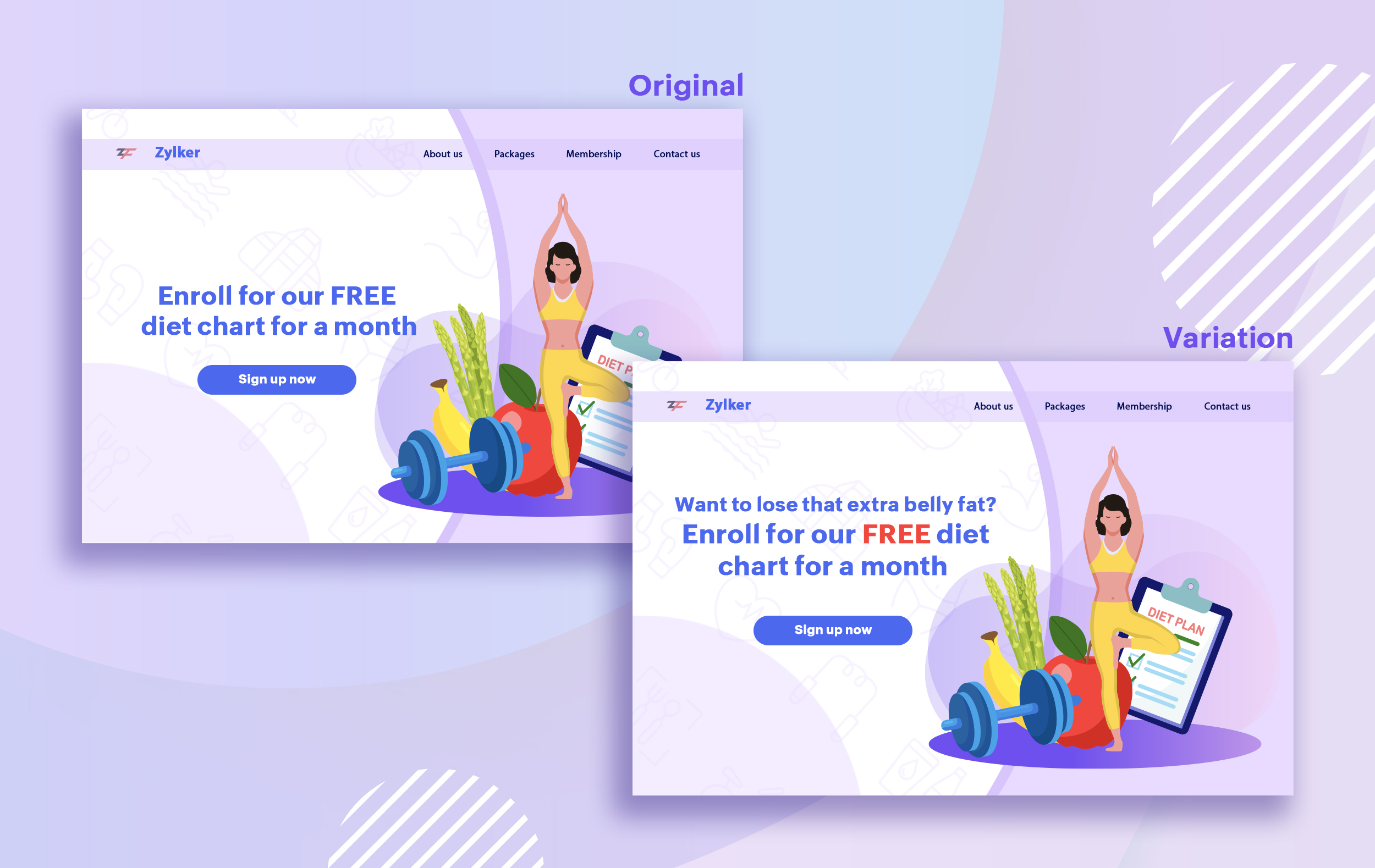
Take a look at the image below to see how implementing the problem and solution technique in your fitness website can make your headline sound more interesting.
Solving your customers' problem is the easiest and fastest way to reach their heart. Crafting a headline that addresses an issue and provides a cutting-edge solution to solve the problem can make optimizing your website easier. Intriguing your readers like this can make them look for more information on the rest of your site. Further, when done well, it can build a solid emotional bond between you and your customer for a longer term.
Example:
Take a look at the image below to see how implementing the problem and solution technique in your fitness website can make your headline sound more interesting.
Test with power words and sentiments
Sometimes the right audience is just one word away. Using forceful positive or negative power words in your headlines has the potential to kindle your customers' emotions and inspire action on your website in no time. Also, these words can guarantee more clicks and make your headlines stand out from the rest. You can test your headlines depending on two groups of power words:
Sometimes the right audience is just one word away. Using forceful positive or negative power words in your headlines has the potential to kindle your customers' emotions and inspire action on your website in no time. Also, these words can guarantee more clicks and make your headlines stand out from the rest. You can test your headlines depending on two groups of power words:
- Negative headlines: This type of headline tends to intrigue your customers by setting a stage to avoid a miserable situation. It includes words like never, stop, worst, avoid, or do not.
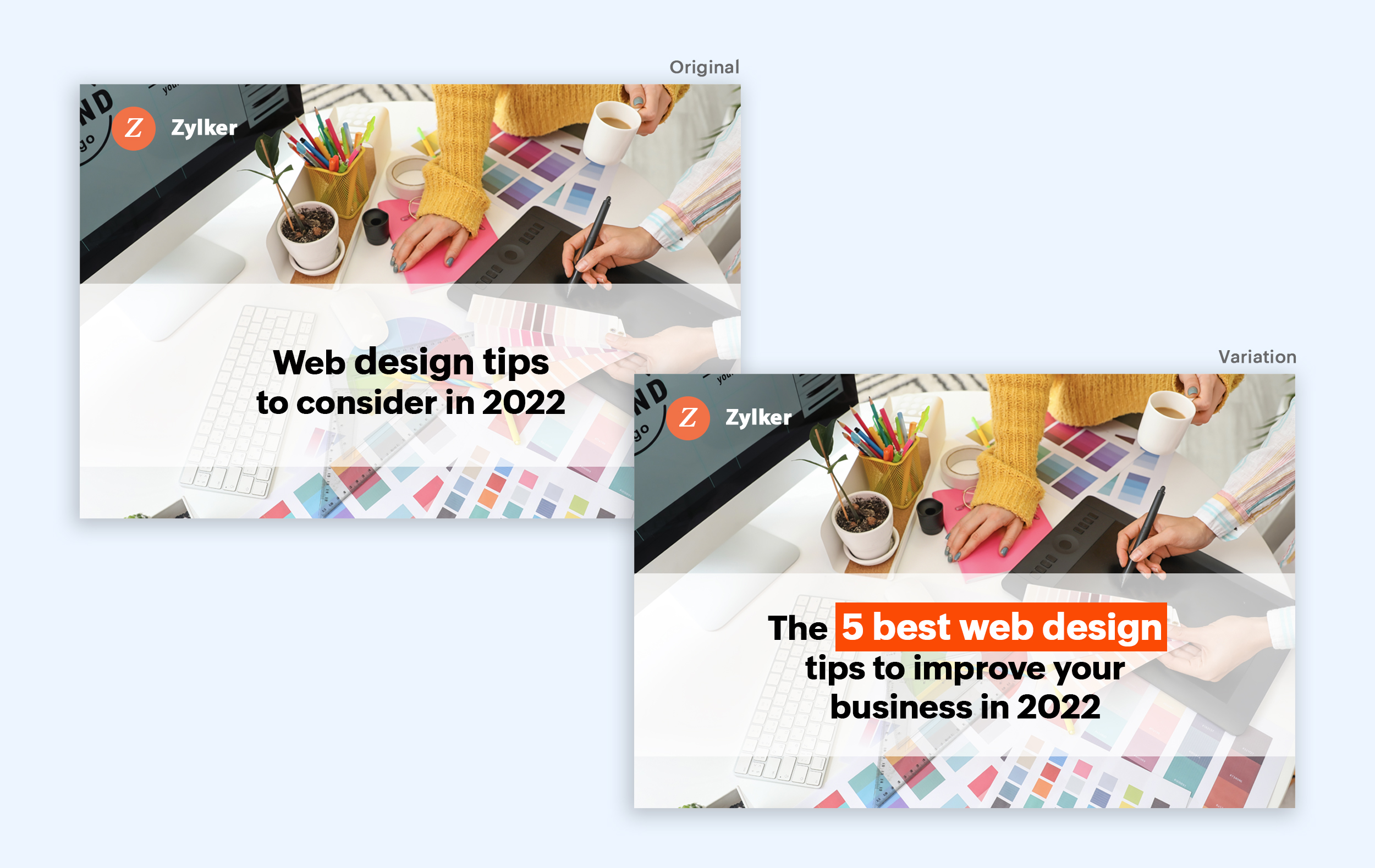
- Positive headlines: This type of headline tries to build a relationship with feel good emotions. It includes words like best, always, fastest, easiest, most, greatest, largest, funniest, hottest, strongest, biggest, and ever.
Example:
Take a look at the image below to see how the choice of words can invoke a positive feeling as you read the headline.
Test the font and appearance of your headline
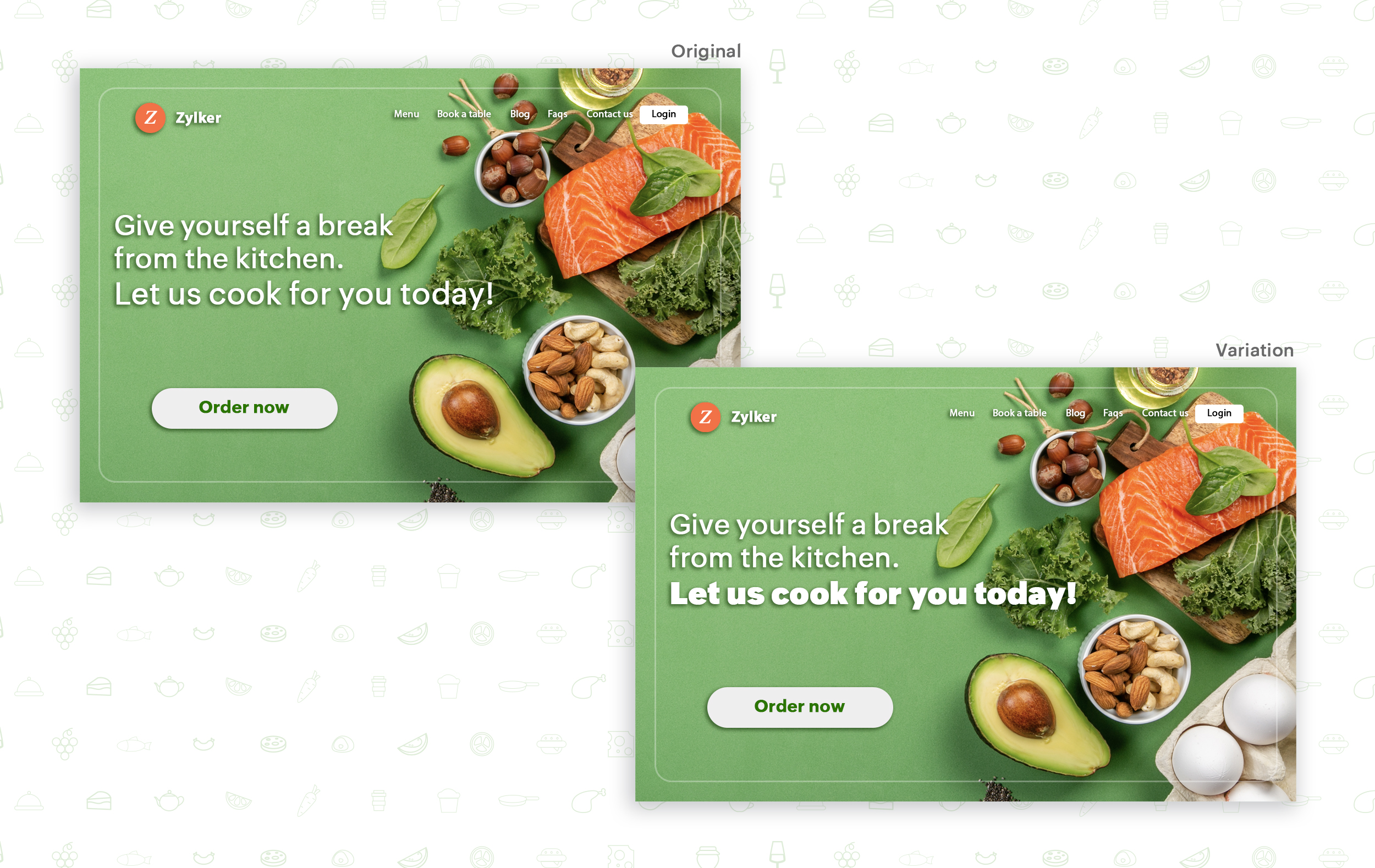
The presentation (color, fonts, and layout) of your headline copy has a huge impact on the performance of your site. Below are a few points to consider while testing the appearance of your headline:
- Use title case. Avoid writing your headlines in all caps as it can reduce the readability of your text.
- Choose a font style and size that matches your website's personality. The most popular font style is sans-serif and font size is 20 - 36 pixels.
- Apply colors that contrast (while complimenting) your website's background well and focus on the legibility of your content.
- Align your headline perfectly with your body content for a bigger impact. Centered headlines are most powerful visually, while left-centered are more conservative and formal.
Example:
Say you own an online food delivery website, and you want to test the color and font of your homepage headline for better clickthrough rates. Take a look at the before and after images of the headline below. Which one you think will attract more eyeballs?
Try out the two-part strategy
Don't forget your supporting cast! Successful headlines act in two parts. Including a persuasive subheadline copy below your headline can be another winning strategy to pull your customers deeper into your website. You can test different versions of your subheadings to see which best suits your visitors, such as explaining a bit more about your product or services, emphasizing your product benefits, or encouraging visitors to click the CTA button placed on your site.
Example:
Take a look at the main headline and the subheading of a customer support software website as shown below. In this case, your subheadline re-affirms how your software helps your customers and adds emphasis about different product features.

Test the headline length and SEO compatibility
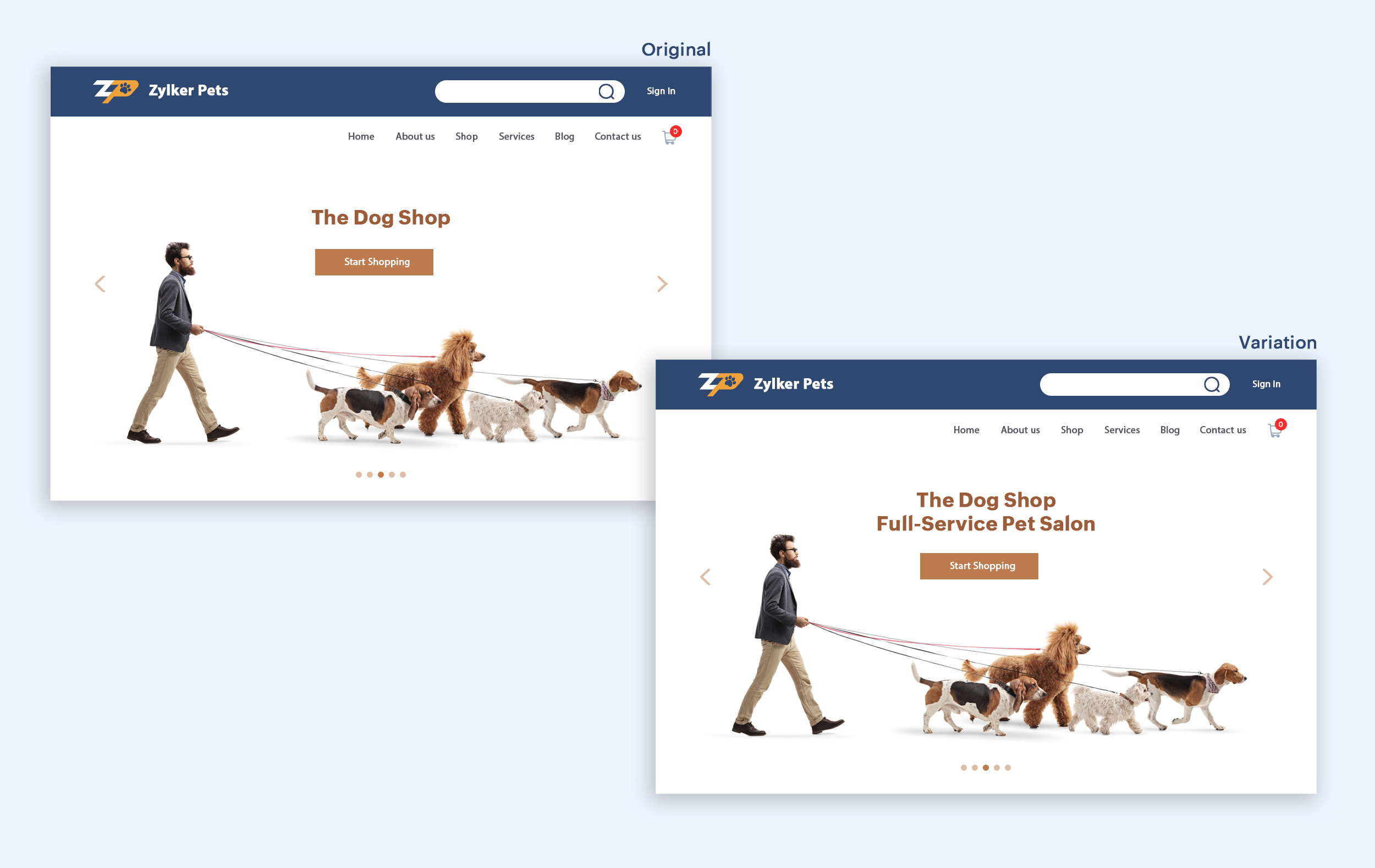
Test your headline for the right length, SEO keywords, and sentiments. Keeping a headline no longer than six words will help readers easily process your text and attain the goal of your website. Using free headline analyzer tools such as Coschedule or Sharethrough can help you effortlessly understand your website's performance. They analyze important factors (like searchable keywords, word balance, and sentiments) and assign a percentage score based on how good your headline is. They'll help you identify the factors you need to improve for more productive headlines.
Test your headline for the right length, SEO keywords, and sentiments. Keeping a headline no longer than six words will help readers easily process your text and attain the goal of your website. Using free headline analyzer tools such as Coschedule or Sharethrough can help you effortlessly understand your website's performance. They analyze important factors (like searchable keywords, word balance, and sentiments) and assign a percentage score based on how good your headline is. They'll help you identify the factors you need to improve for more productive headlines.
Example:
Let's say you own an online pet supply store and you want to test the headline of your homepage to attract more visitor traffic. The screenshots below show the performance of both the old and new versions of the headline in terms of length.
Bonus tips:
- Create a sense of urgency in your headline with words like "today," "now," and "last-minute offer."
- Use comparison phrases like "versus" to reinforce the benefits and features of your products/services.
- Research your competitor's headlines to add more value and optimize your headlines better.
We hope you found this article useful. What is your favorite headline tester? Have you had any success with headline A/B testing? Do share with us in the comments box below.
Happy testing. Happy converting!
Thank you.
Topic Participants
Balarohini Paulraj
info
Sticky Posts
[Live Webinar] How to maximize your conversions using existing website traffic
Hello all, Did you know that on an average only 0.1% of your traffic converts? The rest are either heading towards your competitors or dropping off without being able to find what they came for. When you want to increase your conversions, it's naturalA/B Testing Idea #2: Make your headlines sound super cool.
Hello everyone, We're back with our second post in the CRO testing idea series. If you missed the first post, please check it out here: "Place irresistible and clear CTAs." In today's post, we'll look at how to effectively A/B test your headline content.A/B Testing Idea #1: Place irresistible and clear CTA buttons
Are you wasting much of your time and effort A/B testing every single idea that pops into your head, yet you're not generating sufficient traffic to your website? Don't worry—we've got you. We'd like to introduce you to the A/B Testing Ideas learningDid you know?#3: How to target and run your experiment based on custom audience segments in PageSense
Whatever kind of online business you're running, defining your target audience is the key factor to delivering relevant messages and further positioning your brand in the industry. Most marketing efforts revolve around this basic strategy of segmentingDid you know?#2: How to filter your report by custom date range in PageSense
Do you want to quickly view your experiment analysis or responses over different time periods? Want to effortlessly compare the performance of your website by specific weeks, months, or years? Also, see whether your new marketing strategies or efforts
Recent Topics
Add home page or dashboard in CRM customer portal
is it possible to add home page or dashboard in CRM customer portal?User Tips: How to change the the label display name of a system defined field
Most users know how to change field label names via Settings > Modules & Fields but if you want to change the name of a system defined field you can’t as there is no “edit properties” option. However with a simple hack you can edit any system definedSearch not working!
I have items in my notebook tagged but when I search for a tag nothing comes up! Any fix for this?Zoho CRM Community Digest - October 2025 | Part 1
Hello Everyone! Here's a quick recap of first two weeks of October! Product Updates: Zoho CRM Android App Update: Surveys, Blueprints, and Smarter Mobile Features! Zoho CRM’s Android app just got a useful upgrade. You can now share records, upload yourAutomate onboarding emails with CRM Workflow and Accounts module
We’re a B2B SaaS company selling to public-sector organisations. Each organisation is stored as an Account in Zoho CRM, and each organisation typically has multiple associated Contacts. Our backend syncs product-usage data (setup status, user activity,Important update: Enhanced security measures for account operations in Zoho Cliq
Greetings from the Zoho Cliq team! We’d like to share an important security update that has an influence on some admin actions such as password reset, MFA reset, and MFA backup code generation. What’s changing? With our latest security enhancements, theseSales Receipts Duplicating when I run reports why and how do we rectify this and any other report if this happens
find attached extract of my reportNo Functional Autosave or Manual Save Button
Application : Zoho Notebook So I wanted to try Zoho Notebook(On Ubuntu) as an application, I installed the application and went solving my LeetCode problems visually(Drawing mode), at one point the app just stopped saving anything... Every time I triedEnterprise subscription support
My organization sells subscription services to enterprise customers, which is a different model from the consumer subscription model that Zoho Billing has been designed to support and I beleve this capability should be added. An enterprise subscriptionIssue with Creator's IF logic
Hi, I found the following code produces unexpected results: if(-1.0 < 0.0000000) { info "True"; } else { info "False"; } if(-1.0 < 0.000000) { info "True"; } else { info "False"; } The output returned is: False True However, theNeed option to send Package PDF in shipment email (Shipment PDF is missing Lot info)
Is there any way to automatically attach the Package PDF instead of (or alongside) the Shipment PDF in the notification emails? We really need this feature because the default Shipment PDF creates a blind spot for our customers. It does not display Batch/Lotzoho creator view is not present in the workspace and blank reports
Hi Support, Users who have "write" permissions keep getting this error for all of our embedded reports all of a sudden. See screen shot below: Meanwhile, my developer permissions account sees a blank screen in view and edit mode as shown in the screenshotsCustomize portal email template
Can i fetch only first name of the user in portal email template instead of the below code Hi ${User.FULL_NAME}Can't we let users decide which options they'd like to add at embed widget?
It seems embed widget DOES NOT offer a feature, where users can choose options upon subscribing plans. What Zoho has instead, is that admins have to manually create plan with options. How come no one in Zoho dev team never raised issue about usabilityReupload and rename from one field to another field (file upload)
Hi Everyone, Sorry, i have question to use invoke url for rename and reupload attachments file to another field. Tested on development mode. Zoho C6. Refer to https://www.zoho.com/creator/help/api/v2/upload-file.html look my error notification. Does anyonePrinting Multi-Page Reports (PDF Export)
Hi, I am moving a report from Google's Looker Studio to Zoho Analytics and trying to reproduce the Looker page by page dashboard editing experience. With Google, what you see is what you get when you print to PDF. But I can't seem to create the same experienceI NEED TO NUMBER TO TEXT NO HERE
=NUMBERTEXT NEEEDError: View is not present in the workspace
When saving a dashboard, user receives a popup with the following error. "View is not present in the workspace" What does this mean or refer to? There is no further insight given.Dear Zoho CEO: Business Growth is about how you prioritise!
All of us in business know that when you get your priorities right, your business grows. Zoho CRM and Zoho Books are excellent products, but sadly, Zoho Inventory continues to lag behind. Just this morning, I received yet another one-sided email aboutBin Locations
Dear all, I am wondering if someone has the ability to develop the bin locations option for zoho inventory (integrated with zoho books) Regards, RyanCreate and populate a record in an instant: Introducing zero-shot field prompting to Zia's ICR
A couple of months ago, we upgraded our in-house AI image detection and validation tool, Zia Vision, with intelligent character recognition (ICR). By training Zia with sample images, you could create and enrich CRM records with data extracted from standardHow to Prevent Users From Skipping LMS Videos in Zoho People
How to Prevent Users From Skipping LMS Videos in Zoho People Hello Zoho Developers, In this blog, we will quickly look at how you can stop users from skipping or fast-forwarding videos in Zoho People LMS. Zoho People provides a feature called Disable[Integration Edition] Deluge Learning Series – Custom API with Deluge | November 2025
We’re excited to conclude this four-month Integration Edition of the Deluge Learning Series: Session 1 – Integrating Zoho Apps with Deluge Using Built-In Integration Tasks Session 2 – Integrating Zoho Apps with Deluge Using invokeURL and invokeAPI SessionAutomate Backups
This is a feature request. Consider adding an auto backup feature. Where when you turn it on, it will auto backup on the 15-day schedule. For additional consideration, allow for the export of module data via API calls. Thank you for your consideration.Tips for Organizing Workflows and Improving Team Coordination in Zoho
Hi everyone, I’m looking for some general advice on how different teams are organizing their daily work within Zoho’s apps. Our team recently expanded, and we’re trying to streamline how tasks, discussions, and documents are shared so everything staysPrevent user from viewing all records?
I have a report that is meant to be used by vendors to view only the records that are assigned to them. All the vendor information is stored in a separate application, so I need to call a function to get the current user's ID (not the zoho user ID). The report settings criteria doesn't support using function calls, so instead I'm embedding the report in an html page like this: if (thisapp.Global.CurrentUserIs("Vendor")) { personID = common.getLoggedInPersonID(); query = "Assigned_Vendor.ID="How do I copy an email message to one or more other folders?
I can move a message to another folder using the "move to" option but I can't figure out how to copy a message.Zoho Site pages not displaying in iframes
I simply want to show a Zoho Site page inside an iframe on another non Zoho website. When testing this across many browsers, the iframe content simply does not appear. IE reports that the host does not allow their content to be displayed in iframes. Very disappointing. Is there a way around this please? Here is the URL of the page I would like to appear in an iframe. http://ips-properties-to-rent.zohosites.comZoho Inventory as connector in Zoho Creator
Hello, It doesn't appear that Zoho Inventory is one of the many built in connectors in Zoho Creator? I see that there are non-Zoho inventory applications that have built in connectors such as Cin7, which leads me to believe that I'm missing somethingSend Zoho Forms Link using Zoho CRM Email Templates
I have set up Zoho Forms and CRM integration to pre-populate data from Zoho CRM to Zoho Forms. The setup is working fine. I have also created an email template in the Zoho CRM deals module to send Zoho forms links. So when I send an email using that templateMy go to On Load Client Script - Fast, efficient, and works for ALL profiles; Hides everything except initial fields
This is my on Load client script that I use for Create pages. I use a modified version for Edit and Display pages which you can create yourself using the same basic structure that I will give you below. First up, the script. Below that will be an explanationCustom Search using HTM+CSS Snippet
Suppose I wanted to create my own list view using HTML and CSS snippets inside a Page with a custom search input at the top of the list (not the Search snippet). Without Javascript, is there a way to retrieve a user's entry from that search input andMass Update of Lookup Fields not possible
Hello List I've created a custom field for Leads and Contacts 'Current Campaign'. This is very Handy as I can filter leads and then related them to a campaign. Everything ready, but then I realized that mass update doesn't work for lookup fields... aZoho CRM Kiosk Upload Files
Hello all, We are trying out Kiosks at the moment to see where it can fit best in our business. We are still a bit off in the application but lets say we will sort this out. My question is the following - when I create a Kiosk I can add "File Upload"Double opt-in notifications and customizable confirmation messages for your webforms
Dear CRM Community, We are excited to announce a major upgrade to our Webforms feature. You can now customize the confirmation message shown to your users who double opt-in from your webform and also customize your confirmation emails when they submitHas Anyone successfully integrated Zoho and Sage Intact?
Hey all, We’re evaluating Zoho One + Sage Intacct and I’m trying to connect with anyone who has actually implemented the two together.Specifically, I’d love to know: -- Which functions you kept in Zoho vs. Intacct (e.g., Product Catalog, AR/AP, invoicing,Introducing Image Upload Field
Hello everyone, In this post we will discuss about the benefits and usage of the Image upload field. The field is available for standard and custom modules. Usage: This field can be used to upload a gallery of images to a record and share the record with peers or customers. The record can be made accessible to users outside of Zoho CRM via Portals, where they can upload the necessary images. Preview, editing, and deleting images: The uploaded images can be directly edited and saved from the recordTrigger a Workflow Function if an Attachment (Related List) has been added
Hello, I have a Case Module with a related list which is Attachment. I want to trigger a workflow if I added an attachment. I've seen some topics about this in zoho community that was posted few months ago and based on the answers, there is no triggerFree webinar alert on November 19 - Email driven strategies - Master personality based styles
Hello Zoho Community! Want to make email management easier, smarter, and more you? We’ve got just the session for you! Join our interactive, game-based webinar to discover how Zoho Mail adapts to your personality and work style. Learn practical hacks,AI generated meeting notes associated to Account or Deal
As our organization works to improve efficiency we are looking for a solution to leverage AI to generate meeting notes and then add those notes to a CRM record such as an Account or Deal. I see Zoho has a Notebook AI offering that talks about the abilityNext Page