AI Interview Insights: Transcripts & Summaries for One-Way Interviews
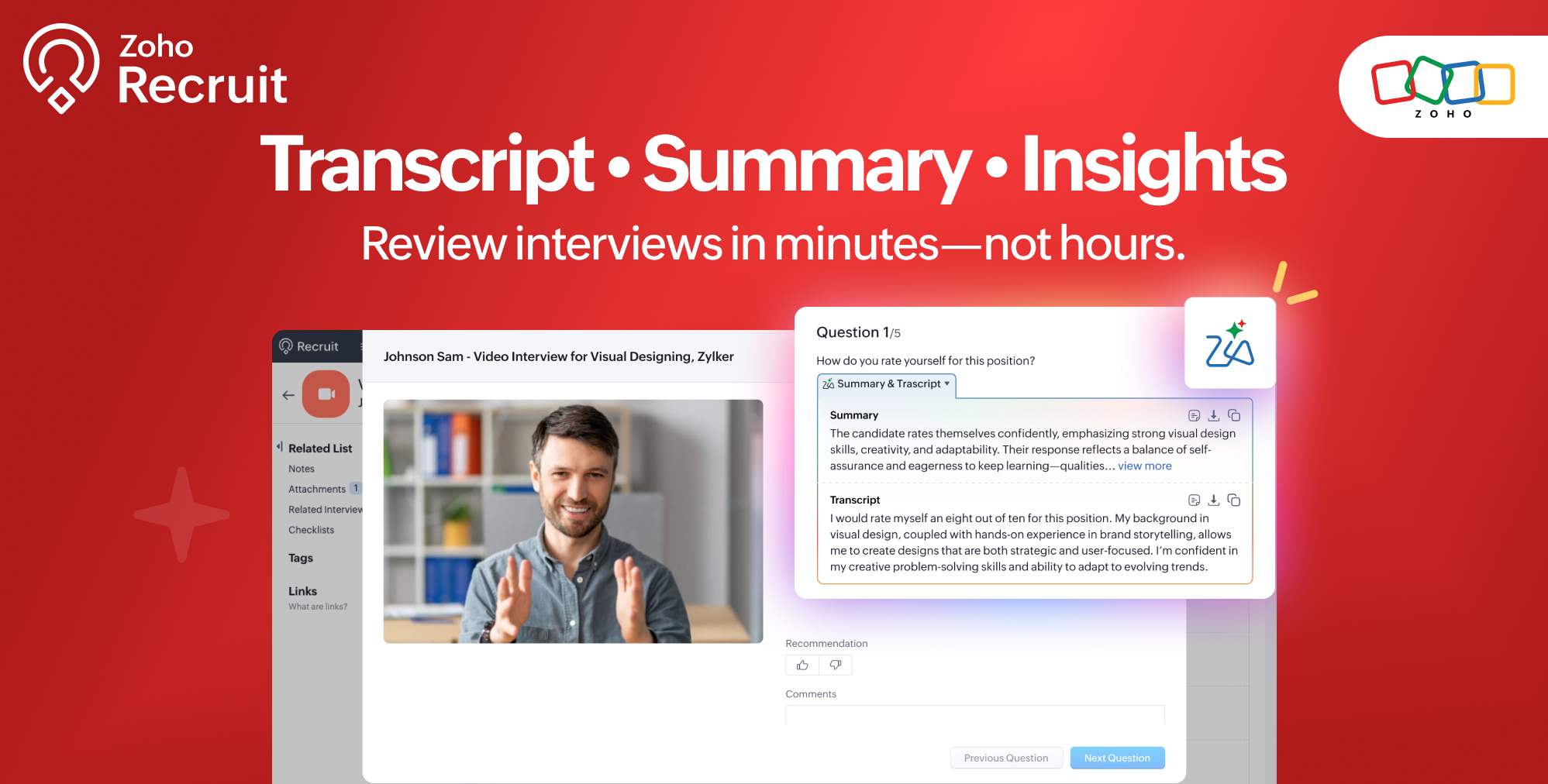
AI Interview Insights: Transcripts & Summaries for One-Way Interviews


Evaluating interviews shouldn’t require replaying long recordings or taking manual notes. With AI Interview Insights, you can now review complete transcripts and AI-generated summaries of your One-way (Recorded) interviews right inside Zoho Recruit.
This helps you get to the candidate’s strengths, red flags, and talking points faster, without scrubbing through the audio.

What’s New  

Instant Transcripts & AI Summaries for One-Way Interviews.

Zia automatically converts recorded interviews into readable transcripts and provides a concise summary of each response.
This means you can quickly revisit what the candidate said, identify key highlights, and make informed decisions without replaying the whole recording.

Problems Solved  

  • No more replaying lengthy interview recordings just to find one point.

  • Reduced dependency on manual note-taking.

  • Faster review cycles for hiring managers handling multiple interviews.

  • Better collaboration—teams can review, reference, and comment on transcripts in one place.

How It Works  

1. Zia processes your recording

Once a One-way (Recorded) interview is submitted, Zia automatically:

  • Converts the audio into text using speech-to-text processing

  • Breaks the transcript into question–answer segments

  • Generates a concise summary of each response

  • Flags key talking points to help you skim faster

You don’t need to take any action, Zia begins analysis as soon as the recording is available.

2. Enable AI Interview Insights  
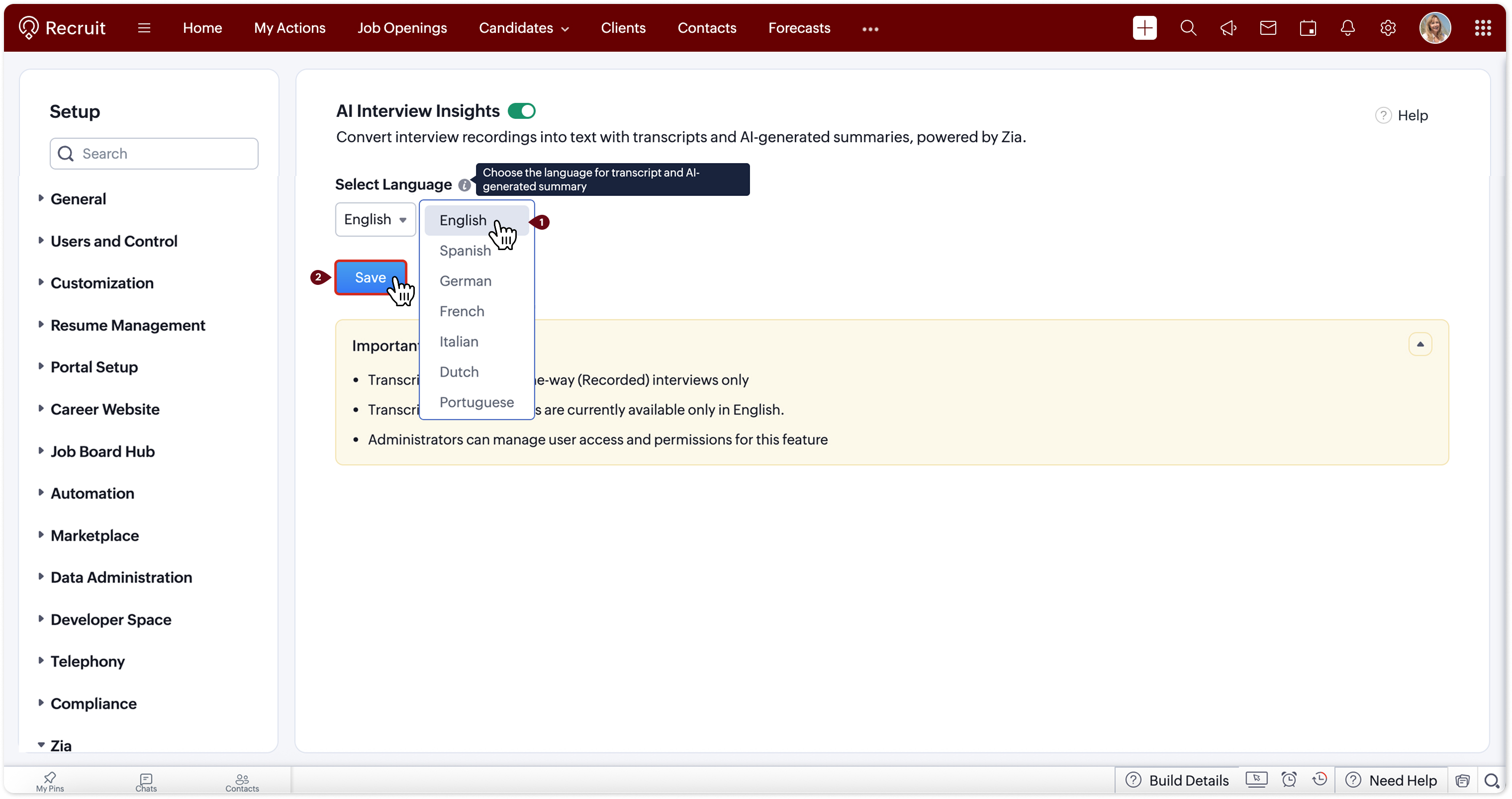

Go to Setup > Zia > AI Interview Insights, enable the toggle, and choose your preferred transcript/summary language.

3. View all insights in one place  
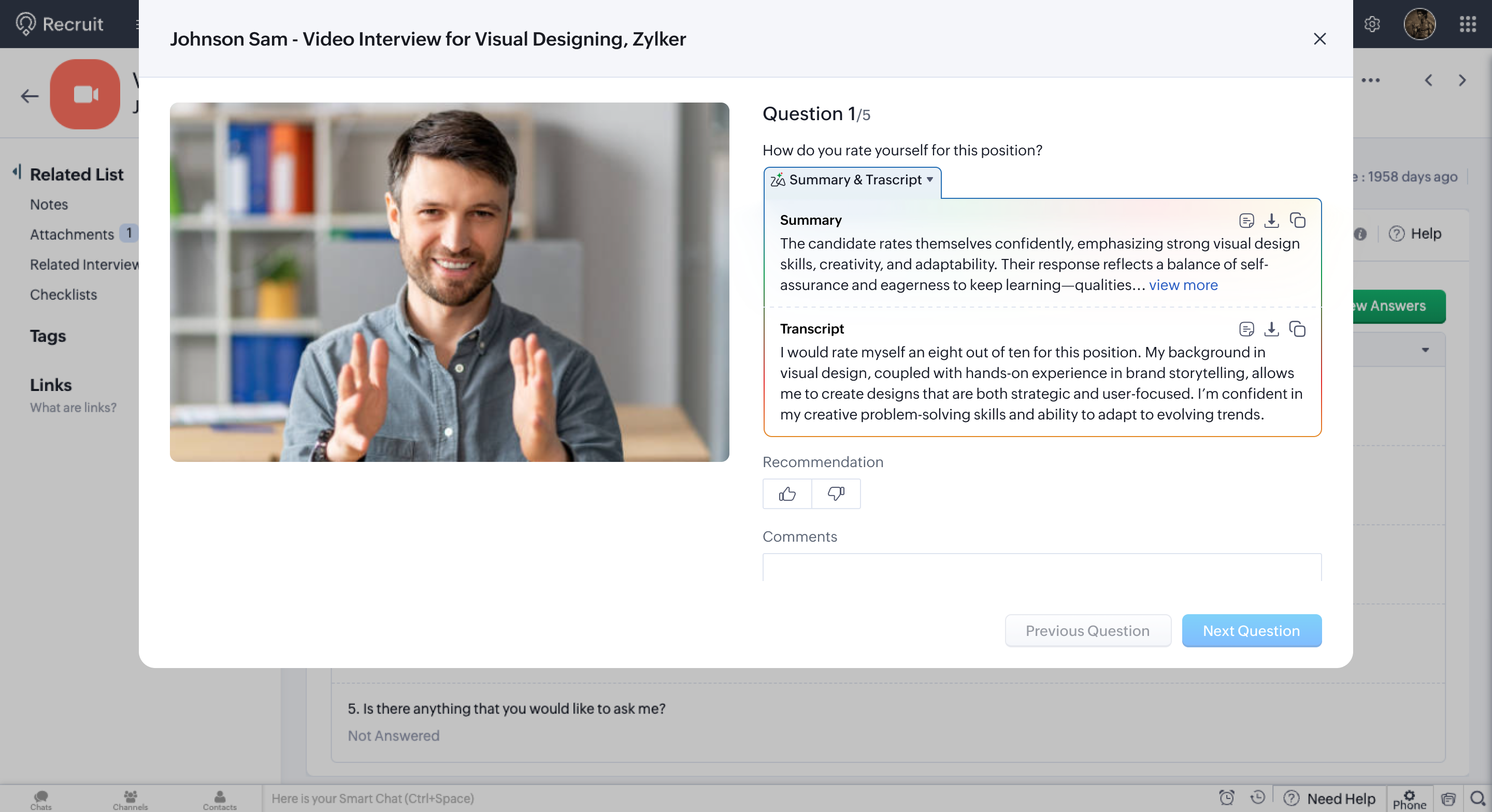

In the Interviews module → open the interview → go to the Evaluation tab.
Here, you'll find:

  • Full Transcript

  • AI-generated Summary for each response

  • Review Answers view with the transcript pinned at the top for quick reference

This makes it easy to revisit strengths, weak areas, or follow-up points without replaying the recording.

Quote

Availability  

  1. Plans: Enterprise, People Plus, Zoho One
  2. Editions: Staffing Agency & Corporate HR
  3. Module: Interviews
  4. Supported Interview Type: One-way (Recorded)
  5. Languages Supported: English, Spanish, German, Dutch, Portuguese, French, Russian, Italian
  6. Data Center: US, IN and EU

Why It’s Called “AI Interview Insights”  

While the current release focuses on transcriptions and AI-generated summaries, this feature will soon evolve to include deeper layers of analysis—such as sentiment and other interpretive cues.
To ensure a consistent experience and avoid renaming later, we’re introducing it under a broader, future-ready name: AI Interview Insights.

Try It Out  

Head to Setup > Zia > AI Interview Insights, enable it, and upload a One-way interview to see instant transcripts and summaries in action.

For detailed steps and setup options, check out our help article:
👉  AI Interview Insights - Help Documentation

Tell Us What You Think

We’d love to hear how AI Interview Insights is helping you review interviews faster and streamline your evaluation process.
Share your feedback in the comments below, or write to us anytime at support@zohorecruit.com.

Regards,
Team Zoho Recruit
    • Sticky Posts

    • An update to improve email delivery | Email Authentication & Relay

      Update Rollout Latest Update: Enterprise users (8th July, 2025) This update is now live for Enterprise plan users in all regions. This includes People Plus, but not Zoho One, which will be covered in an upcoming update. Professional users (31st May 2025)
    • Zoho Recruit User Group Meet-up | INDIA 2025 (Venue Finalised)

      Hello Zoho Recruit users from India, We’re pleased and excited to announce our 2025 edition of Zoho user group meet-up in India in five cities! In this meet-up, our team of experts will help you understand the intricate nuances to use Zoho Recruit better,
    • Zoho Recruit is coming to the UK | Zoho Community Learning Series

      Customers from the United Kingdom, Exciting news: We will be in London for the Zoho Recruit user meet up. Our team will help you better understand the intricate nuances of Zoho Recruit to help you hire faster, inform about new and upcoming features, and
    • Ask the experts - A live Q & A discussion on Zoho Recruit

      We are delighted to come back with another edition of Ask the Experts community series. This edition, we'll be focusing on everything about Zoho Recruit. The topics will focus on the features that are used/asked by the majority of users and also based
    • Restriction on 'From' addresses with a public domain

      Dear Zoho Recruit Community, We hope this message finds you well. This post is to inform you about some important updates regarding email restrictions within Zoho Recruit. Effective post 31st March 2025, we will be implementing changes to the use of email
    • Recent Topics

    • Add RTL and Hebrew Support for Candidate Portal (and Other Zoho Recruit Portals)

      Dear Zoho Recruit Team, I hope you're doing well. We would like to request the ability to set the Candidate Portal to be Right-to-Left (RTL) and in Hebrew, similar to the existing functionality for the Career Site. Currently, when we set the Career Site
    • Uplifted homepage experience

      Hello everyone, Creating your homepage is now much easier, more visual, and more impactful. Until now, your homepage allowed you to display custom views, widgets, analytic components, and Kiosk. With the following improvements, the homepage is now a smarter,
    • Add an background image to an email template in CRM

      Hi all, We wants to put an background image behind all our email templates. Is there a way to import this thru html. If i put the option background image in <body style="background-image:...</body> and i look to the preview it shows our background, but
    • Tracking Emails sent through Outlook

      All of our sales team have their Outlook 365 accounts setup with IMAP integration. We're trying to track their email activity that occurs outside the CRM. I can see the email exchanges between the sales people and the clients in the contact module. But
    • Whats that

      Price?
    • Crossbeam

      Does anyone use Crossbeam with their Zoho CRM? I'm looking for a way to import Crossbeam partner leads into Zoho CRM. If so: - What's your experience been like? - Are you able to automatically import Crossbeam leads > Zoho CRM? How? - What doesn't work
    • The same Contact associated to multiple Companies - Deals

      Hi, I would like to know if there is an option to associate the same contact with multiple companies (two or more) deals, using the same contact details for all. This is because we have contacts who are linked to different companies or branches of the
    • I need to know the IP address of ZOHO CRM.

      The link below is the IP address for Analytics, do you have CRM's? IP address for Analytics I would like to know the IP address of ZOHO CRM to allow communication as the API server I am developing is also run from CRM.
    • How to Print the Data Model Zoho CRM

      I have created the data model in Zoho CRM and I want the ability to Print this. How do we do this please? I want the diagram exported to a PDF. There doesnt appear to be an option to do this. Thanks Andrew
    • What is the easiest way to move Hotmail emails to an IMAP server?

      The easiest way to move Hotmail (Outlook.com) emails to an IMAP server is to add your Hotmail account directly to any email client that supports IMAP, then copy the messages across. This avoids paid tools and keeps the process simple. Fastest free method:
    • Convert invoice from zoho to xml with all details

      How to convert an Invoice to XML format with all details
    • Export all of our manuals from Zoho Learn in one go

      Hi, I know there's a way to export manuals in Zoho Learn, but I want to export everything in one go so it won't take so long. I can't see a way to do this, can I get some assistance or is this a feature in the pipeline? Thanks, Hannah
    • Portals-Adjust Column Sizes

      I am trying to adjust the column widths in Portals tabs. Columns that don't need to be wide are wide and longer ones are very short. I thought adding more to the digits box in Edit would widen them, but it doesn't. Anyone know how to adjust these?
    • Add link/button to open approved record from approval list and detail views?

      Hi, How do I allow users to click on an approval record and open that submission? For example, userA submits a quotation then userB approves/rejects. They both can see the quotation on "completed task" list & detail views, but there's no way for them
    • record submitted from creator and invoice is creating in books , but the workflow of books is not tiggering on create of record in books

      record submitted from creator and invoice is creating in books , but the workflow of books is not tiggering on create of record in books headermap = Map(); headermap.put("X-ZOHO-Execute-CustomFunction","true"); response_inv = invokeurl [ url :"https://www.zohoapis.com/books/v3/invoices/fromsalesorder?salesorder_id="
    • Prevent editing of a record after getting approved/rejectedr

      Hi, I'd like to block any user from editing a record after it was approved or rejected, how can I do that?
    • Formula Field/Campo de Fórmula

      Hello everyone, I have a purchase requisition form in which each department submits a request, and the request is automatically routed to the person responsible for that department. In this form, I have several fields with the following link names: Quantidade1,
    • Free Webinar: Zoho Sign for Zoho Projects: Automate tasks and approvals with e-signatures

      Hi there! Handling multiple projects at once? Zoho Projects is your solution for automated and streamlined project management, and with the Zoho Sign extension, you can sign, send, and manage digital paperwork directly from your project workspace. Join
    • Formatting Problem | Export to Zoho Sheet View

      When I export data to Zoho Sheet View, ID columns are automatically formatted as scientific notation. Reformatting them to text changes the actual ID values. For example, 6557000335603071 becomes 6557000335603070. I have attached screenshots showing this
    • Introducing Workqueue: your all-in-one view to manage daily work

      Hello all, We’re excited to introduce a major productivity boost to your CRM experience: Workqueue, a dynamic, all-in-one workspace that brings every important sales activity, approval, and follow-up right to your fingertips. What is Workqueue? Sales
    • Feature Request - The Ability to Link A Customer with a Vendor

      Hi Finance Suite Team, Many businesses buy and sell products from the same companies or individuals. For example, a car sales business may buy a car from a member of the public, and that member of the public may also buy a new car from us. This makes
    • Long table name (sync from Zoho Creator)

      Dears, How can I remove the suffix in parentheses? These tables are synced from Zoho Creator and are treated as system tables, so their names cannot be changed. This issue makes the aggregation formulas look awful.
    • CRM limit reached: only 2 subforms can be created

      we recently stumbled upon a limit of 2 subforms per module. while we found a workaround on this occasion, only 2 subforms can be quite limiting in an enterprise setting. @Ishwarya SG I've read about imminent increase of other components (e.
    • Zoho OAuth Connector Deprecation and Its Impact on Zoho Desk

      Hello everyone, Zoho believes in continuously refining its integrations to uphold the highest standards of security, reliability, and compliance. As part of this ongoing improvement, the Zoho OAuth default connector will be deprecated for all Zoho services
    • Contact data removes Account data when creating a quote

      Hi, Our customer has address fields in their quote layout which should be the address of the Account. They prefill the information, adding the account name - the address data is populated as per what is in the account - great. However when they then add
    • [Free Webinar] Learning Table Series - Streamlining incident management process with Zoho Creator

      Hello everyone, We’re excited to invite you to another edition of the Learning Table Series webinar. As you may already know, we've moved to a purpose-based approach in the Learning Table Series this year. Each session now focuses on how a Zoho Creator
    • Unattended - Silent

      How can I hide the tray icon / pop up window during unattended remote access for silent unattended remote access?
    • How to apply customized Zoho Crm Home Page to all users?

      I have tried to study manuals and play with Zoho CRM but haven't found a way how to apply customized Zoho CRM Home Page as a (default) home page for other CRM users.. How that can be done, if possible? - kipi Moderation Update: Currently, each user has
    • Importing into Multiselect Picklist

      Hi, We just completed a trade show and one of the bits of information we collect is tool style. The application supplied by the show set this up as individual questions. For example, if the customer used Thick Turret and Trumpf style but not Thin Turret,
    • Cliq iOS can't see shared screen

      Hello, I had this morning a video call with a colleague. She is using Cliq Desktop MacOS and wanted to share her screen with me. I'm on iPad. I noticed, while she shared her screen, I could only see her video, but not the shared screen... Does Cliq iOS is able to display shared screen, or is it somewhere else to be found ? Regards
    • Text snippet

      There is a nice feature in Zoho Desk called Text Snippet. It allows you to insert a bit of text anywhere in a reply that you are typing. That would be nice to have that option in Zoho CRM as well when we compose an email. Moderation Update: We agree that
    • Marketing Tip #18: Make your online store mobile-friendly to improve traffic

      Most online shoppers browse on their phones first. If your store is hard to read, slow to load, or tricky to navigate on mobile, they’ll bounce fast. A mobile-friendly store doesn’t just look nice; it improves engagement, reduces drop-offs, and helps
    • [Need help] Form closed. Please contact your form administrator for further assistance.

      https://forms.zohopublic.com/cceinfoifly1/form/CCE2025CCEFocusGroupRegistrationForm2025Fall/formperma/s_8XcLETTbFxZ_TAS4r_W6W5UBl8o5oxEnIX35IBKg4 I checked we didn't exceed the usage limit and form availability is enabled, Please help us enable this form
    • Zoho People. Updating TabularData

      I am trying to update tabular data in the record. I always have the same response. I have checked many times. Section ID is correct. May be something wrong with request structure itself. Can someone help me. Body content type: form urlencoded query params
    • Email was sent out without our permission

      Hi there, One customer just reached out to us about this email that we were not aware was being sent to our customers. Can you please check on your end?
    • Automatically CC an address using Zoho CRM Email Templates

      Hi all - have searched but can't see a definitive answer. We have built multiple email templates in CRM. Every time we send this we want it to CC a particular address (the same address for every email sent) so that it populates the reply back into our
    • Polish signer experience to compete with docusign

      I would like to suggest that someone spend the little bit of time to polish the signer experience, and the email templates to more of a modern professional feel. They are currently very early 2000s and with some simple changes could vastly improve the
    • Unable to Send Different Email Templates for Different Documents in Zoho Sign

      Hello Zoho Community, I am facing a limitation with Zoho Sign regarding email notifications sent to customers when a document is sent for signing. Currently, whenever I send any template/document for signing, the email notification that goes to the customer
    • Introducing real-time document commenting and collaboration in Zoho Sign

      Hi, there! We are delighted to introduce Document commenting, a feature that helps you communicate with your recipients more efficiently for a streamlined document signing process. Some key benefits include: Collaborate with your recipients easily without
    • What are the create bill API line item requiered fields

      While the following documentation says that the line items array is requiered it doesn't say what if any files are requiered in the array. Does anyone know? API documentation: https://www.zoho.com/inventory/api/v1/bills/#create-a-bill I'm trying to add
    • Next Page