Augmenting subform capabilities
Greetings, everyone!
Finally, the day has come for us to announce some of the most anticipated, requested, and exciting updates to
subforms in Zoho Creator.
As you're aware, subforms are an integral part of Creator forms, as they help in establishing proper modelling of the app, collecting rows of data, and setting up users to enter data that has a parent-child relationship. With this new set of updates, we've bought in a paradigm shift to subforms, as they'll be getting an all-new look for an improved user experience, along with new capabilities for solving challenges. This post will give you a sneak peek into these new subform enhancements.
Do you find it difficult to scroll subforms horizontally? Do you wish you could drag and drop subform rows? Do you want to manipulate subform fields via Deluge script? Then your wait has come to an end—continue reading to learn more on how you can now do all of this in subforms.
Subform list and pop-up view
As announced in the
March 2023 post, the List
view type of subforms will display the subform as a pop-up, and the current method of displaying subforms has been christened
Grid.
To further understand how this can be helpful, let's put ourselves in the shoes of a supply chain manager. Their job requires them to regularly keep track of inventory lists in their warehouses.
Let's assume there's a form collecting warehouse details, like name, location, and stock inventory. For collecting the stock inventory details, a subform is present with these fields—Item No, Name, Manufacturer, Description, Cost Per Item, Stock Quantity, Inventory Value, Units Sold, Reorder Quantity, Reorder Date,
and
Person In Charge.
Now, the default view type will tire you out from scrolling back and forth horizontally, and results in a frustrating time-consuming process. We all long for a new way to avoid this and make data entry swifter.
To achieve this, make use of the new List option under
Subform->Field Properties->View Type.
List view, which looks similar to our list report, is a table-like subform without inline inputs. When you try adding or updating data in each row, a pop-up will be displayed listing out the fields with vertical scrolling, thereby ensuring a vastly superior user experience and more effective space management.
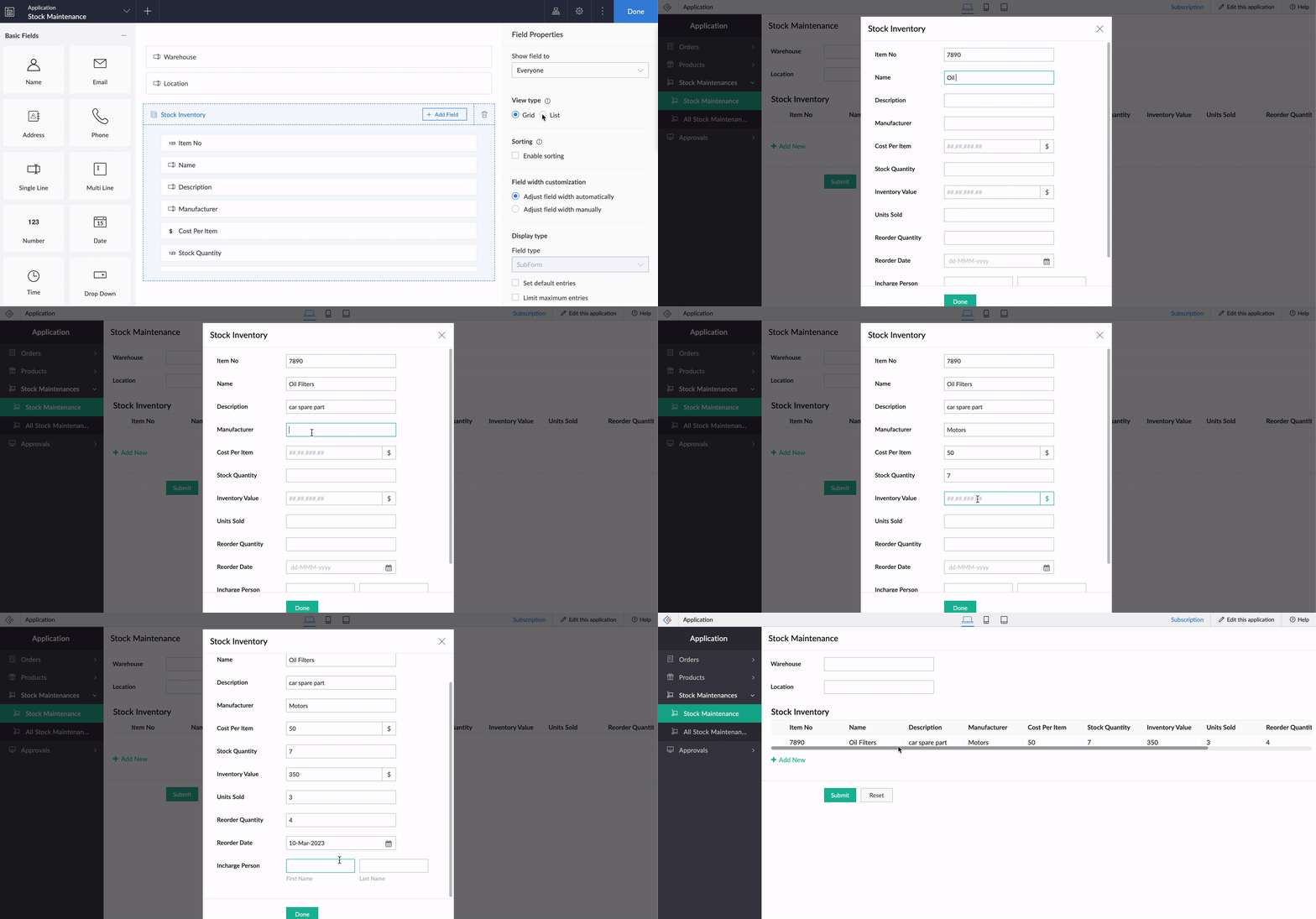
Crucially, it also helps to load subform rows quickly while editing records, by reducing the loading time.
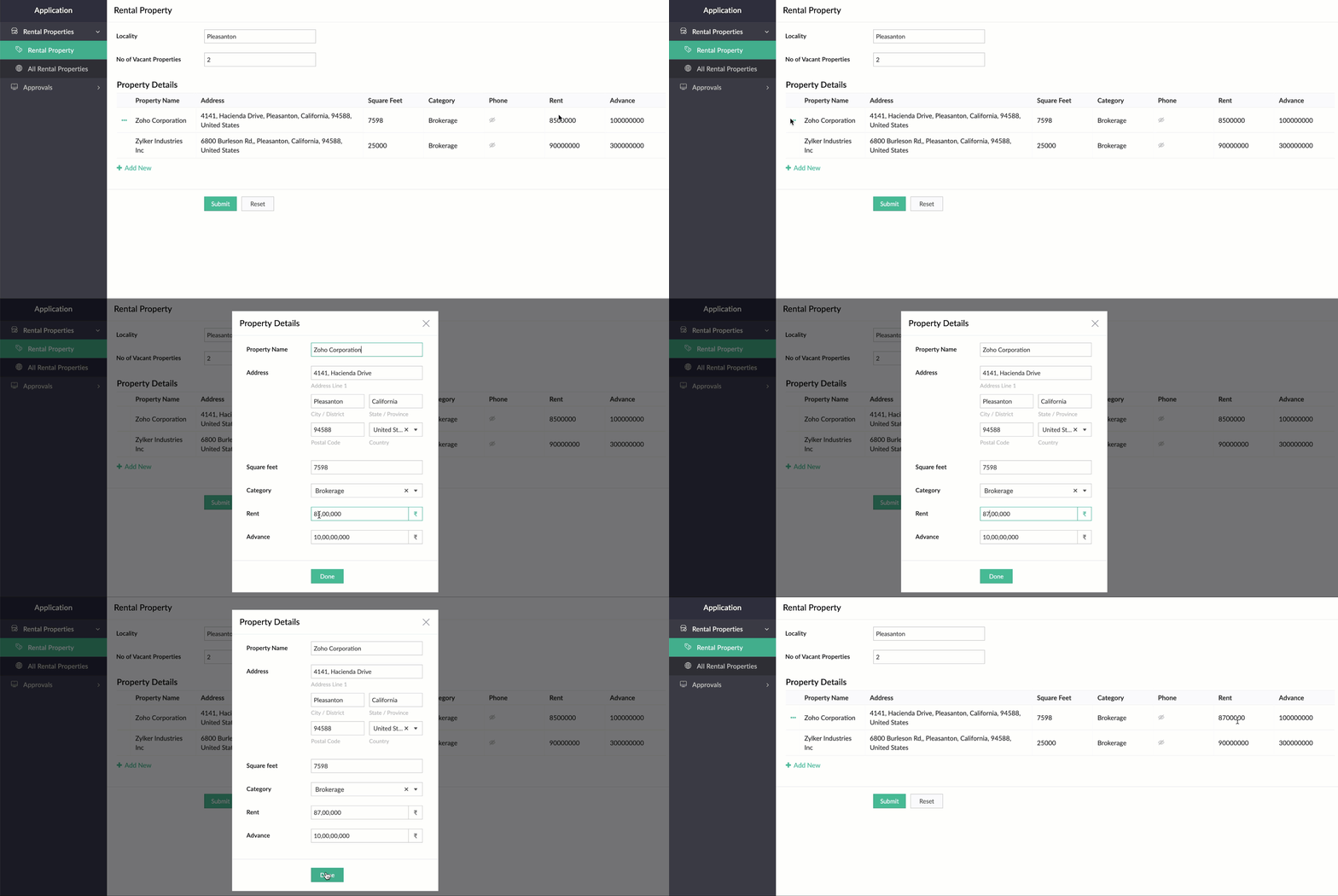
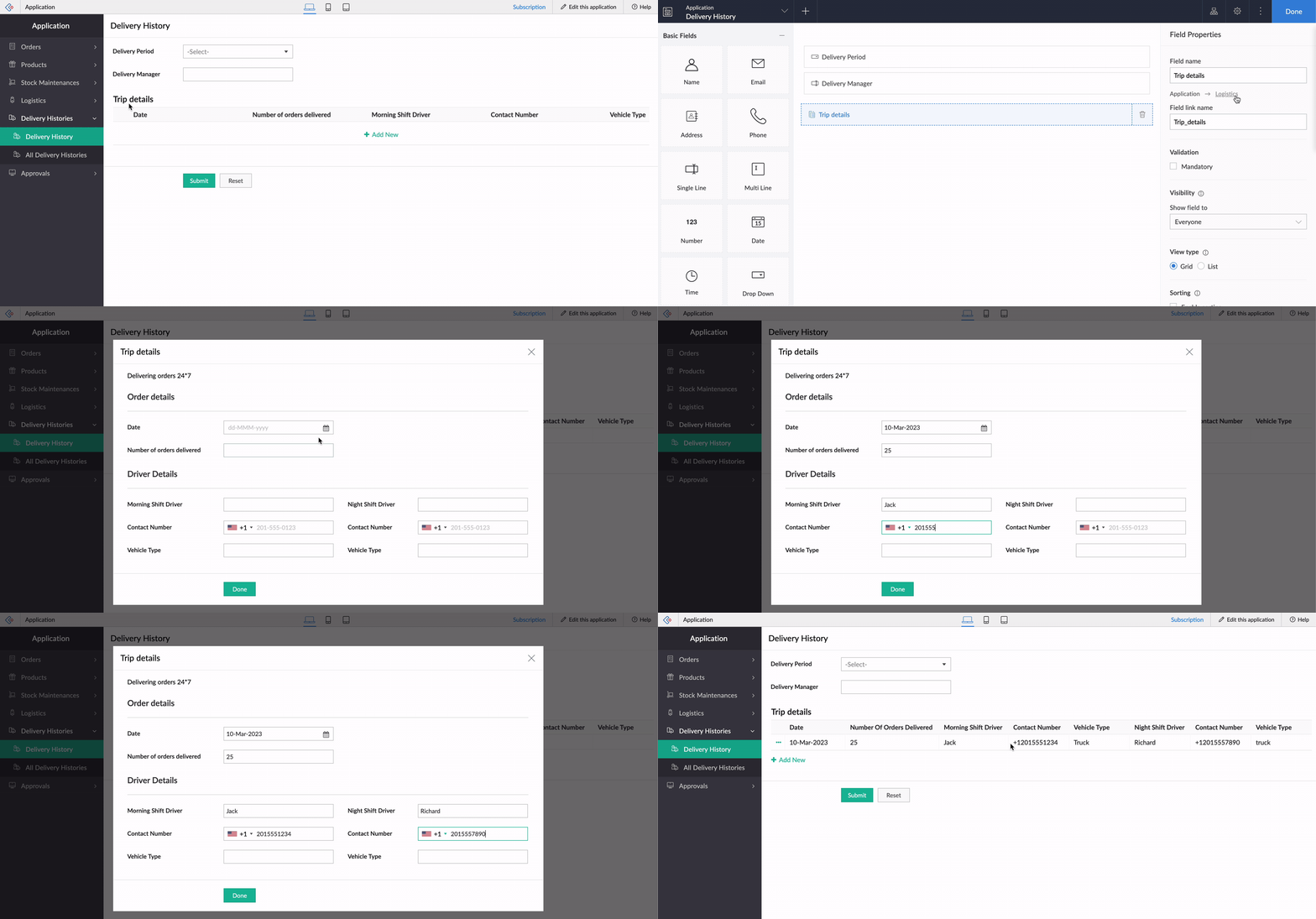
While using an existing form as a subform, the form's exact structure will be replicated in the pop-up, to ensure consistency in the look and feel of the form. To understand this better, let's assume our form has a two-column layout, with
Section
and Note
fields. Now the same customizations will be displayed in the pop-up, too!
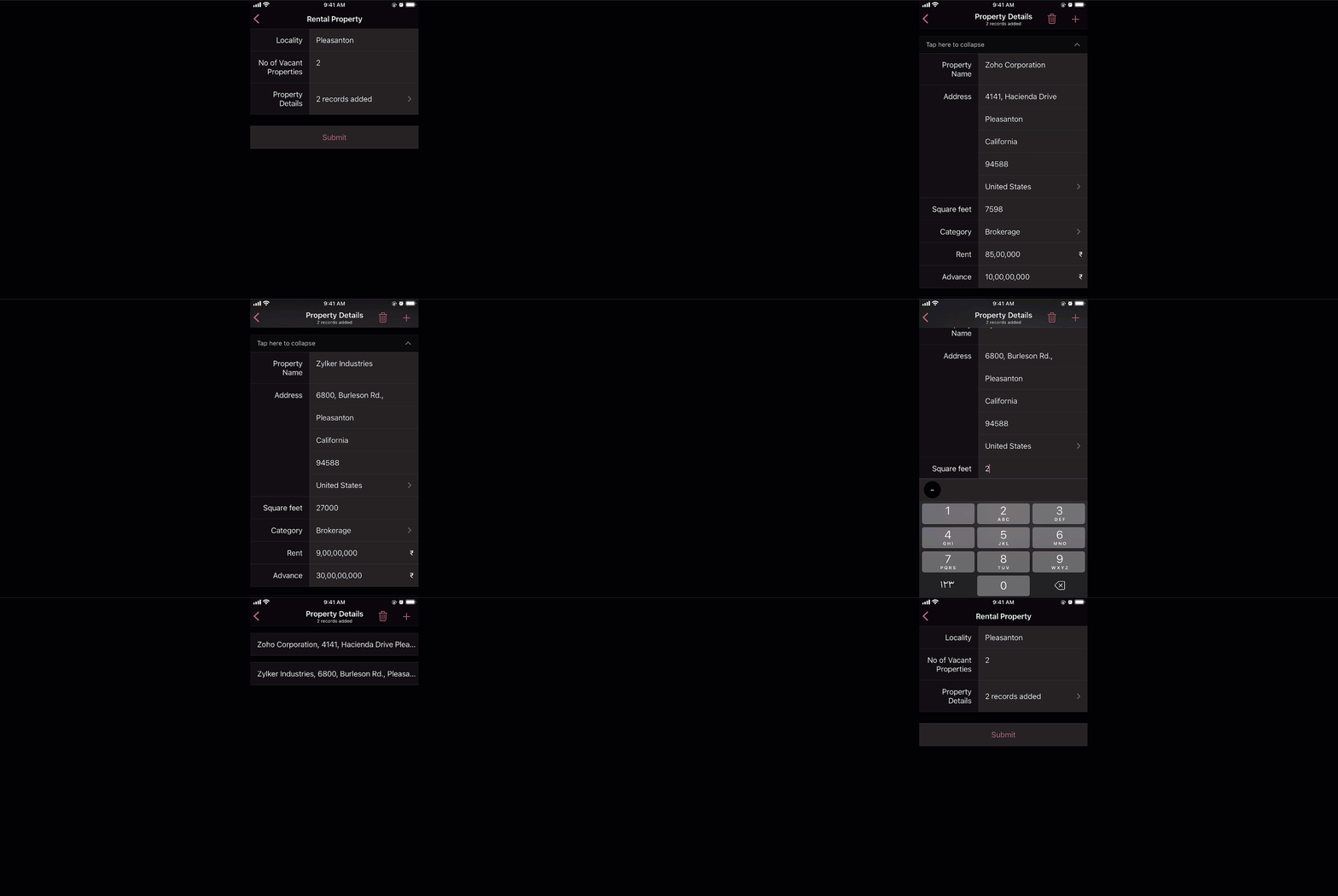
And that's not all—the new List view type is being extended to mobile apps, too. When it's enabled, the subform will be opened in the next screen, where users can add their data. This data will then be added as a subform row.
Custom sorting
Currently, the only sorting option in subforms is
field-based sorting, where you can choose a field based on which rows are sorted, either in ascending or descending order. Though this works well for basic cases, the need may arise in some cases to sort the subform in random order. With the new custom sorting support, you can effortlessly drag and drop subform rows to rearrange them.
To understand how it works, let's consider a task manager working on a To-Do List
form, to plan activities for a current project. For this, they have a main form collecting
project details, date-time,
and
milestones,
and a subform for maintaining the to-do list with the following fields:
Task Name, Description, Category, Status, Deliverables, Priority, and
Deadline. Here, before submitting the list, they want to rearrange some tasks based on their daily routine.
To achieve this, they use the Custom sorting option under
Subform->Field Properties->Sort type.
Now, with custom sorting, all they need to do to reorder the row sequence—both while adding and editing records—is simply drag and drop them in the required position.
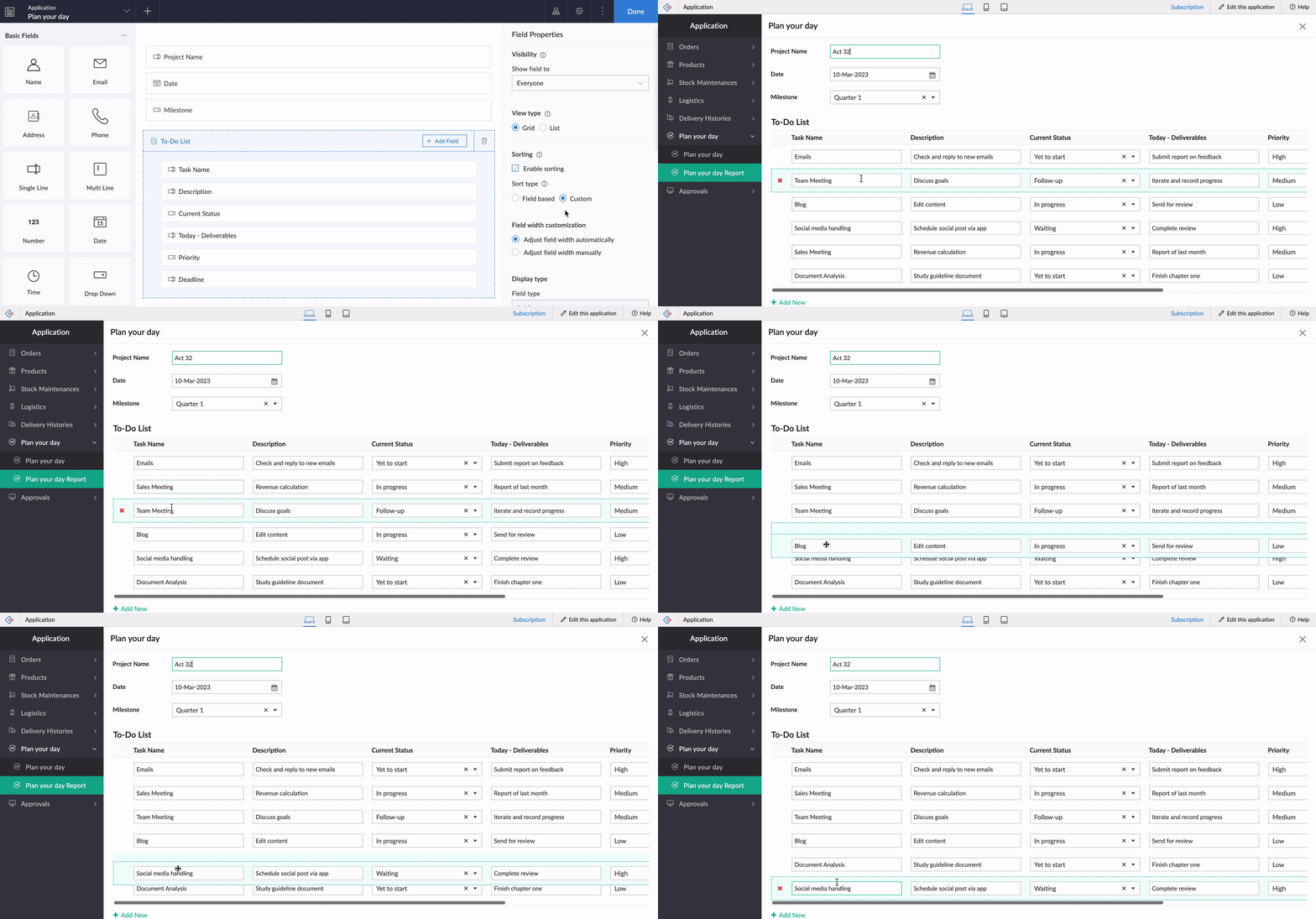
The same order will be retained in reports or while opening the form for updating the list.
Note:
Custom sorting can be used both in List and Grid-type subforms.
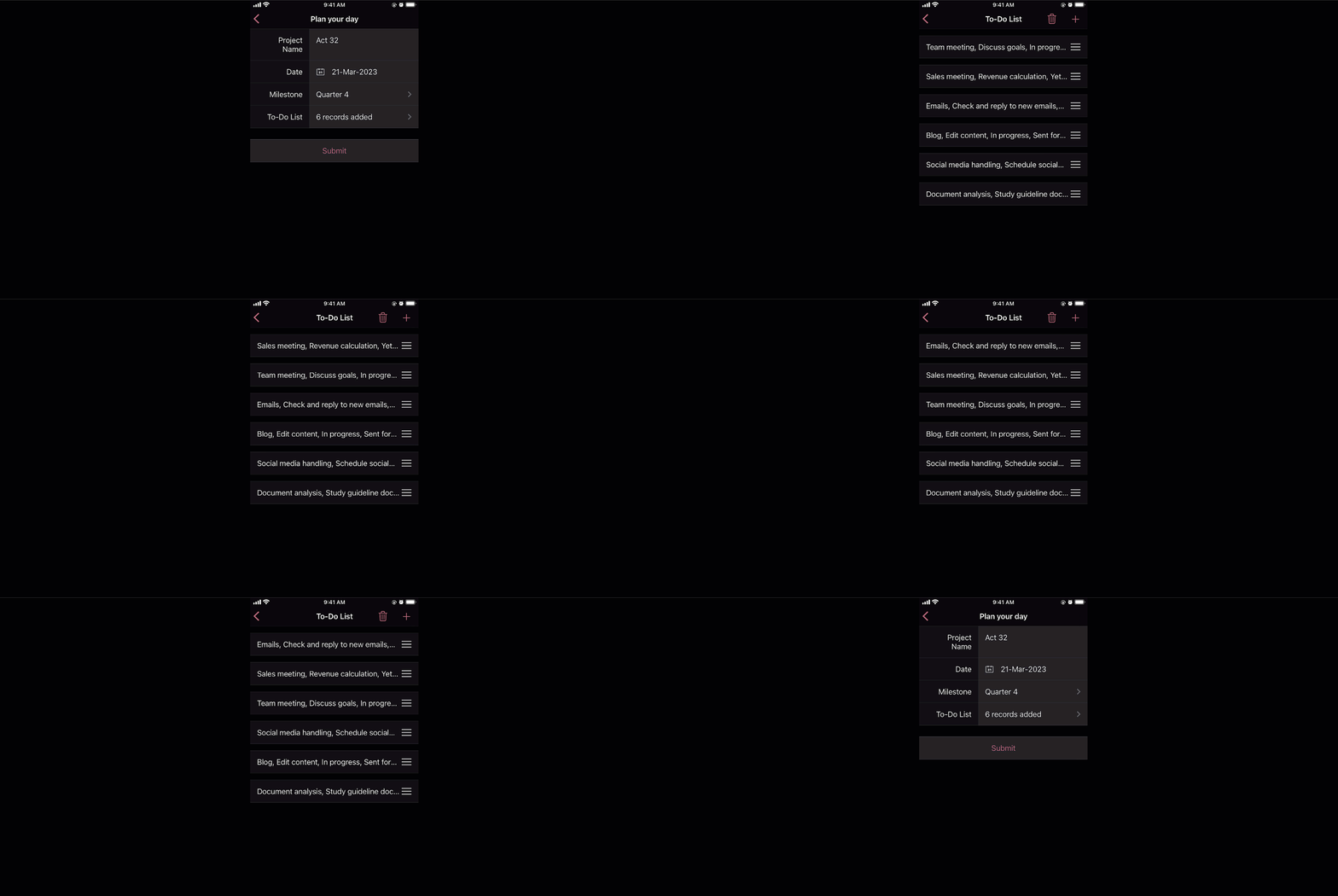
Custom sorting will also be available on the mobile apps and you can effortlessly rearrange fields in subforms.
Deluge tasks for row-level actions
You can use a combination of workflows and Deluge scripts to help your subforms handle complex business logic. With that in mind, we formulated the idea of bringing in actions that help you take control at the row level of subforms.
In the past, you may have come across business scenarios which required you to hide/show or enable/disable a particular field in a specific subform row. Now, with new dedicated Deluge tasks, you can bid adieu to shortcuts and workarounds.
Note:
Deluge tasks can be used both in List and Grid-type subforms.
Enable/disable
The new enable and disable subform Deluge tasks can be used to enable and disable specific fields.
Syntax:
enable row.subform_field
disable row.subform_field
disable row.subform_field
Events:
On add row, On delete row, On user input of subform field
Let's assume a Vehicle form has fields like
Customer Name, Vehicle Model, and Date of Booking,
and a subform to collect payment details with the following fields:
Payment Date, Payment Method, Credit Card Number, Bank Account Number,
and
Transaction Ref Number.
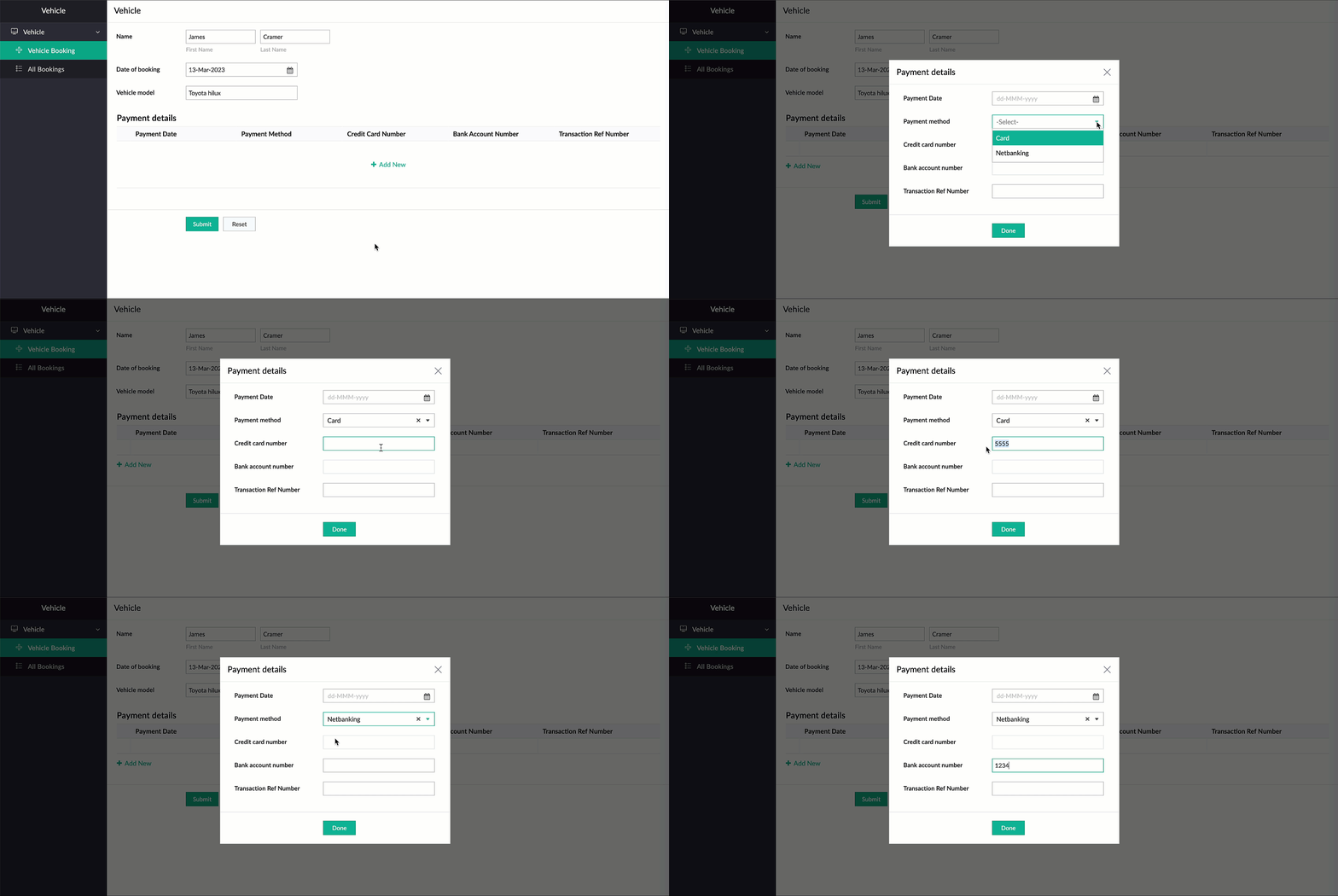
Now, there are two payment options—Card and Netbanking. If Card is chosen, then the Credit Card Number field should be enabled and the Bank Account Number field should be disabled. Similarly, when Netbanking is chosen, then the Bank Account Number field should be enabled and the Credit Card Number field disabled.
Code snippet:
if(Payment_details.Payment_method == "Card")
{
enable row.Credit_card_number;
disable row.Bank_account_number;
}
if(Payment_details.Payment_method == "Netbanking")
{
enable row.Bank_account_number;
disable row.Credit_card_number;
}
{
enable row.Credit_card_number;
disable row.Bank_account_number;
}
if(Payment_details.Payment_method == "Netbanking")
{
enable row.Bank_account_number;
disable row.Credit_card_number;
}
Hide/show
The new show
and
hide subform
Deluge tasks can be used to show and hide specific fields.
Syntax: hide row.subform_field
show row.subform_field
show row.subform_field
Events: On add row, On delete row, On user input of subform field
Let's use the example of a rental property manager who needs to keep track of a list of properties that are available in every locality. For this, a form is used for collecting information like Locality and No of Vacant Properties, and a subform will be used to list property details with the following fields: Property Name, Address, Square Feet, Rent, Advance, Category, and Contact Number.
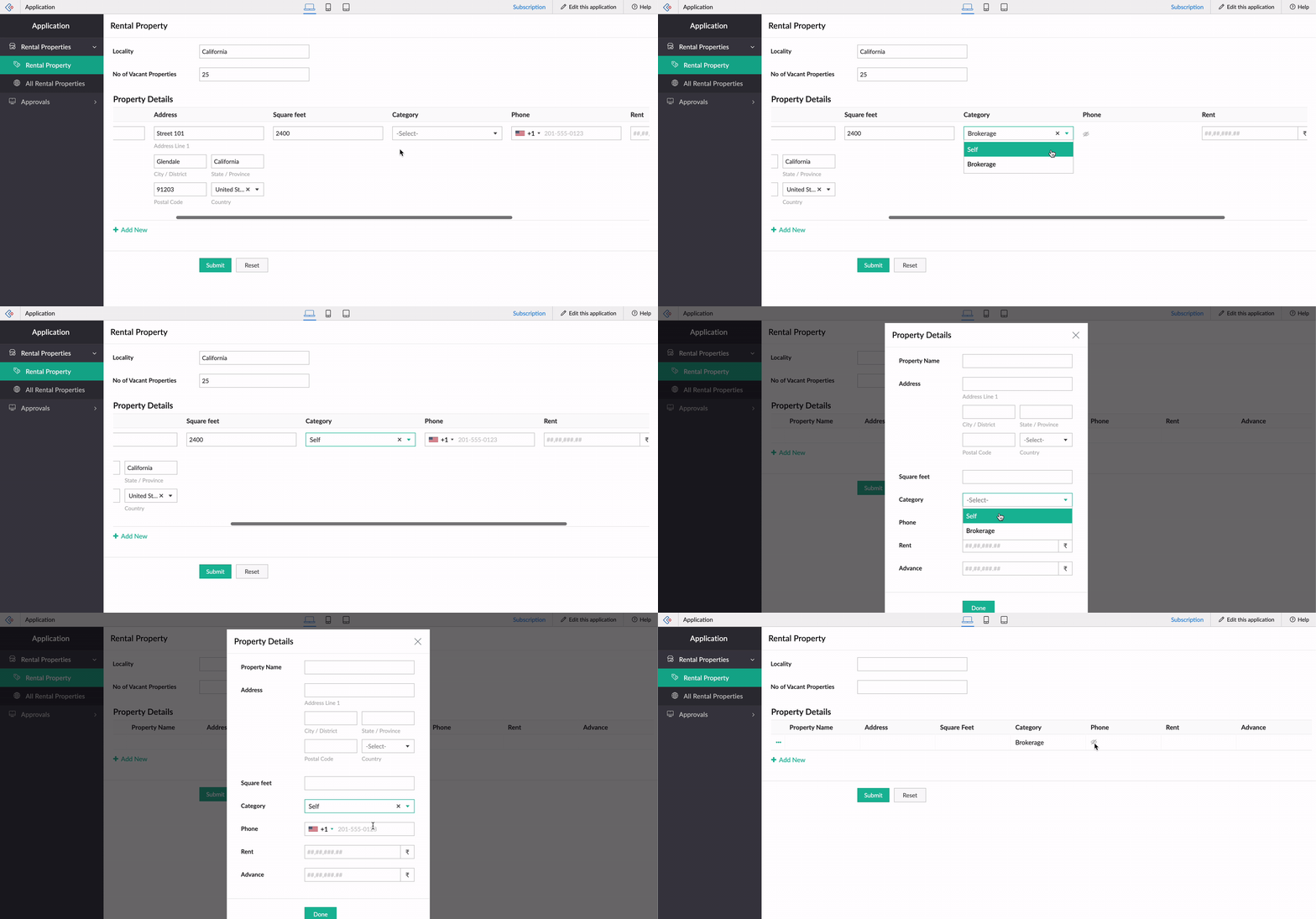
When the category is Brokerage, we need to hide the contact number of the landlord. We can use the new Deluge tasks to achieve this.
Code snippet
:
if(row.Category == "Brokerage")
{
hide row.Phone_Number;
}
else
{
show row.Phone_Number;
}
-----
That's it from us on our subform enhancements! We expect these updates to be rolled out in the upcoming weeks. Once done, we'll pop in a comment below and also update our Release Notes page.
Don't forget—your feedback helps us make Creator better and stronger. We'd love to hear what you think about these updates. Please use the space below or send your feedback to
support@zohocreator.com.
Regards,
Zoho Creator Team
Topic Participants
Ashwin Vishal R
Jean Le Gal
stevesmith41
Darren Burn
Anurag Jaiswal
Sticky Posts
Introducing Zoho Creator's 2025 Release Projection 2
Hello Creators! I'm Prakash, from the Creator product management team, and today I'm delighted to unveil our next set of features as part of Release Projection 2 for 2025. With thoughtful analysis and planning, we've curated powerful new capabilitiesZoho Creator - 2023 Release Projection 1
Hello everyone! A very Happy New Year to you and your family. Hope you're all good and having a great time using Zoho Creator to make your lives easier and your businesses prosper. 2022 was an action-packed year for us at Creator, and we hope to continueZoho Creator User Group meetups in a city near you! - Oct - Nov, 2023
Greetings from the Zoho Creator team! We're hosting a series of Zoho Creator meetups in various cities across the globe, and we'd love to meet you there! Our meetups are a great opportunity to network with industry peers, exchange ideas and best practices,Zoho Creator - 2023 Release Projection 2
Hello everyone! Time truly flies when you're having an incredible journey, and today we mark the completion of an eventful and action-packed six months. It feels like just yesterday when we embarked on this adventure together with the launch of our newUpcoming Updates - August 2022
Hi all, Greetings from the Zoho Creator team! Today we've got news for you on some exciting updates. And rest assured— there’s more to come! In this post, we'll be going over the upcoming features and improvements for this month as mentioned below. A
Recent Topics
Quickly send emails and sync conversations with custom email addresses in CRM
Editions: All editions DCs: All DCs Release plan: This enhancement has been released for customers in all DCs except IN and US. We will be enabling it for IN and US DC customers soon. [Update on 22 May 2024] This enhancement has been released for allZoho製品と生成AIツールの活用について
いつもありがとうございます。 弊社では、Zoho Oneを契約し、CRMを軸として、見込み客の管理から商談、その後の受注や請求の管理、サポート業務(Desk)、業務データのレポーティング(Analytics)などを行っております。 Zohoサービス自体には、Ziaというツールが搭載されているかと存じますが、それ以外の外部の生成AIツールと連携した活用などもできるのでしょうか?具体的には、CopilotなどがZohoに登録されているデータや情報を見て、対話型で必要なデータを提示してくれたり、商談や蓄積されたメモなどを分析してユーザが知見を得られるような活用ができないか、と考えております。Work with Contacts who use multiple Emails / Manage obsolete Email addresses without loosing Emails in Context
Hello List Work with Contacts who use multiple Emails Only after 1 week in using Zoho CRM productively we have contacts which randomly use 2 different email addresses. From the concept I've understood that Zoho CRM offers two email fields which are recognizedNew Field in CRM Product Module Not Visible in Zoho Creator for Mapping
I created a new single-line field in the Products module in Zoho CRM. Zoho CRM and Zoho Creator are integrated, but the newly created field in CRM is not visible in Zoho Creator when I try to map fields.I want to subscribe 1 professional user but the email only 250 per day?
When I subscribe 1 professional user, I am only able to send 250 email per day? So less? Or is it typo, 2500 rather than 250? Any sale agent or friends can clear my doubt? Thank YouHow to add a % Growth column for year-over-year comparison (2024 vs 2025)
Hello, I am trying to build a monthly revenue comparison between 2024 and 2025 in Zoho CRM Analytics. My current setup is: Module: Deals (Affaires) Filter: Stage = Closed Won Date field: Closing Date Grouping: By Month Metrics: Sum of Amount for 2024,How do you map a user picklist field to another user picklist field.
In Zoho Projects, I'm trying to map a custom field (user picklist) in Task Details to a field (user picklist) in the Project Details. How do you get the two to map to each other? This is what I currently have that works for my other fields but doesn'tExplore Competitive 3D Scanner Prices at Protomont Technologies
The genesis of Protomont Technologies emerged from the collaborative efforts of the founders in 2019, both the founders shoulder an enormous experience in the world of 3D Printing. Protomont Technology aims to craft your vision with creativity, empoweringNew and improved API resources for Zoho Sign Developers
Hello, Developers community! We know that for you, an API's real value depends on how quickly, easily, and reliably you can integrate the it with your application. That's why we're excited to talk about the recent improvements to our developer resources,Project Approval Process Workflow
Issue: When a new Project is created, there is lack of process/workflow that provides their manager a process to approve or review. Suggestion/Idea: Similar to “Workflow”, we need “Workflow” ability at Project level, where based on the criteria of theWhy can I not choose Unearned Revenue as an account on items?
Hello, I do not understand why we don't have the ability to code an item to unearned revenue. It is not an uncommon situation to have in business. I understand that there is the Retainer invoice as an option, however that doesn't really work for us. OurRules not working properly
I created a rule to display certain fields on certain states. But it seems to be not working. It hides the fields even when I selected California, (which is a state that should show the fields when selected)Notebook font size issue
If I copy something from somewhere and paste it in my notebook, the font size becomes smaller.Sign in process is beyond stupid. I'd rather plug my phone into USB and copy files than sign in to this POS.
792 clicks and fields to fill in just to get into a 3rd rate app is too stupid for me.cant use mail API
I have generate Auth token from https://accounts.zoho.com/apiauthtoken/nb/create?SCOPE=ZohoMail/ZohoMailApi&EMAIL_ID=Zoho Mail Username or Email ID&PASSWORD=Your Zoho Mail Password and get the token but when i use that token on http://mail.zoho.com/api/organization/Ampersand in URL parameter // EncodeURL does not work
Hi Zoho, I have a url link with a parameter. The parameter is including ampersand in some cases (Can be "H&M" or "P&I") When trying to use %26 instead of "&" (the result I get using EncodeURL()) I get H%26M instead of H&M in the parameter field. How can I solve this? Thanks! Ravidhow can we create in zoho crm a new contact when the looup does not find a similar existing one
In forms/integrations/zoho crm / ne w record tab, contact name is to be mapped with my form contact name. When I go in biew edit/lookup configuration, I don t get the options (help dedicated page simply repeat the same info you get in the app) and doesDirectory Websites
Directories are a good website category to gain search engine traffic. Directories for a professional service category as an example can help their members in search results over their individual website. It would be nice to have a directory templateManage Task on Mobile
How do we manage our task on mobile devices? It seems that there should be a standalone mobile app to handle the new task features. The new features released in regards to Task management are great by the way! Now we need to bring that all together inSet Default Payment Method & Default account
Hi, I would like to know how to set the default payment method and default bank account when recording payments in zoho books. At present we have to change these fields everytime we record a payment, which leads to potential error and as we have a veryCustomer Portal on Zoho Desk
Hi, I'd like to know more about the items below I found when setting up the Customer Portal on Zoho Desk. Could someone help me explaining these in details? Especially the 2nd and 3rd point. Thanking you in advance! Permissions Customers can sign up for Customer Portal Customers can view tickets of their organization (contacts) Customers must register to access Customer Portal Display Community in Customer Self Service portalComputer Showing Offline in Unattended Access
I have a computer that was connected to the internet but showing offline in Assist. I tried uninstalling the program and deleting it from Zoho Assist the reinstalling and it still does not show up. I have been a user for several months and am not pleased with the lack of connectivity with Assist. If this continues I will have to find another product. The computer I reinstalled it on is not even showing up in Assist now. The name is NYRVLI-PC. ThanksZoho CRM Portal Error
Hi, We’re experiencing an issue with the Zoho CRM Portal. When we try to access it, we receive an HTTPS connection error: net::ERR_CERT_COMMON_NAME_INVALID. If we proceed past that, we then get a 400 Bad Request error. Could you please help us resolveIntegrating Zoho CRM EmbeddedApp SDK with Next.js — Initialization and Data Fetching Issues
You can get an idea from my code I have given in end: First, I worked on a React project and tried the same thing — it worked. My goal was to import the Zoho script and then load contacts using the Zoho Widget SDK, which was successful in React. Now,monetizing the courses
Can I add a price for course enrollment ?Can we add zoho books features like invoices estemates etc on our zohocommerce website. When our customer login with their account they can able to see all books features in one place on zohocommerce?
Can we add zoho books features like invoices estemates etc on our zohocommerce website. When our customer login with their account they can able to see all books features in one place on zohocommerce?Taxes for EU B2B Transactions
Currently, ZC doesn't seem to have a procedure for validating VAT numbers of businesses purchasing in another EU state, and removing local VAT is valid. This is essential for all inter EU B2B trade.Unable to Receive Emails on Zoho Mail After Office 365 Coexistence Setup – Error: 553 Relaying Disallowed
Hello, My domain name is bigniter.com, and I’ve been using Zoho Mail as my email service provider without any issues. Recently, I followed the steps outlined in the Zoho documentation to enable Coexistence with Office 365: 🔗 https://www.zoho.com/mail/help/adminconsole/coexistence-with-office365.html#multi-serverCandidate Registration/Invitation
It would be great to include the 'invite' candidate functionality into some of the automation functions - ether through a custom function trigger or webhook or accessible through an email template. Currently there is no way to add this functionality into any workflows or blueprint steps which, I find limits the ability to invite candidates to engage with us directly through our candidate portal.[Free Webinar] Learning Table Series - Creator for Infrastructure Management | A Partner-driven collaborative session
Hello Everyone! We’re excited to invite you to another edition of Learning Table Series, where we showcase how Zoho Creator empowers industries with innovative and automated solutions. About the Learning Table Series The Learning Table Series is a free,I have error AS101 when I try to add paypal@mydomain.com to Zoho
Please help me with this. I tried to call the help line 4 times but don't get any response.VAT on Multiple Expenses
Firstly, might I say I am based in Ireland, and I'm not an accountant, and therefore my understanding of procedures could be somewhat limited. Scenario. An employee pays for items throughout a month, and therefore their claim for expenses includes multiple items - some of the items are VAT deductible (eg, an IT product) and some are not (eg, a client lunch). Discovery The odd thing in ZBooks, is that whilst it seems possible to add a VAT rate to a one-off item of expense, it is not possible to addAgent assignment filter?
Godo day, We are starting to play with FSM to see if it's going to work for our needs. Now so far we have found that it's very restrcitve in the field department you you have layout rules or can't even hide fields depending on the users roles. We can'tKiosk Page Refresh
We have a Kiosk running from a button in contacts to update values and also add related lists, which works great, but when the kiosk is finished the page does not refresh to show the changes. Is there a way to force the contact to refresh/update whenTips & tricks: Make SalesIQ automations work for you
Every day, thousands of visitors land on your website. Some browse, some buy, and some leave without a word. But, wouldn’t it be great if you could automatically know who’s interested, engage them at the right moment, and never miss a lead, and all thisDigest Octobre - Un résumé de ce qui s'est passé le mois dernier sur Community
Chers utilisateurs, Faisons le point sur les temps forts du mois d'octobre au sein de notre Community Zoho France. Partager des informations sensibles, comme des mots de passe, peut vite devenir compliqué et risqué. Les données circulent par email ouHow do I fully delete a user account
Hi, I have two old accounts on my CRM which are inactive and show as 'Closed' in the list of users. BUT they are basically still there. How do I fully delete these accounts? They appear in some parts of CRM still such as the on the contact record emailsAutomatically Add Recurring Zoho Meeting Events to Zoho Calendar / Zoho Meeting Calendar
Hello Zoho Meeting Team, Hope you are doing well. We would like to request an enhancement regarding recurring meetings created inside Zoho Meeting. At the moment, when we schedule a recurring meeting in Zoho Meeting, it does not appear in Zoho CalendarCredit Management: #6 Tackling Common Mistakes in Credit Based Billing
Businesses extend credit to build relationships, make buying easy, and drive more sales. But somewhere between extending and collecting, things begin to slip. A few late payments here and there, an overlooked invoice, and a backlog make cash flow feelUpdating Blueprint stage from my Deluge function
Hi all, I need to update the blueprint stage. Its almost working, but ONLY if the current Deal stage is 'Closed Lost'. On any of my custom stages that Ive specified in the pipeline it doesnt work! My code: dealmap = Map(); deal_stage = deal.get("Stage");Next Page