Automation Series: Auto-update Phase Status

Automation Series: Auto-update Phase Status

Hello Folks!

You can auto-update your phase's status based on status of underlying tasks using custom functions.

In this series, we will showcase how to create and run custom functions, using Deluge, with ease. Follow the steps below and automate your project management process.

Use-case

Consider a scenario where a sales representative manages all his customers conversations as tasks in Zoho Projects. To stay organised, he divides the year into four quarters and sets up one milestone for each.
He wants the milestone status to be updated automatically once all the tasks in a milestone are updated.

So, if every task in Q1 is marked In Progress, the milestone status should automatically be updated to In Progress. When all tasks are Completed, the milestone should also be completed.

Configuration Flow

To automate this process, the sales representative should
  1. Create custom status for tasks and milestones.
  2. Establish a connection.
  3. Create a custom function using Deluge.
  4. Define a Workflow Rule to set a trigger.

Create Custom Status:

Create a custom status by double-clicking the Status column name in the milestone and task list view.

Establish a connection:

A Connection is a secure and reusable authentication layer that lets your custom functions and integrations communicate with external services or other Zoho apps.
Users can select the relevant scopes to create a connection. Scopes for this particular use case are,

Zohoprojects.portals.all,
Zohoprojects.projects.all,
Zohoprojects.tasks.all,
Zohoprojects.milestones.all

Click here to learn how to establish a connection.

Create a custom function:

You don't need development expertise to execute this custom function. Zoho Projects manages the underlying execution. Simply add the function code, map the required inputs, and the system will run it automatically whenever the workflow is triggered.

Sample connection name - milestonestatus
Sample status name - In Review

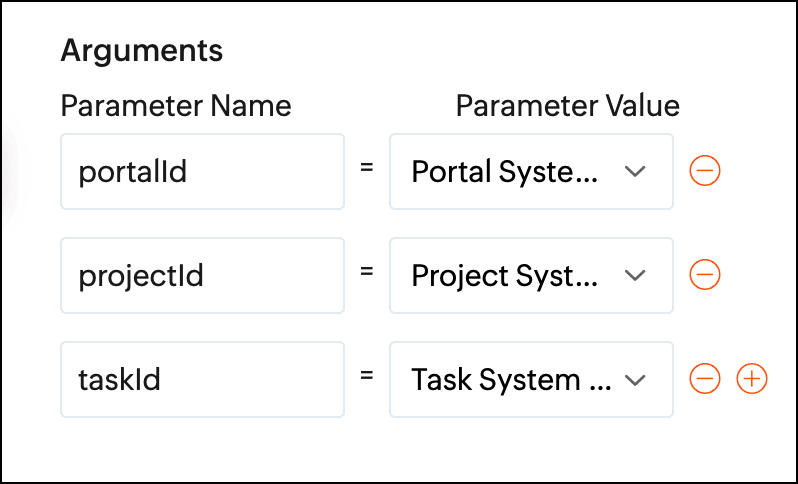
Arguments required:

Arguments are variables or parameters that pass an input value to execute a custom function.

  1. //scopes: Zohoprojects.portals.all, Zohoprojects.projects.all, Zohoprojects.tasks.all, Zohoprojects.milestones.all
  2. endPointV3 = "https://projects.zoho.in/api/v3/portal/";
  3. endPoint = "https://projects.zoho.in/restapi/portal/";
  4. milestoneStatusIds = List();
  5. milestoneStatusNames = List();
  6. milestoneParameter = Map();
  7. statusName = "In Review";
  8. indexValue = 0;
  9. rangeValue = 100;
  10. taskStatusId = "";
  11. state = true;
  12. // Get task layout details
  13. taskLayoutDetailsResponse = invokeurl
  14. [
  15. url :endPoint + portalId + "/projects/" + projectId + "/tasklayouts"
  16. type :GET
  17. connection:"milestonestatus"
  18. ];
  19. statusDetails = taskLayoutDetailsResponse.get("status_details");
  20. for each status in statusDetails
  21. {
  22. if(status.get("name").notContains(statusName))
  23. {
  24. taskStatusId = taskStatusId + status.get("id") + ",";
  25. }
  26. }
  27. taskStatusId = taskStatusId.removeLastOccurence(",");
  28. taskResponse = zoho.projects.getRecordById(portalId,projectId,"Tasks",taskId,"milestonestatus");
  29. milestoneId = taskResponse.get("tasks").get(0).get("milestone_id");
  30. id_list = taskStatusId.toList(",");
  31. chunk_size = 4;
  32. count = 0;
  33. chunk = List();
  34. all_chunks = List();
  35. for each id in id_list
  36. {
  37. count = count + 1;
  38. chunk.add(id);
  39. if(count == chunk_size)
  40. {
  41. all_chunks.add(chunk);
  42. chunk = List();
  43. count = 0;
  44. }
  45. }
  46. if(chunk.size() > 0)
  47. {
  48. all_chunks.add(chunk);
  49. }
  50. for each sub_chunk in all_chunks
  51. {
  52. param = sub_chunk;
  53. // Get All Tasks
  54. taskParameter = Map();
  55. taskParameter.put("custom_status",param.toString());
  56. taskParameter.put("index",indexValue);
  57. taskParameter.put("range",rangeValue);
  58. taskParameter.put("milestone_id",milestoneId);
  59. tasks = zoho.projects.getRecords(portalId,projectId,"tasks",taskParameter,0,"milestonestatus");
  60. if(tasks.containKey("tasks"))
  61. {
  62. state = false;
  63. break;
  64. }
  65. }
  66. if(state)
  67. {
  68. // Get milestone layout details
  69. info "in";
  70. milestoneLayoutDetails = invokeurl
  71. [
  72. url :endPointV3 + portalId + "/projects/" + projectId + "/milestones/layouts"
  73. type :GET
  74. connection:"milestonestatus"
  75. ];
  76. milestoneCustomFieldDetails = milestoneLayoutDetails.get("section_details").get(0).get("customfield_details");
  77. for each milestoneCustomFieldDetail in milestoneCustomFieldDetails
  78. {
  79. if(milestoneCustomFieldDetail.get("api_name").equalsIgnoreCase("status"))
  80. {
  81. milestoneStatusIds = milestoneCustomFieldDetail.getJSON("picklist_details");
  82. milestoneStatusNames = milestoneCustomFieldDetail.getJSON("picklist_valuemap");
  83. }
  84. }
  85. // Milestone re-open status id
  86. indexOfReopen = milestoneStatusNames.indexOf(statusName);
  87. // Get milestone details
  88. milestoneResponse = zoho.projects.getRecordById(portalId,projectId,"milestones",milestoneId,"milestonestatus");
  89. if(milestoneResponse.containKey("milestones"))
  90. {
  91. milestoneStatusId = milestoneResponse.get("milestones").get(0).get("status_det").get("id");
  92. }
  93. else
  94. {
  95. return "Couldn't update status of none milestone";
  96. }
  97. if(milestoneStatusId != milestoneStatusIds.get(indexOfReopen))
  98. {
  99. milestoneParameter = Map();
  100. milestoneParameter.put("milestone_ids",{"" + milestoneId + ""});
  101. milestoneParameter.put("update_fields",{"CUSTOM_STATUSID":"" + milestoneStatusIds.get(indexOfReopen) + ""});
  102. updateMilestoneDetails = invokeurl
  103. [
  104. url :endPointV3 + portalId + "/projects/" + projectId + "/milestones/" + milestoneId + "/updatefieldvalue"
  105. type :POST
  106. parameters:toString(milestoneParameter)
  107. connection:"milestonestatus"
  108. ];
  109. info updateMilestoneDetails;
  110. }
  111. }
  112. return "success";

Define a Workflow Rule:

After creating the custom function, define a task-based workflow rule. Set the trigger as "when task is updated" and associate the custom function under Add Action.
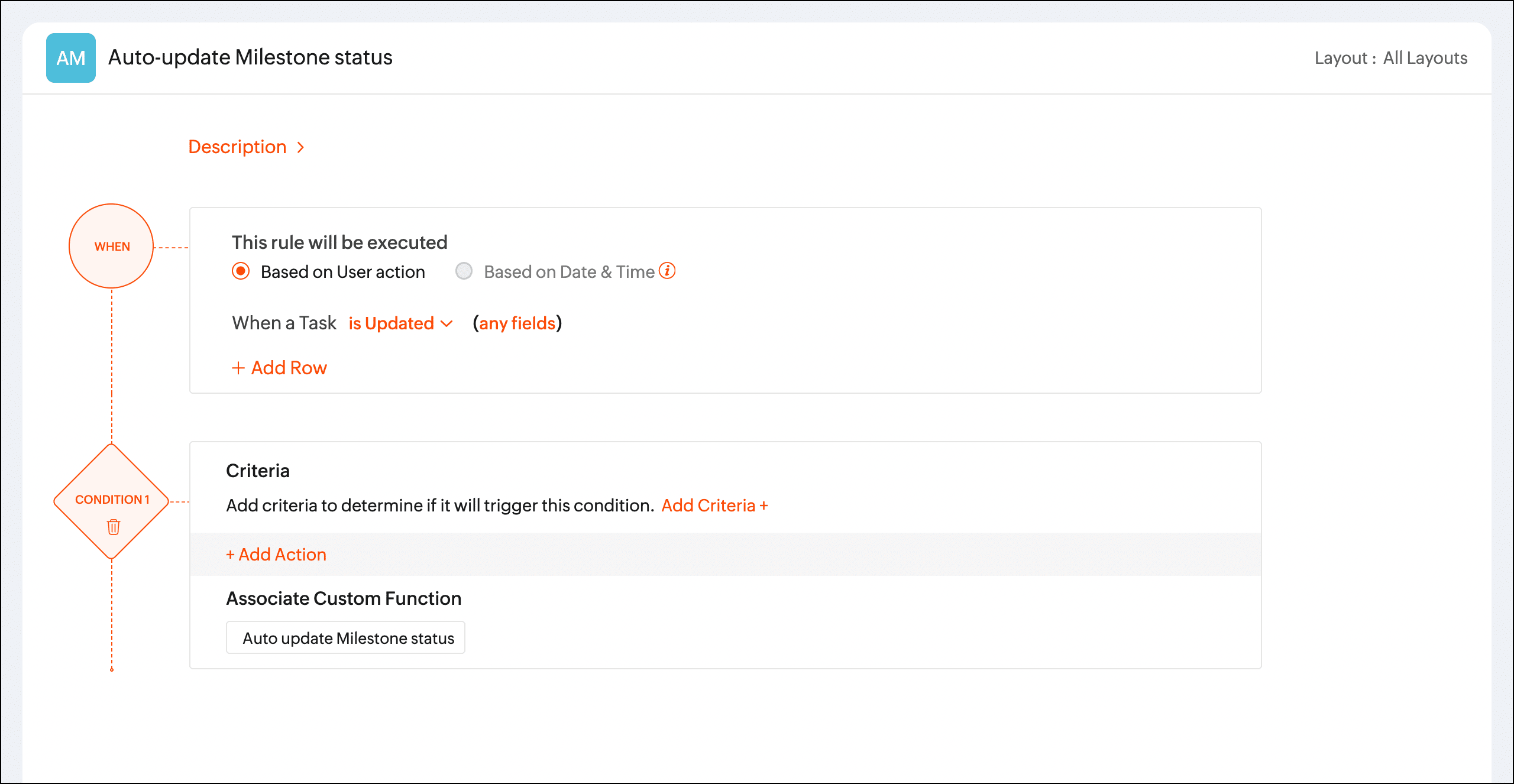


Once the workflow rule is triggered, the custom function will update the phase status automatically.

We hope you found this post to be helpful. If you have any questions, please leave a comment below or email us at support@zohoprojects.com.

    • Sticky Posts

    • Automation Series: Auto-create Dependent Task on Status Change

      In Zoho Projects, you can automatically create and assign a dependent task when a task’s status is updated. This helps teams stay aligned, ensures reviews happen on time, and reduces manual effort. In this post, we’ll walk through an easy setup using
    • Time Log Reminder

      Tracking the time spent on tasks and issues is one of the most important functions of a timesheet. However, users may forget to update the time logs because they have their own goals to achieve. But, time logs must be updated at regular intervals to keep
    • Introducing the Zoho Projects Learning Space

      Every product has its learning curve, and sometimes having a guided path makes the learning experience smoother. With that goal, we introduce a dedicated learning space for Zoho Projects, a platform where you can explore lessons, learn at your own pace,
    • Update on V2 API End-of-Life Timeline

      Dear Users, Earlier this year, we shared the launch of the V3 APIs and requested users to migrate from the older V2 APIs by December 2025. We have received valuable feedback from our users and partners regarding their migration timelines. We are happy
    • Automation Series: Auto-update Phase Status

      Hello Folks! You can auto-update your phase's status based on status of underlying tasks using custom functions. In this series, we will showcase how to create and run custom functions, using Deluge, with ease. Follow the steps below and automate your
    • Recent Topics

    • Power up your Kiosk Studio with Real-Time Data Capture, Client Scripts & More!

      Hello Everyone, We’re thrilled to announce a powerful set of enhancements to Kiosk Studio in Zoho CRM. These new updates give you more flexibility, faster record handling, and real-time data capture, making your Kiosk flows smarter and more efficient
    • Release Notes | January 2026

      We have rolled out a set of powerful new enhancements across Zoho Vertical Studio that bring several long-awaited capabilities to your applications. These updates focus on deeper customization, smarter automation, better reporting, and improved usability
    • [Free Webinar] Zoho RPA - OCR, PDF Automation, & More

      Hello Everyone! Greetings from the Zoho RPA Training Team! We’re excited to invite you to our upcoming webinar on the latest release updates for Zoho RPA, where we’ll unveil powerful new capabilities designed to make your automation journey smarter, faster,
    • Zobot Execution Logs & Run History (Similar to Zoho Flow)

      Dear Zoho SalesIQ Team, We would like to request an enhancement for Zoho SalesIQ Zobot: adding an execution log / run history, similar to what already exists in Zoho Flow. Reference: Zoho Flow In Zoho Flow, every execution is recorded in the History tab,
    • Capture Last check-in date & days since

      I have two custom fields on my Account form, these are "Date of Last Check-In" and "Days Since Last Contact" Using a custom function how can I pull the date from the last check-in and display it in the field "Date of Last Check-In"? and then also display the number of days since last check-in in the "Days SInce Last Contact" field? I tried following a couple of examples but got myself into a bit of a muddle!
    • Global Search Settings

      I'd love a way to remove some modules from being included in the global search. This would allow use to provide a better user experience, limiting the global search to only those modules that are regularly used removing any models used for background
    • Card Location in Zobot

      Hello, when using the “Location” card in a codeless builder Zobot, the behavior in WhatsApp is inconsistent. When asking the user to share their location, they can type a message, which will return the message “Sorry, the entered location is invalid.
    • Automation Series: Auto-create Dependent Task on Status Change

      In Zoho Projects, you can automatically create and assign a dependent task when a task’s status is updated. This helps teams stay aligned, ensures reviews happen on time, and reduces manual effort. In this post, we’ll walk through an easy setup using
    • Zoho CRM || Unable to Bulk Assignment of Territories for Contacts

      Dear Zoho CRM Support Team, I hope this email finds you well. We recently performed a bulk upload of Contacts into Zoho CRM using the official sample Excel template downloaded from the CRM. The upload itself was completed successfully; however, we encountered
    • Languages in Zobot

      Hello, I have found a list of supported languages for the Zobot. The information specifies the languages are supported in the following 3 features: SalesIQ supports 34 different languages in the following features. Resources (Articles, FAQs, Small Talks)
    • Sync your Products Module for better context.

      In customer support, context is everything. The integration between Zoho Desk and Zoho CRM helps your sales and support teams function as one, delivering better customer experiences. With the latest update to this integration, you can now sync the Product module in your Zoho CRM with your Zoho Desk portal. This feature enables products from Zoho CRM to reflect in the "product" field in Zoho Desk. This can save your support team valuable time and effort.    Some things to note when syncing the two:
    • Composite items inside of composite items; bill of materials needed

      Hi Zoho and Everyone, I am evaluating whether Zoho Inventory will work for my small business. I grow and harvest herbs and spices but also get from wholesalers. I use all these items to make herbal teas, but also sell them as individual items on my Shopify store and Etsy. I discovered the composite item bundling and am wondering if I could get some assistance since there is no bill of materials: Our herbal company's best selling tea is a sleepytime tea. Sleepytime Tea can be purchased in three weights
    • Action required: Reauthorizing your Google account for automatic cloud backup to Google Drive

      This is applicable to users who have already configured automatic cloud backup to Google Drive. Hi there! Google has mandated reauthorization of all preconfigured third-party integrations to ensure only the necessary scopes are shared as an improved security
    • Zoho CRM Layouts

      I have customised all our modules, Leads, Contacts and deals, and within them, I have created lots of different layouts depending on the type of Lead or contact, for example. Since the new Zoho UI came out, they have all disappeared. I have gone into
    • Zoho Desk API - Send Reply to CUSTOMERPORTAL

      Hello! I'll try to send a reply to Customer Portal, But the response is 500 (INTERNAL_SERVER_ERROR in service response). {"Error":"{\"errorCode\":\"INTERNAL_SERVER_ERROR\",\"message\":\"An internal server error occurred while performing this operation.\"}"}
    • Zoho CRM for Everyone's NextGen UI Gets an Upgrade

      Hello Everyone We've made improvements to Zoho CRM for Everyone's Nextgen UI. These changes are the result of valuable feedback from you where we’ve focused on improving usability, providing wider screen space, and making navigation smoother so everything
    • WhatsApp IM in Zoho Desk always routes to Admin instead of assigned agent

      Hello Zoho Experts, I connected WhatsApp IM to my Zoho Desk account. I only assigned my Customer Service (CS) agent to the WhatsApp channel, and I did NOT include Admin in this channel. However, every new WhatsApp conversation automatically gets assigned
    • hide resolution from help centre

      to my surprise, i just found out that the resolution text is public in the helpcenter, even if 'notify customer' is off. is there a workaround to that? how do others deal with this? How zoho support does this and I don't think its used by Zoho in the first place. the resolution is meant to be private, not public
    • Multiple Cover Letters

      We are using the staffing firm edition of Recruit and we have noticed that candidates cannot add more than one cover letter. This is a problem as they might be applying for multiple jobs on our career site and when we submit their application to a client,
    • Zoho Analytics + Facebook Ads: Performance Alerts for Active Campaigns

      Is it possible with integration of Zoho Analytics with Facebook Ads and set up alerts or notifications for active campaigns when performance drops? For example, triggering a notification if CTR goes below a defined threshold or if other key metrics (like
    • Multiple upload field CRM

      I desperately need the functionality to add more than one upload field to web to contacts form. How can I do this?
    • Workdrive Oauth2 Token Isn't Refreshing

      I have set up oauth for a bunch of zoho apis and have never had a problem with oauth. With workdrive i am using the exact same template i usually use for the other zoho apps and it is not working. All requests will work for the first hour then stops so
    • Sort by age

      It would be very helpful if there was a way to sort by age in the Age column. Please add this function if possible. Thanks!
    • Lookup Field Option Not Available in Customization

      Hello, I am trying to customize different modules (e.g., Work Orders, Systems, and others), but I am unable to find the Lookup field option in the layout customization. When I go to: Setup → Customization → Modules and Fields → Add Field The Lookup field
    • Stage History previous stage to new stage

      We are looking for a way to display deals that have changed stages the previous week. We want to see what stage it was previously and what it was changed to, as well as salespersons names if possible. I've tried to create a report as well as looked into
    • Snapchat

      Are there any plans to add Snapchat to Zoho Social or is there any API that we can use to integrate into Zoho.
    • Scheduled sending of a poll and its results

      Is there a way to schedule sending a poll to all my users and have the results sent separately to the team?
    • Canvas View bug

      I would like to report a bug. When clone a canvas view from an existing canvas view, if the original canvas view have canvas button with client script. Then the new create canvas view will have canvas button, it is make sense. But when I try to delete
    • How can I import OLM to Yandex Mail easily?

      For migrating Mac Outlook OLM data to Yandex Mail efficiently, the Aryson OLM Converter is a reliable professional tool that ensures complete data integrity throughout the process. Unlike manual methods, which can risk inconsistent formatting or missing
    • Zoho recruit's blueprint configuration is not functioning as mapped

      Current Status: Zoho Blueprint is not functioning as configured. Issue: We are moving a Candidate status in Zoho Recruit "for active file" but we encountered: "Status cannot be changed for records involved in Blueprint." This happens to various client
    • CRM x WorkDrive: We're rolling out the WorkDrive-powered file storage experience for existing users

      Release plan: Gradual rollout to customers without file storage add-ons, in this order: 1. Standalone CRM 2. CRM Plus and Zoho One DCs: All | Editions: All Available now for: - Standalone CRM accounts in Free and Standard editions without file storage
    • validation rules doesn't work in Blueprint when it is validated using function?

      I have tried to create a validation rule in the deal module. it works if I try to create a deal manually or if I try to update the empty field inside a deal. but when I try to update the field via the blueprint mandatory field, it seems the validation
    • Bulk Delete Attachments

      Is there a way to bulk delete attachments on the form entries? our storage is full and deleting files one by one is pain taking process.
    • Integrating Zoho Suite and apps more with Linux

      I just got introduced with Zoho just couple of months ago, and I've already planned to contribute to it, even though it's not an open-source software. Still I have found it's potential to beat the tech giants and still being respective towards data privacy
    • How do I edit the Calendar Invite notifications for Interviews in Recruit?

      I'm setting up the Zoho Recruit Interview Calendar system but there's some notifications I don't have any control over. I've turned off all Workflows and Automations related to the Calendar Scheduling and it seems that it's the notification that is sent
    • Store Submitted Forms as PDF

      Hi there, Is there a method to store Form submissions as a PDF in workdrive for archival? I set the form to email the submission to the user and an internal inbox but I'd really love to store the final form as PDF in workdrive automatically. I can't seem
    • How can Data Enrichment be automatically triggered when a new Lead is created in Zoho CRM?

      Hi, I have a pipeline where a Lead is created automatically through the Zoho API and I've been trying to look for a way to automatically apply Data Enrichment on this created lead. 1) I did not find any way to do this through the Zoho API; it seems like
    • Important Update: Google Ads & YouTube Ads API Migration

      To maintain platform performance and align with Google's newest requirements, we are updating the Google Ads and YouTube Ads integrations by migrating from API v19 to the newer v22, before the official deprecation of v19 on February 11, 2026. Reference:
    • Separate Items & Services

      Hi, please separate items and services into different categories. Thank you
    • How to list services on quote instead of products

      I need to create a customer facing estimate that displays our services. The default quote layout only allows products to be listed. Is there a way to correct this?
    • Next Page