Power up Zoho CRM with project intelligence

Power up Zoho CRM with project intelligence


Dear user,

You're probably one of those businesses using your CRM as a single source of truth. It's where sales, project execution, and finance teams go to analyze past decisions and formulate future strategies. But what happens when project data is either missing or out of sync with the CRM? Delayed or missed action results in missed opportunities.

It's important to allow users to track projects and allow salespeople and stakeholders to keep an eye on the client lifecycle without leaving the CRM.

The Zoho Projects-Zoho CRM integration

The existing Zoho CRM plugin for Zoho Projects helps users associate and create new projects right from their CRM modules, as well as map project tasks to CRM deal activities, at a basic level.

But there's more to it than meets the eye. In this post, we're exploring how to sync data so that project activities drive action inside Zoho CRM and vice versa. Let's dive in.

Accelerate onboarding with discovery


When CRM has a sales qualified lead (SQL) or qualifies a lead as "hot," discovery or onboarding tasks should be created in the appropriate project, assigning the lead owner to the task. This reduces manual coordination and facilitates better tracking, reduced wait times, and faster execution.

'Closed Won' to Active Projects
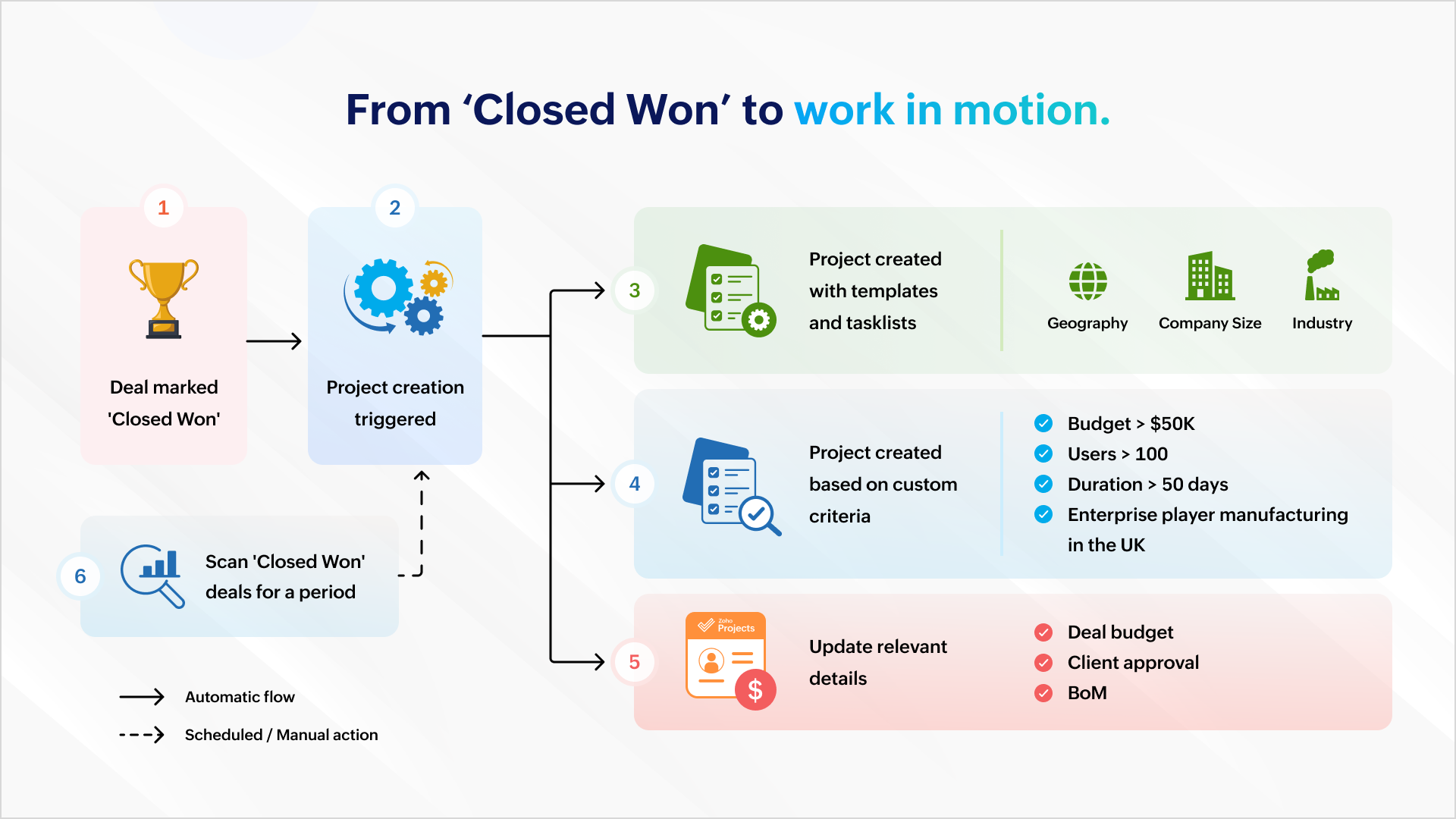


Once a deal is won, a project can be created automatically to ensure work commences immediately. Project creation can be automated with predefined task lists (for EU compliance or HIPAA-readiness) and project templates based on geography, company size, or industry.

It can also be based on custom criteria like a high-value deal (say, a budget that's greater than $50K), a bigger deal size (say, more than 100 users), a fast-track deal (needs closure within 50 days) or a combination of criteria (say, enterprise businesses in the manufacturing sector in the UK).
The deal's budget can be auto-populated during or after project creation so that users are mindful of expenses and effort.

You can scan all the "closed won" deals this quarter and create a project which matches your criteria.

Managing ownership and assignments
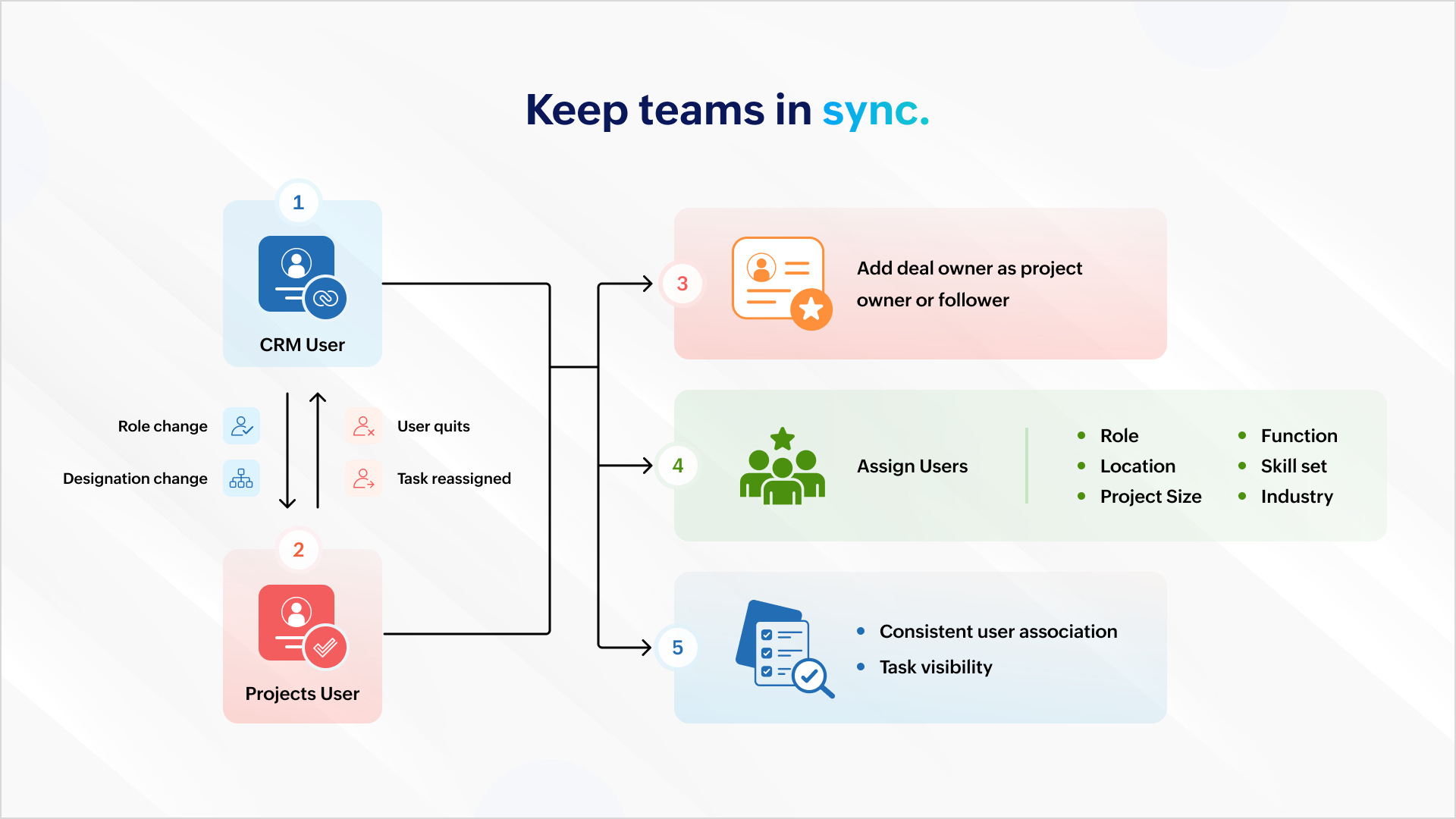


All role and designation changes should reflect uniformly across both platforms to ensure consistent association and task visibility. If a projects user quits or is assigned a new task, the reassignment should reflect inside Zoho CRM.

You can also add the deal owner as the project owner or project follower to ensure accountability carries over. Project users can then be assigned based on role, location, function, skill set, project size, industry, and more.

Deal management


Mapping your project phases to respective deal stages helps mirror project status inside the CRM. Estimated project spends and project completion percent can help identify possible bottlenecks.

Notifying relevant stakeholders about delays or budget overruns helps them intervene and get involved early in damage control. Marking the deal as "At Risk" also ensures it gets the necessary attention among relevant stakeholders.

Tracking


Tasks created in a project must be logged as activities against the associated deal to ensure stakeholders have a complete view of the progress.

Similarly, when users log time in Zoho Projects, it should update against the respective deal in CRM. This gives a picture of the billable hours consumed and the hours remaining to identify scope creep.

Stay on top of issues


It's important to keep customer success and account management teams up to date with showstoppers and blocking issues. This requires creating a case for each issue logged in Zoho Projects so that managers can take ownership and take issues to closure with constant monitoring.


Invoicing


Milestone completion should automatically draft an invoice and send it for approval. Automating invoicing based on project progress gives more time to focus on essential work.

Compliance


It's important that deals don't spring up surprise data during an audit. Zoho Books, Zoho CRM, and Zoho Projects can restrict deal activity during the "Legal Review" stage. Records can return to business as usual when legal review is complete.

And, there's more..

What we discussed here is only the tip of the iceberg. You can do more with analytics, insight-based actions, and advanced forecasting.

As a business owner or head of operations, charting your business process and identifying the gaps, problems, and aspirations will help your identify more opportunities. Once you have what you want, there are two ways to go about it.

1. Customization

You can create workflow rules, custom functions, blueprints, conditional field updates, and webhooks to strengthen automation, alert other systems, and receive data all by yourself.

But there's the risk of your org users meddling with the setup during everyday work.

2. Work with a partner

If you think you don't have the time for it or require assistance, our partners can help. As certified Zoho Experts, partners can help you customize your requirements and help you set it up. They can also help you package the entire setup (workflow rules, custom functions, etc.) into a single installable unit like a plugin or an extension from Zoho Marketplace. The custom plugin can then be installed and set up according to your needs.

AI-powered utilities

You can leverage MCP for Zoho Projects and orchestrate project management from your favorite LLMs using natural language.

Idea
This means you can get answers and initiate actions for the following requests right from a chat box:

"Show me all tasks that don't have a task owner."
"List the least profitable projects from the previous year."
"Create onboarding tasks for all hot leads in Mumbai."
"Generate invoices for milestones completed this week."

We will showcase an extension with custom capabilities to track activities and initiate automated action in one of our upcoming articles. Write to us if you are interested and we can talk - support@zohoprojects.com.

Learn more about the existing integration - setup, capabilities, and uses here - Zoho Projects and Zoho CRM integration.

Feel free to read up on the previous editions of the series:

#1 Effective project and task customization using CodeX
#2 Build an approval management system using custom modules

Best,
The Zoho Projects Team
    • Sticky Posts

    • Improve User Onboarding in Zoho Projects with Zoho DAP

      Rolling out new processes or onboarding new users in the tool comes with a familiar challenge: the employees need guidance at the moment they are doing the work. Traditional training sessions and knowledge sharing often require users to leave the application.
    • Introducing the Zoho Projects Learning Space

      Every product has its learning curve, and sometimes having a guided path makes the learning experience smoother. With that goal, we introduce a dedicated learning space for Zoho Projects, a platform where you can explore lessons, learn at your own pace,
    • Create Custom Module Using AI in Zoho Projects

      Every team has its own way of managing work. While standard modules support common project management needs, many business processes require their own structure, fields, and terminology. With AI-powered Custom Modules in Zoho Projects, users can create
    • Update on V2 API End-of-Life Timeline

      Dear Users, Earlier this year, we shared the launch of the V3 APIs and requested users to migrate from the older V2 APIs by December 2025. We have received valuable feedback from our users and partners regarding their migration timelines. We are happy
    • Automation Series: Auto-assign Task Followers

      As task progresses, several users are required to stay aware of the updates to plan their upcoming work items efficiently. Manually adding users as followers for an active task might create additional overhead. With this automation, followers can be added
    • Recent Topics

    • Show when an invoice has been viewed

      It would be nice to know if/when a customer has viewed an invoice. This would mean not having PDF attachments and just have the link to the invoice. My previous invoicing solution had this feature and I did not realize how much I used it until it was gone. Would this be possible, or this already available and I am just missing it?
    • Zoho Books | Product updates | March 2026

      Hello users, We’ve rolled out new features and enhancements in Zoho Books. From Advanced Reporting Tags to the ability to mark projects as completed, explore the latest updates designed to improve your bookkeeping experience. Introducing Advanced Reporting
    • Separator line

      Is there a way i can insert a line in an invoice or quote without showing qty or prices? e.g. Options I Item description qty and price Option II Item description qty and price Thanks
    • All new Address Field in Zoho CRM: maintain structured and accurate address inputs

      Availability Update: 29 September 2025: It's currently available for all new sign-ups and for existing Zoho CRM orgs which are in the Professional edition exclusively for IN DC users. 2 March 2026: Available to users in all DCs except US and EU DC. 24
    • BCC Drop Box Centralisation

      Hi Team, For the last few years, I have had a question related to the Zoho CRM BCC Dropbox feature. Although BCC Dropbox is very useful for tracking customer email communication, I have always wondered why its configuration is managed at the individual
    • Kiosk Page Refresh

      We have a Kiosk running from a button in contacts to update values and also add related lists, which works great, but when the kiosk is finished the page does not refresh to show the changes. Is there a way to force the contact to refresh/update when
    • CRM Integration - Option to Sync Reporting Tags

      It would be nice to be able to sync reporting tags in Zoho Finance to a custom field in Zoho CRM. My use case is for a Customer in Finance to an Account in CRM (and vice-versa, of course), but I'm sure it's pretty obvious that this could also be used
    • Join the Zoho Desk Virtual Classroom Training (VCRT)

      Hello everyone, Have you heard about Zoho's Virtual Classroom Training (VCRT)? Zoho Desk's Virtual Classroom Training offers end-to-end training for Zoho Desk users. Join the VCRT and get hands-on guidance for setting up Zoho Desk and getting your business
    • Make Rich Text fields available in Canva Print Views

      Everything is on the title. I don't really understand why this is not already possible as Rich Text Fields are available in Canva Detailed Views for example.
    • Zoho CRM Approval Process based on Field Update

      Hello, In current structure, Zoho CRM send records to approval based on record creation and edit.  I think, it should be to set approval process trigger based on any field update in record. When the user update any field, the record can assign to approval
    • Approve records efficiently: Useful enhancements to My Jobs module and Approval process in Zoho CRM

      Dear Customers, As you might know, approval process is a process automation tool that allows you to automate approvals in your organization and My Jobs is where you approve requests from a single point of view. Here's how you'd go about it: You’d add
    • Filter isn't

      The ability to filter the history of a given flow to a specific status however it would be great to have the ability to filter to a status that isn't something for example if i want to find all history that isn't complete.
    • Introducing the Store Locator widget

      Hello everyone! Your website is often the first place customers visit before deciding where to shop. But when they can't quickly find the nearest store, check business hours, or get directions, many leave your website and search elsewhere. Every extra
    • Important updates to your connectors

      Hello everyone, Greeting from Zoho Creator! We're excited to announce that we'll be rolling out significant backend updates to Zoho Creator's built-in connectors to enhance security by following the latest frameworks. The existing version of some of the
    • Important updates to your Salesforce integrations in Zoho Creator

      Hello everyone, We're writing to inform you of an important change regarding Salesforce integrations in Zoho Creator. Salesforce has introduced new security requirements for third-party platforms that connect with their services via APIs. To comply with
    • Password Policy in Zoho Mail: Set password rules to keep your organization secure

      Weak or repetitive passwords are one of the most common causes of unauthorized account access in organizations. Zoho Mail's Password Policy feature allows administrators to define and enforce specific password requirements for all users in the organization,
    • What is Workqueue and how to hide it?

      Hi, My CRM suddenly have this "Workqueue", may I ask how to set the permission of this tab?
    • Zoho Community Digest - July 2026| Part 4

      Hi everyone, and welcome back! We're closing out July with a strong final week, from a major LinkedIn integration in Zoho Recruit to AI-powered forecasting in Zoho Analytics. There are also a few heads-ups worth noting, including API changes in Zoho CRM
    • Zoho CRM Community Digest - July 2026| Part 2

      Hello everyone! The second half of July brought five CRM updates, including a heads-up for developers on API changes coming in October, one Quick Win on keeping your attribution data intact through lead conversion, two Dev's Corner threads worth bookmarking,
    • Keeping project teams in the know with Zoho Cliq

      Project management is all about processes, data flow, and maintaining order. But communicating appropriate information at crucial times to stakeholders is as important as the moving parts of a project. Zoho Cliq can facilitate effective communication
    • Enable Credit Note creation for Sales Returns BEFORE receiving goods

      Currently, it is not possible to issue a Credit Note linked to a Sales Return until the goods have been officially marked as "received" in the system. In our business, we often need to issue a credit note to our clients immediately upon the initiation
    • Getting Internal Server Error message when filing for MTD

      I am trying to file for the MTD submission, and after I filled in all the information and click (Fetch Obligation) this message "Internal Server Error [500]" pops up. I have been trying for awhile and its still the same. What shall I do as today is deadline
    • No access to change view permission for team members

      Hi, I want team members to be able to update the percentage progress on their goals at mid year. Currently they cannot edit this, they can only update the comments against the goals. The ability to add view permission to goal progress for team members
    • Turn your Zoho One Home into your workspace with Dashboard 2.0

      When you open Zoho One, you probably don't need to see everything. You need to see what matters to you. A sales manager may want to track pipeline and revenue. An HR manager may want to monitor employee information. A business leader may want a quick
    • Zoho Assist Feature Update: August 2026

      Web Forms Web Forms in Zoho Assist help you collect support requests directly from your website and route them to the right team. Embed a customizable form so customers can raise issue details or join an active remote session using a session ID. Depending
    • Tip #84 – A More Natural Remote Experience with Custom Cursor Support – 'Insider Insights'

      Hello Zoho Assist Community! Anyone who has spent time in a remote support session knows the feeling. You're guiding a customer through a task, moving the cursor across the screen, and something feels just slightly off. The cursor doesn't behave the way
    • 【無料/オンライン】8/20開催|Zoho ワークアウト|ユーザー同士で学び合うオンラインもくもく会

      ユーザーの皆さま、こんにちは。 コミュニティグループの中野です。 8月20日(木)開催の「Zoho ワークアウト」をご案内します。 Zoho ワークアウトは、参加者それぞれが取り組みたいテーマを持ち寄り、 ユーザー同士で交流しながら、設定・検証・運用改善を進めるオンラインの「もくもく会」です。 「作業を進めたいけれど、一人だと手が止まってしまう」 「他社がどのように活用しているのか知りたい」 「同じ課題を持つユーザーと情報交換したい」 そんな方は、ぜひお気軽にご参加ください。 ▶︎ 参加登録はこちら(無料)
    • Assign Price Book to Accounts (again!)

      I can see this topic has been bumping about for over 10 years and unfortunately Zoho hasn't seen the need (or use case) in CRM to be able to assign an account to a price book to automate quoting (amongst other things). Strange given they DO assign price
    • Custom Statuses - Can You Do Anything With Them?

      As far as I can tell, one really cannot do much with custom statuses. I created a new custom status for sales orders called "Customizing / Hold". This is for sales orders that have the Confirmed status. The use case here is that, as an e-commerce company,
    • Price Book in foreign currency

      We have many customers who buy in foreign currency (USD), where our base currency is our local currency (AUD). It would be normal (it is in Zoho Books, Zoho Inventory etc.) to assign a currency to a price book, but I cannot find this option in Zoho CRM
    • How to disable option to search (In Advanced Field > Matrix Choice > Dropdown)

      In Advanced Field > Matrix Choice > Dropdown I don’t want the option to search or type to fill in words. How can I disable or remove this function?
    • Layout rules in Zoho FSM

      As titled, is there an item in the pipeline or an ETA for the implementation of layout rules in Zoho FSM? Similar to how they work in Zoho CRM https://help.zoho.com/portal/en/kb/crm/customize-crm-account/customizing-page-layouts/articles/create-conditional-layouts
    • Marketing Tip #45: Use WhatsApp to engage customers and drive more sales

      Email is great. Social media is useful. But when it comes to getting a message actually read? WhatsApp wins. In general, open rates on WhatsApp messages are significantly higher than email, and the conversation feels personal rather than promotional.
    • Client Script also planned for Zoho Desk?

      Hello there, I modified something in Zoho CRM the other day and was amazed at the possibilities offered by the "Client Script" feature in conjunction with the ZDK. You can lock any fields on the screen, edit them, you can react to various events (field
    • View Answer Bot conversations?

      We are trialing Zia and are experimenting with Answer Bot on our knowledge base. So far so good! Management asks me if it is possible to view Answer Bot conversations, the purpose being to look over its shoulder and confirm that it is working as des
    • Add Comment workflow action delayed by 1–2 minutes in Zoho Desk

      Hello Zoho Support team, We are experiencing an issue with a workflow in Zoho Desk. The workflow is triggered when the Quote ID field is updated and performs two actions: A standard Field Update An Add Comment custom action When the Quote ID field is
    • Zoho CRM Layout Rules: Nine New Actions, Profile-Based Execution, and Interactive Preview

      Hello everyone, Availability: This feature is now available for customers in the JP and SA DCs. It is planned to be released for other customers in soon. We’re excited to announce powerful new enhancements to Layout Rules in Zoho CRM - a feature built
    • Zoho Books and TRAINING SALES receipt label for eTims?

      Hi, Can Zoho Books implement TRAINING SALES receipts and push them to eTims for test? In other words how can we send to Zoho or even create in Zoho training mode invoices and TEST the workflow POS>Zoho Books>eTims and back without actually registering
    • Reporting Tags and COGS

      Is there any way to get COGS recorded against reporting tags? The use cases seems very straightforward to me. If I'm running a P/L report against a specific reporting tag (I use mine for customer type, but it could be used for regions, etc.), the revenue
    • Hide Custom Fields for Customers or Vendors

      For whatever reason, all custom fields added to the Customer module also get added to the Vendor module. This leads to a clunky experience for users, as many custom fields we add only apply to one or the other. There should be a "hide" option to hide
    • Next Page