Canvas templates can now be shared with different CRM organizations
----------------------------------------Moderated on 14th February, 2023-------------------------------------------
Dear all, This feature is now open for all users in all DCs. To learn more about importing and exporting canvas templates, read our help doc - Customizing Record Detail Page Using Canvas
Dear All,
We hope you're well! We're here with a useful update for Canvas in Zoho CRM.
Canvas is our flagship feature that helps you add context to your record details pages. With the help of templates, elements, and styles, you can design your CRM records in a way that's coherent and relevant to your business. However, it hasn't been possible so far to share a Canvas template.
In this update, we're adding a new capability to share templates with different CRM organizations. Imagine your business has multiple CRM organizations for different purposes. If you wanted to apply your brand elements uniformly for all your CRM organizations, you had to create new templates each time, one by one. With this new sharing feature, you can now easily transmit templates created in one organization to another.
How is a template transmitted?
You can share a template from one organization to another via a unique key. This key is a combination of alphanumeric characters that is specific to each template. All you have to do is to export the key from one CRM organization and import it into the other. Your template UI will be transmitted immediately.
Let's get further into the details!
Exporting a template: As mentioned above, you can export a template by sharing a unique key with the recipient.
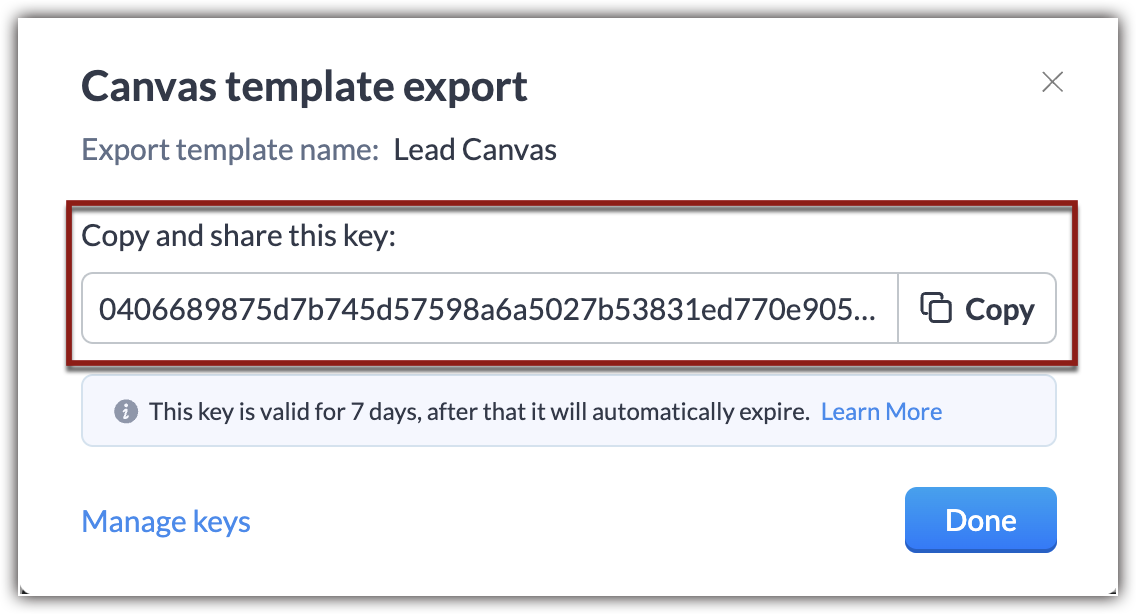
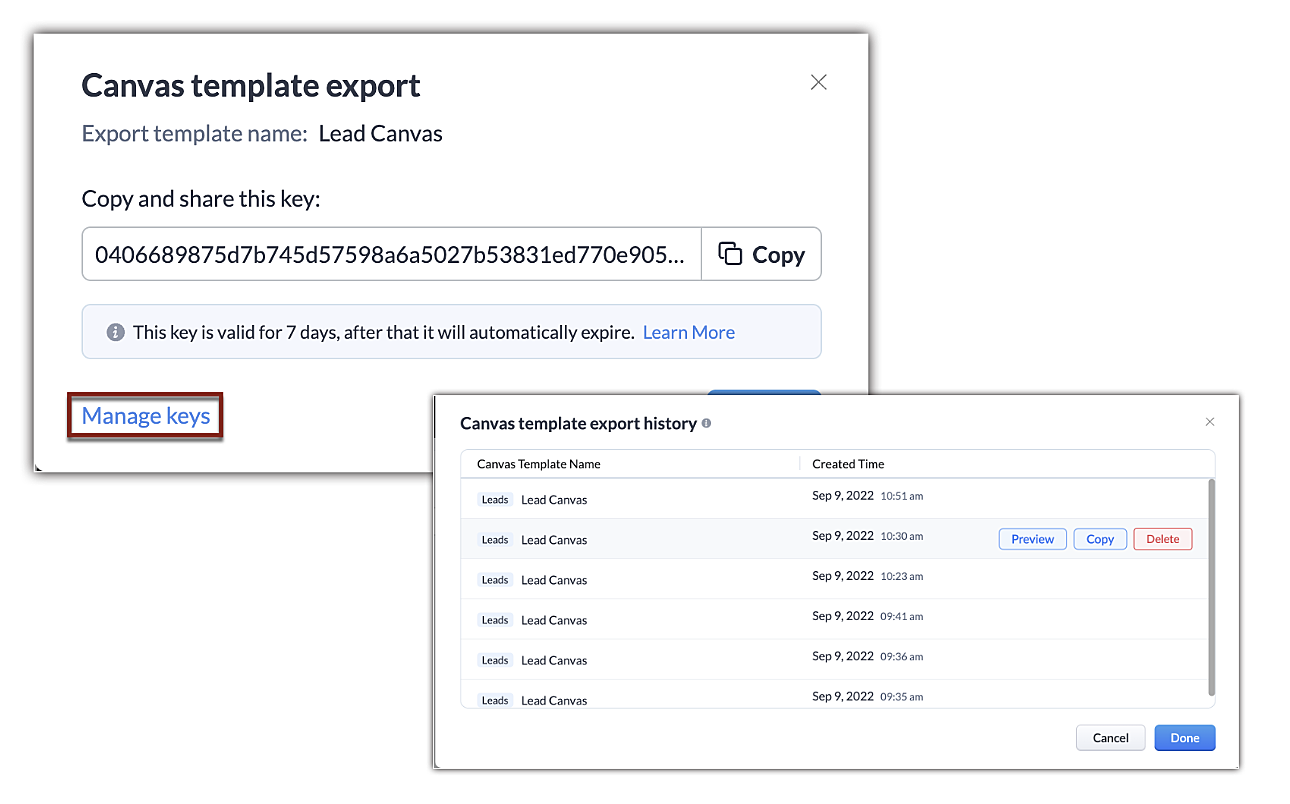
This key is valid for seven days after the date of export, and an organization can have up to 10 active exports at a time. In the event you reach this limit, you'll have to delete old keys to enable new exports.
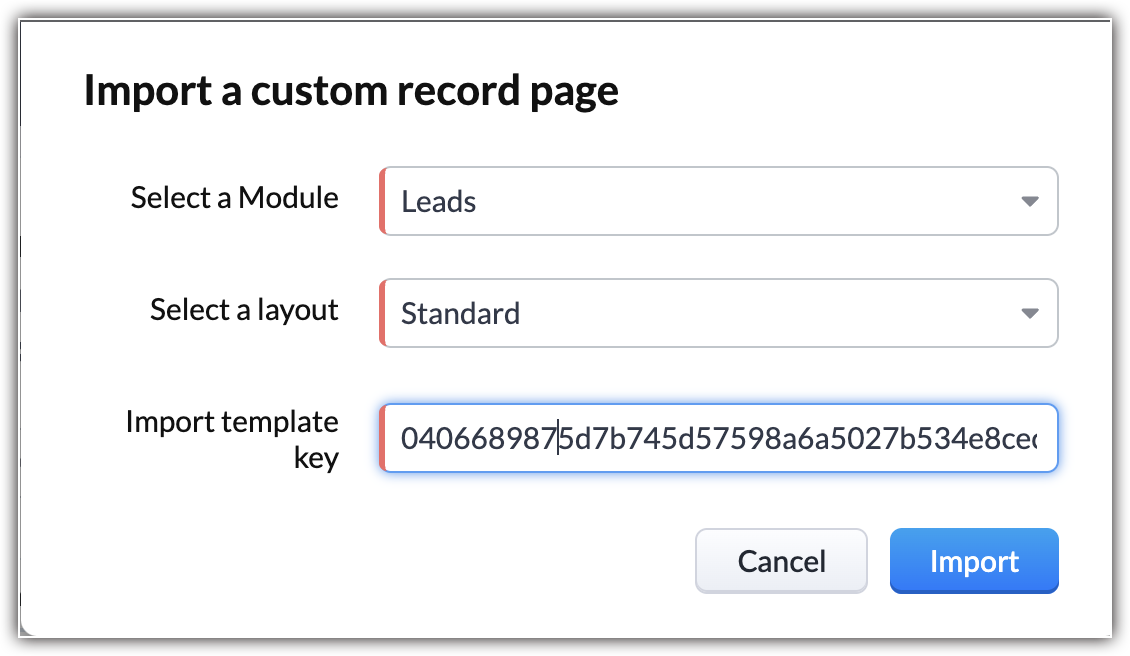
Importing a Canvas template: You can import a canvas template by applying the unique code shared with you. This code will transmit the design elements from the source and Canvas will automatically incorporate values in accordance to the module you're importing the template into.
Some additional pointers about importing/exporting templates:
- In addition to the template transfer between CRM organizations, you can also transmit a canvas within the organization.
- There is no limit to the number of times you can import a template using a key. You can have multiple imports as long as the key is valid.
- You can import a template into any module or layout.
- Importing a template counts as creating a new template. CRM follows the same template limits as usual. Click here to learn about the limits of each module.
- If the export code is deleted or expires before you import, the code will no longer be valid and you'll have to obtain the updated code.
- Only the formatting and UI placeholders of the template will be transmitted. The values, images, and rules ascribed to them will not be transmitted.
- Components and presets you've saved to reuse will be carried over.
That's it for the update. We have opened this feature for all users in US DC for now. For the rest of the DCs, it will be gradually opened.
We hope this added capability will make your work easier. If you have feedback or comments, feel free to start a conversation.
Thanks and have a good one!
Kind Regards,
Saranya Balasubramanian
Saranya Balasubramanian
Topic Participants
Saranya Balasubramanian
Diogo Sá
Piyush Goyal
Ishwarya SG
Jordan Talmor
Sticky Posts
VoC in Zoho CRM is now data savvy: Explore response drilldown, summary components and participation in CRM criteria
VoC has all the goods when it comes to customer intelligence—which is why we're constantly enhancing it. We recently added the following: A customer drilldown component that shows you the list of prospects and customers behind a chart's attribute ExpandedWrapping up 2025 on a high note: CRM Release Highlights of the year
Dear Customers, 2025 was an eventful year for us at Zoho CRM. We’ve had releases of all sizes and impact, and we are excited to look back, break it down, and rediscover them with you! Before we rewind—we’d like to take a minute and sincerely thank youGood news! Calendar in Zoho CRM gets a face lift
Dear Customers, We are delighted to unveil the revamped calendar UI in Zoho CRM. With a complete visual overhaul aligned with CRM for Everyone, the calendar now offers a more intuitive and flexible scheduling experience. What’s new? Distinguish activitiesPresenting ABM for Zoho CRM: Expand and retain your customers with precision
Picture this scenario: You're a growing SaaS company ready to launch a powerful business suite, and are looking to gain traction and momentum. But as a business with a tight budget, you know acquiring new customers is slow, expensive, and often deliversCreate and populate a record in an instant: Introducing zero-shot field prompting to Zia's ICR
A couple of months ago, we upgraded our in-house AI image detection and validation tool, Zia Vision, with intelligent character recognition (ICR). By training Zia with sample images, you could create and enrich CRM records with data extracted from standard
Recent Topics
The Social Wall: December 2025
Hello everyone! As we wrap up the final edition of the Social Wall for 2025, it’s the perfect time to look at what went live during December. QR code generator From paying for coffee to scanning metro tickets, QR codes are everywhere and have made everydayCustom AI solutions with QuickML for Zoho CRM
Hello everyone, Earlier, we introduced Custom AI Solutions in CRM that let you access QuickML for your custom AI needs. Building on that foundation, we’ve now enabled a deeper integration: QuickML models can be seamlessly integrated into CRM, and surfaceHelper Functions and DRY principle
Hello everyone, I believe Deluge should be able to use 'Helper functions' inside the main function. I know I can create different standalones, but this is not helpful and confusing. I don't want 10000 different standalones, and I dont want to have toIntroducing workflow automation for the Products module
Greetings, I hope all of you are doing well. We're happy to announce a few recent enhancements we've made to Bigin's Products module. The Products module in Bigin now supports Workflows, enabling you to automate routine actions. Along with this update,Power up your Kiosk Studio with Real-Time Data Capture, Client Scripts & More!
Hello Everyone, We’re thrilled to announce a powerful set of enhancements to Kiosk Studio in Zoho CRM. These new updates give you more flexibility, faster record handling, and real-time data capture, making your Kiosk flows smarter and more efficientZia Formula Expression Generator for Formula fields
Hello everyone! Formula fields are super useful when you want your CRM to calculate things for you but writing the expression is where most people slow down. You know what you want, but you’re not fully sure which function to use, how the syntax shouldIssue with Zoho Creator Form Full-Screen View in CRM Related List Integration
Hi Team, We have created a custom application in Zoho Creator and integrated it into Zoho CRM as a related list under the Vendor module, which we have renamed as Consignors. Within the Creator application, there is a form named “Pickup Request.” InsideWrapping up 2025 on a high note: CRM Release Highlights of the year
Dear Customers, 2025 was an eventful year for us at Zoho CRM. We’ve had releases of all sizes and impact, and we are excited to look back, break it down, and rediscover them with you! Before we rewind—we’d like to take a minute and sincerely thank youCustomer Parent Account or Sub-Customer Account
Some of clients as they have 50 to 300 branches, they required separate account statement with outlet name and number; which means we have to open new account for each branch individually. However, the main issue is that, when they make a payment, theyProjects custom colors replaced by default orange
Since yesterday, projects uploaded to Zoho, to which I had assigned a custom color, have lost the customization and reverted to the default color (orange). Has anyone else had the same problem? If so, how did you resolve it?Restrict Users access to login into CRM?
I’m wanting my employees to be able to utilize the Zoho CRM Lookup field within Zoho Forms. For them to use lookup field in Zoho Forms it is my understanding that they need to be licensed for Forms and the CRM. However, I don’t want them to be able toIntroducing Connected Records to bring business context to every aspect of your work in Zoho CRM for Everyone
Hello Everyone, We are excited to unveil phase one of a powerful enhancement to CRM for Everyone - Connected Records, available only in CRM's Nextgen UI. With CRM for Everyone, businesses can onboard all customer-facing teams onto the CRM platform toUnknown table or alias 'A1'
I would like to create a subquery but i am getting the following error: Unknown table or alias 'A1' used in select query. This is the sql statement: SELECT A1.active_paying_customers, A1.active_trial_customers, A1.new_paying_signup, date(A1.date_active_customers),in the Zoho creator i have address field based the customer lookup im selecting the addresss , some times the customer address getting as null i want to show as blank
in the Zoho creator i have address field based the customer lookup im selecting the addresss , some times the customer address getting as null ,i want to show as blank instead of showing null. input.Billing_Address.address_line_1 = ifNUll(input.Customers_Name.Address.address_line_1,"");Question about upgrade and storage space Zoho Notebook
After upgarding my Zoho Notebook plan, I am running into the following issue. I just upgraded from a free Zoho Notebook subscription to Pro Lite after I got a notification in my Window Zoho Notebook desktop app saying that I had run out of space. However,how to add email to existing organization i w
I am already registered my organization and i have an email id. I need one more email id but i can't find anywhere .i want the cheapest email id . how to add ?add zoho account
How to add a zoho mail to previous zoho account? I have twoName changed in settings for mailbox but still not changed when typed in To field
In the email account secretary@ i have updaetd the new staff members details but the old members name still appears when I type secretary@ in the To field. I cant work out where Zoho is finding the old name from. I have deleted the browser cache. If IPrinting to a brother label maker
I see allot of really old unanswered posts asking how to print to a label maker from a zoho creator app. Has their been any progress on providing the capability to create a customized height & width page or print template or whatever to print labels?Sync desktop folders instantly with WorkDrive TrueSync (Beta)
Keeping your important files backed up and accessible has never been easier! With WorkDrive desktop app (TrueSync), you can now automatically sync specific desktop folders to WorkDrive Web, ensuring seamless, real-time updates across devices. Important:Track online, in-office, and client location meetings separately with the new meeting venue option
Hello everyone! We’re excited to announce meeting enhancements in Zoho CRM that bring more clarity and structure to how meetings are categorized. You can now specify the meeting venue to clearly indicate whether a meeting is being held online, at theCalling the new 'Custom API' feature from within a Custom Widget
From what I've learned it is not possible to call an endpoint from the new "Custom API" feature within a Creator Widget. The SDK's doesn't support it yet, when calling it natively you end up with CORS issues or at least I couldn't get it working evenAnnouncing new features in Trident for Mac (1.32.0)
Hello everyone! We’re excited to introduce the latest updates to Trident, which are designed to reinforce email security and protect your inbox from evolving threats. Let’s take a quick look at what’s new. Deliver quarantined emails. Organization adminsMarketing Tip #5: Improve store speed with optimized images
Slow-loading websites can turn visitors away. One of the biggest culprits? Large, uncompressed images. By optimizing your images, your store loads faster and creates a smoother shopping experience leading to higher sales. It also indirectly improves SEO.SMS to customers from within Bigin
Hi All, Is there anyone else crying out for Bigin SMS capability to send an SMS to customers directly from the Bigin interface? We have inbuilt telephony already with call recordings which works well. What's lacking is the ability to send and receiveAdmins cannot see each others' Scheduled Reports?!
Very frustrating that as an admin I cannot see what my reports my fellow admins have created and scheduled. After asking about this on the help chat, I was told the issue is trust and security. By giving someone Admin status, it means we trust them with those responsibilities. Please change this, it is not a good process to have to bother other users to change a report or change users within a report.Automatically CC an address using Zoho CRM Email Templates
Hi all - have searched but can't see a definitive answer. We have built multiple email templates in CRM. Every time we send this we want it to CC a particular address (the same address for every email sent) so that it populates the reply back into ourWriter update results in BitDefender blocking it as malware
After updating Writer to latest update, Bitdefender blocked the app and writer no longer runs.Is there a way to invoke deluge function from within a widget?
Hi! I have custom functions in deluge and I was wondering whether there is any way to call this function through a widget? Something like on click of a button inside a widget, run the deluge custom function. Would this be possible?Missing Import Options
Hello, do I miss something or is there no space import option inside of this application? In ClickUp, you can import from every common application. We don't want to go through every page and export them one by one. That wastes time. We want to centralizeZoho CRM Portal Field Level Permission Issue
Hi Support Team, I am using the Zoho CRM Portal and configuring field-level editing permissions. However, we are unable to restrict portal users from editing certain fields. We have created a portal and provided View and Edit (Shared Only) access forWhy am I seeing deleted records in Zoho Analytics syncing with Zoho CRM?
I have done a data sync between Zoho CRM and Zoho Analytics, and the recycle bin is empty. Why do I see deleted leads/deals/contacts in Zoho Analytics if it doesn't exist in Zoho CRM? How can I solve this problem? ThanksCustom Fonts in Zoho CRM Template Builder
Hi, I am currently creating a new template for our quotes using the Zoho CRM template builder. However, I noticed that there is no option to add custom fonts to the template builder. It would greatly enhance the flexibility and branding capabilities ifIntroducing the Zoho Projects Learning Space
Every product has its learning curve, and sometimes having a guided path makes the learning experience smoother. With that goal, we introduce a dedicated learning space for Zoho Projects, a platform where you can explore lessons, learn at your own pace,All new Address Field in Zoho CRM: maintain structured and accurate address inputs
The address field will be available exclusively for IN DC users. We'll keep you updated on the DC-specific rollout soon. It's currently available for all new sign-ups and for existing Zoho CRM orgs which are in the Professional edition. Latest updateCollaboration with customers made easy with Zoom Meeting and Zoho Desk integration
Hello everyone! We are happy to announce that you can now integrate your Zoho Desk account with Zoom Meeting. The integration bridges the gap between digital communication and human connection, empowering teams to deliver timely support when it mattersCRM Canvas - Upload Attachments
I am in the process of changing my screens to Canvas. On one screen, I have tabs with related lists, one of which is attachments. There doesn't appear to be a way to upload documents though. Am I missing something really obvious? Does anyone haveTrueSync regularly filling up my local disk
Seems that WorkDrive's TrueSync randomly starts filling up my local hard drive space. None of the folders have been set as "Make Offline" but still it seems to randomly start making file offline. The settings of the app is so minimal and is of no realKaizen #194 : Trigger Client Script via Custom buttons
Hello everyone! Welcome back to another interesting and useful Kaizen post. We know that Client Scripts can be triggered with Canvas buttons and we discussed this with a use case in Kaizen#180. Today, let us discuss how to trigger Client Script when a[Webinar] A recap of Zoho Writer in 2025
Hi Zoho Writer users, We're excited to announce Zoho Writer's webinar for January 2026: A recap of Zoho Writer in 2025. This webinar will provide a recap of the features and enhancements we added in 2025 to enhance your productivity. Choose your preferredNext Page