Gain control over record sharing with portal users through our new enhancement: criteria-based data exposure

Gain control over record sharing with portal users through our new enhancement: criteria-based data exposure

Dear Customers,

We hope you're well!

Portals is a self-service avenue through which your clients can access and manage their direct and related data in Zoho CRM. This empowers them to be more independent and enables them to experience a sense of transparency with your business.
Here, the key term to notice is direct and related data. The current portal setup serves clients only with their own primary and related data via a lookup field. Here's a pictorial representation of the current setup:
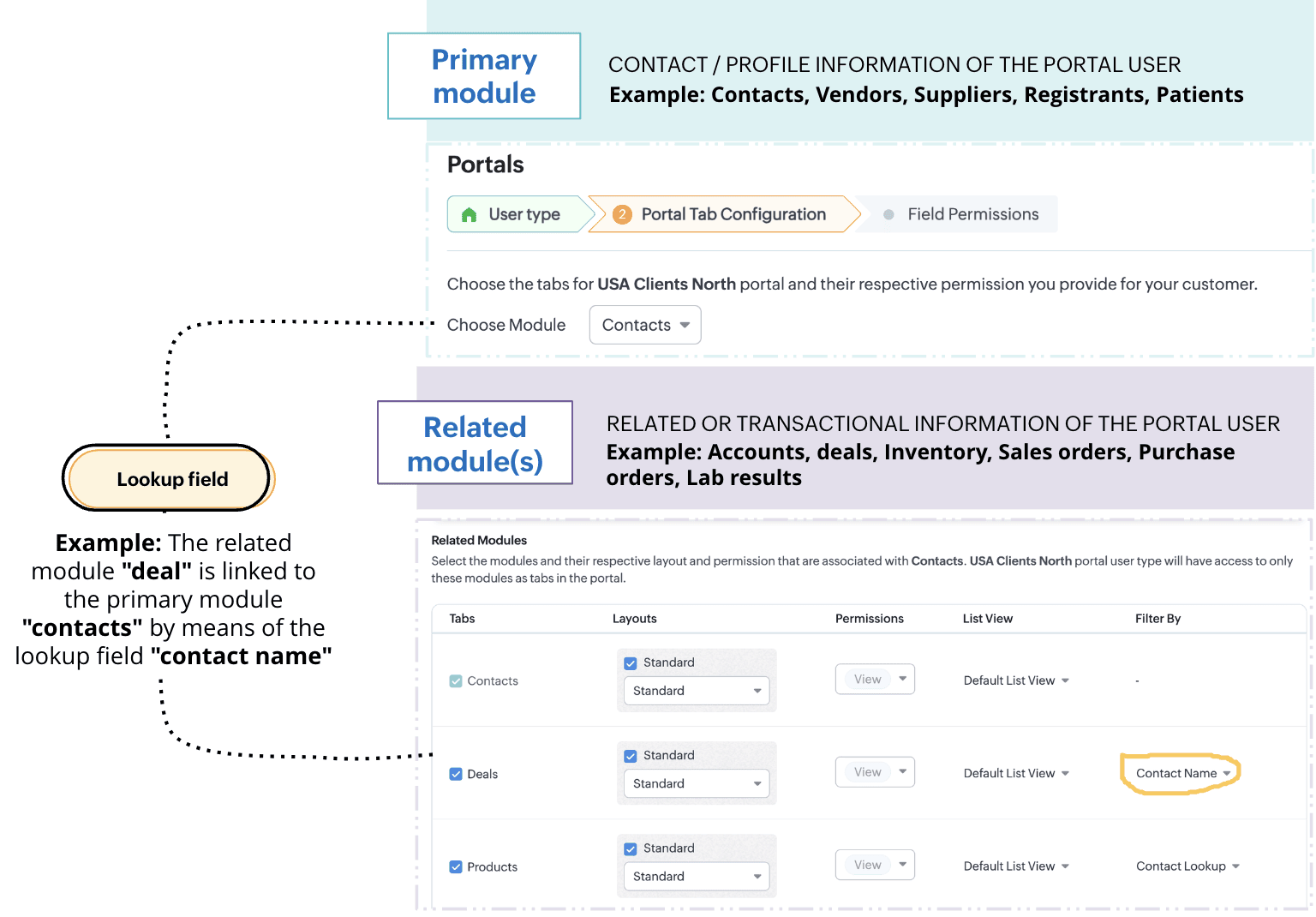
While having access only to their records gives customers authority over their information, it presents some notable challenges.

Challenge #1: Lack of control
A record undergoes two types of processes: customer-driven processes like conversion, negotiation, winning a deal, and more, and internal processes like approvals, discussions, and rejections. While the former keeps customers informed about the progress of their deals, the latter reveals the business' internal decision-making process. Administrative information isn't necessarily meant to be seen, but the current portal setup exposes each stage a record goes through, unconditionally. This poses a problem: The business lacks control over the kind of information that's shared.

Imagine this scenario: Patricia is your customer. She has access to her profile, deals, and quotes. She can manage data all by herself and track records as they progress. While having access to her own records empower her with independence, witnessing all the process changes—including approvals and rejections of discounts that aren't yet final—might cause her some anxiety. It also violates the business's privacy policies.

Challenge #2: Lack of flexibility
The portals you have now only enable you to share clients' personal and transactional records. Clients can only see their own data. But what if they want to access information other than their own? Or what if they want to view records with a particular trait?
Say, for example, your business sells multiple products across Canada, and you want your portal users to see only the products available in their regions. This is a specific request that's based on the location of the customer. The current setup limits this requirement and fails to preserve context for the customer.

Thus, to give the admins control over any exposed information and simultaneously provide portal users with both flexibility and independence, we've developed an exciting addition to portals' data-sharing functionality: criteria-based data exposure.

Introducing criteria-based data exposure
Criteria-based data exposure is the ability to expose modules and data based on conditions that you use to control what data should be exposed and when, or to render contextual results for portal users.
Technically speaking, in addition to linking a primary module and a related module using lookup fields, admins can now define two types of criteria to expose other records with a particular trait in the module: match with fields and match with values.

Match with value: This criterion should be familiar to you as a seasoned Zoho CRM user. You can determine record eligibility by defining a fieldoperator, and qualifying value.

Example: Deal type is new business. All those deals that are new businesses will be displayed to the portal user.

Match with field: Here, the relationship between the related module and the primary module is established by mapping their fields. That is, the relationships between records in primary and related modules are established by fields with the same values.

Example: Implementation agent servicing area is the client's billing city.

Let's understand these criteria by addressing our initial challenges:

Solution for challenge #1 (lack of control)
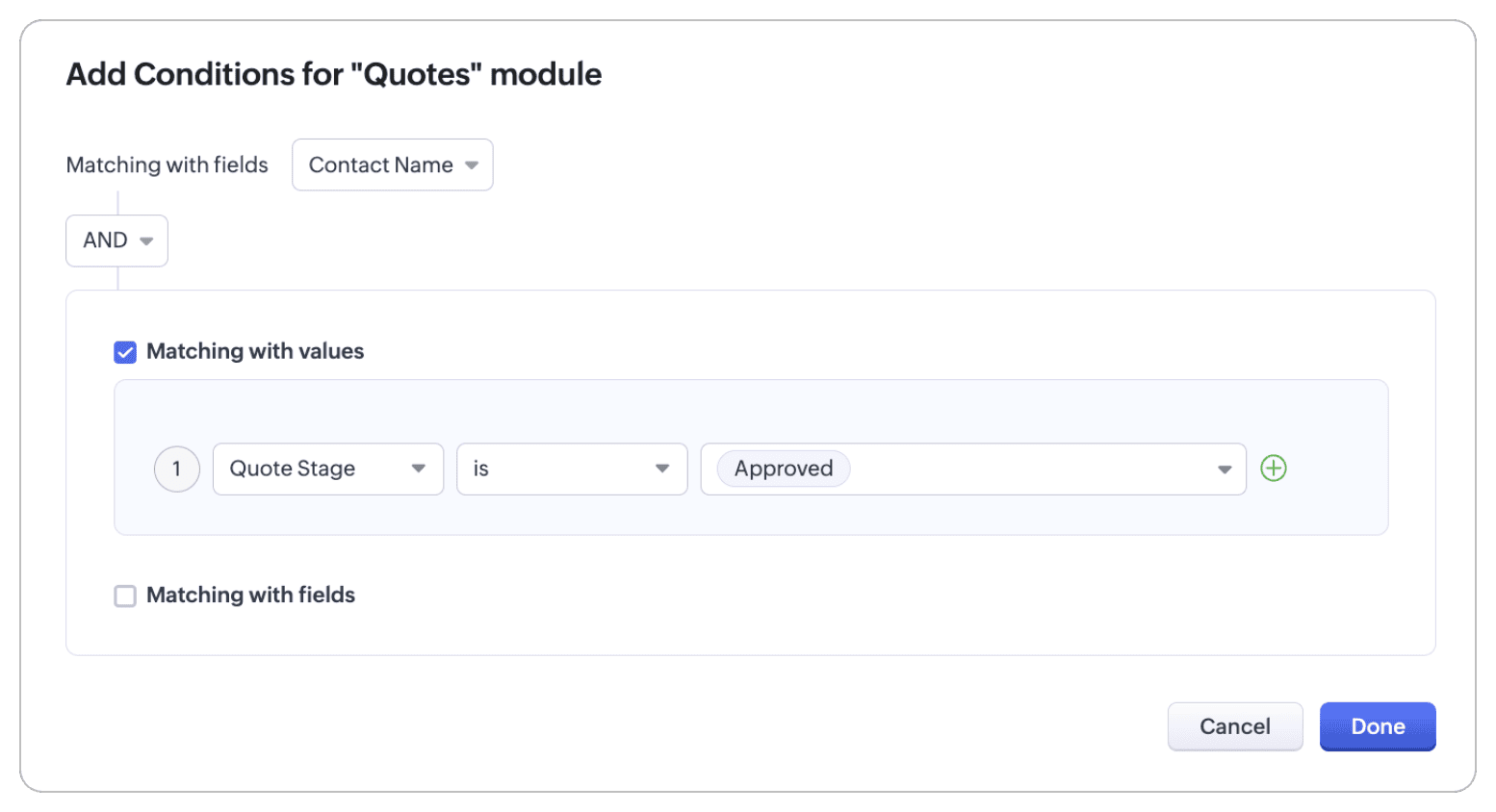
By matching with value, we can allow Patricia to view her quote only after it reaches the approved stage. This way, your business's internal correspondence stays internal, and Patricia can track her quotes without any impact on her experience.

Below is how you can configure this feature. Again, let's suppose Patricia is your customer and that you want her to have access to her transactional data:
  1. Create a mutual lookup field called "Contact name" between the Contacts and Quotes modules.
  2. To control who can access this information, use the match by value criterion and add two conditions:
    1. Quote stage is approved
    2. Quote stage is not negotiating
      This way, Patricia's quote is visible only when it reaches the approved stage.
Solution for challenge #2 (lack of flexibility)
With the match with field criterion, your portal user can view all products that are available in Canada.
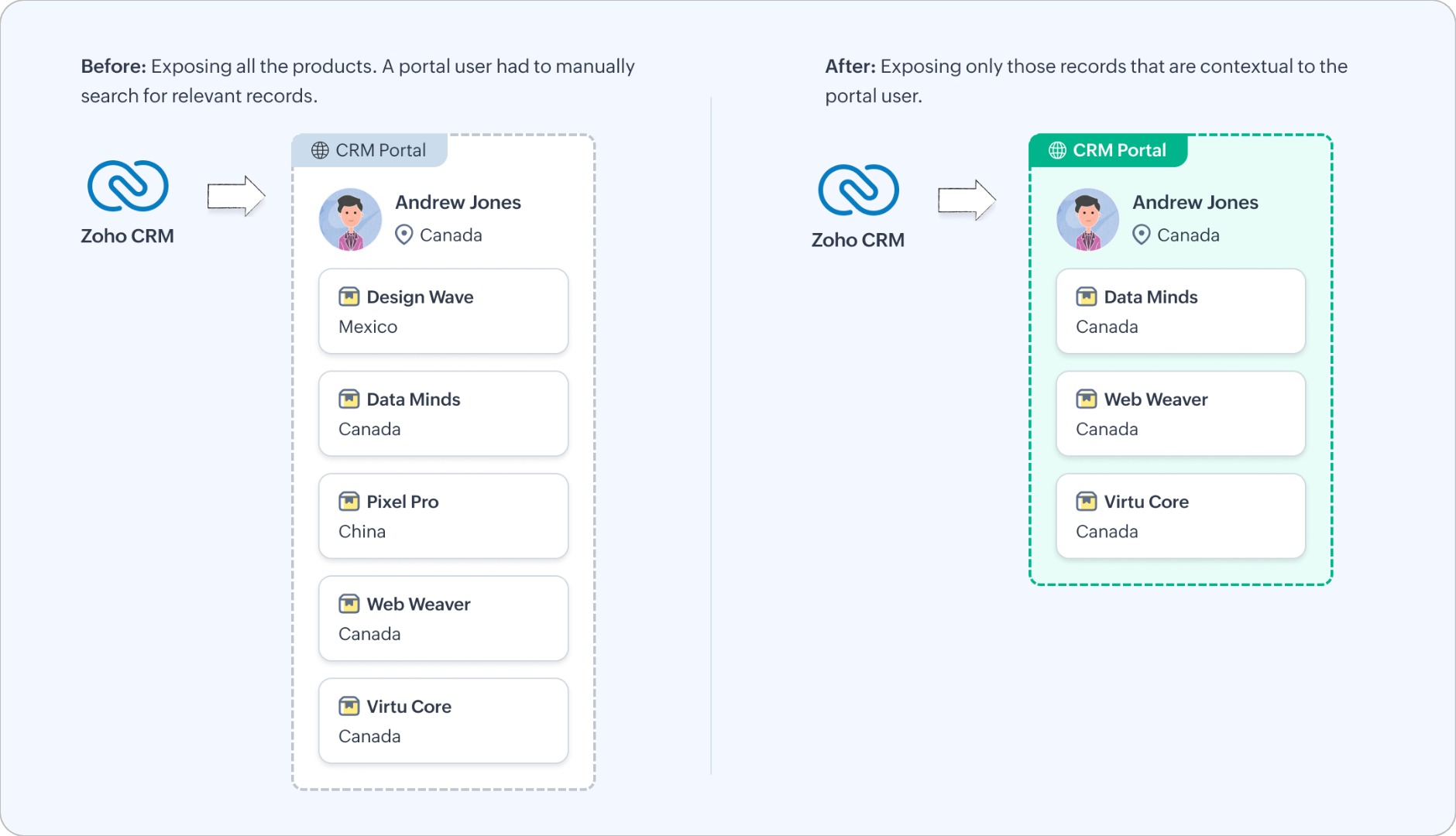
Let's look at how you can configure this functionality.
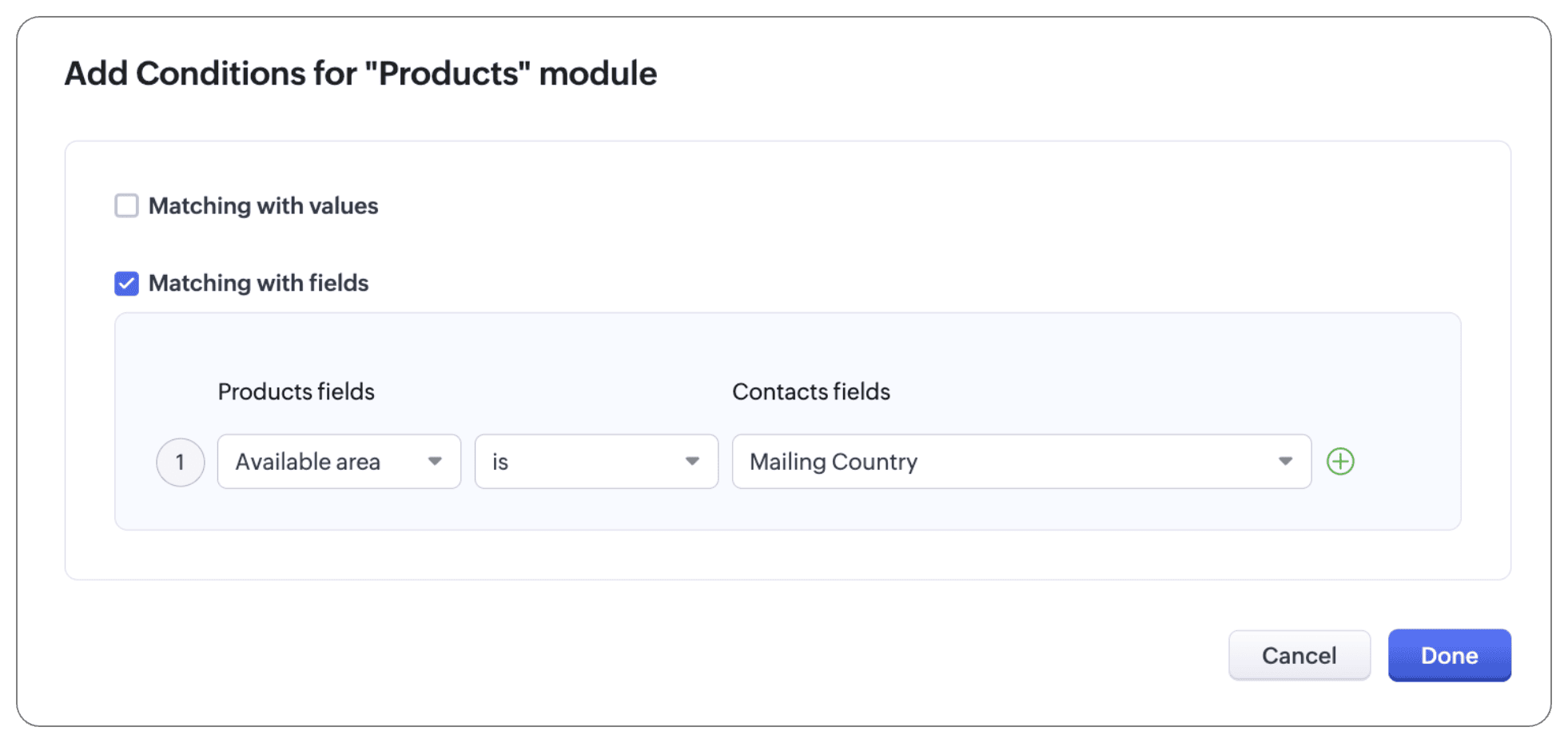
The Products module is a public module, accessible to all portal users, irrespective of their relationship to that module. To bring context to this setup, add a condition using the match by field criterion:
  • Available area is mailing country
Note:
In addition to configuring criteria, you can also use an "and/or" conditional to follow these criteria. That is, you can use both criteria and lookup, or either of the three (criteria, or match with values, or match with fields), or one of the criteria and lookup.

For example, let's say your Implementation Specialist module has an exhaustive list of agents that implement servers in different areas, with varying levels and types of expertise. To display the agents the user hired as well as other agents for reference, we can configure conditions, as shown below:
  • The primary module and the related module can be linked using the native lookup field to bring up agent records that users have hired directly.
  • To display other agents in the location, let's use conditions:
    • If the record matches with values, the customer can see all agents who belong to Michigan, Ohio, Chicago, Washington, and Indianapolis will be displayed.
    • If the record matches with fields, the customer can see all agents whose service region matches the contact's mailing state. 
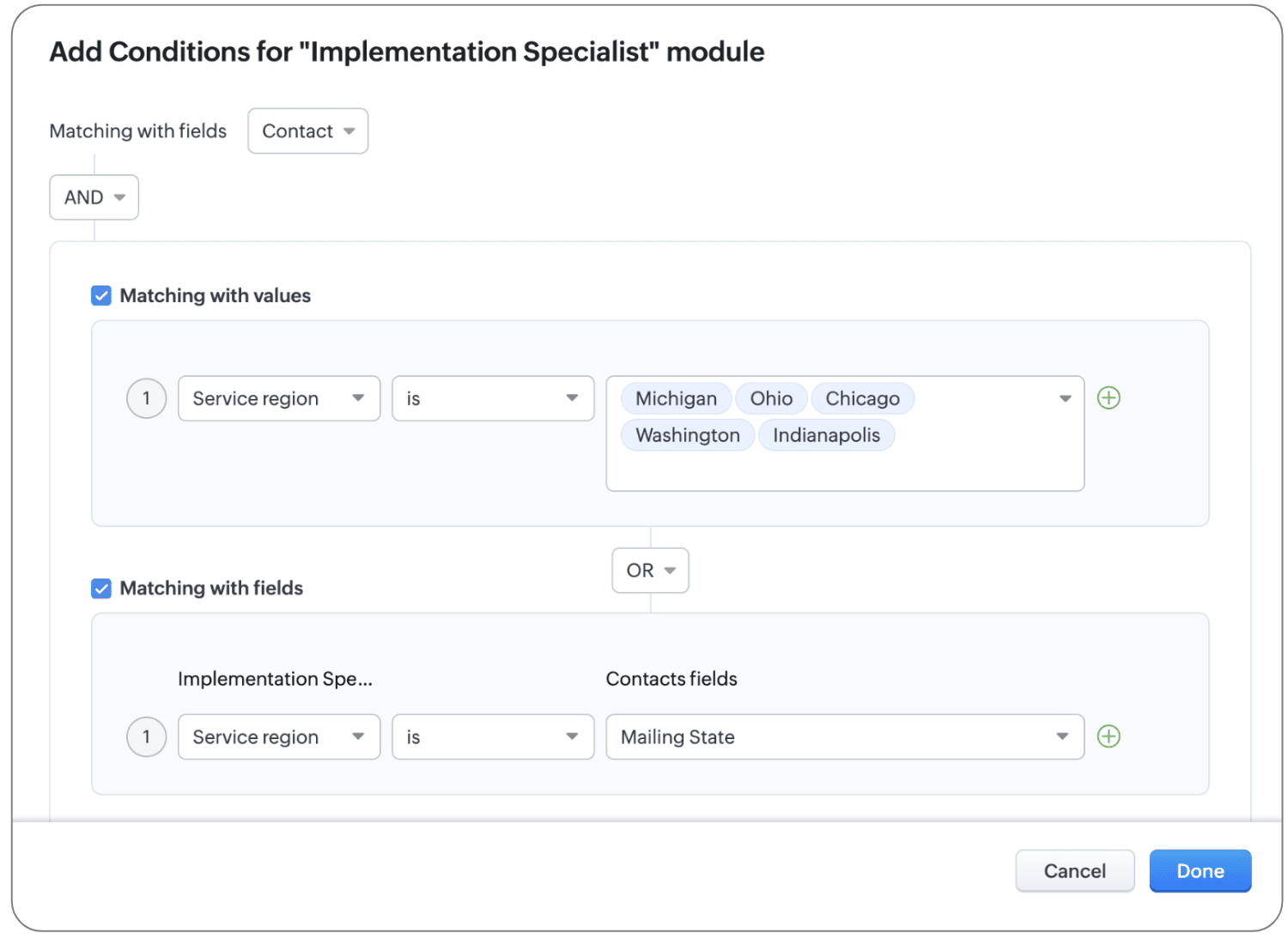
This way, both the agents directly hired by the contact and those agents that are from a desired location are displayed for portal users' reference.

Thanks to these new criteria, we've updated the UI of the configuration page as well. What used to be called Filter by column (where the lookup value is selected) has been renamed to Linked as and conditions.
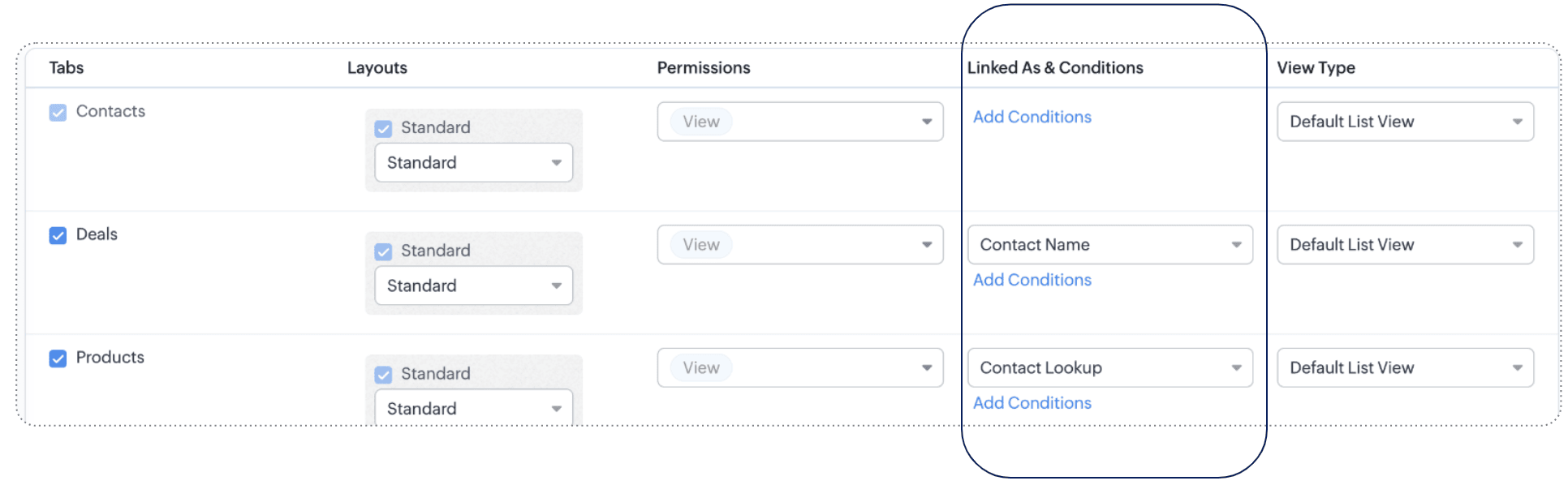
To understand the scope and impact of this enhancement, let's look at a couple more examples.

Example 1: Match with value
Let's say you sell electronics and accessories in bulk for large enterprise organizations. You've extended the following modules in portals for enterprise customers:
  • Primary module: Contacts
  • Related modules: Products, Invoices, Cases, Appointments
  • Public module: Channel partners
 
So that customers can look at all the products applicable for enterprise customers, you've formulated some criteria: Lookup and Match by value. Customer type is Enterprise.

Now clients can see their contact records, their products (thanks to the lookup connection), and products for enterprise customers (thanks to the match by value criterion), as well as invoices, cases, and appointments related to them, and, finally, all channel partners.

Example 2: Match by field
Saint Laurent Hospital is a multi-specialty hospital in Iowa. They let their patients manage their profiles, view their prescriptions, order medicines from the pharmacy, view lab results, and book appointments with doctors using a dedicated portal.

This is their setup:
  • Primary module: Patient's profile
  • Related modules: The Prescriptions module, Lab Results module, and Appointments module are related with the primary module via lookup fields, and the Doctors module via the Match by field criterion.
  • Public modules: Medicines 
As you can see, records with personal data (prescriptions, lab results, appointments) are directly linked to the patient's profile using lookup fields, and to map the doctors to the patients' ailments, the complaint field from the patient's profile is linked to doctors whose specialization is also the same as the ailment. This means that the patient can see all the doctors whose specialization matches their complaint.
(i.e.) Specialization contains Complaint. IBS specialist contains IBS

That's all for this enhancement to the Portals configuration.

We hope these criteria will enhance your clients' experiences with your business. If you have any questions or concerns, please drop a comment. Let's connect!

Release plan: This enhancement is available for users in all DCs.
Resources: Portals in Zoho CRM

Thanks and kind regards, 
Saranya Balasubramanian
    • Recent Topics

    • Zoho Books Sandbox environment

      Hello. Is there a free sandbox environment for the developers using Zoho Books API? I am working on the Zoho Books add-on and currently not ready to buy a premium service - maybe later when my add-on will start to bring money. Right now I just need a
    • Form to PDF template

      I am looking to create a Form and when information is inputted, it will merge it into a PDF template we already have. There could be multiple lines in the form and each line inputs information into a new page of a PDF template.
    • Using gift vouchers

      We would like to be able to offer a limited number of gift vouchers, of varying values, to our customers, and are looking for the best way to do this. We have looked at Coupons and Gift Certificates, but neither seem to fit the bill perfectly. Coupons:
    • Customizable UI components in pages | Theme builder

      Anyone know when these roadmap items are scheduled for release? They were originally scheduled for Q4 2025. https://www.zoho.com/creator/product-roadmap.html
    • Feature Request - Set Default Values for Meetings

      Hi Zoho CRM Team, It would be very useful if we could set default values for meeting parameters. For example, if you always wanted Reminder 1 Day before. Currently you need to remember to choose it for every meeting. Also being able to use merge tags
    • Please verify my account

      Hi, We have just launched our website and received media coverage in our country. Hundreds of users are signing up for our platform every day. We would like to send them a welcome email, but we are unable to do so because our ZeptoMail account has not
    • Subject character limit increase

      We have an occasional user case where subject lines exceed 500 characters which is the ZeptoMail imposed limit. While I understand long subject lines are not "best practice", these are particular notification emails with specific information for client
    • Conditional Field Visibility in Bigin CRM

      I would like to request support for conditional field visibility within Bigin CRM. This feature should allow administrators to configure show/hide rules for fields based on predefined criteria (e.g., field values, picklist selections, stage changes,
    • Account blocked

      Yesterday I got my Zeptomail account blocked due to too many hard bounces. My account is used exclusively for sending transactional emails (eg. your order has been shipped, a form has been filled, etc) and the sudden blocking impacted hundreds of websites
    • Nested notebooks

      Dear Sir/Madam, I would like to know if it is possible to nest notebooks. It would be very helpful when there are too many, as it would improve organization. Thank you for your response. Best regards.
    • Whats that

      Price?
    • Proactive Alert for Existing Open Tickets per Contact / Account

      Hello Zoho Desk Team, Greetings, and hope you’re doing well. We would like to submit a feature request aimed at improving agent awareness and efficiency when handling tickets in Zoho Desk. Use case When an agent opens a ticket (new or existing), it is
    • Shift-Centric View for Assigning and Managing Shifts in Zoho People

      Hello Zoho People Product Team, Greetings and hope you are doing well. This feature request is related to Zoho People - please don't move it to zoho one! We would like to submit a feature request regarding the shift assignment and management view in Zoho
    • Bring Zoho Shifts Capabilities into Zoho People Shift Module

      Hello Zoho People Product Team, After a deep review of the Zoho People Shift module and a direct comparison with Zoho Shifts, we would like to raise a feature request and serious concern regarding the current state of shift management in Zoho People.
    • Add the ability to Hide Pages in Page Rules

      Hi, We have Field Rules to show and hide fields and we have page Rules, but we can't hide a page in Page Rules so it isn't completed before the previous page (And then have the Deny Rules to prevent submitting without both pages completed), we can only
    • Ticket resolution field - can you add links, video, and images?

      Seems like the ticket resolution fields is just a text field. Any plans to add the ability to add links, images...the same functionality in the problem description box? I would like to send the customer a link to a KB article, a link to our Wiki, embed
    • Ticket Resolution - Add rich formatting, screenshots and attachments

      The resolution field only allows plain text at the moment. Many of our resolutions involve posting screenshots as evidence, it would be great for us to be able to have rich text formatting, be able to paste screenshots and add attachments in the solution
    • Remove the “One Migration Per User” Limitation in Zoho WorkDrive

      Hi Zoho WorkDrive Team, Hope you are doing well. We would like to raise a critical feature request regarding the Google Drive → Zoho WorkDrive migration process. Current Limitation: Zoho WorkDrive currently enforces a hard limitation: A Zoho WorkDrive
    • Deprecation Notice: OpenAI Assistants API will be shut down on August 26, 2026

      I recieved this email from openAI what does it means for us that are using the integration and what should we do? Earlier this year, we shared our plan to deprecate the Assistants API once the Responses API reached feature parity. With the launch of Conversations,
    • CRUD actions for Resources via API

      Hello, is it possible to perform CRUD actions through the API for Resources? We want to create a sync from Zoho CRM Car record to Bookings resources to create availabilities for Car bookings. For Test drives, not only the sales person needs to be available,
    • Stop the Workarounds: We Need Native Multi-Step Forms

      After over 17 years of community requests, I'm hoping the Zoho team can finally address the lack of native multi-page form support in Zoho Creator. This has been one of the longest-standing feature requests in the community, with threads spanning nearly
    • Feature Request - The Ability to Link A Customer with a Vendor

      Hi Finance Suite Team, Many businesses buy and sell products from the same companies or individuals. For example, a car sales business may buy a car from a member of the public, and that member of the public may also buy a new car from us. This makes
    • Kaizen #140 - Integrating Blog feed scraping service into Zoho CRM Dashboard

      Howdy Tech Wizards! Welcome to a fresh week of kaizen. This week, we will look at how to create a dashboard widget that displays the most recent blog post of your preferred products/services, updated daily at a specific time. We will leverage the potential
    • Convert Lead Automation Trigger

      Currently, there is only a convert lead action available in workflow rules and blueprints. Also, there is a Convert Lead button available but it doesn't trigger any automations. Once the lead is converted to a Contact/Account the dataset that can be fetched
    • Conditional formatting: before/after "today" not available

      When setting conditional formatting, it only allows me to set a specific calendar date when choosing "Before" or "After" conditions. Typing "today" returns the error "Value must be of type date". Is there a workaround? Thanks for any help!
    • Text snippet

      There is a nice feature in Zoho Desk called Text Snippet. It allows you to insert a bit of text anywhere in a reply that you are typing. That would be nice to have that option in Zoho CRM as well when we compose an email. Moderation Update: We agree that
    • Analytics <-> Invoice Connection DELETED by Zoho

      Hi All, I am reaching out today because of a big issue we have at the moment with Zoho Analytics and Zoho Invoice. Our organization relies on Zoho Analytics for most of our reporting (operationnal teams). A few days ago we observed a sync issue with the
    • I'm getting this error when I try to link an email to a deal inside the Zohomail Zoho CRM extension.

      When I click "Yes, associate," the system displays an "Oops!! Something went wrong" error message. I have attached a screenshot of the issue for reference.
    • CRM gets location smart with the all new Map View: visualize records, locate records within any radius, and more

      Hello all, We've introduced a new way to work with location data in Zoho CRM: the Map View. Instead of scrolling through endless lists, your records now appear as pins on a map. Built on top of the all-new address field and powered by Mappls (MapMyIndia),
    • Adding custom "lookup" fields in Zoho Customization

      How can I add a second “lookup” field in Zoho? I’m trying to create another lookup that pulls from my Contacts, but the option doesn’t appear in the module customization sidebar. In many cases, a single work order involves multiple contacts. Ideally,
    • Zoho Sheet - Desktop App or Offline

      Since Zoho Docs is now available as a desktop app and offline, when is a realistic ETA for Sheet to have the same functionality?I am surprised this was not laucned at the same time as Docs.
    • ZOHO add-in issue

      I cannot connect ZOHO from my Outlook. I am getting this error.
    • Issues with Actions By Zoho Flow

      Hi, I have a workflow that fires when a deal reaches a stage. This then sends out a contract for the client to sign. I have connected this up through Actions by Zoho Flow. Unfortunately this fails to send out. I have tracked it down to the date fields.
    • Special characters (like â, â, æ) breaking when input in a field (encoding issue)

      Hey everyone, We are currently dealing with a probably encoding issue when we populate a field (mostly but not exclusively, 'Last Name' for Leads and Contracts). If the user manually inputs special characters (like ä, â, á etc.) from Scandinavian languages,
    • Set Custom Icon for Custom Modules in new Zoho CRM UI

    • Which WhatsApp API works seamlessly with Zoho CRM?

      I’m exploring WhatsApp API solutions that integrate seamlessly with Zoho CRM for customer communication, lead nurturing, and automation. I would love to hear insights from those who have successfully implemented WhatsApp within Zoho CRM. My Requirements:
    • Marketing Automation

      L.S. Marketing Automation is and has always been part of the Zoho One bundle - according to the information provided on the Zoho Website. Why when I open Marketing Automation do I get the following message?: "Your trial has expired. We hope you enjoyed
    • What's New in Zoho Analytics - January 2026

      Hello Users! We are starting the year with a strong lineup of updates, marking the beginning of many improvements planned to enhance your analytics experience. Explore the latest improvements built to boost performance, simplify analysis, and help you
    • Can I convert multiple OLM files to Thunderbird at once?

      Yes, you can convert multiple OLM files to Thunderbird at once using the Aryson OLM file Converter. The tool supports bulk OLM file conversion, allowing users to select multiple OLM files in a single process. It preserves the original folder structure,
    • Translation from Chinese (Simplified) to Chinese (Traditional) is not working. It randomly translated. Google Translate accurately but zoho translate is not working at all

      Hi friends, The newly added language for translation. https://www.zoho.com/deluge/help/ai-tasks/translate.html "zh" - Chinese "zh-CN" - Chinese (Simplified) "zh-TW" - Chinese (Traditional) my original text: 郑这钻 (and it is zh-CN) translated traditional
    • Next Page