Introducing AI Modeler—a no-code approach to adding AI to your business applications
Forward-thinking businesses today are embracing AI to make life easier for themselves, their employees, and their customers. But if you haven't started yet, you might be concerned that your business will be left behind. Or maybe you're worried because you don't know much about AI, machine learning, or data science. Well, you can now relax—we've got you covered on all counts!
We've been hard at work lately, incorporating AI into Creator without deviating from our long-held low-code philosophy. The result of this hard work is an exciting new feature we're announcing today: AI Modeler.
What do you mean by "AI"?
Artificial intelligence is the ability of software to replicate human intellect, such as learning from experience and applying lessons learned while making decisions. While sci-fi enthusiasts and media like to portray artificial intelligence as a scary thing that'll take over the world, the reality is that we haven't reached that stage (yet!).
Instead, the current generation of AI technologies has been adopted in many ways, like providing specific benefits to different industries. In general terms, an AI model provides specific intelligence based on trained data, and can be customized to automate or optimize your business process—all with minimal human interference.
What's in it for me?
Our AI modeler includes a no-code AI builder that helps you harness the power of AI without having knowledge of programming. The AI Modeler feature will be available under the
Microservices
section. From there, you can jump into the world of AI with our ready-to-use models, which we've prebuilt and rigorously tested for your use. You'll only have to choose the application name and the form name to deploy these models—it's that easy!
Custom models allow you to build customized AI models tailor-made for your business, by providing it with unique data based on which it can work. Here, you'll need to provide the model with sample datasets relevant to your business for it to get familiarized with—this is called training
—and then you can test whether it works as intended before deploying it.
Interesting. Tell me more!
While the uses of AI are endless, we've zeroed in on a handful of popularly used models, which we believe will add immense value to your business.
The key capabilities of our AI models are:
-
Prediction
-
OCR (optical character recognition)
-
Object detection
-
Keyword extraction
- Sentiment analysis
Prediction (Custom)
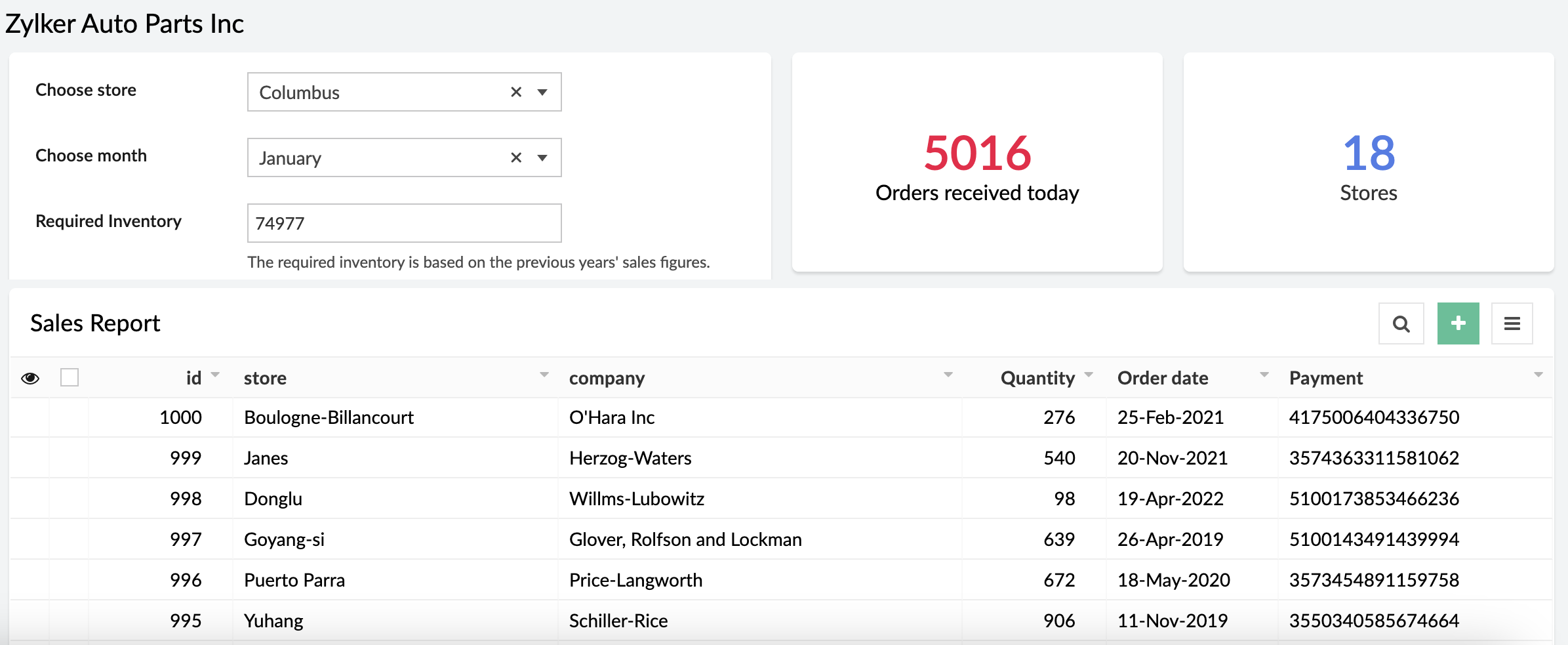
Prediction models process known results from historical data, and try to forecast future outcomes. It allows you to use data from an existing form or CSV file and predict future outcomes with just a few clicks.
Example:
A store can calculate how much inventory they need in order to meet demand during a particular sales period by providing previous years' sales data.
OCR (Ready-to-use and custom)
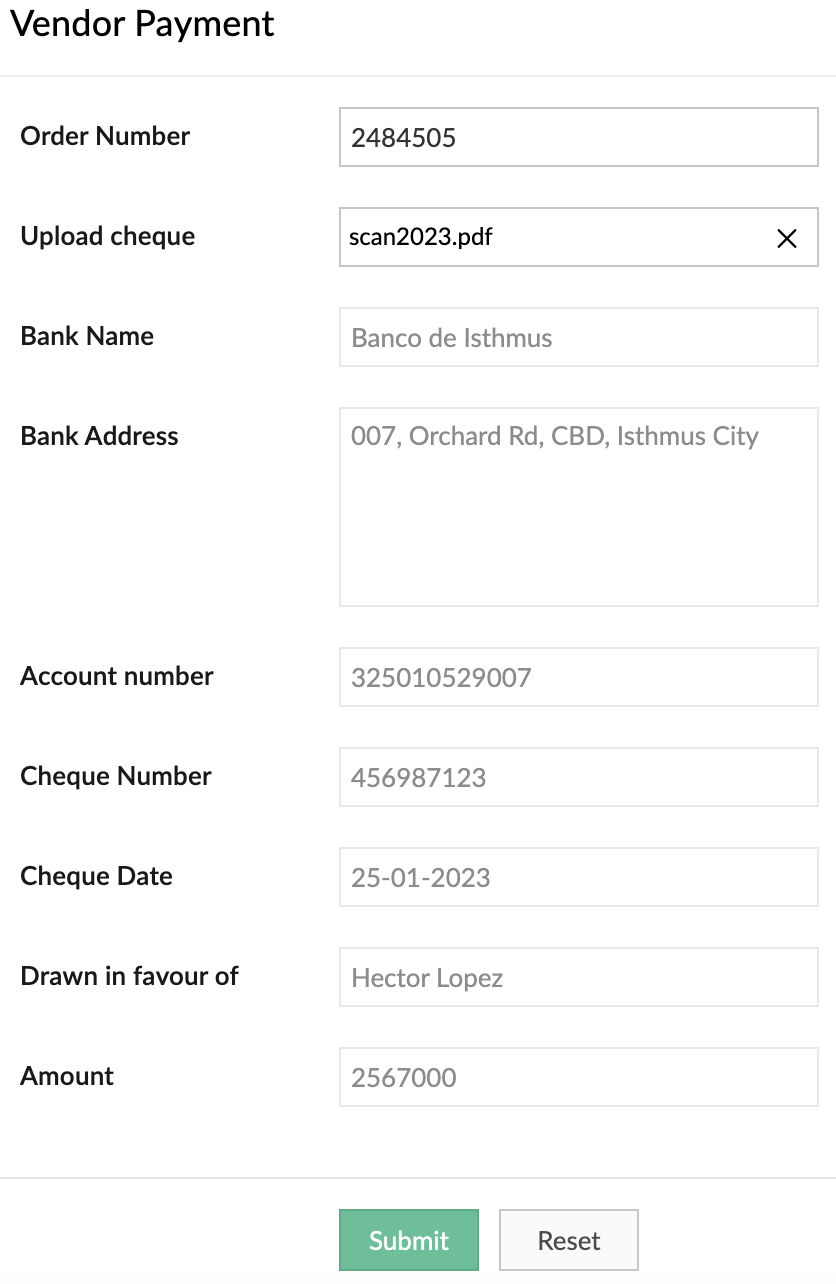
Optimize operations, eliminate repetitive manual tasks, and digitize your business by using our OCR model to extract text from images. The ready-to-use OCR model will extract all the text it identifies in the image, while you can build a custom OCR to extract specific text from images into fields in your forms. Tag the fields to the corresponding values once and eliminate manual data entry forever.
Example:
It's 2023, but many people still prefer to settle payments using checks. A business can use our custom OCR to extract details—like the bank name, check number, amount, date, and more—from the checks.
Object detection (Ready-to-use and custom)
Object detection models are used to identify specific objects in images and use them to optimize business processes. Our ready-to-use model is trained to identify common objects (like people, dogs, cars, etc). Otherwise, you can build a custom model and provide it with the training data for the objects you want to identify.
Example:
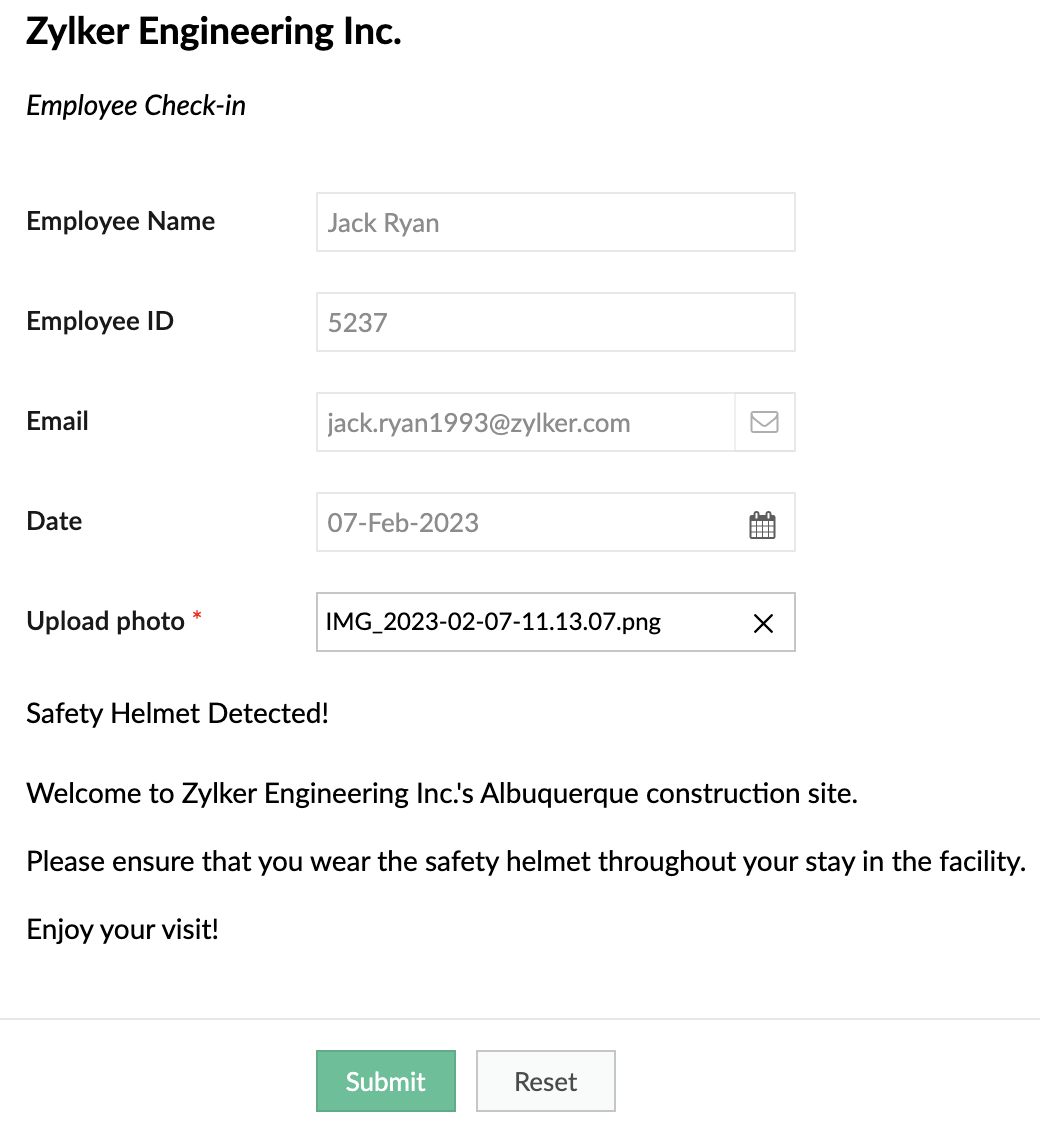
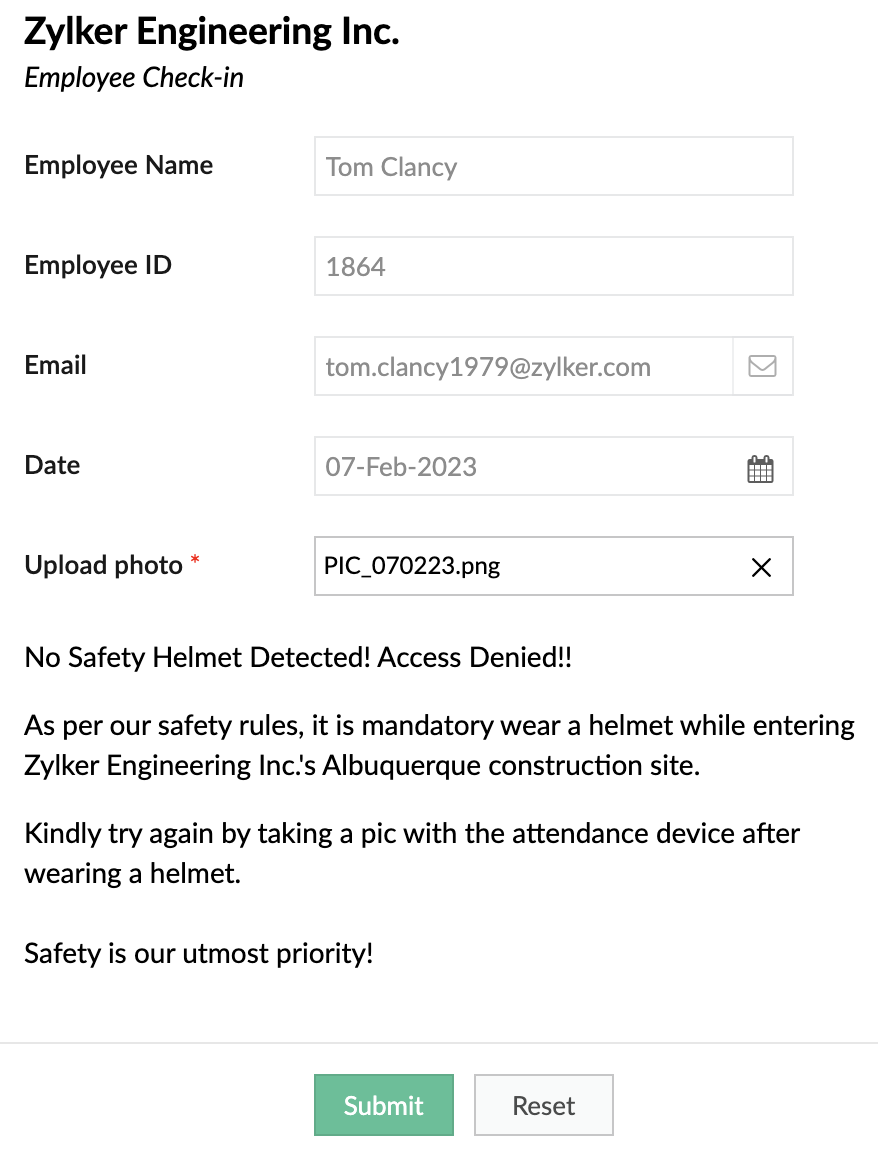
A safety-focused company can use OD models to detect things like whether its employees are wearing a helmet while entering a construction site.
When helmet is detected
When helmet is detected
When helmet is not detected:
Keyword extraction (Ready-to-use)
This functionality extracts the most important, representative words/phrases from large amounts of text data. In consumer facing industries, keyword extraction is quite helpful in analyzing customer responses, without having to go through each response manually.
Example:
An e-commerce site that sells mobile phones allows its customers to post reviews after purchase. Instead of manually going through each of the reviews, the site can use keyword extraction to gain insights automatically. They could choose to extract words like "camera", "battery", and "display" to learn more about the most discussed attributes of the product.
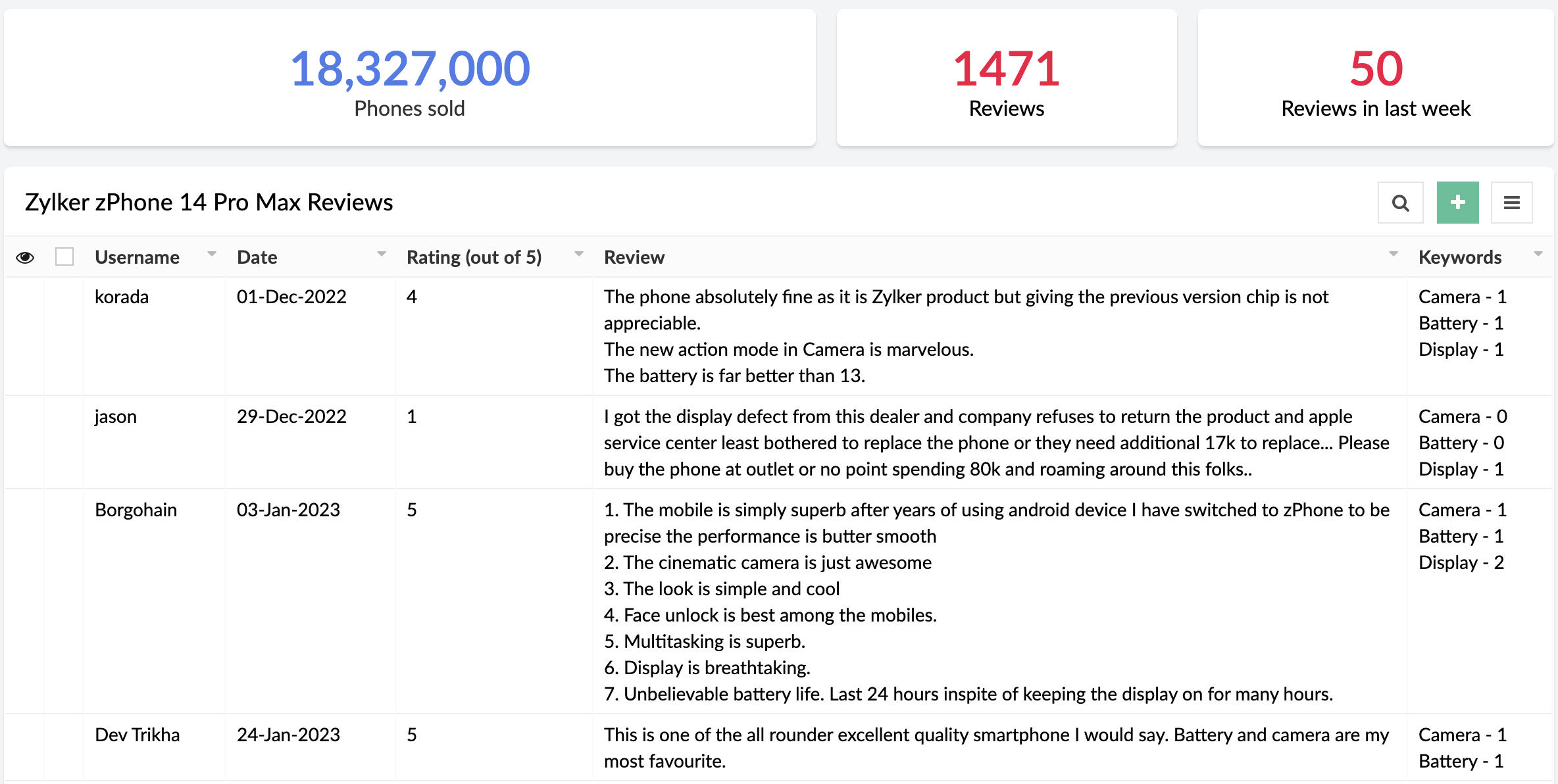
Sentiment analysis (Ready-to-use)
The sentiment analysis model analyzes text and predicts the sentiment expressed (positive, negative, or neutral). Sentiment analysis is widely used across industries to assist in analyzing customer feedback, customer support management, and social media monitoring.
Example:
A business receives a large amount of feedback on its products. It can use sentiment analysis to gather whether its products have been well-received or not.
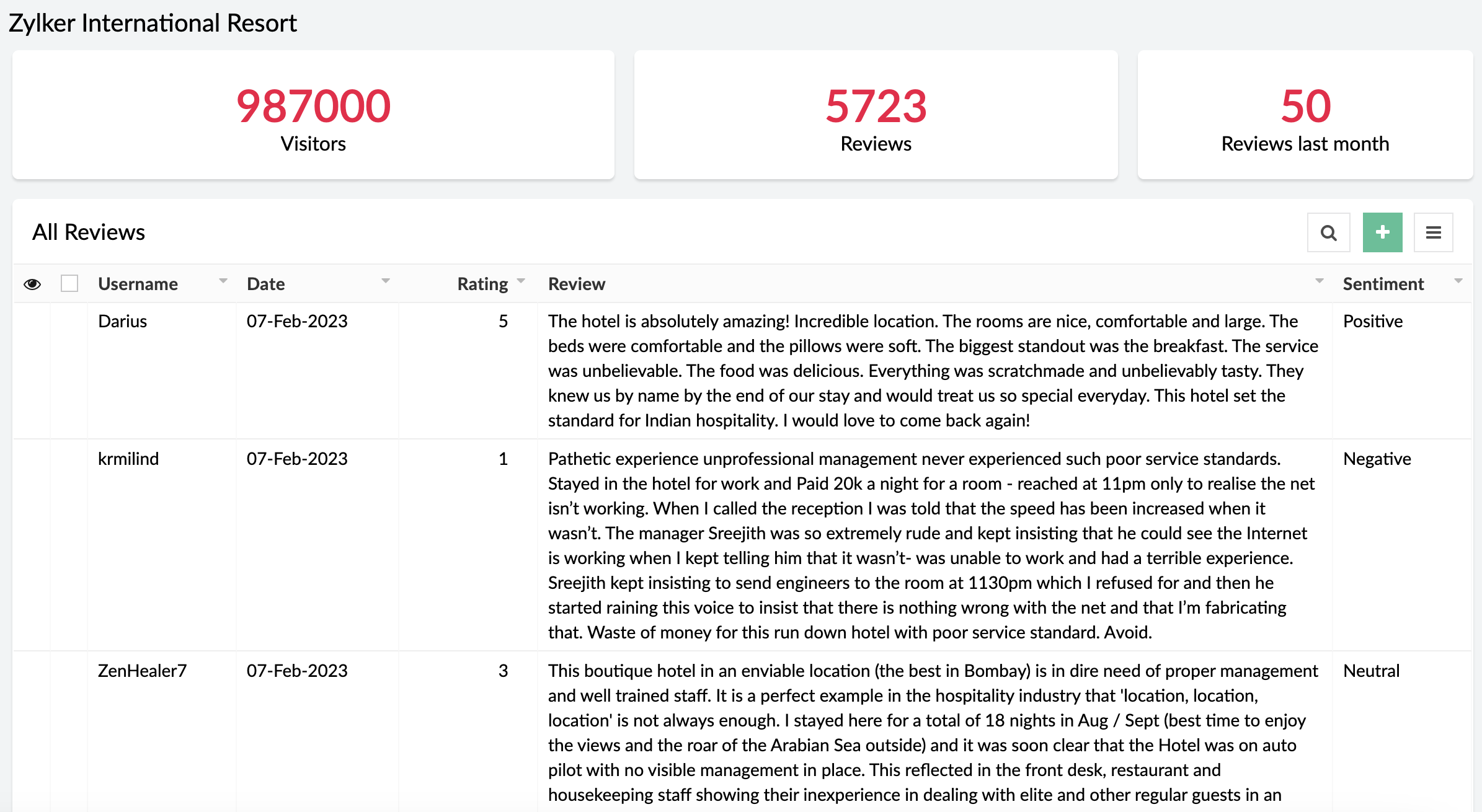
When can I get my hands on it?
Pretty soon! We're as excited as you are and will be rolling out AI Modeler to C6 users on
February 20, 2023. Once live, we'll pop in a comment below this post and also update our
Release Notes page.
Versions
-
C5
(Ready-to-use models only. Use them via the AI fields in the form builder),
C6 (Both custom and ready-to-use models as Microservices)
C6 (Both custom and ready-to-use models as Microservices)
Pricing
- Ultimate & Professional
100 custom models & 250 ready-to-use with 1,000 free AI calls per month
After exhausting the free AI calls, you'll have to get monthly add-ons for more AI calls. You can choose from the $50(50000 AI Calls / Month), $100(120000 AI Calls / Month), and $200(250000 AI Calls / Month) add-ons based on your requirement.
100 custom models & 250 ready-to-use with 1,000 free AI calls per month
After exhausting the free AI calls, you'll have to get monthly add-ons for more AI calls. You can choose from the $50(50000 AI Calls / Month), $100(120000 AI Calls / Month), and $200(250000 AI Calls / Month) add-ons based on your requirement.
DCs
- US, EU, AU, IN, CN
Help documentation
In the meantime, you can go through our comprehensive set of help docs to learn the nitty-gritty of our AI models.
Our inbox is always open. Feel free to send your feedback to
support@zohocreator.com!
Regards,
Zoho Creator Team
Topic Participants
Ashwin Vishal R
Roberto Ríos
Ideal Calibrations
eminomartin61
Phillip Briski
Sticky Posts
Introducing Zoho Creator's 2025 Release Projection 2
Hello Creators! I'm Prakash, from the Creator product management team, and today I'm delighted to unveil our next set of features as part of Release Projection 2 for 2025. With thoughtful analysis and planning, we've curated powerful new capabilitiesZoho Creator - 2023 Release Projection 1
Hello everyone! A very Happy New Year to you and your family. Hope you're all good and having a great time using Zoho Creator to make your lives easier and your businesses prosper. 2022 was an action-packed year for us at Creator, and we hope to continueZoho Creator User Group meetups in a city near you! - Oct - Nov, 2023
Greetings from the Zoho Creator team! We're hosting a series of Zoho Creator meetups in various cities across the globe, and we'd love to meet you there! Our meetups are a great opportunity to network with industry peers, exchange ideas and best practices,Zoho Creator - 2023 Release Projection 2
Hello everyone! Time truly flies when you're having an incredible journey, and today we mark the completion of an eventful and action-packed six months. It feels like just yesterday when we embarked on this adventure together with the launch of our newUpcoming Updates - August 2022
Hi all, Greetings from the Zoho Creator team! Today we've got news for you on some exciting updates. And rest assured— there’s more to come! In this post, we'll be going over the upcoming features and improvements for this month as mentioned below. A
Recent Topics
Error AS101 when adding new email alias
Hi, I am trying to add apple@(mydomain).com The error AS101 is shown while I try to add the alias.an issue in Zoho CRM where the workflow rule is not triggering
H I’m currently facing an issue in Zoho CRM where the workflow rule is not triggering when a new lead is created through a webform. I’ve double-checked the criteria and field updates, everything seems fine but it still doesn’t fire. Has anyone faced this401 Unauthenticated Error – Zoho CRM to Google Sheets Integration
Hi I'm building an Automation Function in Zoho CRM using Deluge that appends contact data from Zoho CRM into a Google Sheet whenever a new contact is created. WHAT I'VE DONE: I created a connection in Zoho CRM (Developer Hub → Connections) with the followingPower up your Kiosk Studio with Real-Time Data Capture, Client Scripts & More!
Hello Everyone, We’re thrilled to announce a powerful set of enhancements to Kiosk Studio in Zoho CRM. These new updates give you more flexibility, faster record handling, and real-time data capture, making your Kiosk flows smarter and more efficientIncome not showing in direct bank feed
Hi, I am trying to enter income without knowing or mentioning customer, as i am told, my client wants single or cash basis accounting but i seriously struggling......................I am not able to check in and checkout in zoho people even location access allowed
This issue i am facing in mackbook air m1, I allowed location in chrome browser and i also tried in safari but getting similar issue. Please have a look ASAP.Preview future shift rotation in Shift Schedule
Hi, What if, instead of the current behavior, the Shift Rotation feature in Zoho People allowed users to preview future shift schedules before the scheduler execution? Currently, when a shift rotation is configured (for example, monthly rotation), theAutomatically Update Ticket Status in Zoho Desk Based on Actions in Zoho Projects
Hi Zoho Desk Team, Hope you’re doing well. We’re using the Zoho Desk–Zoho Projects integration to manage tasks related to customer tickets, and it works well for linking and tracking progress. However, there are a few important automation capabilitiesSign Out
Hello, I have a doubt with Permalink. I have a view created with critera to show only the records belonging to the user who has sign in. The problem is that the different users use the same computer and some times the user login keep signed, and when I send the permalink (by email) of the view, the users enter with other login signed. Moreover the permalink view doesn�t allow to do a log out. May I add something in the permalink to request always sign in? Sorry for my English. Many thanks! RegardsAnnouncing new features in Trident for Windows (v.1.39.4.0)
Hello Community! Trident for Windows just received a major update, with a range of capabilities that focuses on strengthening communication and simplifying workflows. Let’s dive into what’s new! Upload email attachments to WorkDrive. Until now, you couldIntroducing Automatic Field Addition (Text Tags) in Zoho Sign
Hello, Today we are excited to announce the general availability of automatic field addition (text tags) feature in Zoho Sign. Now, you can now add text tags in the content of your documents and Zoho Sign will automatically add the corresponding fields when they are uploaded for the signing process. For example: when you add text tags to your sales orders, new employee contracts, and NDAs, Zoho Sign will add the corresponding fields when these documents are uploaded for the signing process. If youIntroducing Built-in Telephony in Zoho Recruit
We’re excited to introduce Built-in Telephony in Zoho Recruit, designed to make recruiter–candidate communication faster, simpler, and fully traceable. These capabilities help you reduce app switching, handle inbound calls efficiently, and keep everyWrite-Off multiple invoices and tax calculation
Good evening, I have many invoices which are long overdue and I do not expect them to be paid. I believe I should write them off. I did some tests and I have some questions: - I cannot find a way to write off several invoices together. How can I do that,Splitting Transactions in Zoho Books
I have read in past forum posts that the ability to split bank transactions would likely be implemented - it's definitely a typical accounting program feature. I'm new to Zoho and thought I'd found nirvana until I realized this feature doesn't seem toStatement Aging On Cutomer Statement
Hello, Is it possible to put aging on customer statements? Current 1-30days 31-60days 61-90days 91-120days Over 120 days. See attached image from another accounting package. Many customers pay off a statement and clear older invoices.Unveiling the next iteration of Ask Zia in Zoho CRM: An all-new chat interface, conversation history, actions, and much more
Your CRM assistant just leveled up. Zoho CRM's Ask Zia functionality now offers a more conversational and context-aware experience to help you not just understand your data, but act on it—all from one chat window. With its redesigned interface and expandedResponse rate and time on social media
Hello, I just want to know if it's possible to manage the response rate and response time from my social media on zoho social ? I don't see any statistical reports on the online scoreboard ? Thank you in advance for your response and sorry if the question has already been postedWhatsapp BOT with CRM
Hello, how do you use Whatsapp integrations in zoho CRM?Ability to translate Zoho CRM Kiosks
Hi team, Is support for translating kiosk text and screen names in the Zoho CRM translation tool planned on the roadmap? Thanks,Whatsapp Limitation Questions
Good day, I would like to find out about the functionality or possibility of all the below points within the Zoho/WhatsApp integration. Will WhatsApp buttons ever be possible in the future? Will WhatsApp Re-directs to different users be possible basedEditing the list of Categories in the Categorize Manually section of Banking in Zoho Books
Hi, I need to create two new Categories called Withdrawals and Deposits to categorize payments in a bank account. How do I edit the Categories list?Can I write a check in Zoho Books with no associated bill?
This currently does not seem possible, and I have a client that desperately needs this function if I am able to convert them with Quickbooks. Thank you in advance for your reply.Internal Fillable Contract with Zoho Writer (Before Sending to Client)
Hi everyone, I’m trying to automate the following process in Zoho CRM and would appreciate some guidance. Process: When a Deal moves to a specific stage, CRM triggers an automation. CRM sends a contract template to an internal team member so they can[Free Webinar] Intelligent document processing with Zoho RPA
Hello everyone! Greetings from the Zoho RPA team! We're excited to invite you to our upcoming webinar on intelligent document processing with Zoho RPA, where we'll introduce powerful new capabilities designed to make your automation journey smarter, faster,Enhancements for Currencies in Zoho CRM: Automatic exchange rate updates, options to update record exchange rates, and more
The multi-currency feature helps you track currencies region-wise. This can apply to Sales, CTC, or any other currency-related data. You can record amounts in a customer’s local currency, while the CRM automatically converts them to your home currencyWhen I schedule calendar appointments in zoho and invite external emails, they do not receive invites
Hello, We have recently transitioned to zoho and are having a problem with the calendar feature. When we schedule new calendar appointments in zoho the invite emails aren't being sent to the external users that we list in participants. However, this worksSend emails directly via Cases module
Greetings all, The ability to send emails from the Cases module, which users have been eagerly anticipating, is now available, just like in the other modules. In Zoho CRM, Cases is a module specifically designed for managing support tickets. If your organizationWebinar Alert: Supercharge landing pages with data insights | Zoho LandingPage
Every visitor to your landing page leaves behind valuable data, but are you leveraging it to improve conversions? Join our expert-led Landing Page Analytics webinar to learn how to track, analyze, and optimize landing page performance with Zoho LandingPage’sBulk Deletion of Zoho Projects Using Node.js and Zoho Projects API
Zoho Projects currently does not provide a built-in option to delete multiple projects in bulk from the UI. When working with testing environments or large numbers of temporary projects, deleting them one by one becomes time-consuming. To address this,Show unsubscribed contacts ?
Hello, I would like to display the unsubscribed contacts. Unfortunately, I do not have this subscription type as described in the documentation (https://help.zoho.com/portal/en/kb/marketing-automation-2-0/user-guide/contacts/contact-management/articles/subscription-type-24-1-2024#Subscription_Type_field.)Track Marketing Automation Campaigns in Zoho CRM
Hello, I've been searching but haven't found the exact answer to this question. I am looking to track Marketing Automation email campaigns and activities inside of Zoho CRM. Use Case: Action: Prospect Submits A Lead Form Outcomes: Prospect created inValidation rule for Date field
The condition settings for a Date field are are absolutlly usless. Conditions can only be set for a specific date, which is logically ineffective in most cases. When setting a condition for a Date field, users usually need to compare the value relativeEasily map shift data fields during user imports
Greetings all, You can now include all your shift-related data for your users without any hassle during user imports. With this enhancement, the Map Import Fields to Zoho CRM option includes all shift-related fields: Current Shift, Next Shift, and ShiftUnable to send
Hello, I am unble to send any single email during the whole time due to the Zoho IP 136.143.188.16 being bloked by SpamCop.net Please help can somebody help me?Adding new data to the sheet with most recent data being added to top row.
I am using a form that I built from within sheets. When the form is submitted, is it possible to have the data entered in (for example) row 2 (since row 1 is the heading) instead of being added into the next available row which should be hundreds ofHow do you arrange order in which the speakers are listed in a session once they have been selected?
Probably another simple thing I've missed but I can't find how to arrange the order in which the speakers are listed in a session once they have been selected. We usually want the speakers listed alphabetically by last name, but sometimes not. Once theProduct Updates in Zoho Workplace applications | February 2026
Hello Workplace Community, Let’s take a look at the new features and enhancements that went live across all Workplace applications for the month of February. Zoho Mail Organize Personal Notes with Collections You can now create collections under My PersonalIntroducing note actions and dynamic visibility in Kiosk Studio
Hello all, We are introducing enhancements to Kiosk Studio that will improve the product scope and meet your custom needs more precisely. What's new? Add notes as Actions: You can add notes to CRM records as kiosk Actions, as well as insert merge fieldsRegarding the Recipient Email change
I was not being able to change the Recipient email. Kindly resolve the problemRequest to Customize Module Bar Placement in New Zoho CRM UI
Hello Support and Zoho Community, I've been exploring the new UI of Zoho CRM "For Everyone" and have noticed a potential concern for my users. We are accustomed to having the module names displayed across the top, which made navigation more intuitiveNext Page