Introducing Lead Capture: Empower exhibitors to capture leads effortlessly
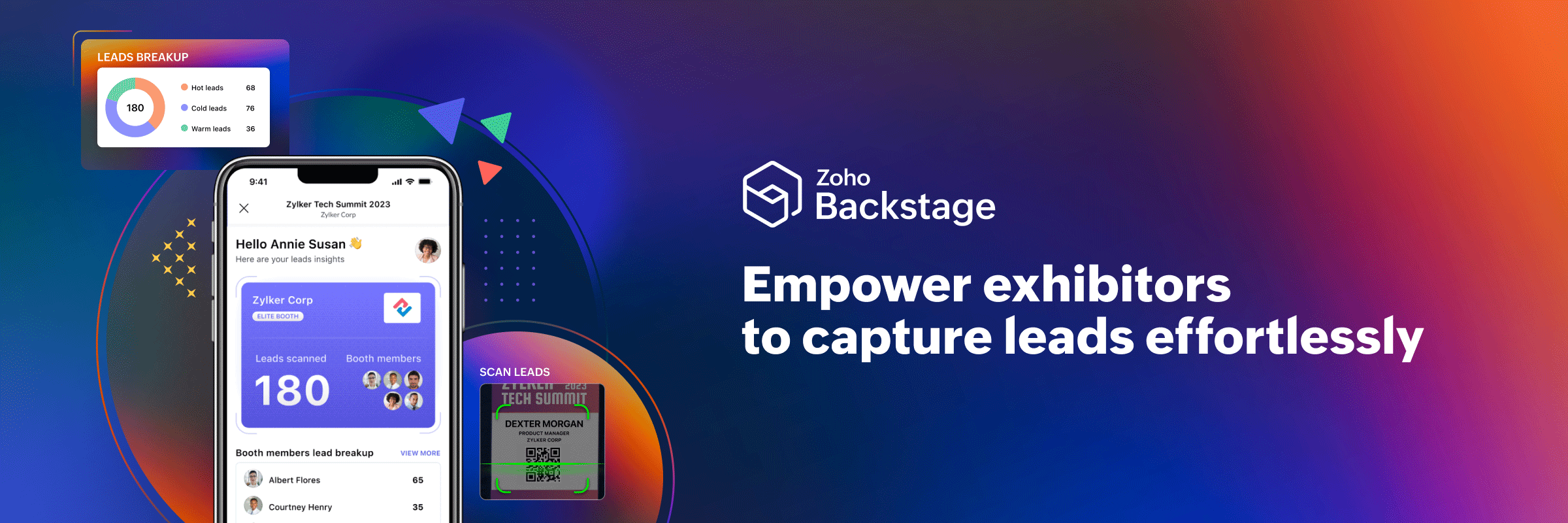
Introducing Lead Capture: Empower exhibitors to capture leads effortlessly


Events provide a great opportunity for exhibitors to generate awareness and engage with potential customers. Efficiently distributing attendee information to exhibitors through a seamless and secure way is of paramount importance.

Introducing Lead Capture in Zoho Backstage to help exhibitors streamline the collection, qualification, and management of leads. So how can your exhibitors benefit from using this feature?

Manage access control
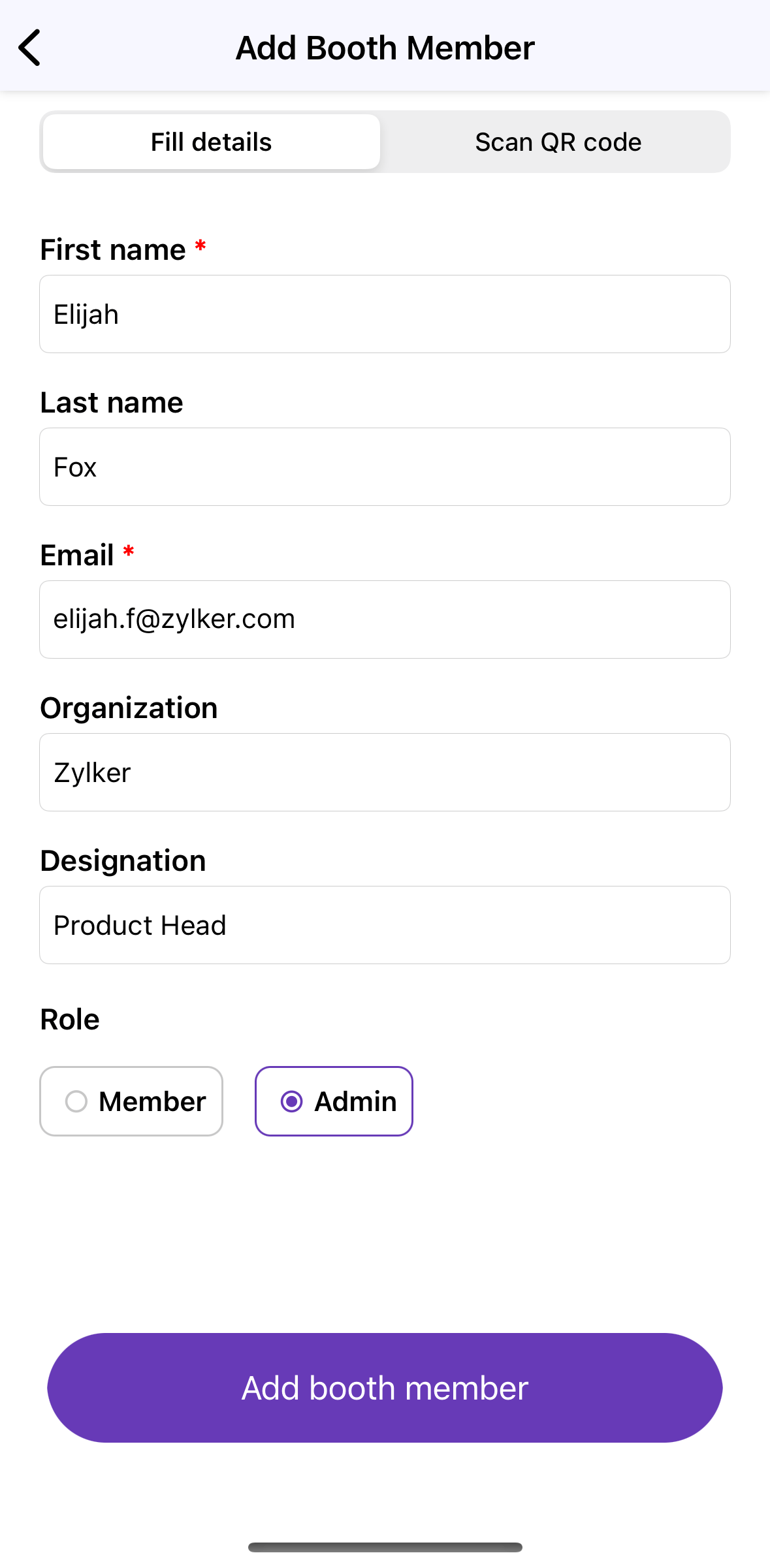


Stay organized by managing booth members and their access permissions, which can be set at the category level, giving you to have granular control over which exhibitors have access to the Lead Capture tool. Exhibitors can invite members and add their details on the go right from the mobile app. When adding booth members, assigning them a role—admin or member—will also tailor their access and provide them with the appropriate level of permission.

Capture leads instantly
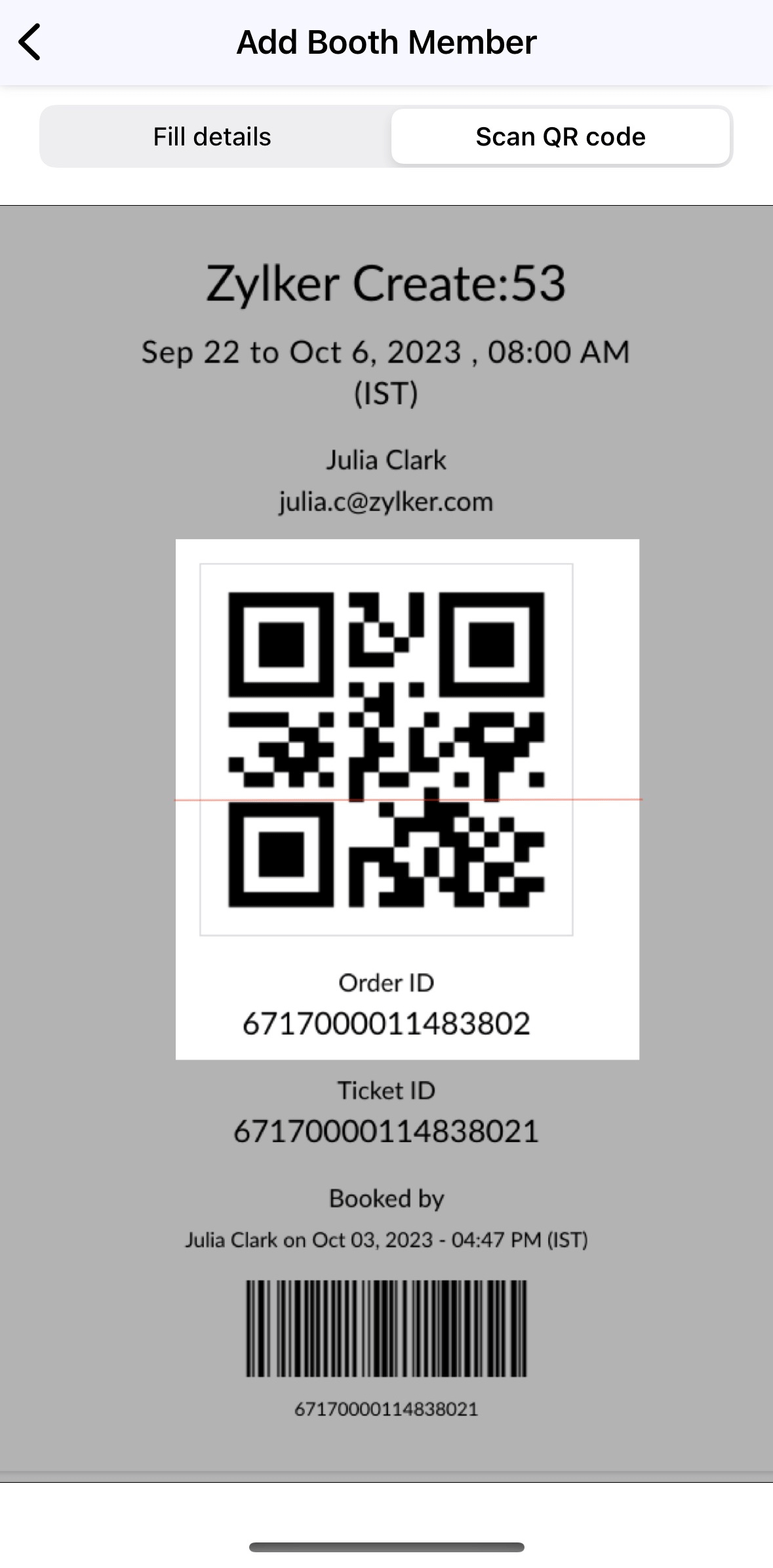

Move away from manual data entry and improve exhbitor-attendee interactions with higher ROI for exhibitors. Leads can be added swiftly and accessed digitally using the mobile app. The My leads option in the left panel in an event can be used to open Lead Capture. A participant's QR code can be scanned to fetch their lead information. With two scanning options available—Quick scan and Scan and qualify—these details can be captured instantly.

Qualify leads with additional notes
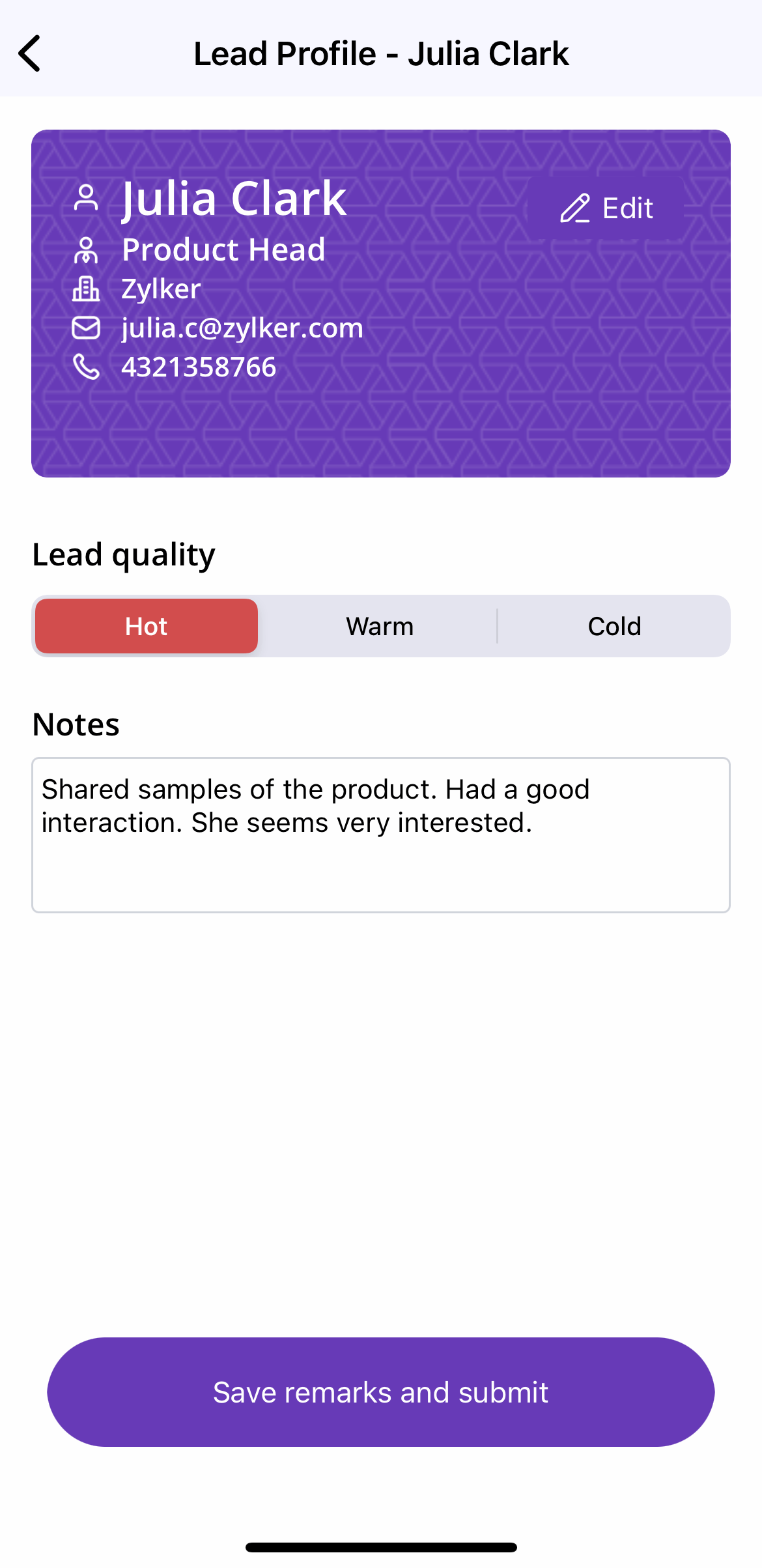


With the Quick scan option, only the QR code needs to be scanned in order to save the lead to your list. The lead quality will automatically be set as hot. With the Scan and qualify option, simply review pre-filled lead details, rate the lead's quality, and provide any additional notes or insights about your conversation. Recording notes specific to each lead can empower exhibitors to tailor their approach for future follow-up efforts, increasing the probability of converting prospective leads to customers.

View collected lead summary 
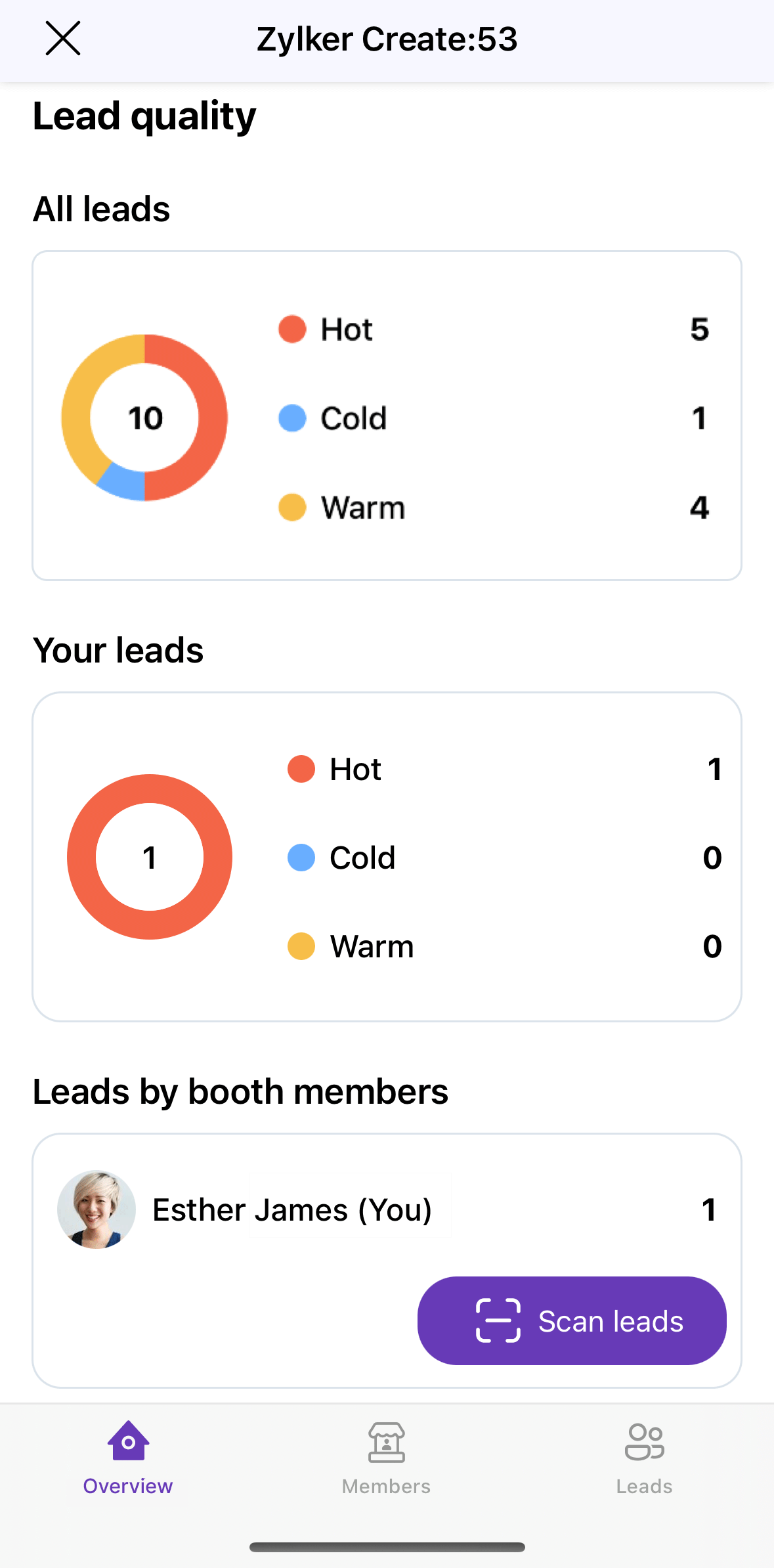


Lead reports can be viewed in real time as leads are captured at the event. Exhibitors can view individual lead profiles to get a comprehensive view of each attendee.

Booth members can filter and segment leads based on criteria such as lead quality and the booth member who captured the lead.

The lead list can also be kept up to date with the flexibility to edit saved information. Updates or corrections made to entered details will maintain its accuracy and relevancy. Also, when a particular lead no longer fits the desired customer profile, they can be deleted.

Securely export leads
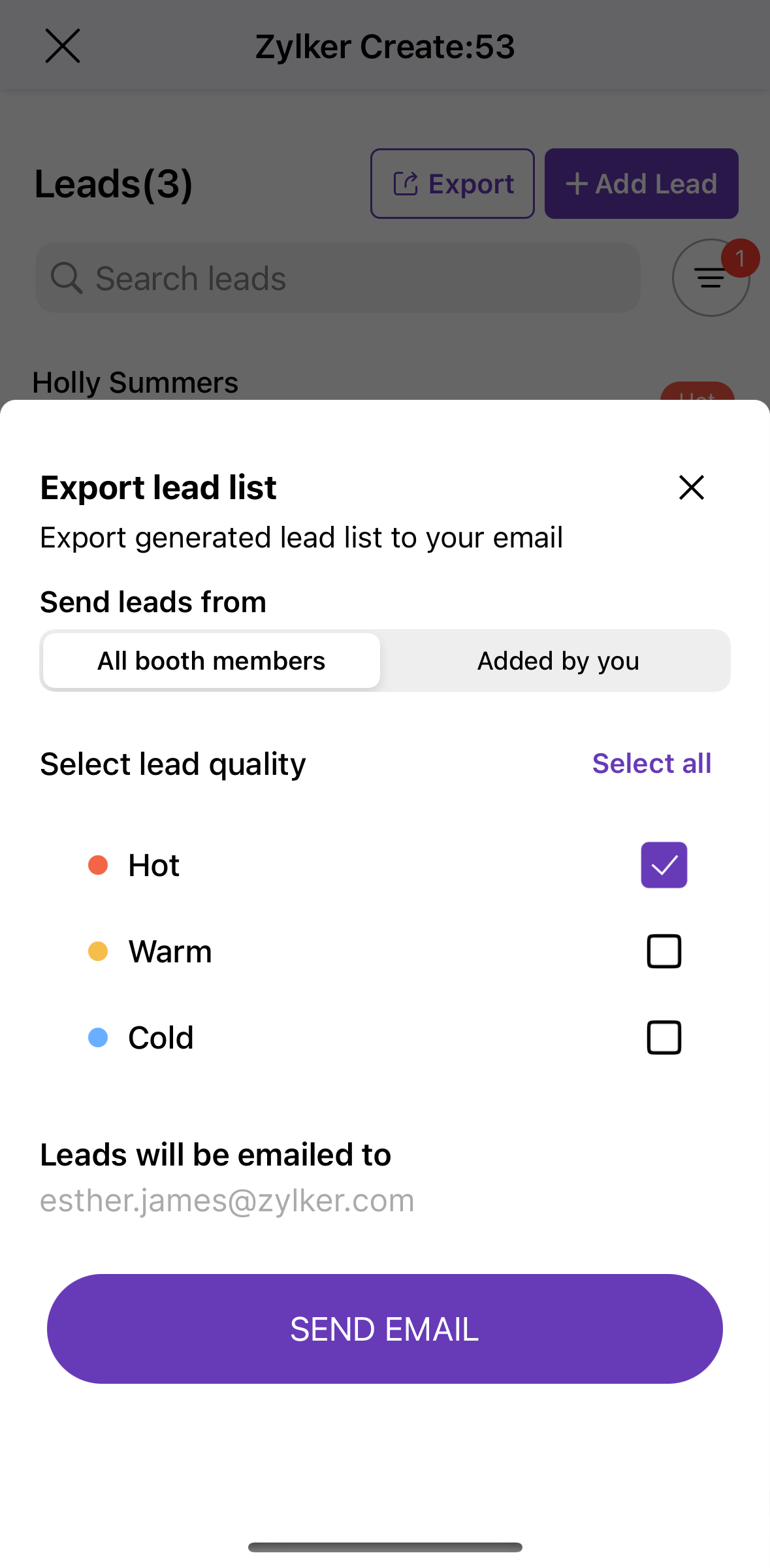


Finally, you can safely export the lead list directly by email. As an enhanced security measure, the lead list is sent as a password-protected email attachment. Only booth admins will be allowed to export the report. This can then be selectively shared with the people who are authorized to access the information.

Equip exhibitors at your next event with Lead Capture and let us know how it went in the comments below. We're always looking for feedback on how we can improve our product to serve your needs better. You can also start a discussion about this in our community or write to us at support@zohobackstage.com for any product-related questions.
 
Happy organizing!

    • Sticky Posts

    • Important notice: Changes in sender domains

      Hello Backstage users, This is a heads-up about a major change with sender domains in Zoho Backstage. In response to Google's new guidelines for email senders, Backstage won't be able to send emails with the sender domain "gmail.com" or "googlemail.com".
    • Announcing Backstage OnAir, our in-house virtual events solution

      These past months have seen a huge rise in the number of virtual events with some of the biggest events of the year going online. Though there's little possibility for virtual events to completely replace in-person ones, COVID-19 has shown how flexible
    • Introducing the mobile app for event organizers

      It doesn't matter if you're planning your first trade show or an annual executive retreat—organizing an event requires your undivided attention. This is especially true on event day, when things can quickly get out of hand. So how can you stay on top of everything happening at your event? Introducing the Zoho Backstage for Event Organizers mobile app, for Android and iOS—designed to improve and simplify your event management. Getting things started on time, checking in attendees on event day, following
    • Announcing Zoho Backstage: Your complete event management software

      With just a few months till the event, you're still racking your brain. Did you advertise to the right audience? Is your event website design appealing? How will you keep attendees engaged and interested during sessions? It doesn't matter if you're organizing
    • Recent Topics

    • How to compare a subform lookup field that allows multiple entries when edited

      I have a form with a subform with multiple fields. One of the fields is a lookup field that allows a multi select. On edit validation, I want a workflow to execute only when the entries in that subform field has changed. The old. function is not working
    • Issue with WhatsApp Template Approval and Marketing Message Limit in Zoho Bigin

      We are facing issues while creating and using WhatsApp message templates through Zoho Bigin, and we request your clarification and support regarding the same. 1. Utility Template Approval Issue Until December, we were able to create WhatsApp templates
    • How to install Widget in inventory module

      Hi, I am trying to install a app into Sales Order Module related list, however there is no button allow me to do that. May I ask how to install widget to inventory module related list?
    • Zoho Social - Feature Request - Reviewer Role

      Hi Social Team, I've come across this with a couple of clients, where they need a role which can review and comment on posts but who has no access to create content. This is a kind of reviewer role. They just need to be able to see what content is scheduled
    • Zoho Social - Feature Request - Non-US Date Format

      Hi Social Team, I have noticed that there is no option to change the date format from US mm/dd/yyyy to others like dd/mm/yyyy. It would be great to see this added as the platform matures. Thanks for considering this feedback.
    • Drop Down Value

      Hi, May I know why Zoho Flow treat this drop down as number and not as string. If so, how can I fetch the right value for filtering. This field is from Creator, in Creator upon checking by default it is a string since it's not a lookup field.
    • Zoho CRM's mobile apps: A 2025 Recap

      2025 marked a year of steady progress for Zoho CRM's mobile apps. We rolled out several updates and features to improve usability and make everyday CRM work a lot easier to manage. Here’s a look back at some of the key releases from 2025. Android releases
    • Zoho → ShipStation Integration – Sales Order–Driven Fulfilment Workflow

      Hello All, I’m reaching out to explore the best way to integrate a shipping tool into our inventory which will speed our process up. We are looking to integrate ShipStation into our existing order-to-fulfilment workflow, as we’re keen to standardise on
    • Facebook follower count doesn't match FB Analytics

      Hi all, I am wondering if anyone else has issues with follower counts for Facebook not matching FB's native analytics tool. On the Zoho dashboard, it's showing 1,007, but FB shows 1,060. All the other channels match up. Any insights are much appreciated!
    • Unable to mass update a picklist field

      Hello, I have the records within our Accounts module divided between two account types: Parent Accounts & Member Accounts. I am attempting to mass update accounts from one picklist value to the other (within other specific criteria in our custom fields)
    • Meta and Facebook data report discrepancy

      I have been currently gathering manually facebook follower data thru meta. In zoho marketing plus the social media reporting only allows for page likes, and so there is a discrepancy with the data. please the difference in files attached. Is there way
    • Business Day Logic Update: More Accurate Scheduling for Your Workflows

      Hello everyone, We’re improving how business-day calculations work in workflows, especially when triggers happen on weekends. This update ensures that offsets like +0, +1, and +2 business days behave exactly as intended, giving you clearer and more predictable
    • Develop and publish a Zoho Recruit extension on the marketplace

      Hi, I'd like to develop a new extension for Zoho Recruit. I've started to use Zoho Developers creating a Zoho CRM extension. But when I try to create a new extension here https://sigma.zoho.com/workspace/testtesttestest/apps/new I d'ont see the option of Zoho Recruit (only CRM, Desk, Projects...). I do see extensions for Zoho Recruit in the marketplace. How would I go about to create one if the option is not available in sigma ? Cheers, Rémi.
    • Unlocking New Levels: Zoho Payroll's Journey in 2025

      Every year brings its own set of challenges and opportunities to rethink how payroll works across regulations and teams. In 2025, Zoho Payroll continued to evolve with one clear focus: giving businesses more flexibility, clarity, and control as they grow.
    • Can I export all attachments from Zoho CRM?

      Can I export all attachments from Zoho CRM?
    • Please can the open tasks be shown in each customer account at the top.

      Hi there This has happened before, where the open tasks are no longer visible at the top of the page for each customer in the CRM. They have gone missing previously and were reinstated when I asked so I think it's just after an update that this feature
    • What's new in Zoho Sheet: Simplify data entry and collaboration

      Hello, Zoho Sheet community! Last year, our team was focused on research and development so we could deliver updates that enhance your spreadsheet experience. This year, we’re excited to deliver those enhancements—but we'll be rolling them out incrementally
    • Displaying only unread tickets in ticket view

      Hello, I was wondering if someone might be able to help me with this one. We use filters to display our ticket list, typically using a saved filter which displays the tickets which are overdue or due today. What I'd really like is another filter that
    • Community Digest — Noviembre y Diciembre 2025

      ¡Hola, Comunidad de Zoho en Español! Cerramos el año de la mejor forma con nuestro último Community Digest de 2025, donde podrás encontrar las últimas novedades de nuestros productos. ¿Todo listo para empezar 2026 con el mejor pie? ¡Vamos a ello! Zoho
    • Passing the CRM

      Hi, I am hoping someone can help. I have a zoho form that has a CRM lookup field. I was hoping to send this to my publicly to clients via a text message and the form then attaches the signed form back to the custom module. This work absolutely fine when
    • Zoho Projects Plus’ 2025- the year we launched

      We’ve been building project management tools for the past 19 years, and a question we often hear is: Different teams in our organization prefer different project management methods; while the development team prefers agile, the marketing and sales teams
    • Why can't we change the Account type from an Expense to an Asset?

      Like the question. Why in QuickBooks for example if I mistakenly created an account as an expenses and I already captured information in those accounts, I can just change the account type from expense to asset
    • Move email between inboxes?

      Is it possible to move emails from one team inbox to another? We would like to be able to have a single "catch-all" inbox for incoming requests, and then move the email to the appropriate department inbox. I was hoping we would be able to accomplish this
    • Zoho Books emails suddenly going to Spam since 11 Nov 2025 (Gmail + now Outlook) — anyone else?

      Hi everyone, We migrated to Zoho Books in July 2025 and everything worked fine until 11 Nov 2025. Since then, Zoho Books system emails are landing in customers’ Spam (first Gmail, and now we’re seeing Outlook/Office 365 also starting to spam them). Impacted
    • Default Tagging on API-generated Transactions

      If one assigns tags to an Item or Customer, those tags get auto-populated in each line item of an Invoice or Sales Order when one creates those documents. However, if one creates the Sales Order or Invoice via the API (either directly coding or using
    • How do you print a refund check to customer?

      Maybe this is a dumb question, but how does anyone print a refund check to a customer? We cant find anywhere to either just print a check and pick a customer, or where to do so from a credit note.
    • Data Import | Zoho Analytics Custom Query Window Size

      Please increase the window size for the Custom Query Data Import. It's impossible to work with such a small query window.
    • Company Multiple Branch/ Location Accounting

      Hi All, anyone know whether company can maintain their multiple Branch Accounting in Zoho  Books. It will be chart of Accounts & Master Data will be same but different report available as per per Branch. Thanks & regards, Vivek +91 9766906737
    • Zoho Books Invoices Templates

      It would be really helpful to have more advanced features to customise the invoice templates in Zoho Books. Especially I´m thinking of the spacing of the different parts of the invoice (Address line etc.). If you have a sender and receiver address in
    • Zoho Tracking Image location

      So we've been having an issue with tracking email opens. Specifically in Gmail. Our emails are not that long either, maybe 4 sections of image/250 characters of text/button per section.  But all my test accounts I used via Gmail we're showing opens. But then come to find out the tracking image is at the very bottom of the email. So If the message is clipped (It always just clips our social icons on the bottom) and the user doesn't click the show more button it never tracks the open.  Looking at other
    • Support for Developing Zoho Recruit Extensions via Zoho Sigma

      Hi, I’m interested in building an extension for Zoho Recruit using Zoho Sigma. However, when I navigate to Sigma and attempt to create a new extension (via the "New Extension" option), Zoho Recruit does not appear as a listed service—only options like
    • Email Administrators! Join our tips & troubleshooting series

      Greetings to all the admins out there! This announcement is exclusively for you. As we step into the New Year, we’re excited to start a dedicated series of admin-specific tips curated to support you. These posts will help you overcome everyday challenges
    • Notes badge as a quick action in the list view

      Hello all, We are introducing the Notes badge in the list view of all modules as a quick action you can perform for each record, in addition to the existing Activity badge. With this enhancement, users will have quick visibility into the notes associated
    • Deprecation of the Zoho OAuth connector

      Hello everyone, At Zoho, we continuously evaluate our integrations to ensure they meet the highest standards of security, reliability, and compliance. As part of these ongoing efforts, we've made the decision to deprecate the Zoho OAuth default connector
    • Personalize your booking pages with Custom CSS

      Greetings from the Zoho Bookings team! We’re introducing Custom CSS for Zoho Bookings, designed to give you complete control over the look and feel of your booking pages. With this new feature, you can upload your own CSS file to customize colors, fonts,
    • Free Webinar : Unlock AI driven business insights with Zoho Inventory + Zoho Analytics

      Are you tired of switching between apps and exporting data to build customized reports? Say hello to smarter & streamlined insights! Join us for this exclusive webinar where we explore the power of the Zoho Inventory–Zoho Analytics integration. Learn
    • No OR Filter for Views with a Related Modules Criteria

      We would like to create a Deal View where the User can see all their deals. For that, we would need an OR to connect the criteria. One of the Fields is a "multiselect User", these (Related Modules Criteria) can only be Filter with an AND. Even between
    • Creating a Chart from a Report

      In Zoho Analytics, is it possible to create a chart from a Pivot View report? We are looking to use Zoho Analytics to replace Excel for Sales reports and would like to be able to show both the table and the chart together.
    • Import Function: ONLY update empty fields

      When setting up an import from a spreadsheet to CRM, there is a checkbox "Don't update empty values for existing contacts" (see screenshot below). While I see some limited benefit from this functionality, I think there should also be an "ONLY update empty
    • Sales IQ Chat Widget is Only Displaying Last Name

      Can anyone suggest why the widget is only displaying "last name"?! We have the latest version of the wordpress plugin installed. Thanks Thanks!
    • Next Page