Kaizen #126 - Circuits in Zoho CRM - Part 1
Hello everyone!
Welcome back to another week of Kaizen!
Today, we will discuss an exciting topic—Circuits in Zoho CRM.
For starters, we will discuss what Circuits are, how beneficial they are for businesses, different views of a Circuit, and the different states and flow controls.
In the next post, we will discuss associating a Circuit to a blueprint, workflow, and a button, testing and execution, and see a Circuit in action with an interesting use case.
What are Circuits in Zoho CRM?
We use different microservices to accomplish our business needs, but most of the time, we are forced to switch over to multiple places.
With Circuits in Zoho CRM, you can integrate multiple microservices in a single platform and create automated workflows, all within your CRM!
For example, consider that you have an e-commerce application that involves multiple processes like tracking inventory, payment processing, fulfilling and tracking orders, generating receipts and reports, etc.
Typically, you would code this entire logic and use it to fulfill your business needs. But, with Functions in Zoho CRM, you can write the logic for each of these individual processes and simply orchestrate them using Circuits.
So, for the above example, you can simply create an automated workflow using Circuits and use the functions in the right order. That's not just it! You can re-use these functions elsewhere, too.
Another simple example of a Circuit is when you want to automating sending SMS alerts to users when an event occurs. How this is different from a workflow is that in this circuit, you can have a function that triggers an SMS alert, and also a function that sends an email to the user when the SMS alert ails. This involves circuit's functional states and a decision making state.
Like this, the use cases of circuits are endless.
Advantages of Circuits
- Automate your routines
Convert all your manual routines to automated workflows to save time. Avoid the need to trigger or interrupt applications to control the system flow, as you can create smooth-sailing, smart workflows that control themselves. - Scale fast
Handle any number of requests hassle free as your workflows get executed on cloud. While Zoho Circuit dynamically allocates resources on need, you can focus more on building your applications rather than managing them. - Update in minutes
Building the business logic of your applications in workflows empowers you to update the applications quickly. Swap or reorganize the components easily and build the modified applications in minutes. - Low-code
Create a circuit effortlessly with the visual drag-and-drop interface, which makes it easier for the users with minimum coding knowledge. - Developer-friendly
Circuits help you manage parallel processes, service integrations, spot failures, retry, and view logs, within minutes. Developers can focus on the business logic and not worry about these factors. - Orchestrate CRM Functions
Use various CRM functions on your circuit to integrate multiple third-party apps and Zoho CRM seamlessly. Write functions once, and orchestrate them in circuits to solve different business needs. - Automate IT and business processes within CRM
Create a circuit, associate it with a workflow, blueprint, or button, and automate your entire business process. With high availability, scalability, and fault tolerance, circuits ensure the performance of your workflow remains consistent even with changing states and an increase in frequency. - Diagnose errors and view audit logs
A detailed log of each execution provides the status of each state's task execution, the payload and parameters passed, and the responses and exceptions generated. - Use Existing Functions
From picking functions you've already tried, tested, and are up and running in your CRM account, to using a circuit within another circuit, this flexibility opens up possibilities of handling so much of your out-of-the-box requirements in a single space.
How are Circuits different from Workflow Rules and Blueprints?
Circuits is simply an orchestration of functions with powerful state management capabilities, along with in-built flow controls to automate the business process.
Workflow rules help us automate repetitive tasks and standardize business processes within the CRM system.
Workflow rules are useful in simple automations that the sales person does on a regular basis, like sending an email after record creation.
Builder View and Code View of a Circuit
Builder View
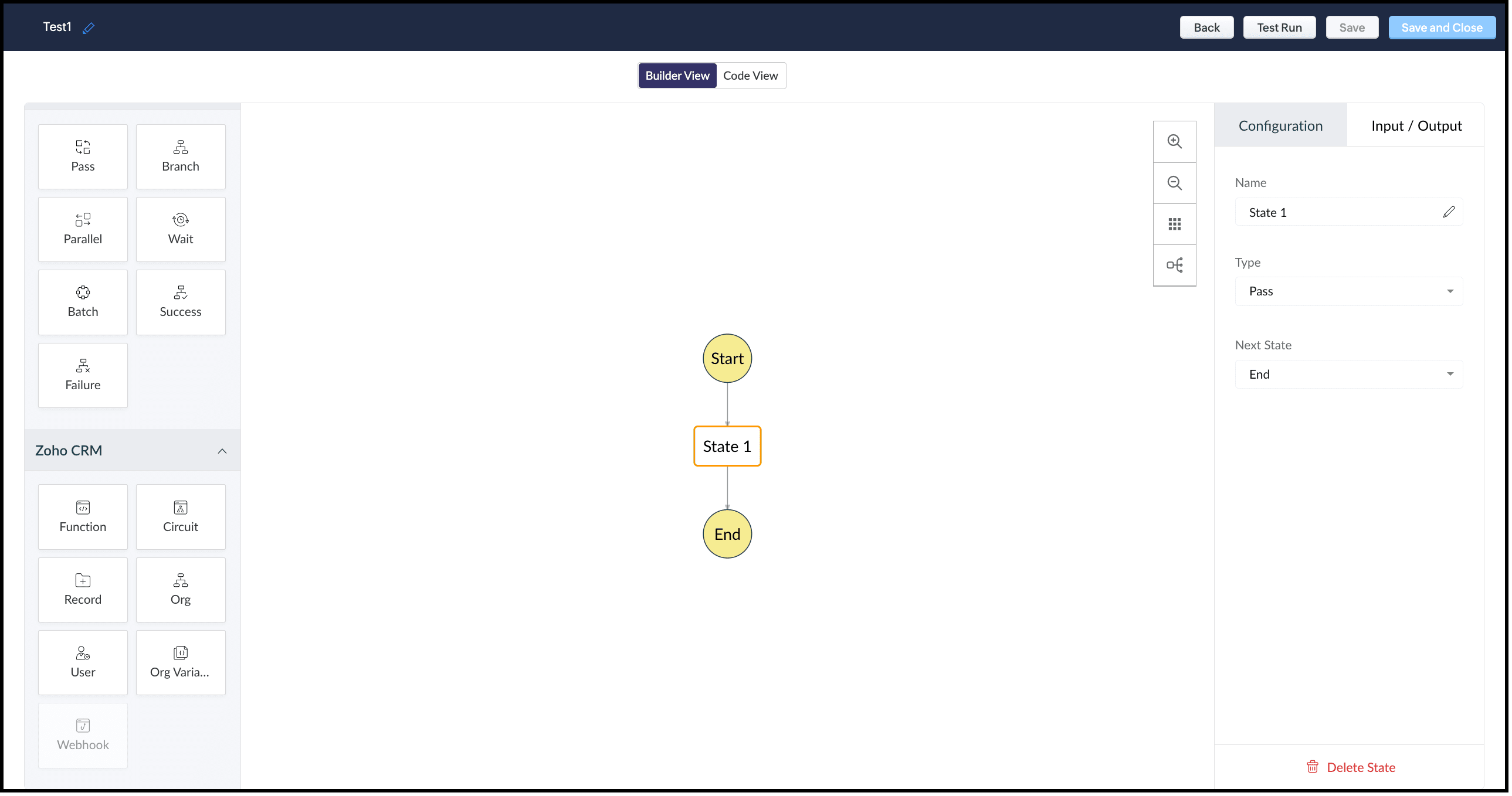
This view offers an easy drag-and-drop interface to build your circuit. The left pane in this view comprises all the states that can be added to a circuit.
The right pane comprises Configuration and Input/Output.
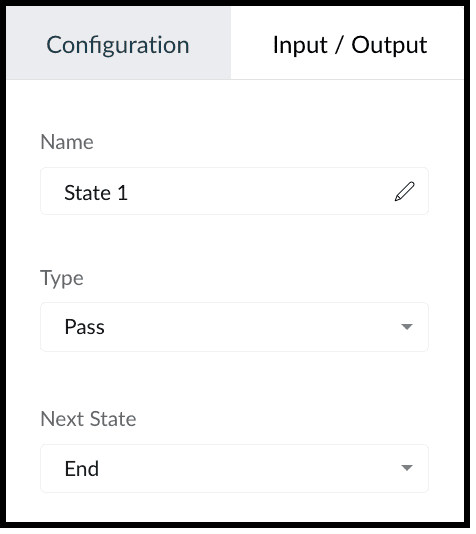
The Configuration tab lets you give a name to the state, choose its type, and select its next state.
The Input/Output tab allows you to control how JSON data must flow from one state to another through Paths.
Paths are strings beginning with $ that identify the components within the JSON. Specific parts of a JSON can be accessed by denoting their attributes in Input Path, Result Path, and Output Path.
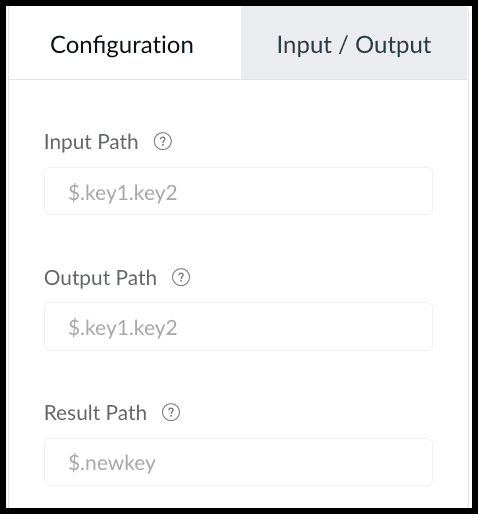
This tab contains the following.
1. Input Path
Input path selects parts of the input JSON to pass to the state. You can also pass parameters to the input as a collection of key-value pairs. The values of Parameters can either be static or parts of the input JSON selected as a Path. For example, if your state's input is
{
"Entry1": {...},
"Entry2": {...}
}
then, you can apply the input path as $.Entry2 within the state definition. So, only the data inside the "Entry2" object will be passed as input to the state.
2. Result Path
After the input is processed by the state, Result Path selects what combination of the state result and the actual state input has to be passed to the output.
3. Output Path
Output Path further filters the data from the Result Path to pass it as state output.
Code View of a Circuit
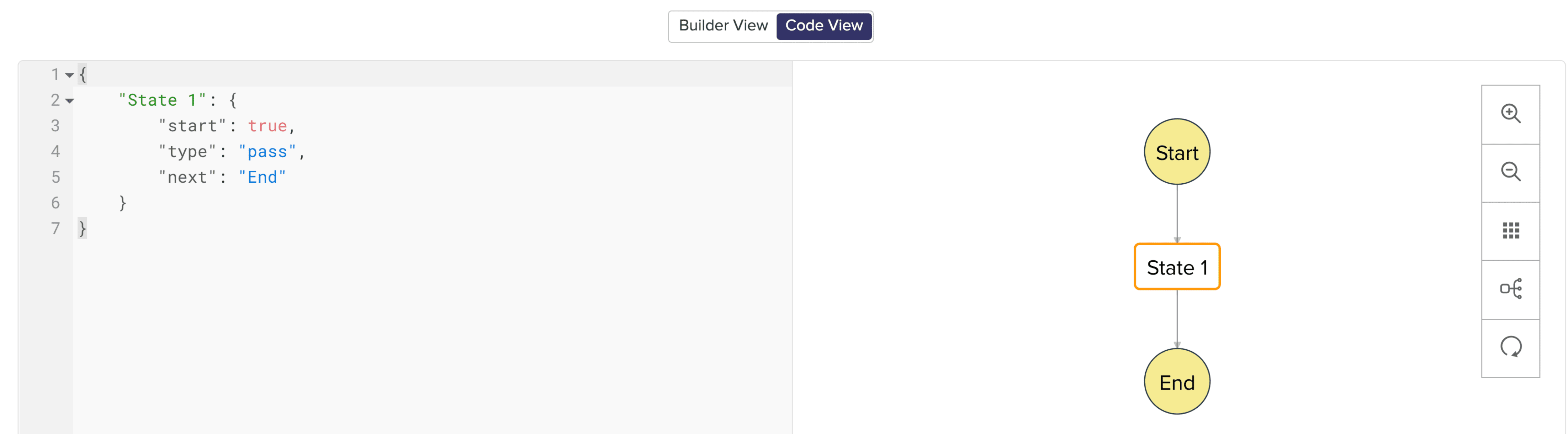
In Code View, you can define your state machine in a simple JSON-based, structured language. Once a circuit is created, a sample workflow with the pass state as 'State 1' is created by default.
States of a Circuit and Flow Controls
Circuits offer a cascading structure to different states in a business process, allowing you to write functions that each feed their output into the next one, or any other one you pre-define, individually. You can also reroute, pause for a certain period, or feed it in batches to enable just about any sort of action.
Simply put, Circuits have different 'functional states' and 'flow controls' that allow you to automate execute your business process.
Flow Controls
Flow Controls let you control the flow of your circuit. To achieve this, Circuits make use of different states that allow you to make the execution, 'Wait' for another state, 'Pass' the input of a state to another, use 'Success' and 'Failure' to stop the execution of the Circuit.
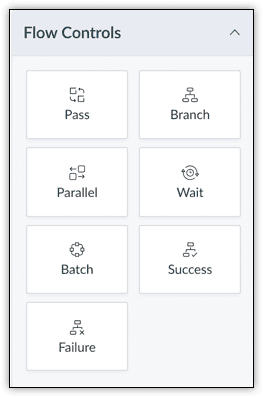
The different states available are:
- Pass: Transfers the input from one state to another.
- Branch: Decides between branches of execution based on input.
- Parallel: Performs simultaneous executions.
- Wait: Inserts a delay for a specific time. The maximum wait time is 30 days.
- Batch: Implements multiple group executions. You can have a maximum of 10 jobs per batch.
- Success: Terminates an execution, returning 'Success'.
- Failure: Terminates an execution, returning 'Failure'.
For more details on states, refer to this article.
Zoho CRM
Zoho CRM states help you execute business logic in circuits with respect to the data available in CRM.
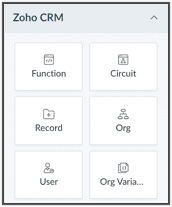
You can write functions in the built-in editor or orchestrate existing ones, get the details of a record as an input to other the states, get the details of your org, user, CRM variables and use them in your Circuit.
You can also trigger another Circuit within a Circuit using the 'Circuit' flow control.
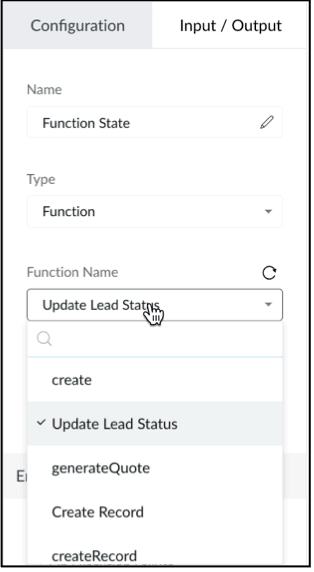
'Function' State
Use this state in your Circuit to use an existing function in CRM. Depending on your need, you can configure the input and output, and control data flow in your circuit. Only the functions that are REST API-enabled are shown here.
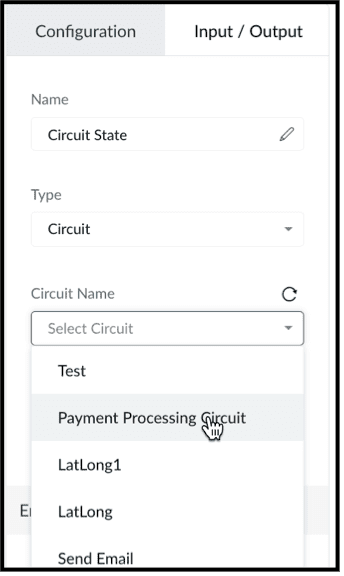
'Circuit' State
You can use another Circuit in one of the states and configure the flow accordingly.
'Record' State
This state fetches the details of a particular record in a module in CRM. You can choose to pass a portion or all of this state's result as an input to the next state in the circuit. Note that the information displayed will be based on the scope provided to the user.
Depending on where the Circuit is associated(Blueprint, Workflow, Button - Create/Clone/Details/Edit View pages, individual record, mass action), the response of the Record State differs.
'Org' State
This state gives you the details of your CRM org that you can use in your circuit.
'User' State
Use this state in your circuit to get the details of the current user in your org and process this information in other states.
'Org Variable'
This state gives you the details of all CRM Variables in your org.
Error Handling
When you use any of the Zoho CRM states, you can also perform error handling as these functional states tend to have runtime errors.
On TimeOut
When a functional state runs longer than the expected time, timeout errors occur. For handling timeout errors in code view, the field value "errorType": "Error.TimeOut" will be added.
On Execution Failure
When a state's execution fails due to some exception that cannot be processed, it can be handled using execution failure. In code view, key-value "errorType": "Error.ExecutionFailure" is appended.
Custom Error
You can also have custom error handling for your states.
Configure Exception Type and Exception Value to set the error handling options based on the error code or error message delivered by the state's output.
Retry the function in case of failure or timeout, set the Attempt (number of retries) and Delay (wait time after failure for every retry attempt).
In case of failure, if the retries fail to fix the error, the State will Fallback the error output to the Next state in the Result field.
We hope you found this post useful. Stay tuned for part 2!
Let us know if you have any questions or suggestions.
Cheers!
Shylaja S
Topic Participants
Shylaja S
Ash-Tech.co.il
Pheranda Nongpiur
Nicolás
Sam Stemp
Sticky Posts
Kaizen #198: Using Client Script for Custom Validation in Blueprint
Nearing 200th Kaizen Post – 1 More to the Big Two-Oh-Oh! Do you have any questions, suggestions, or topics you would like us to cover in future posts? Your insights and suggestions help us shape future content and make this series better for everyone.Kaizen #226: Using ZRC in Client Script
Hello everyone! Welcome to another week of Kaizen. In today's post, lets see what is ZRC (Zoho Request Client) and how we can use ZRC methods in Client Script to get inputs from a Salesperson and update the Lead status with a single button click. In thisKaizen #222 - Client Script Support for Notes Related List
Hello everyone! Welcome to another week of Kaizen. The final Kaizen post of the year 2025 is here! With the new Client Script support for the Notes Related List, you can validate, enrich, and manage notes across modules. In this post, we’ll explore howKaizen #217 - Actions APIs : Tasks
Welcome to another week of Kaizen! In last week's post we discussed Email Notifications APIs which act as the link between your Workflow automations and you. We have discussed how Zylker Cloud Services uses Email Notifications API in their custom dashboard.Kaizen #216 - Actions APIs : Email Notifications
Welcome to another week of Kaizen! For the last three weeks, we have been discussing Zylker's workflows. We successfully updated a dormant workflow, built a new one from the ground up and more. But our work is not finished—these automated processes are
Recent Topics
iOS Zoho Mail App Crashesruni
Whenever I trying to search emails via the Zoho Mail app on my iPhone the app crashes, I am running the latest version of the app and the latest iOS version. I have all set reset the app and deleted the app and still have the same issue. Thank you inAssessment Answered - Automation (Related List)
Hello everyone, We have linked a candidate assessment to our job posting. When someone applies, they are required to answer all the assessment questions. However, some candidates submit their applications without completing the questions. In such cases,Rebrand your CRM with the all-new custom domain mapping setup
UPDATES TO THIS FEATURE! 19th Jan, 2024 — Custom domain mapping has been made available for portal users in Zoho One and CRM Plus. 23rd June, 2023 — Custom domain mapping has been made available for all users, in all DCs. Hello everyone! We are elatedPaid Support Plans with Automated Billing
We (like many others, I'm sure) are designing or have paid support plans. Our design involves a given number of support hours in each plan. Here are my questions: 1) Are there any plans to add time-based plans in the Zoho Desk Support Plans feature? TheHow Does Knowledge Base Search and Article Recommendation Work?
Hello, I would like to understand how the Knowledge Base search engine works. Specifically, does it search based on: The article title only? The full article content? Both, the article and the content? Keywords? Tags? Also, how does the system determineZoho CRM for Everyone's NextGen UI Gets an Upgrade
Hello Everyone We've made improvements to Zoho CRM for Everyone's Nextgen UI. These changes are the result of valuable feedback from you where we’ve focused on improving usability, providing wider screen space, and making navigation smoother so everythingCan't change form's original name in URL
Hi all, I have been duplicating + editing forms for jobs regarding the same department to maintain formatting + styling. The issue I've not run into is because I've duplicated it from an existing form, the URL doesn't seem to want to update with the newCalendar report with order options and more quick view templates
I think many of us regularly work with calendar-style reports. It would be great to be able to customize the quick view with new templates and have options to sort the entries for each day of the calendar by different criteria. I think this is an interestingShared Views
Hello, is there a way to prevent an agent from changing a shared table view? I have no issues with agents being able to create and customize their own view, but when I create a view and share it to my team -- the expectation is that they are viewing itUsing Zoho answer bot across departments (help center articles from another department)
Hi Zoho Community, I’ve run into a major issue and hope someone here has experience with this setup. We currently have a Help Center in the department A where all of our knowledge base articles are maintained. However, we would like to use a Zoho AnswerZoho Desk Partners with Microsoft's M365 Copilot for seamless customer service experiences
Hello Zoho Desk users, We are happy to announce that Zoho Desk has partnered with Microsoft's M365 to empower customer service teams with enhanced capabilities and seamless experiences for agents. Microsoft announced their partnership during their keynotehow to avoid duplicate customer
How can i avoid to create a duplicate customer. I charged a same customer with two different plans and it showed up twice in my customer list and subsequently in Zoho books contacts. It creates confusion to have a same customer appears multiple times in customer or contact list. How can i avoid it.The Social Wall: January 2026
Hello everyone, We’re back with the first edition of The Social Wall of 2026. There’s a lot planned for the year ahead, and we’re starting with a few useful features and improvements released in January to help you get started. Create a GBP in SocialAPI keys not showing in ZeptoMail dashboard
Hi there, I'm hoping someone can provide some assistance as support isn't replying. I am trying to configure my transactional emails, but the dashboard doesn't show any of my API details - the `div` is there but it's emtpy. Every time I click "GeneratePipeline: Copying rulesets from one data source to another
When creating and editing data pipelines, it would be really helpful to be able to copy the ruleset from one data source and 'paste' it to another. This would save time and reduce manual mistakes.Doubt about maximum email reach
Good morning, greetings. This is Bramdon García from EDULABS S.A.S ESP, located in Colombia. I'm writing to inquire about the possibility of sending an email to 35,000 people simultaneously. Our company has a Zoho account, but we'd like to know if there'sZoho calendar not working in browser
Hello, I am new to Zoho. I have two accounts for two separate businesses. In one of them, calendar loads in a browser no problem. However, if I use this account (sairfeetmusic.co.uk) calendar does not load. I also cannot add it to my Thunderbird LighteningAuthentication Failure when adding POP3 accounts
Hi everyone, I am a new user currently migrating from Gmail to Zoho Mail. I decided to make the switch following Google's decision to discontinue POP3 fetching. I previously used Gmail as my primary mail hub, and Zoho seems like the perfect alternativeTrident Application Folder
Hi, How to choose installation folder for Trident, by default it gets installed in C drive. How to change drive?How exactly does "Reply assistance" work in Zoho Desk? What context is sent to the LLM?
Hi, Im trying to better understand the technical behavior of the feature "Reply assistance" in Zoho Desk, and I couldn’t find detailed information in the current documentation. Specifically, I have questions about what data is actually being sent to theEmail disappeared to specific contact
Good afternoon, this morning I emailed somebody. This email isn’t showing up in my sent folder. They sent me a response which I clicked on and it disappeared immediately. Why could this be?Deletion Workflows
Hello, Unless I missed it, we can't create deletion workflows. My usecase is to auto-delete junk leads. We have field called lead status, and an agent qualify all our new leads. When it's a junk lead she chose the correspondant value in the picklist. My goal is that the system delete them automatically. Is that possible? Planed ?How Do Mutliple Sales People Prospect in the "LEADS" module without calling the same leads?
We have 4 sales reps and the Leads module does not have real time intuitive knowlodge to make the sales rteps dont call the same people at the same time. How can we crate a fluent prospecting sytem where the salres reps can go out bound without callingCreate an Eye-Catching Announcement Widget for Your Help Center
Hello Everyone! In this week’s edition, let’s explore how to keep your customers updated with exciting news in the Help Center. See how ZylkerMobile wowed their customers by bringing updates right to their portal. ZylkerMobile, the renowned brand forEnable Free External Collaboration on Notecards in Zoho Notebook
Hi Zoho Notebook Team, I would like to suggest a feature enhancement regarding external collaboration in Zoho Notebook. Currently, we can share notes with external users, and they are able to view the content without any issue. However, when these externalUpdating records through Zoho Sheets View doesn't update timeline or trigger workflow rules
I have noticed that when i update a series of record with the zoho sheets view (see here http://d.pr/i/ahnR) it doesn't update timeline history or trigger workflow rules. I am using it in the Deals module. Looking forward for some more info. DenisHow do I change the account bank charges are charged to?
I want bank charges charged to my Credit Card Fees account. Is there a way to do this?ZOHO.CRM.UI.Record.open not working properly
I have a Zoho CRM Widget and in it I have a block where it will open the blocks Meeting like below block.addEventListener("click", () => { ZOHO.CRM.UI.Record.open({ Entity: "Events", RecordID: meeting.id }).catch(err => { console.error("Open record failed:",Mail Search should allow grouping by conversation like Gmail.
Having switched from gmail I have found the search function hard to use. Mostly because mail is not grouped by conversation in search. If I search for a word when looking for a conversation had with someone then sometimes 10 emails will come up from theAbility to CC on a mass email
Ability to CC someone on a mass email.Updation of Old Browsers Versions for Zoho CRM
We have upgraded the default browser version for CRM to facilitate features like widgets and scripts that are often implemented aside from advanced functionalities for various business requirements. The latest version is aimed to provide better performanceProject-Based Inventory Consumption and Proforma Invoice in Zoho ERP
While working with customers across different industries, we have identified a few functional questions and gaps that commonly arise—especially for project-based and service-oriented businesses. Many organizations, such as those in shipping, construction,Zoho Desk domain Mapping not Working Showing CNAME Error
I have created the subdomain and created the Cname as well as its instracted on the Zoho website but when i try add the domain on help desk its showing error msg : Make sure you've mapped the CNAME entry and linked it to desk.cs.zohohost.com.au on yourFounders using Zoho — are you leveraging Zoho Campaigns + Zoho Social for thought leadership… or just sending emails?
I’ve noticed something interesting in the Zoho ecosystem. Many founders use Zoho Campaigns and Zoho Social for basic marketing—newsletters, scheduled posts, and announcements. But very few are using these tools strategically to: • Position themselvesI have the item field and Quantity field in the sub form , on the submit of the form if the quantity is grater than inventory means show alert on submit validation only for item type goods ,
I have the item field and Quantity field in the sub form , on the submit of the form if the quantity is grater than inventory means show alert on submit validation . Stock Check Validation only for item type goods , not for item type service . For theIMAP stopped working after enabling 2 factor authentication
IMAP stopped working after enabling 2 factor authentication. Is there any solution for this?Rename Service Report
Some of our customers are requesting the name of the service report PDF to be in a specific format, for example, instead of REP-001.PDF some are requesting to include their name like customername.pdf. is that possible?Approvals in Zoho Creator
Hi, This is Surya, in one of my creator application I have a form called job posting, and I created an approval process for that form. When a user submits that form the record directly adding to that form's report, even it is in the review for approval.Outgoing emails rejected due to SpamCop RBL listing (IP 136.143.188.12)
Hi All, I am writing to report a deliverability issue affecting outgoing emails from my Zoho Mail account. Recently, several messages sent from my domain (example.com) to external recipients have been rejected with the following error message (redactedIntroducing Workqueue: your all-in-one view to manage daily work
Hello all, We’re excited to introduce a major productivity boost to your CRM experience: Workqueue, a dynamic, all-in-one workspace that brings every important sales activity, approval, and follow-up right to your fingertips. What is Workqueue? SalesNext Page