Kaizen #129 : Client Script Support for Blueprints
Hello everyone!
Welcome to another week of Kaizen. Today, let us discuss about how you can use Client Script during a Blueprint transtion to meet your requirements. This Kaizen post will provide solution for the post - Need non-mandatory fields in blueprint pop-up using Client Script.
In this Kaizen post,
- What is a Blueprint?
- Blueprint event in Client Script
- ZDKs and methods available in Client Script related to Blueprint
- Use Case - During a blueprint transition, show a pop up with fields that are not mandatory
- Solution
- Summary
- Related Links
- Kaizen Collection
1. What is a Blueprint?
Blueprint is an online replica of a business process. For instance, leads generation and follow-up, deals closure and order management. Each of these processes has several stages, and different teams may be responsible to complete each stage. At this point, one needs to take a moment to see if the CRM dictates how these processes should be executed. It captures every detail of your entire offline process within the software. Click here to know more about Blueprint in Zoho CRM.
Moving from one stage of a blueprint to the next stage is called as Blueprint transition.
2. Blueprint event in Client Script
Whenever you want to meet your custom requirements in Zoho CRM before a Blueprint transition happens, you can use the beforeTransition event type available in Client Script. This event occurs before the transitions occur, as per the process flow designed in the Blueprint. You can add the "return false" statement at the end of the script to prevent the blueprint transition. Click here to know more about the events in Client Script.
3. ZDKs and methods available in Client Script related to Blueprint
Here is the list of ZDKs and methods using which you can code in Client Script.
ZDK.Page.getBlueprintTransitionByID() - You can get the blueprint transition by id.
ZDK.Page.getBlueprintTransitions(). - You can get all the blueprint transitions in page.
getId() - You can get the id of transition using Blueprint transition object.
getName() - Get the name of transition using Blueprint transition object.
initiate() - Initiate the transition using Blueprint transition object.
Click here to view the detailed documentation of ZDKs and methods related to Blueprint in Client Script.
4. Use Case
Zylker is a manufacturing organisation which uses Blueprint to manage the various updates in the status of Leads. Below is the blueprint configuration. For the transition "Gather details", the field "Alternate Number" will be prompted as mandatory. Without entering this detail, the transition cannot proceed.
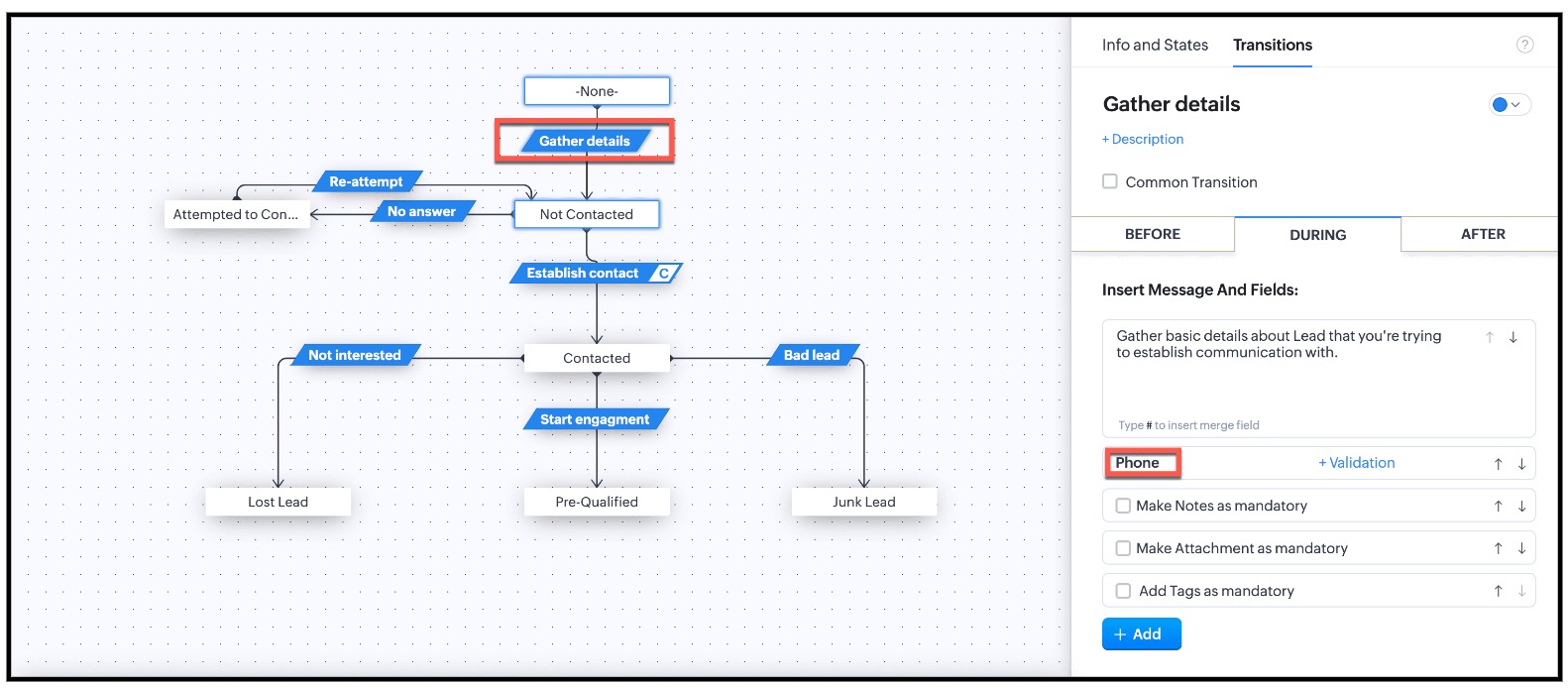
This is the existing Blueprint.
Now, the Admin wants to prompt the user to enter a value for the Alternate Number, but it should not be mandatory for the transition "Gather Details".
4. Solution
Currently in Blueprint the fields in the pop-up are mandatory. You can achieve non-mandatory fields in a pop-up using Client Script and update the values to that record. However you should not add the fields in the "During" phase of the "Gather Details" transition in Blueprint, to achieve this non-mandatory pop-up using Client Script. This solution will work for the requirement raised in this post.
For this, you need to create a Client Script and use the "Before Transition" type of "Blueprint" Event.
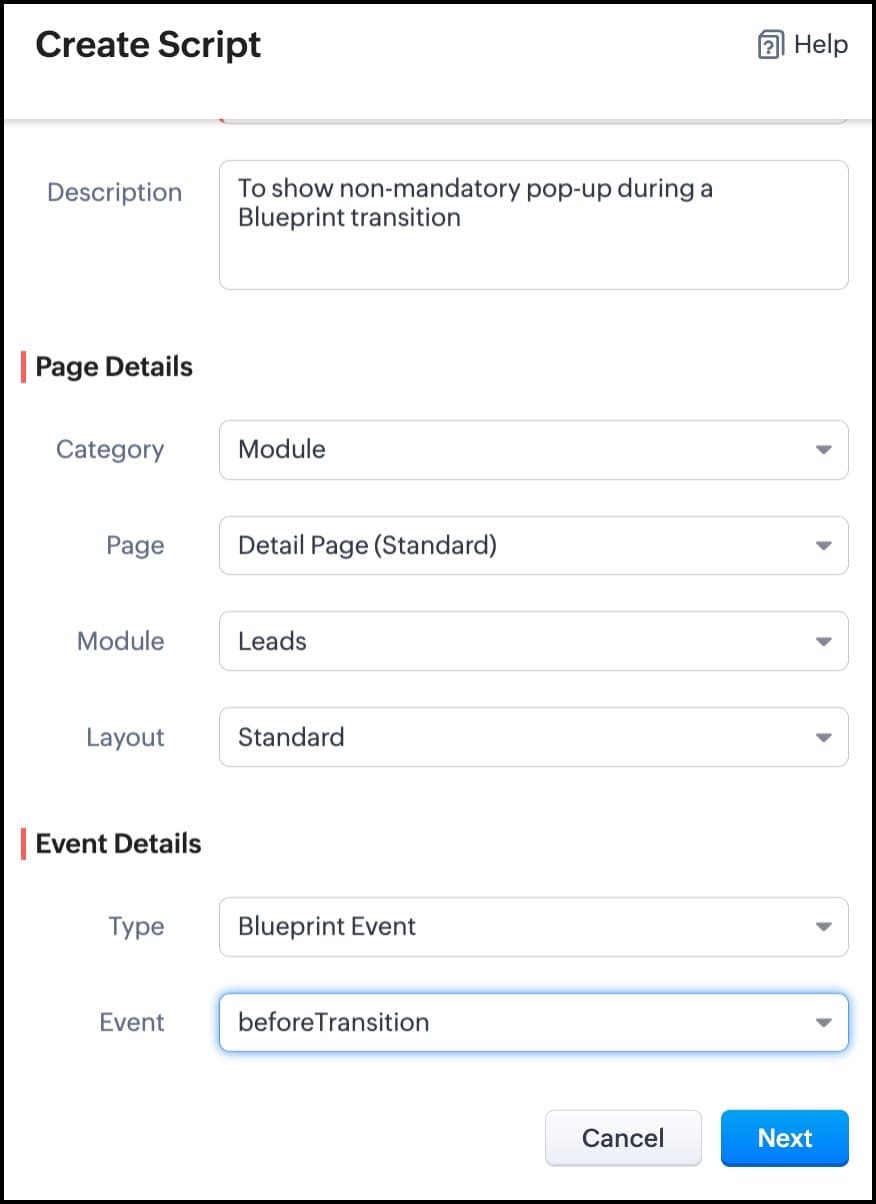
For more details on how to configure a Client Script, click here. Once you give the module and event details, you can see the Client Script IDE's Editor.
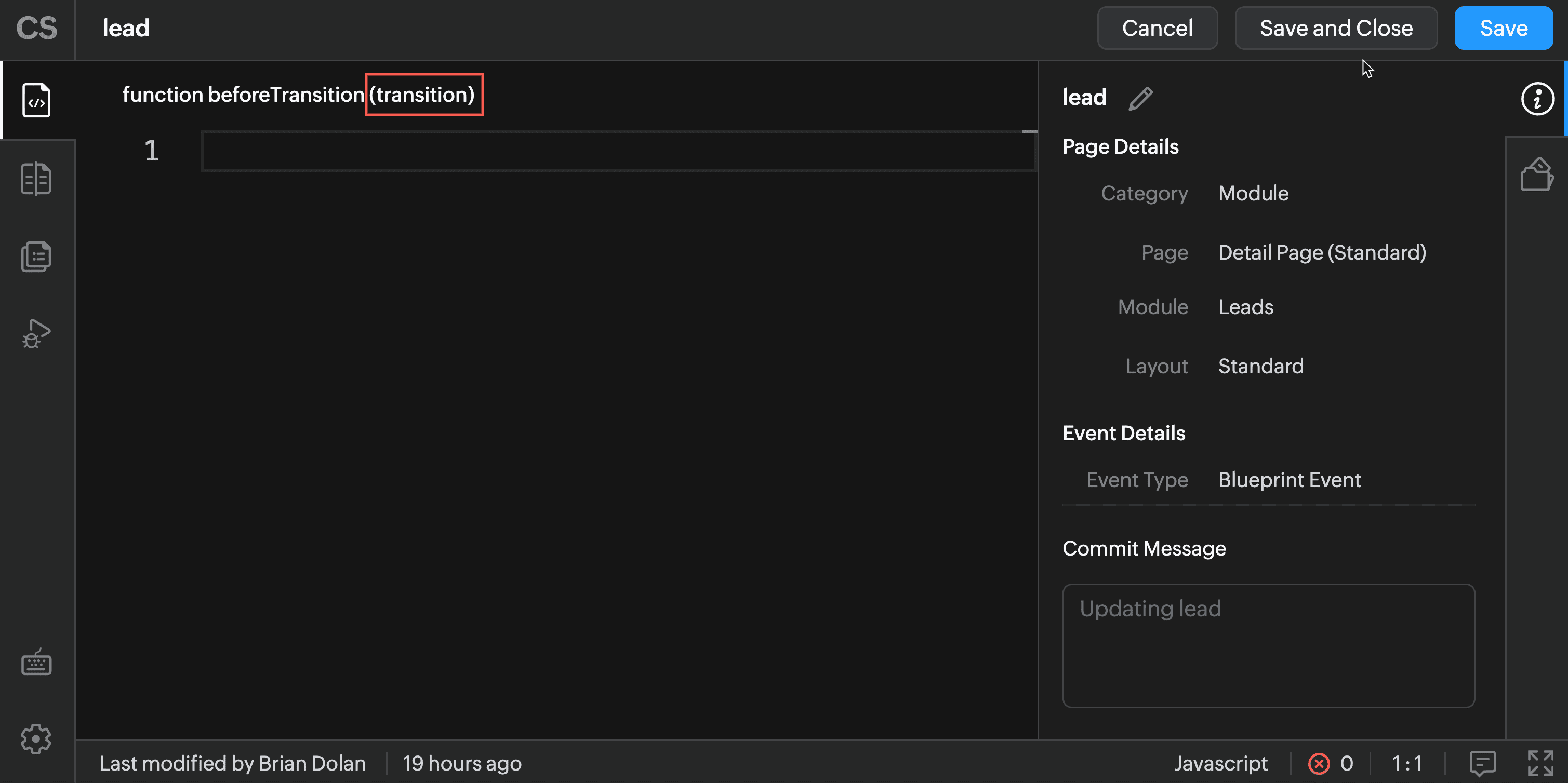
The argument "transition" will hold the the details of current Blueprint transition.
In the Client Script IDE, type the below script and click Save.
if (transition.name == 'Gather details') { // To show pop up and get the Alternate Number and update the //record's Alternate Number var var_alt = ZDK.Client.getInput([{ type: 'text', label: Alternate Number}], 'Give these details', 'OK', 'Cancel'); if (var_alt != null) { var lead = ZDK.Apps.CRM.Leads.fetchById($Page.record_id); lead.alternate_number = var_phone.toString(); var response = lead.__update(); } else { ZDK.Client.showMessage('Details have been gathered successfully' }); } $Client.refresh();// to refresh the page } |
The above script will get executed before every transition happens in the Blueprint. So, in the script, the code is added based on the transition name. As per the requirement, when the transition name is "Gather details" , you can show the pop-up through Client Script's getInput() function. Once you capture this value you can update the alternate number using the CRM API ZDKs. $Page.record_id will return the id of the current Lead record.
Here is how the Client Script works.
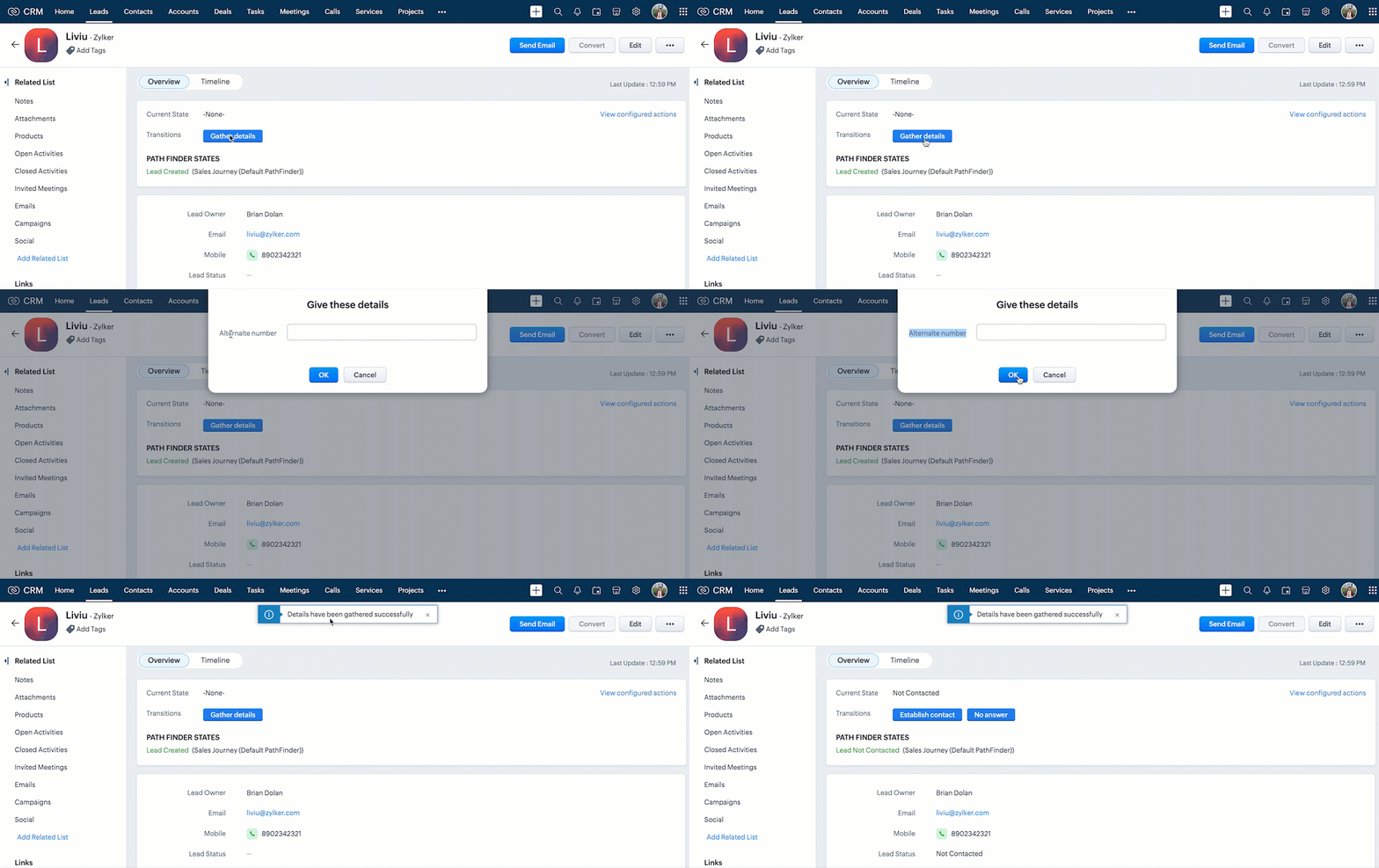
You can see that the transition happens even after the "Alternate Number" field is not filled by the user.

Note :
1. If you want to prevent a Blueprint Transition you need to add "return false" statement in the Script.
2. The blueprint event and the related ZDKs are available only for Detail(Standard) Page and Detail(Canvas) Page.
5. Summary
In this post, we have discussed,
- About Blueprint events in Client Script.
- The ZDKs and methods related to Blueprint.
- How to configure a Client Script to trigger before a Blueprint transition
- How to open a non - mandatory fields pop up before a blueprint transition
- How to update current record using Update Records API through Client Script
- How to refresh a page using Client Script
- How to prevent a Blueprint Transition
6. Related Links
- Client Script Overview
- Creating a Client Script
- Client Script Events
- Client Script IDE
- Use cases of Client Script

Kaizen Collection :
- Click here to view our Kaizen Collection.
- Also, check our previous post - Kaizen #128 - Circuits in Zoho CRM - Part 3
Cheers!
Maadhari M
Topic Participants
Maadhari M
Cameron McEvenue
allan
Maria Antony Betson M
Ishwarya SG
Sticky Posts
Kaizen #198: Using Client Script for Custom Validation in Blueprint
Nearing 200th Kaizen Post – 1 More to the Big Two-Oh-Oh! Do you have any questions, suggestions, or topics you would like us to cover in future posts? Your insights and suggestions help us shape future content and make this series better for everyone.Kaizen #226: Using ZRC in Client Script
Hello everyone! Welcome to another week of Kaizen. In today's post, lets see what is ZRC (Zoho Request Client) and how we can use ZRC methods in Client Script to get inputs from a Salesperson and update the Lead status with a single button click. In thisKaizen #222 - Client Script Support for Notes Related List
Hello everyone! Welcome to another week of Kaizen. The final Kaizen post of the year 2025 is here! With the new Client Script support for the Notes Related List, you can validate, enrich, and manage notes across modules. In this post, we’ll explore howKaizen #217 - Actions APIs : Tasks
Welcome to another week of Kaizen! In last week's post we discussed Email Notifications APIs which act as the link between your Workflow automations and you. We have discussed how Zylker Cloud Services uses Email Notifications API in their custom dashboard.Kaizen #216 - Actions APIs : Email Notifications
Welcome to another week of Kaizen! For the last three weeks, we have been discussing Zylker's workflows. We successfully updated a dormant workflow, built a new one from the ground up and more. But our work is not finished—these automated processes are
Recent Topics
Domain renewals
Need to know how hoe to renew the domainMX shopify problem
hello, i added all MX values in my shopify DNS - it shows those values on the shopify panel + your toolkit. I tried to send some email and it works, however on my gmail it says they cant verify this email. When i try to answer into my domain's email -Best Way to Manage Email Notifications While Running a Strategy Website
I am currently managing a content-based website, and I use Zoho Mail for handling contact forms, user queries, and collaboration emails. One challenge I am facing is organizing incoming emails efficiently, especially when messages come from differentWhat is the maximum email domains ?
I help manage about 20 associations and I'm looking for a way to centralize them in one place. Does Zoho Mail pro or enterprise support 20-30 domains for 3-5 users each?Add to Workdrive filter
I'm trying to create a filter that will upload attachments in emails and the e-mail body to a folder in workdrive. I am able to do one or the other (attachment, or e-mail content), but not both. I first tried it using the "Email (EML) + attachment" option.Forgot my admin Panel Id and password
Sir, I have an account , where a domain mycityestate.in is added for Zoho email , now it is hard for me to manage email because i have forgotten the Email account and password registered with Admin Panel of Zoho. Just need email name which is registeredMCP no longer works with Claude
Anyone else notice Zoho MCP no longer works with Claude? I'm unable to turn this on in the claude chat. When I try to toggle it on, it just does nothing at all. I've tried in incognito, new browsers, etc. - nothing seems to work.Image Compression Options
Much better if we have level of options to compress the image [20%, 40%...] We are dealing with service reports daily that has before and after photos (image field)- the file size too large and one thing, the current limit is 10mb or 15mb for reportBlocklist candidates in Zoho Recruit
We’re introducing Block Candidate, which helps recruiters to permanently restrict a candidate from applying to current/future job openings. Once the candidate is blocked, they will no longer be able to participate in the recruitment process. This willPass shipping info to payment gateway Zoho Books to Authorize.net
For some reason the integration from Zoho books to Authorize.net does not pass the shipping address. Authorize.net is ready to receive it, but zoho books does not send itKnowledgebase SEO
We have a custom-domain mapped help center that is not restricted via login. I have some questions: a) will a robots.txt file still allow us to control indexing? b) do we have the ability to edit the sitemap? c) do category URLs get indexed by searchProblem with CRM Connection not Refreshing Token
I've setup a connection with Zoom in the CRM. I'm using this connection to automate some registrations, so my team doesn't have to manually create them in both the CRM and Zoom. Connection works great in my function until the token expires. It does not refresh and I have to manually revoke the connection and connect it again. I've chatted with Zoho about this and after emailing me that it couldn't be done I asked for specifics on why and they responded. "The connection is CRM is not a feature toNew Features: Repeat Last Action, Insert Cut/Copied Rows/Columns and Hyperlink
You might have noticed the constant updates to Zoho Sheet of late. Here are 3 more features that have been added to Zoho Sheet recently: F4 - Repeat Last Action Insert Cut/Copied Rows and Columns Insert Hyperlink Here is a screen cast demonstrating each of these features. Read further below to learn more about these new features. F4 - Repeat Last Action: You can now repeat the last action you made on your spreadsheet by using the keyboard shortcut, F4. It is quite handy and helps you get your workNeed help getting my mail on iPhone and Tablet
I need to access my Zoho mail via the iPhone Mail app. I have entered the login name, password and the incoming and outgoing servers, which my Mail Settings page says are imappro.zoho.com and smtppro.zoho.com. The iPhone keeps saying it cannot authenticate.Add an background image to an email template in CRM
Hi all, We wants to put an background image behind all our email templates. Is there a way to import this thru html. If i put the option background image in <body style="background-image:...</body> and i look to the preview it shows our background, butIs there a way to show contact emails in the Account?
I know I can see the emails I have sent and received on a Contact detail view, but I want to be able to see all the emails that have been sent and received between all an Accounts Contacts on the Account Detail view. That way when I see the Account detailHow do I bulk archive my projects in ZOHO projects
Hi, I want to archive 50 Projects in one go. Can you please help me out , How can I do this? Thanks kapilCopy contents of File Upload Field into Workdrive
Hello, I have set up our CRM so that a Workdrive folder is automatically created for each Deal via workflow, this adds the id of the folder into a dedicated field. We also have a field on each Deal called 'Approved Layout', which is a file upload field.Deleting a memorized email address
How can I delete a memorized email address? Even though the address has been deleted from Contacts, Zoho mail still auto suggests the address when typing it into the TO field. Thanks!553 Relaying disallowed. Invalid Domain - gzkcompany.ro
Hi there, Can you please assist me in getting the right domain settings? I just renewed my domain subscription, after expired and i got error: 553 Relaying disallowed. Invalid Domain - gzkcompany.ro Zoho mail can receive emails, but its impossible toNot able to receive emails for a while
I am not able to receive emails for a while now.Confirmation requested: eligibility and process to downgrade to Forever Free — tenant bigbanghawking.com
Thank you for your reply. I am testing Zoho Mail from Brazil with the tenant bigbanghawking.com (endpoint: mail.zoho.com) and we are currently on the Premium trial that expires 21/01/2026. Before deciding whether to pay or cancel, I need written confirmationCreate Tasklist with Tasklist Template using API v3
In the old API, we could mention the parameter 'task_template_id' when creating a tasklist via API to apply a tasklist template: https://www.zoho.com/projects/help/rest-api/tasklists-api.html#create-tasklist In API v3 there does not seem to be a way toZoho API v2.0 - get ALL users from ALL projects
Hello, I've been trying to work on an automatization project lately and I find it difficult to work with this strict structure. To be more explicit, if i would like to get all users participating in a project i would need to get all projects first. Same thing with projects. If i want to get all projects, I would need to get all portals first. The problem with this aproach is that it consumes a lot of time and resources. I want to ask if there is another way of gettingالموقع لا يقوم بالسداد
السلام عليكم ورحمة الله وبركاته وبعد من أمس وانا احاول السداد للدومين YELLOWLIGHT ولا اتمكن من السداد اقوم بتعبئة جميع البيانات ولكن دون جدوى يطلع لى حدث خطأ ماNew in Office Integrator: Enhanced document navigation with captions and cross references
Hi users, We're pleased to introduce captions, table of tables and figures, and cross-references in the document editor in Zoho Office Integrator. This allows you to structure documents efficiently and simplify document navigation for your readers fromWhere Do I set 24h time format in Cliq?
Where Do I set 24h time format? Thanks🎉 ¡Seguimos trayendo novedades a Español Zoho Community! 🎉 Confirmada la agenda y ubicación para los Workshops Certificados
Si todavía no te has hecho con tu entrada para nuestros Workshops Certificados del próximo 26 y 27 de marzo o, por el contrario, estabas esperando que confirmáramos dónde los celebraremos, ¡este post es para ti! 📍¿Dónde nos vemos?📍 Nuestros WorkshopsUser is already present in another account error in assigning users to marketing automation
Hello everyone Greeting, I had a problem in assigning user in marketing automation, when I try to add it I see this error: (User is already present in another account error) what should I do?How do I get complete email addresses to show?
I opened a free personal Zoho email account and am concerned that when I enter an email address in the "To", "CC", fields, it changes to a simple first name. This might work well for most people however I do need to see the actual email addresses showingWhat's New in Zoho POS - January 2026
Hello everyone, Welcome to Zoho POS’s monthly updates, where we share our latest feature updates, enhancements, events, and more. Let’s take a look at how January went. Sort and resolve conflicts Conflicts are issues that may arise when registers andOutlook is blocking incoming mail
Outlook is blocking all emails sent from the Zoho server. ERROR CODE :550 - 5.7.1 Unfortunately, messages from [136.143.169.51] weren't sent. Please contact your Internet service provider since part of their network is on our block list (S3150). It looksNot receiving email from customers and suppliers
I am getting error . most of the customers tell me not able to send me email please check i have attached screenshotCreate user
Hello I want to create user, but i get this error Unusual activity detected from this IP. Please try again after some time.File emails in Shared email folder
Hi, I am unable to allow users to collaborate in Shared email folders: User 1 shares a folder let's say "SharedTopic" with full permissions Users 2 and 3 can see this folder but are unable to add emails to this folder or search in this folder. For example,Consolidated report for multi-organisation
I'm hoping to see this feature to be available but couldn't locate in anywhere in the trial version. Is this supported? The main aim to go to ERP is to have visibility of the multi-organisation in once place. I'm hopeful for this.Integrating Zoho Suite and apps more with Linux
I just got introduced with Zoho just couple of months ago, and I've already planned to contribute to it, even though it's not an open-source software. Still I have found it's potential to beat the tech giants and still being respective towards data privacyHow to Switch from Outlook for Mac to Outlook for Windows
The most often used file formats for users to manage crucial data are OLM and PST files. PST files keep a copy of data on the configured system from Outlook, while the OLM file contains the Mac Outlook data items, which are only accessible with OutlookName autocomplete
Hi, During searching emails the web tool does not always propose the auto-completion of the saved emails. As a result I either have to go to contacts and look up the exact email, or the exact full name including the middle name and any dots, which isAre custom portals accessible on the Zoho learn smartphone app?
In other words, can users external to my organisation, once signed up, use the app in the same way as internal users? ThanksNext Page