Kaizen #154 - Dynamically Update Picklist Values in Zoho CRM Workflows

Hello all!
Welcome back to another interesting Kaizen post.
Today, we will discuss how to add automatically or remove values from a picklist field using Deluge within a workflow. This post serves as a solution for the forum post.
Use case
The sales team migrates users from Pipedrive to Zoho CRM. In Pipedrive, the team managed deals using a Kanban view displayed based on the Closing Months (a picklist field). They automated the updating of picklist values to include current and upcoming months based on the deals' closing timelines.
In Zoho CRM, to replicate this process, users should manually update the picklist values. The requirement is to automate updating the picklist options during record creation or editing within a workflow.
Solution
By triggering the PATCH Fields API (introduced in V6) through a Deluge function within a workflow, this process can be easily automated. Automating picklist updates saves time, reduces the chances of human error, and ensures that picklist values are always up-to-date.
- First, create a custom picklist field called "Closing Month" in the Deals module.
- Then, use the custom picklist along with the Closing Date (a mandatory field date field in the Deals module) within a Deluge function in the Workflow.
- The PATCH Fields API can be used within the Deluge function to automate updating picklist values and to list the current and upcoming closing dates in deals.
Let us see the steps in detail on how to achieve this case.
Example
Consider the Closing Month as a custom picklist in the Deals module with three months: January, February, and March. Whenever a new deal is created and its closing month matches one of the picklist values, the record will be updated with the corresponding month in the Closing Month field and placed under the existing picklist value in the Kanban view. If the new closing month is not already in the picklist values, then the Deluge function will automatically create a new picklist value, and the record will fall under the new picklist value section in the Kanban view.
Follow the steps below to achieve our case in Zoho CRM:
- Create a Custom Picklist Field in the Deals module.
- Set Up a Workflow.
- Add a Deluge Function within a workflow.
- Configure the Workflow.
1. Create a Custom Picklist Field in the Deals Module
- Go to Setup > Customization > Modules and Fields.
- Select the Deals module and the desired layout where you want to add the picklist.
- Click on New Fields and then Add New Field.
- Select Picklist as the field type, name it "Closing Month", and add a list of months (In this post, only three months have been added for example purposes).
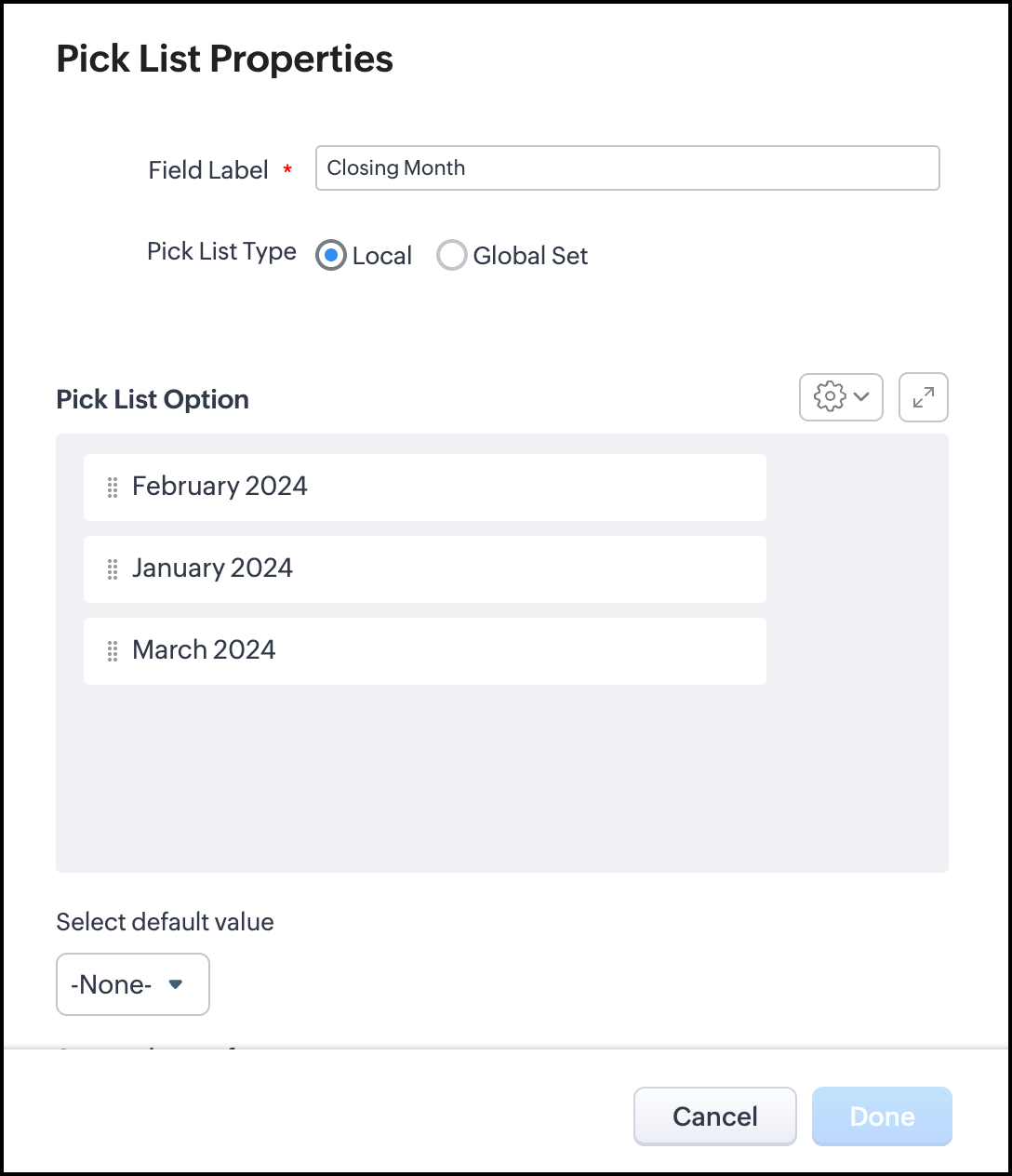
- Click Done to save the new picklist field.
2. Set Up a Workflow
- Navigate to Setup > Automation > Workflow Rules.
- Click on Create Rule, select the Deals module, and name the workflow in the Rule Name.
- Set the rule to trigger on record creation or update.

The workflow triggers based on the value of the Closing Date in the Deals module, executing the function when the Closing Date is not empty.
3. Add a Deluge Function within a workflow
You can either create a custom function or you can associate an existing one. Below is the Deluge code used within the workflow.
- //To map months with Numbers
- month = {1:"Jan",2:"Feb",3:"Mar",4:"Apr",5:"May",6:"June",7:"Jul",8:"Aug",9:"Sep",10:"Oct",11:"Nov",12:"Dec"};
- //To retrieve the Deal record
- dealRecord = zoho.crm.getRecordById("Deals",dealRecordID);
- info dealRecord;
- //To retrieve the Closing Date
- closingDate = dealRecord.get("Closing_Date");
- info closingDate;
- //To get the predefined value from the closing month
- closingMonth = month.get(closingDate.month());
- closingYear = closingDate.year();
- //To Format the Month and Year from the Closing Date
- picklistValue = closingMonth + " " + closingYear;
- info picklistValue;
- //Retrieving Current Picklist Values
- Dealsfield = invokeurl
- [
- url :"https://www.zohoapis.com/crm/v7/settings/fields/5725767000003664513?module=deals"
- type :GET
- connection:"zohocrm"
- ];
- info Dealsfield;
- picklistValues = Dealsfield.get("fields").get(0).get("pick_list_values");
- info picklistValues;
- //Checking if the Picklist Value Already Exists
- flag = false;
- for each option in picklistValues
- {
- if(option.get("display_value").equals(picklistValue))
- {
- flag = true;
- info flag;
- }
- }
- //Adding a New Picklist Value if It Doesn't Exist
- if(flag == false)
- {
- requestBody = Map();
- requestList = List();
- requestData = Map();
- picklist = list();
- picklistobj = Map();
- picklistobj.put("display_value",picklistValue);
- picklist.add(picklistobj);
- requestData.put("pick_list_values",picklist);
- requestList.add(requestData);
- requestBody.put("fields",requestList);
- info requestBody + "";
- updateField = invokeurl
- [
- url :"https://www.zohoapis.com/crm/v7/settings/fields/5725767000003664513?module=deals"
- type :PATCH
- parameters:requestBody + ""
- connection:"zohocrm"
- ];
- info updateField;
- }
- //To update the Deal Record
- requestBody = Map();
- requestList = List();
- requestData = Map();
- requestData.put("Closing_Month",picklistValue);
- requestList.add(requestData);
- requestBody.put("data",requestList);
- info requestBody + "";
- dealreecordUpdate = invokeurl
- [
- url :"https://www.zohoapis.com/crm/v7/Deals/" + dealRecordID
- type :PUT
- parameters:requestBody + ""
- connection:"zohocrm"
- ];
- info dealreecordUpdate;
4. Configure the Workflow
Create a custom function by clicking the New Function or associate an existing one to the workflow. In our case, the deluge program has already been written and configured (associated) to the workflow.

- Under the workflow actions, select Function and choose the function you created.
- Ensure that the function is set to run when the workflow is triggered.
Creating a Deal with a Closing Date of January 2nd (Using an Existing Picklist Value)

Creating a Deal with a Closing Date of April 1st (Adding a New Picklist Value)
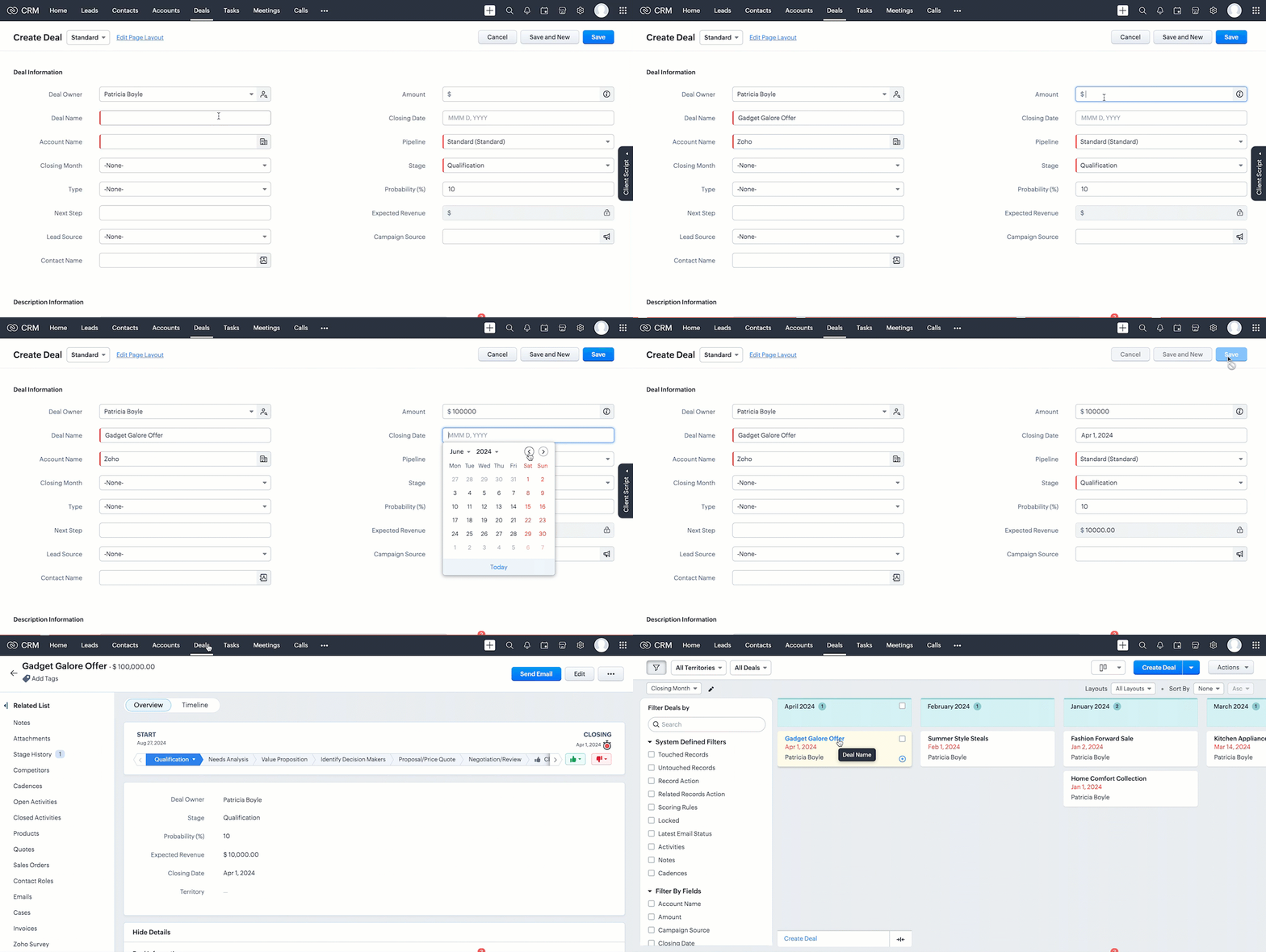
The new picklist value, which was not a value previously, has now been added to the picklist.
You can add values to a picklist field using the PATCH Field API. To remove an option from a picklist, use the Update Custom Layout API. Refer to the Sample input to mark picklist options as unused section in the Layouts API documentation.
Cheers!!!
Related Links
- Configuring Workflow Rules
- Workflow Scenarios
- Workflow Suggestions by Zia
- FAQs: Workflow Rules
- Functions
Additional Links

Previous Kaizen: #153 Interpreting Zoho CRM GraphQL schema | Kaizen Collection
Topic Participants
Subramanian K
Vigneshwaran K
Garron Helman
Ishwarya SG
Alan Majhail
Sticky Posts
Kaizen #198: Using Client Script for Custom Validation in Blueprint
Nearing 200th Kaizen Post – 1 More to the Big Two-Oh-Oh! Do you have any questions, suggestions, or topics you would like us to cover in future posts? Your insights and suggestions help us shape future content and make this series better for everyone.Kaizen #226: Using ZRC in Client Script
Hello everyone! Welcome to another week of Kaizen. In today's post, lets see what is ZRC (Zoho Request Client) and how we can use ZRC methods in Client Script to get inputs from a Salesperson and update the Lead status with a single button click. In thisKaizen #222 - Client Script Support for Notes Related List
Hello everyone! Welcome to another week of Kaizen. The final Kaizen post of the year 2025 is here! With the new Client Script support for the Notes Related List, you can validate, enrich, and manage notes across modules. In this post, we’ll explore howKaizen #217 - Actions APIs : Tasks
Welcome to another week of Kaizen! In last week's post we discussed Email Notifications APIs which act as the link between your Workflow automations and you. We have discussed how Zylker Cloud Services uses Email Notifications API in their custom dashboard.Kaizen #216 - Actions APIs : Email Notifications
Welcome to another week of Kaizen! For the last three weeks, we have been discussing Zylker's workflows. We successfully updated a dormant workflow, built a new one from the ground up and more. But our work is not finished—these automated processes are
Recent Topics
Service Account Admin for API Calls and System Actions
Hello, I would like to request the addition of a Service Account Admin option in Zoho product. This feature would allow API calls and system actions to be performed on behalf of the system, rather than an active user. Current Issue: At present, API callsPlease can the open tasks be shown in each customer account at the top.
Hi there This has happened before, where the open tasks are no longer visible at the top of the page for each customer in the CRM. They have gone missing previously and were reinstated when I asked so I think it's just after an update that this featureHow to Customize Task Creation to Send a Custom Alert Using JavaScript in Zoho CRM?
Hello Zoho CRM Community, I’m looking to customize Zoho CRM to send a custom alert whenever a task is created. I understand that Zoho CRM supports client scripts using JavaScript, and I would like to leverage this feature to implement the alert functionality.Send Whatsapp with API including custom placeholders
Is is possible to initiate a session on whatsapp IM channel with a template that includes params (placeholders) that are passed on the API call? This is very usefull to send a Utility message for a transactional notification including an order numberAdd Israel & Jewish Holidays to Zoho People Holidays Gallery
Greetings, We hope you are doing well. We are writing to request an enhancement to the Holidays Gallery in Zoho People. Currently, there are several holidays available, but none for Israel and none for Jewish holidays (which are not necessarily the sameZO25: The refreshed, more unified, and intelligent OS for business
Hello all, Greetings from Zoho One! 2025 has been a remarkable year, packed with new features that will take your Zoho One experience to the next level! From sleek, customizable dashboards to an all-new action panel for instant task management, we’veIntroducing Multi-Asset Support in Work Orders, Estimates, and Service Appointments
We’re excited to announce a highly requested enhancement in Zoho FSM — you can now associate multiple assets with Work Orders, Estimates, and Service Appointments. This update brings more clarity, flexibility, and control to your field service operations,[Product Update] Locations module migration in Zoho Books integration with Zoho Analytics
Dear Customers, As Zoho Books are starting to support an advance version of the Branches/Warehouses module called the Locations module, users who choose to migrate to the Locations module in Zoho Books will also be migrated in Zoho Analytics-Zoho BooksIntroducing Schedules for smarter availability management
Greetings from the Zoho Bookings team! We’re excited to introduce Schedules, a powerful enhancement to manage availability across your workspace. Schedules are reusable working-hour templates that help you define and maintain consistent availability acrossWhy Zoho Contracts Prefers Structured Approvals Over Ad-hoc Approvals
Approvals are one of the most important stages in a contract’s lifecycle. They determine whether a contract moves forward, gets revised, or needs further discussion. The approval process also defines accountability within the organization. Zoho ContractsWhatsapp Connection Status still "Pending" after migration
Hello, I migrated my WhatsApp API to Zoho from another provider a day ago. So far the connection status is still “Pending”. There is a problem? How long does it usually take?Kaizen #226: Using ZRC in Client Script
Hello everyone! Welcome to another week of Kaizen. In today's post, lets see what is ZRC (Zoho Request Client) and how we can use ZRC methods in Client Script to get inputs from a Salesperson and update the Lead status with a single button click. In thisHow to Filter timewise question to check uploaded one month or two months before in these community question ?
i want to find the question that is asked some month or before any particular year, so how can i filter it ?Proposal for Creating a Unique "Address" Entity in Zoho FSM
The "Address" entity is one of the most critical components for a service-oriented company. While homeowners may change and servicing companies may vary, the address itself remains constant. This constancy is essential for subsequent services, as it providesWorkflow Down/Bug
We have a workflow that sends an email to one of our internal departments 10 minutes after a record is created in a custom module. The workflow actually works correctly. However, we have now noticed that on January 8, between 3:55 p.m. and 4:33 p.m.,Service Locations: Designed for Shared Sites and Changing Customers
Managing service addresses sounds simple—until it isn’t. Large facilities, shared sites, and frequently changing customers can quickly turn address management into an operational bottleneck. This is where Service Locations deliver clarity and control.Can I re-send the Customer Satisfaction Survey after a ticket closure?
Hello, Some customers does not answer the survey right after closure, is it possible to re-send after a few days or weeks? Best Regards!Filter contacts based on selected category in Zoho Desk ticket
Hello community, I’m setting up the Tickets module in Zoho Desk and I need help implementing the following: When a category is selected in a ticket, I want the Contact field to be filtered so that it only displays contacts that are related to that category.Profile Page View Customization
I need to change the fields, sections from the profile view of an emplyoyee.Zoho Desk Android app update: Filter, Sort and Saved filters Enhancements
Hello everyone! We are excited to introduce the below features on the Android version Zoho Desk mobile app: 1. Filter & Sort support has been introduced for the Contacts and Accounts modules. 2. Sort options is now available in Custom Modules as well.Accessing shared mailboxes through Trident (Windows)
Hi, I have a created a couple of shared mailboxes. The mailboxes are showing up on the browser based Zoho workplace, but I cannot seem to figure out how to access my shared inboxes through Trident (Windows). Am I missing something or is this feature notfiltering lookup field options based on information in another module.
In our CRM system. We have the standard Accounts and Deals modules. We would like to introduce the ability to classify Accounts by Sector. Our desired functionality is to have a global list of all sectors that an Account can select, with the ability toService op locatie organiseren met Zoho FSM: waar lopen organisaties tegenaan?
Bij organisaties met service teams op locatie merken we vaak dat de complexiteit niet zozeer in de planning zelf zit, maar in wat er rond die planning gebeurt. Denk aan opvolging na interventies, consistente servicerapporten, en het bijhouden van installatiesIntroducing Assemblies and Kits in Zoho Inventory
Hello customers, We’re excited to share a major revamp to Zoho Inventory that brings both clarity and flexibility to your inventory management experience! Presenting Assemblies and Kits We’re thrilled to introduce Assemblies and Kits, which replaces theDoes the ability exist to make tax on the customer profile mandatory?
I am reaching out to inquire about the possibility of making the "Customer Tax" field mandatory when creating a new customer in Zoho. We want to ensure that all customers have their tax information recorded to maintain compliance with our internal processes.email association with CRM
Why is it 2024 (almost 2025) and Zoho has not figured out how to integrate email with CRM? It is so inconsistent at associating emails within CRM. I am an attorney. I have clients and work with other attorneys. Attorney John Doe is associated with multipleCredit Note for Shipped and Fatoora pushed invoices
We have shipped a Sales Order and created an Invoice. The Invoice is also pushed to Fatoora Now we need to create a credit note for the invoice When we try it, it says we need to create a Sales Return in the Zoho Books, we have already created a SalesFSM - Timesheet entires for Internal Work
Hi FSM Team, Several of my clients have asked how they can manage internal timesheets within Zoho FSM. Since their technicians already spend most of their day working in FSM, it would be ideal if they could log all working hours directly in the FSM app.Add a way of clearing fields values in Flow actions
It would be great if there was an option to set a field as Null when creating flows. I had an instance today where I just wanted to clear a long integer field in the CRM based on an action in Projects but I had to write a custom function. It would beRole Management
I am creating an analytics dashboard for a company that will be utilized by its various departments such as Finance, Marketing, and HR. My goal is to design the dashboard with separate tabs for each department. Additionally, I plan to implement role-basedAnnouncing new features in Trident for Windows (v.1.37.5.0)
Hello Community! Trident for Windows just received a major update, with a range of capabilities that strengthen email security and enhance communication. This update focuses on making your mailbox safer and your overall email experience more reliable.Early Payment Discount customize Text
Hi, I’m currently using Zoho Books and am trying to customize the standard “Early Payment Discount” message that appears in the PDF invoice template. I’ve reviewed the documentation here: https://www.zoho.com/books/help/invoice/early-payment-discount.htmlDeprecation of SMS-based multi-factor authentication (MFA) mode
Overview of SMS-based OTP MFA mode The SMS-based OTP MFA method involves the delivery of a one-time password to a user's mobile phone via SMS. The user receives the OTP on their mobile phone and enters it to sign into their account. SMS-based OTPs offerDKIM Now Mandatory - Changes to Zoho Forms Email Policies
Hello Zoho Forms Users, This post is to inform you about an important update regarding the authentication of all email domains in your Zoho Forms account. This year, we are doubling down on our commitment to deliver a secure, seamless, and empoweringCall description in notes
When completing a call, we type in the result of the call in the description. However, that does not show up under the notes history on the contact. We want to be able to see all the calls that have taken place for a contact wihtout having to go intoEmail Address for Contact not Populating
When I click "Send Mail" from a Contact's page, their email address does not auto populate the "To" field. How do I make this happen?New in CRM: Dynamic filters for lookup fields
Last modified on Oct 28, 2024: This feature was initially available only through Early Access upon request. It is now available to all users across all data centers, except for the IN DC. Users in the IN DC can temporarily request access using this formWhy hybrid project management might be the best fit for you?
Project management techniques are designed to equip teams with proven methods for easy and efficient project execution. While management teams may have apprehensions about adopting the hybrid method of project management, we’ve compiled the top reasonsAllow all Company Users to view all projects, but only owner/admins can change projects
I was wondering if there was a permission setting I could adjust to allow all our company users to see all projects created. Then, only the project owners and admins with the change permission. ThanksSeeking help to be able to search on all custom functions that are defined
Hello I have a lot of custom functions defined (around 200) and i would like to search some specific strings in the content of those. Is there a way to accomplish that? If not, is there a way to download all existing custom functions in some files locallyNext Page