Kaizen #187 - Building a Timer and Worklog Widget (Part 1)

Howdy Tech Wizards!
Welcome back to a fresh week of Kaizen!
This time, we are diving into a two-part series where you will learn how to build a Timer and Worklog Widget for Zoho CRM. This widget helps track active work time and log multitasking sessions using Zoho CRM APIs, Client Script, Functions, and Workflows.
Why It Matters?
Zoho CRM effectively captures stage/status transitions, like tracking when a case moves from Open to In Progress or On Hold. However, in dynamic work environments, employees juggle multiple work items and engage in impromptu tasks or conversations.
Let’s take the On Hold status as an example.
While it can be used to indicate pauses in progress, it does not always align with real-world workflows. Consider these scenarios:
Not all interruptions justify a status change
Moving the case to On Hold for every minor detour (to clarify something with a colleague or respond to another emergency work item) would be impractical and could lead to under reporting actual work hours. Over time, this untracked effort adds up, creating a gap in visibility.
Frequent status changes may dilute their meaning
In many teams, On Hold signifies a legitimate blocker like waiting on customer input or an external dependency. Using it frequently to reflect quick shifts in attention could compromise that clarity.
A timer widget solves this by:
- Capturing hands-on work items.
- Logging context switches (unrelated tasks) with descriptive entries.
- Feeding structured entries into a custom module for reporting and subform sync.
Business Scenario: IT Service Desk & Ticket Resolution
A tech support team uses the Cases module to resolve customer issues. Some tickets are straightforward; others require follow-ups, escalations, or cross-team coordination. While CRM timestamps (like stage transitions or picklist tracking) track when changes happen, they do not reflect how long someone actively worked on a case.
This Timer Widget can be the ultimate solution to track down the active time spent on each case through out the day.
What are we Building?
By the end of this two-part guide, you will know how to:
- Build a timer widget to track time per task or any CRM record.
- Log work sessions into a custom module every time the timer is started/stopped.
- Automatically populate a subform in the corresponding record module using workflows and Deluge functions.
- Leverage the Reports module to analyze work patterns, SLA adherence, and productivity trends.
In Part I, we will focus on:
-> Building and configuring the Timer Widget.
-> Capturing each timed session as a record in a custom module.
Prerequisites
1. Create a Custom Module
Create a custom module named Timer Entries to log work details and generate reports from the Reports module. A new record will be added to this module each time a timer is started.
Set up the following custom fields in the Timer Entries module:
Custom Fields | Data Type |
Start Time | DateTime |
End Time | DateTime |
Total Duration (in mins.) | Formula DateBetween(${Timer Entries.Start Time},${Timer Entries.End Time},'Minutes') |
Related to Case | Lookup to Cases module |
Work Description | Multi Line |

2. Add a custom picklist option
Add a custom picklist option called In Progress to the Status picklist field in the Cases module for precisely identifying the status of the cases.
Follow this Add/Remove Picklist Values help section for more details.

3. Setup Custom Views for Contextual Filtering
To streamline the widget experience and ensure users only see relevant records to associate while tracking time, set up two smart custom views—one in the Cases module and another in the Timer Entries module.
Active Cases View (Cases Module)
Create a custom view in the Cases module to list only the active tickets the logged-in user is working on. Use the following criteria tips:
- Use the Status field to filter records with values like In Progress, On Hold, or Escalated.
- Use the Case Owner field to show records that are assigned only to the currently logged-in user.
This view powers the drop-down inside the widget where users select the case they want to start the timer for.
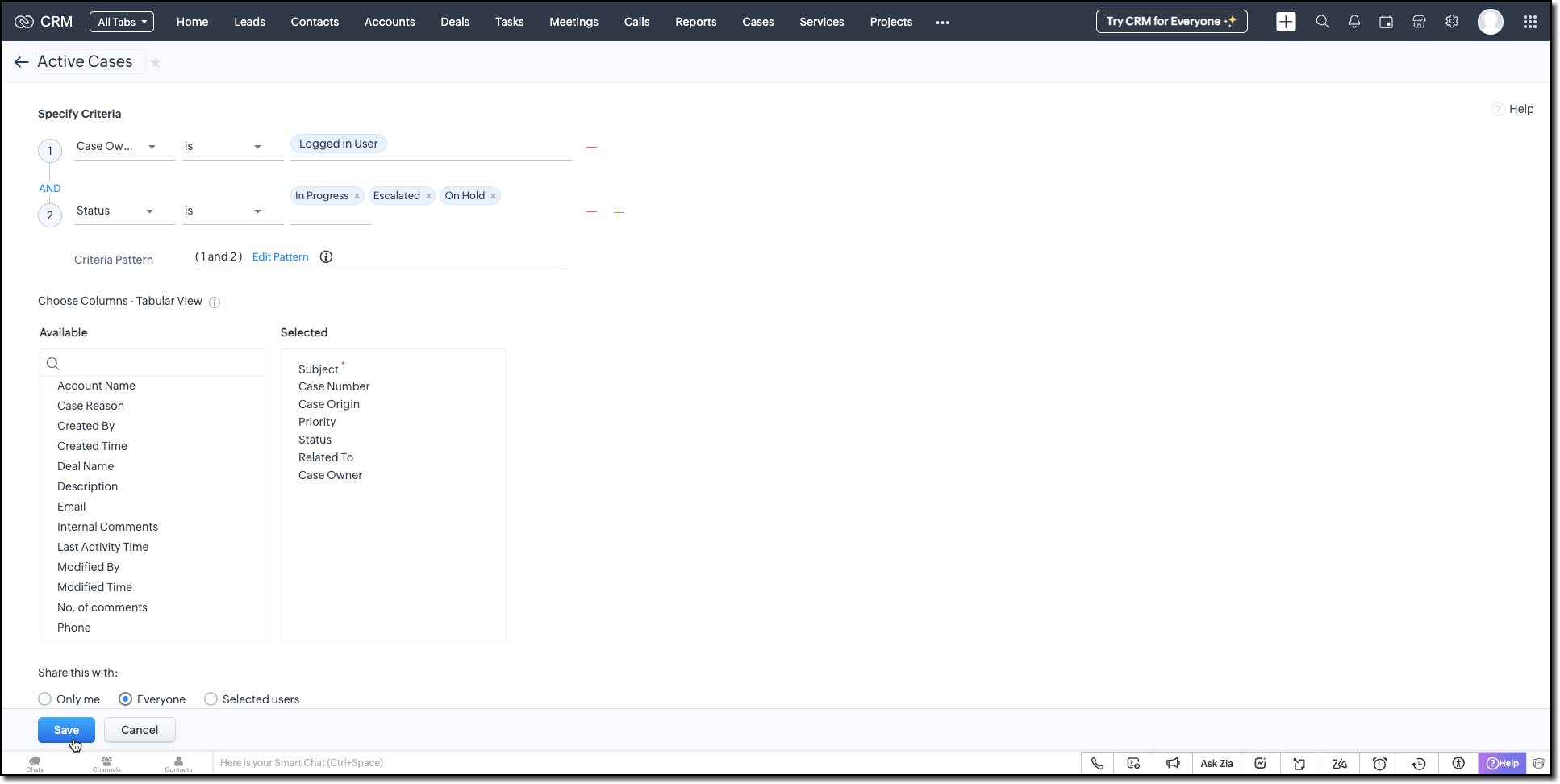
Active Timers View (Timer Entries Module)
Set up a second custom view in the Timer Entries module to track entries where the timer has been started but not yet stopped. These represent active timers. Use the following logic for criteria:
- The End Time field is empty (i.e., timer still running).
- Timer Entry owner field matches the logged-in user.
This view is used internally by the widget to detect if a timer is already running and update the same entry once the timer is stopped.
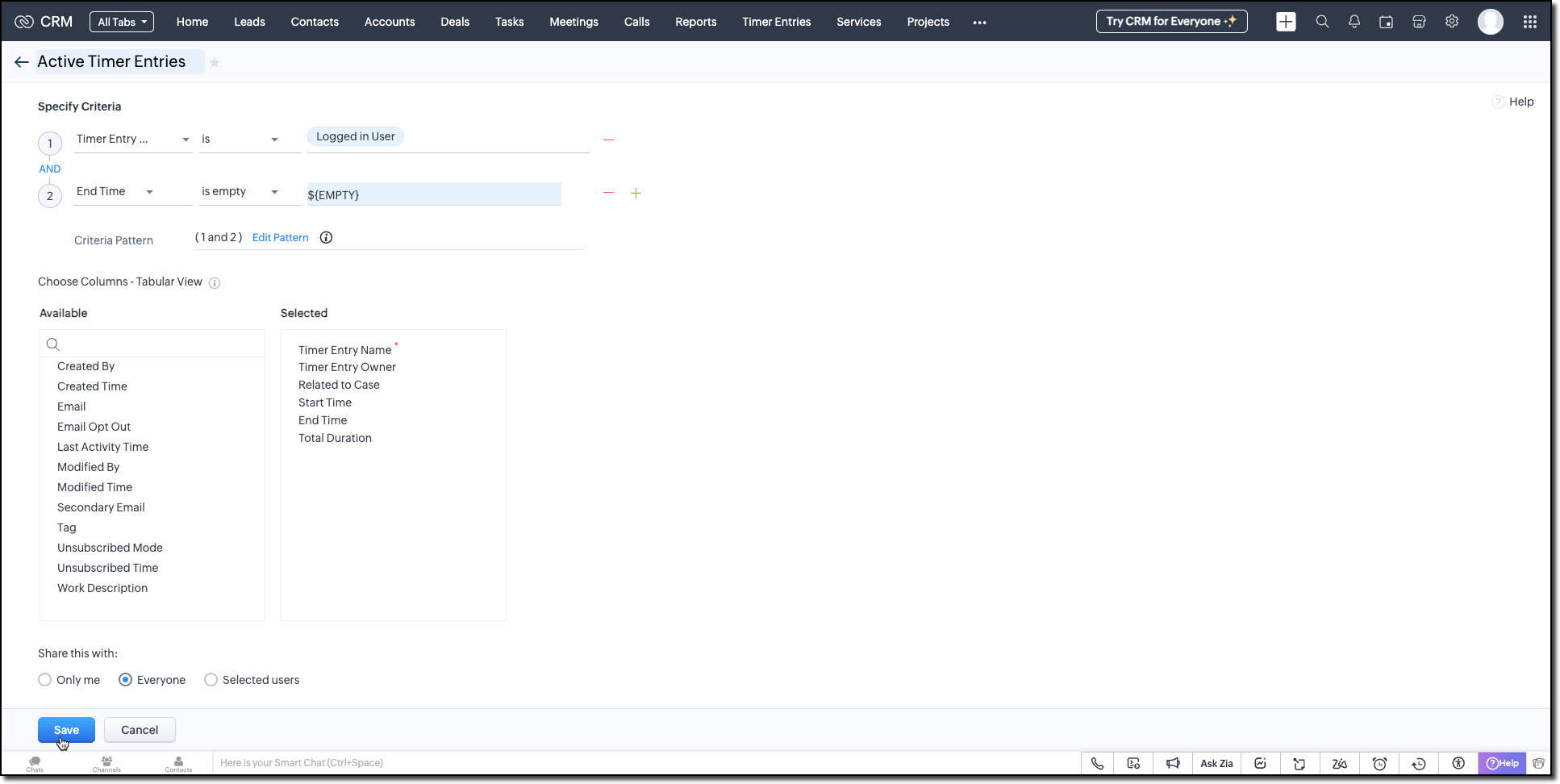
Follow the Managing List View help page and use the specifications shown in the following image.
Building the Timer Widget
Step -1: Review Basics
Refer to our earlier Kaizen on CLI Installation, Creating a Widget Project, and Internal hosting of the same.
Step 2 - Develop the Widget
After initializing your widget project using CLI, implement the timer logic:
Fetching Active Cases
On page load, the populateRecordsDropdown function initiates a Get Records API call to the Cases module, using the Active Cases custom view ID. This fetches all active case records assigned to the logged-in user.
These records are then listed in a dropdown, allowing users to quickly select the relevant case they are about to work on.
async function populateRecordsDropdown() { const recordsDropdown = document.getElementById("moduleRecords"); recordsDropdown.innerHTML = ""; try { const recordsResponse = await ZOHO.CRM.API.getAllRecords({ Entity: casesModule, cvid: casesCVID, per_page: 10 }); if (recordsResponse.data && recordsResponse.data.length > 0) { recordsResponse.data.forEach(record => { const option = document.createElement("option"); option.value = record.id; option.textContent = record.Subject || "Unnamed Record"; recordsDropdown.appendChild(option); }); } else { const placeholderOption = document.createElement("option"); placeholderOption.value = ""; placeholderOption.textContent = "No records found"; placeholderOption.disabled = true; placeholderOption.selected = true; recordsDropdown.appendChild(placeholderOption); } } catch (error) { console.error("Error fetching records:", error); } } |
Starting the Timer and Creating an Entry
Once the user starts the timer, The createRecord function triggers a Create Record API call to log the session in the Timer Entries custom module. The record captures the start time and the related case and description (if provided).
Even if no details are entered or case is selected, a timer entry is still created with the start time. This ensures that spontaneous work sessions are tracked and not lost.
async function createRecord(startTime) { try { const workDescription = document.getElementById("workDescription").value; const selectedRecordId = document.getElementById("moduleRecords").value; const selectedRecordText = document.getElementById("moduleRecords").options[ document.getElementById("moduleRecords").selectedIndex ].text; const data = { Start_Time: startTime, Owner: currentUserId, Work_Description: workDescription, Related_to_Case: selectedRecordId, Name: selectedRecordText }; const response = await ZOHO.CRM.API.insertRecord({ Entity: timerModule, APIData: data }); console.log("Start time recorded successfully"); } catch (error) { console.error("Error creating record:", error); } } |
Stopping the Timer and Updating the Entry
When the timer is stopped, the widget uses the Active Timer Entry custom view to locate the most recent Timer Entry record created by the logged-in user that does not have an end time.
The updateRecord is then triggered to update that active entry using the Update Record API call. It updates the End time of the session and the related case, descriptions, if it was not already provided when the timer was started.
async function updateRecord(endTime) { try { const workDescription = document.getElementById("workDescription").value; const selectedRecordId = document.getElementById("moduleRecords").value; const response = await ZOHO.CRM.API.getAllRecords({ Entity: timerModule, cvid: timerEntriesCVID, per_page: 1 }); const latestRecord = response.data[0]; if (latestRecord) { const recordId = latestRecord.id; const data = { id: recordId, End_Time: endTime, Work_Description: workDescription, Related_to_Case: selectedRecordId }; await ZOHO.CRM.API.updateRecord({ Entity: timerModule, APIData: data, RecordID: recordId }); console.log("End time updated successfully"); } } catch (error) { console.error("Error updating record:", error); } } |
Step 3 - Validate and Pack the Widget
- Follow the steps given in the Widget help page to validate and package the widget.
- Go to Zoho CRM > Setup > Developer Hub > Widgets and click Create New Widget.
- Fill in the required details as shown in this image and ensure to select Button as the widget type.

Step 4 - Associate it with Flyout
- Go to Setup > Developer Space > Client Script. Click New Script.
- Enter a name and description for the script. Choose Command type in Category.

- Create a Flyout and render a widget within it using its details like the API name of the widget, title, size, and animation type. You can get the Widget API name from the widget's detail page.
let allowedUserEmails = []; allowedUserEmails.push('user1_email_address'); allowedUserEmails.push('user2_email_address'); allowedUserEmails.push('user3_email_address'); let currentUserEmail = $Crm.user.email; if (allowedUserEmails.indexOf(currentUserEmail) == -1) { ZDK.Client.showMessage('Command access resticted', { type: 'error' }); return false; } ZDK.Client.createFlyout('myFlyout', {header: 'Timer', animation_type: 4, height: '600px', width: '500px', top: '10px', left: '10px', bottom: '10px', right: '10px' }); ZDK.Client.getFlyout('myFlyout').open({ api_name: 'Timer', type: 'widget' }); return true; |
Refer to Creating a Client Script help page for more details.
Try It Out!
A complete working code sample of this widget is attached to this post.
Now, let us see how this Timer widget works:
1. Start the Timer
Open the widget and select an active case from the dropdown. As soon as you start the timer, a new record will be automatically created in the Timer Entries module to capture the session.

2. Stop the Timer
When the task is complete, provide a description of the work you have done and stop the timer. The same Timer Entry record (created when the timer was started) will be updated automatically with the end time and your work description.
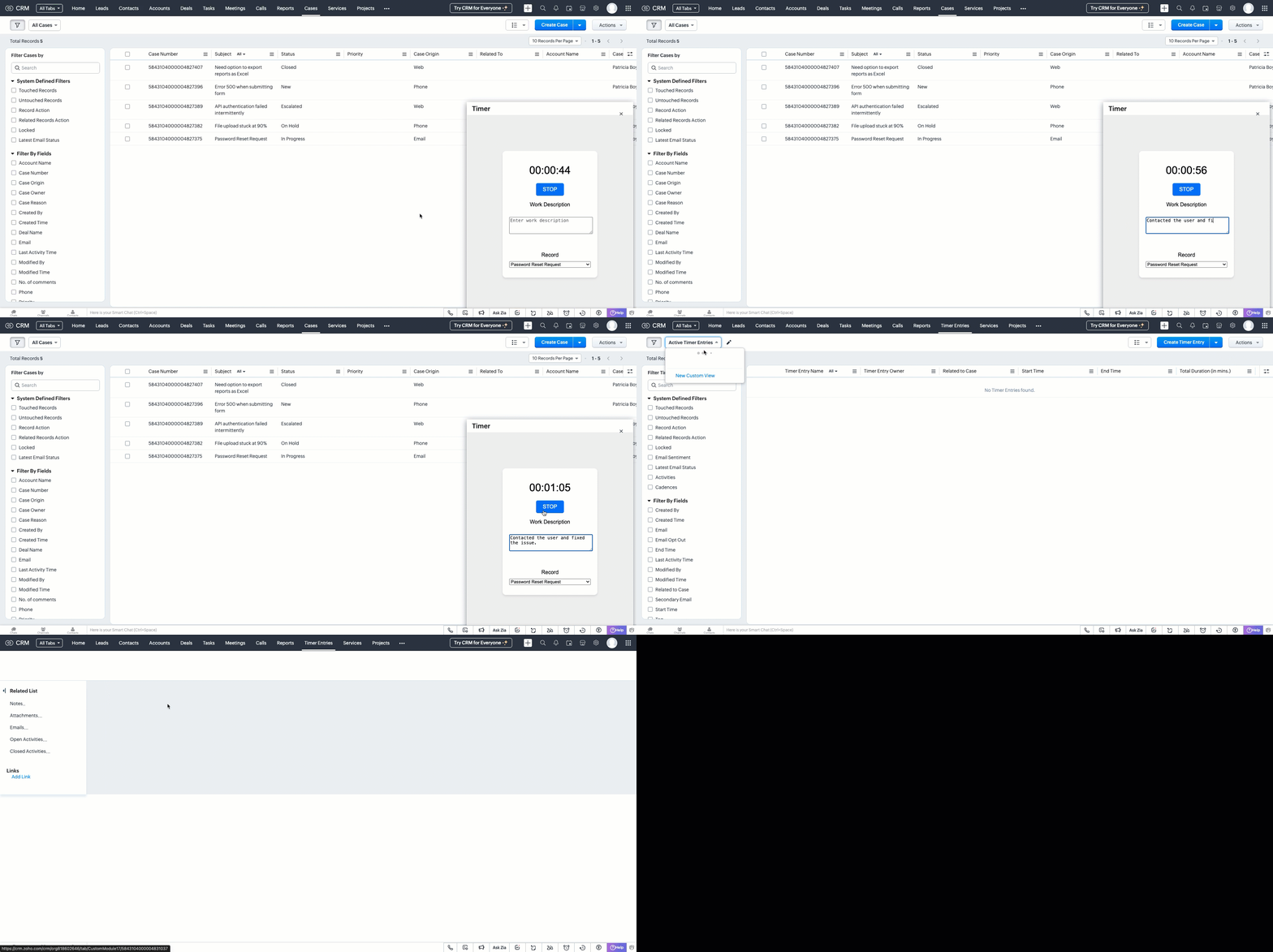
This forms the foundation for accurate time tracking at the record level.
In Part 2, we will show how to:
-> Use a workflow and Deluge function to transfer these entries into the Work Log subform inside the relevant Cases record.
-> Use CRM Reports to slice and dice work time for better SLA and productivity insights.
In the meantime, would you like us to address any of your pain-points or have a topic to discuss? Let us know in the comments or reach out to us via support@zohocrm.com.
Until next time, Happy Coding!
-----------------------------------------------------------------------------------------------------------------
Related Reading
- Custom Fields - Working with Custom Fields and Working with Picklist Field
- Widget - An Overview, CLI Installation, Working with Widgets, JS SDKs, Mobile Compatibility of Widgets and Kaizens
- Core APIs - GET Records, POST Records and UPDATE Records
- Client Script - An Overview, Creating a Client Script, Best Practices and Troubleshooting
-----------------------------------------------------------------------------------------------------------------

Previous Kaizen: Client Script Support for Subforms | Kaizen Collection: Directory
Topic Participants
Kiruthiga G
Sticky Posts
Kaizen #152 - Client Script Support for the new Canvas Record Forms
Hello everyone! Have you ever wanted to trigger actions on click of a canvas button, icon, or text mandatory forms in Create/Edit and Clone Pages? Have you ever wanted to control how elements behave on the new Canvas Record Forms? This can be achievedKaizen #197: Frequently Asked Questions on GraphQL APIs
🎊 Nearing 200th Kaizen Post – We want to hear from you! Do you have any questions, suggestions, or topics you would like us to cover in future posts? Your insights and suggestions help us shape future content and make this series better for everyone.Kaizen #198: Using Client Script for Custom Validation in Blueprint
Nearing 200th Kaizen Post – 1 More to the Big Two-Oh-Oh! Do you have any questions, suggestions, or topics you would like us to cover in future posts? Your insights and suggestions help us shape future content and make this series better for everyone.Celebrating 200 posts of Kaizen! Share your ideas for the milestone post
Hello Developers, We launched the Kaizen series in 2019 to share helpful content to support your Zoho CRM development journey. Staying true to its spirit—Kaizen Series: Continuous Improvement for Developer Experience—we've shared everything from FAQsKaizen #193: Creating different fields in Zoho CRM through API
🎊 Nearing 200th Kaizen Post – We want to hear from you! Do you have any questions, suggestions, or topics you would like us to cover in future posts? Your insights and suggestions help us shape future content and make this series better for everyone.
Recent Topics
MS Teams Meeting to Zoho CRM
Has anyone figured out a good way to push MS Teams meeting info on a trigger of "meeting end" to Zoho CRM? We're looking for a way to take attendees of a meeting and meeting duration and push it into Zoho CRM after the meeting has ended. If I can justCreating Layout Rule With Formula Field
By The Grace Of G-D. Hi, I see that i cannot use Layout Rules to show/hide Formula Fields. Is that something you plan on adding sometime soon?Combine / merge multiple invoices into master
Good morning Zoho! Upon looking for a solution for my issue, I found many that had my similar problem...dating 13 years ago! Please, any updates on this? Merging multiple invoices on a Master Invoice would alleviate all the extra work of resending andFree Webinar Alert! Productivity Hacks that you don't want to miss on June 24
Hello Zoho Community! Want to work smarter and get more done with Zoho Mail? We’re here to help! Join our interactive webinar to explore powerful Zoho Mail features that can boost your productivity. Watch live demos, learn helpful tips, and take partWeb Clipper cannot save to collections
With the recent update that added collections, i am unable to use the web clipper to save to a collectionsort by name is always z to a
I typically keep my notes in alphabetical order. Suddenly they are all backwards - z to a. They stay that way whether I select a to z or z to a. Is there a way to fix this?Project Management Bulletin: June, 2025
Our project management suite's representatives have been busy socializing with global customers in the USA (Zoholics) and Australia (roadshows). We also had multiple stop overs at our customer’s establishments and were glad to see the efficiency our productsAgenda For Zoholics Benelux & Nordics 2025
Dear Zoho Benelux community, We are pleased to announce the agenda for Zoholics Benelux & Nordics 2025 on September 23-24 at NBC Congrescentrum in Nieuwegein. The topics of the presentations are: Zoho innovations in the region and worldwide The introductionHow to query Deal "Stage" "Is Open" in Analytics SQL?
How do I query this "field" in Analytics? What is going on? It seems like there is another 'mapping' somewhere but that it is inaccessible with raw sql??? If I query "Stage" Like '%Won%' I get a wildly different number than I do when I manually filterEnhanced Candidate Portal: Now Featuring Federated Login, Passwordless Access & MFA
You can now enhance your Candidate Portal experience with Federated Login, Password less Sign-in and Multi-Factor Authentication (MFA). These features offer greater flexibility and control—allowing seamless sign-ins through trusted platforms and addingCustom View and Custom Fields
Hi We have custom fields that we need in the Sales\Customer module and we would like to have the fields available to view in the Bills module so that we can add them to a custom view, is that possible? That way we can look at the Bills screen to see whatCan I write a check in Zoho Books with no associated bill?
This currently does not seem possible, and I have a client that desperately needs this function if I am able to convert them with Quickbooks. Thank you in advance for your reply.Automation#35 : Auto-Add Comments under the Owner's Name in Tickets via Macros
Hello Everyone, This week's custom function provides simple steps to configure a Macro for adding comments to tickets with the name of the Comment owner. When managing tickets, you can use the Comment feature to communicate internally with your team andSubfrom Changes are NOT included in Audit Logs and Timeline
In the Timeline the subform changes are not tracked We have an important custom module for Recording Pricing Information It has a subfrom, now if Changes are made to the subform fields they are not shown in the timeline, ONLY the aggregated fields ThisTracking Emails sent through Outlook
All of our sales team have their Outlook 365 accounts setup with IMAP integration. We're trying to track their email activity that occurs outside the CRM. I can see the email exchanges between the sales people and the clients in the contact module. ButChanging Link Color
When I create a link from a block of text, the text color changes to a color i do not want. After scrolling through the CSS and HTML files I cannot find the setting for the link color. Changing the link color word by word seems inefficient and must be a setting somewhere? Greg Aanes 2109 Queen Street Bellingha WA USAContent Management System
Is there any plan to develop a CMS application that allows us to manage all of the ZOHO services such as Writer, Sheet, and Planner? Besides that, it would be nice to manage the files and logs of WebNMS using SOA. Otherwise i'll try to make it. Thanks, Takash FHow do I pause or halt a running campaign?
Hi, I set up an A/B campaign - and after testing, scheduled the campaign, I noticed an error in the subject line and had to pause or halt the campaign 'mid-flight' - could not find this, and the only option was to delete the entire campaign to halt the send (it was an emergency). Is there a campaign Pause or Stop function/button? I could not find it - am I missing something? (Thank you for your help - I searched the resources and could not find an answer)Contact Segments with multiple CRM modules
Hello, We have a somewhat unique setup in our system involving various components: Contacts, Accounts, Deals, and a couple of custom modules named Properties and Audit Logs. We're looking to implement a notification system via SMS and Email specificallyCannot reorder fields in Page Layout in Expenses and Purchase Requests
It is very inconvenient that the custom fields in Page Layout cannot be re-ordered. The only way is to remove the fields and re-create them; however, it is impractical. This would affect the reports and dashboards we are having. Not able to re-order theHaving issues with creator, flow and calendar
So I have made a creator app when engineer puts in the date and time for when they are going to out on site , this then passes the calendar data to flow and then should populate the inputed data to the calendar. So If use${system.zf_current_date_time}.Problem when forwarding emails
When I want to forward an email received through Zoho, the layout changes: Buttons are cut Pictures change size Text changes alignment (left/right/center) Is this a common problem in Zoho? Thank you, SuzannahView Audit Trail field
The Audit Trail feature is great, but its data is only available to admin users. It would be really great to have a system field "Audit trail" that we can add to the detailed view of a record. This would allow supervisors, directors and etc. to quickly track what changes have been done by whom for each record. It is a current feature from a client of mine and while it's probably possible to hard code it, since this data is already available in Zoho, I would be surprised to hear how hard it wouldRecuring bills payments
I've entered recuring bills that are auto drafted from my account monthly. Can I set up the recuring payment or do I continue to manually do it monthly?Automatically assign Contact Roles to a Deal
Hi guys, Is there a way to assign multiple Contact Roles to a Deal via a workflow or similar? Thankson submit of creator form then record is create in Zoho crm purchase module then on automatically task want to create in the crm
on submit of creator form then record is create in Zoho crm purchase module then on automatically task want to create in the crmZoho CRM Webinar – Automate everything across Customer Journeys in CommandCenter 2.0
How efficient is your current CRM automation setup? As customer journeys become more dynamic, it's common for data and actions to get scattered across teams and modules. This leads to broken processes and inconsistent customer experiences—especially acrossChanging employees email address
How do I change an employee's email address? I am an administrator on the account but it says that I am "not allowed" to do it?MULTI-SELECT LOOKUP - MAIL TEMPLATE
Dear all how are you? We need to insert data from MULTI-SELECT LOOKUP in a email template, but I can't do that, when I'm creating the template I can't find the field to insert it. is there any solution? PVUChanging the owner of a call
Am I correct in my conclusion that I cannot change the owner of a call in Zoho? The field does not show up in the screen, nor can I make it show up as the systems does not give me that option. I cannot "mass update" it either. I tried it, but Zoho refuses to change the name of the owner. Please help out: how do I change the owner of a call.Global Fields
Just like Global Sets for Picklists, we would like to have global fields for any kind of field. Three things that should be saved globally: 1. The Existence of the field 2. The Name and 3. Association with a module should be set up in a respective placeIntroducing Screen Share with Audio
Share your entire screen or just the chrome tab with audio for more engaging presentations. Your audience will hear sound just like you do, whether it's a video, demo or any other content. This is ideal for training sessions, team meetings, and clientNeed Help Preventing Overselling in Zoho Inventory
Hi fellow Zoho Inventory users, I'm reaching out for advice on managing inventory control in our growing business. We've recently encountered situations where sales orders get confirmed despite insufficient stock, creating operational challenges. OurTip #53: Populate and search values from tables using Table Lookup
Qntrl supports tables to store organization-related data and access it easily. Data stored here can be populated and displayed in orchestration using Table Lookups. This helps organizations list sizeable data in dropdown or multiselect dropdown fieldsIntroducing more AES digital signature options in Zoho Sign
Greetings! Zoho Sign has continually strived to partner with trust service providers across the globe to give you complete security and confidence, so you can e-sign documents no matter where you are. We've recently partnered with IgniSign, a trust serviceShuffling between one note to the next
I usually start all my notes per interaction with a contact with the date and then a little detail. But when I search for it it only see a small portion of the note and can't immediately tell which contact its associated with. can we make the note contentImportant Update: TRAI Mandates New SMS Header Format
Hello everyone, We have an announcement regarding a new regulation by the Telephone Regulatory Authority of India (TRAI) that affects all application-to-person (A2P) SMS services. Starting on May 6, 2025, TRAI has mandated that telecom service providersPreview generation in progress for days
I uploaded a video file to Zoho webinar. The file has been showing Preview generation in progress for days. Pls help, why is not approved?Workdrive Upload Notification
Is there a way to be notified when someone externally has uploaded files to a folder? The "Unread" tab is really worthless because it shows all files from every directory on the system. I just need an email (or bell at worst) that says "someone has uploaded into <foldername>".Workflow for "Expenses" module?
Hi there, over the last 2 years, Zoho Expense has seen tremendous growth and we are happy with it. But, sometimes it is frustrating to see things are being implemented halfheartedly, or so it seems. For example, There is the possibility to create workflowsNext Page