Kaizen 241 - Automating Deal Risk Escalation Using Workflow APIs, Connected Workflows, and Functions

Welcome to another Kaizen week.
In many organizations, sales teams work in Zoho CRM, finance teams manage invoices in Zoho Books, and support teams handle customer issues in Zoho Desk. Now consider this scenario:
A sales representative is working on a high-value upsell opportunity for an existing customer. The deal has reached the final negotiation stage and is ready to move forward. From the sales team’s perspective, everything looks fine. However, the finance team may know that the customer has unpaid invoices, while the support team may already be handling unresolved tickets for the same customer.
Sales teams typically do not verify these details manually every time a deal progresses, which can lead to risky business decisions.
In this post, we will build a cross-app risk validation flow for high-value deals in Zoho CRM. When a deal enters the Negotiation/Review stage, the automation checks for unpaid invoices in Zoho Books and open support tickets in Zoho Desk, updates risk fields in CRM, escalates risky deals into a connected review process, and resumes deal progression only after approval.
To implement this, we will use a combination of:
Workflow APIs for the initial trigger
Custom Functions for runtime validation logic
Connected Workflow APIs for cross-module review orchestration
Email Notification APIs for stakeholder communication
Field Update APIs for updating the original Deal after review.
Prerequisites
Before implementing this flow, make sure the following are already available:
Zoho CRM with access to Workflows, Custom Functions, and Connected Workflows.
Zoho Books and Zoho Desk configured for the same business context, and integrated with Zoho CRM. Check these links for more details : CRM - Books integration help, CRM - Desk integration help.
Active connections from Zoho CRM to Zoho Books and Zoho Desk.
The Deals module in CRM.
A custom module called Risk Reviews.
NOTE: This implementation assumes that the Zoho Books and Zoho Desk integrations are already configured and CRM connections are available for use inside Deluge invokeurl calls. In the sample function, these are referenced as books_connection and desk_connection.
The connections must include the scopes required by the APIs used in the custom function:
the Zoho Books connection should include scope(s) to read invoices
the Zoho Desk connection should include scope(s) to read contacts and tickets
If these scopes are missing, the invokeurl calls in the custom function will fail even if the workflow and Deluge logic are configured correctly.
CRM Setup
Fields to Add
Add three fields to the Deals module:
Approval_Status : Tracks the validation/approval state (Picklist field : Pending Validation, Approved, Escalation Required)
Invoice_Risk_Count : Number of problematic invoices found (Number field)
Open_Ticket_Count : Number of open support tickets found (Number field)
Risk Reviews Module
Create a custom module called Risk Reviews to store escalation records for Deals. Each Risk Review record remains connected to the originating Deal so that the review process is traceable and the original Deal can be updated automatically after approval.
Include the following fields in the Risk Reviews module:
Review_Status (Picklist: Pending, Approved, Rejected, Needs Clarification)
Risk_Type (Multiselect Picklist: Invoice Risk, Support Risk, Both)
Deal (Lookup to Deals module)
Account (Lookup to Accounts module)
Deal_Amount (Currency)
Reviewer (User field)
Comments (Long Text)
Escalated_On (DateTime - auto-populated when created)
Reviewed_On (DateTime - populated when review is completed)
Step 1: Create the workflow rule
Whenever a deal enters the final negotiation stage, we want the system to validate whether the customer has any financial or support-related risks before allowing the deal to move forward.
Workflow Trigger Conditions:
Stage = Negotiation/Review
Deal Amount > threshold value. In this example, we use ₹250000 as the high-value threshold.
This ensures that only high-value deals go through this validation process.Create this using the Create Workflow Rule API. The workflow contains a single instant action: execute a custom function.
Find the Workflow Rule API input JSON here.

Solution flow
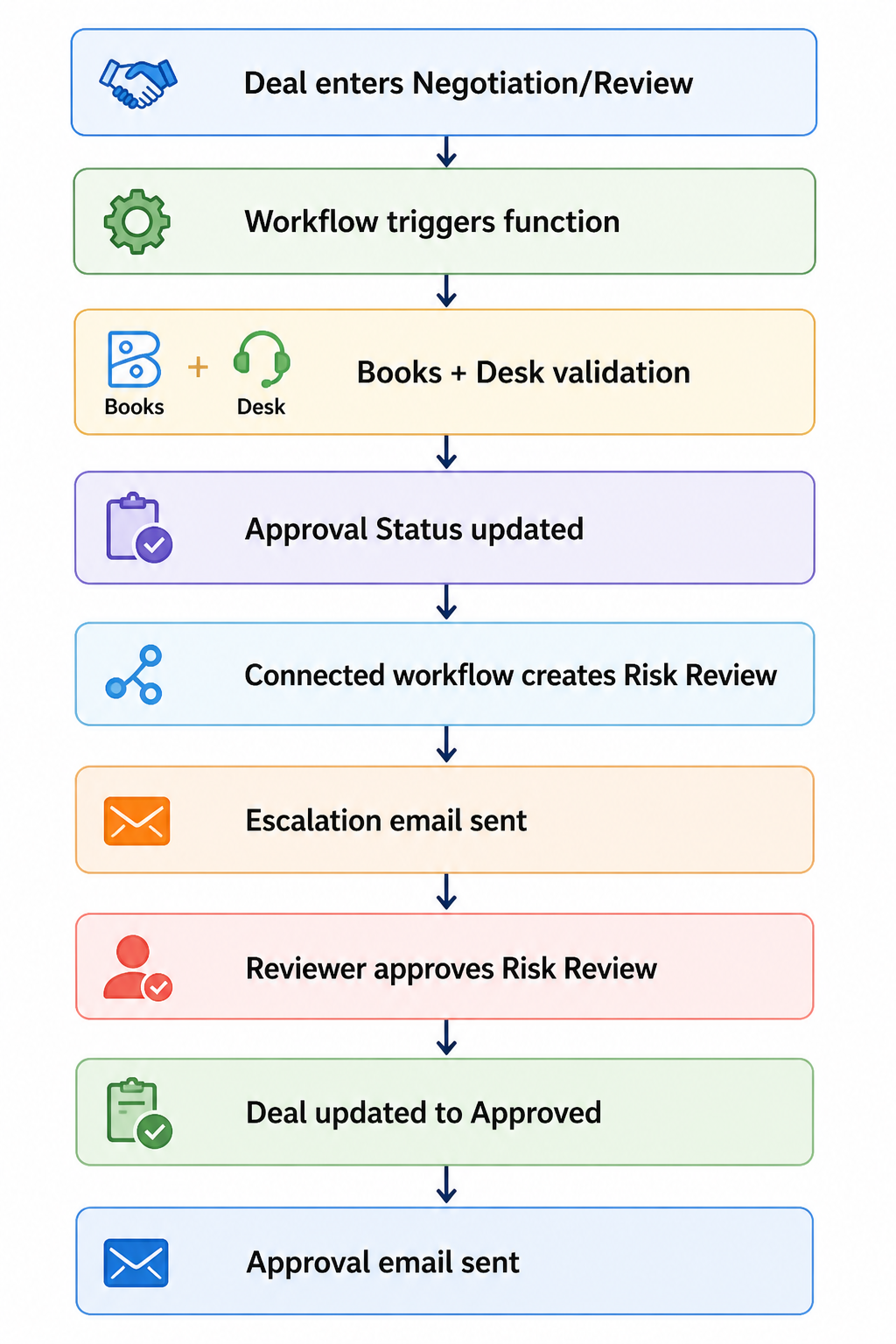
Custom Function
Once triggered, the workflow executes a custom function. The function accepts a single input parameter, dealId, from the workflow context and performs the validation logic in five steps.
1. Fetch deal details from Zoho CRM
It first fetches the deal record and extracts:
Deal stage
Deal amount
Current approval status
Account details
Contact details
These values are used both for qualification checks and for matching records across Zoho CRM, Zoho Books, and Zoho Desk.
2. Check whether the deal qualifies for validation
We do not want every deal to go through this process. The function exits if:
the deal is not in the Negotiation/Review stage
the deal amount is below ₹250000
This avoids unnecessary API calls and keeps the validation logic focused only on high-value deals. In a production implementation, this threshold can be moved into a configurable setting instead of being hard-coded in the function.
3. Check invoice risk in Zoho Books
The function fetches invoices using the configured Books connector and Zoho Books APIs. It then loops through the returned invoices and counts records where:
customer_name matches the CRM Account name
status is one of:
unpaid
overdue
draft
The count is stored in Invoice_Risk_Count.
In the current implementation, the CRM Account is matched to Zoho Books using the account display name. This works for simple cases, but according to your implementation, it is better to match using a stable customer identifier instead of relying only on account names.
4. Check support risk in Zoho Desk
The function validates support risk in two stages.
First, it fetches Desk contacts using the configured desk_connection and identifies the matching contact by comparing the Desk contact email with the CRM Contact email.
Once a match is found, the function fetches Desk tickets and counts records where:
contactId matches the identified Desk contact
status = Open
The final count is stored in Open_Ticket_Count.
5. Determine approval status
Once both validations are complete, the function determines the new approval state:
if Invoice_Risk_Count > 0 or Open_Ticket_Count > 0, set Approval_Status to Escalation Required
otherwise, set Approval_Status to Approved
The function always refreshes:
Invoice_Risk_Count
Open_Ticket_Count
It updates Approval_Status only if the new value is different from the current one. This avoids unnecessary status updates while still keeping the numeric risk fields current.
Find the full Deluge function code here.
To make this automation safer in implementations, it is also a good idea to prevent duplicate escalations. For example, before creating or triggering a new review cycle, you can check whether an open Risk Review record already exists for the same Deal.
Note: If you have high invoice volumes or large contact bases, extend this implementation with pagination, server-side filtering, and error handling.
Step 2: Create the Connected Workflow
At this stage, the function has already identified whether the deal is risky.
If no risks are found, the Deal is approved and moves forward.
If risks are found, the process needs to do more: create a review record, notify stakeholders, wait for a human decision, and then update the original Deal once that decision is made. This kind of multi-record, multi-stage flow can technically be assembled using a combination of separate workflow rules and custom functions, each reacting to field changes across modules. But that means you are manually maintaining the relationships between those rules, keeping track of which record triggered what, and ensuring updates flow back correctly to the originating Deal.
Connected Workflows are built specifically for this pattern. They let you define the entire cross-record process in one place, where each stage is explicitly linked to the record that triggered it. The Risk Review stays connected to the Deal it came from, so when a reviewer approves it, the platform knows exactly which Deal to update, without you wiring that logic together separately.
This keeps the process traceable, reduces the number of moving parts you need to maintain, and makes the flow easier to extend later if you add outcomes like Rejected or Needs Clarification.
The first step is to create a Connected Workflow using the Create a Connected Workflow API, where you define the root node, name and description. After that, you can add rules using the Add a Rule to a Connected Workflow API.
Download the input JSON to create a Connected Workflow for Deals module here.
First Connected Workflow Rule: Deal > Risk Review
The first connected workflow rule runs when the Deal record gets updated by the function.
Trigger: Approval_Status = Escalation Required
When this happens, the rule performs two actions.
Action 1: Create a connected record
A connected Risk Review record gets created automatically.
Fields such as Deal name, Account, Deal amount, and risk-related details are mapped from the Deal. Additional fields such as Review_Status and Risk_Type are also populated so that reviewers can immediately understand why the Deal was escalated.
Action 2: Send escalation email
Once the review record is created, an email notification is sent to the relevant stakeholders to inform them that the deal requires review before progressing further. This action is created using the Email Notifications API. Click here for the input JSON to create Email Notification Action request.
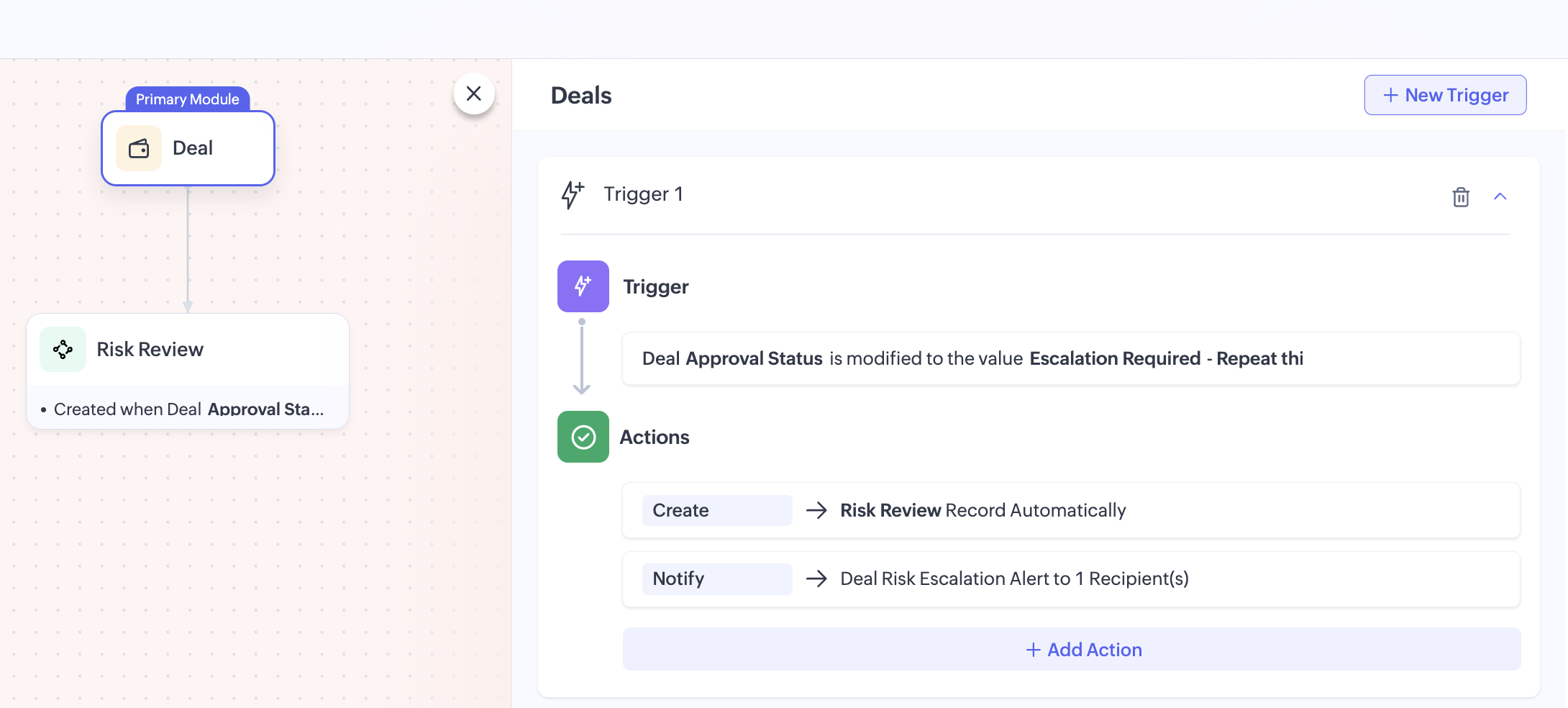
To download the input JSON for adding this rule to the Connected Workflow, click here.
Second Connected Workflow Rule: Risk Review > Deal
Once reviewers complete their review, the process should move back to the original Deal. This is handled by the second connected workflow rule.
Trigger: Review_Status = Approved
When the Risk Review record is updated to Approved, the rule performs two actions.
Action 1: Update the Deal record
The related Deal record gets automatically updated using a field update action. The Approval_Status will be updated to Approved, allowing the sales team to continue progressing the Deal.
This action is created using the Create Field Update Action API. Click here to download the input JSON for this request.
Action 2: Send approval email
Once the Deal is approved, another email notification is sent.
This informs stakeholders that the review is complete, risks were addressed and the deal can now move forward. This action is created using the Create Email Notification API.
You can also extend this flow by defining additional outcomes such as Rejected or Needs Clarification, depending on your review process.
Attached files:
By combining Zoho CRM workflows, custom functions, Connected Workflows, and action APIs, we can turn a manual risk checkpoint into a structured and traceable approval process.
This pattern is useful whenever CRM decisions depend on data spread across multiple Zoho applications. By combining workflows, custom functions, and Connected Workflows, businesses can enforce validations, reduce manual checks, and create more reliable approval processes.
For production use, you can extend this implementation further by:
making the threshold configurable
storing stable cross-app identifiers for more reliable matching
preventing duplicate review creation
adding rejection or revalidation paths
logging integration failures for easier troubleshooting.
If your business process depends on data spread across multiple Zoho applications, this is a practical way to orchestrate that logic inside CRM.
You can find all the sample files used in this implementation, including the workflow JSONs, Connected Workflow configurations, email actions, field update actions, and Deluge function code here: Project files
We hope you found this useful. If you have any questions, feel free to leave a comment below or reach out to us at support@zohocrm.com

Topic Participants
Anu Abraham
Sticky Posts
Announcing the new SKILL.md for Zoho CRM and the updated OAS repository!
We are introducing a new zoho-crm skill to make working with Zoho CRM Developer tools (like APIs, functions, widgets, client scripts, queries etc) easier and faster, with the help of AI in your preferred AI harness like Claude Code, Codex, Cursor, VSCodeKaizen #261 : Using Zoho CRM Skill to generate complex COQL queries
Hello everyone, In the previous Kaizen posts, we introduced the zoho-crm SKILL.md and discussed how it can help you when you are working with Zoho CRM APIs and Client Script. In this Kaizen, we will focus on using the Zoho CRM `SKILL.md` with GitHub CopilotKaizen #256 - Build an Arrival Readiness Web Tab in Zoho CRM
Hi everyone! Welcome back to the Kaizen series! In the post, we discuss a use case in hospitality industry: how an Arrival Readiness web tab widget can be used to let reception staff identify and resolve issues before arrival of guests. Use case In theKaizen #198: Using Client Script for Custom Validation in Blueprint
Nearing 200th Kaizen Post – 1 More to the Big Two-Oh-Oh! Do you have any questions, suggestions, or topics you would like us to cover in future posts? Your insights and suggestions help us shape future content and make this series better for everyone.Kaizen #226: Using ZRC in Client Script
Hello everyone! Welcome to another week of Kaizen. In today's post, lets see what is ZRC (Zoho Request Client) and how we can use ZRC methods in Client Script to get inputs from a Salesperson and update the Lead status with a single button click. In this
Recent Topics
Breaking Change Announcement: Users API Response Restricted for Client Portal Users
Hi all, We are introducing a breaking change to the Users API when it is accessed by Client Portal users. Status: Live This change is now live in production. Please review your integrations and make the necessary updates. Affected endpoints: GET /usersautomatic email reminder
in need of an email reminder to participants having trained for a course but have not paidSharedmail box access via an api
Hi, I am trying to access a sharedmailbox via an API. I am the moderator and creator of this shared mailbox. I have created a self client but when when i try to get list of all emails, it does not list the sharedmailbox. Help me to resolve this or provideDuplicate Record Creation
Hello Team, I would like to check whether there are any options available in Zoho FSM to prevent duplicate record creation in the following modules: Assets Companies Contacts Ideally, we would like the system to check for existing records before allowingCC'd User Receiving Both Regular Email Chain Response & Reply Notification
Hi, I am trying to set up the notifications for users and I'm a bit confused. I'm testing with personal accounts and my Desk agent, and I'm noticing that CC'd users are receiving both the regular email chain that the requester (contact) receives, butDefault View for Email Sent
Hi, can the default view for email sent to candidates be "ALL" instead of the current user? I have to click the dropdown menu every time so that I can see if other recruiters have already sent an email to a candidate. Thanks!KB Articles - Can't See Content or Trigger Immediate Sync
Once a file has been submitted to the KB, there's no way to check what it actually contains. There's also no way to force an immediate sync with the source document. These are issues when one is developing and testing an agent. It makes troubleshootingEnable Screen Recording in Zoho WorkDrive Mobile Apps (Android & iOS)
Hi Zoho WorkDrive Team, How are you? We are enthusiastic Zoho One users and rely heavily on Zoho WorkDrive for internal collaboration and content sharing. The screen-recording feature in the WorkDrive web app (similar to Loom) is extremely useful- however,Add Comprehensive Accessibility Features to Zoho Writer
Hello Zoho Writer Team, We hope you are doing well. We would like to submit a feature request to enhance Zoho Writer with a full set of accessibility tools, similar to the accessibility options already available in the Zoho Desk agent interface. 🚧 CurrentProblem with currency field in Zoho CRM
Hi Guys Zoho Books has a feature in currency fields that automatically converts decimal numbers with commas ( , ) to period format ( . ) when pasting them. For example: R$ 2,50 --> R$ 2.50 Is this behavior available in Zoho CRM? I couldn't find any configurationAbility to Attach Images When Reporting Issues to Zoho Projects from Zoho Desk
Hi Zoho Desk Team, Hope you’re doing well. We’re using the Zoho Desk–Zoho Projects integration to report bugs directly from support tickets into the Zoho Projects issue tracker. This integration is extremely useful and helps us maintain smooth coordinationIs it possible to convert regular pick-list to multi-select pick list?
I have a regular drop-down pick-list and we realized that we need this info as a multi-select pick-list. I don't think there is a way to convert from one type to the other, but what is the simplest way of moving the data over? Meaning, whatever valueMake Camera Overlay & Recording Controls Visible in All Screen-Sharing Options
Hi Zoho WorkDrive Team, Hope you are doing well. We would like to request an improvement to the screen-recording experience in Zoho WorkDrive. Current Limitation: At the moment the recording controls are visible only inside the Zoho WorkDrive tab. WhenVENDORS ARE NOT SYNCHED WITH CONTACTS IN CRM
Hello, While the ACCOUNTS and CONTACTS (Including the primary contact) are synced with the CONTACTS module in CRM, the vendor's CONTACTS are not synced with CRM - which basically forces the users to re-enter all vendor's contacts twice and then updateProperly Capture Dropdowns & Hover Elements When Recording a Window/Tab
Hi Zoho WorkDrive Team, Hope you are doing great. We encountered a limitation when recording a selected window or browser tab: Certain UI elements, such as dropdown lists, hover menus, and overlays, are not captured unless we record the entire screen.Add Camera Background Blur During Recording
Hi Zoho WorkDrive Team, Hope everything is well. We would like to request an enhancement to the video recording feature in Zoho WorkDrive. Currently, the camera preview displayed during a recording does not support background blur. This is an essentialWorkDrive Desktop Sync Is Being Deprecated: Move to WorkDrive TrueSync for a Smarter Experience
Hi everyone, We are excited to share a better, smarter way to access and manage your files directly from your computer! We’re transitioning from our legacy Desktop Sync app to WorkDrive TrueSync, designed to give you faster performance,greater flexibility,Support Uploading YouTube Videos Longer Than 60 Minutes
Hi Zoho Social Team, How are you? We would like to request support for uploading YouTube videos longer than 60 minutes directly through Zoho Social. Your support team informed us that Zoho Social currently cannot upload videos over 60 minutes due to “APICaso de Éxito: ACKstorm transforma la gestión de personas con Zoho People
"Con Zoho People hemos centralizado la gestión de personas y facilitado la autonomía de la plantilla." Equipo de ACKstorm ACKstorm es una empresa especializada en consultoría y servicios cloud que trabaja con el ecosistema de Zoho para optimizar sus procesosZoho Books Sandbox environment
Hello. Is there a free sandbox environment for the developers using Zoho Books API? I am working on the Zoho Books add-on and currently not ready to buy a premium service - maybe later when my add-on will start to bring money. Right now I just need aAction required: Authenticate your sender domain in Zoho Marketing Automation before December 14, 2026
Starting December 14, 2026, Zoho Marketing Automation will enforce a daily sending cap for unauthenticated custom sender domains. If you're sending email campaigns from your own domain but haven't authenticated it yet, you'll only be able to send up toAsk the Expert: Unlock the Power of AI and Zia Agents in Zoho CRM
Are you using Zoho CRM to manage your sales processes and customer relationships, and wondering how AI can help you work smarter, automate more, and take your CRM capabilities to the next level? We have great news: the “Ask the Expert” session is comingWhat's new in Zoho Desk 2026 - A decade of ideas brought to life
Hello everyone, 2026 marks a special milestone for us as we celebrate 10 years of Zoho Desk. A decade into business, there is always something new to keep up with, new expectations to meet, and new ways to make customer support better. Zoho Desk continuesManual categorisation of bank transactions
Good Day I am hoping someone here can assist me. I have a lot of catching up to do with some bank transactions. I imported all my bank statements manually. Where possible i created a rule to have the transactions auto categorised. However there are someIdea: Upload your own letterhead and design PDF templates freely (like Lexware Office and sevDesk)
Your own letterhead on every invoice and quote, uploaded in two clicks, no HTML, no public image links. Tools like Lexware Office (formerly lexoffice) and sevDesk already offer this. Zoho Books is more powerful in almost every other way, so let's closeSorting of invoices keeps changing
Hi there, I log into Zoho invoice around 2-3 times a week. Usually I sort my invoice list by "Date created". Every now and again when I log in, this sorting criteria has changed. It's not clear to what criteria it is changing and how/why, but I find it a little annoying not seeing the latest invoices at the top. Can you please look into this and make sure the sorting function is stored in a cookie or on the server? Thanks, KaiFeature Request: Add Sort by Cell Color and Text Color functionality
Hello Zoho Sheet Development Team, I am writing to suggest a feature enhancement for Zoho Sheet. Currently, the platform supports "Filter by Color," which is incredibly useful. However, there is no native option to "Sort by Color" (by cell fill or textMulti-Day Installations
We schedule technicians on multi-day installations. A single appointment from Monday 8 AM through Friday 5 PM counts as 105 working hours, causing false overbooking. We need one appointment spanning five days but only 40 hours counted toward technicianRebrand your CRM with the all-new custom domain mapping setup
UPDATES TO THIS FEATURE! 19th Jan, 2024 — Custom domain mapping has been made available for portal users in Zoho One and CRM Plus. 23rd June, 2023 — Custom domain mapping has been made available for all users, in all DCs. Hello everyone! We are elatedHow to manage additional required address information for Customers and Vendors.
Has anybody figured out a way to incorporate relevant delivery information in the limited address fields for customers and vendors? For example, most carriers have an additional 'delivery instructions' field to add important information like deliveryAction required: Authenticate your sender domain before December 14, 2026
Starting December 14, 2026, Zoho Campaigns will enforce a daily sending cap for unauthenticated custom sender domains. If you're sending email campaigns from your own domain but haven't authenticated it yet, you'll only be able to send up to 5,000 emailsChange default "Sort by"
Is there a way to change the default "sort by" when searching across modules?" in Zoho CRM? Currently the default sort method is "Modified time" but i would like to utilize the second option of "relevance" as the sort by default and not have to changeEnhanced access controls and smoother authentication for organization emails
Available to customers in all DCs. Hello everyone, We've improved how organization emails work in Zoho CRM, which are used when multiple users need to send emails from a common address, like sales@company.com or support@company.com. Admins can set upError AS101 when adding new email alias
Hi, I am trying to add apple@(mydomain).com The error AS101 is shown while I try to add the alias.Transaction rules for "Owner's Contribution" ?
I have a bank account where a lot of the deposits are "Owner's Contributions" (i.e., the business owner investing money in the company). Is it possible to create a Transaction Rule to automatically recognize these? They all have the same verbiage fromPrint a price list or price book
Hi Community. Am I right in concluding that Zoho has no functionality to print a price list from either Zoho CRM, Zoho Inventory or Zoho Books? I won't get stuck on the fact that Zoho doesn't sync price books between Zoho CRM and Books/Inventory (moreThe Social Wall: October 2026
Hello everyone This month, we're making it easier to organize your monitoring workspace with Monitor Groups in Zoho Social. Organize your monitor columns into groups You can now organize your monitor columns into custom groups based on your preferences.Field of Lookup - 5 Field Association Limit.
This query relates to the post at: https://help.zoho.com/portal/en/community/topic/introducing-the-field-of-lookup-in-crm-public-early-access-2023 My simple (and common) scenario: I select an account / customer lookup and want their address pulled intoFeature Request - Electronic submission of tax returns in Canada
Allow the user to submit Canada Revenue Agency GST/HST returns with NETFILE. Provide the same functionality for provincial revenue agencies for PST/RST remittances. Today Zoho Books only provides the math required to calculate each line, requiring theAbility to translate Zoho CRM Kiosks
Hi team, Is support for translating kiosk text and screen names in the Zoho CRM translation tool planned on the roadmap? Thanks,Next Page