Deal Notes Sentiment Analysis with Zia Assistant API, Workflow, Deluge in Zoho CRM

Deal Notes Sentiment Analysis with Zia Assistant API, Workflow, Deluge in Zoho CRM


Hello all! 
Welcome back to a fresh Kaizen week. 
In this post, we will explore how to detect negative sentiment in notes added to a deal in Zoho CRM using the Zia Assistant API with Workflow and Custom Functions.

Introduction

Sales teams capture every interaction in notes such as calls, emails, meetings, and feedback. These notes contain important signals that indicate whether a deal is progressing or at risk.
As deals grow, manually tracking every note becomes difficult. Important signals are often missed, leading to delayed actions.
This solution builds an automated system that reads notes, detects sentiment, assigns a risk score, tracks changes over time, sends alerts, and highlights high-risk deals.

Final output

Here is how the system automatically analyses and updates the deal when a negative sentiment note is added.


Let us look at an example scenario to understand the challenge.

Example Scenario

A team manages around 50 active deals, each with 8 to 10 notes. This results in hundreds of notes to review. It is not practical for a manager to read all of them. Signals like “customer is evaluating competitors” can easily go unnoticed, and by the time they are identified, the deal is already at risk.

The real cost of missed signals

When negative sentiment goes undetected:

What Happens

Business Impact

Customer says "too expensive" in a note

Deal lost to competitor offering lower price

Customer cancels 2 meetings in a row

Prevent deals from going cold by detecting repeated meeting cancellations early and triggering timely follow-ups.

Customer mentions "evaluating other options"

Identify when customers start evaluating other options and respond quickly before they finalize their decision.

Customer says "not a priority right now"

Deal sits in pipeline for months, inflating forecasts

The common thread? The warning signs were there in the notes, but no one caught them in time.

What sales teams need?
  1. Automatic monitoring of every deal note as it's added.
  2. Zia Assistant's analysis that understands context, not just keywords.
  3. Risk scoring that quantifies how much danger a deal is in.
  4. Trend tracking to see if things are getting better or worse.The system retrieves the existing risk from the deal and compares it with the new risk calculated by Zia. Based on this comparison, it sets the trend as Increasing, Decreasing, or Stable.
  5. Instant alerts via mail when a deal crosses into dangerous territory.

Solution

Using three native Zoho CRM capabilities with the Workflow Rule, Custom Functions, and Zia Assistant API, we built an end-to-end automation with 9 steps:
  1. Fetches deal details: Name, Stage, Amount, Close date, Owner, Existing risk.
  2. Collects all deal notes: Every note linked to the deal.
  3. Sends to Zia Assistant: With enhanced prompt and classification guidelines.
  4. Extracts AI response: Structured sentiment, Risk score, and AI Analysis.
  5. Parses & normalizes: Cleans up AI output to match exact field values.
  6. Calculates risk trend: Compares current risk vs previous risk.
  7. Updates deal record: Writes all 6 custom fields.
  8. Sends email alert: Notifies deal owner if risk > 8.
  9. Manages tags: Adds/removes High Risk Deal tag automatically.
The entire flow runs automatically in the background every time a note is added or modified. Zero manual effort from the sales team.

Prerequisites

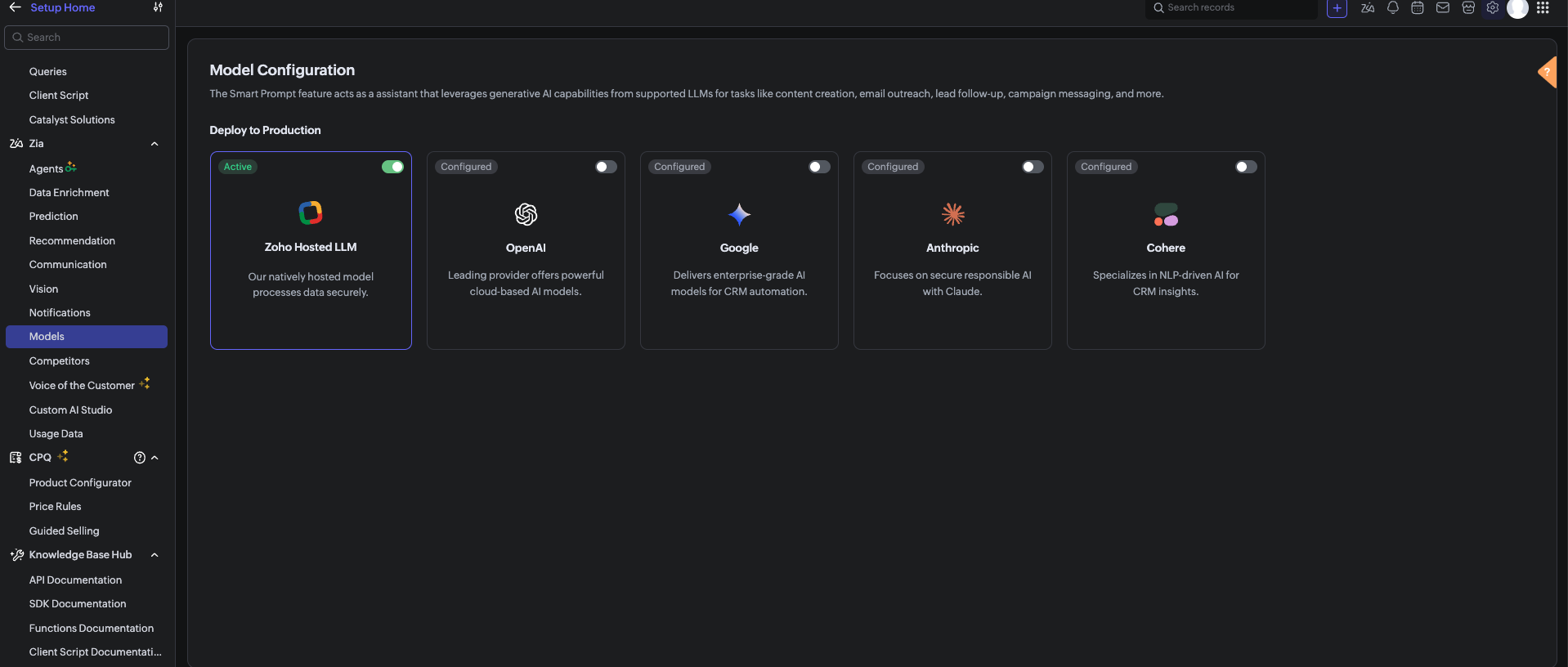
Before using the Zia Assistant API inside the Deluge function, make sure that AI is enabled in Zoho CRM.

To enable AI configuration, go to Setup > Zia > Models > Zoho Hosted LLM vendor.
Note: In V8, only the Zoho Hosted LLM vendor can be enabled and used.           


  1. CRM Connection: Connections with appropriate scopes.

Implementation steps

Step 1: Create custom fields

Navigate to Settings → Customization → Modules and Fields → Deals and create these 6 custom fields:

S.No

Field Label

API Name

Data Type

values

1

Risk

Risk

Picklist

1, 2, 3, 4, 5, 6, 7, 8, 9, 10

Risk: 1 = low risk, Risk 10 = high risk

2

Sentiment

Sentiment

Picklist

Positive, Neutral, Negative

3

AI Analysis

AI_Analysis

Multi-line Text

—

4

Previous Risk

Previous_Risk

Number

—

5

Risk Trend

Risk_Trend

Picklist

Increasing, Stable, Decreasing

6

Alert Sent

Alert_Sent

Checkbox

—


Note: After creating each field, verify the API Name matches exactly. Zoho sometimes appends numbers (example, Sentiment1) if a field name conflicts with existing or deleted fields. 

Step 2: Set up Zoho CRM Connection

  1. Go to Settings → Developer Space → Connections.
  2. Click Create Connection
  3. Select your services.
  4. Name the connection: zohocrm (used in this post)
  5. Add the required scopes
  6. Click Create and Connect
  7. Authorize the connection

Step 3: Create the custom function

  1. Go to Settings → Developer Space → Functions
  2. Click Create Function
  3. Display Name: Deal Notes Sentiment Analysis
  4. Function Name: DealNotesSentimentAnalysis
  5. Category: Automation
  6. Return Type: void
  7. Add Argument: dealId: Deals.Deal Id Type: int
  8. Click Save
      Note: The complete custom function code is provided at the end of this post.

Step 4: Configure the Workflow Rule

  1. Go to Settings → Automation → Workflow Rules
  2. Click Create Rule
  3. Module: Deals
  4. Rule Name: Deal Notes Sentiment Trigger
  5. When: A note is added or modified
  6. Condition: All Deals (or customize as needed)
  7. Instant Action: Associate the custom function →DealNotesSentimentAnalysis
  8. Map the dealId argument to the Deal's Record ID
  9. Click Save

What happens inside the custom function?

At this point, the workflow is fully set up. Whenever a note is added or modified in a deal, the workflow triggers the custom function. But what exactly happens inside this function?
Instead of going through the code line by line, let’s break it down into logical stages to understand how the system works end-to-end.
The snippets below highlight only the core logic for each step.

Note: The complete function code is provided in the next section for reference. You can use and adapt it based on your use case.

Step 1: Gathering complete deal context

The function begins by collecting key details about the deal:
  1.  Deal Name 
  2.  Stage 
  3.  Amount 
  4.  Close Date 
  5.  Deal Owner 
  6.  Existing Risk Score 
This ensures that the analysis is not done in isolation.
 The AI receives full deal context, which improves the accuracy of sentiment and risk evaluation.

dealData = zoho.crm.getRecordById("Deals", dealIdLong);
dealName   = ifnull(dealData.get("Deal_Name"), "");
dealStage  = ifnull(dealData.get("Stage"), "");
dealAmount = ifnull(dealData.get("Amount"), "0");
closeDate  = ifnull(dealData.get("Closing_Date"), "Not defined");
// Existing Risk
existingRisk = ifnull(dealData.get("Risk"), "0").toString().toNumber();
// Owner Info
owner = dealData.get("Owner");
ownerName  = ifnull(owner.get("name"), "");
ownerEmail = ifnull(owner.get("email"), "");


Step 2: Reading All deal notes

Next, the function fetches all notes associated with the deal.
Instead of analyzing only the latest note, it:
  1.  Collects every note.
  2.  Combines them into a structured format.
This allows the system to:
  1.  Identify repeated concerns.
  2.  Detect patterns across conversations.
  3.  Understand the overall direction of the deal.

dealNotes = zoho.crm.getRelatedRecords("Notes", "Deals", dealIdLong);

notesContext = "";
for each note in dealNotes
{
 notesContext = notesContext + "- " + ifnull(note.get("Note_Content"), "") + "\n";
}


Step 3: Sending data to Zia Assistant

The collected deal data and notes are sent to Zia Assistant using a carefully designed prompt.
The prompt includes:
  1.  Definitions of positive, negative, and neutral signals. 
  2.  Real-world sales scenarios (pricing concerns, delays, objections).
  3.  Clear risk scoring guidelines (1 to 10 scale).
This ensures that the AI response is:
  1.  Consistent.
  2.  Context-aware.
  3.  Aligned with real sales behavior.

chatEntry = Map();
chatEntry.put("role", "user");
chatEntry.put("content",
 "Deal Name: " + dealName +
 "\nStage: " + dealStage +
 "\nAmount: " + dealAmount +
 "\nClose Date: " + closeDate +
 "\n\n=== DEAL NOTES ===\n" + notesContext
);

assistantMap.put("chat_history", {chatEntry});
assistantMap.put("prompt", "<custom sentiment + scoring prompt>");

response = invokeurl
[
 type :POST
 parameters: payload.toString()
 connection:"zohocrm"
];

This is where AI transforms raw notes into structured insights.

Step 4: Interpreting the AI response

Zia Assistant analyzes the input and returns a structured response containing:
  1. Overall Sentiment (Positive / Neutral / Negative) 
  2.  Risk Score (1–10) 
  3.  AI Analysis (brief reasoning) 
The function extracts these values for further processing.


aiText = "";

if(response.get("assistant") != null)
{
 aiText = response.get("assistant").get("details").get("data");
}


Step 5: Normalizing the output

Since AI responses can vary slightly in format, the function standardizes the output:
  1. Ensures sentiment matches exact CRM field values 
  2.  Validates risk score within the 1–10 range 
  3.  Cleans up any extra characters or formatting 
This step ensures clean and consistent data inside the CRM.


// Extract & clean risk
riskLine = riskLine.replaceAll("[^0-9]", "", false);
riskScore = riskLine.toNumber();
if(riskScore > 10) riskScore = 10;
if(riskScore < 1)  riskScore = 1;

// Normalize sentiment
sentimentLower = sentiment.toLowerCase();
if(sentimentLower.contains("negative")) sentiment = "Negative";
else if(sentimentLower.contains("positive")) sentiment = "Positive";
else sentiment = "Neutral";


Step 6: Calculating risk trend

The system then compares:
  1. Previous Risk Score 
  2.  Current Risk Score 
Based on this, it determines whether the deal is:
  1. Increasing in risk
  2. Decreasing in risk
  3. Stable
This adds an important layer of intelligence and not just what the risk is, but how it is changing over time.


riskTrend = "Stable";

if(riskScore > existingRisk)
{
    riskTrend = "Increasing";
}
else if(riskScore < existingRisk)
{
    riskTrend = "Decreasing";
}


Step 7: Updating the deal record

Once all values are processed, the function updates the deal with:
  1. Risk 
  2.  Sentiment 
  3.  AI Analysis 
  4.  Previous Risk 
  5.  Risk Trend 
  6.  Alert Sent Flag 
At this stage, the deal record becomes a live reflection of customer sentiment.


updateMap = Map();
updateMap.put("Risk", riskScore.toString());
updateMap.put("Sentiment", sentiment);
updateMap.put("AI_Analysis", analysis);
updateMap.put("Previous_Risk", existingRisk.toString());
updateMap.put("Risk_Trend", riskTrend);
zoho.crm.updateRecord("Deals", dealIdLong, updateMap);


Step 8: Smart email alerting

If the risk score crosses a threshold (Risk > 8), the system triggers an alert to the record owner to take immediate action.
An email is sent to the Deal Owner with:
  1. Deal details 
  2. Risk score 
  3. Sentiment 
  4. Risk trend 
  5. AI analysis 
To avoid alert:
  1. The system checks whether an alert has already been sent. 
  2.  A new alert is triggered only if the risk increases further.
previousAlertSent = ifnull(dealData.get("Alert_Sent"), false);

if(riskScore > 8 && (previousAlertSent == false || riskScore > existingRisk) && ownerEmail != "")
{
    // Send alert email
    mailPayload = {
        "from": {"user_name": ownerName, "email": zoho.crm.getOrgVariable("defaultMail")},
        "to": {{"user_name": ownerName, "email": ownerEmail}},
        "subject": "🚨 Deal At Risk: " + dealName,
        "content": "Risk Score: " + riskScore + "/10<br>Sentiment: " + sentiment + "<br><br>" + analysis,
        "mail_format": "html"
    };

    invokeurl
    [
        url :"https://www.zohoapis.com/crm/v8/Deals/" + dealIdLong + "/actions/send_mail"
        type :POST
        parameters: {"data": {mailPayload}}.toString()
        headers: {"Content-Type":"application/json"}
        connection: "zohocrm"
    ];

    zoho.crm.updateRecord("Deals", dealIdLong, {"Alert_Sent": true});
}
else if(riskScore <= 8)
{
    // Reset alert flag
    zoho.crm.updateRecord("Deals", dealIdLong, {"Alert_Sent": false});
}

Step 9: Dynamic tag management

Finally, the system visually marks high-risk deals:
  1.  If Risk > 8 → Adds tag “High Risk Deal”
  2.  If Risk reduces → Removes the tag automatically 
This makes it easy for users to:
  1.  Identify risky deals instantly 
  2.  Prioritize follow-ups 

if(riskScore > 8)
{
 invokeurl
 [
 url :"https://www.zohoapis.com/crm/v8/Deals/" + dealIdLong + "/actions/add_tags"
 type :POST
 parameters: tagPayload.toString()
 connection:"zohocrm"
 ];
}
else
{
 invokeurl
 [
 url :"https://www.zohoapis.com/crm/v8/Deals/" + dealIdLong + "/actions/remove_tags"
 type :POST
 parameters: tagPayload.toString()
 connection:"zohocrm"
 ];


Complete custom function code
The complete Deluge script used in this implementation is provided below for reference and direct use:

Notes
  1. To get better sentiment detection, use a clear and strong prompt in the Zia Assistant API.
  2. The output depends on how well the prompt defines positive, negative, and neutral signals.
  3. Zia looks at the overall trend of notes, not just one note.
  4. If a deal had negative notes earlier but recent notes are positive, the risk (Risk field ) will decrease
  5. If new negative notes are added, the risk will increase.
  6. Sometimes Zia Assistant may not detect sentiment perfectly, as it is AI-based

Conclusion

This automation transforms deal notes from passive text into actionable intelligence. Instead of relying on sales managers to read hundreds of notes manually, Zia Assistant does it automatically detecting sentiment, scoring risk, tracking trends, alerting owners, and tagging high-risk deals all in real time.

We trust that this post meets your needs and is helpful. Let us know your thoughts in the comment section or reach out to us at support@zohocrm.com

Stay tuned for more insights in our upcoming Kaizen posts!

Happy coding!!!

Related Links:
  1. Kaizen Index
  2. Kaizen Directory
  3. API Directory
  4. Zoho CRM API Document


    • Sticky Posts

    • Announcing the new SKILL.md for Zoho CRM and the updated OAS repository!

      We are introducing a new zoho-crm skill to make working with Zoho CRM Developer tools (like APIs, functions, widgets, client scripts, queries etc) easier and faster, with the help of AI in your preferred AI harness like Claude Code, Codex, Cursor, VSCode
    • Kaizen #261 : Using Zoho CRM Skill to generate complex COQL queries

      Hello everyone, In the previous Kaizen posts, we introduced the zoho-crm SKILL.md and discussed how it can help you when you are working with Zoho CRM APIs and Client Script. In this Kaizen, we will focus on using the Zoho CRM `SKILL.md` with GitHub Copilot
    • Kaizen #256 - Build an Arrival Readiness Web Tab in Zoho CRM

      Hi everyone! Welcome back to the Kaizen series! In the post, we discuss a use case in hospitality industry: how an Arrival Readiness web tab widget can be used to let reception staff identify and resolve issues before arrival of guests. Use case In the
    • Kaizen #198: Using Client Script for Custom Validation in Blueprint

      Nearing 200th Kaizen Post – 1 More to the Big Two-Oh-Oh! Do you have any questions, suggestions, or topics you would like us to cover in future posts? Your insights and suggestions help us shape future content and make this series better for everyone.
    • Kaizen #226: Using ZRC in Client Script

      Hello everyone! Welcome to another week of Kaizen. In today's post, lets see what is ZRC (Zoho Request Client) and how we can use ZRC methods in Client Script to get inputs from a Salesperson and update the Lead status with a single button click. In this
    • Recent Topics

    • How to disable automatic ticket closure emails for specific outgoing communications?

      Is there a way to disable the automatic "Ticket Closed" email notification for specific tickets or outgoing emails? Currently, every time we send an email to a customer, the system automatically sends a "Ticket Created" email, followed by a "Ticket Closed"
    • Sharing View Only Portal

      Im looking at Youtube videos on how to share a view only link to my projects. Everyone has the screen with Manage Users. I don't have it. Is that an old version or new version? I can't see how to send a view only link to clients. There is a Profiles and
    • Unable to export reports despite enabled report export permissions

      Hi Zoho Community, We are unable to export reports in Zoho CRM. When attempting an export, we receive the following error: “Cannot Export Report — You do not have permission to export one or more modules used in this report. Please contact your administrator.”
    • Allow widgets to be placed between native sections in the Ticket Properties panel

      One of our biggest frustrations with the Tickets module is how rigid the Ticket Properties panel is. Every section there is built only from native Zoho Desk fields. We can add sections, rearrange fields, and pick layouts, but we can’t put anything custom
    • What does "Tickets for Review" do?

      What is the purpose of the va nilla view " Tickets for Review?"
    • Zoho Desk training for administrators in EU and US region

      Hello Everyone, Get ready for the certified Virtual Classroom training for our Zoho Desk users in Europe and the US. Our in-house Zoho Desk expert, @Dheeraj | Zoho Desk, will conduct the virtual classroom training. This training focuses on simplifying
    • Set same ticket Threshold for Agent-Level Thresholds

      I am creating Agent-Level Thresholds for agents to auto-assign tickets in a Load-based Round Robin rule. I am unable to set the same number of Open tickets for agents when setting their Thresholds. For exampel: Agent 1 = 10 Agent 2 = 25 Agent 3 = SHOULD
    • Zoho Mail MCP connector

      Issue: Zoho Mail MCP connector (https://mail-organization-930963415.zohomcp.com/mcp/.../message) — OAuth authorization completes successfully in-browser ("Authentication successful"), but the issued token is rejected when the MCP client reconnects to
    • Zoho Books | Product updates | October 2026

      Hello users, October brings a range of new features and enhancements to Zoho Books, designed to simplify compliance, streamline accounting workflows, and improve inventory management. From the launch of the Nigeria Edition and France’s e-invoicing capabilities
    • Multiple criteria in searchRecords

      Hi, is it possible to search with multiple criteria in zoho.crm.searchRecords? I have tried several variations of the following without much success. CustomerRecord = zoho.crm.searchRecords("Contacts", "(First Name|=| lee)" && "(Last Name|=| spencer)"); Thanks. Chris
    • Plans to make "Generate Presentation with Zia AI" available as API endpoint?

      This 'Generate Presentation with Zia' feature has great potential, and we would like to be able to trigger it automatically from a workflow. https://show.zoho.com/home/ziaai/generate Is there already a way to trigger this via API? If not, is there any
    • How to setup noreply@ example.com

      How do I setup noreply@example.com so the mail never gets delivered. I currently have a catchall setup aswell.
    • Pleas unblock E-Mail-Adress service@montana-energie.de / kontakt@montana-energie.de

      Dear Zoho Support, Could you please unblock service@montana-energie.de / kontakt@montana-energie.de which belongs to a regular customer with whom we are having frequent business-related conversations. Thank you very much in advance, Erdem Kar homewise
    • Unable to change alias in the from field on the ZOHO mac app

      I have 1 main mail address, and 3 alias's. on the web mailbox when I create a new email, I can select the alias's from the dropdown in the from field. On the app no dropdown is available.
    • Zmail mobile application

      ho do i remove people from this app
    • My allies email (info@xxxx.com) was been deleted by system, and I can not build the same info allies email now

      Dear Zoho Mail Support Team, I am the super administrator of the Zoho organization 【Organization Name, as shown in Admin Console】. I am writing to report an urgent issue with two of our custom-domain email addresses and to request your help restoring
    • Cannot create mail account

      Hi, i have a problem, i can't create a mail account every time i try the error massage like this Oops! Something went wrong during mailbox creation. Please try again please help
    • Amazon.it always ends up in spam

      Emails from amazon.it always end up in the spam folder, even though I have added the domain and the various individual Amazon addresses for shipping, payments, and other matters to the trusted lists at the user administrator level. What should I che
    • Your Authenticate email domain (SPF, DKIM, DMARC) is bad to say the least

      How about actual instructions rather than vague generalities? There is no way to complete this with what is provided. Please provide specific verifiable steps.
    • Generate a Zoho Sign link

      From time to time I get a response "I never received your you e-document for electronic signature" is there a way to generate a Zoho Sign link to share.
    • ChatGPT Plugin / MCP Server auth error

      Hi all I'm trying to connect the ChatGPT plugin for Zoho CRM but after username stage of the auth process, I get this error from the URL https://mcp.zoho.eu/mcp-client/ {"error_description":"Invalid request url, Request is not as per defined in oauth
    • Zeptomail in the blacklists

      Hello, I noticed some hard bounces while sending emails, and upon checking the details, I see that we have been added to the blacklists of certain spam lists: Bounce category: Policy failure Reason: ip-issues Message: 5.7.1 Service unavailable; client
    • Possible to reorder Pipelines position?

      I have multiple Pipelines and want to reorder their positions, so that in the Deals module record for the Pipeline field, I have them ordered in a certain way. Is there a way to reorder the position of the Pipelines without deleting existing Pipelines
    • Categorize Items with Item Headers

      Hello customers, Did you ever want to classify items based on specific categories to help your customers understand your invoice better? With the new Item Header feature, you can easily categorize items in your invoices and estimates and give them a common title.  Item Headers are available in the Invoices, the Recurring Invoices and the Estimates module. It can be carried forward from estimates to invoices at the time of converting the estimates.  To add an item header: Go to the Estimates, Invoices
    • Gettting "You are Offline" Messages all the time

      Al of a sudden, a few days ago, I suddenly began getting a message on the bottom left side of the Mail App saying "You are Offline". Why? Does it mean I'm not getting incoming mails now? why is has started?
    • Zoho CRM Quotes – Subform and PDF/Writer Limitations

      Hello, I am encountering the following limitations in Zoho CRM Quotes: Custom product images cannot be uploaded in the subform – the image upload field cannot be added; only the file upload field is available. File upload placeholders cannot be used in
    • Invoice Only Shipped Items

      Dear Zoho, We are a company that deals with sales orders with 600-1000 lines We need to be able to do partial invoicing based on shipped items Right now when we click convert to invoice we can not only select items that have een shipped It takes hours
    • Alias Email Id already exists

      Hi, I just verified my domain sesque (dot) com and now I am trying to create the admin account using admin (at) sesque (dot) com, but I am getting an error saying "Alias Email Id already exists". I used to have another Zoho account with this email address,
    • Show backordered items on packing slip

      We send out a lot of large orders, and often there are one or two things backordered. How can I fix the packing slips to show quantity ordered  & quantity packed There should also be the ability to "ship" 0 of an item so the receiver knows that things
    • Deleted Module

      I accidentally deleted a module and its fields. Im trying to get it back. Thanks to Youtubers flooding the internet with out of date videos I can't find how to get deleted modules back. The Recycle Bin doesn't have modules. Anyone know how to do thi
    • Set department automatically for incoming calls

      Is it possible, when receiving an incoming call through Zoho Desk (using Twilio integration), for the department to be auto-selected based on the phone line being called? Currently, we have to manually select the department from the dropdown menu when
    • Make better hiring decisions with Compare Applications and Zia Insights (Beta)

      When multiple candidates apply for different job openings, evaluating each application against the right job requirements can take time. Reviewing resumes, candidate details, and interview feedback separately can make it harder to assess role fit and
    • Support Plan: Recuring Issue

      Hi Zoho Team, Could you please look into this recurring alert and provide clarification on why this restriction is still in place? This issue has become a bottleneck in our workflow, significantly limiting our automation capabilities. We are unable to
    • mail sent to gmail goes directly to spam

      Hi TKIM and SPF are configured and verified. E-mails coming from zoho to my personal gmail account are going directly to the spam folder. How can I solve this? I can send you guys the headers privately if you need to.
    • Creating packages according to actual shipping processes

      Hi community. I would like to ask a question to see if there's a better method or workflow for the creation of packages in Zoho Inventory. There is a little confusion in some of Zoho's language relating to the use of term Packing Slip when connected to
    • mail

      We want our tracked links in campaign and journey emails to use our own domain instead of the shared maillist-manage.net domain. We have already created the CNAME links.rexven.com → customer-campaign.zoho.com (DNS only). Does our plan support a custom
    • Zoho Webinar - Sharing System Audio (NOT AVAILABLE)

      Hi, We are having a serious problem with Zoho Webinar. In the webinars we run, we very often share the audio from a video we are streaming directly from YouTube or other applications. Until recently we were using Zoom, but as we use other Zoho applications
    • Ad-hoc approvals are now available in CRM approval processes

      Released for all DCs. Hello everyone, We've introduced ad-hoc approvals in CRM approval processes. This enhancement lets approvers add additional approvers when needed, without changing the configured approval workflow. How the approval process works
    • Introducing PRM: Build, manage, and scale your partner ecosystem

      Growing a partner ecosystem is a good problem to have. What starts as a handful of partners can quickly turn into a maze of spreadsheets, emails, and disconnected processes. More partners mean more opportunities, greater reach, and new ways to grow
    • Data Subject Requests in Zoho Mail: Retrieve and export email data for legal and compliance needs

      Organizations are often required to retrieve specific email communication data in response to legal investigations or compliance audits. The Data Subject Requests (DSR) feature in the Zoho Mail Admin Console allows administrators to search for all email
    • Next Page