Kaizen #71 - Client Script ZDKs for Detail (Canvas) Page

Kaizen #71 - Client Script ZDKs for Detail (Canvas) Page

Hello everyone! 
Welcome back to another interesting Kaizen post. In this post, we can discuss Client Script ZDKs support for Detail (Canvas) Page.

What is Detail (Canvas) Page?
A Detail(Canvas) Page allows you to customize the record detail page to your preference by letting you add background color to each field, arrange them in a different order, use custom buttons instead of field names, use different font styles, and a lot more. This view is available in all the modules, including the custom modules.
Canvas is a powerful design platform that aims to transform your Zoho CRM user experience, from a visual as well as functional perspective. To customize a record detail page using Canvas, you can select any pre-designed template from the gallery and customize them according to your requirements, or create your design template from scratch with the help of design tools. 
The following are the ZDK Functions related to the Detail(Canvas) Page in Client Script.

  • getBlueprintTransitionByID() - To get blueprint transition by id
  • getBlueprintTransitions()  - To get blueprint transitions in page
  • addTag() - To add a tag to the page
  • removeTag() - To remove a tag from the page
  • getTags()  - To get the list of tags in the Page as array of objects
  • openMailer() - To open Mailer component
  • scrollTo(element_id) - To scroll the page to the given element's location
  • highlight(config) - Using this ZDK you can highlight an element
  • getElementByID(element_id) - To get the UIElement object.
  • mask() - To mask the field value
  • initiate() - To initiate a transition in Blueprint
  • click() - To initiate link click event
  • disable() - To disable the link
  • enable() - To enable a link
  • setVisibility() - To show or hide an element
  • addToolTip(config) - Use this ZDK to add tooltip for an element
  • removeToolTip() - Use this ZDK to remove tooltip for an element
  • addStyle(config) - To apply CSS styles for an element
  • freeze(value) - To freeze a particular element
  • setImage(value) - To set image for the image element
  • setActive() - To set active tab in a container
  • setContent(value) - To set text content for the text element

Note: Apart from these ZDKs, you can use all the other ZDK functions which are not tagged.

Use Case
ABC is a hardware manufacturing company. Let us consider that you want to achieve the following using Client Script. The Detail (Canvas) Page has the fields Category, Products, Phone Number and there are two images added to the Detail (Canvas) page currently. One corresponds to Ignition System and the other corresponds to Gauges and Meters. The following is the Detail (Canvas) Page of Orders Module.
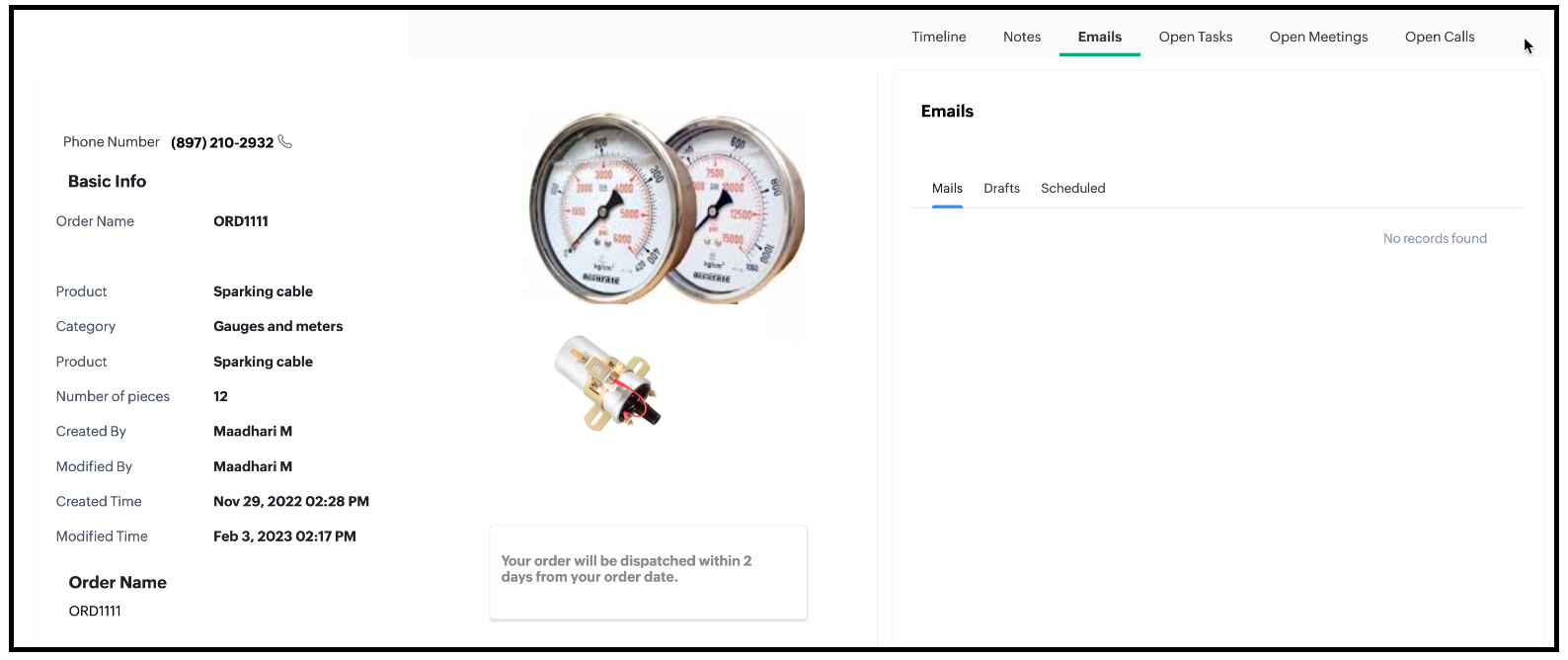


1. Based on the Category of the order, display the image.
  • If the Category is Ignition System then the image corresponding to Ignition System should be displayed.
  • If the Category is "Gauges and Meters" then the image corresponding to "Gauges and Meters" should be displayed.
2. The image should have a tooltip.
  • The Ignition System image should have the tooltip as "Ignition System".
  • Gauges and Meters image should have the tooltip as "Gauges and Meters".
3. The Detail (Canvas) page has a text element. The background colour of the text box should be blue and the text should be grey.
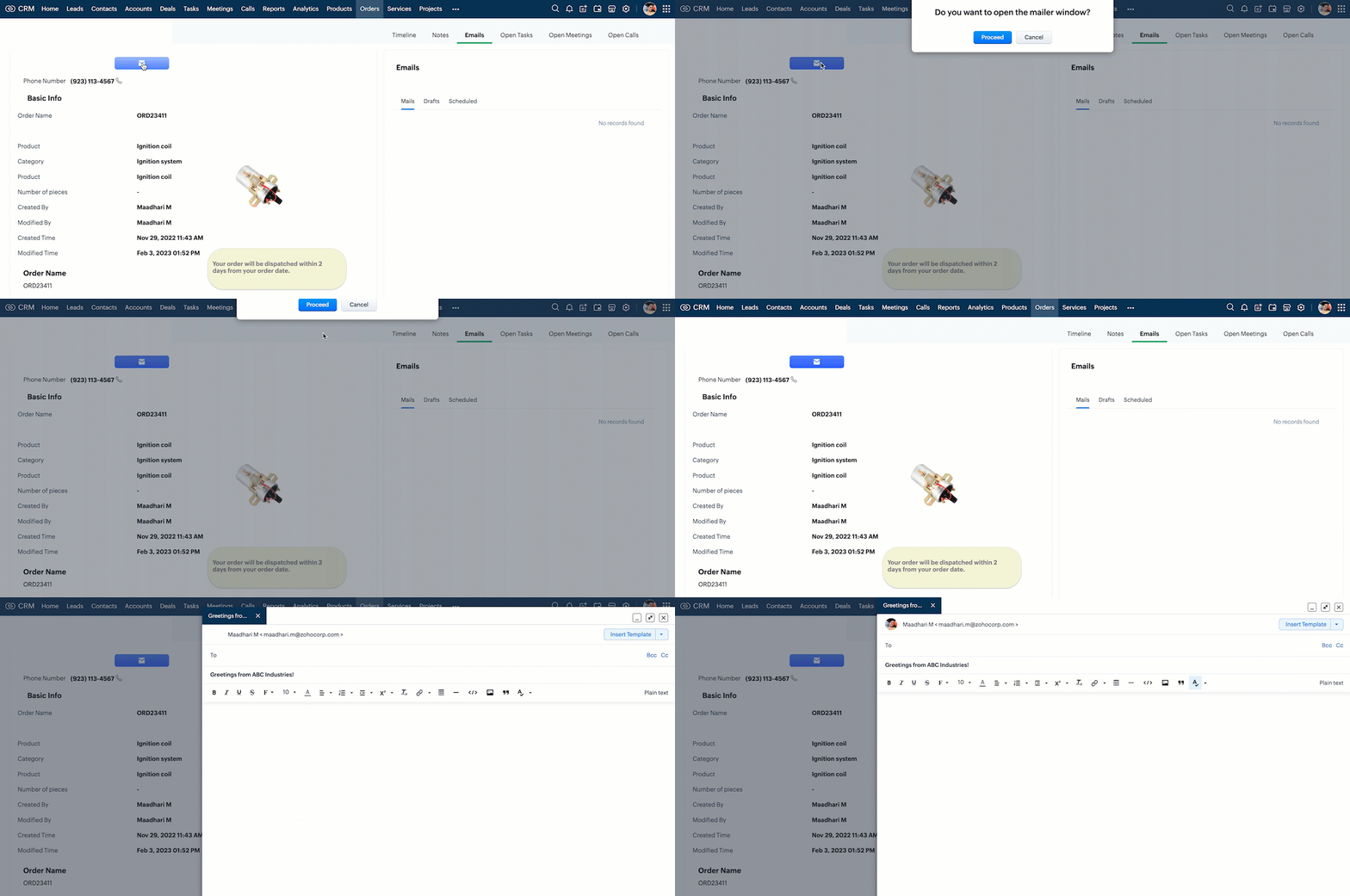
4. Create a custom button in the Detail (Canvas) Page. When the user clicks this, ask for confirmation, and open the mailer box.
5. Mask the last 5 digits of the phone number for all profiles other than the administrator.

Solution using Client Script
All the requirements are for the Detail (Canvas) page of Orders module. For the requirements 1, 2, 3  and 5, you need to create a Client Script with onLoad page Event.
For requirement 4, you need to create a Client Script with Canvas Button Event type and onClick Event. So create two scripts as follows.

1. Client script 1 for requirements 1,2,3 and 5.
2. Client script 2 for requirement 4.
1. Client script 1 for requirements 1,2,3 and 5.
  • Go to Setup > Developer Space > Client Script. Click +New Script.
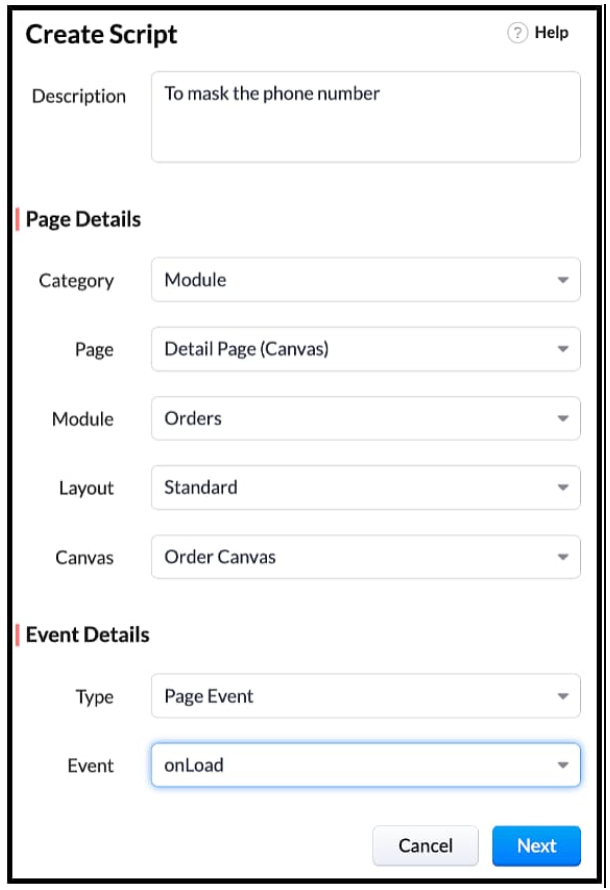
  • Specify the details to create a script and click Next.
  • Enter the following script and click Save.


 // Tooltip for images
var ignitionImage = ZDK.UI.getElementByID('iImage')
ignitionImage.addToolTip({ text: 'Ignition System' });

var guageImage = ZDK.UI.getElementByID('gImage')
guageImage.addToolTip({ text: 'Guages and Meters' });
log(category_name);
// Visibility of Images
if (category_name == "Gauges and meters")
{
    ignitionImage.setVisibility(false);
}
else if (category_name == "Ignition system") {
    guageImage.setVisibility(false);
}
// Style textbox
var elem = ZDK.UI.getElementByID('Section')
elem.addStyle({ 'background-color': 'blue', color: 'white', 'border-radius': '40px' })
//Mask phone Number
var user = ZDK.Apps.CRM.Users.fetchById($Crm.user.id);
log(user);
var field_obj = ZDK.Page.getField('Phone_Number');
log(field_obj.getValue());
log("Profile name of the user is "+ user.profile.name);
if(user.profile.name != 'Administrator')
{
    field_obj.mask({ character: '*', length: 5, reverse: true });
}
var category_name = ZDK.Page.getField('Category').getValue();


  • $Crm is a constant supported by Client Script, using which you can get the org related information and use it in your script. 
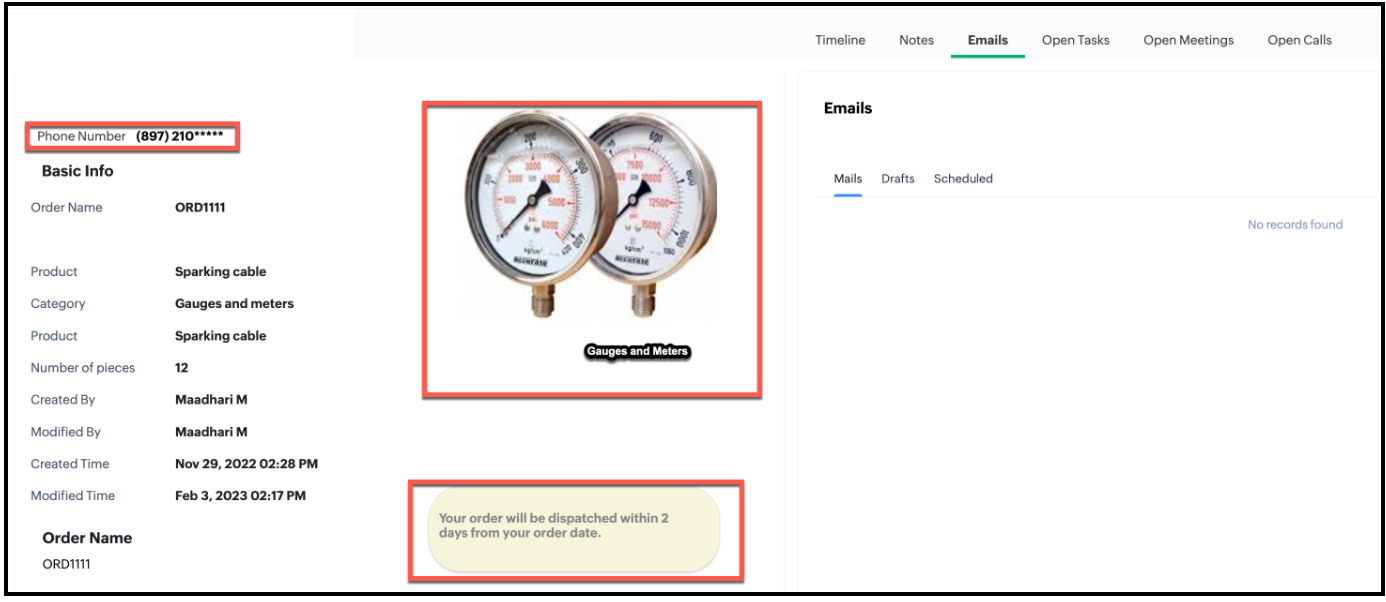
  • Here is the impact of Client Script in Detail (Canvas) page for a Standard user.
  • Here is the impact of Client Script in Detail (Canvas) page for Administrator.
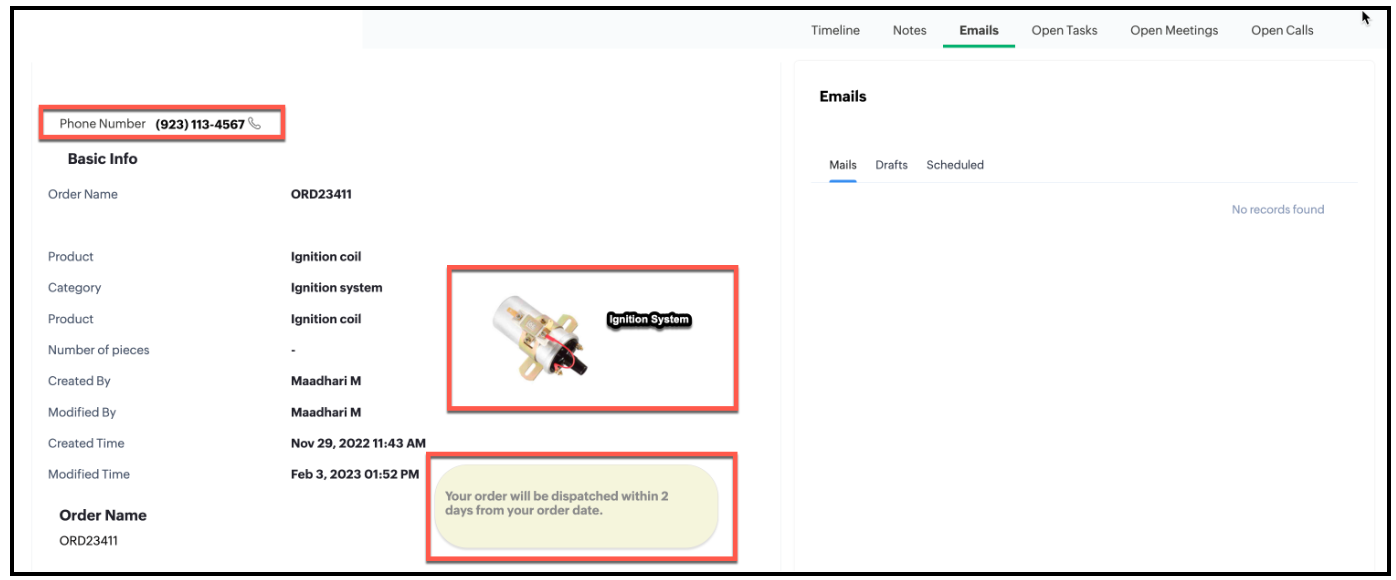

  • You can see that the Phone Number is partially masked when you view the order canvas page as a Standard User and not masked when you view the order canvas page as an Administrator.
2. Client Script 2 for requirement 4
  • First, you need to add the button to the Detail(Canvas) page.
  • Go to Setup > Customization > Canvas.
  • Right click  the Canvas page for Accounts module and click Edit.
  • Click Elements, drag and drop the button wherever required and specify a label for the button.
  • Right click on the button, select Add Element ID and enter the ID of the button in the pop up that appears.
  • Once the button is created, you can configure Client Script in two ways:
  • Right click on the button--> Add Client Script--> onClick. The Client Script IDE appears with the event type as Canvas Button Event.                                                (or)
  • Go to Setup > Developer Space > Client Script. Click +New Script.
  • Specify the details to create a script and click Next.
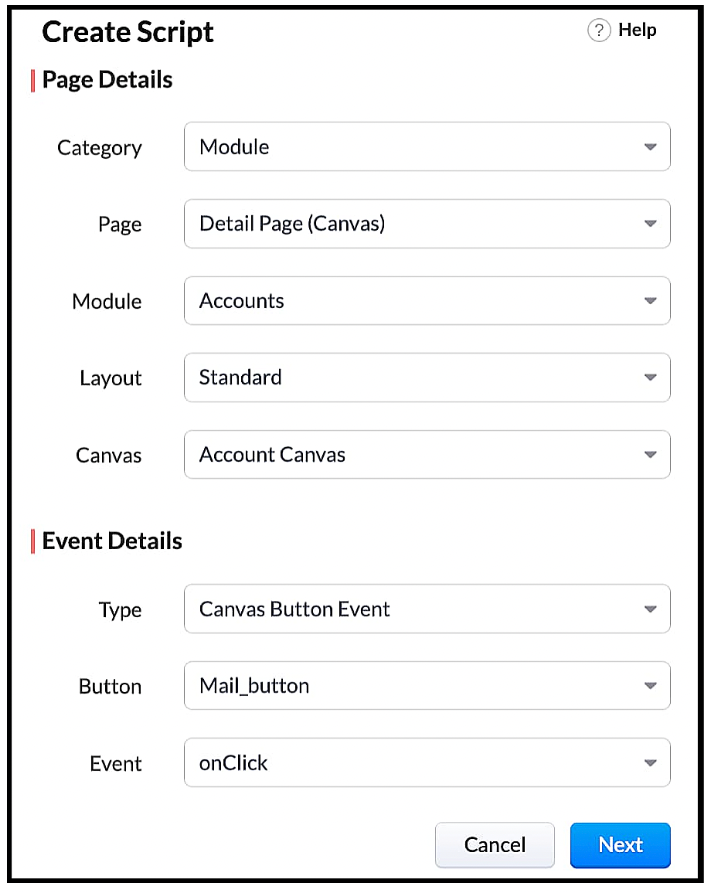
  • Enter the following script and click Save.
var isProceed = ZDK.Client.showConfirmation('Do you want to open the mailer window?','Proceed','Cancel');
if (isProceed) {
ZDK.Client.openMailer({ from: '', to: [{ email: '', label: 'ABC Industries' }], cc: [{ email: '', label: 'ABC Industries' }], subject: 'Greetings from ABC Industries!', body: ' ' });
}

  • The showConfirmation() function will return a Boolean value based on the user selection. You should get this Boolean value using a variable and write the actions based on the Boolean value returned. Here the variable isProceed will capture the user response and based on that Boolean value, the mailer box will get displayed.

  • Here is how the Client Script works.


We hope you found this post useful. We will meet you next week with another interesting topic!  If you have any questions or if you want a Kaizen post on a particular topic let us know in the comments.

Click here for more details on Client Script in Zoho CRM.

Related Links

Cheers!


    • Sticky Posts

    • Kaizen #217 - Actions APIs : Tasks

      Welcome to another week of Kaizen! In last week's post we discussed Email Notifications APIs which act as the link between your Workflow automations and you. We have discussed how Zylker Cloud Services uses Email Notifications API in their custom dashboard.
    • Kaizen #216 - Actions APIs : Email Notifications

      Welcome to another week of Kaizen! For the last three weeks, we have been discussing Zylker's workflows. We successfully updated a dormant workflow, built a new one from the ground up and more. But our work is not finished—these automated processes are
    • Kaizen #152 - Client Script Support for the new Canvas Record Forms

      Hello everyone! Have you ever wanted to trigger actions on click of a canvas button, icon, or text mandatory forms in Create/Edit and Clone Pages? Have you ever wanted to control how elements behave on the new Canvas Record Forms? This can be achieved
    • Kaizen #142: How to Navigate to Another Page in Zoho CRM using Client Script

      Hello everyone! Welcome back to another exciting Kaizen post. In this post, let us see how you can you navigate to different Pages using Client Script. In this Kaizen post, Need to Navigate to different Pages Client Script ZDKs related to navigation A.
    • Kaizen #210 - Answering your Questions | Event Management System using ZDK CLI

      Hello Everyone, Welcome back to yet another post in the Kaizen Series! As you already may know, for the Kaizen #200 milestone, we asked for your feedback and many of you suggested topics for us to discuss. We have been writing on these topics over the
    • Recent Topics

    • Zoho CRM for Everyone's NextGen UI Gets an Upgrade

      Hello Everyone We've made improvements to Zoho CRM for Everyone's Nextgen UI. These changes are the result of valuable feedback from you where we’ve focused on improving usability, providing wider screen space, and making navigation smoother so everything
    • search and Smart Bar both missing in Mail

      One of the users on my account does not have the search bar at the top right or the Smart Bar at the bottom left of the desktop Mail app. Any ideas how to get those back?
    • Printing from Zoho Creator hosted on my own server to printers hosted on my clients local network

      Hello. Fairly new to Zoho Creator and looking for best options to be able to print from my application hosted on my own server to any printer hosted on my clients own local network. Any advice is welcome. Thank you.
    • Add System Pre-Defined Lookup Field to Subform?

      Hi there! New to using Zoho, so this may already exist, but I'm having trouble figuring it out. Is there a way to get the system pre-defined Account Lookup field (in our case, renamed to Company Name), as the starting point for a subform? In our company,
    • Synchronise item image between Zoho Commerce and Zoho Books/Inventory/CRM

      Here is a blindingly simple idea to tie several Zoho products together. Zoho - please include a method to synchronise the item image (or images) from one Zoho application to another. For example, if you upload an item image in Zoho Inventory, a user should
    • Zoho CRM Participants Automatic - Invite Using Deluge

      Hi Zoho! Is there a way to make the invitations automatic via API? I'm using this one but it doesn't work or reflect in the CRM: participantUser = Map(); participantUser.put("type","email"); participantUser.put("participant",email); participantUser.put("invited",
    • Numbered / bullet point List in Zho Cliq

      Hi, is there a way to format chat messages in Cliq like this Topic 1 Hey, I finished this project yesterday etc... Topic 2 I am still working on this etc...
    • Cannot Access Subform Display Order in Deluge

      As highlighted in this community post, we still have to deal with the significant limitation of not being able to access the user-sorted order of subform rows through Deluge. This creates a major disconnect between the UI capabilities and backend automation,
    • ZOHO Blueprint and Workflow

      Hi, Correct me if i'm wrong, Blueprint triggers when a record that meets the criteria is created. It follows a specific transition that you will be setting up. Does blueprint work if the first state was triggered by a workflow? For example, In my custom module 1, I have a field named status. The statuses are 1, 2, 3 and 4. As soon as I create a new record, a workflow triggers that updates the status field to 1. Can a blueprint start from 2? My other concern is, can blueprint transitions work at the
    • Creating multiple CRM leads from a Zoho Forms subform

      Hi all, We have a heavily used intake form that is used for new leads as a part of our intake. There is a subform that allows the lead to add additional team members, their titles and other basic info. That form submission creates a new Lead and the subform
    • How many groups in Zoho Mail can I make?

      I'm currently on the free plan, which has a limit of 10 users. Does that limit includes groups too? If not, what is the limit for groups? Thanks!
    • Feature Suggestion for Zoho Social: Auto-reply to Comments or Keywords

      Hi Zoho team, I'd like to suggest a very specific feature that would be extremely helpful for customer engagement: the ability to automatically send a reply to comments on posts — either all comments or those containing specific keywords. For example,
    • My domain did not activate

      Hi, my domain (apsaindustrial.com.ar) did not activate, and the phone verification message never arrived. Please would you solve this problem? Thanks.
    • Already have Zoho account. Not letting me log in

      I already have a Zoho account that is associated with my Google email and my phone number. Even though I'm already logged in to Zoho, when I click on the mail icon to access my email, it takes me to the pricing page. When I click on the free option, it
    • ZOHO Mail App Not working

      There seems to be an issue with Zoho Mail App today. It is not connecting to server, internet is working fine, tried uninstalling app and reinstalling, loading circle keeps spinning round. Is there an update on the way?
    • facing error 550 5.4.6 while sending emails

      Please help me fix this issue
    • Allow Itemization for Recurring Expenses

      For whatever reason, one cannot itemize a Recurring Expense. This capability should be added. The use cases to support this are largely the same as what they were to allow for itemization in Expenses. Anything that would need to be itemized for a regular
    • Zoho reply to not working. just reply to my self

      Hello. i using on my wordpress website a contact form from Wsform. i can set the reply to email there. normally it works. but since i am using your wordpress plugin zoho mail it doesn`t work. its not using the reply to (email from customer). I just can
    • Painfully Slow Zoho mail

      Since yesterday Zoho Mail seems to have starting functioning very slowly and having a few bugs. It's slow to open mails, slow to send, slow to change between email accounts. Sometimes clicking on a particular folder (eg Sent folder) stops working and
    • Can't receive any email from other platform

      Hello,everyone, i'm just join zoho and create two email accounts for my own business. I was using it to get a verified email from stripe, but can't receive it. and I use my private gmail account to send test email twice, first time show below reply, but
    • Weekly Tips: Secure your attachment downloads with Zoho Mail

      Safety is one of our main concerns, whether it’s about device security or online protection. We use tools like fingerprint scanners, facial recognition, and two-factor authentication to keep our devices and email accounts secure. We use methods like OTP
    • Your Incoming has been blocked and the emails will not be fetched in your Zoho account and POP Accounts

      Can some on help me regarding our account . thank you so much
    • Zoho Creator integration with Sage 50

      Hi, Wondering if anyone has had any experience connecting Zoho to Sage 50 and could share any information on this matter. Thank you.
    • Dropshipping Address - Does Not Show on Invoice Correctly

      When a dropshipping address is used for a customer, the correct ship-to address does not seem to show on the Invoice. It shows correctly on the Sales Order, Shipment Order, and Package, just not the Invoice. This is a problem, because the company being
    • Conditional Email Forwarding

      How can I set conditional email forwarding of the users? For example: Mail should be forwarded to a address only if it comes from a particular sender. So, I want such email forwarding, which forwards mails based on particular conditions, like the incoming
    • Series Label in the Legend

      My legend reads 'Series 1' and 'Series 2'. From everything I read online, Zoho is supposed to change the data names if it's formatted correctly. I have the proper labels on the top of the columns and the right range selected. I assume it's something in
    • Dependent drop-downs... how?

      Good day. I have 2 different situations where I need a dependent drop-down field. First is for a subform, where I want to show related fields for a specific customer on the main form. In my case it is a parent whose children make use of our school transport
    • Incoming emails not appearing in Inbox

      Hello, I have an issue with incoming emails sent from my website (domain: h2ostop.si). Emails are visible in the Sent folder, which means they are successfully sent through Zoho SMTP, but they never appear in my Inbox. Nothing arrives in Inbox, Spam,
    • Automatic Matching from Bank Statements / Feeds

      Is it possible to have transactions from a feed or bank statement automatically match when certain criteria are met? My use case, which is pretty broadly applicable, is e-commerce transactions for merchant services accounts (clearing accounts). In these
    • Is there any way to send an Excel received by email to Dataprep?

      Every day I receive an email alert with an Excel file that I want to process through a Dataprep pipeline. To do this, I need to: -Save the file to disk -Open the pipeline -Run the pipeline -Update the source -Several clicks to select and open the saved
    • Email Opt Out Question

      Has the problem where if a customer is emailed opt out prevents you sending standard emails? For me this feature is simply to stop any email marketing and should not block people from receiving emails via Zoho mobile, which makes no sense.
    • Can No Longer Access Zoho Email Accounts from iPhone or iPad Apple Mail Apps ,.

      Keeps asking for password, Says ID or password incorrect. Tried creating a new app specific password. Same result. Is this possibly related to the server maintenance. Have verified all email settings, userid and password. This has worked for years until
    • Latest update caused issue in using marathi typingzoho

      With latest update now marathi typing does Not work in zohonotebook. I preferred zoho over other because it was supporting marathi font without any distortion.. But after new update,keyborad simply does not work
    • Login verification emails never received.

      I can't login to my account. You send a verification email, but it never arrives. This is a common problem, frequently caused by some relay point out there classifying the sender as a spammer. Is there anything I can do to bypass this? Maybe get a text
    • Zoho Bigin - should be able to link a "contact" to multiple "companies"

      Hello Support, I called into telephone support and was told that a contact can only be linked to one company. We have situations were director are contacts of and directors of multiple companies so that seems a basic weakness in Bigin. When go to add
    • CRM: hosting a single html file in Zoho and displaying it as a widget

      I have seen that CRM offers the option of uploading a web project to Zoho itself and displaying it as a widget in CRM. The instructions then talk about setting a development environment with Node and developing an application to upload to Zoho. But I
    • Global lists for Multi select

      It would be great if I could select a global list to use for a multi select dropdown filed.
    • Hotmail is blocking the zoho mail IP

      Greetings, Since last Tuesday (5 days ago today) I wrote to Zoho support and I still haven't received a single response (Ticket ID: 2056917). Is this how you treat people who pay for your email service? I am making this public so that those who want to
    • Yahoo is rejecting e-mails sent from a Zoho server

      Diagnostic-Code: 4.7.0 [TSS04] Messages from 136.143.169.51 temporarily deferred due to unexpected volume or user complaints - 4.16.55.1; see https://postmaster.yahooinc.com/error-codes Remote-MTA: dns; mta5.am0.yahoodns.net
    • Yahoo blocks e-mail sent from Zoho servers

      Getting this for a bunch of Yahoo addresses. Do you know if some of your servers got blacklisted? Diagnostic-Code: 4.7.0 [TSS04] Messages from 136.143.169.51 temporarily deferred due to unexpected volume or user complaints - 4.16.55.1; see https://postmaster.yahooinc.com/error-codes
    • Next Page