Power up your Kiosk Studio with Real-Time Data Capture, Client Scripts & More!

Power up your Kiosk Studio with Real-Time Data Capture, Client Scripts & More!

Hello Everyone,

We’re thrilled to announce a powerful set of enhancements to Kiosk Studio in Zoho CRM. These new updates give you more flexibility, faster record handling, and real-time data capture, making your Kiosk flows smarter and more efficient than ever.

What's New? 

  1. Launch Kiosks Anywhere with Client Script Support (Phase 1) 
  2. Capture data live during Kiosk execution
  3. GetRecords Screen Enhancements :
    1. Fetch all records from a module 
    2. View more records with pagination
    3. Find records faster with the new Search & Filters
    4. Select more records at a time with increased selection limits
    5. GetRecords first screen loads Instantly with no refresh needed 
  4. Kiosk Studio now available in the Standard Edition 
 
Let's dive into the details below:

Launch Kiosks anywhere with Client Script Support 

The first phase of Client Script support for Kiosk is here.

Now users can open a Kiosk directly through scripts anywhere within Zoho CRM.

As part of this update, there’s an important change to note. We’ve introduced a Unified API Name which is a unique identifier that stays consistent across all versions of the Kiosk. While creating Kiosks, users must now also add this API name so it will be easier to manage and track Kiosks while ensuring smooth integration with scripts.

Kiosks can be opened using Client Scripts in both Modules and Commands.

To open Kiosks using client scripts in Modules : Navigate to Settings < Developer hub < Client Script < Module. Then select where the Kiosk should open from (while creation or editing or cloning, etc), the layout and choose the event. 

To open Kiosks using client script in Commands: First create the command to open kiosks from anywhere in the CRM by navigating to Settings < Developer hub < Client Script < Command. Next you can open the command from the Command Palette or use keyboard shortcuts from any module in your CRM account to open Kiosks.


Kiosks can open in three ways either as Pop-up, Flyout or a Callout.

Given below are some sample codes to open Kiosk for the above ways.

openPopup() : This will open a Kiosk as a modal popup. Learn more

Sample Code :

ZDK.Client.openPopup(

  { api_name: 'test',        // Required: Unified Kiosk API name

    type: 'kiosk',           // Required

    header: 'Kiosk Header',  // Optional

    height: '500px',         // Optional

    width: '200px',          // Optional

    animation_type: 4        // Optional

  },

  {

    data: 'sample data'      // Optional: Passed to PageLoad event

  }

);


openFlyout() : This will open a Kiosk in a flyout panel. Learn more

var flyout;

try {

  flyout = ZDK.Client.getFlyout('newFlyout');

} catch (error) {

  flyout = ZDK.Client.createFlyout(

    'newFlyout',

    {

      type: 'kiosk',           // Required to execute Kiosk

      animation_type: 4,       // Optional

      header: 'Sample Kiosk'   // Optional

    }

  );

}

flyout.open({

  api_name: 'testNew',        // Required: Unified Kiosk API name

  type: 'kiosk',              // Required

  data: 'Sample data'         // Optional

});


openCallout() : This will open a Kiosk as a callout anchored to a field on the record details page.  Learn more

ZDK.Client.openCallout(

  {

    api_name: 'test',        // Required: Unified Kiosk API name

    type: 'kiosk',           // Required

    header: 'Sample Kiosk',  // Optional

    height: '450px',         // Optional

    width: '450px'           // Optional

  },

  {

    type: 'field',           // Required

    api_name: fieldApiName   // Required: Field API name

  },

  {

    data: fieldApiName       // Optional

  }

);


This is just the beginning! Phase 1 lays the foundation for deeper client script integrations coming soon.

Some of the upcoming client script support enhancements include :
  1. Allow users to add clients scripts for a screen from both a screen in Kiosk or from a command in Client Script.
  2. Add multiple client scripts for a Kiosk screen,
  3. Invoke responses from a Kiosk for a call back function from Client Script.
Notes
Note :
  1. Learn more about Client Scripts from our developer guides.
  2. Learn how to create commands in Client Scripts.

Capture data live during Kiosk Execution with new create record actions  

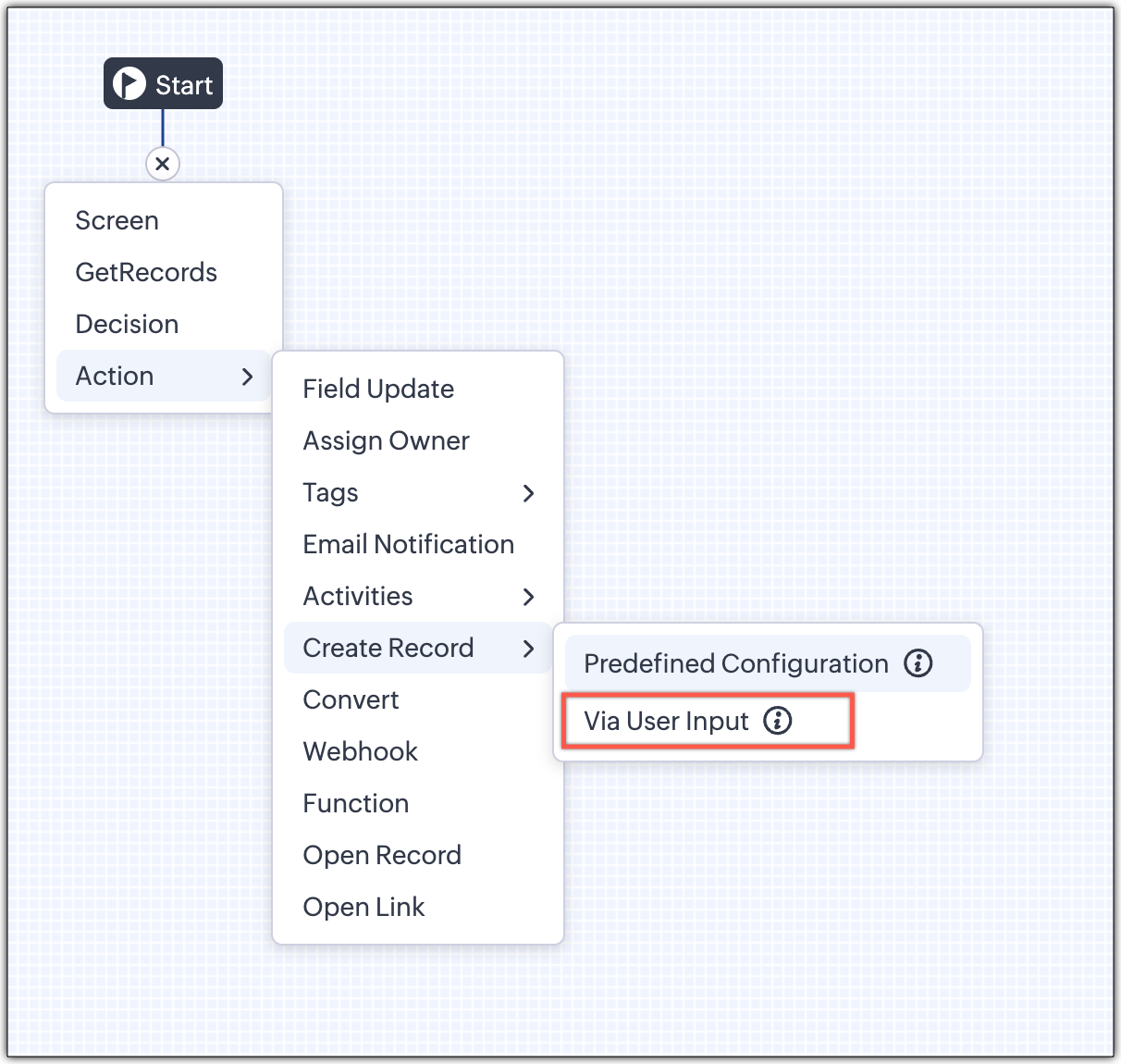
1 - Predefined Configuration (Existing Action)

The current create record action will be retained and renamed as 'Predefined Configuration'.

Records will be created automatically during the execution of a Kiosk. They require you to add pre-defined values either as static values or data from previous screens. This is ideal for predefined updates or recurring tasks where information is known in advance.

2 - Via User Input (New Action)

The key advantage of this update is that it simplifies how admins configure record creation in Kiosk Studio. Earlier, admins had to manually create a separate screen replicating all the fields of a module and then map them in the Create Record action. Moreover, if there were changes made to the fields in the module, the admin would have to edit the Kiosk and add/map the new field. All this was time-consuming and complex to setup.

Now, admins can choose to allow records to be created during the Kiosk's execution and eliminate the need to replicate, map and merge fields to save time and effort through the use of Quick Create pop-up.

Through this enhancement, real-time record creation is possible during live Kiosk execution. Users can input values in the Quick create layout that would pop-up during execution to create new records in a module. Perfect for real-world scenarios, the exact information needed to create a record only becomes available during the live execution of the Kiosk.   
Real-time scenarios

Let's say you run a Kiosk for your sales team. During a call, a customer requests a product demo and shares their availability Or, your support team receives a call and has to log the customer’s issue details or updated contact info.

With this enhancement, the sales rep or support executive can create records instantly while the Kiosk is running, to input the information they get during their call to provide a smooth customer experience.

How does it work?

  1. While setting up the Kiosk, select Create Record > Via User Input.
  2. Enter Action Name, then choose the Module and Layout.
  3. During execution, the Quick Create layout for the selected module appears.
  4. There is an option to pre-fill frequently used field values during configuration.
  5. Now, users can enter details directly while the Kiosk is being executed.
  6. Note: If a user lacks Create permission for a module, this step is skipped, and related values will show as null.

Take a look at the GIF below to understand how this action can be setup and executed.
 

GetRecords just got smarter with these new enhancements

Fetch All Records from a module to your GetRecords Screen

You can now choose to fetch all records from a module to be displayed in your GetRecords Screen.

Previously, you could select a single record or multiple records based on the limit set for record preferences. Now, we've given you a choice to be able to select Some Records or All records. This is useful in scenarios when users need to view or act on a complete set of records in a module rather than on a limited number of them.

New pagination making easier to navigate records

We’ve added pagination to the GetRecords screen, making it easier to navigate and locate specific records quickly, even when dealing with large data sets.

Search or filter records in GetRecord screen s

Quickly find records in GetRecords screens with this new addition to Kiosk.

Increased selection limit to select more records

We have increased the GetRecord selection limit from 10 to 100.

GetRecords First-Screen Loads Instantly - No Refresh Needed

Currently, only Kiosks opened through user actions (like Blueprint or Custom Buttons) loaded records directly, while others showed a 'Refresh to load' button. 


Now, every Kiosk auto-loads the first-screen of GetRecords without the need to manually refresh. When a Kiosk opens with GetRecords on the first screen, records now load instantly, regardless of whether it’s on the Home Page, Canvas, Record Detail View, Blueprint, or a Custom Button.

Kiosk Studio Added to the Standard Edition

We have extended the ability to create Kiosks to all paid editions in Zoho CRM including the Standard Edition. We aim to allow more users to create and manage Kiosks for their business processes. Take a look at the table below to know Kiosk creation limits for each Zoho CRM edition.


Standard
Professional
Enterprise
Ultimate / CRMPlus / ZohoOne
Number of Kiosks
2
7
25
50


Info
Release Plan :

- These enhancements is available for all users in all data centers. 


Start exploring these new features today and experience a faster, smarter, and easier way to capture data with Kiosk Studio.

Stay tuned for even more exciting enhancements coming your way!


Regards,
Serena Woolridge

    • Recent Topics

    • List of Mail Merge Templates via Deluge

      Hello, Is it possible to get a list of the mail merge templates I've created in CRM within a custom function? I want to retrieve them and put them in a dropdown list but all I get is a scopes error! Can anyone see where I'm going wrong? Is this even possible?
    • Feature Request Improve parent-child relationship visibility

      Hi team, The Parent-Child ticket feature is great, but I've struggled to see the relationship between tickets when using ticket list views. It would be a great quality of life enhancement for users if child tickets were nested under parent tickets in
    • Displaying only unread tickets in ticket view

      Hello, I was wondering if someone might be able to help me with this one. We use filters to display our ticket list, typically using a saved filter which displays the tickets which are overdue or due today. What I'd really like is another filter that
    • Is there provision to charge the attendees to join the webinar?

      We want to host some webinar of public interest and want to charge them to participate in this. Does this feature in-build in the application? Offcourse, we will be having Razor pay account activated for these purpose.
    • Pricelists

      So we have them in books but I cannot find them in commerce?
    • Desktop app doesn't support notecards created on Android

      Hi, Does anybody have same problem? Some of last notecards created on Android app (v. 6.6) doesn't show in desktop app (v. 3.5.5). I see these note cards but whith they appear with exclamation mark in yellow triangle (see screenshot) and when I try to
    • Don't send customer email when creating a ticket

      Hi Is there an easy way to stop the system sending an email to the customer when we manually create ticket.
    • Connecting a contact with the deal + Emails not showing up under Deals

      Hello. I have two problems. Im not sure if the problem is due to level of my subscription - Im on Proffessional plan. 1. I have a JotForm connected with ZohoCRM which automatically creates a contact and a new deal based on form submission. That is done
    • Accessing GDPR Data Source metadata for workflows and Zoho Analytics

      Hi everyone, We have GDPR compliance enabled in Zoho CRM, which has added the Data Source section within the Data Privacy tab for Leads and Contacts. This section shows useful information such as: Original creation source, for example Zoho Forms Form
    • Tiktok

      When will Tiktok be added to the Zoho Social Platform?
    • Zoho Mail iOS app update: Spam Controls & Sender Verification

      Hello everyone! We are excited to introduce spam control enhancements in the Zoho Mail iOS app update. Let's dive into what's new. Spam Alerts in Mail Preview : Mail preview now shows warning alerts for emails identified as potentially harmful, helping
    • Mise à jour de Zoho Books – France

      Chers clients, Merci pour votre patience et votre soutien continu. Avec les évolutions réglementaires à venir en France nous introduisons de nouvelles fonctionnalités dans Zoho Books pour les clients français. Ces mises à jour ont été conçues pour répondre
    • Admin Logging in as another User

      How can a Super Admin login as another user. For example, I have a sales rep that is having issues with their Accounts and I want to view their Zoho Account with out having to do a GTM and sharing screens. Latest Update (27th April 2026): With the early
    • Zoho Books API: Bulk update thousands of records using Node.js with OAuth refresh, retries and resume support

      Hello everyone, During Zoho Books implementations, one common challenge is updating a large number of existing records. The current options are usually: Update records manually from the UI using Mass Update (with limited batch size). Update records one
    • SalesIQ's Summer '26 Release: For The Moments That Matter

      Every customer journey is made up of moments. The moment someone discovers your business. The moment they need help. The moment you decide to reach out. The moment a simple chat turns into something more. And the moments that continue long after the conversation
    • CNIL - Suivi de Pixel

      Bonjour à tous, À la suite de la nouvelle recommandation de la CNIL sur les pixels de suivi dans les e-mails, savez-vous si Zoho Campaigns permet : de conditionner le suivi des ouvertures au consentement de chaque contact ; de proposer un lien permettant
    • Customer/Vendor Portal session duration - can it be extended?

      Hi all, We'd like to know how long the login session lasts for the Customer/Vendor Portal in Zoho Books, and whether there's any way to extend it (either through settings or via support/API). Right now this is causing a pretty poor experience for our
    • Accessible & Customizable User Governance in Zoho Projects!

      As teams expand and collaborate with multiple external collaborators across projects, keeping control of user access to project data becomes a challenge. Mismanaged access can cause accidental or unauthorized edits, data leaks and lack of accountability.
    • Bulk deleting Zoho CRM records using Deluge, COQL and CRM API

      Hello everyone, During CRM implementations, data cleanup is a common task, especially after testing, migrations, imports, or integration development. The Zoho CRM UI allows deleting records in batches of 100, which is not practical when dealing with thousands
    • CNIL - Suivi de Pixel

      Bonjour à tous, À la suite de la nouvelle recommandation de la CNIL sur les pixels de suivi dans les e-mails, savez-vous si Zoho Campaigns permet : de conditionner le suivi des ouvertures au consentement de chaque contact ; de proposer un lien permettant
    • Zoho CRM Layout Rules: Nine New Actions, Profile-Based Execution, and Interactive Preview

      Hello everyone, Availability: This feature is now available for customers in the JP and SA DCs. It is planned to be released for other customers in soon. We’re excited to announce powerful new enhancements to Layout Rules in Zoho CRM - a feature built
    • How to View Part Inventory and Warehouse Location When Creating a Work Order in Zoho FSM

      Hi everyone, We’re currently setting up Zoho FSM and would like to improve how our team selects parts when creating a Work Order. Right now, when we add a part or item to a Work Order, we can select it from our Zoho Inventory list but we don’t see any
    • Zoho Sprints - Q2 Updates for 2026

      Improve your agile project management experience with the newly released capabilities in Zoho Sprints. This quarter we've shipped a few new features and enhancements that are built around smarter planning and execution tools, tighter integrations, and
    • Problem with currency field in Zoho CRM

      Hi Guys Zoho Books has a feature in currency fields that automatically converts decimal numbers with commas ( , ) to period format ( . ) when pasting them. For example: R$ 2,50 --> R$ 2.50 Is this behavior available in Zoho CRM? I couldn't find any configuration
    • Building extensions #5: Creating custom user interfaces using widgets

      In our last post, we looked at connections and how they help build a seamless integration with an example. In this post, we'll explore creating widgets in Zoho Sprints and their benefits with a real-time example. Widgets What and where? Widgets are custom
    • Images not saved in notes

      Created noteboards and create a note, copy pasted the image, close the note and open again, image is not coming this same problem occurs in note on notebook I have attached the replication steps as video url to analyse it, and also attached the videos
    • How to Change Notecard Color After It Is Created

      I would like to change the color of a Notecard that already exists in my notebook. I can't for the life of me figure out how to do it. I don't see an option or color picker anywhere.
    • Cannot export Zoho Notebook data nor search via MCP (GDPR)

      Hi, I'm using Zoho Notebook for a few years now. Not as my main notetaking app, but for specific usecases I did find it handy. Now I want to export all my data. Preferably all notes in html format with metadata like note title, included images and parent
    • Add a MATRIX field to the forms creation

      Same as Zoho forms, we need a Matrix field in Zoho Creator forms, is very usefull
    • incoming mails not received

      incoming mails not received
    • Integrate QuickBooks with Bigin and streamline your sales and accounting!

      If your business relies on Bigin for customer management and QuickBooks for accounting and invoicing, this new integration is here to make your operations more efficient. By connecting these two platforms, you can now manage your CRM and financial processes
    • Automatically calculate and include tax on quotes

      I've recently been VAT registered and now need to include VAT on my quotes. I have been able to set the tax label and amount but still need to click the tax link and select the tax I wish to include before it appears on the quote. Does anyone know of
    • Relative Dates

      Is there a way to apply a Relative Date filter in DataPrep (ie. Today or Yesterday)? I need to filter a dataset to only include rows with a created date of yesterday, but I’m not finding a way to do it?
    • Change email addresses - Advise how

      Good day, I need assistance to change all our users email addresses Please advise
    • email signature

      How do you add an email signature
    • Email Forwarding | How to Enable and Disable Email Forwarding on a Non-Admin User Account

      Email Forwarding Issue: Enable and Disable Email Forwarding
    • Ask the Experts 31: Improving support performance with reports and dashboards

      Hello everyone, Join us for the next Ask the Experts (ATE) session! Ask the Experts is an opportunity to connect with people who have deep knowledge of Zoho Desk. Let's look at the topic we're focusing on this month. Just as we rely on the right tools
    • Zia AI capabilities now available in all paid editions

      Hello everyone, We are expanding the availability of AI-powered features in Desk to the other paid subscriptions from 7th July 2026. Right now, the following AI-based features are available for Enterprise edition users: Intelligence: Sentiment analysis,
    • Product updates in Zoho Workplace applications | June 2026

      Hello Workplace Community, Let’s take a look at the new features and enhancements that went live across all Workplace applications for the month of June. Zoho Mail Alphanumeric support for attachment extensions in rule conditions Attachment extension
    • Biggest supported size of a note

      I'm still testing this ZOho Notebook before purchasing a premium licence and can't work with large notes. I store personal vocabulary in two 13,000-word / 83200-character notes. Same poor experience with PC, Web, and mobile apps: Is there an application
    • Next Page