Visualize Charts Using Groupby and Aggregate functions
Hello!
Have you been using tables to present data in mail merged documents? If so, it maybe time to try a more interesting alternative. Charts help you present data in an exciting way, and make it easy to highlight specific aspects of your data.
With Writer, adding charts to mail merged documents is simple. Easily create and edit charts to meet your needs using different chart types, built-in aggregation functions, and chart customization options.
Aggregation in charts / Aggregate functions in charts
Pull data from your data source and choose an aggregate function to present it within your document. Writer offers Count, Count Distinct, Sum, Average, Min, Max, and Median functions to process your data however you need.
1. Numerical data aggregation
Data comprised entirely of numbers (such as the number of cars sold by a company) is numerical data. Compared with raw or individual data (like a list of all cars sold), aggregated data (such as the number of a specific type of car sold every month) is more useful. Writer helps you instantly aggregate data with built-in chart functions.
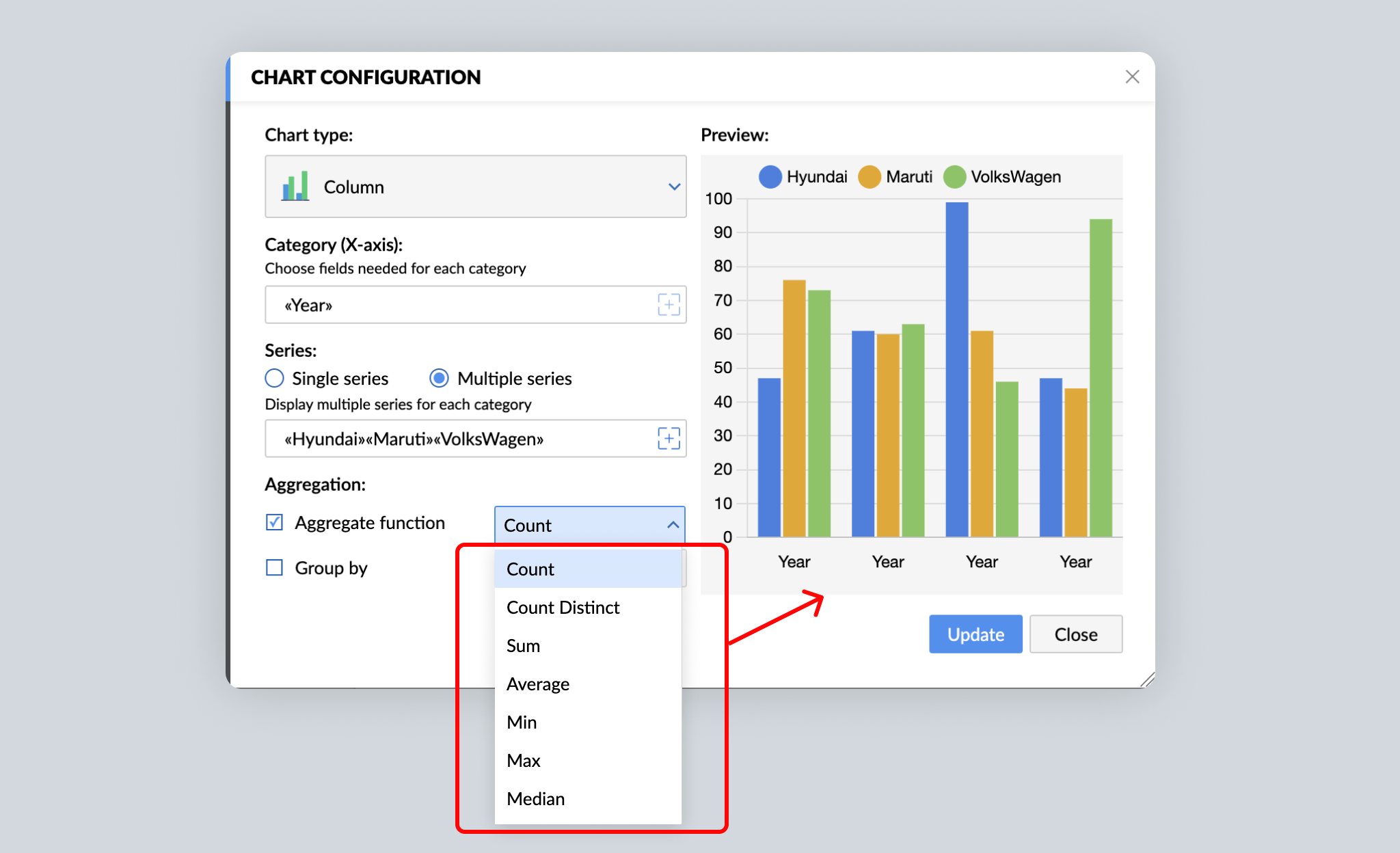
Writer's charts support the following aggregate functions: Count, Count Distinct, Sum, Average, Min, Max, and Median. For example, you can apply the Count function to the monthly sales data to get the number of cars sold per month. Similarly, the Average function will show the average number of sales per month. Click here to learn what each aggregation function does.
Aggregated data helps reveal patterns, and charts make the patterns easy to understand. In the case of our example, a chart provides an overview of the car company's monthly sales performance.
2. Non-numerical data aggregation
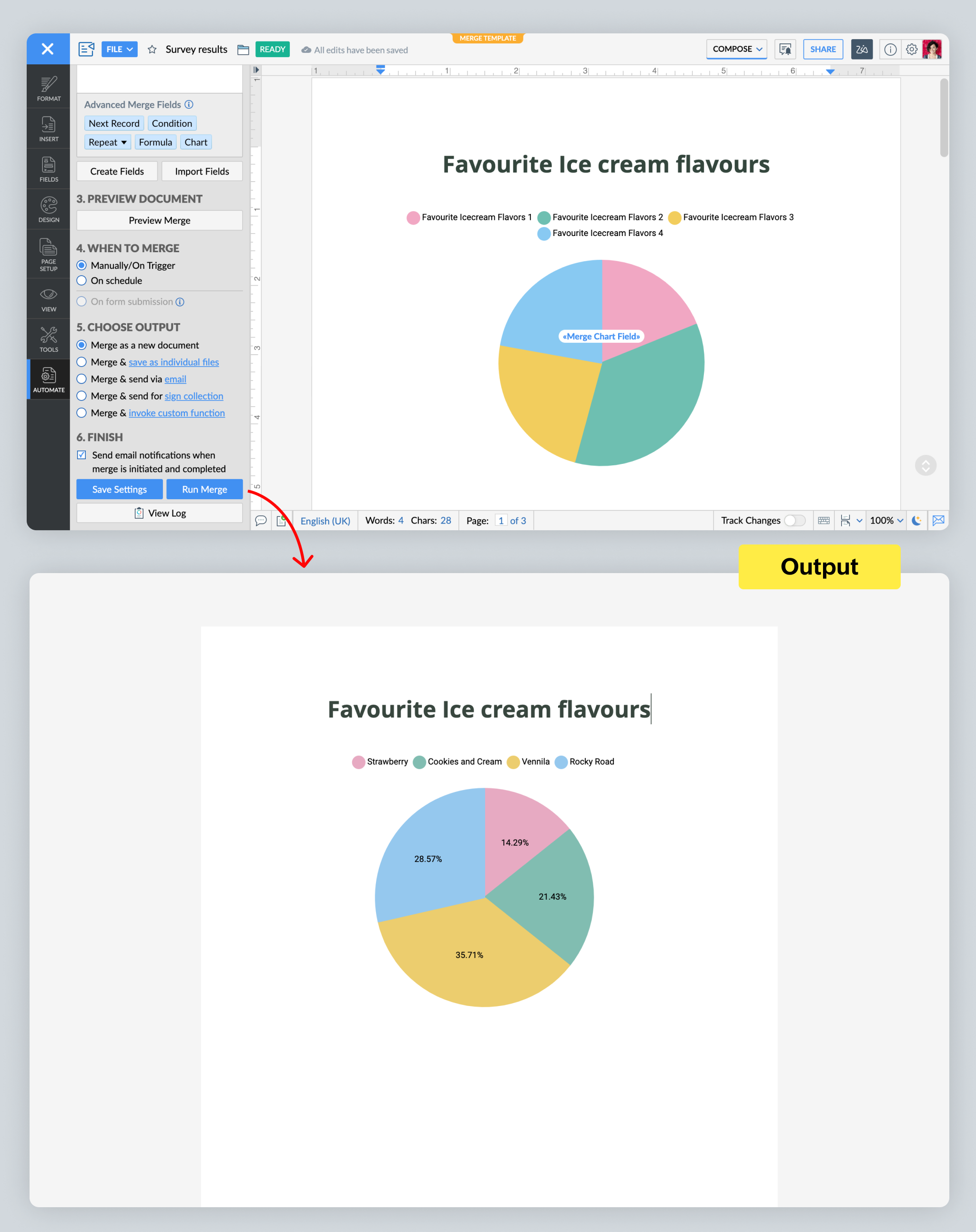
Any data without numbers (such as yes/no answers, or answers to open-ended questions) is non-numerical data. Let's say a fast food restaurant wants to add ice cream to its menu. It can run a survey among its customers asking for their favorite ice cream flavors. From there, it can use Writer to aggregate the responses, and present them in the form of a pie chart to easily understand customers' preferences.
3. Group By and Aggregate
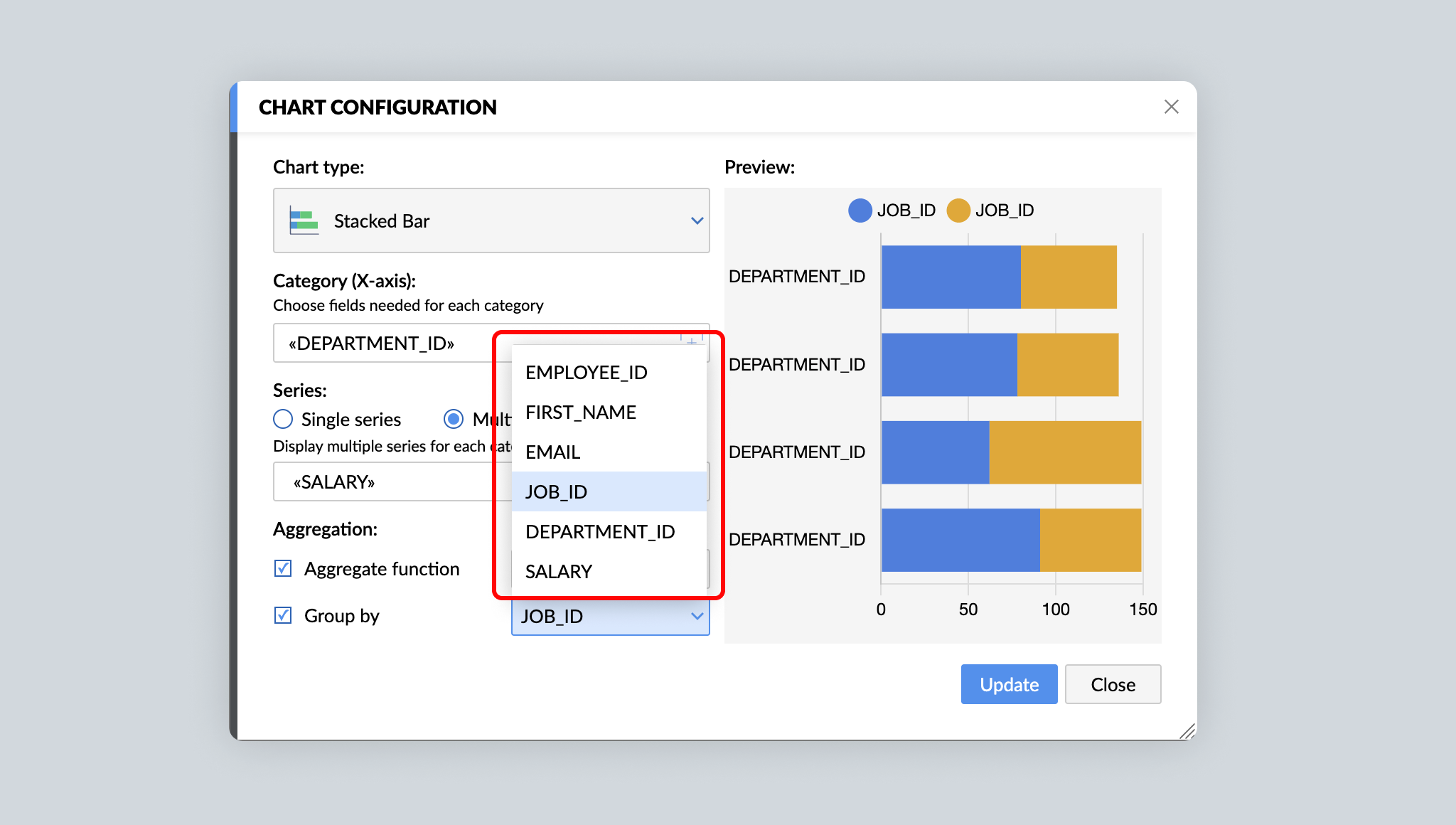
For detailed analysis and insights, you may choose to split data into separate groups before aggregating them. For example, in addition to the total number of cars sold in a month, you might also want to know the number of hatchbacks, sedans, and coupes sold in a month. With Writer's Group By function in charts, segregating raw data into different groups and then aggregating them becomes simpler.
Advanced chart tools
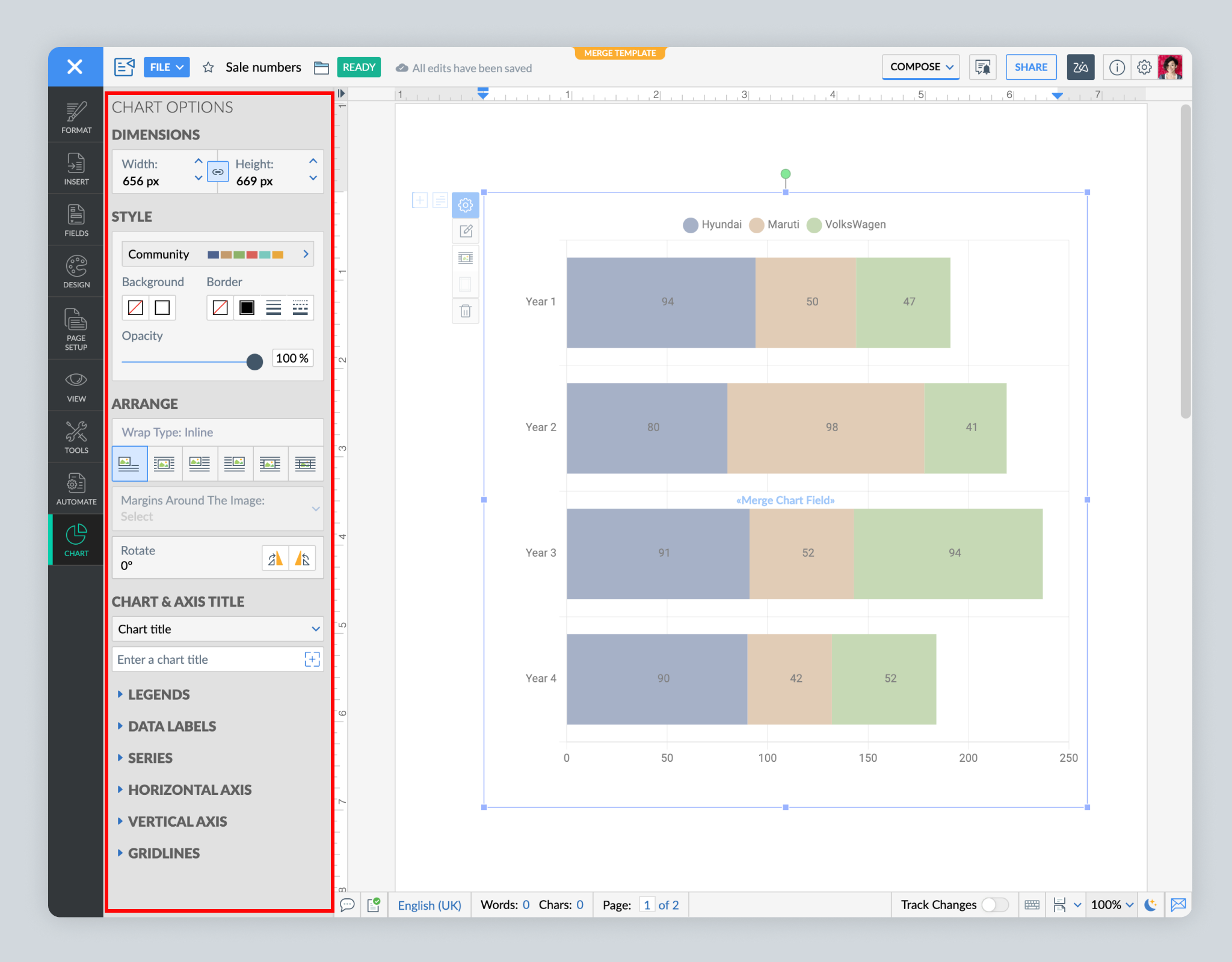
Make your data visually appealing and easy to understand. After choosing a chart type, use various customization options, such as colors, wrap style, margins, position of legends and data labels, and font sizes.
That's all for now! Tryout Writer's charts, advanced chart tools, and aggregate functions in mail merge, and let us know what you think.
Need any help working with charts? Write to us at support@zohowriter.com or simply leave a comment.
Happy writing!
Topic Participants
Shri Rakkshaa Gk
Sticky Posts
Zoho Writer's WordPress extensions
Hey Zoho Writer users! Say goodbye to all your WordPress content publishing woes with Zoho Writer's WordPress extensions. Publish content with all your formatting and images, republish content when you update a document, and more—from a single windowEasily perform calculations using dates with the new DATEDIF function
Hey Zoho Writer users! We've enhanced Zoho Writer's formula capabilities with the new DATEDIF function. This allows you to calculate the difference between dates in days, months, and years. Function syntax: =DATEDIF(start_date, end_date, unit) Inputs:Date-based conditions and filters
Configure conditions with date Hi everyone! We are excited to announce that you can now compare and filter data with date-based conditions. This update lets you compare date fields in a document to a reference date and display a text or value if theIntroducing group by, aggregation, and repeating regions in mail merge templates
Display data exactly the way you want and highlight key insights with Zoho Writer's enhanced merge templates. We've supercharged Zoho Writer's merge templates with the capability to dynamically group, aggregate, and repeat data as blocks. You can nowSay hello to an improved way to merge documents!
Automating all your documents from start to finish is now easier than ever with Writer's new merge tools. If you haven't seen it yet, you can read the main announcement here. Here is the full list of the features we've rolled out: 1. Dynamic Table Headers
Recent Topics
Recurring Tasks and Reminders in Projects
Recurring tasks are tasks that are created once, and then recreated automatically after a designated time period. For example, the invoice for your billable tasks is due every week. You can set that task to recreate itself every week. Also, the futureUnable to remove the “Automatically Assigned” territory from existing records
Hello Zoho Community Team, We are currently using Territory Management in Zoho CRM and have encountered an issue with automatically assigned territories on Account records. Once any account is created the territory is assigned automatically, the AutomaticallyImproved Functionality PO Bill SO Invoice
Hello, I need to enter over 100 items, it's frustrating to scroll a few item rows and wait for more to load, then scroll again. It would be nice to have buttons that scroll to the top or bottom with one click. Furthermore, these items I'm adding are VATWishes for 2026
Hello, and a happy new year 2026! Let's hope it's better for everyone. I'd like to share some thoughts on Zoho One and what could be useful in the short, medium, and long term. Some things are already there, but not applied to Zoho One. Others seem likeHow to Integrate Zoho Books with Xero (No Native Connection Available)
Hi everyone, I’m currently facing an issue with integrating Zoho Books invoices with Xero, as I’ve noticed Zoho does not provide a native integration with Xero at this time. I would like to ask: What are the common or recommended solutions for syncingZohoSalesIQ.Chat cannot send messages
Chat cannot send messages. Our app implements the customer service chat window functionality by integrating the Mobilisten SDK. Recently, we encountered an issue: after successful SDK initialization and visitor registration, when the `startWithQuestion`Critical Issue: Tickets Opened for Zoho Support via the Zoho Help Portal Were Not Processed
Hi everyone, We want to bring to your attention a serious issue we’ve experienced with the Zoho support Help Portal. For more than a week, tickets submitted directly via the Help Portal were not being handled at all. At the same time no alert was postedHide/Show Subform Fields On User Input
Hello, Are there any future updates in Hide/Show Subform Fields "On User Input"?Cloning Item With Images Or The Option With Images
Hello, when I clone an item, I expect the images to carry over to the cloned item, however this is not the case in Inventory. Please make it possible for the images to get cloned or at least can we get a pop up asking if we want to clone the images asCustom validation in CRM schema
Validation rules in CRM layouts work nicely, good docs by @Kiran Karthik P https://help.zoho.com/portal/en/kb/crm/customize-crm-account/validation-rules/articles/create-validation-rules I'd prefer validating data input 'closer to the schema'Adding Default Module Image into mail merge field
As with most people finding their way to these forums i have a specific requirement that doesn't seem to be supported by Zoho I have created 2 custom modules to suit my purpose 1 is an inventory type module that lists aluminium extrusions, and all relevantIs it possible to roll up all Contact emails to the Account view?
Is there a way to track all emails associated with an Account in one single view? Currently, email history is visible when opening an individual Contact record. However, since multiple Contacts are often associated with a single Account, it would be beneficialFree Training - Explore What’s New in Zoho One 2025
Greetings! We hope you have all had a chance by now to get hands-on with the new features and updates released as part of ZO25. Yes, we understand that you may have questions and feedback. To ensure you gain a comprehensive understanding of these updates,Good news! Calendar in Zoho CRM gets a face lift
Dear Customers, We are delighted to unveil the revamped calendar UI in Zoho CRM. With a complete visual overhaul aligned with CRM for Everyone, the calendar now offers a more intuitive and flexible scheduling experience. What’s new? Distinguish activitiesQuick way to add a field in Chat Window
I want to add Company Field in chat window to lessen the irrelevant users in sending chat and set them in mind that we are dealing with companies. I request that it will be as easy as possible like just ticking it then typing the label then connectingHow to create a two way Sync with CRM Contacts Module?
Newbie creator here (but not to Zoho CRM). I want to create an app that operates on a sub-set of CRM Contacts - only those with a specific tag. I want the app records to mirror the tagged contacts in CRM. I would like it to update when the Creator appZoho Sheet for Desktop
Does Zoho plans to develop a Desktop version of Sheet that installs on the computer like was done with Writer?How to import data from PDF into Zoho Sheet
I am looking to import Consolidated Account Statement (https://www.camsonline.com/Investors/Statements/Consolidated-Account-Statement) into zoho sheet. Any help is appreciated. The pdf is received as attachment in the email, this document is passwordZoho Projects Android app: Integration with Microsoft Intune
Hello everyone! We’re excited to announce that Zoho Projects now integrates with Microsoft Intune, enabling enhanced security and enterprise app management. We have now added support for Microsoft Intune Mobile Application Management (MAM) policies throughCant't update custom field when custom field is external lookup in Zoho Books
Hello I use that : po = zoho.books.updateRecord("purchaseorders",XXXX,purchaseorder_id,updateCustomFieldseMap,"el_books_connection"); c_f_Map2 = Map(); c_f_Map2.put("label","EL ORDER ID"); c_f_Map2.put("value",el_order_id); c_f_List.add(c_f_Map2); updateCustomFieldseMapAbout Zoneminder (CCTV) and Zoho People
Hi team I would like to implement a CCTV service for our branches, with the aim of passively detecting both the entry and exit of personnel enrolled in Zoho Peeple, but my question is: It is possible to integrate Zoho People with Zoneminder, I understandAdmin asked me for Backend Details when I wanted to verify my ZeptoMail Account
Please provide the backend details where you will be adding the SMTP/API information of ZeptoMail Who knows what this means?Kaizen #223 - File Manager in CRM Widget Using ZRC Methods
Hello, CRM Wizards! Here is what we are improving this week with Kaizen. we will explore the new ZRC (Zoho Request Client) introduced in Widget SDK v1.5, and learn how to use it to build a Related List Widget that integrates with Zoho WorkDrive. It helpsSet connection link name from variable in invokeurl
Hi, guys. How to set in parameter "connection" a variable, instead of a string. connectionLinkName = manager.get('connectionLinkName').toString(); response = invokeurl [ url :"https://www.googleapis.com/calendar/v3/freeBusy" type :POST parameters:requestParams.toString()Possible to connect Zoho CRM's Sandbox with Zoho Creator's Sandbox?
We are making some big changes on our CRM so we are testing it out in CRM's Sandbox. We also have a Zoho Creator app that we need to test. Is it possible to connect Zoho CRM's Sandbox to Zoho Creator's Sandbox so that I can perform those tests?I Need Help Verifying Ownership of My Zoho Help Desk on Google Search Console
I added my Zoho desk portal to Google Search Console, but since i do not have access to the html code of my theme, i could not verify ownership of my portal on Google search console. I want you to help me place the html code given to me from Google searchTimeline Tracker
Hi Team, I am currently using Zoho Creator – Blueprint Workflows, and I would like to know if there is a way to track a timeline of the approval process within a Blueprint. Specifically, I am looking for details such as: Who submitted the record Who clickedPrimary / Other Billing Contacts
If you add an additional contact to a Zoho Billing Customer record, and then mark this new contact as the primary contact, will both the new primary and old primary still receive notifications? Can you stop notifications from going to the additional contactsIs it possible to enforce a single default task for all users in a Zoho Projects ?
In Zoho Projects, the Tasks module provides multiple views, including List, Gantt, and Kanban. Additionally, users can create and switch to their own custom views. During project review meetings, this flexibility creates confusion because different users[Free Webinar] Zoho Creator webinars - Learning Table and Creator Tech Connect Series in 2026
Hello everyone, Wishing you all a wonderful new year! May 2026 and the years ahead bring more opportunities, growth, and learning your way 🙂 We’re excited to kick off the 2026 edition of the Learning Table Series and Creator Tech Connect Series ! LearningReply and react to comments
Hi everyone! We're excited to bring to you a couple of new features that'll make your sprint process simpler. A cloud application brings with it an array of social media features that can be efficiently used in your organizational setup. As an agile scrumModule Customisation - Lookup function not available
Good evening, Within my business, I can have multiple customers, who have multiple mobile assets. When I set these assets up, I enter information such as vehicle registration, Vehicle identification number (VIN), Unit number, YOM, in addition to others.zoho click, and nord VPN
Unfortunately, we've been having problems with Zoho Click, where essentially the line cuts off after about a minute's worth of conversation every time we are on VPN. Is there a way we can change this within the settings so it does not cut the line offZoho Calender
a) does the clanender in zoho project allow you to see the name of the event in the celnder view, it currently says either "Task (1) or "Milestoen (1)" b) Alternatively does the calender in Zoho project integrate with zoho calender?Matching ZOHO Payments in Banking
Our company has recently integrated ZOHO Payments into our system. This seemed really convenient at first because our customers could pay their account balance by clicking on a link imbedded in the emailed invoice. Unfortunately, we can't figure out howNew Enhancements to Zoho CRM and Zoho Creator Integration
Hello Everyone, We’ve rolled out enhancements to the Zoho Creator and Zoho CRM integration to align with recent updates made to the Zoho Creator platform. With enhancements to both the UI and functionality, This update also tightens access control byWork Type - Limitation
Hello, I'm setting up work types and have noticed, a limitation on the parts area to 10 lines. Can this be increased to 20 or greater? In addition to this, when I attempt to add the work type to a work order, the correct labour hours doesn't flow through.Emails sent through Bigin are not posting in IMAP Sent folder
I have set up my email to work from within Bigin using IMAP. I am using IMAP so I can sync my email across multiple devices - phone / laptop / desktop / iPad / etc. I want all my emails to populate my email client (outlook & iphone email) whether orTurning the page for Zoho SalesIQ: 2025 to 2026
As we wrap up 2025, we would like to take a moment to reflect on what we set out to achieve this year, what we’ve delivered, and where we’re headed next. What we focused on in 2025 This year was all about strengthening the core of engagement and AI, makingTemporary Outage in Zoho Cliq Affecting US Users – July 23, 2025
We experienced a service disruption in Zoho Cliq that impacted core functionality for users in the US region. The issue occurred between Jul 23, 2025, 06:54:00 PM IST and 07:13:13 PM IST, lasting approximately 19 minutes. To restore service stability,Next Page