Response Time Report
From data to decisions: A deep dive into ticketing system reports
Every organization that interacts with its customers should have an established timeframe for how soon an agent is expected to send the first response and any reply to any follow-up messages.
It's common for the support team to operate under a service level agreement that requires the first response to any customer ticket to be sent within one hour of ticket creation.

If a team has 10 agents, the manager does not need to check each ticket to see if the response time SLA is met. Instead, the response time report can help identify whether all responses are sent on time or if there is a delay.
What are time-based reports?
Time-based reports are valuable tools that help us understand how well things are going by breaking down key metrics over specific periods. By tracking, measuring, and visualizing data, these reports allow us to evaluate performance, spot trends, and make better decisions. They enable businesses to monitor efficiency, productivity, and operational effectiveness.
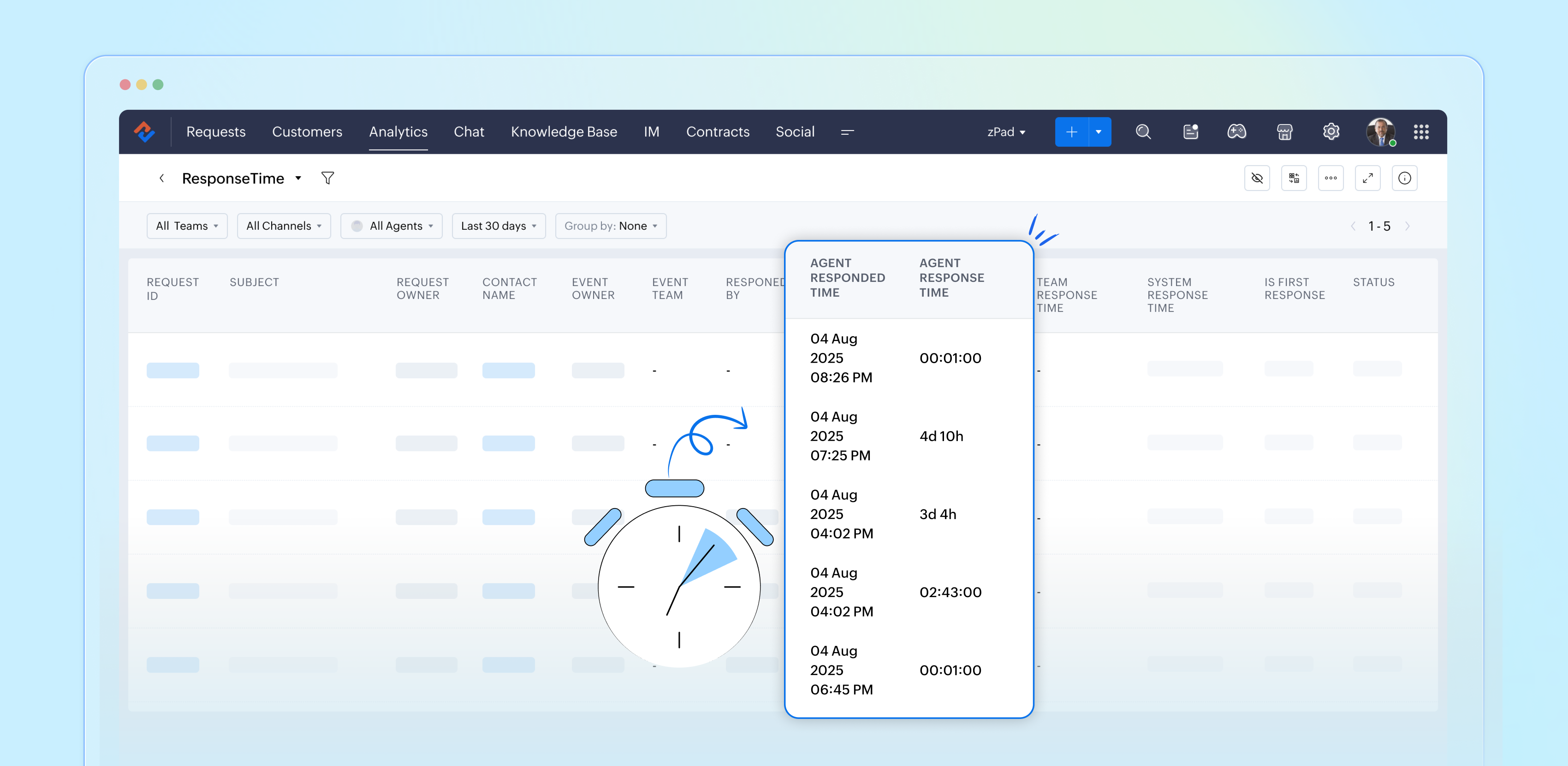
If a ticket was raised on February 23, and the response was sent on February 28, the manager can review the details to understand why there was a delay. This might be due to reasons such as holidays, a mistake by a new agent who is unfamiliar with the process, or unusually high demand for support. By identifying the cause, the manager can offer more training on SLA processes, adjust the way agents' workloads are allocated, or arrange for extra help during holidays to ensure timely customer responses in the future.
Example of response time reports
Suppose a ticket was raised on February 23rd about a patient’s health concern, and the response was sent on February 28th. In this case, the hospital manager can review the details to see why there was a delay in addressing the patient's needs. This delay may be caused by factors such as holidays affecting staffing levels, staff being unfamiliar with the ticketing process related to patient care, or an increased workload resulting from a sudden rise in patients.
By figuring out the cause of the delay, the manager can take proactive steps. For example, they could provide more training on the standard procedures for handling patient inquiries to ensure all staff understand the process. The manager might also adjust the workload by redistributing cases among staff or bringing in temporary help during busy times or holidays.
Another strategy is to form a dedicated task force to handle customer inquiries during peak periods to provide quicker responses. By tackling these issues, the organization can improve its operations and ensure timely responses to ensure customer satisfaction.

Availability: All paid versions
Specific attributes of the report
- Ticket ID: Zoho Desk identifies and distinguishes tickets using a unique reference number called a ticket ID.
- Subject: The ticket subject is typically a summary or description of the issue the customer is experiencing.
- Ticket owner: Owner of the ticket.
- Contact name: The customer's contact name.
- Event owner: The owner of the event.
- Event team: The change in the ticket's status.
- Responded by: The name of the agent who responded to the customer's ticket.
- Agent responded time: The time the response was sent.
- Agent response time: The total time taken to respond to the ticket.
- Team response time: The time the team responded to the ticket.
- System response time: The total time the team took to respond to the ticket
- Is first response: Confirms if this is the first response in the conversation's thread.
- Status: The current status of the ticket.
- Status during event: The status of the ticket at a particular point in time.
- Channel: The channel through which the ticket was submitted.
Importance of response time reports
Response time reports are important for support systems. They measure how quickly agents reply to customer inquiries.
- Enhance customer satisfaction
- Easily promote customer loyalty
- Enable performance tracking
- Drive operational efficiency
- Support data-driven decisions
- Reinforce brand reputation
Analyze and improve response times with reports
By closely examining both our first response times and the tickets that require more attention, the support team can gather valuable insights from every customer interaction. This continual analysis of response time reports allows us to identify patterns and areas for improvement, ultimately enhancing our overall performance and ensuring a superior experience for our customers.
Please stay tuned for more articles in our Desk Reports series.
Regards,
Kavya Rao
The Zoho Desk Team

Also read:
Time-based reports
Topic Participants
Kavya Rao Addepalli
Sticky Posts
Zoho Desk Partners with Microsoft's M365 Copilot for seamless customer service experiences
Hello Zoho Desk users, We are happy to announce that Zoho Desk has partnered with Microsoft's M365 to empower customer service teams with enhanced capabilities and seamless experiences for agents. Microsoft announced their partnership during their keynoteWhatsApp pricing changes: Pay per message starting July 1, 2025
Starting July 1, 2025, WhatsApp is shifting from conversation-based pricing to per-message billing. That means every business-initiated message you send will count. Not just the first one in a 24-hour window. Pricing updates on the WhatsApp Business PlatformLive Webinar - Work smarter with Zoho Desk and Zoho Workplace integration
Hello customers! Zoho Desk and Zoho Workplace are coming together for a webinar on 14th May, 2024. Zoho Workplace is a suite of productivity apps for email, chat, docs, calls, and more at one single place. Zoho Desk is closely integrated with a few toolsApple iOS 17 and iPadOS 17 updates for Zoho Desk users
Hello Zoho Desk users! Apple recently announced the release of iOS 17 and iPad OS 17. These latest OS updates will help you stay productive and efficient, through interactive and seamless user experiences. Zoho Desk has incorporated the updates to helpZoho Desk Cheat Sheet For The Year-End
Check out these Zoho Desk best practices to end this year on a high and have a great one ahead! #1 Set Business (Holiday) Hours - If you have limited working hours, please make sure you restrict your business hours or set them as holidays for the coming days. Let your customers know when you will, and won't, be available. #2 Update the Annual Holiday List - Check the holidays for the new year and update the holiday schedule. Usually, holidays from the current year will be carried over for the next
Recent Topics
You have reached the maximum limit of bank accounts that can be connected to Zoho Books through token.
I can no longer connect to my bank account to download transactions into Zoho Books. I egt the error message: "You have reached the maximum limit of bank accounts that can be connected to Zoho Books through token. To connect more accounts, write to usAssign emails to lead
I have some contacts who refers leads but there is no away to manually assign emails to lead.Print Sales Orders, Purchase Orders or Invoices from API
Hello, Is it possible to use the print option that is available in Sales Orders Purchase Orders and Invoices with the API?. I don't see any information in the docs about this. ThanksPush Forms to CRM
Hello, I created a Form but forgot to integrate to CRM before many of the Forms were filled out. Is it possible to push those entries to CRM or should I just export a CSV then upload to CRM?Layout Adjustment.
Hello Latha, Hope you are doing well. I wanted to check with you about adjusting the layout columns in the Service Report from the backend, as currently there is no capability for us to customize the layout from our end. Below is the output that I amInvoice emails repeatedly "Bounced back" from perfectly good email address of clients.
Hi For a couple of months now I am getting tens of invoice email invoices "bounced back" from perfectly sound email addresses when they are sent via Zoho Books. (see attached or an example) (the common theme seems to be that the emails are going to eitheryodlee bank fees
My bank feeds have been pretty much error-free until this recent Yodlee update. I have configured it as per the information however nothing comes through. It says that bank feeds have been refreshed as of 30th June, 2022. It is the end of the financialCreate Item group from a composite Item
I have applied my mind for hours but cannot figure this out. Can you have a composite item in an item group?. E.g. We bundle different color and size SKU's together as composite items. Also Using composite items as Bill of Materials. We want to createAmazon.in FBA multiple warehouse integration with Zoho Inventory
My organisation subscribed to Zoho One looking at the opportunity to integrate Amazon.in with Inventory. But during the configuration, we understood the integration has severe limitations when it involves multiple warehouses in the same Organisation.Feature Request - Make Available "Alias Name" Field In Item List View
Hi Zoho Inventory Team, I have noticed that the "Alias Name" field does not appear on the list of selectable columns in the Customise Columns feature in the Items module. This would be very useful to see for businesses who are using the Alias Name fieldFeature Request - Option To Hide Default System Fields on Items
Hi Zoho Inventory Team, As far as I know it is not possible to hid some of the defult system fields on Items, such as UPC, MPN, EAN, ISBN. A good use case is that in many cases ISBN is not relevant and it would be an improved user experience if we couldOpenAPI Specs are just plain wrong
The provided yml files for generating the OpenAPI specs are absolutely riddled with errors and inconsistencies. From missing fields on the objects, to just incorrectly named resource objects. I'm having to go through and manually changing the spec toZoho Inventory - Composite Items - Assembly - Single Line Item Quantity of One
Hi Zoho Inventory Team, Please consider relaxing the system rules which prevent an assembly items from consisting of a single line item and outputting a quantity of 1. A client I'm currently working with sells cosmetics and offers testers of their productsCategorize Items with Item Headers
Hello customers, Did you ever want to classify items based on specific categories to help your customers understand your invoice better? With the new Item Header feature, you can easily categorize items in your invoices and estimates and give them a common title. Item Headers are available in the Invoices, the Recurring Invoices and the Estimates module. It can be carried forward from estimates to invoices at the time of converting the estimates. To add an item header: Go to the Estimates, InvoicesZoho Creator Developer Console | Improved Distribution and Lifecycle Management for apps
Hello everyone, We're excited to introduce new enhancements now in the Zoho Creator Developer Console. These updates strengthen private app distribution through licensing controls and extend environment support across all installed apps, helping teamsZoho Notebook API
Hi there, I was wondering if you guys are planning to create an API service for this product? Currently, I have developed a custom program based on Evernote's API that allows me to automate my notes. The program completely changes the way notes are taken and makes anyone more productive, combining notes, logging, reminders, tasks and time management. I would love to deploy it on the Zoho Notebook API. In fact, I think this would be the perfect product for Zoho to package and offer as a service/product.Add Reauthentication Option for Zoho Bug Tracker Integration in Zoho Desk
Hello Zoho Desk Team, We hope you're doing well. We would like to request an enhancement to the Zoho Bug Tracker integration within Zoho Desk. Current Limitation: At the moment, there is no option to reauthenticate the Zoho Bug Tracker integration inNewby Questions
Q1. The top bar of Zoho Books has a "Search in Banking (/) " field. What is the proper use of this text box? - Searching for Amazon for example has no results but there are transactions. - Is the search case sensitive? - Are regular expressions allowed?Rules not executing and sending error messages
We have been using ZoHo Teambox for just over 6 months and recently our team members have been getting the following error messages when sending emails, "Sorry you do no have access for this action" or "Entity does not exist". Then we noticed that theThree Zoho Billing Limitations Blocking Standard Subscription Operations
After working through Zoho Billing support for over a year on these three issues without resolution, we wanted to flag them to the broader community. We are curious whether other businesses are running into the same walls. 1. Cannot Prepone (Move Earlier)Automation #3 - Auto-sync email attachments to tickets
This is a monthly series where we pick some common use cases that have been either discussed or most asked about in our community and explain how they can be achieved using one of the automation capabilities in Zoho Desk. Most of our customers use emailCan't add a sender adress from zoho campaigns
hi, I need to change the sender address for a campaign. When i try to add it i get a message to say 'duplicated email address found while adding your sender address'. This is the first campaign i'm sending so I don't understand why this message is displayed? Thanks JaneIntroducing Workqueue: your all-in-one view to manage daily work
Hello all, We’re excited to introduce a major productivity boost to your CRM experience: Workqueue, a dynamic, all-in-one workspace that brings every important sales activity, approval, and follow-up right to your fingertips. What is Workqueue? SalesDashboard target enhancements
Often individuals in IT are creating dashboards for their sales team. The ability to create a single dashboard that can be used by multiple people is key. A components for a dashboard have the ability to filter by logged in user which is great. HoweverZoho Campaigns - Feature Request - Re-Send Existing Email Action in Automations/Journeys
Hi Zoho Campaigns and Zoho Marketing Automation teams, I would like to suggest a feature that would make building and managing complex automations significantly easier. The Feature Introduce a “Re-Send” or “Send Existing Email” action within AutomationsZoho Books | Product updates | October 2025
Hello users, We’ve rolled out new features and enhancements in Zoho Books. From iOS 26 updates to viewing reports as charts, explore the updates designed to enhance your bookkeeping experience. Zoho Books Updates for Apple Devices At WWDC 2025, AppleBill sent for Payment Approval
Zoho Books currently supports three levels of transaction approval for bills: Draft, Submit, and Approved. We are looking to add a layer of approval like a bill marked for payment before initiating payment requests through HSBC Bank. Can you please guideKaizen #235 - Automating record restoration using Recycle Bin APIs in Zoho CRM
Welcome to another Kaizen week. Here's a question that came up in our developer forum: "I'm working on a piece of software to automate conversion of Leads into Deals based on order status from my company's website. There are some cases where a previouslyOpen PDFs using Zoho PDF Editor
Hello users, In this article, we will be exploring the open PDF capability in Zoho PDF Editor to collaboratively edit PDFs, insert text and images, add fillable and e-signature fields, and more. You can upload PDFs upto 50 MB or 150 pages. Password-protectedOne Contact with Multiple Accounts with Portal enabled
I have a contact that manages different accounts, so he needs to see the invoices of all the companies he manage in Portal but I found it not possible.. any idea? I tried to set different customers with the same email contact with the portal enabled andBank Feeds Breaking Constantly
Hey Everyone, I have already reached out to support about this issue but I am wondering if anyone else is having the same issue. My bank feeds keep breaking within days of me fixing them by updating the credentials. Its been happening for a while andTimed addition to segments
Hi there - hoping you can help me figure out a graceful way of doing this: • I want to add contacts to a Segment in Campaigns based on a Stage pick-list field value X in CRM - that bit's fine. The problem is that I only want to add them to the SegmentZoho Developer AI Agent = Claude AI + MCP Server + Zoho Ecosystem
Hello Zoho Community 👋 I’m excited to share a recent integration we’ve worked on at Officehub Tech: ✅Claude + MCP Server + Zoho Creator Zoho Developer AI Agent – an AI-powered Zoho automation platform This solution connects Zoho applications with anCRM
How do I build an email funnel of 10 emails with decision tree ie; if yes use this email if no use this email. Also I cannot figure out how to add more groups or see my whole groups. I've set up different groups like attorneys is one group of companies/peopleWebDAV support
I need WebDAV support so that I can upload/download (and modify) documents from my local file system. Is anything planned in his direction?Is there a way to show contact emails in the Account?
I know I can see the emails I have sent and received on a Contact detail view, but I want to be able to see all the emails that have been sent and received between all an Accounts Contacts on the Account Detail view. That way when I see the Account detailInternal Fillable Contract with Zoho Writer (Before Sending to Client)
Hi everyone, I’m trying to automate the following process in Zoho CRM and would appreciate some guidance. Process: When a Deal moves to a specific stage, CRM triggers an automation. CRM sends a contract template to an internal team member so they canERROR: This user is not allowed to add in Zoho. Please contact support-as@zohocorp.com for further details
I can add new user for mail, i received message error about; This user is not allowed to add in Zoho. Please contact support-as@zohocorp.com for further details Try creating user name; instagram@eficaztecnologia.com.brImport Quote from CRM into document in Writer?
Hi, I created a quote for a proposal in the Zoho CRM and was wondering if there is a way to embed the quote into a document in Zoho Writer so I can make our sales proposals look a little nicer. Is that possible?Can I convert MSG to HTML on Mac?
Yes, you can convert MSG files to HTML on a Mac using software Aryson MSG file Converter. This tool allows you to convert Outlook MSG emails into multiple formats, including HTML, PDF, EML, PST, and more. It preserves all email content, attachments, metadata,Next Page