Zoho Creator Developer Console | Improved Distribution and Lifecycle Management for apps

Zoho Creator Developer Console | Improved Distribution and Lifecycle Management for apps

Hello everyone,

We're excited to introduce new enhancements now in the Zoho Creator Developer Console. These updates strengthen private app distribution through licensing controls and extend environment support across all installed apps, helping teams test changes safely before going live.

What is private sharing?
Private sharing of apps gives you the flexibility to distribute your apps directly to specific clients using their Zoho email address. This is especially useful for developers and Partners who want to deliver tailored solutions to select customers.

Why this matters
Many of our Partners would like to distribute applications directly to clients and manage payments offline. Until now, Zoho Creator had no in-product mechanism to enforce app validity based on your payment or agreement status with clients. This meant that even if a client stopped renewing their license, the application remained fully functional in their account.
This new enhancement solves that issue by allowing Partners to define a clear validity period. Once expired, the app automatically becomes disabled, and the Partner gains the ability to block access fully. This protects your IP and ensures fair usage of your apps.

Additionally, there was previously no way to share apps for evaluation purposes. With this update, the Trial License feature enables developers to offer a time-bound preview before subscription.

While Developer Console already supported private sharing, we recognized that the existing flow was limited and didn't fully address the diverse requirements of our Partners. That’s why we've rolled out this new update to make the flow more robust and professional.

Here's how the new flow works:
  1. Evaluation: You can now offer your client a Trial License for your app. Once the client is added and the app is shared with a trial license, they'll receive an installation email. After they install the app using the provided link, it becomes available in their Creator account for the trial period.

  2. Post-evaluation: If an agreement isn't reached, the application will be disabled after the evaluation period ends. This means the app will switch to read-only mode, where the client would have access to existing data but won't be able to add new entries. At any point after the trial period expired, the developer will have the option to delete the disabled application (along with its data) from the client's account.

  3. Subscription: Following the evaluation, if the client decides to proceed with a purchase, you can offer them a Subscription License after completing the transaction through your preferred channels. Based on your agreement, the subscription can be granted for as little as one month or set to lifetime validity.

    Once the subscription period ends, the application is automatically disabled and moved to read-only mode, allowing clients to view existing data but not perform any actions. If required, developers can further restrict the application, completely blocking client access. If the client and developer agree to extend the subscription, the app can be unblocked and access restored. 

    These safeguards ensure clients can't continue using your app beyond your agreed terms with the client, giving you complete control, since payments are handled outside Zoho Creator. 
 
To share applications with your clients:
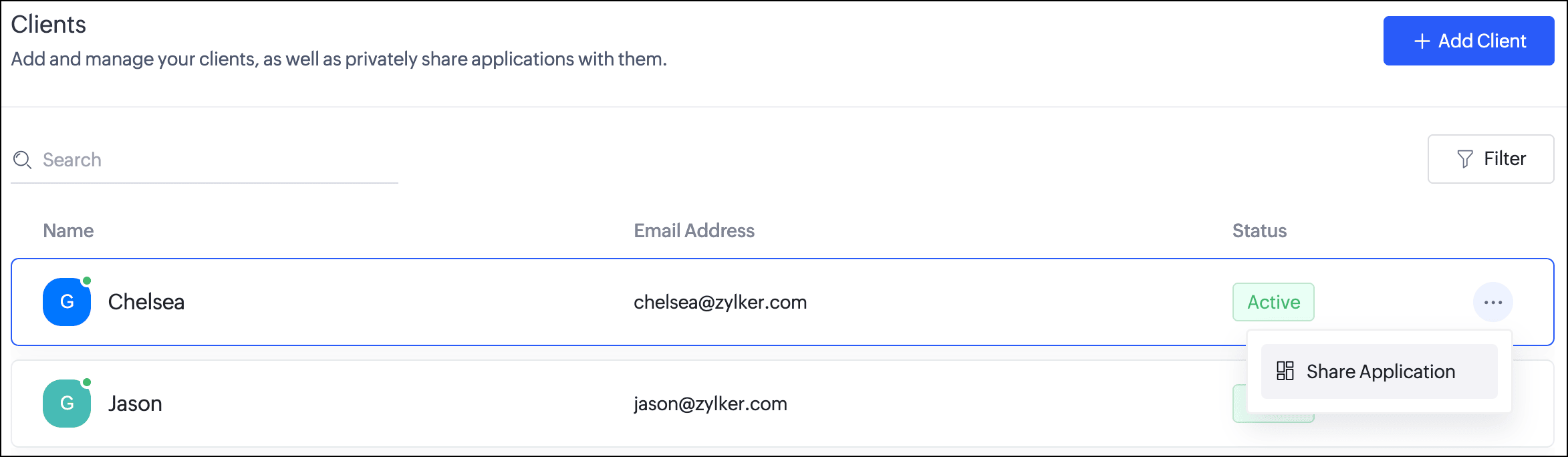
  1. Navigate to the Clients section. Click the horizontal ellipsis icon next to a client and select Share Application.
  2. In the popup, you can choose the Application and the version to be shared with the client.
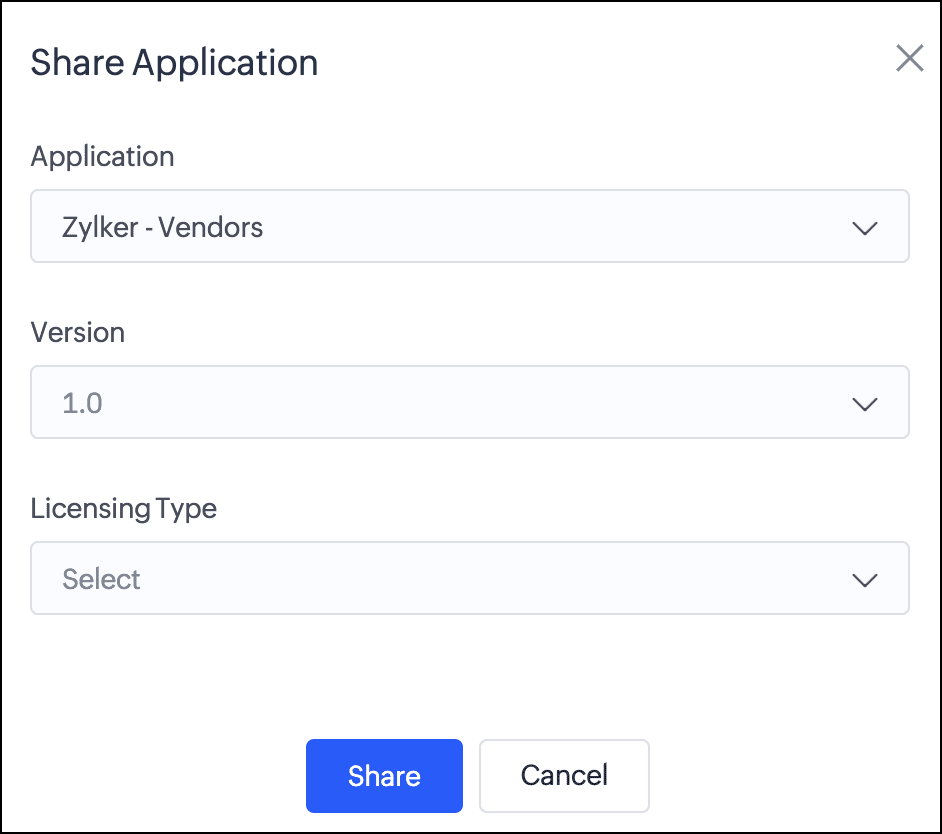
  3. Next, you can choose from two license types:
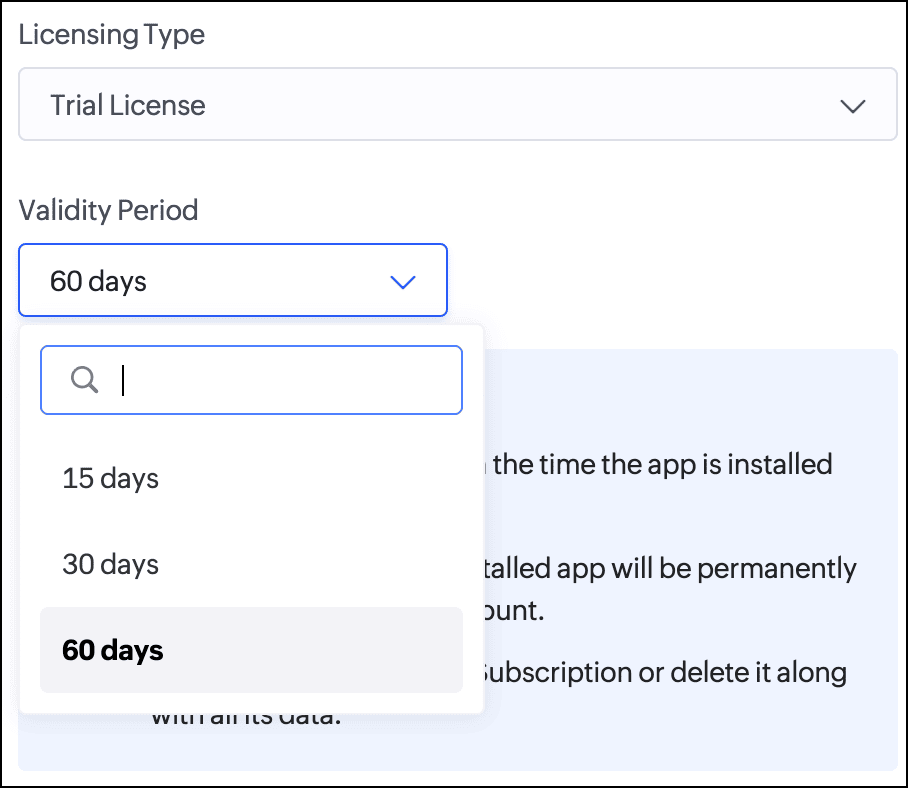
    Trial License: Provide your client with a trial period to evaluate the app. You can set the duration to 15, 30, or 60 days.
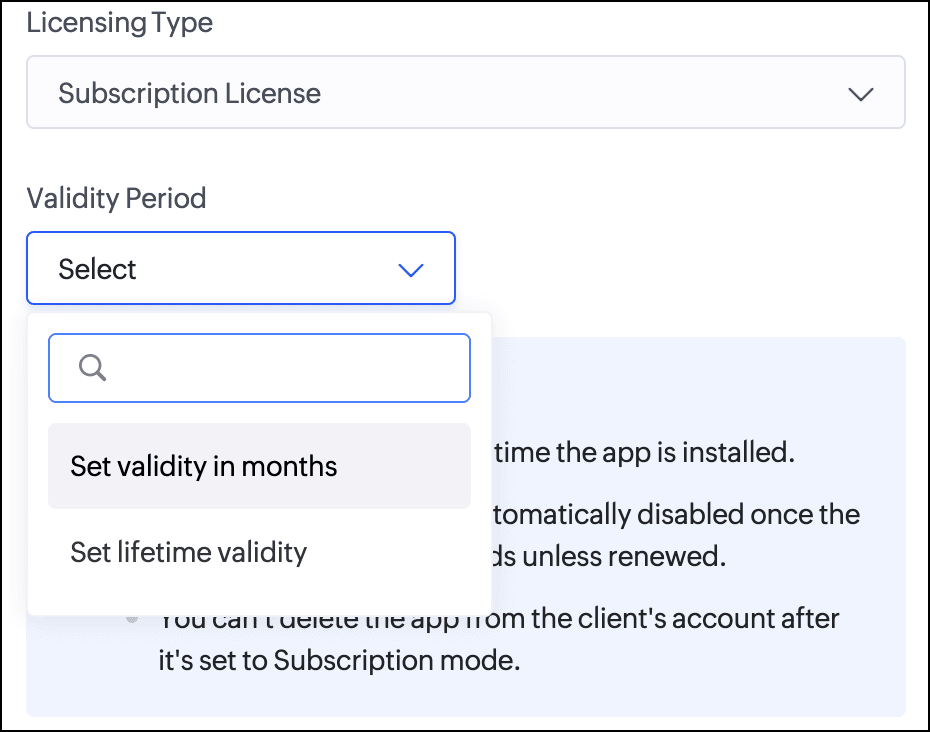
    Subscription License: Once you've finalized the subscription terms with your client, you can issue a subscription license. You have the option to set a fixed validity period in months (from 1 to 36) or grant lifetime access to the app.

Consequently, with the introduction of this new flow, we've implemented automated email reminders to keep clients informed about their subscription status and expiry timelines. Developers will be proactively notified about client subscription activity and upcoming license expirations. This ensures both parties stay in sync throughout the subscription lifecycle.

Documentation
To help you better understand these changes, we've provided comprehensive resources to assist you with the private sharing of applications. They can be accessed at the Understanding private distribution of apps help page.

Environment support for installed apps  
Along with the above enhancements, we're also introducing environment support for apps you've distributed. Your clients will now be able to add installed apps to environments and thoroughly test them in the staging environment before publishing them to production. This ensures the changes to apps are validated before they become accessible to end users.

This enhancement removes the earlier limitation that prevented distributed apps from being added to environments. Please note that while your clients can add distributed apps to environments, they will not have access to development. This continues our policy of protecting intellectual property and ensuring that developers remain in control of their apps.

For more information, visit the Installing and managing distributed apps help doc.

Timeline
These enhancements have already been rolled out and are now accessible to users in all DCs.

We believe this new enhancement to the private sharing feature will provide you with greater control and flexibility when distributing your Zoho Creator applications. We hope you love it!

We'll be back soon with more exciting updates, so stay tuned.

Regards,
The Zoho Creator Team

    • Sticky Posts

    • Introducing Zoho Creator's 2025 Release Projection 2

      Hello Creators! I'm Prakash, from the Creator product management team, and today I'm delighted to unveil our next set of features as part of Release Projection 2 for 2025. With thoughtful analysis and planning, we've curated powerful new capabilities
    • Zoho Creator - 2023 Release Projection 1

      Hello everyone! A very Happy New Year to you and your family. Hope you're all good and having a great time using Zoho Creator to make your lives easier and your businesses prosper. 2022 was an action-packed year for us at Creator, and we hope to continue
    • Zoho Creator User Group meetups in a city near you! - Oct - Nov, 2023

      Greetings from the Zoho Creator team! We're hosting a series of Zoho Creator meetups in various cities across the globe, and we'd love to meet you there! Our meetups are a great opportunity to network with industry peers, exchange ideas and best practices,
    • Zoho Creator - 2023 Release Projection 2

      Hello everyone! Time truly flies when you're having an incredible journey, and today we mark the completion of an eventful and action-packed six months. It feels like just yesterday when we embarked on this adventure together with the launch of our new
    • Upcoming Updates - August 2022

      Hi all, Greetings from the Zoho Creator team! Today we've got news for you on some exciting updates. And rest assured— there’s more to come! In this post, we'll be going over the upcoming features and improvements for this month as mentioned below. A
    • Recent Topics

    • Removing To or CC Addresses from Desk Ticket

      I was hoping i could find a way to remove unnecessary email addresses from tickets submitted via email. For example, a customer may email the support address AND others who are in the helpdesk notification group, in either the TO or CC address. This results
    • Enhancing Zia's service with better contextual responses and article generation

      Hello everyone, We are enhancing Zia's Generative AI service to make your support experience smarter. Here's how: Increased accuracy with Qwen One of the key challenges in AI is delivering responses that are both contextually accurate and empathetic while
    • How can I prevent having recepients from being added as contacts in Zoho Desk?

      How can I prevent having recepients from being automatically added as contacts in Zoho Desk? There's no option to disable this.
    • Agent Concern

      would like to ask the difference between an agent and a light agent. can a light agent close a ticket. thank you.
    • Train Zoho Answer Bot Based on Customer

      Hi all, Is it currently possible to mark Help Centre articles to a specific customer, and restrict the answer bot to only use relevant information if it is either marked as "General", or tagged for the specific customer in question? We currently have
    • Candidate Assessments, no workflows.

      I have an issue where I would like to trigger a workflow based on a candidate assessment being completed. Sometimes a returning candidate will complete a second assessment, on completion the status of the candidate will be updated to "Unqualified" if
    • Non-depreciating fixed asset

      Hi! There are non-depreciable fixed assets (e.g. land). It would be very useful to be able to create a new type of fixed asset (within the fixed assets module) with a ‘No depreciation’ depreciation method. There is always the option of recording land
    • Ability to translate Zoho CRM Kiosks

      Hi team, Is support for translating kiosk text and screen names in the Zoho CRM translation tool planned on the roadmap? Thanks,
    • How to use filters on all products page? Or even a category page?

      Hello, I am trying to create some filters so users can use filters to find products they are looking for. So what i am trying is to create a filter according to price lets say. So if i define it this way i am expecting to see this filter option on category
    • audio and video comments in tasks in zoho projects

      Hi, is it planned to have the ability to post audio and video comments? the whatsapp wechat format of communicating is a reality... tools like zoho project would facilitate a lot teamwork by facilitating the way in which we can give feedback in audio and video rather than only text. thx!
    • Zoho Projects app update: Voice notes for Tasks and Bugs module

      Hello everyone! In the latest version(v3.9.37) of the Zoho Projects Android app update, we have introduced voice notes for the Tasks and Bugs module. The voice notes can be added as an attachment or can be transcribed into text. Recording and attaching
    • Boas práticas de desenvolvimento em Deluge

      O Deluge (Data Enriched Language for the Universal Grid Environment) é a linguagem de script utilizada em diversas aplicações do ecossistema Zoho, como Zoho Creator, Zoho CRM, Zoho Books e Zoho Flow. Ela foi projetada para permitir automações rápidas
    • Zoho Books | Product updates | February 2026

      Hello users, We’ve rolled out new features and enhancements in Zoho Books. From Advanced Reporting Tags to the ability to mark projects as completed, explore the latest updates designed to improve your bookkeeping experience. Introducing Advanced Reporting
    • Send emails directly via Cases module

      Greetings all, The ability to send emails from the Cases module, which users have been eagerly anticipating, is now available, just like in the other modules. In Zoho CRM, Cases is a module specifically designed for managing support tickets. If your organization
    • Seeking a WhatsApp Business App (not API) Zoho CRM integration

      We have a business need to integrated WhatsApp Business App (not API) into Zoho CRM to centrally manage communications between our Sales team and Leads & Contact. Is there a reputable integration available for this scenario of ours? Core features we would
    • Zoho Sign 2025–2026: What's new and what's next

      Hello! Every year at Zoho Sign, we work hard to make document signing and agreement execution easy for all users. This year we sat down with our head of product, Mr. Subramanian Thayumanasamy, to discuss what we delivered in 2025 and our goals for 2026.
    • Force mandatory entry on one of two fields on Contacts

      We are finding our users aren't always entering a phone number or email address of a contact.  We would like to make these fields mandatory but realize they won't always have both pieces of information, but should at least have one. Is there a way to make either the Phone number OR Email Address fields mandatory on the Contacts screen.  We want to make sure they fill in at least one of those fields. Is this possible?
    • Error AS101 when adding new email alias

      Hi, I am trying to add apple@(mydomain).com The error AS101 is shown while I try to add the alias.
    • Intergrating multi location Square account with Zoho Books

      Hi, I have one Square account but has multiple locations. I would like to integrate that account and show aggregated sales in zoho books. How can I do that? thanks.
    • Is there a way to configure dark mode for Campaigns emails that go out to customers?

      I've found a lot of information on how to configure dark mode for my (The user) personal Zoho workspace and email, but is there any way to edit dark mode settings on emails that we send out to customers via campaigns?  We sent out a test email the other
    • Can I hide empty Contact fields from view?

      Some contacts have a lot of empty fields, others are mostly filled. Is there a way I can hide/show empty fields without changing the actual Layout? I would like to de-clutter my view, and also be able to add information later as I am able. I would be
    • CRM x WorkDrive: We're rolling out the WorkDrive-powered file storage experience for existing users

      Release plan: Gradual rollout to customers without file storage add-ons, in this order: 1. Standalone CRM 2. CRM Plus and Zoho One DCs: All | Editions: All Available now for: - Standalone CRM accounts in Free and Standard editions without file storage
    • Auto-publish job openings on my Zoho Recruit Careers Website

      I have developed a script using the Zoho Recruit API that successfully inserts new jobOpening records to my Zoho Recruit website, but my goal is to auto-publish to the Careers Website. The jobOpening field data shows two possible candidates to make this
    • Zoho Recruit - Email Relay

      Good day, Has anyone succeeded in setting up an email relay for Office 365? If I add the details from https://support.microsoft.com/en-us/office/pop-imap-and-smtp-settings-8361e398-8af4-4e97-b147-6c6c4ac95353, I get the connection error. Regards, Eka
    • Credit Card Terminal for Zoho Books

      Hello, Instead of punching the credit card number manually for customer payment, do you have a third-party hardware credit card reader that works with Braintree? Thank You
    • How do you print out the invoices comments

      I have some invoices where i need to print out the comments that show when reminders and etc were sent how do we print those out in Zoho Books.
    • Feature Request: Enable Custom PDF Layout Editor for All Modules (Including Package Slips)

      Hello Zoho Community and Product Team, I am writing to share a suggestion that would significantly enhance the customization capabilities within Zoho Books. We all appreciate the power of the Custom PDF Layouts (the "New" template engine) that allows
    • Need advice for product/item search functionality when adding invoices.

      My client uses "Catalog or Vendor" name and Product code to search for his items. But Zoho only allow to search by product name and SKU when adding items to Invoices/Estimates. Clients product codes are not unique as they may overlap from different catalogs/vendors.
    • How to dynamically pass IDs from one API response to a second API call in Zoho DataPrep?

      Hi Team, I am setting up a global consolidated reporting pipeline in Zoho Analytics (India) using Zoho DataPrep as the ETL engine. I am pulling data from multiple Zoho Books Data Centers (US, Singapore, India) thats why i used the URL Source (OAuth 2.0)
    • Please can the open tasks be shown in each customer account at the top.

      Hi there This has happened before, where the open tasks are no longer visible at the top of the page for each customer in the CRM. They have gone missing previously and were reinstated when I asked so I think it's just after an update that this feature
    • Zoho Recruit -> Exchange Online Relay

      HI! I have tried to connect Recruit to our MS 365 Exchange Online without any luck. I use this guide https://help.zoho.com/portal/en/kb/recruit/outreach/email-relay/articles/email-relay-zoho-recruit#Configuring_Email_Relay_Settings Do anyone have the
    • Feature Request: "Send Invitation" Toggle for Events

      I am writing to request a critical "Quality of Life" update for the Activities module. Currently, adding people to the Participants field in an Event triggers an automatic email invitation/acceptance tracking with no way to opt-out. For general events
    • Account Review Pending - Daily Limit 100

      Hi ZeptoMail Team, I'm writing to request a manual review of my account. I am currently stuck on the 100-email daily limit and cannot purchase credits. Status: My domain is already verified (DKIM/CNAME). Issue: The "Customer Validation" option is no longer
    • Automation Series: Move Tasks to a different Task List on Status Change

      In Zoho Projects, you can automatically move a task from one task list to another when its status is updated. This keeps your tasks organised and ensures better visibility while reducing manual work. For instance, during a product launch, the marketing
    • Introducing Bigin's all new integration with Microsoft Teams

      Picture this: You are on call with your team to discuss some important deals that need to be closed soon. While discussing each deal, your team has to switch back and forth between your Teams account and Bigin account to refer to details about the deal.
    • Scaling the customer journey: What's new in CommandCenter

      Dear Customers, The last time we connected about CommandCenter, it was about the tool's new controls and revamped UI. Personally, the overhaul of the UI from the last update, still excites me. Today, we're here with news about its scalability and added
    • Adjusting Physical Inventory

      Not getting very far with support on this one, they say they are going to fix it but nothings happened since November. Please give this a thumbs up if you would like to see this feature or comment if you have some insight. Use Case: Inventory set to be
    • Dynamic Remaining Quantity in Lookup During Allocation

      Hi everyone, From what I understand in Zoho Creator, lookup fields only display the stored value from the source record and do not dynamically update while a form is being filled. Because of this, showing a real-time updated remaining quantity inside
    • Is it possible to use HTML formatting in SMS messages sent from Zoho?

      Hi everyone, I have a question regarding sending SMS from Zoho When we send emails from Zoho, we can include HTML code to format the message (like adding links, styling, etc.). Is it possible to do something similar when sending SMS messages through Zoho
    • Important update: Migrate to the new SalesIQ live chat widget before April 14, 2026

      This is a final reminder to migrate to the new SalesIQ Live Chat Widget before April 14, 2026. The old live chat widget will be deprecated after this date. To continue providing a faster and more engaging chat experience, we recommend upgrading to the
    • Next Page