Ring in the New Year with Guided Conversations for Smooth Offline Support
As we step into the new year, it’s time to refocus, re-energize, and gear up for fresh opportunities. But what about your customers as they begin the year with their own set of challenges or queries to resolve?
With Zoho Desk’s Guided Conversations (GC), you can ensure they’re supported seamlessly, even as your team navigates the post-holiday rush.
Zylker Techfix, a mobile gadget firm, has a busy start as its customers flood them with requests: repair appointments, service inquiries, delivery tracking, and questions about new products. By leveraging Guided Conversations, Zylker Techfix provided an efficient, self-service experience that kept customers engaged while their team prioritized high-value tasks.
Here’s why Zylker Techfix setup the Guided Conversations feature within Zoho Desk:
- Customers could effortlessly log repair or service requests.
- Delivery updates and product inquiries were instantly addressed without delays.
- Clear and reassuring messaging kept customers informed that their concerns were logged and would be prioritized.
Guided Conversations acts as a dependable, 24/7 virtual assistant, automating ticket creation while offering a personal touch. Its intuitive, drag-and-drop builder enables you to design workflows that guide customers through their questions, gather essential information, and create tickets—even when your team is unavailable.
For businesses like Zylker Techfix, GC turned the often-hectic start of the year into an opportunity to build stronger customer relationships. By ensuring requests were acknowledged and logged, customers felt valued and confident that their needs were being addressed.
As you plan for the year ahead, Guided Conversations can help you create a customer experience that’s efficient, thoughtful, and future-ready.
Guide to Set up Guided Conversations (GC) in Zoho Desk
Guide to Set up Guided Conversations (GC) in Zoho Desk
Here’s how you can easily set up Guided Conversations to create tickets when agents are unavailable/offline:
1. Go to Setup > Self-Service > Guided Conversations.
2. Select the department before creating the flow because Guided Conversations are department-specific.
Create a New Flow
3. Click on the Create Flow tab in the top-right corner.
4. Select the Web Channel.
5. Enter a Name and Description for your flow, then click Next.
6. The GC design window will appear. Below the Guided Conversation icon, click the + icon to start building your flow.
7. Drag and drop elements from the right-hand panel to create your conversation blocks.
8. Drag the Text Message Block and drop it into the flow. Type a Welcome message.
9. Enter the Name of the block and the Message you want to display to customers. This block is used to share direct information with your customers.
10. Click the + icon below the text message block and add a Question Block.
11. Use the Question blocks to collect inputs from customers based on your questions.
For example, use the following Question Blocks using the + icon to receive the information from your customers:
- Name (Text Block)
- Email (Email Block)
- Contact Number (Number Block)
- Date (Calendar Block for availability)
- Attachments (Attachment Block to receive files or images, such as screenshots).

Add Button Choice Blocks
12. Use the Button Choice Blocks to present predefined options to customers, such as a list of countries, states, or regions. This is useful for collecting specific information like location and understanding the time zone.
13. Drag the Text Question block to receive a description on the Issues submitted.
14. Create the Date and Time question block to get the customer's availability time to reconnect, if required.

To Create a Ticket
15. Now, click on the Zoho Desk blocks, click on the Create ticket.
16. Give the Block Name, choose the Department (the same department where you create this Guided Conversation), choose the layout for the Email template.
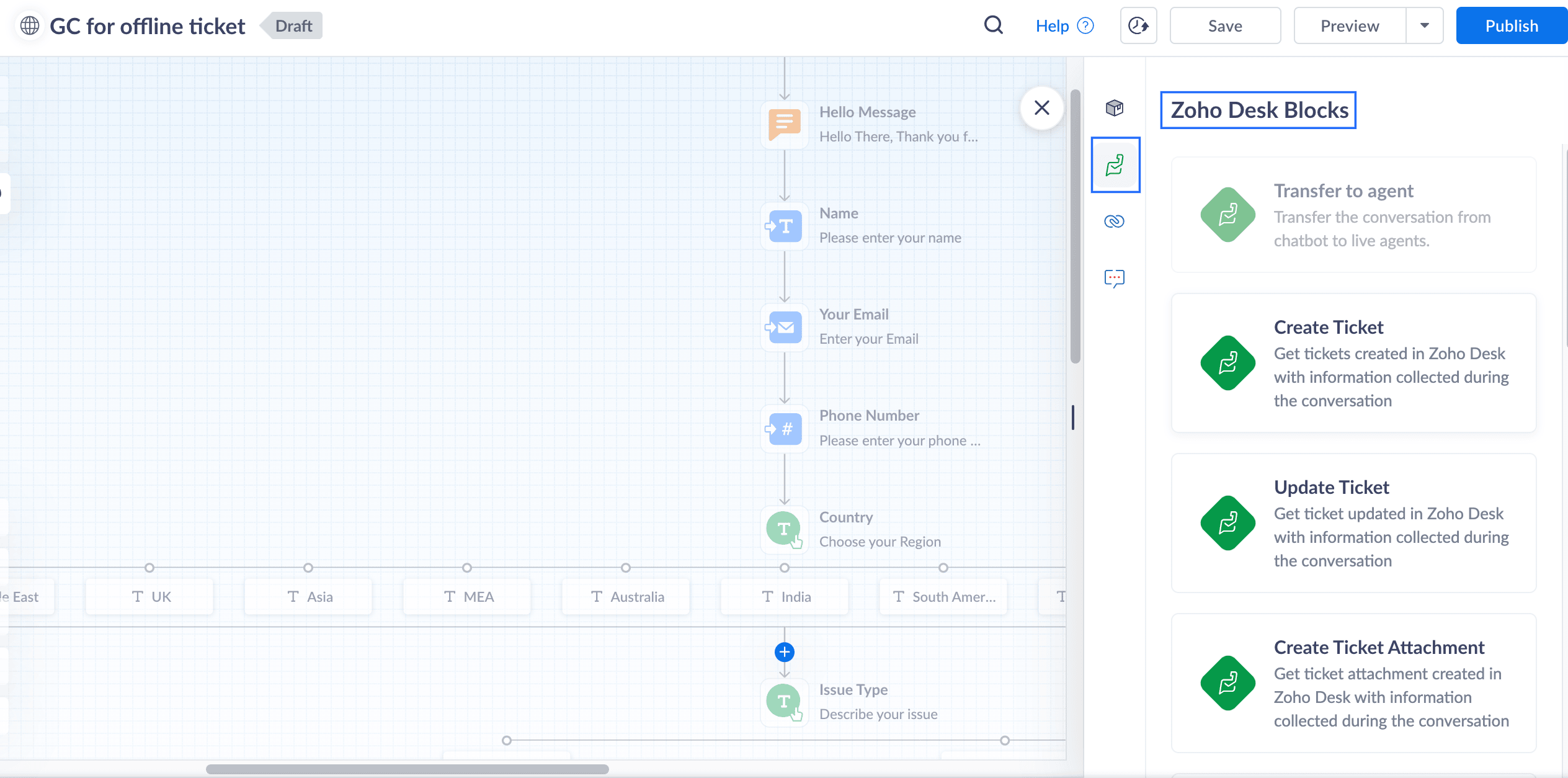
17. In the Input variable mapping, click on the gear icon, map the field variables in the Tickets layout with the Flow variables created within GC.
For example, map the Email field within Tickets to the Email block in GC, map Phone with the Phone field, map Subject with the Issue Type, and map Description with the Describe issue text block
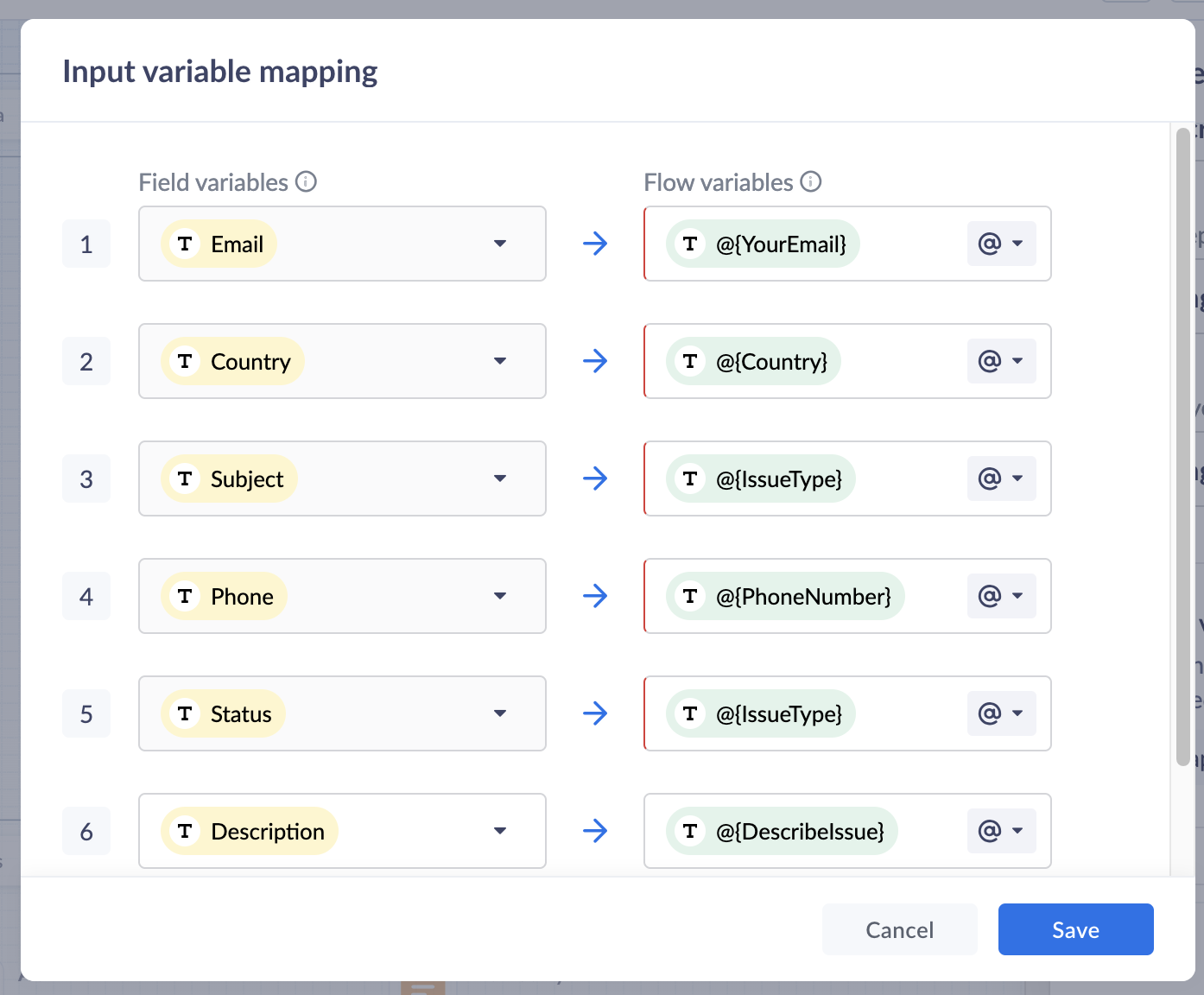
18. Click Save to save the mapping variables
19. In the Output variable mapping, click on the gear icon, map the ticket related information which you would like to share with the customers within the GC.
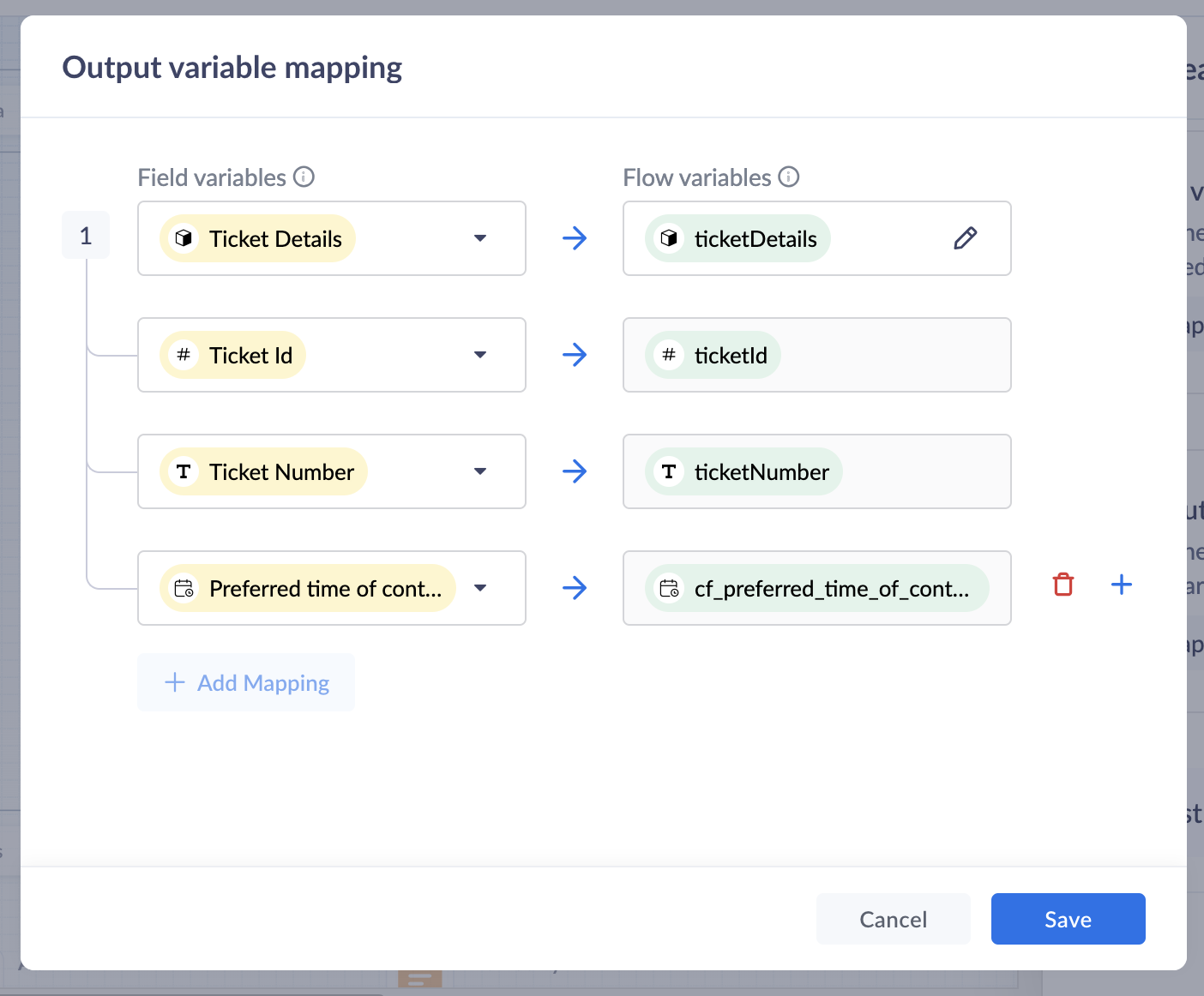
Preview and Publish
20. Once all blocks are added, click on Preview to view the flow and ensure it works based on your requirements.
21. Save your changes, and click Publish. Your Guided Conversation is ready to use!

Note: Some blocks are being developed for Instant Messaging (IM) channels and will appear faded out if you choose IM channels.
Create A GC Widget
i. Go to Setup(S) >> Self Service >> Guided Conversations >> GC widgets.ii. Click on Create GC widget. Give a Name and Description.iii. Choose the Channels. click on the drop-down arrow under Associate flows >> Add Flow >> select the Published GC.iv. Click Associate. under Access Permissions, select users based on your preferences.v. Enter your preferred welcome message that you would like to appear on your GC widget.vi. Enter End Options based on your preferences.vii. Click Save to save your GC widget.
ASAP Widget
Go to Setup (S) >> Self-Service >> ASAP >> Create New Widget.
a. Enter a Name, enable the widget launcher to show the widget on your website.b. Associate the help widget with required departments.c. Choose the required modules to associate with the widget.d. Once you are done, click on Generate.
Embed GC
You can obtain the embed code to integrate the widget into your website or Help Center, as well as the organization ID for iOS and Android SDKs.
i. Go to Setup (S) >> Self-Service >> ASAP.ii. Hover over the created ASAP widget; click on Embeddable Code.iii. Copy the web embed code for use on your website or Help Center.iv. Use the iOS ID for iOS SDK and the Android ID for Android SDK.
That’s it—your Guided Conversation is now live and ready to assist your customers!
Pro Tip
Guided Conversations can be tailored to suit a variety of scenarios, from managing customer inquiries to streamlining ticketing operations. Enhance the customer experience by customizing, editing, or updating workflows to meet their needs effortlessly.
Explore our Guided Conversation Guide and the automation with GC to ensure your customers always have the support they need.
Here’s to a fantastic start to the New Year! Wishing you success and seamless experiences ahead: Happy New Year from the Zoho Desk Team! 🎉
Topic Participants
Lydia | Zoho Desk
Sticky Posts
Register for Zoho Desk Beta Community
With the start of the year, we have decided to take a small step in making the life of our customers a little easier. We now have easy access to all our upcoming features and a faster way to request for beta access. We open betas for some of our featuresShare your Zoho Desk story with us!
Tell us how you use Zoho Desk for your business and inspire others with your story. Be it a simple workflow rule that helps you navigate complex processes or a macro that saves your team a lot of time; share it here and help the community learn and grow with shared knowledge.Tip #1: Learn to pick the right channels
Mail, live chat, telephony, social media, web forms—there are so many support channels out there. Trying to pick the right channels to offer your customers can get pretty confusing. Emails are most useful when the customer wants to put things on record. However, escalated or complicated issues should not be resolved over email because it's slow and impersonal. When you need immediate responses, live chat is more suitable. It's also quick and convenient, so it's the go-to channel for small issues.Welcome to Zoho Desk Community - Say hello here!
Hello everyone! Though we have been here for a while, it’s time to formally establish the Zoho Desk Community; we’re really happy to have you all here! This can be the place where you take a moment to introduce yourself to the rest of the community. We’d love to hear all about you, what you do, what company or industry you work for, how you use Zoho Desk and anything else that you will like to share! Here’s a little about me. I am Chinmayee. I have been associated with Zoho since 2014. I joined hereWebinar 1: Blueprint for Customer Service
With the launch of a host of new features in Zoho Desk, we thought it’ll be great to have a few webinars to help our customers make the most of them. We’re starting off with our most talked about feature, Blueprint in Zoho Desk. You can register for the Blueprint webinar here: The webinar will be delivered by our in-house product experts. This is a good opportunity to ask questions to our experts and understand how Blueprint can help you automate your service processes. We look forward to seeing
Recent Topics
String handling
If I cut a currency string from a quote and try and paste it into the Deal "Amount", it will fail unless I manually delete any commas. Dollar signs are no problem, but comma's seem to fail. Please correct this Input Validation error.Allow Stripe Credit Card and Stripe ACH payment methods to be enabled separately on an invoice.
I need to be able to pick at the invoice level whether Stripe Credit Card and/or Stripe ACH payment methods are available. Currently, I'm not able to select from the two Stripe payment methods individually on an invoice. However, there are some largerFeature Request - Allow Customers To Pick Meeting Duration
Hi Bookings Team, It would be great if there was an option to allow customers to pick a duration based on a max and minimum amount of time defined by me and in increments defined by me. For example, I have some slots which are available for customersYouTube Live streaming? how to? Zoom has this feature, built-in. Can't find it on zoho meetings.
YouTube Live streaming? how to? Zoom has this feature, built-in. Can't find it on zoho meetings.Feature Request - A Way To Search Item Groups
Hi Inventory Team, I can't find any way to filter or search by fields of Item Groups. It would be great to see that functionality added. I have a use case where a single product might come from 5 or more suppliers and each supplier's item is an Item inFeature Reqeust - Include MPN In Selectable FIelds
I have noticed that the MPN is not available to show in the list view of Items. Please consider adding it as EAN, UPC and ISBN are all available, so it doesn't make much sense to exclude this similar option. Thanks for considering my feedback.Feature Request - Option To Hide Default System Fields on Items
Hi Zoho Inventory Team, As far as I know it is not possible to hid some of the defult system fields on Items, such as UPC, MPN, EAN, ISBN. A good use case is that in many cases ISBN is not relevant and it would be an improved user experience if we couldCampaigns does not work!
I am running into so many problems trying to use Zoho Campaigns, that I am seriously considering dropping the app from my (shrinking) list of Zoho applications I actually use. Apart from having to fight the software trying to create a design and email,Feature Request - Make Available "Alias Name" Field In Item List View
Hi Zoho Inventory Team, I have noticed that the "Alias Name" field does not appear on the list of selectable columns in the Customise Columns feature in the Items module. This would be very useful to see for businesses who are using the Alias Name fieldproduct name field issue-n8n
Hey guys, I have a question. I want to create a new product using the workflow. The problem is with the product name field; I don't know how to fill it in. The workflow starts with retrieving information from the leads table, retrieving links to scrapeHow to filter Packages in zoho inventory api
Hi Team, I want to perform some tasks in a schedular on the packages which are in "Shipped" state. I tried to use filter_by in my api call but in return I get response as {"code":-1,"message":"Given filter is not configured"} My Api request is as followsCRM
Is anyone else experiencing this issue? Our company is not moving out of using Gmail's web app. It just has more features and is a better email program than Zoho Mail. Gmail has an extension (Zoho CRM for Gmail) that we're using but we've found some seriousSyncing with Google calendar, Tasks and Events
Is it possible to sync Zoho CRM calendar, task and events with Google Calendar's tasks and events. With the increasing adoption by many major tool suppliers to sync seamlessly with Google's offerings (for instance I use the excellent Any.do task planningHow can i view "Child" Accounts?
It can be very useful in our field of business to know the parent-child account relationship. However, there seems to be a shortcoming in the parent account view: no child account list. How can we view the child accounts per each account?Easily perform calculations using dates with the new DATEDIF function
Hey Zoho Writer users! We've enhanced Zoho Writer's formula capabilities with the new DATEDIF function. This allows you to calculate the difference between dates in days, months, and years. Function syntax: =DATEDIF(start_date, end_date, unit) Inputs:Adding Comments Using Workflows - How to Change User Attributed
We have worklflows in Desk where a comment is added to a ticket based on certain criteria. It seems that the comment added is always attributed to the user who last edited the workflow. This does not make sense for us because: - It's misleading to otherAdd Attachment Support to Zoho Flow Mailhook / Email Trigger Module
Dear Zoho Support Team, We hope you are well. We would like to kindly request a feature enhancement for the Mailhook module in Zoho Flow. Currently, the email trigger in Zoho Flow provides access to the message body, subject, from address, and to address,Conect chat of salesiq with zoho cliq
Is there any way to answer from zoho cliq the chat of salesiq initiated by customers?Les dernières avancées en saisie de données et collaboration
Après une année dédiée à la recherche et au développement, notre équipe est prête à dévoiler des améliorations majeures pour Zoho Sheet. Ces nouveautés seront lancées par étapes afin d’en assurer une prise en main optimale. Nous commençons avec des fonctionnalitésRich Text For Notes in Zoho CRM
Hello everyone, As you know, notes are essential for recording information and ensuring smooth communication across your records. With our latest update, you can now use Rich Text formatting to organize and structure your notes more efficiently. By usingImplement Meeting Polls in Zoho Bookings
Dear Zoho Bookings Support Team, We'd like to propose a feature enhancement related to appointment scheduling within Zoho Bookings. Current Functionality: Zoho Bookings excels at streamlining individual appointment scheduling. Users can set availabilityService Account Admin for API Calls and System Actions
Hello, I would like to request the addition of a Service Account Admin option in Zoho product. This feature would allow API calls and system actions to be performed on behalf of the system, rather than an active user. Current Issue: At present, API callsPlease can the open tasks be shown in each customer account at the top.
Hi there This has happened before, where the open tasks are no longer visible at the top of the page for each customer in the CRM. They have gone missing previously and were reinstated when I asked so I think it's just after an update that this featureHow to Customize Task Creation to Send a Custom Alert Using JavaScript in Zoho CRM?
Hello Zoho CRM Community, I’m looking to customize Zoho CRM to send a custom alert whenever a task is created. I understand that Zoho CRM supports client scripts using JavaScript, and I would like to leverage this feature to implement the alert functionality.Send Whatsapp with API including custom placeholders
Is is possible to initiate a session on whatsapp IM channel with a template that includes params (placeholders) that are passed on the API call? This is very usefull to send a Utility message for a transactional notification including an order numberZO25: The refreshed, more unified, and intelligent OS for business
Hello all, Greetings from Zoho One! 2025 has been a remarkable year, packed with new features that will take your Zoho One experience to the next level! From sleek, customizable dashboards to an all-new action panel for instant task management, we’veIntroducing Multi-Asset Support in Work Orders, Estimates, and Service Appointments
We’re excited to announce a highly requested enhancement in Zoho FSM — you can now associate multiple assets with Work Orders, Estimates, and Service Appointments. This update brings more clarity, flexibility, and control to your field service operations,[Product Update] Locations module migration in Zoho Books integration with Zoho Analytics
Dear Customers, As Zoho Books are starting to support an advance version of the Branches/Warehouses module called the Locations module, users who choose to migrate to the Locations module in Zoho Books will also be migrated in Zoho Analytics-Zoho BooksIntroducing Schedules for smarter availability management
Greetings from the Zoho Bookings team! We’re excited to introduce Schedules, a powerful enhancement to manage availability across your workspace. Schedules are reusable working-hour templates that help you define and maintain consistent availability acrossWhy Zoho Contracts Prefers Structured Approvals Over Ad-hoc Approvals
Approvals are one of the most important stages in a contract’s lifecycle. They determine whether a contract moves forward, gets revised, or needs further discussion. The approval process also defines accountability within the organization. Zoho ContractsWhatsapp Connection Status still "Pending" after migration
Hello, I migrated my WhatsApp API to Zoho from another provider a day ago. So far the connection status is still “Pending”. There is a problem? How long does it usually take?Kaizen #226: Using ZRC in Client Script
Hello everyone! Welcome to another week of Kaizen. In today's post, lets see what is ZRC (Zoho Request Client) and how we can use ZRC methods in Client Script to get inputs from a Salesperson and update the Lead status with a single button click. In thisHow to Filter timewise question to check uploaded one month or two months before in these community question ?
i want to find the question that is asked some month or before any particular year, so how can i filter it ?Proposal for Creating a Unique "Address" Entity in Zoho FSM
The "Address" entity is one of the most critical components for a service-oriented company. While homeowners may change and servicing companies may vary, the address itself remains constant. This constancy is essential for subsequent services, as it providesWorkflow Down/Bug
We have a workflow that sends an email to one of our internal departments 10 minutes after a record is created in a custom module. The workflow actually works correctly. However, we have now noticed that on January 8, between 3:55 p.m. and 4:33 p.m.,Service Locations: Designed for Shared Sites and Changing Customers
Managing service addresses sounds simple—until it isn’t. Large facilities, shared sites, and frequently changing customers can quickly turn address management into an operational bottleneck. This is where Service Locations deliver clarity and control.Can I re-send the Customer Satisfaction Survey after a ticket closure?
Hello, Some customers does not answer the survey right after closure, is it possible to re-send after a few days or weeks? Best Regards!Is the app being developed?
Hi, is this app being developed/improved? Or is it just another app started and let go like others (market automation, campaign, etc)?Filter contacts based on selected category in Zoho Desk ticket
Hello community, I’m setting up the Tickets module in Zoho Desk and I need help implementing the following: When a category is selected in a ticket, I want the Contact field to be filtered so that it only displays contacts that are related to that category.Profile Page View Customization
I need to change the fields, sections from the profile view of an emplyoyee.Next Page