With efficient, collaboration-friendly options, Zoho Sheet is a popular choice among users. Sheet's external share links help you collaborate more effectively by sharing your spreadsheets with anyone outside your organization, including users who do not have a Zoho account.
Say you run a wholesale ecommerce business and need to share your inventory data with your retailers. You want your retailers to view and edit the spreadsheet, make updates, and track inventory. Thanks to external share links, it's not necessary for your retailers, or anyone outside your business, to maintain a Zoho account. Simply use your external share links to share your sales data and facilitate seamless collaboration.
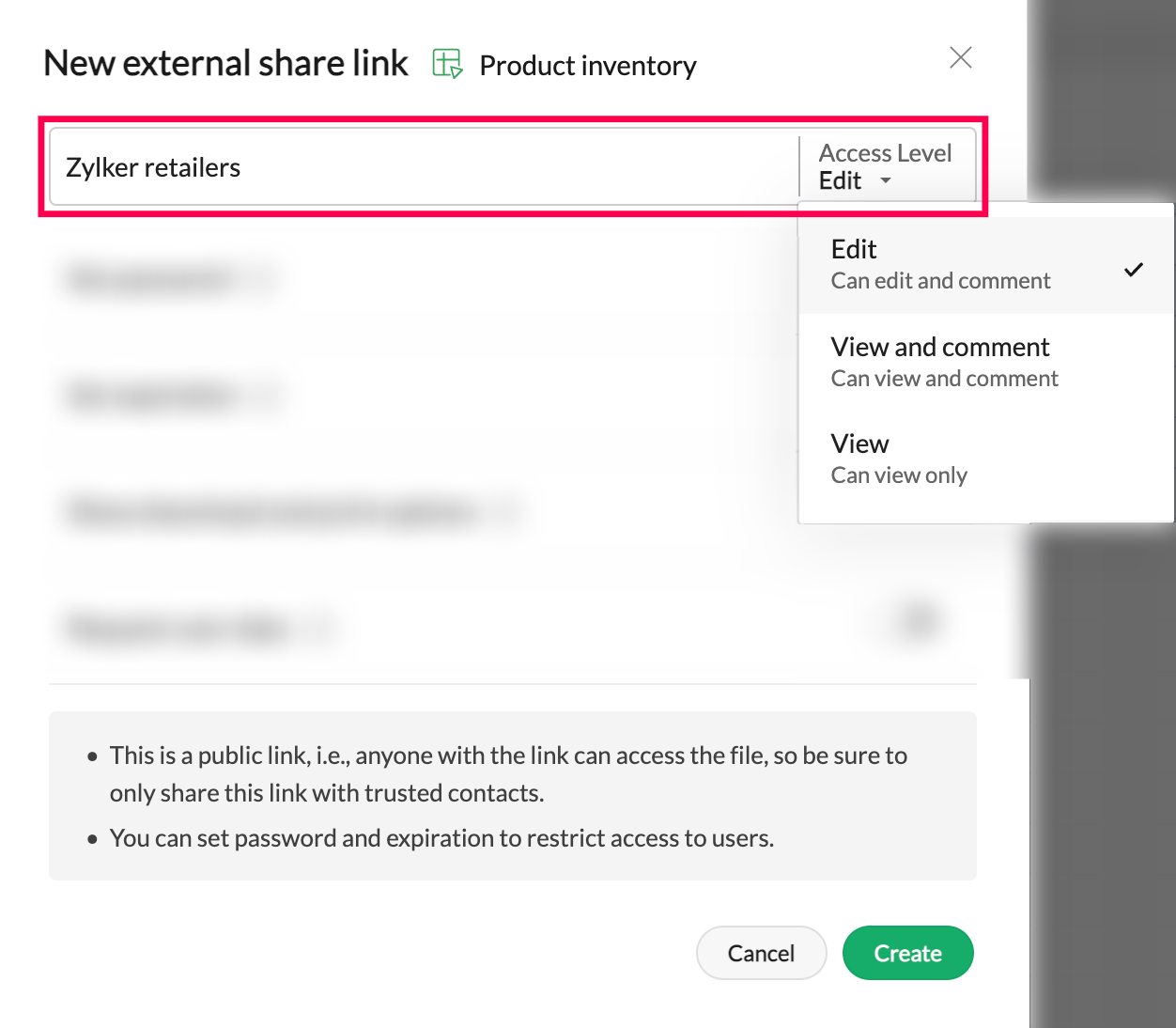
Set access limits
Zoho Sheet allows you to create multiple external share links for the same spreadsheet. You can set your preferred access settings for each link before sharing it with your collaborators.
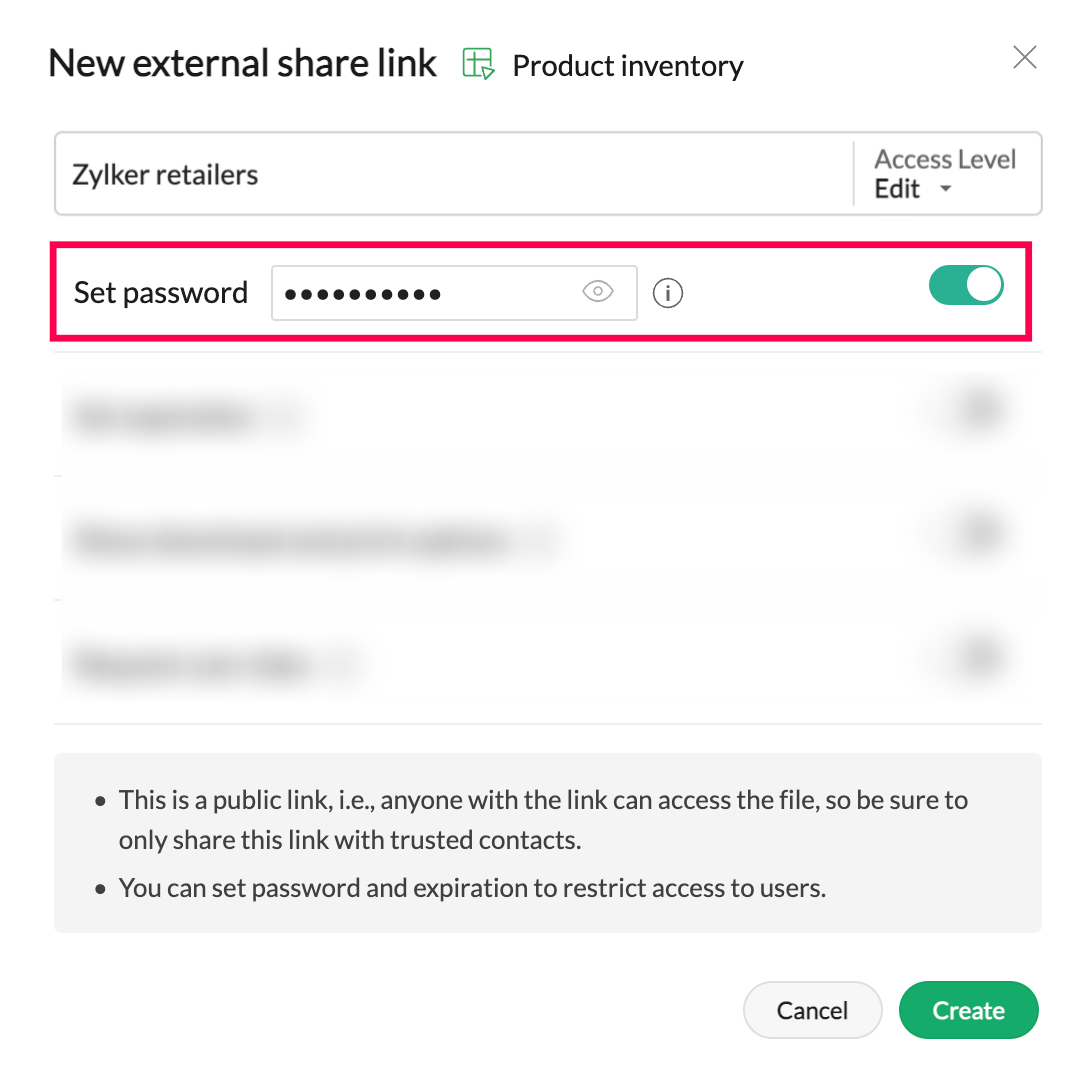
Protect your file with a password
Password protection is highly recommended to prevent unauthorized users from accessing your file through external share links. This is crucial if you are sharing sensitive spreadsheet data with your collaborators.
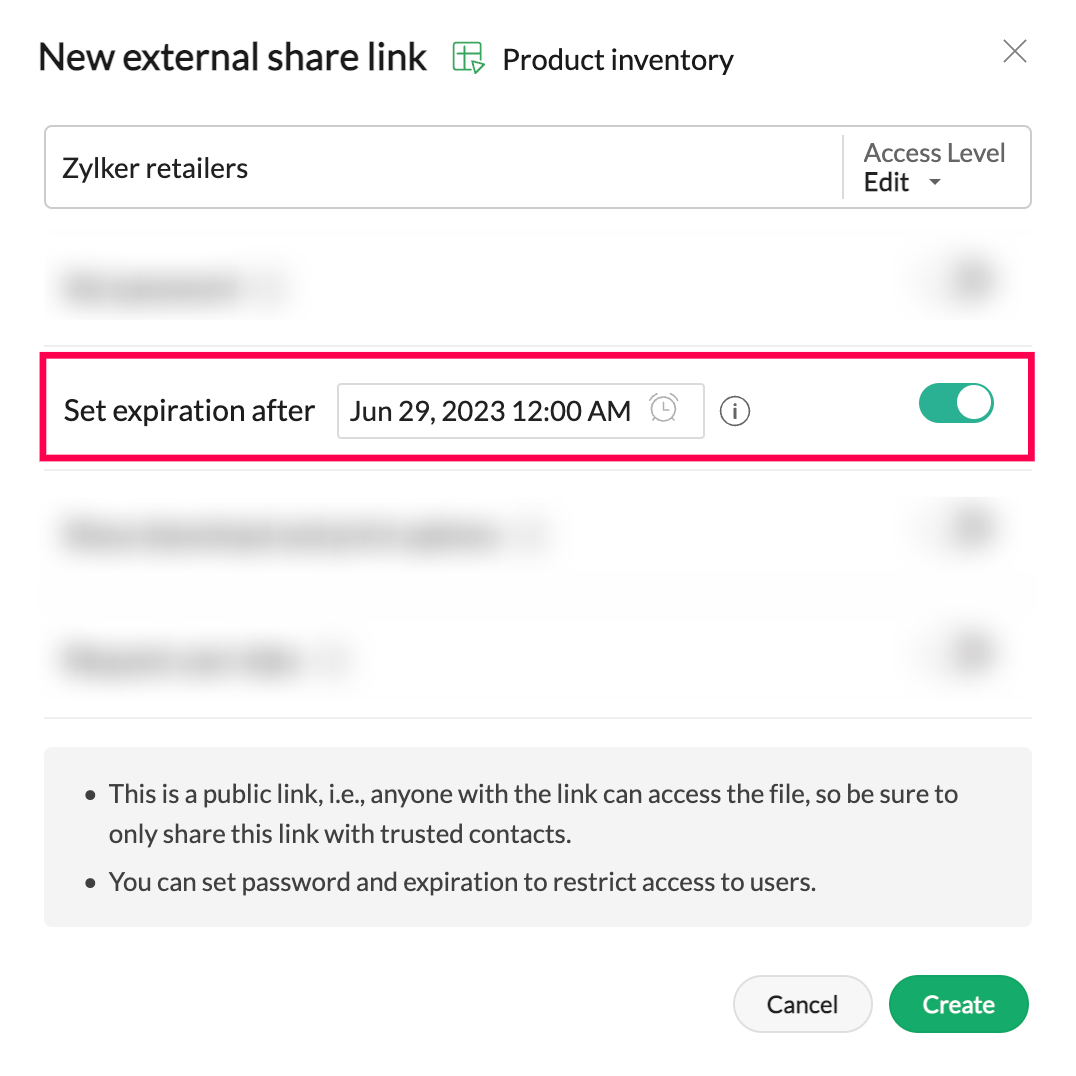
Deactivate your external share link
You may need to collaborate with external business users temporarily. In that instance, you can specify a date and time when the external share link will be automatically disabled.
Gather client details
The external share link settings come with an option to collect basic client details, like name, email address, and phone number. Clients must share the details in order to access the spreadsheet.
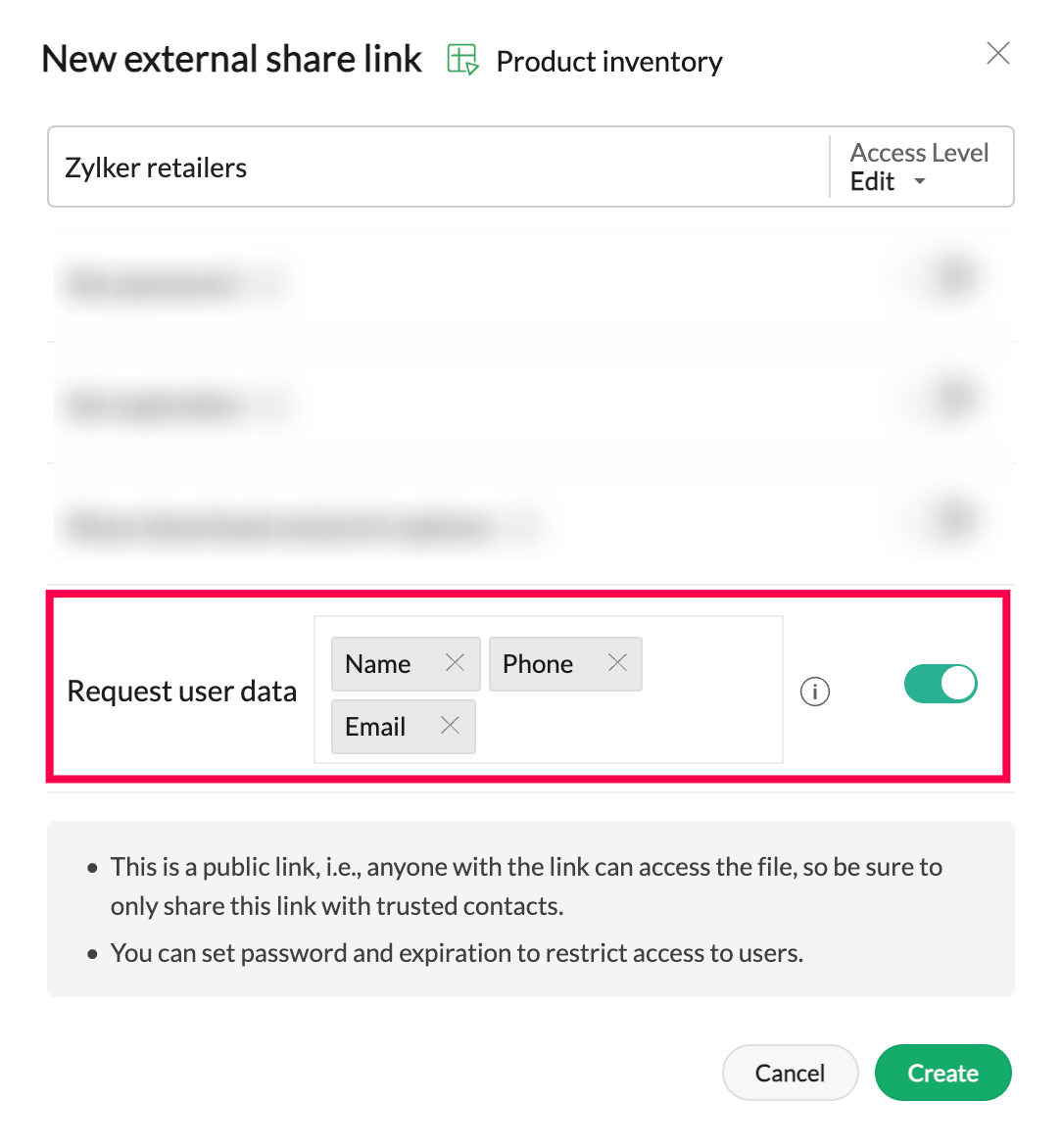
Note: If you don't wish to collect client details, they will be considered "guest" users and will be referenced as such in the spreadsheet's audit trail and other collaboration tools.
In tandem with the above-discussed external share link settings, you can allow/restrict spreadsheet downloads. You can also change the link settings and add new collaborators anytime.
If you want your audience to view and interact with spreadsheet data, while keeping the source data intact, use the Publish option to publish the entire spreadsheet, a specific worksheet, or a cell range within your organization or externally.
Explore the tips on internal collaboration features available in Zoho Sheet here.
Follow our Tips and Tricks forum to discover ways to leverage Zoho Sheet for your business. Also, join our Zoho Sheet community to stay updated with the latest product announcements and engage with other users.
Recent Topics
Zobot Execution Logs & Run History (Similar to Zoho Flow)
Dear Zoho SalesIQ Team, We would like to request an enhancement for Zoho SalesIQ Zobot: adding an execution log / run history, similar to what already exists in Zoho Flow. Reference: Zoho Flow In Zoho Flow, every execution is recorded in the History tab,
using the client script based on the look up filed i wnat to fetch the record details like service number , service rate
based on selected service look up field iwant to fetch the service serial number in the serice form how i achive using client script also how i get the current date in the date field in the on load of the form
Importing into Multiselect Picklist
Hi, We just completed a trade show and one of the bits of information we collect is tool style. The application supplied by the show set this up as individual questions. For example, if the customer used Thick Turret and Trumpf style but not Thin Turret,
I need to know the IP address of ZOHO CRM.
The link below is the IP address for Analytics, do you have CRM's? https://help.zoho.com/portal/ja/kb/analytics/users-guide/import-connect-to-database/cloud-database/articles/zoho-analytics%E3%81%AEip%E3%82%A2%E3%83%89%E3%83%AC%E3%82%B9 I would like to
Password Assessment Reports for all users
I'm the super admin and looking at the reporting available for Zoho Vault. I can see that there is a Password Assessment report available showing the passwords/weak and security score by user. However I'm confused at the 'report generated on' value. Monitor
Allow people to sign a zoho form by using esign or scanned signature
Can't change form's original name in URL
Hi all, I have been duplicating + editing forms for jobs regarding the same department to maintain formatting + styling. The issue I've not run into is because I've duplicated it from an existing form, the URL doesn't seem to want to update with the new
How to Print the Data Model Zoho CRM
I have created the data model in Zoho CRM and I want the ability to Print this. How do we do this please? I want the diagram exported to a PDF. There doesnt appear to be an option to do this. Thanks Andrew
Customer ticket creation via Microsoft Teams
Hi all, I'm looking to see if someone could point me in the right direction. I'd love to make it so my customers/ end users can make tickets, see responses and respond within microsoft teams. As Admin and an Agent i've installed the zoho assist app within
Transfer ownership of files and folders in My Folders
People work together as a team to achieve organizational goals and objectives. In an organization, there may be situations when someone leaves unexpectedly or is no longer available. This can put their team in a difficult position, especially if there
Setting certian items to be pickup only
How do we have some items that are pickup only? I have several items in my item's list that I do not ship. But they need to be on the website to be sold, and picked up in store. Need to be able to do this as one of these products is a major seller for
Using gift vouchers
We would like to be able to offer a limited number of gift vouchers, of varying values, to our customers, and are looking for the best way to do this. We have looked at Coupons and Gift Certificates, but neither seem to fit the bill perfectly. Coupons:
Automatically updating field(s) of lookup module
I have a lookup field, which also pulls through the Status field from the linked record. When the lookup is first done, the Status is pulled through - this works perfectly. If that Status is later updated, the lookup field does not update as well. As
Zoho Commerce and Third-party shipping (MachShip) API integration
We are implementing a third-party shipping (MachShip) API integration for our Zoho Commerce store and have made significant progress. However, we need guidance on a specific technical challenge. Current Challenge: We need to get the customer input to
Adding custom "lookup" fields in Zoho Customization
How can I add a second “lookup” field in Zoho? I’m trying to create another lookup that pulls from my Contacts, but the option doesn’t appear in the module customization sidebar. In many cases, a single work order involves multiple contacts. Ideally,
Can you import projects into Zoho Projects yet?
I see some very old posts asking about importing project records into Zoho Projects. But I can't find anything up to date about the topic. Has this functionality been added? Importing tasks is helpful. But we do have a project where importing projects
Allocating inventory to specific SO's
Is there a way that allocate inventory to a specific sales order? For example, let's say we have 90 items in stock. Customer 1 orders 100 items. This allocates all 90 items to their order, and they have a back order for the remaining 10 items which could
Introducing Workqueue: your all-in-one view to manage daily work
Hello all, We’re excited to introduce a major productivity boost to your CRM experience: Workqueue, a dynamic, all-in-one workspace that brings every important sales activity, approval, and follow-up right to your fingertips. What is Workqueue? Sales
Zoho Inventory. Preventing Negative Stock in Sales Orders – Best Practices?
Dear Zoho Inventory Community, We’re a small business using Zoho Inventory with a team of sales managers. Unfortunately, some employees occasionally overlook stock levels during order processing, leading to negative inventory issues. Is there a way to
Automation #10 - Auto Assign Ticket based on Keywords
This is a monthly series designed to help you get the best out of Desk. We take our cue from what's being discussed or asked about the most in our community. Then we find the right use cases that specifically highlight solutions, ideas and tips on optimizing
Automate attendance tracking with Zoho Cliq Developer Platform
I wish remote work were permanently mandated so we could join work calls from a movie theatre or even while skydiving! But wait, it's time to wake up! The alarm has snoozed twice, and your team has already logged on for the day. Keeping tabs on attendance
Reusable Custom Functions Across Department Workflows
Dear Zoho Desk Team, We appreciate the powerful workflow automation capabilities in Zoho Desk, particularly the ability to create and use custom functions within workflows. However, we have encountered a limitation that impacts efficiency and maintainability.
Contact data removes Account data when creating a quote
Hi, Our customer has address fields in their quote layout which should be the address of the Account. They prefill the information, adding the account name - the address data is populated as per what is in the account - great. However when they then add
Feature Request - Gift Cards or Gift Voucher Capability in Zoho Commerce
Hi Zoho Commerce team, I'm comming accross more and more retail businesses who sell gift cards. As there is currently no way to manage this in Zoho Commerce, it is a blocker to addoption. This is particularly popular in Europe and North America. I recently
Don't Allow Customer to Edit Values After Submitting Ticket
After a customer submits a ticket through the customer portal, they can go into the ticket and see some of the values from the questions they answered in the sidebar. Currently, a customer can edit these values even after they submitted them. This makes no sense. We ask very specific questions that we don't want customers to later change! Please disable the ability for customers to edit the values to their submission questions in the portal. Screenshot attached.
Analytics <-> Invoice Connection DELETED by Zoho
Hi All, I am reaching out today because of a big issue we have at the moment with Zoho Analytics and Zoho Invoice. Our organization relies on Zoho Analytics for most of our reporting (operationnal teams). A few days ago we observed a sync issue with the
text length in list report mobile/tablet
Is there a way to make the full text of a text field appear in the list report on mobile and tablet? With custom layouts, the text is always truncated after a certain number of characters.
Automation #4 - Auto Delete Tickets based on Rules
This is a monthly series in which we pick some common use cases that have been either discussed or most asked about in our community and explain how they can be achieved using one of the automation capabilities in Zoho Desk. Unwanted tickets spamming
Automation #3 - Auto-sync email attachments to tickets
This is a monthly series where we pick some common use cases that have been either discussed or most asked about in our community and explain how they can be achieved using one of the automation capabilities in Zoho Desk. Most of our customers use email
Automation #11 - Auto Update Custom Fields with Values from Emails
This is a monthly series designed to help you get the best out of Desk. We take our cue from what's being discussed or asked about the most in our community. Then we find the right use cases that specifically highlight solutions, ideas and tips to optimize
Automation #13 - Auto assign tickets based on agent shift time
This is a monthly series designed to help you get the best out of Desk. We take our cue from what's being discussed or asked about the most in our community. Then we find the right use cases that specifically highlight solutions, ideas and tips to optimize
Automation #14: Capture Jira Issue Key/ID in a Ticket Custom Field
Hello Everyone! This month's edition brings you a custom function to consolidate your records associated with Jira integration. Jira integration enables support engineers and R&D units to collaborate seamlessly on feature development, product improvement,
Automation #16: Automate Ticket Reopening on Scheduled Timestamp
Hello Everyone! This edition uncovers the option to schedule reopening a ticket automatically. Zylker Finance tracks insurance policyholder activities through Zoho Desk. For policyholders who pay monthly premiums, tickets are closed upon payment completion.
Automation#19:Auto-Close Tickets Upon Task Completion
Hello Everyone! We’re excited to bring you another custom function this week. In this edition, we’ll show you how to automatically close tickets when all associated tasks are marked as completed. Let’s see how ZylkaPure, a leading water filter company,
Automation #15: Automatically Adding Static Secondary Contacts
Rockel is a top-tier client of Zylker traders. Marcus handles communications with Rockel and would like to add Terence, the CTO of Zylker traders to the email conversations. In this case, the emails coming from user address rockel.com should have Terence
How to apply customized Zoho Crm Home Page to all users?
I have tried to study manuals and play with Zoho CRM but haven't found a way how to apply customized Zoho CRM Home Page as a (default) home page for other CRM users.. How that can be done, if possible? - kipi Moderation Update: Currently, each user has
City field suggestion in Zoho Books
Hi team, We are using Customers module in Zoho Books. In the Address section, we want to understand whether the City field can show suggestions while typing using any API or built-in feature. For example, if a user types “Mum”, can the system suggest
Improved UX design for Projects CRM integration
The current integration embeds the entier projects inteface into the CRM this is confusing and allows users to get lost. For example as a user i navigate to an account and go down to the related projects list and want to get information about a specific
Link Purchase Order to Deal
Zoho Books directly syncs with contacts, vendors and products in Zoho CRM including field mapping. Is there any way to associate vendor purchase orders with deals, so that we can calculate our profit margin for each deal with connected sales invoices
Transformer vos stocks en décisions intelligentes avec Zoho Inventory et Zoho Analytics
Zoho Inventory permet de suivre facilement les niveaux de stock et d’anticiper les restockages. Pour de nombreuses entreprises, cela suffit à gérer les opérations au quotidien. Mais à mesure que l’activité se développe, cette clarté peut commencer à montrer
Next Page