Tip #7: Customize the appointment confirmation page
A confirmation page plays a crucial role in creating the first impression, as that's where customers land when booking with you. It shows your brand identity, engages your audience, and drives more conversions. Yet, this section is often overlooked when establishing an online scheduling process. That's why Zoho Bookings makes it simple to create your own confirmation page.
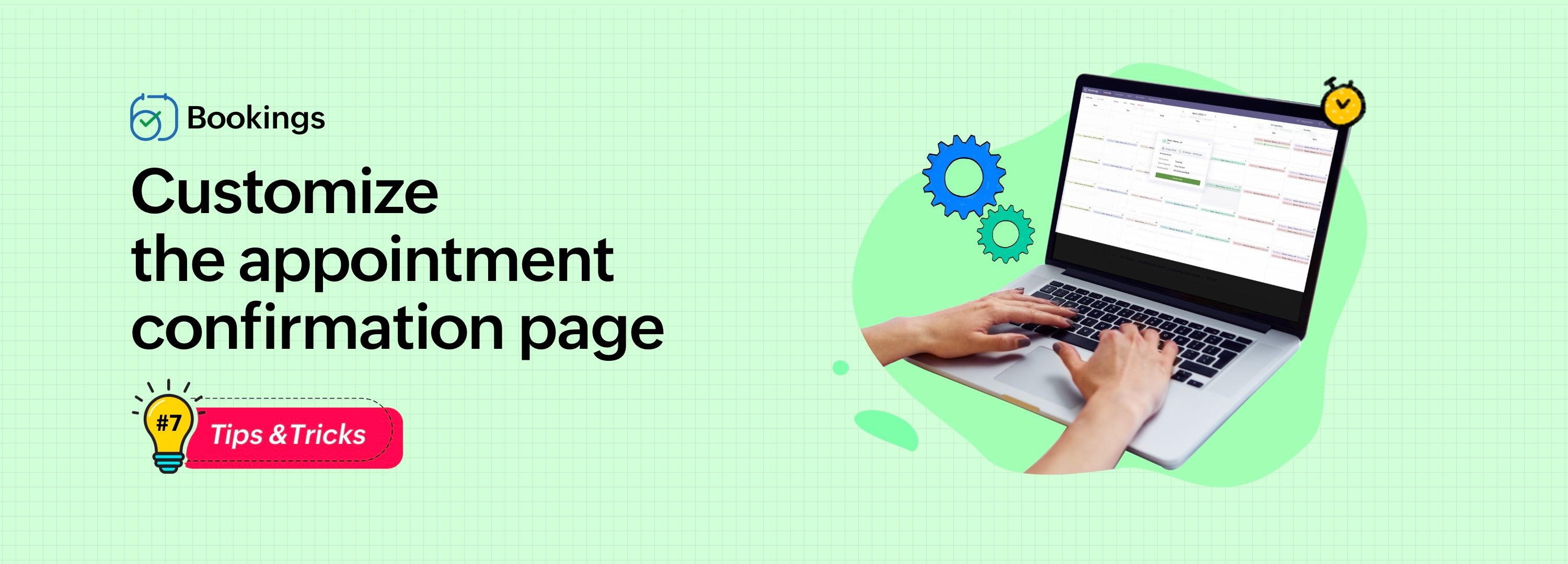
After booking an appointment, the customer will see a confirmation page. This is the default confirmation page of Zoho Bookings.
If you'd like, you can redirect the customer to your website instead. You can also get the customer and appointment details through the URL and utilize it to enhance the user experience.
Redirecting to your webpage offers many advantages.
➤ Better branding: Gain better control over the page design and give the customer a more cohesive navigation experience.
➤ Cross-promotion: Promote other services and encourage the user sign up for your newsletter or promotional emails to improve revenue.
- ➤ Additional information: Show additional details than that of the existing confirmation page and customize according to your need.
Use case
Jacob is a financial advisor in Zylker Consultations. Whenever a customer books a Medical Insurance Planning session with him, he wants the customer to explore other services related to it (say, life insurance or car insurance). So, he sets the confirmation page so that it lands on his site's insurance page. This way, he attracts more business by offering special discounts for further bookings.
Please note that each service can have different confirmation pages.
To customize the confirmation page for a service
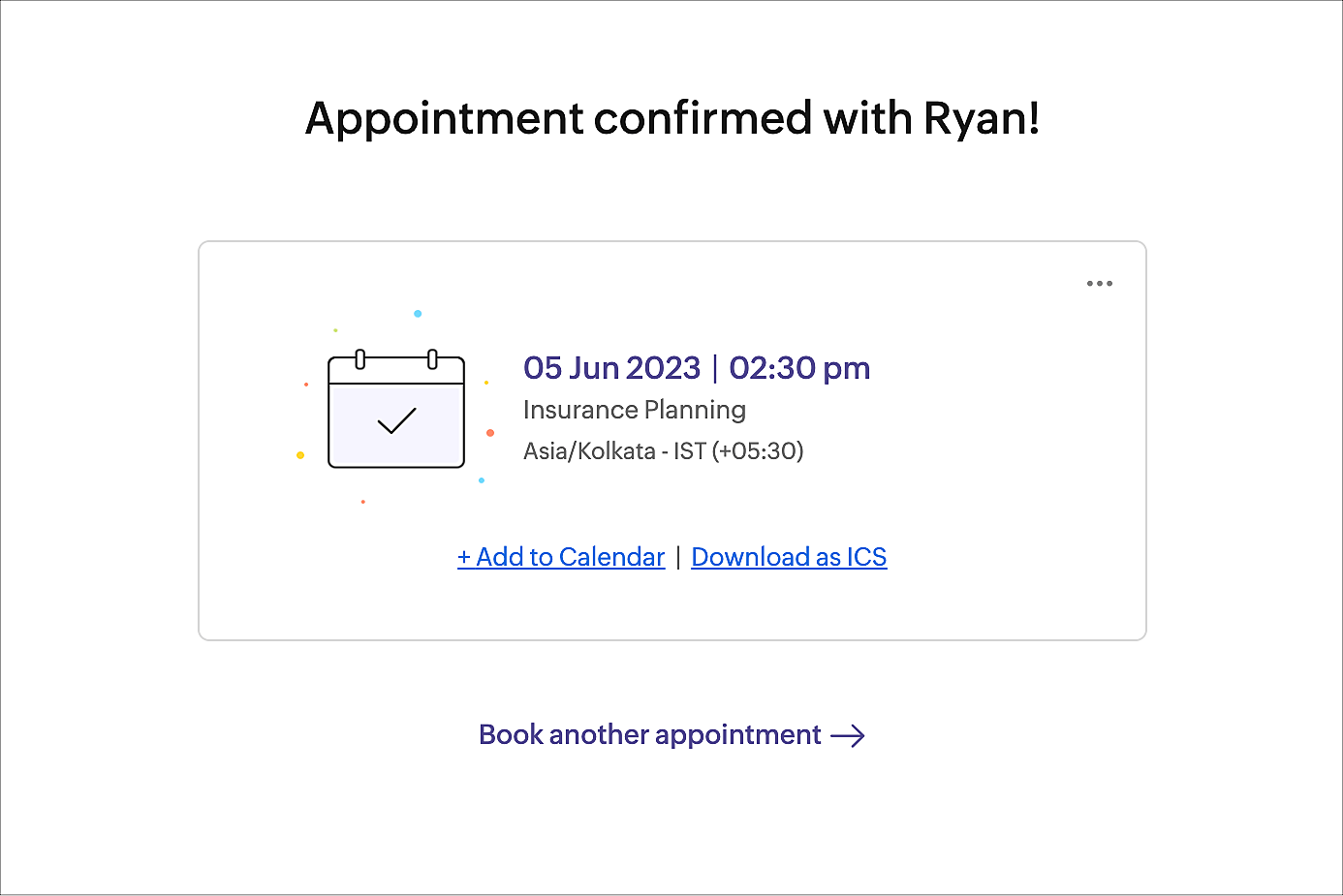
Navigate to Services > (Select the required service) > Service Preferences.
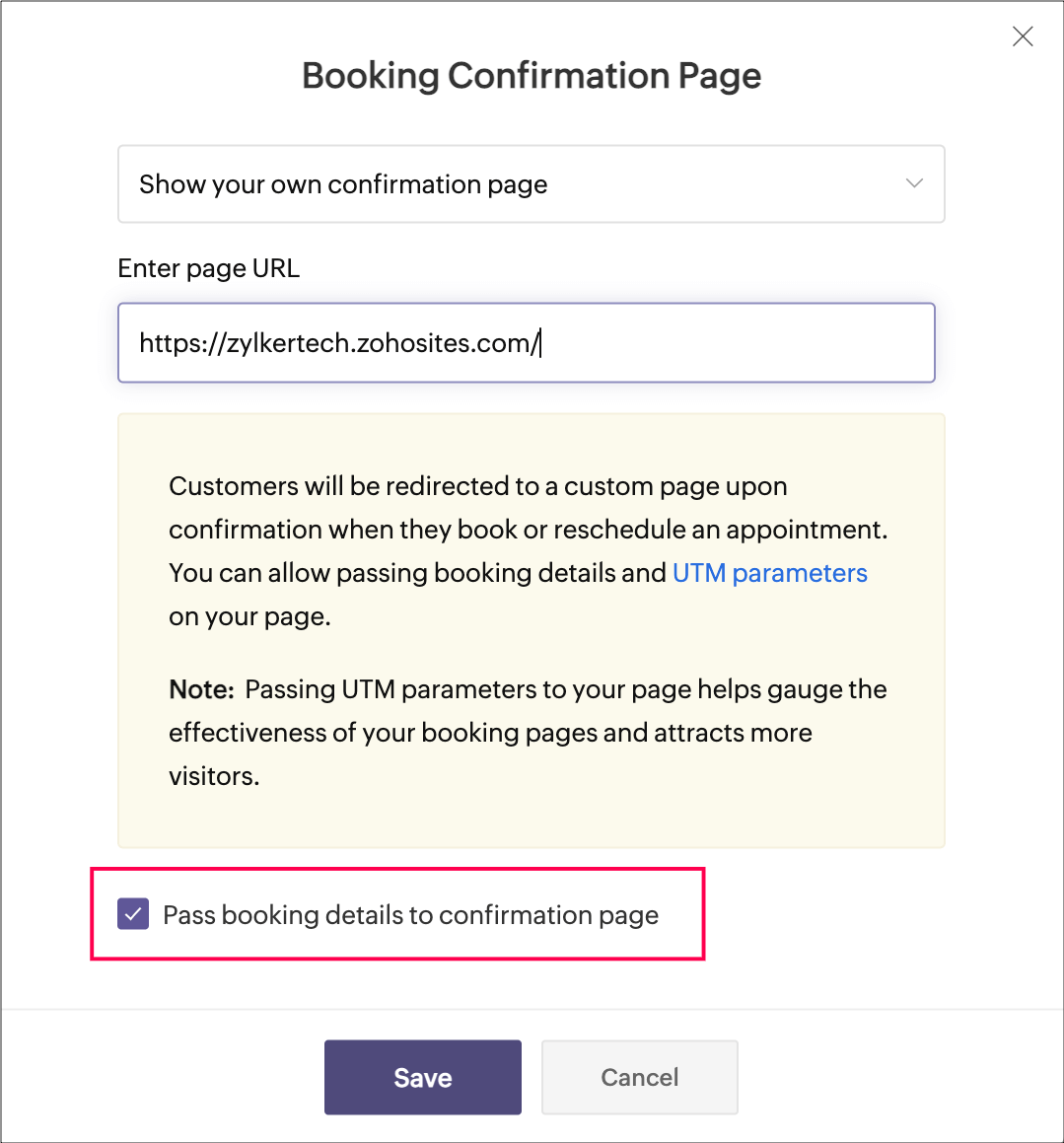
Under General, click the edit icon next to the option Booking Confirmation Page.
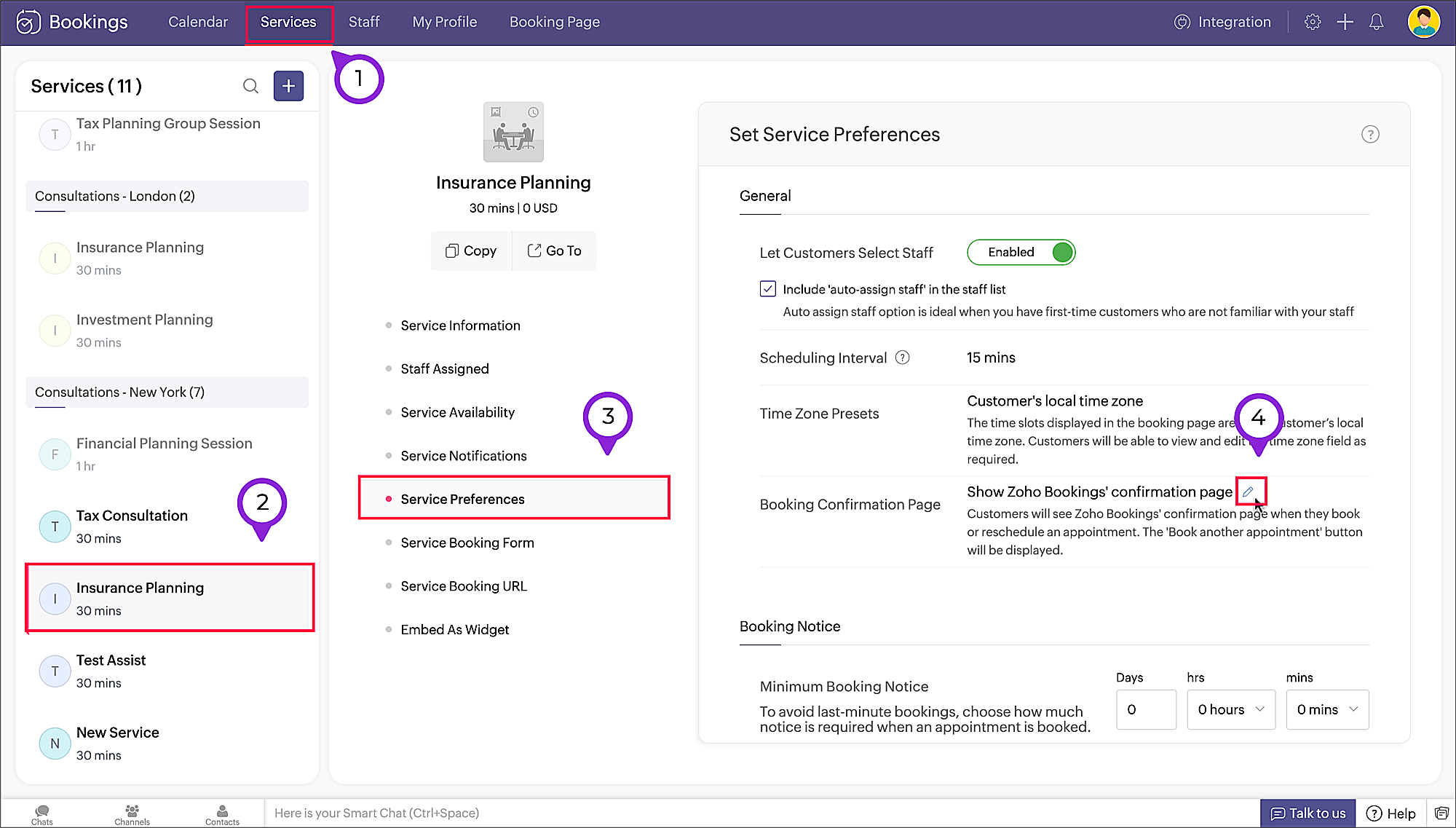
A pop-up appears. From the dropdown, select Show your own confirmation page.
In the Enter page URL textbox, enter the url of your preferred confirmation webpage.
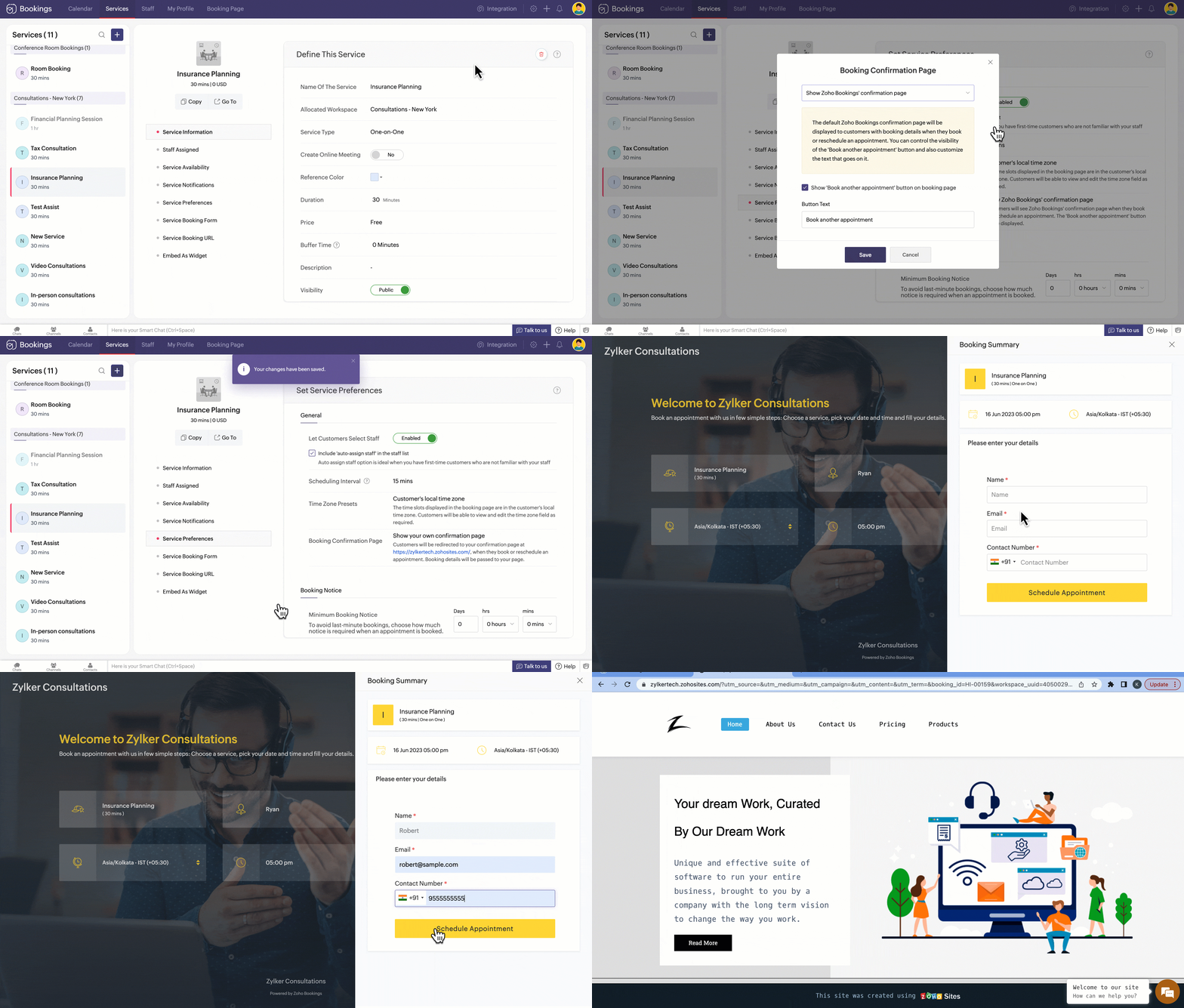
The appointment details are included in the URL and can be used to show customer or service details on your website. This is useful if, for instance, you'd like to retrieve the customer's age range and show them relevant services.
Below is the list of parameters that are passed.
Booking details
1. booking_id=<value>
2. workspace_uuid=<value>
3. workspace_name=<value>
4. assigned_to=<value> (staff or resource name)
5. service_uuid=<value>
6. service_name=<value>
7. booking_start_time=<value> (represented in ISO 8061 format in customer timezone)
8. booking_end_time=<value> (represented in ISO 8061 format in customer timezone)
9. booking_cost=<value>
10. booking_cost_paid=<value>
11. booking_currency=<value>
Customer details
12. customer_name=<value>
13. customer_first_name =<value> (if applicable)
14. customer_last_name=<value> (if applicable)
15. customer_contact_no=<value>
16. customer_email=<value>
Custom fields
17. customer_<custom_field_name>=<value>
You can fetch these values and use them on your confirmation page as you wish.
In the above case, you can fetch the customer name (Robert) and the service he booked (Insurance Planning) from the URL. This can be used to display the confirmation message of your choice ("Hey Robert! Thanks for booking the Insurance Planning consultation.").
This custom confirmation page can also be set at the workspace level. Refer to the help articles below for more info.
Workspace Preferences - Confirmation Page
Service Preferences - Confirmation Page
Hope you find this tip helpful. Let us know in the comments if you have any questions.
Stay tuned and happy scheduling!
Topic Participants
Praveena Chandran
Total BusinessWare
Akshara Amarnath
Ward van de Oudeweetering
Vipul Chaturvedi
Sticky Posts
Tip #13: Identify where your bookings come from with Source Tracking
Source tracking is the practice of identifying where your bookings originated. This is important, because online bookings come from a wide variety of sources like social media platforms, your website, email and ad campaigns, partner websites, organicTip #17: How to mandate partial payment for your appointments
When you require partial payments during the booking process, customers can only schedule with you after paying a certain amount in advance. This deposit acts as a commitment between both parties. Apart from that, it has many more advantages. BenefitsTip #18: Organize a group workshop in a few steps
It's the season for workshops—they're everywhere, catering to diverse interests and needs. Whether for more professional goals like leadership development or creative endeavors like painting, there's an abundance of workshops offered every day. A schedulerTip #16: Custom labels for staff, service, and resources
Every industry uses its own jargon. Take healthcare, for example; when you visit a doctor, it's not just an appointment, it's a consultation. The people who provide consultations are the providers. Similarly, in the tranquil world of a spa, a massageTip #15: Customize service prices for each staff member
It's common practice for a service to be priced differently based on the staff member providing it. For example, an experienced hair stylist may charge more for a haircut compared to the other stylists. This pricing strategy allows businesses to charge
Recent Topics
Phone system to integrate with Zoho CRM
I am looking for phone software that would allow my agency to do the following within Zoho CRM: Make calls from zoho Track calls and notes Leave pre-recorded messages after reaching voicemail of lead Only 2 members, so need company who will allow justUI Enhancement Request - Projects Users Section
UI Enhancement Request - Projects Users Section Under Projects → Users, the UI for the Departments and Sub BU fields needs to be improved. Currently, the input area appears as a simple underline and visually looks like the end of the field label ratherIntroducing PRM: Build, manage, and scale your partner ecosystem
Growing a partner ecosystem is a good problem to have. What starts as a handful of partners can quickly turn into a maze of spreadsheets, emails, and disconnected processes. More partners mean more opportunities, greater reach, and new ways to growZoho Projects connector with Zoho CRM (Related List module) features
Hi community, I use Zoho Projects connected to Zoho CRM, where we associate Projects with Deals, clients, etc.. I am looking to change/edit the fields that are available in the integration. Currently it shows Project Status, Project Completion, Milestones,Feature Request: Render Markdown (.md) files in Zoho Cliq
Hi, We regularly share Markdown (.md) files in Zoho Cliq. However, when we open these files in Cliq, the content does not render as Markdown—it displays as plain text. This forces us to copy/paste the content into an external Markdown viewer to read itFree webinar: Zoho Sign for Microsoft apps
Hello, Did you know Zoho Sign works right inside the Microsoft apps you already use? A signature request shouldn't mean leaving Teams for another tab, or downloading an Outlook attachment just to sign it. Zoho Sign integrates with Microsoft 365, Teams,Users can now notify the contact while adding a 'Resolution' to the ticket.
Hello, In the latest version of the Desk iOS mobile app (v2.6.4), users can now notify the contact while adding a 'Resolution' to the ticket. Also, the 'Resolution' UI has been tweaked to support edit and delete option. Please update the app eitherBetter Time Tracking
We need better time tracking customization for IT MSPs. We also need reporting that is built in, rather than having to try and fumble with creating custom reports. We also need to be able to mark whether a ticket has been billed or not, I don't think[ZohoDesk] Improve Status View with a new editeble kanban view
A kanban view with more information about the ticket and the contact who created the ticket would be valueble. I would like to edit the fields with the ones i like to see at one glance. Like in CRM where you can edit the canvas view, i would like to editIntroducing Custom Fonts for Career Sites
Your Careers page is often the first place candidates interact with your organization. From exploring job opportunities to submitting applications, a consistent visual experience helps candidates recognize and connect with your brand. To give you moreNeed help with importing expenses
I'm using the template downloaded from the application. When I try to import my expenses, I get the message: Duplicate entry in the Expense Date column. Ensure it contains unique values. None of the rows will import. There are duplicate dates, but theytime tracking on zoho crm cases
Is there a time tracking feature in zoho crm cases? I need calculate time spent in calls, tasks and events Thanks in AdvanceIntegrate with Power BI
Hi, How to connect Zoho CRM dashboards & reports with POWER BI ?Error creating an XML file
I am creating an xml as string in the function Employee.generatePartA_XML_String, and then I want to save it as a file to the field "Part_A_XML", but I get the response: {"code":3700,"message":"Unable to upload a file. Please check and try again."} HowUnbundle feature for composite items
We receive composite items from our vendors and sell them either individually or create other composite items out of them. So, there is a lot of bundling and unbundling involved with our composite items. Previously, this feature was supported in formTrident Missing
No way you guys get so close to having trident complete for over a year then just kill it off. Wow just wowZoho Recruit: Time to Step Up Your AI Game!
I've been using Zoho Recruit for many years and I love it. But let's be honest, it's starting to feel a bit like a relic from the pre-ai era. I recently tried out new systems that have ai resume screening and ai interviewing capabilities, these systemsZoho mail app throwing network error
Zoho mail app is throwing network error and I do not know how to fix the issue.Cannot unblock account
Hi, I have recently been travelling for work and now my mail account has been locked due to suspicious activity (I guess login attempts from different countries) however when I go into my admin panel it won’t let me unblock and asks me to contact support.WorkDrive Desktop Sync Is Being Deprecated: Move to WorkDrive TrueSync for a Smarter Experience
Hi everyone, We are excited to share a better, smarter way to access and manage your files directly from your computer! We’re transitioning from our legacy Desktop Sync app to WorkDrive TrueSync, designed to give you faster performance,greater flexibility,Time logging issues
I am losing times tracked on tasks. The problem is that it is not clear when the time is logged, when the timer is stopped or when the task is closed? I've done both and neither works. Whats more when the task is closed, the tracked time disapperas (i guess bc it shouldve been logged) but when it's not logged you've just lost your tracked time. The bigger problem is the UN-NATURAL way this time logging is set up. On every other plat form that tracks time, it is made clear to save timer or log whenStart/Stop Timmer in Chrome Extension
The chrome extension is great and allows you to do allot however one of the most common things employees working on projects need to do is track their time. Having an easy start/stop timer to track time would be great.Employee Logged Hours Report
Hi Team, We are looking at having all Employees logged hours report, but different staff uses diferent modules to log their time. Is there anywhere that we can get a report that captures every time entered through all Zoho modules? Thank you.Time Log Report Across Zoho Apps?
Currently there are at least 4 different apps in Zoho where users can book time. Projects Desk Books People In our case for instance, the same user may book time against both Projects and Desk Tickets. So we have no way to see a simple timesheet for aZoho Time tracking option with automated screen shots.
Time tracking option with automated screen shots would be an exceptionally good feature, any plans to develop something like that? Please do the needful. Thank you, Raj RajincDetailed time tracking (for productivity/accountability). How to?
Hello everyone! I read an interesting article about accurately tracking your time in 15 mins intervals and after some time analyzing it in order to improve your productivity. I'd like to give this a try myself. I would like to use Zoho apps. (How) could I do this? Thanks for the tips!Time Tracking Needed in Zoho
It seems lots of people request a Time Tracking Zoho Desktop App, that is only problem I have with working with Zoho. People need to know how much time they spend on specific tasks. Is Zoho planning to do this sometime in the future?emails?
Why can't I send emails from my account anymoreErase function in Zoho PDF editor does not truly redact
Using the "erase" function in the Zoho PDF editor online does not redact the text underneath when opening the file in Adobe. When I used the erase function to whiteout the areas I didn't want to be seen, I opened the supposed redacted files in Adobe.Backorder For Composite Items
Hello If i released SO for composite item and use backorder feature of zoho inventory then it should backorder child item items of composite and not composite item.This is basic of backordering.I conveyed this to zoho call center but no solution yet.Global Constants / Variables
It would be great if there were a Global Constant feature. The idea here is for managing constants that are used in multiple Flows and Subflows, but might change over time. The idea is that the change could be made in one place and cascade to all futureDeal Activity Tracking - By Time
Hello, I am trying to figure out a way to implement a time tracking ability within the CRP that will provide a line item on the final invoice in books. Would the Cases module be of good to use in this scenario? Want to integrate into Books as well. ITime Card Tracking For Employees
Does ZOHO have an add-on or app that my employees can use to clock in & out on a daily basis. In the past we had used a third party solution, but it was hard to use and pricey. We would really like to use your time tracking feature if you have one......ifLogging time within Time Tracking
At the moment I use the call logging feature of CRM to log time spent on clients work. Its nice to be able to start, stop and pause the timer and record how many hours I need to bill the client. Any chance of implementing this in Zoho Invoice's time tracking feature The same interface as CRM would be great or a simple start/stop/pause/restart timer.3rd Party/Easy Time Tracking Integration with Zoho
We are new customers using Zoho One with Zoho Project/CRM/Desk being the 3 big applications we will use. The majority of our work is done in the field and we need accurate and easy time tracking for our workers on mobile phones. aka TSheets type functionality. but tied to Zoho. Zoho is outstanding overall so I am surprised at how laborious, inefficient and disconnected time tracking is mobile devices. Adding time to a project task on a mobile phone can be a 10+ click task and that's not an exaggeration!TrueSync for Windows 5.16+ breaks Excel save in "Shared with Me" (temp file writes fail) – workaround: pin 5.15.1
Hi all, After TrueSync for Windows auto-updated past 5.15.1, some of our users can no longer save Excel files that live under "Shared with Me". We isolated it to a client-side regression and found a workaround. Sharing in case it saves someone a few hoursPurchase Requisition in Zoho Books
I want to understand if Zoho Books is having the following workflow: PR ( Purchase Requisition ) >> PO ( Purchase order) >> GRN/SRN ( Goods/Services receipt note) >> BillEnhancement Request: Preserve Canceled Zoho Bookings Meetings in CRM
I recently worked with Zoho Support on ticket 170383788 regarding what happens in Zoho CRM when an appointment is canceled in Zoho Bookings. Support confirmed that the current behavior is intentional: when a Bookings appointment is canceled, the correspondingIntroducing the Markdown editor in Zoho Learn
Hello everyone, We're excited to announce the release of the Markdown editor in Zoho Learn. With Markdown editor, you can create and import articles as Markdown. You can write content using simple Markdown syntax and see how it looks with the built-inWhen will Bigin's latest AI features be available in Europe?
Hi, As I previously raised this question in the post “Introducing Bigin's latest AI features, built for the way you work!”, but received no response, I am bringing it up again here. It has now been five months since the announcement, and these AI featuresNext Page