Tips & Tricks #09 Automatiseren met Zoho Desk Deel 1

Tips & Tricks #09 Automatiseren met Zoho Desk Deel 1


Beste Community leden,

Zoals jullie weten hebben we in Nederland een woningtekort. Een oplossing hiervoor is de hoogbouw. Echter, om de de hoogte in te gaan moet er ook voor de juiste faciliteiten in flats worden gezorgd. Problemen kunnen we allemaal wel bedenken: de afvoer raakt verstopt, de lift is defect of het warme water werkt niet. Om dit op te lossen hebben we verschillende mensen nodig: een elektricien, loodgieter, rioolservice.

We willen natuurlijk dat onze problemen zo snel mogelijk kunnen worden opgelost. Dit kan gemakkelijk gedaan worden door het proces uit te schrijven en dit te automatiseren. Aan de hand van een voorbeeld zullen we jullie uitleggen om het proces te automatiseren met Zoho Desk.

De Zalmhaventoren, het hoogste gebouw van Nederland, bevat maar liefst 256 appartementen. Stel dat de verlichting van verdieping 49 ineens niet meer werkt, je wilt dit zo snel mogelijk melden, zodat het gerepareerd kan worden. Dit kan door bijvoorbeeld op elke verdieping en elke kamer een specifieke QR code op te hangen. Door de QR code te scannen kun je je probleem melden en zal de desbetreffende partij een melding ontvangen, in dit geval de elektricien. De elektricien zal binnen 24 uur langskomen om het probleem op te lossen.

Hoe ziet dit er nou uit in Zoho Desk?
  1. Binnenkomst van probleem en toewijzing naar de juiste afdeling
  2. Melding naar de juiste persoon
  3. 24 uur de tijd om het probleem op te lossen anders een escalatie.
Zoho App Mapping


Vereisten


Aanbevolen applicatie van Zoho

Klacht invoer

Zoho Forms


Toewijzen van agenten en probleem escalatie


Zoho Desk


Deze use case kan worden opgelost door gebruik te maken van Zoho Forms en Zoho Desk, waarbij Zoho Forms kan worden gebruikt om het klachtenformulier te maken en Zoho Desk de verzamelplaats is voor alle klachten als tickets.
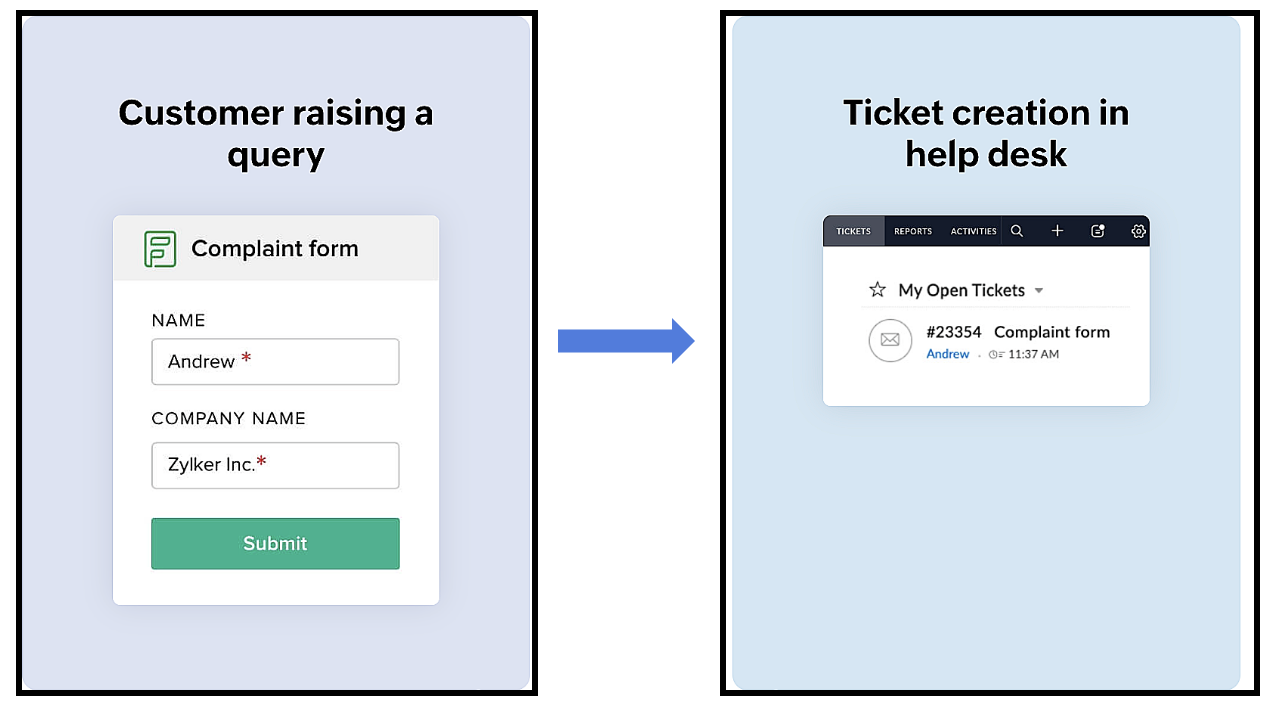


Het proces verloopt als volgt:
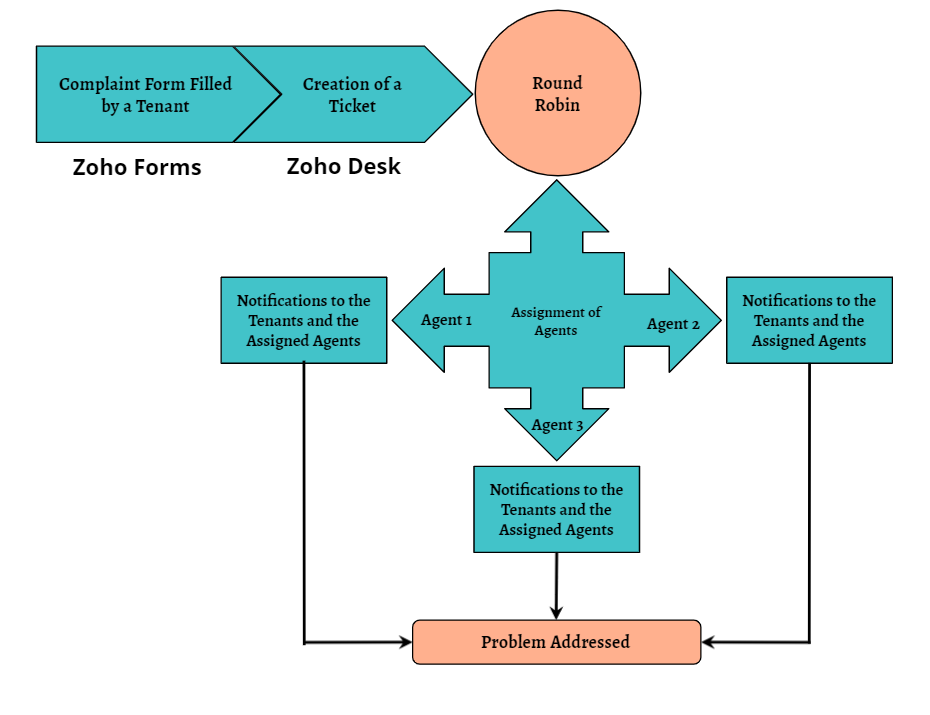
Een huurder scant de QR-code die beschikbaar is op elke verdieping van het gebouw om toegang te krijgen tot het klachtenformulier (dat is aangemaakt in Zoho Forms), om een klacht in te dienen. Zodra de huurder het formulier indient, wordt een ticket aangemaakt (in Zoho Desk) voor de klacht. Het aangemaakte ticket wordt toegewezen aan één van de medewerkers met behulp van de Round Robin toewijzingsregel. Zodra het ticket is toegewezen, ontvangen zowel de huurder als de medewerker aan wie het ticket is toegewezen een notificatie met relevante details. Vervolgens zal de medewerker het probleem aanpakken door de geschikte technici te sturen om het gemelde probleem op te lossen.
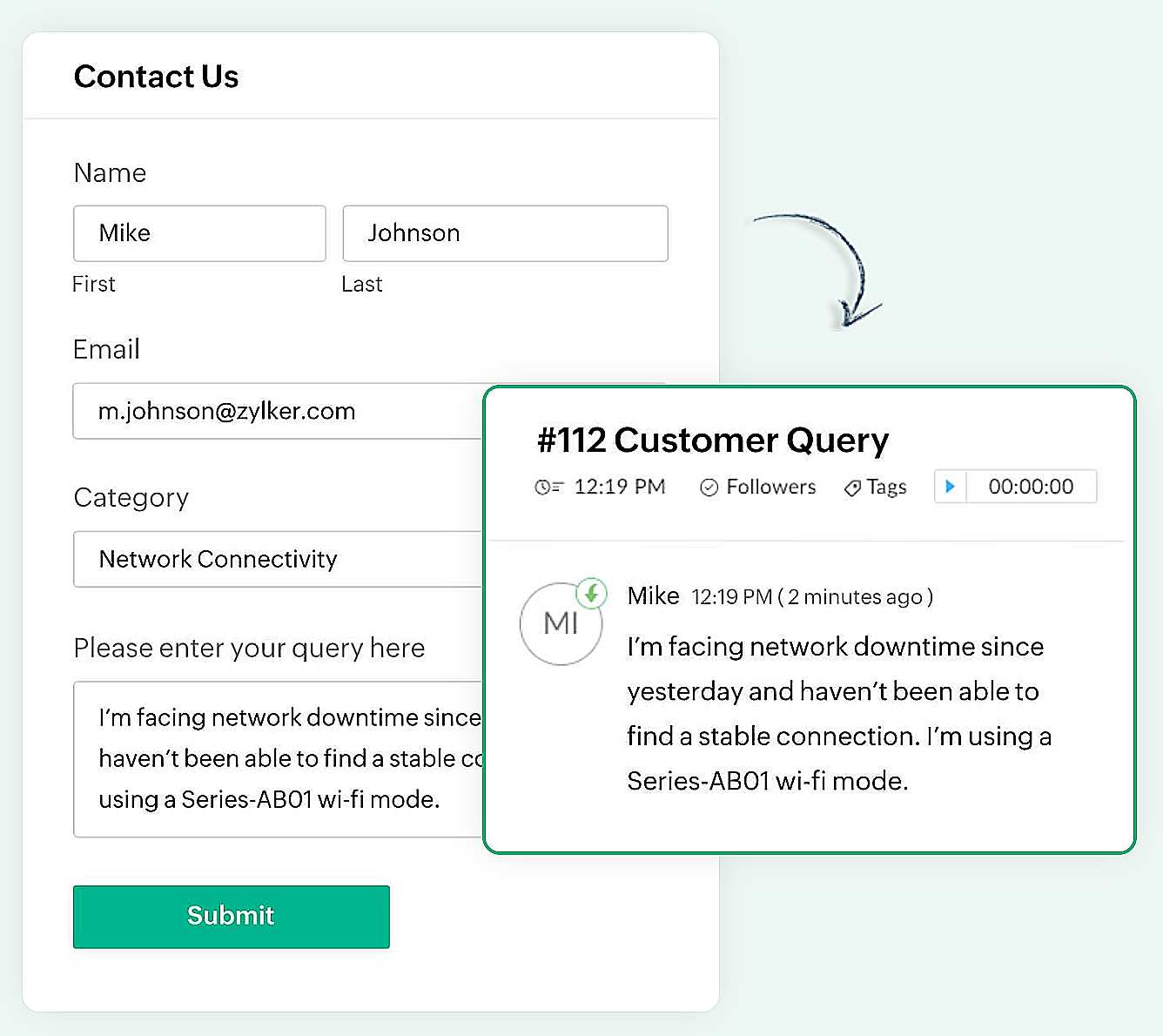

Er kan een eenvoudig formulier met alleen een naam en e-mailadres worden gemaakt of een complex formulier dat meerdere velden bevat om gedetailleerde informatie vast te leggen, zoals de problemen waarmee de huurder wordt geconfronteerd, de prioriteit van het probleem en enkele andere redenen kunnen ook gemakkelijk in Zoho Forms worden gemaakt.

Zoho Forms
Zoho Forms is een eenvoudig te gebruiken tool om formulieren te maken, zonder dat er downloads of installaties nodig zijn. Je kunt een formulier maken, delen en beginnen met het verzamelen van gegevens in slechts enkele minuten. Zoho Forms is toegankelijk vanaf laptops, tablets en mobiele telefoons.

Klachtenformulier maken in Zoho Forms
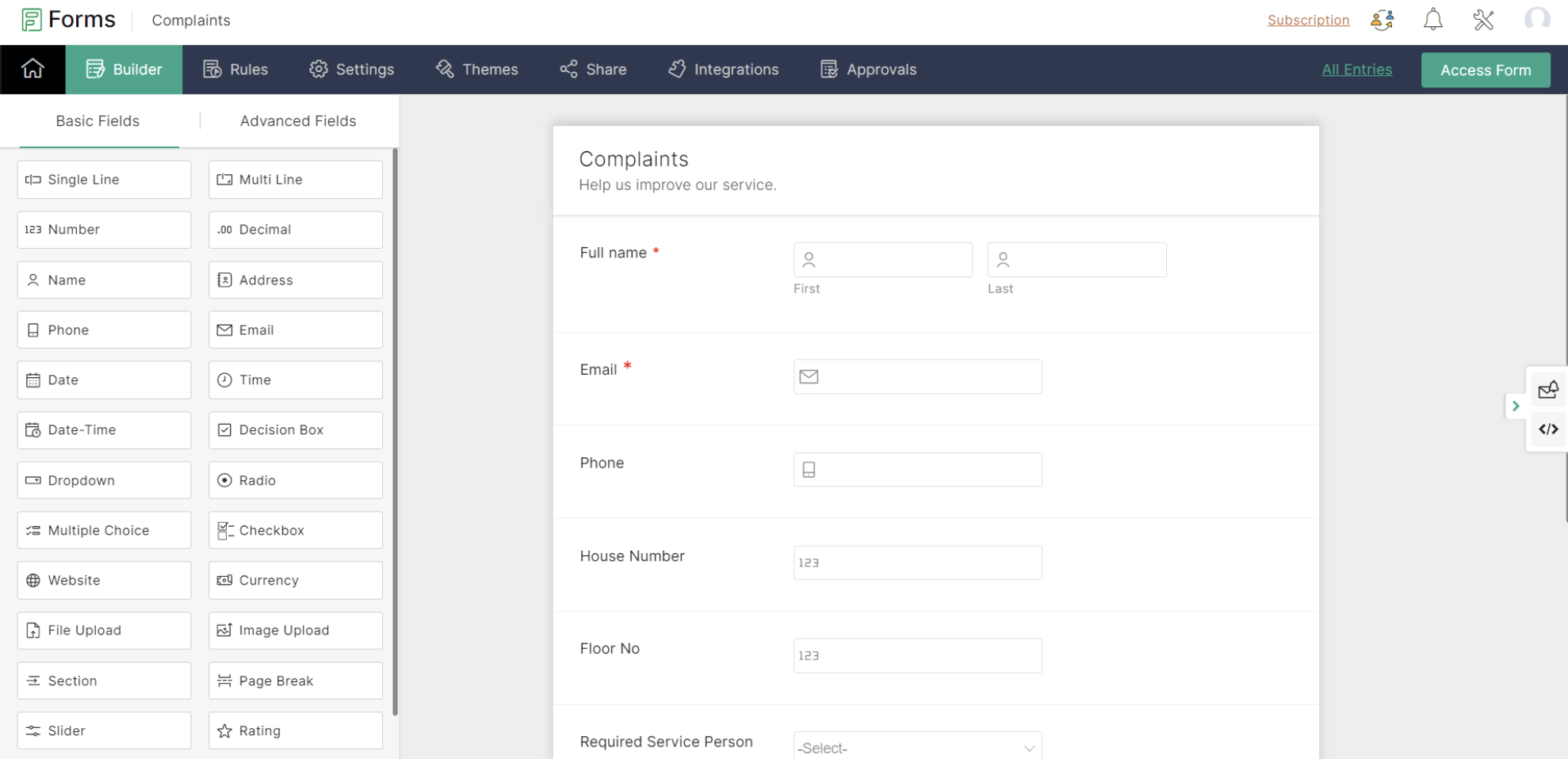


Met Zoho Forms kun je formulieren maken met een eenvoudige drag-and-drop optie.

- Begin met het geven van een formuliernaam (de gebruiker wordt doorgestuurd naar een formulierbouwpagina).
- Voeg de nodige velden toe om informatie van je huurders te verzamelen.
- Sla het formulier op.

Zoho Forms biedt kant-en-klare formulieren die geschikt zijn voor verschillende gelegenheden. Een nieuw formulier kan binnen enkele seconden worden gemaakt met behulp van deze sjablonen.

Klachtenformulier
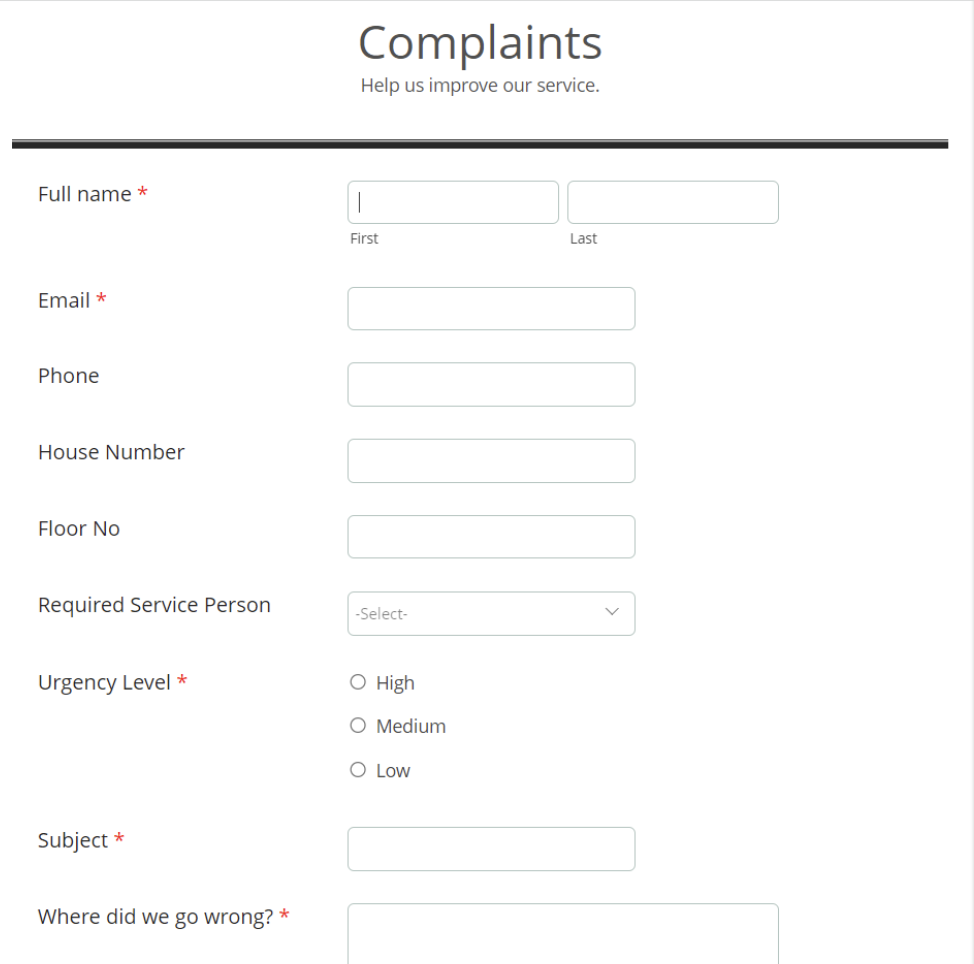

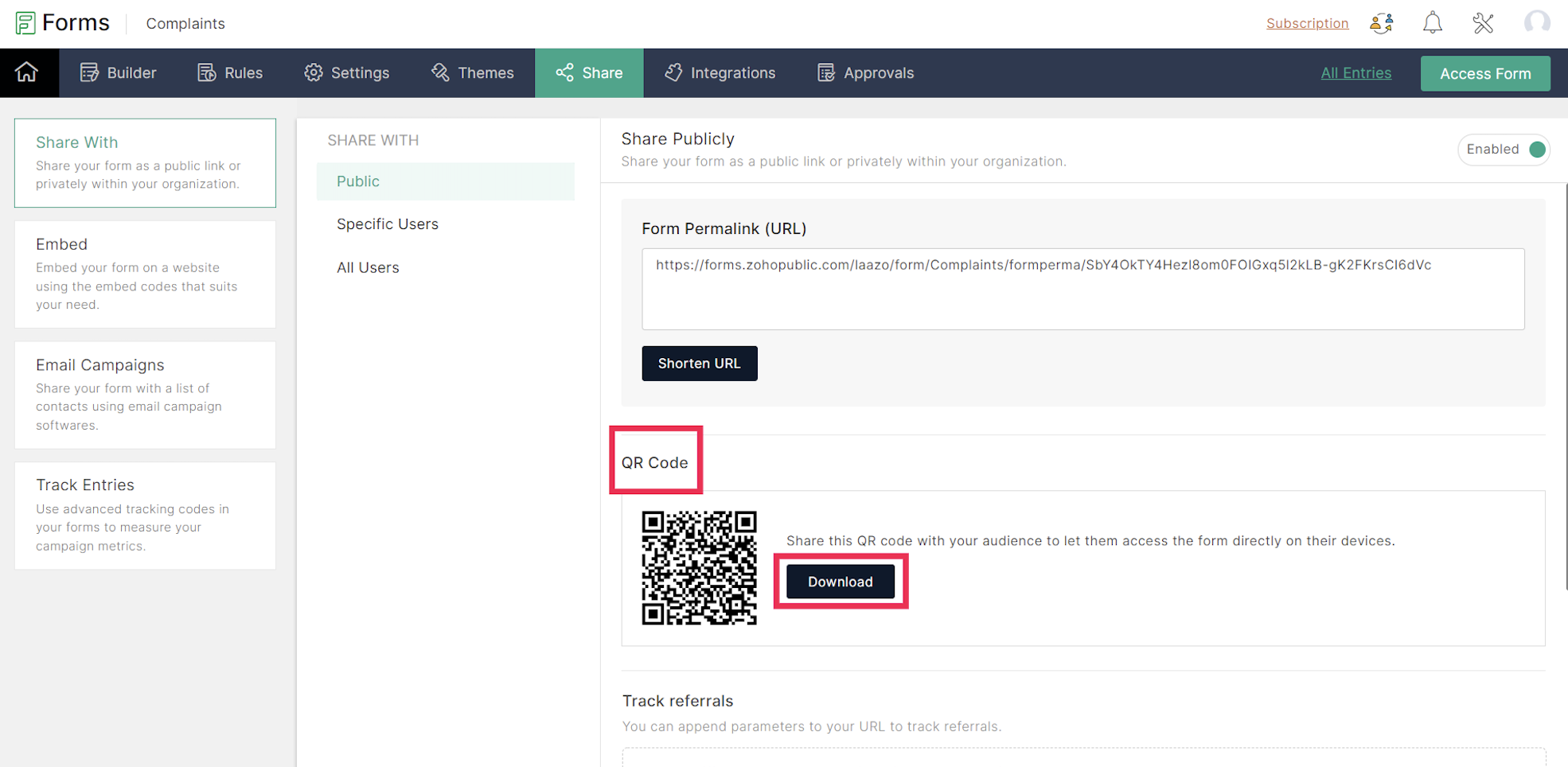
Een URL en een QR-code worden gegenereerd voor het aangemaakte formulier onder het tabblad Delen, dat in een png-vorm kan worden gedownload. De gedownloade QR-code kan worden afgedrukt en op alle muren van elke verdieping van het appartement worden geplakt voor de huurders.

De volgende stap is het integreren van Zoho Forms met Zoho Desk. Dit lees je in de volgende Tips & Tricks van Zoho Desk.

    • Sticky Posts

    • Doe mee aan de Zoho Desk Meetup op 7 maart in Antwerpen

      Beste Community leden, Wij nodigen jullie graag uit voor de Community Meetup van Zoho Desk! Op 7 maart komen we bij elkaar in Antwerpen, samen met een klant en de Zoho Experts van Brainsolutions. Onze experts zullen een live demo presenteren en jouw vragen
    • Doe mee aan de Zoho Desk Meetup op 16 Februari in Utrecht

      Beste Community leden, Wij nodigen jullie graag uit voor de Community Meetup voor Zoho Desk! Op 16 februari komen we bij elkaar in Utrecht, samen met Fleetkennis en de Zoho Expert van Mobile XL. Onze experts zullen een live demo presenteren en jouw vragen
    • Wat is er nieuw in Zoho Desk 2023

      Beste Community leden, Hoeveel je ook van je klanten en je werk houdt, als klantenservice medewerker zul je zeker een aantal zware dagen tegenkomen. We hebben het dan over de dagen dat je een paar keer op de snooze-knop drukt, koffie morst op je favoriete
    • Tips & Tricks #10 Automatiseren met Zoho Desk Deel 2

      In deel 1 van het automatiseren met Zoho Desk las je een use case over een probleem in een appartementencomplex en hoe dit door gebruik te maken van Zoho Forms en Zoho Desk kan worden opgelost. In deel 2 lees je meer over het integreren van Zoho Forms
    • Tips & Tricks #09 Automatiseren met Zoho Desk Deel 1

      Beste Community leden, Zoals jullie weten hebben we in Nederland een woningtekort. Een oplossing hiervoor is de hoogbouw. Echter, om de de hoogte in te gaan moet er ook voor de juiste faciliteiten in flats worden gezorgd. Problemen kunnen we allemaal
    • Recent Topics

    • Restrict Users access to login into CRM?

      I’m wanting my employees to be able to utilize the Zoho CRM Lookup field within Zoho Forms. For them to use lookup field in Zoho Forms it is my understanding that they need to be licensed for Forms and the CRM. However, I don’t want them to be able to
    • How do people handle using Outlook and Zoho Project calendar at the same time?

      We have an ongoing problem in our organisation where we use Zoho Projects to plan all of our projects tasks and that also allows us to look forward using the workload report to see which of our consultants are overstretched etc and which are available.
    • 3 year sick leave cycle

      How do you set up a sick leave cycle for South Africa? In SA the sick works like this for the first 6 months you get 0.83 paid sick days a month, then after 6 months you sick leave balance is reset to 30 days that can be used over a 36 month cycle.  This
    • WorkDrive and CRM not in sync

      1/ There is a CRM file upload field with WorkDrive file set as the source: 2/ Then the file is renamed in WorkDrive (outside CRM): 3/ The File in CRM is not synced after the change in WorkDrive; the file name (reference) in CRM record is not updated (here
    • Introducing Connected Records to bring business context to every aspect of your work in Zoho CRM for Everyone

      Hello Everyone, We are excited to unveil phase one of a powerful enhancement to CRM for Everyone - Connected Records, available only in CRM's Nextgen UI. With CRM for Everyone, businesses can onboard all customer-facing teams onto the CRM platform to
    • Is Zoho Communityspaces now part of Zoho One?

      Is Zoho Communityspaces now part of Zoho One?
    • How to update "Lead Status" to more than 100 records

      Hello Zoho CRM, How do I update "Lead Status" to more than 100 records at once? To give you a background, these leads were uploaded or Imported at once but the lead status record was incorrectly chosen. So since there was a way to quickly add records in the system no matter how many they are, we are also wondering if there is a quicker way to update these records to the correct "Lead Status". I hope our concern makes sense and that there will be a fix for it. All the best, Jonathan
    • Bigin’s 2025 Evolution: Highlights from 2025 and What’s Ahead in 2026

      Dear Biginners, Wishing you a very happy New Year! As we stand at the cusp of endless possibilities in 2026, we would like to take a moment to reflect on what we achieved together in 2025. Your continued support, thoughtful feedback, and kind words of
    • Automatically CC an address using Zoho CRM Email Templates

      Hi all - have searched but can't see a definitive answer. We have built multiple email templates in CRM. Every time we send this we want it to CC a particular address (the same address for every email sent) so that it populates the reply back into our
    • Send Supervisor Rule Emails Within Ticket Context in Zoho Desk

      Dear Zoho Desk Team, I hope this message finds you well. Currently, emails sent via Supervisor Rules in Zoho Desk are sent outside of the ticket context. As a result, if a client replies to such emails, their response creates a new ticket instead of appending
    • Zoho Desk - Change Time Zone for all users and set default for new user

      Hi,   Is there a way to set a default time zone so that when user creates an account via the Zoho Desk invitation, they don't need to select the time zone via the hundreds of choice?   And, for already created users, can we edit the incorrect time zone selected by the user at the account creation ?   Thanks ! Fred
    • Introducing WhatsApp integration in Bigin

      Greetings! In today's business landscape, messaging apps play a significant role in customer operations. Customers can engage with businesses, seek support, ask questions, receive personalized recommendations, read reviews, and even make purchases—all
    • Why is Zoho Meeting quality so poor?

      I've just moved from Office 365 to Zoho Workplace and have been generally really positive about the new platform -- nicely integrated, nice GUI, good and easy-to-understand control and customisation, and at a reasonable price. However, what is going on
    • Allow Manual Popup Canvas Size Control

      Hello Zoho PageSense Team, We hope you're doing well. We would like to request an enhancement to the PageSense popup editor regarding popup sizing. Current Limitation: Currently, the size (width and height) of a popup is strictly controlled by the selected
    • Why does Zoho’s diff viewer highlight parts of unchanged lines?

      Hi everyone, I’ve noticed something odd in the Zoho editor’s diff view. When I delete a single line, the diff doesn’t just mark that line as removed. Instead, it highlights parts of the next line as if they changed, even though they are identical. Example:
    • All new Address Field in Zoho CRM: maintain structured and accurate address inputs

      The address field will be available exclusively for IN DC users. We'll keep you updated on the DC-specific rollout soon. It's currently available for all new sign-ups and for existing Zoho CRM orgs which are in the Professional edition. Latest update
    • CRM x WorkDrive: File storage for new CRM signups is now powered by WorkDrive

      Availability Editions: All DCs: All Release plan: Released for new signups in all DCs. It will be enabled for existing users in a phased manner in the upcoming months. Help documentation: Documents in Zoho CRM Manage folders in Documents tab Manage files
    • Wrapping up 2025 on a high note: CRM Release Highlights of the year

      Dear Customers, 2025 was an eventful year for us at Zoho CRM. We’ve had releases of all sizes and impact, and we are excited to look back, break it down, and rediscover them with you! Before we rewind—we’d like to take a minute and sincerely thank you
    • Passing the CRM

      Hi, I am hoping someone can help. I have a zoho form that has a CRM lookup field. I was hoping to send this to my publicly to clients via a text message and the form then attaches the signed form back to the custom module. This work absolutely fine when
    • Where can we specify custom CSS in Zoho Forms custom theme ?

      I'm using a form with a dark theme. The OTP popup window is unreadable, because for some reason, the OTP popup background fixes color to white, but still takes the font color specified in the custom theme. This ends up as white on white for me, rendering
    • Automating Employee Birthday Notifications in Zoho Cliq

      Have you ever missed a birthday and felt like the office Grinch? Fear not, the Cliq Developer Platform has got your back! With Zoho Cliq's Schedulers, you can be the office party-cipant who never forgets a single cake, balloon, or awkward rendition of
    • Drop Down Value

      Hi, May I know why Zoho Flow treat this drop down as number and not as string. If so, how can I fetch the right value for filtering. This field is from Creator, in Creator upon checking by default it is a string since it's not a lookup field.
    • Create PO from an invoice

      We are a hardware and software sales company which receives orders over the internet. We drop ship most of our products from a warehouse outside of our company. Our orders get sync'd into Zoho from our store via onesaas as invoices. It would be great
    • SMS to customers from within Bigin

      Hi All, Is there anyone else crying out for Bigin SMS capability to send an SMS to customers directly from the Bigin interface? We have inbuilt telephony already with call recordings which works well. What's lacking is the ability to send and receive
    • Zoho Survey reminder settings are extremely confusing

      Hi, I just want to set 3 reminders, one week apart from the first email out. Your form is too confusing and I don't understand. Can you simplify and be more specific regarding the language used on the form ?
    • Add deluge function to shorten URLs

      Zoho Social contains a nice feature to shorten URLs using zurl.co. It would be really helpful to have similar functionality in a Deluge call please, either as an inbuilt function or a standard integration. My Creator app sends an email with a personalised
    • Add specific field value to URL

      Hi Everyone. I have the following code which is set to run from a subform when the user selects a value from a lookup field "Plant_Key" the URL opens a report but i want the report to be filtered on the matching field/value. so in the report there is
    • form data load issue when saving as duplicate record is made

      Hello. I have a form with a lookup when a value is selected the data from the corresponding record is filled into all of the fields in the form. But the form is loaded in such a state that if any value is changed it will take all of the values pre loaded
    • Recurring Tasks and Reminders in Projects

      Recurring tasks are tasks that are created once, and then recreated automatically after a designated time period. For example, the invoice for your billable tasks is due every week. You can set that task to recreate itself every week. Also, the future
    • Unable to remove the “Automatically Assigned” territory from existing records

      Hello Zoho Community Team, We are currently using Territory Management in Zoho CRM and have encountered an issue with automatically assigned territories on Account records. Once any account is created the territory is assigned automatically, the Automatically
    • Track online, in-office, and client location meetings separately with the new meeting venue option

      Hello everyone! We’re excited to announce meeting enhancements in Zoho CRM that bring more clarity and structure to how meetings are categorized. You can now specify the meeting venue to clearly indicate whether a meeting is being held online, at the
    • Google Fonts Integration in Pagesense Popup Editor

      Hello Zoho Pagesense Team, We hope you're doing well. We’d like to submit a feature request to enhance Zoho Pagesense’s popup editor with Google Fonts support. Current Limitation: Currently, Pagesense offers a limited set of default fonts. Google Fonts
    • Improved Contact Sync flow in Google Integration with Zoho CRM

      Hello Everyone, Your contact sync in Google integration just got revamped! We have redesigned the sync process to give users more control over what data flows into Google and ensure that this data flows effortlessly between Zoho CRM and Google. With this
    • CRM Canvas - Upload Attachments

      I am in the process of changing my screens to Canvas.  On one screen, I have tabs with related lists, one of which is attachments.  There doesn't appear to be a way to upload documents though.  Am I missing something really obvious?  Does anyone have
    • Pro Lite Upgrade - Quick Access Tray

      Hello, I was going to upgrade to Pro Lite but the Quick Access Tray feature isn't available for Windows. Of the four features not available for Windows, the QAT is what I'm most interested in. Are there plans to add this feature for Windows anytime soon?
    • Custom Fonts in Zoho CRM Template Builder

      Hi, I am currently creating a new template for our quotes using the Zoho CRM template builder. However, I noticed that there is no option to add custom fonts to the template builder. It would greatly enhance the flexibility and branding capabilities if
    • Improved Functionality PO Bill SO Invoice

      Hello, I need to enter over 100 items, it's frustrating to scroll a few item rows and wait for more to load, then scroll again. It would be nice to have buttons that scroll to the top or bottom with one click. Furthermore, these items I'm adding are VAT
    • Camera access

      My picture doesn't appear in a group discussion. (The audio is fine.) The guide says "Click the lock icon on address bar," but I can't find it. Advise, please
    • Wishes for 2026

      Hello, and a happy new year 2026! Let's hope it's better for everyone. I'd like to share some thoughts on Zoho One and what could be useful in the short, medium, and long term. Some things are already there, but not applied to Zoho One. Others seem like
    • How to Integrate Zoho Books with Xero (No Native Connection Available)

      Hi everyone, I’m currently facing an issue with integrating Zoho Books invoices with Xero, as I’ve noticed Zoho does not provide a native integration with Xero at this time. I would like to ask: What are the common or recommended solutions for syncing
    • Next Page