Use Zoho Creator as a source for merge templates in Zoho Writer

Use Zoho Creator as a source for merge templates in Zoho Writer

Hello all!

We're excited to share that we've enhanced Zoho Creator's integration with Zoho Writer to make this combination even more powerful. You can now use Zoho Creator as a data source for mail merge templates in Zoho Writer.

Making more data from your favorite low-code development platform accessible in Writer will open new opportunities for users to create and send a wide variety of documents, manage business processes efficiently, and ensure security.

Features

Seamless integration with subform fields
Zoho Creator users can now seamlessly utilize subform fields in Zoho Writer with the merge task feature. This empowers businesses to create documents that are more data-driven and user-friendly, and reduces the manual effort required for document preparation.

Access more Creator fields
Access to comprehensive data from Creator empowers users to produce intricate and data-rich documents. With this enhanced integration, you can access data in subform fields, and lookup fields.
This seamless data integration streamlines the creation of complex business documents, which is particularly beneficial for organizations dependent on data-intensive documents like contracts, reports, and financial statements.

Uses and benefits

Unlock the power of signatures
One of the standout features of this integration is the ability to use the signature field in Zoho Writer. For instance, in contract management, you can use electronic signatures to streamline the approval and signing process while ensuring security.


Turn IDs or fields into barcodes
Another exciting feature is the ability to convert Creator IDs or fields into barcodes with help of the mail merge templates. Using barcodes enables efficient data tracking and retrieval, enhances accuracy and accessibility, and much more.

Assume a Vendor management app which contains contracts. The mail merge templates feature will facilitate the seamless extraction data from Creator to Writer, and help you create a document for contracts. Within the Writer document, the fields, Product IDs, Alphanumeric or numeric fields can be shown can be visually represented as barcodes.
   

How to get started

  1. Go to writer.zoho.com and click Create New.
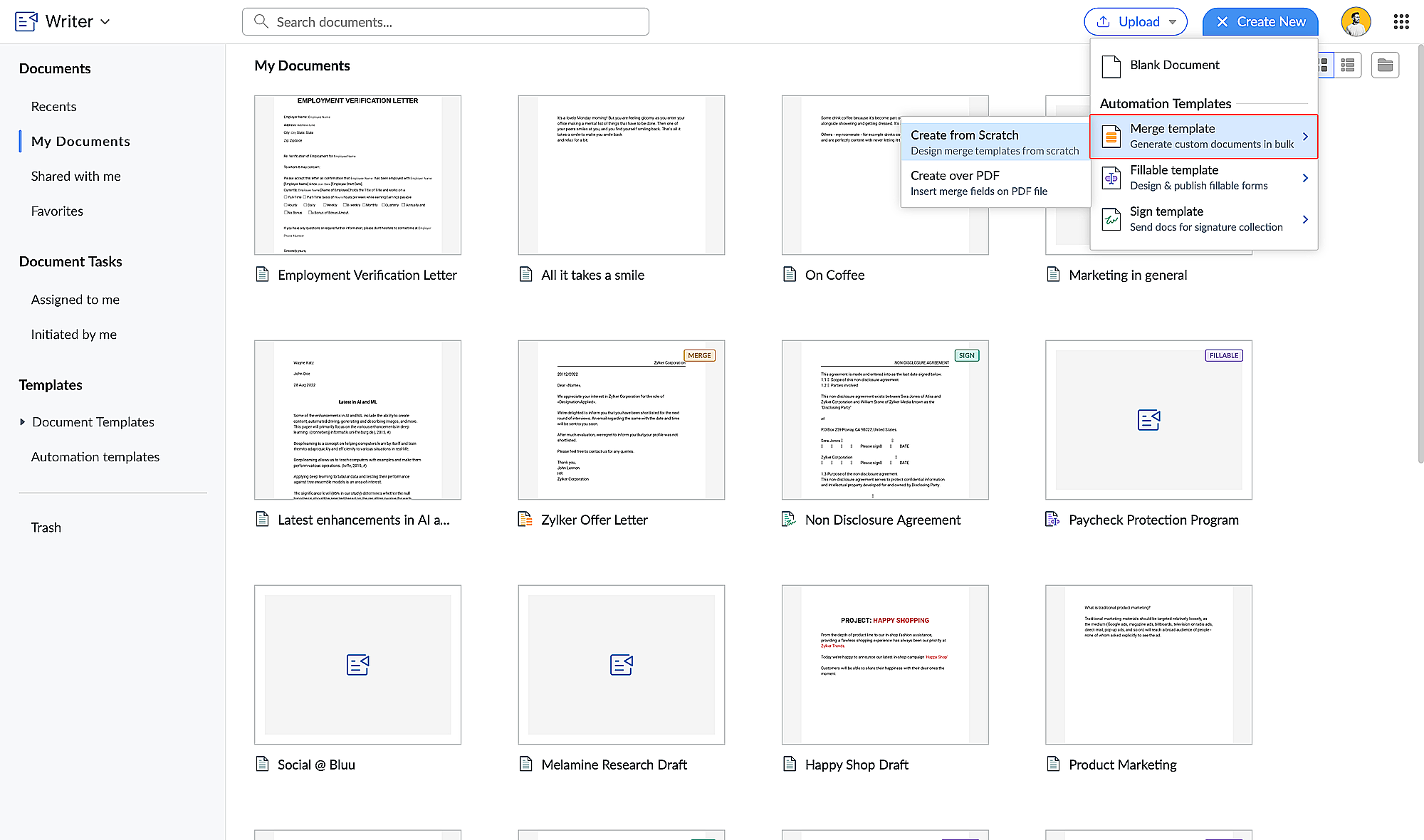
  2. Choose Merge Template under Automation Templates and click Create from Scratch. Design your merge template using these steps.
  3. Click the hamburger menu on the left and click Automate.

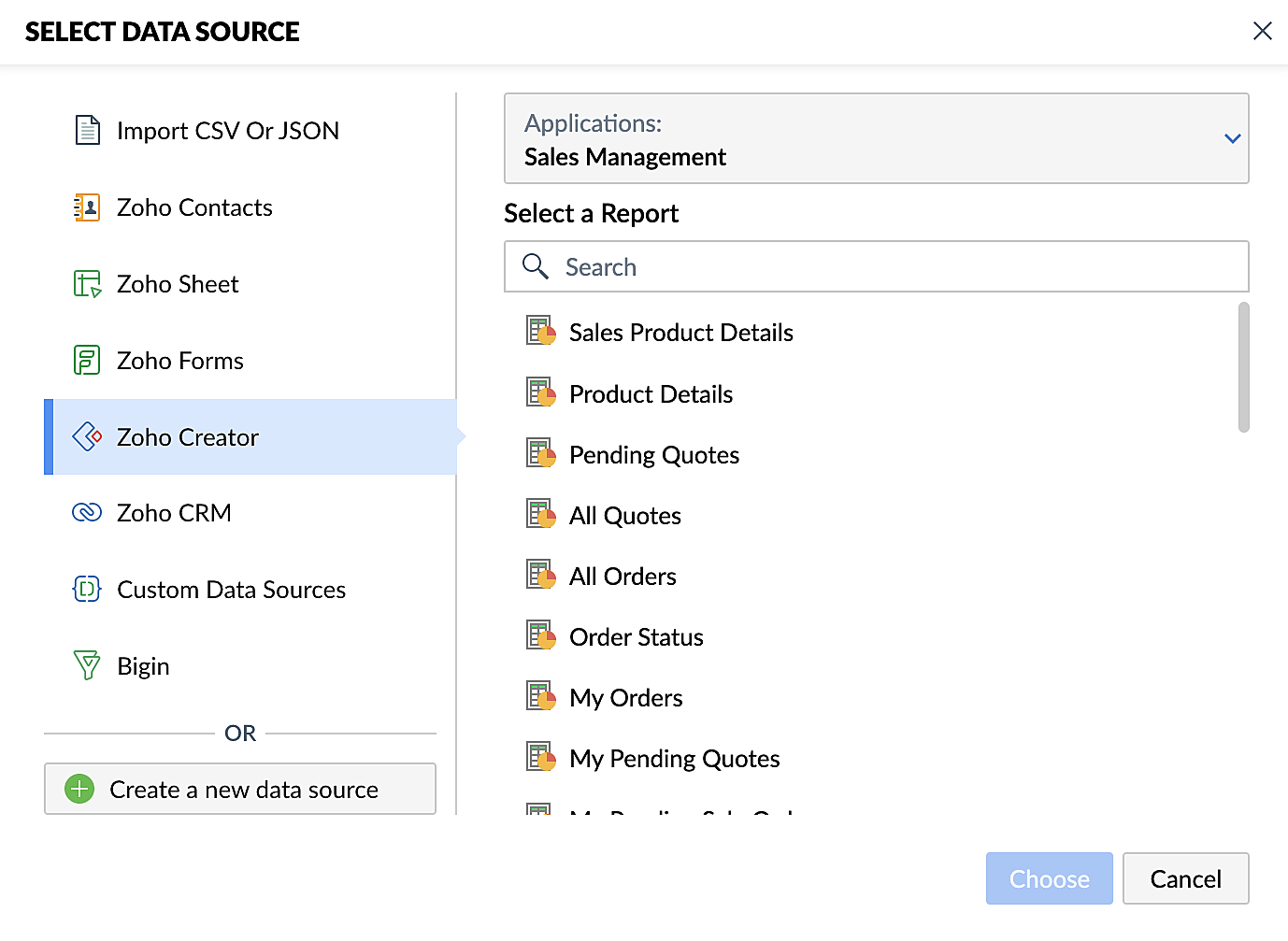
  4. Under Select the Data Source, choose Zoho Creator and select your application.
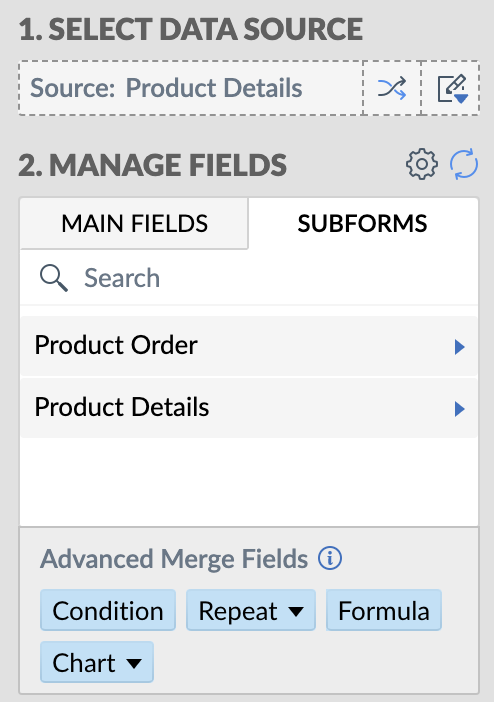
  5. Add the appropriate fields from your Creator application. Click here for a detailed guide to working with fields.

Steps for creating merge documents using a Zoho Creator workflow
  1. Create a form in Zoho Creator with the necessary fields.
  2. Create a merge template in Zoho Writer using these steps.
  3. Create a workflow for your Creator form and choose Deluge Script as the workflow action. This allows you to perform custom functions with Writer's mail merge.
  4. Use the name of the connection you've added in the Deluge script to perform the function you've configured. Connections enable you to integrate cloud services via Deluge.
These enhancements make Zoho Creator and Zoho Writer an even more valuable combination for businesses looking to simplify document management. By harnessing the capabilities of both platforms, businesses can look forward to a future where document creation and data management are more efficient, secure, and user-friendly than ever before.

Also, do take a look at Zoho Writer's post regarding mail merge templates.

Feel free to test out this integration and provide your feedback by reaching out to support@zohocreator.com or sharing your thoughts in the comments section below.

Regards,
The Zoho Creator Team
    • Sticky Posts

    • Introducing Zoho Creator's 2025 Release Projection 2

      Hello Creators! I'm Prakash, from the Creator product management team, and today I'm delighted to unveil our next set of features as part of Release Projection 2 for 2025. With thoughtful analysis and planning, we've curated powerful new capabilities
    • Zoho Creator - 2023 Release Projection 1

      Hello everyone! A very Happy New Year to you and your family. Hope you're all good and having a great time using Zoho Creator to make your lives easier and your businesses prosper. 2022 was an action-packed year for us at Creator, and we hope to continue
    • Zoho Creator User Group meetups in a city near you! - Oct - Nov, 2023

      Greetings from the Zoho Creator team! We're hosting a series of Zoho Creator meetups in various cities across the globe, and we'd love to meet you there! Our meetups are a great opportunity to network with industry peers, exchange ideas and best practices,
    • Zoho Creator - 2023 Release Projection 2

      Hello everyone! Time truly flies when you're having an incredible journey, and today we mark the completion of an eventful and action-packed six months. It feels like just yesterday when we embarked on this adventure together with the launch of our new
    • Upcoming Updates - August 2022

      Hi all, Greetings from the Zoho Creator team! Today we've got news for you on some exciting updates. And rest assured— there’s more to come! In this post, we'll be going over the upcoming features and improvements for this month as mentioned below. A
    • Recent Topics

    • Introducing the locking option for CRM records

      Last modified on 06/04/2023: Record locking option in CRM is now available for all Zoho CRM users in all DCs. Note that it was an early access feature available only upon request. Hello All, Hope you're doing well! We're thrilled to introduce our latest
    • CRM x WorkDrive: File storage for new CRM signups is now powered by WorkDrive

      Availability Editions: All DCs: All Release plan: Released for new signups in all DCs. It will be enabled for existing users in a phased manner in the upcoming months. Help documentation: Documents in Zoho CRM Manage folders in Documents tab Manage files
    • Subforms in stateless forms

      I think the title says it all. We need to be able to add subforms to stateless forms. Currently the only workaround is to create a Form and delete each record upon submission of the form. I need to build an interface to update our inventory. Basically
    • Paste issues in ZOHO crm notes

      Hi, since a week or so I have issues with the paste function in ZOHO CRM. I use "notes" to copy paste texts from Outlook emails and since a week or so, the pasting doesnt function as it should: some text just disappears and it gives a lot of empty lines/enters.....
    • Standard Payment Term is not pulled from account to quotation

      Hey Team There seems to be something off. I do have "Net 30" as my default payment term in Zoho Books for my customers. If, from the customer overview or quote section, I create a new Quotation, the payment terms field stays blank and doesn't get the
    • Zoho Analytics Export API

      Hi Team, I’m working on some integration tasks and wanted to confirm if it’s possible to retrieve a Zoho Analytics table as JSON data using a Deluge script. I’ve already stored my custom data from multiple sources and combined it into a single source.
    • Best way to display complex Bookings Consultation Descriptions on Zoho Site?

      I am a new user so apologies if this has been asked before. I couldn't find any answers in the forum. We offer 18 complex Consultations to our subscribers. Our current platform lets me put detail on these Consultations thoroughly (200-300 words) during
    • Gmail is ramping up its email sender policy as of November 2025

      Hello marketers, As you may be aware, Gmail introduced a guideline for bulk senders starting February 2024. If not, here's a quick refresher straight from Google: After this policy was announced first in 2023 and soft-implemented in February 2024, we
    • Modifying iframe data of Zoho booking iframe

      Hello, I have integrated a Zoho Bookings embedded iframe into my website. Currently, I am pre-filling the booking form with default values as part of our process flow. However, I want to ensure that if an input field is already populated with a default
    • Zoho CRM Workflow and Function Backup Options

      Hi everyone! I have been able to make several backups of my CRM data and noticed that the Workflows and Functions are not included in these backups. To my knowledge, there is no backup feature for workflows and functions, which is problematic in of itself.
    • Enhance Sign CRM integration

      Hello all, I'm working on a custom Deluge script to enhance the integration between Zoho CRM and Sign by using a writer merge template for additional flexibility. I want to replicate the post-sign document integration that exists between CRM and Sign
    • YouTube Live streaming? how to? Zoom has this feature, built-in. Can't find it on zoho meetings.

      YouTube Live streaming? how to? Zoom has this feature, built-in. Can't find it on zoho meetings.
    • Is or will be possible to associate meeting transcription and summary, made by Zia, to meeting/contact/account record in CRM?

      Would be useful to keep context and track jobs, better if it will be auto
    • Zoho API to create ticket

      I'm developing an integration to create tickets via API, but, locally it works (send and recieve requests). In production it also works sending requests, but, my file don't recieve any response data. My URL is available in Zoho API Console and I have
    • Desk Field Not Showing in Analytics

      Hi there, I recently added a field to our Zoho Desk Ticket Information. I went and added the data retrospectively to the tickets. It is also marked as required, so all new tickets cannot be closed off without it being filled in. When I try to run a report
    • Export data using advanced export options and customizable settings

      Hello everyone, The user interface for exporting data has been revamped with updates to make data exports more flexible and efficient for users. These updates not only enhance usability but also bring advanced capabilities to help users extract precise
    • Retainer invoice in Zoho Finance modlue

      Hello, Is there a way of creating retainer invoices in the Zoho Finance module? If not can I request this is considered for future updates please.
    • We should have an option to Toggle Off KB Article Links in AI Answer Bot Replies

      Hi everyone, I'm creating this topic to share a feature idea that I think would improve the customer experience when using the AI Answer Bot for self-service. The Current Behavior (The Problem) Currently, when the AI Answer Bot generates a summary or
    • Moving data from one pipeline to another

      Hey all, I've got some complex pipelines to build and I'd like to seperate them into seperate pipelines rather than have one mammoth one. If I create 2 pipelines, is there any easy way to use the output of Pipeline1 to be the input into Pipeline2? Or
    • How to export/find all deluge code.

      Hi, I have a large app wich contains several forms, reports, html views, I need to find thow my application if any contains specific word, I could find it manually by editing app and see on every section(field code, on succes, on load, etc) but I would like to do it faster. Is there a way to at least export it to a file the whole deluge code on my application?
    • Very long loading times | bad performance [ZOHO DC: EU]

      Hello there, we have recently noticed that the loading times have become extremely long when retrieving tickets and ticket details. For example, I open any ticket and get the following view. The subject and standard information (ticket owner, status etc.)
    • Have Some Bugs in Zoho CRM Ask Zia Assistant

      Hi Support Team, I have found some bugs in Zoho CRM Ask Zia Feature Please Check below screenshot, insight option is showing twice i think its in early access that's why its have some bugs .
    • COD with Partial payment

      Two reasons why we need COD with partial payment option. 1) Since we deal heavy weight products our shipping costs are too high. If shipment is rejected by customer we incur huge loss. 2) Some competitors place fake orders with different names and return
    • How to disable the Login button in Desk Helpcenter

      Hey there, I'm testing out whether the help center within Zoho Desk could replace our existing Customer FAQ. I tried to customize the themes for the public help center frontend, but stumbled across the login button in the navigation bar. Is there any
    • Slicers are now available in Zoho Sheet—filter your data interactively

      At Zoho Sheet, we diligently track user requests and feedback. In line with this, based on extensive user requests, we've integrated Slicers to pivot tables and are delighted to announce its release. Slicers are interactive visual filters that have add,
    • Resizing a Record Template Background Inage

      Hi everyone, I have an issue which I can't seem to resolve: Basically, I'm designing a record template in certificate form. I've specified A5 landscape. I've set my background image the same dimensions with total pixels at 443,520. Whatever I try, when
    • Updated font library: New font styles and custom font options in Zoho Sheet

      Zoho Sheet's font library now supports 500+ font styles in 60+ languages! The updated font library is stacked with new font styles, and some of the previously available font styles have been replaced with equivalent options. There are two ways you can
    • Introducing Data Bars: Graphically represent changes in data within the cells

      Conditional formatting has helped millions of spreadsheet users analyze and highlight their data more efficiently. In addition to the classic rules, color scales, and icon sets available in Zoho Sheet, you can now apply Data Bars, a convenient method
    • Default Font Size in Desk

      How do I set my default font size in Desk? It takes me about 45 minutes to find the place to set it, then, when I sign out of Zoho and log back in, it's back to font 10 again. Seems like this would be simple, but like everything with Zoho, it's buried
    • Tip #19 - Create checkbox tracker in your spreadsheet

      Hello Sheet users! We are here with yet another tip to help you get the most out of Zoho Sheet. Spreadsheets can be used to handle a variety of tasks, but ever tried using checkboxes to track the progress of your action items dynamically? Here's a sample
    • Tip #20 - Three things you probably didn't know you can do with picklists

      Hello Zoho Sheet users! We’re back with another quick tip to help you make your spreadsheets smarter. Picklists are a great tool to maintain consistency in your spreadsheet. Manually entering data is time-consuming and often leaves typos and irregular
    • Per Level Approval for admins

      We need Process admins like Zoho CRM in Zoho Books for per stage approval Currently in books, admins only have the option for Final Approval But for example, in cases like when an employee is on leave, we can't just approval one level we only have option
    • CUSTOM FUNCTION GIVE ERROR #EVAL!

      CUSTEM FUNCTION CREATE KYA ZOHOSHEET ME US FUNCTION KO USE KIYA LEKIN DATA TO SAHI HAI LAKIN DATA SHEET ME NAHI LAG LAHA HAI KRUPYA SOLVE KARE MY CODE IS float ADDTWO_TWO(float NO1, float NO2) { ADD = NO1 + NO2; return ADD; }
    • Need to set workflow or journey wait time (time delay) in minutes, not hours

      Minimum wait time for both Campaigns workflows and Marketing Automation journeys is one hour. I need one or the other to be set to several minutes (fraction of the hour). I tried to solve this by entering a fraction but the wait time data type is an integer
    • Integrate Projects for Desk KB article release tasks

      Could you please look into the possibility of integrating project tasks for Zoho Desk article release processes? We are looking for an internal integration between Zoho Projects and Zoho Desk's KB article drafting, reviewing and releasing tasks. We could
    • Feature enhancement: Highlight rows based on a cell value

      Hello Sheet users, We're excited to announce a new feature enhacement, shaped directly by your valuable feedback! As you might know, conditional formatting is a great tool for anyone dealing with large data sets. Previously, if you’ve ever wanted to draw
    • Mind mapping in Zoho Projects

      Good morning,   I would like to congratulate the Zoho team for building such an inovative and responsive application that fits in the daily challenges of so many work groups. I would like suggest you another functionality that helps a lot in project planning and development: mind mapping. Mind mapping would be of great help for brianstorming, knowledge management and other needs in online collaboration.   Thanks and wish you all the best! George Maha Empresa Júnior Multidisciplinar do Instituto de
    • Shortcut to fill a range of cells

      Good evening: I'm writing because I haven't been able to find a feature that allows you to select a range of cells, type in one of them, and then use a key combination to type in all of them. In Excel, the keyboard shortcut is Ctrl+Enter. I haven't found
    • Create custom rollup summary fields in Zoho CRM

      Hello everyone, In Zoho CRM, rollup summary fields have been essential tools for summarizing data across related records and enabling users to gain quick insights without having to jump across modules. Previously, only predefined summary functions were
    • Detect and ignore bots in visitors

      The SalesIQ visitor numbers are basically useless to us because there is no bot detection. We get the same bots coming in from the same countries looking at the same pages every day. It can't be that difficult to tell the difference between an actual
    • Next Page