Use Zoho Creator as a source for merge templates in Zoho Writer

Use Zoho Creator as a source for merge templates in Zoho Writer

Hello all!

We're excited to share that we've enhanced Zoho Creator's integration with Zoho Writer to make this combination even more powerful. You can now use Zoho Creator as a data source for mail merge templates in Zoho Writer.

Making more data from your favorite low-code development platform accessible in Writer will open new opportunities for users to create and send a wide variety of documents, manage business processes efficiently, and ensure security.

Features

Seamless integration with subform fields
Zoho Creator users can now seamlessly utilize subform fields in Zoho Writer with the merge task feature. This empowers businesses to create documents that are more data-driven and user-friendly, and reduces the manual effort required for document preparation.

Access more Creator fields
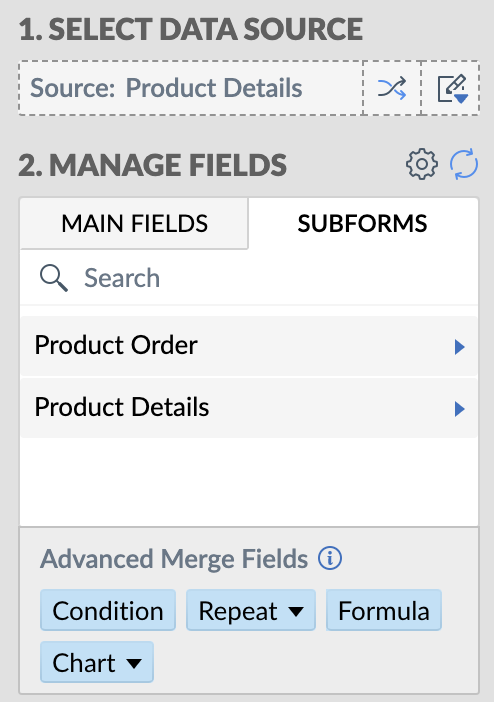
Access to comprehensive data from Creator empowers users to produce intricate and data-rich documents. With this enhanced integration, you can access data in subform fields, and lookup fields.
This seamless data integration streamlines the creation of complex business documents, which is particularly beneficial for organizations dependent on data-intensive documents like contracts, reports, and financial statements.

Uses and benefits

Unlock the power of signatures
One of the standout features of this integration is the ability to use the signature field in Zoho Writer. For instance, in contract management, you can use electronic signatures to streamline the approval and signing process while ensuring security.


Turn IDs or fields into barcodes
Another exciting feature is the ability to convert Creator IDs or fields into barcodes with help of the mail merge templates. Using barcodes enables efficient data tracking and retrieval, enhances accuracy and accessibility, and much more.

Assume a Vendor management app which contains contracts. The mail merge templates feature will facilitate the seamless extraction data from Creator to Writer, and help you create a document for contracts. Within the Writer document, the fields, Product IDs, Alphanumeric or numeric fields can be shown can be visually represented as barcodes.
   

How to get started

  1. Go to writer.zoho.com and click Create New.
  2. Choose Merge Template under Automation Templates and click Create from Scratch. Design your merge template using these steps.
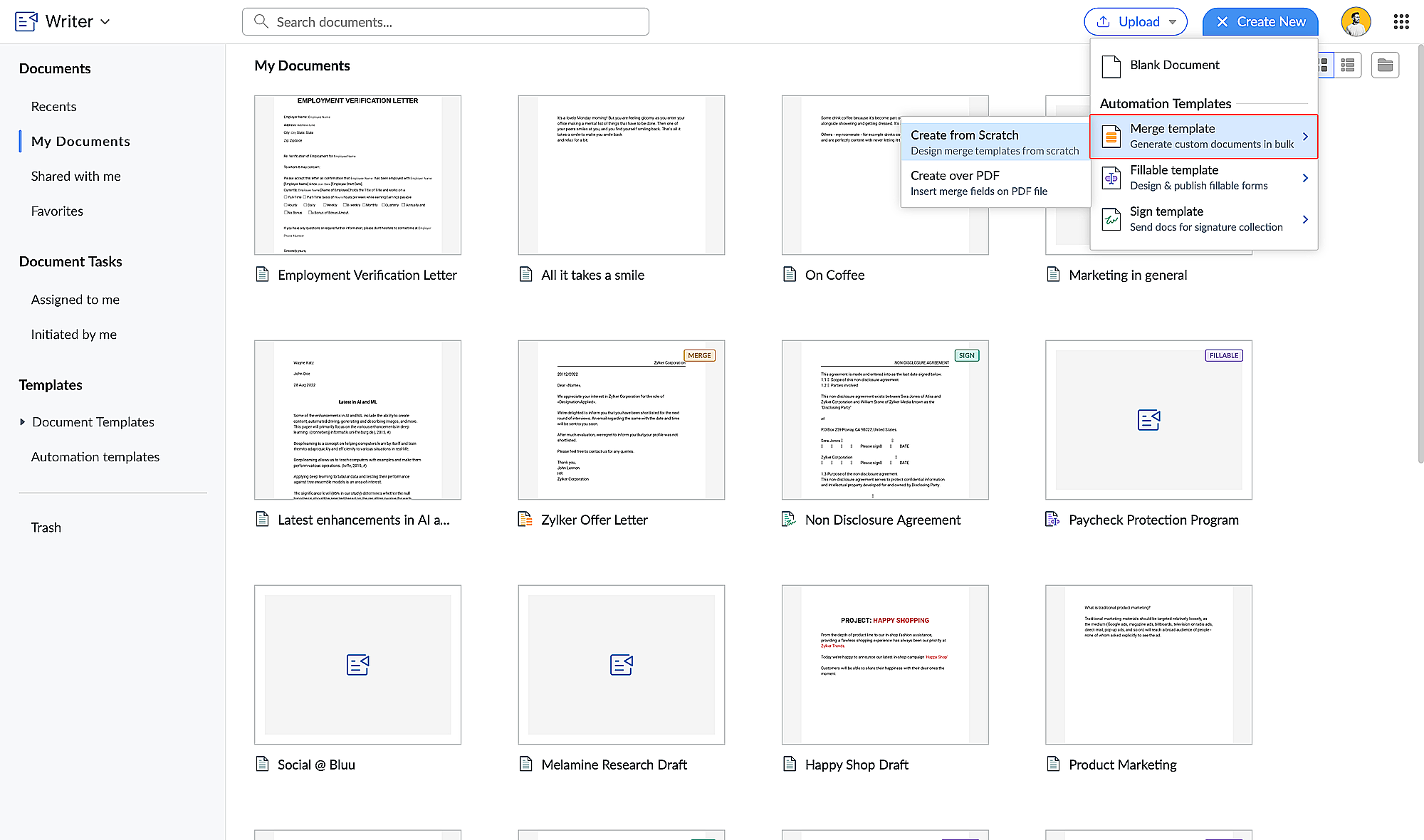
  3. Click the hamburger menu on the left and click Automate.

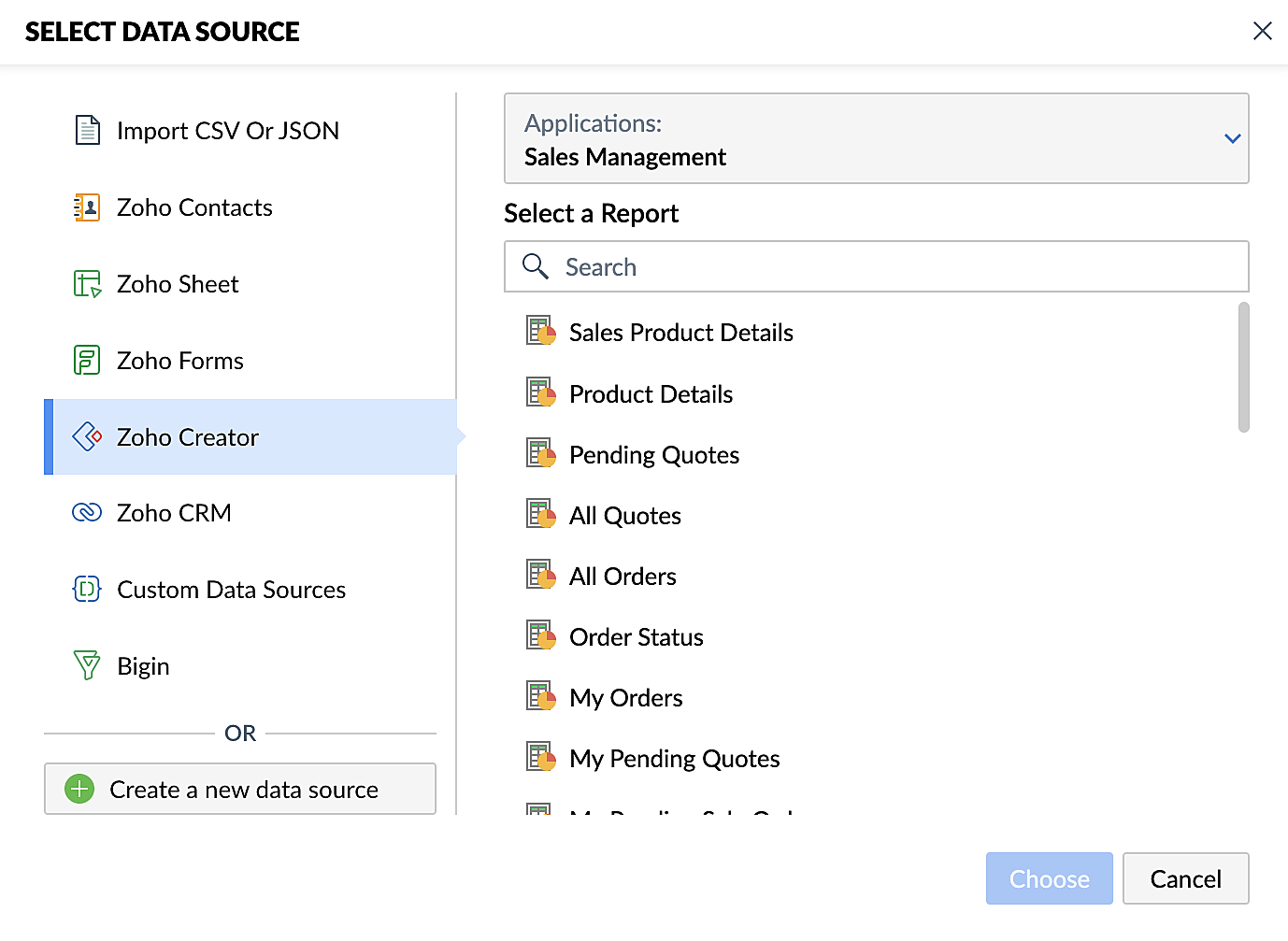
  4. Under Select the Data Source, choose Zoho Creator and select your application.
  5. Add the appropriate fields from your Creator application. Click here for a detailed guide to working with fields.

Steps for creating merge documents using a Zoho Creator workflow
  1. Create a form in Zoho Creator with the necessary fields.
  2. Create a merge template in Zoho Writer using these steps.
  3. Create a workflow for your Creator form and choose Deluge Script as the workflow action. This allows you to perform custom functions with Writer's mail merge.
  4. Use the name of the connection you've added in the Deluge script to perform the function you've configured. Connections enable you to integrate cloud services via Deluge.
These enhancements make Zoho Creator and Zoho Writer an even more valuable combination for businesses looking to simplify document management. By harnessing the capabilities of both platforms, businesses can look forward to a future where document creation and data management are more efficient, secure, and user-friendly than ever before.

Also, do take a look at Zoho Writer's post regarding mail merge templates.

Feel free to test out this integration and provide your feedback by reaching out to support@zohocreator.com or sharing your thoughts in the comments section below.

Regards,
The Zoho Creator Team
    • Sticky Posts

    • Introducing Zoho Creator's 2025 Release Projection 2

      Hello Creators! I'm Prakash, from the Creator product management team, and today I'm delighted to unveil our next set of features as part of Release Projection 2 for 2025. With thoughtful analysis and planning, we've curated powerful new capabilities
    • Zoho Creator - 2023 Release Projection 1

      Hello everyone! A very Happy New Year to you and your family. Hope you're all good and having a great time using Zoho Creator to make your lives easier and your businesses prosper. 2022 was an action-packed year for us at Creator, and we hope to continue
    • Zoho Creator User Group meetups in a city near you! - Oct - Nov, 2023

      Greetings from the Zoho Creator team! We're hosting a series of Zoho Creator meetups in various cities across the globe, and we'd love to meet you there! Our meetups are a great opportunity to network with industry peers, exchange ideas and best practices,
    • Zoho Creator - 2023 Release Projection 2

      Hello everyone! Time truly flies when you're having an incredible journey, and today we mark the completion of an eventful and action-packed six months. It feels like just yesterday when we embarked on this adventure together with the launch of our new
    • Upcoming Updates - August 2022

      Hi all, Greetings from the Zoho Creator team! Today we've got news for you on some exciting updates. And rest assured— there’s more to come! In this post, we'll be going over the upcoming features and improvements for this month as mentioned below. A
    • Recent Topics

    • Need Easy Way to Update Item Prices in Bulk

      Hello Everyone, In Zoho Books, updating selling prices is taking too much time. Right now we have to either edit items one by one or do Excel export/import. It will be very useful if Zoho gives a simple option to: Select multiple items and update prices
    • Upgraded sentiment analysis model for more accurate detection

      Hello everyone! Sentiment Analysis in Zia is being upgraded to a newer model to improve how customer sentiment is detected and interpreted. This transition is aimed at getting better contextual understanding across all supported channels. As part of this
    • Notebook Al

      Why was our organisation's Notebook AI disabled, even though our admin said it wasn't done on their side?
    • Dashboard Filtering with 2 query tables using one filter field

      Hi There, I have been using user filters on the dashboard and for the most part they are fine. However I have one issue I would like to see if there is a fix for it. I have a main query that most of my widgets use. Then I have a second query for another widget. The dashboard uses the field "brand" in the main query for the filter.  The second query uses the main_query.brand field alongside fields from a second table. I have set the widget to use main_query.brand as a filter, but when the dashboard
    • How to get static reports via Desk API

      Hello, we are hoping to use the Desk API to automatically export the default static reports in Zoho Desk, or reconstruct them via other API calls. What's the best way to do this? For example, if I want to recreate the Response Time static report via the
    • What's New in Zoho POS - April 2026

      Hello everyone, Welcome to Zoho POS’s monthly update, where we share our latest feature updates, enhancements, events, and more. Let’s take a look at how April went. Access and manage other web applications in Zoho POS with Web Tabs You can now access
    • Issue with adding “Roblox” as an answer option in Zoho SurveyО

      Hello Zoho Support Team, I’m experiencing an issue while editing a survey in Zoho Survey. For some reason, I’m unable to add “Roblox” as an answer option. The same issue occurs with any answer option that contains this exact combination of letters, regardless
    • How to import MBOX to Gmail?

      In order to import or restore MBOX file backup Gmail account you can go for Advik MBOX to Gmail Import utility. This utility will import MBOX to Gmail or G Suite account without any configuration. This tool is considered as the most easiest and simplest process to perform email migration. Key Feature of this tool Import MBOX to Gmail in Bulk Maintain folder struture Retain Key elements Single Panel Interface 100% accuracy rate Download source : http://www.adviksoft.com/mbox/gmail.html
    • Free webinar! Accelerate deals with Zoho Sign for Zoho CRM and Bigin by Zoho CRM

      Hello, Paperwork shouldn’t slow you down. Whether you’re growing a small business or running a large enterprise, manual approvals and slow document turnaround can cost you time and revenue. With Zoho Sign for Zoho CRM and Bigin by Zoho CRM, you can take
    • Sort or filter CRM report by count value

      Hi there, I'm trying to create a report that will show me high frequency bookings (leads) coming through within a time period for any particular account - this is so we can proactively reach out to these accounts. I have a report that shows the information
    • Automatically set the default VAT percentage on a quote

      Every time I create a quote, I have to manually adjust the VAT and activate the checkbox for 21%. But all of our quotes include 21% VAT. So now occasionally, it happens that the checkbox is forgotten, and the customer receives an incorrect quote (without
    • Don't understand INVALID_REQUEST_METHOD when I try to post up an attachment

      When I make the POST request (using python requests.post() for files): https://www.zohoapis.com/crm/v8/Calls/***************01/Attachments I get this response: r:{ "code": "INVALID_REQUEST_METHOD", "details": {}, "message": "The http request method type
    • Bigin & Booking. Associate the appointment with existing customers in bigin.

      I tried to change the stage of the pipeline associated to a existing contact after he book a appointment in Booking. I use flow to create a event in booking when a appointment is done. But.... How can I relate the appointment with the existing contact
    • Can Zoho Books support an Asset account as an item's purchase/COGS account? (Prepaid reseller use case)

      Hi everyone, I run a prepaid digital plan reseller business where I fund a vendor account upfront and draw it down as I make sales — essentially a float-based model, similar to a gift card or prepaid airtime reseller. The correct accounting treatment
    • Quotes - Freehand line items - zoho crm

      Hi, In the zoho crm quotes module is it possible to add line items that are freehand typed? We have a business need to use the quotes module but the product nams/description, quantity, price, etc. needs to be freely typed rather than from a defined list
    • TDS Payable report not Generating

      TDS Payable report for Last Quarter of FY 25-26 is not generating and giving error. Please get it rectified as soon as possble.
    • Remove Zoho Header from Portals

      I have a portal page with custom domain. But when I print directly from a webpage, the Zoho CRM header shows. It kind of kills the branding aspect. Is there a way to get rid of this?
    • Multi-column sorting

      Is multi-column sorting a planned feature for CRM? We are needing to sort by one column and then subsort by another column. I am just wondering if there is a planned feature that will allow this?
    • Clearing Fields using MACROS?

      How would I go about clearing a follow-up field date from my deals? Currently I cannot set the new value as an empty box.
    • Webinar Alert: Turn campaign leads into conversions with Zoho LandingPage and Zoho CRM

      Landing pages are great at capturing leads, but what happens after that is just as important. In this webinar, we’ll walk through how Zoho LandingPage and Zoho CRM work together to create a smooth flow from lead capture to follow-up and conversion. You’ll
    • Catch-All Address: A safety net for misdirected emails

      Email is often the first point of contact with an organization. In many cases, a simple typo in a recipient's address can quietly turn into a missed message—a customer query never reaches support, a partner’s reply goes unnoticed, and the sender has no
    • Need Assistance on Redirect URL or Button Based on Deal Stage

      Hello, I’ve developed a custom application and would like to achieve the following scenario: When a deal is moved to the Billing stage, an automatic trigger should execute and redirect to a URL that includes deal details such as Deal Name and Deal Owner.
    • Zoho IMAP Access to mail doesn't sync messages

      As stated in the topic - I have company account email address setup, and it has ( as in the picutre ) ActiveSync and Imap access enabled. However the messages does not show up while logged in in Zoho Mail however when I log in in thunderbird everything
    • Upload own Background Image and set Camera to 16:9

      Hi, in all known online meeting tools, I can set up a background image reflecting our corporate design. This doesn't work in Cliq. Additionally, Cliq detects our cameras as 4:3, showing black bars on the right and left sides during the meeting. Where
    • 【無料/オンライン】5/21(木)開催|Zoho ワークアウト ― ユーザー同士で作業・議論するもくもく会

      ユーザーの皆さま、こんにちは。 コミュニティグループの中野です。 5月開催の「Zoho ワークアウト」のご案内です。 本イベントは、Zohoユーザーが各自のテーマを持ち寄り、 作業を進めながら参加者同士で意見交換する「もくもく会」形式のオンラインイベントです。 「設定を進めたいけれど、一人だと手が止まってしまう」 「他社がどう活用しているのか知りたい」 「同じ課題を抱える仲間と話したい」 そんな方にぴったりのイベントです。 ▶︎ 参加登録はこちら(無料 / 残り3枠) URL:https://us02web.zoom.us/meeting/register/6ojuA778RqqWPOWzCaCU5Q
    • i keep see there is a connetion issue connecting 3rd party api on zoho when using zia

      hi there , i have set up open ai api to zoho zia (copied and pasted to zoho zia) but I keep getting notificaiton "there is a connetion issue connecting 3rd party api on zoho" when using zia on top when click zia and try to type in word there
    • Can't access google from toppings menu

      So... When I click the manage button in toppings, nothing happens. it won't let me access the settings.
    • Marketer's Space: Bookmarks by Zoho Campaigns

      Hello Marketers, In this week's Marketer's Space, we'll look at a simple yet powerful feature that makes a big difference in your workflow: Bookmarks. Bookmarks is a built-in feature in Zoho Campaigns that enables you to create a personalized library
    • Introducing the revamped What's New page

      Hello everyone! We're happy to announce that Zoho Campaigns' What's New page has undergone a complete revamp. We've bid the old page adieu after a long time and have introduced a new, sleeker-looking page. Without further ado, let's dive into the main
    • Cliq iOS can't see shared screen

      Hello, I had this morning a video call with a colleague. She is using Cliq Desktop MacOS and wanted to share her screen with me. I'm on iPad. I noticed, while she shared her screen, I could only see her video, but not the shared screen... Does Cliq iOS is able to display shared screen, or is it somewhere else to be found ? Regards
    • Tip #71 - Exploring Technician Console: Send Clipboard Keystrokes - 'Insider Insights'

      Hello Zoho Assist Community! Say you are helping a customer remotely and need to log into a system on their machine. You have the password ready on your end, but the moment you try to paste it into the login field, nothing happens. The remote screen just
    • Images not saved in notes

      Created noteboards and create a note, copy pasted the image, close the note and open again, image is not coming this same problem occurs in note on notebook I have attached the replication steps as video url to analyse it, and also attached the videos
    • New in Office Integrator: Apply conditional formatting to entire rows

      Hi users, We are pleased to introduce the ability to highlight entire rows based on a cell's value in Zoho Office Integrator's spreadsheet editor. For example, if your finance team tracks invoice payments in a spreadsheet, you can highlight overdue invoices
    • Zoho books - Project Module - Itemised expenses

      Hi All, I heavily use the projects function in Zoho books and can work for one client for successive weeks, providing labour and incurring the occasional general expenses.  As an example, during the one purchase, I purchase 10 widgets and of these 10, 
    • How to get REST API of extension function in CRM

      I create a an extension using ZOHO Sigma for integrate ZOHO CRM and XERO and established two way sync but when I public my extension it's standalone function are not provide any type of access so I can't get REST API Key of standalone functions without
    • A few Issues when using "Pay Bill via Check"

      We have quite a bit of issues with how paying for Bills via Check works. Would love some feedback from the Zoho team in case we are doing something incorrectly. 1. When we go from a vendor and select "Pay Bill via Check" option, we see ALL the outstanding
    • Show backordered items on packing slip

      Is it possible to show a column on the Packing Slip that shows number of backordered items when a PO is only partially filled? I would also like to see the Backordered column appear on POs after you receive items if you didn't get ALL of the items or partial amounts of items. And lastly, it would be nice to have the option of turning on the Backordered column for invoices if you only invoice for a partial order. -Tom
    • Elevate your Radar experience: Best practices part 1

      In the Spotlight: Zoho Desk's Radar app Think about RADAR (Radio Detection and Ranging)? The system used to track and identify aircraft, ships, and vehicles using electromagnetic waves. Imagine what a similar “Radar” experience looks like for customer
    • Mise à jour de Zoho Books – France

      Chers clients, Merci pour votre patience et votre soutien continu. Avec les évolutions réglementaires à venir en France nous introduisons de nouvelles fonctionnalités dans Zoho Books pour les clients français. Ces mises à jour ont été conçues pour répondre
    • Automation Series: Auto-update Budget When Time is Logged

      In Zoho Projects, Summary fields enable instant budget sync by capturing Actual Cost and showcases it at project-level when a time log is added. This allows real-time budget visibility and helps teams stay within financial thresholds. Consider an event
    • Next Page