Useful enhancements to Mail Merge in Zoho CRM

Useful enhancements to Mail Merge in Zoho CRM

Dear Customers, 

We hope you're well!

We're here with a set of highly anticipated enhancements to the Mail Merge feature in Zoho CRM. Let's go!

Mail Merge in Zoho CRM integrates with Zoho Writer to simplify the process of customizing and sharing documents with prospects and customers. By utilizing merge fields, you can combine data from your CRM with pre-existing templates, eliminating the need to create a new template for each document. This feature enables you to send personalized agreements, disclaimers, terms and conditions, contracts, and more effortlessly.

Click here to learn more about Mail Merge in Zoho CRM. 

Now let's talk about the enhancements!

Enhancement 1: Merge is now available for inventory modules
Enhancement 2: Import PDF files to merge
Enhancement 3: Add image fields to merge templates


Enhancement 1: Merge is now available for inventory modules
Previously, in Mail Merge, users could create merge templates only for the following modules: Leads, Contacts, Deals, Accounts, and custom modules. We're now expanding the scope of Mail Merge. Hereafter, you can create merge templates for inventory modules like Quotes, Sales orders, Purchase orders, and Invoices as well.
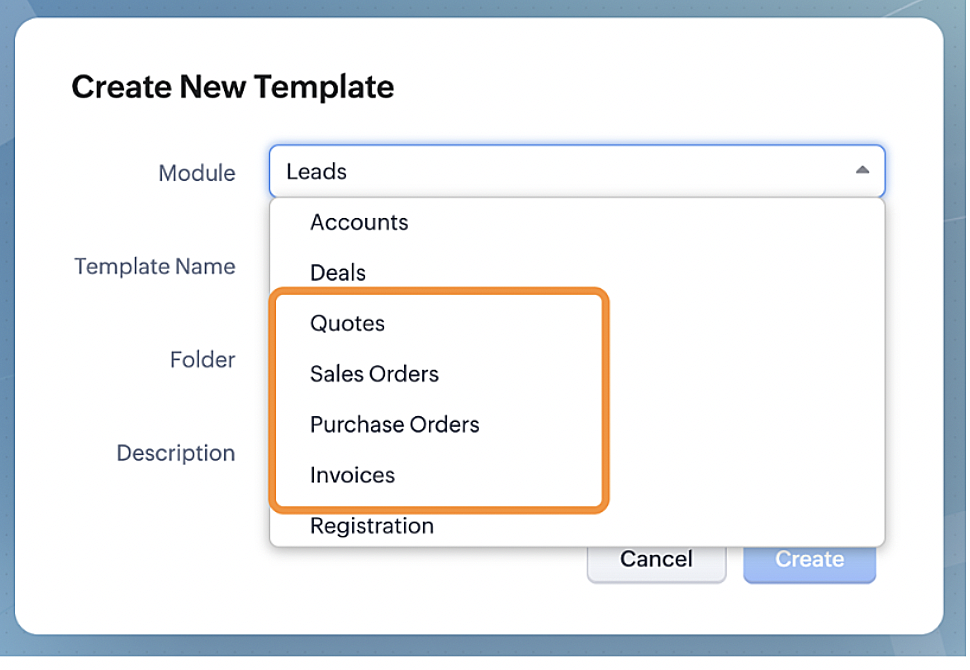


How are these templates different to the native Inventory templates?
In Zoho CRM, users can already create templates for purchase orders, sales orders, quotes, and invoices. However, they have the following limitations:
  • Restricted formatting abilities: Although you can have merge fields and other aspects associated with your templates, an official document should look formal and on par with your company's legal guidelines. With Mail Merge, you can achieve this level of standardized formatting.
  • Distribution: After users created their inventory templates in Zoho CRM, to send them to customers they had to do so from within individual records and send them one by one. Now that Mail Merge extends to inventory/accounting modules, users can perform mass merges and distribute documents like bills of materials, invoices, and more with ease.


Enhancement 2: Import PDF files to merge
Encrypted master information always holds a special value for businesses. For one, it's locked from edits and updates, and for another, it's secure. Companies don't want their terms to be altered, do they?
That's why, along with the existing import template formats—ZDOC, DOCX, and DOC—we're introducing the ability to import PDF files as Mail Merge templates.
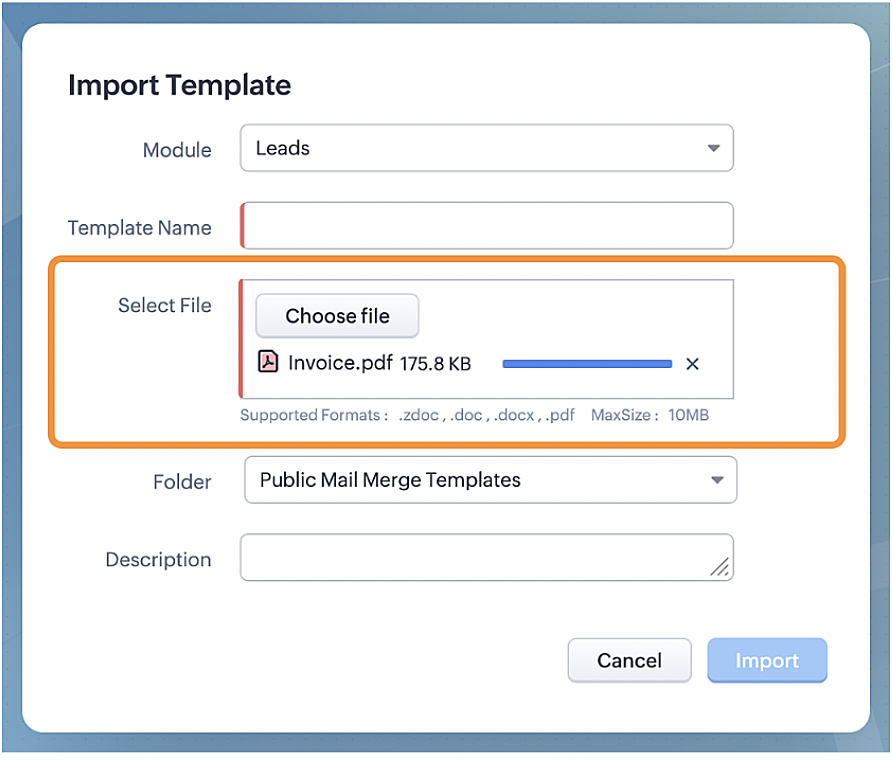


The maximum size of the PDF file is 10 MB, and upon importing, users can add fields from modules and start distributing the PDF file itself from the Writer app.
This enhancement is available for all users in all DCs. Click here to read more about importing PDF files as merge templates.


Enhancement 3: Add image fields to the merge templates
Company logos, property images, and design prototypes are assets that are stored in Zoho CRM image fields. When added to a document, these images provide more context and add value to the transaction.
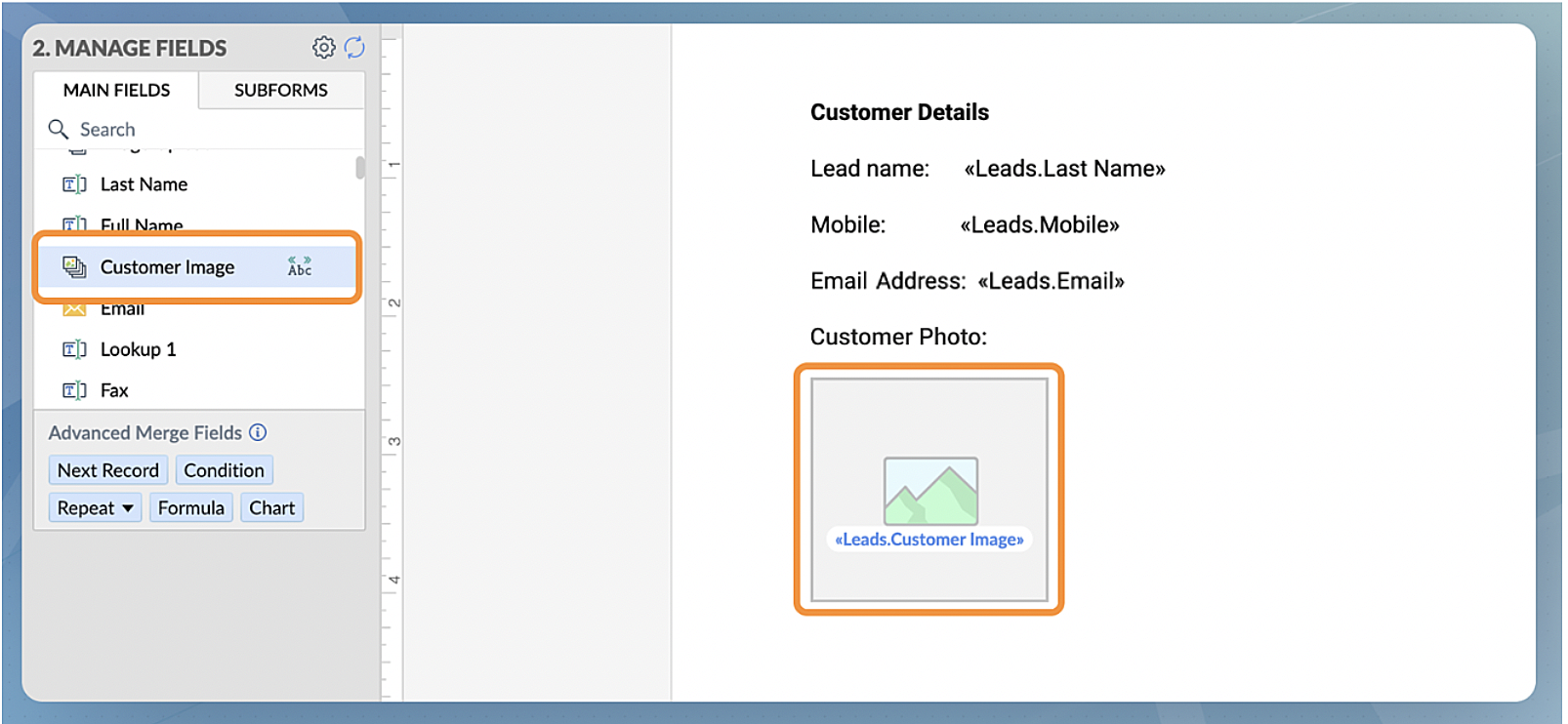
Previously, users couldn't directly import such images into their documents. With this enhancement, we're providing an image field along with the list of merge fields available in a merge template. All one has to do is drag the image field into the template as a placeholder, and when the overall merge happens, the image from the record will automatically be associated with the document. With Zoho Writer's formatting abilities, you can manage the size and span of the image added. 


That's all for today's announcement. We'll be back with more important improvements to Mail Merge in the coming days. Should you have feedback/questions, feel free to leave a comment—our experts will be happy to take them.

Thanks and have a good one!

    • Recent Topics

    • Multiple header in the quote table???

      Hello, Is it possible in Zoho CRM to add multiple headers or sections within the Quote product table, so that when the quote is printed it shows separate sections (for example “Products” and “Services”)? To clarify, I’m asking because: This does not appear
    • Zoho CRM Workflow Automation: Activate & Deactivate Workflows Using API

      Zoho has now enabled: ✅ Activate / Deactivate workflows using API ✅ Schedule workflow activation & deactivation This is extremely useful for real-world automation use cases 💡 🧩 My Use Case I created a scheduled automation that: ☀️ Activates workflows
    • {Action Required} Re-authenticate your Google Accounts to Continue Data Sync

      Hello Users! To align with Google’s latest updates on how apps access files in Google Drive, we’ve enhanced our integration to comply with the updated security and privacy standards, ensuring safer and more reliable access to your data. With this update,
    • Function #53: Transaction Level Profitability for Invoices

      Hello everyone, and welcome back to our series! We have previously provided custom functions for calculating the profitability of a quote and a sales order. There may be instances where the invoice may differ from its corresponding quote or sales order.
    • Project-Based Inventory Consumption and Proforma Invoice in Zoho ERP

      While working with customers across different industries, we have identified a few functional questions and gaps that commonly arise—especially for project-based and service-oriented businesses. Many organizations, such as those in shipping, construction,
    • Power up your Kiosk Studio with Real-Time Data Capture, Client Scripts & More!

      Hello Everyone, We’re thrilled to announce a powerful set of enhancements to Kiosk Studio in Zoho CRM. These new updates give you more flexibility, faster record handling, and real-time data capture, making your Kiosk flows smarter and more efficient
    • Release Notes | January 2026

      We have rolled out a set of powerful new enhancements across Zoho Vertical Studio that bring several long-awaited capabilities to your applications. These updates focus on deeper customization, smarter automation, better reporting, and improved usability
    • [Free Webinar] Zoho RPA - OCR, PDF Automation, & More

      Hello Everyone! Greetings from the Zoho RPA Training Team! We’re excited to invite you to our upcoming webinar on the latest release updates for Zoho RPA, where we’ll unveil powerful new capabilities designed to make your automation journey smarter, faster,
    • Zobot Execution Logs & Run History (Similar to Zoho Flow)

      Dear Zoho SalesIQ Team, We would like to request an enhancement for Zoho SalesIQ Zobot: adding an execution log / run history, similar to what already exists in Zoho Flow. Reference: Zoho Flow In Zoho Flow, every execution is recorded in the History tab,
    • Capture Last check-in date & days since

      I have two custom fields on my Account form, these are "Date of Last Check-In" and "Days Since Last Contact" Using a custom function how can I pull the date from the last check-in and display it in the field "Date of Last Check-In"? and then also display the number of days since last check-in in the "Days SInce Last Contact" field? I tried following a couple of examples but got myself into a bit of a muddle!
    • Global Search Settings

      I'd love a way to remove some modules from being included in the global search. This would allow use to provide a better user experience, limiting the global search to only those modules that are regularly used removing any models used for background
    • Card Location in Zobot

      Hello, when using the “Location” card in a codeless builder Zobot, the behavior in WhatsApp is inconsistent. When asking the user to share their location, they can type a message, which will return the message “Sorry, the entered location is invalid.
    • Automation Series: Auto-create Dependent Task on Status Change

      In Zoho Projects, you can automatically create and assign a dependent task when a task’s status is updated. This helps teams stay aligned, ensures reviews happen on time, and reduces manual effort. In this post, we’ll walk through an easy setup using
    • Zoho CRM || Unable to Bulk Assignment of Territories for Contacts

      Dear Zoho CRM Support Team, I hope this email finds you well. We recently performed a bulk upload of Contacts into Zoho CRM using the official sample Excel template downloaded from the CRM. The upload itself was completed successfully; however, we encountered
    • Languages in Zobot

      Hello, I have found a list of supported languages for the Zobot. The information specifies the languages are supported in the following 3 features: SalesIQ supports 34 different languages in the following features. Resources (Articles, FAQs, Small Talks)
    • Sync your Products Module for better context.

      In customer support, context is everything. The integration between Zoho Desk and Zoho CRM helps your sales and support teams function as one, delivering better customer experiences. With the latest update to this integration, you can now sync the Product module in your Zoho CRM with your Zoho Desk portal. This feature enables products from Zoho CRM to reflect in the "product" field in Zoho Desk. This can save your support team valuable time and effort.    Some things to note when syncing the two:
    • Composite items inside of composite items; bill of materials needed

      Hi Zoho and Everyone, I am evaluating whether Zoho Inventory will work for my small business. I grow and harvest herbs and spices but also get from wholesalers. I use all these items to make herbal teas, but also sell them as individual items on my Shopify store and Etsy. I discovered the composite item bundling and am wondering if I could get some assistance since there is no bill of materials: Our herbal company's best selling tea is a sleepytime tea. Sleepytime Tea can be purchased in three weights
    • Action required: Reauthorizing your Google account for automatic cloud backup to Google Drive

      This is applicable to users who have already configured automatic cloud backup to Google Drive. Hi there! Google has mandated reauthorization of all preconfigured third-party integrations to ensure only the necessary scopes are shared as an improved security
    • Zoho CRM Layouts

      I have customised all our modules, Leads, Contacts and deals, and within them, I have created lots of different layouts depending on the type of Lead or contact, for example. Since the new Zoho UI came out, they have all disappeared. I have gone into
    • Zoho Desk API - Send Reply to CUSTOMERPORTAL

      Hello! I'll try to send a reply to Customer Portal, But the response is 500 (INTERNAL_SERVER_ERROR in service response). {"Error":"{\"errorCode\":\"INTERNAL_SERVER_ERROR\",\"message\":\"An internal server error occurred while performing this operation.\"}"}
    • Zoho CRM for Everyone's NextGen UI Gets an Upgrade

      Hello Everyone We've made improvements to Zoho CRM for Everyone's Nextgen UI. These changes are the result of valuable feedback from you where we’ve focused on improving usability, providing wider screen space, and making navigation smoother so everything
    • WhatsApp IM in Zoho Desk always routes to Admin instead of assigned agent

      Hello Zoho Experts, I connected WhatsApp IM to my Zoho Desk account. I only assigned my Customer Service (CS) agent to the WhatsApp channel, and I did NOT include Admin in this channel. However, every new WhatsApp conversation automatically gets assigned
    • hide resolution from help centre

      to my surprise, i just found out that the resolution text is public in the helpcenter, even if 'notify customer' is off. is there a workaround to that? how do others deal with this? How zoho support does this and I don't think its used by Zoho in the first place. the resolution is meant to be private, not public
    • Multiple Cover Letters

      We are using the staffing firm edition of Recruit and we have noticed that candidates cannot add more than one cover letter. This is a problem as they might be applying for multiple jobs on our career site and when we submit their application to a client,
    • Zoho Analytics + Facebook Ads: Performance Alerts for Active Campaigns

      Is it possible with integration of Zoho Analytics with Facebook Ads and set up alerts or notifications for active campaigns when performance drops? For example, triggering a notification if CTR goes below a defined threshold or if other key metrics (like
    • Multiple upload field CRM

      I desperately need the functionality to add more than one upload field to web to contacts form. How can I do this?
    • Workdrive Oauth2 Token Isn't Refreshing

      I have set up oauth for a bunch of zoho apis and have never had a problem with oauth. With workdrive i am using the exact same template i usually use for the other zoho apps and it is not working. All requests will work for the first hour then stops so
    • Sort by age

      It would be very helpful if there was a way to sort by age in the Age column. Please add this function if possible. Thanks!
    • Lookup Field Option Not Available in Customization

      Hello, I am trying to customize different modules (e.g., Work Orders, Systems, and others), but I am unable to find the Lookup field option in the layout customization. When I go to: Setup → Customization → Modules and Fields → Add Field The Lookup field
    • Snapchat

      Are there any plans to add Snapchat to Zoho Social or is there any API that we can use to integrate into Zoho.
    • Scheduled sending of a poll and its results

      Is there a way to schedule sending a poll to all my users and have the results sent separately to the team?
    • Canvas View bug

      I would like to report a bug. When clone a canvas view from an existing canvas view, if the original canvas view have canvas button with client script. Then the new create canvas view will have canvas button, it is make sense. But when I try to delete
    • How can I import OLM to Yandex Mail easily?

      For migrating Mac Outlook OLM data to Yandex Mail efficiently, the Aryson OLM Converter is a reliable professional tool that ensures complete data integrity throughout the process. Unlike manual methods, which can risk inconsistent formatting or missing
    • Zoho recruit's blueprint configuration is not functioning as mapped

      Current Status: Zoho Blueprint is not functioning as configured. Issue: We are moving a Candidate status in Zoho Recruit "for active file" but we encountered: "Status cannot be changed for records involved in Blueprint." This happens to various client
    • CRM x WorkDrive: We're rolling out the WorkDrive-powered file storage experience for existing users

      Release plan: Gradual rollout to customers without file storage add-ons, in this order: 1. Standalone CRM 2. CRM Plus and Zoho One DCs: All | Editions: All Available now for: - Standalone CRM accounts in Free and Standard editions without file storage
    • validation rules doesn't work in Blueprint when it is validated using function?

      I have tried to create a validation rule in the deal module. it works if I try to create a deal manually or if I try to update the empty field inside a deal. but when I try to update the field via the blueprint mandatory field, it seems the validation
    • Bulk Delete Attachments

      Is there a way to bulk delete attachments on the form entries? our storage is full and deleting files one by one is pain taking process.
    • Integrating Zoho Suite and apps more with Linux

      I just got introduced with Zoho just couple of months ago, and I've already planned to contribute to it, even though it's not an open-source software. Still I have found it's potential to beat the tech giants and still being respective towards data privacy
    • How do I edit the Calendar Invite notifications for Interviews in Recruit?

      I'm setting up the Zoho Recruit Interview Calendar system but there's some notifications I don't have any control over. I've turned off all Workflows and Automations related to the Calendar Scheduling and it seems that it's the notification that is sent
    • Store Submitted Forms as PDF

      Hi there, Is there a method to store Form submissions as a PDF in workdrive for archival? I set the form to email the submission to the user and an internal inbox but I'd really love to store the final form as PDF in workdrive automatically. I can't seem
    • Next Page