What's New in Zoho Expense: July 2023
Hello users,
We're delighted to present our monthly roundup of updates to help you stay informed and experience hassle-free expense management with Zoho Expense. From real-time budget insights to effective date configuration for policy rules and per diem rates, we've tailored our features to meet your unique business needs. Let's dive right in and read everything about them.
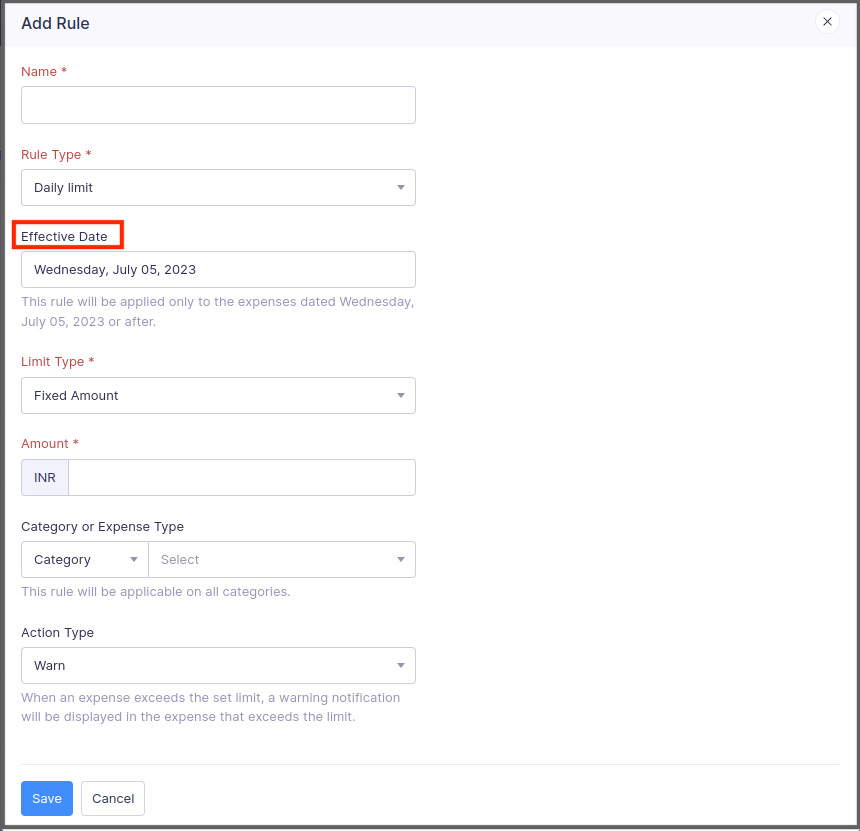
Effective date for policy rules
Now, you can add the date from which the rules you configure in policies can be made effective. Once you set up an effective date for a rule, the rule will be applied only to the expenses that are dated on or after the effective date. If you don't set up an effective date, the rules will be applied to all the expenses.
To add an effective date for a rule: Go to Admin View > Settings > Policies. Select a policy and navigate to the Rules tab. Click a rule, enter the effective date, and click Save.
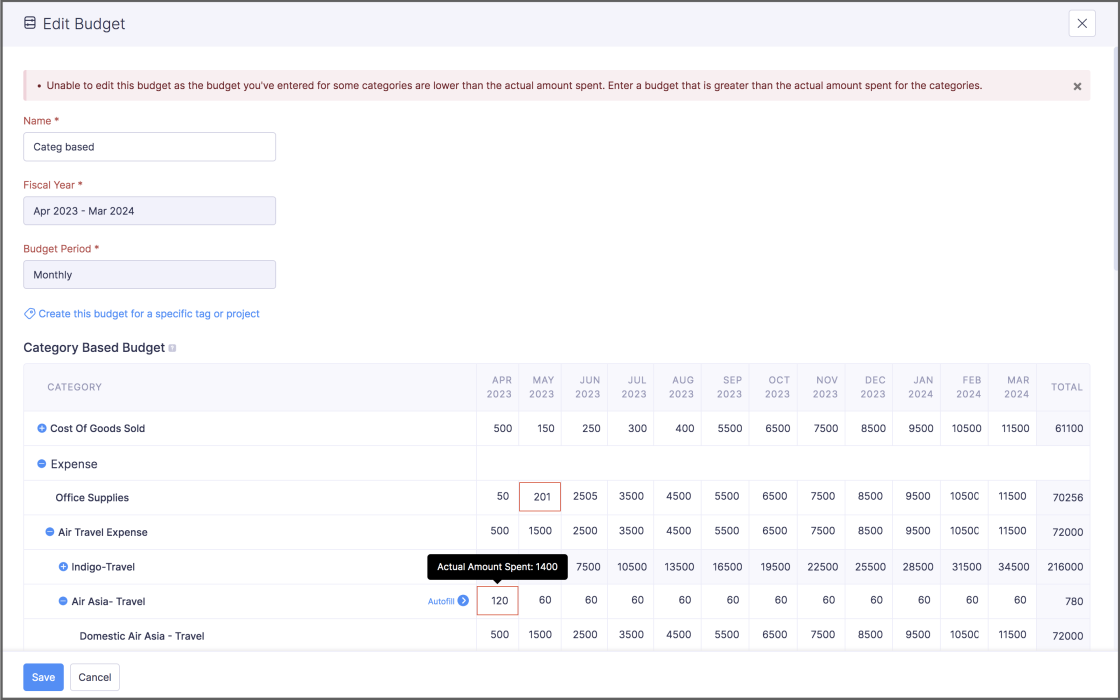
View actual amounts spent while editing budgets - Early access
While editing a budget, if you enter a budget lesser than the actual amount that was spent by the users in that category or expense type, Zoho Expense will display the actual amount spent by the users and will restrict you from saving the budget. This real-time visibility lets you make data-driven decisions and allocate funds strategically. This feature is still in early access. Contact support@zohoexpense.com to enable it for your organization.
To do this: Go to Admin View > Budgets. Click a budget and click the Edit icon in the top-right corner. You can view the actual amount spent if you enter a budget greater than the actual amount spent.
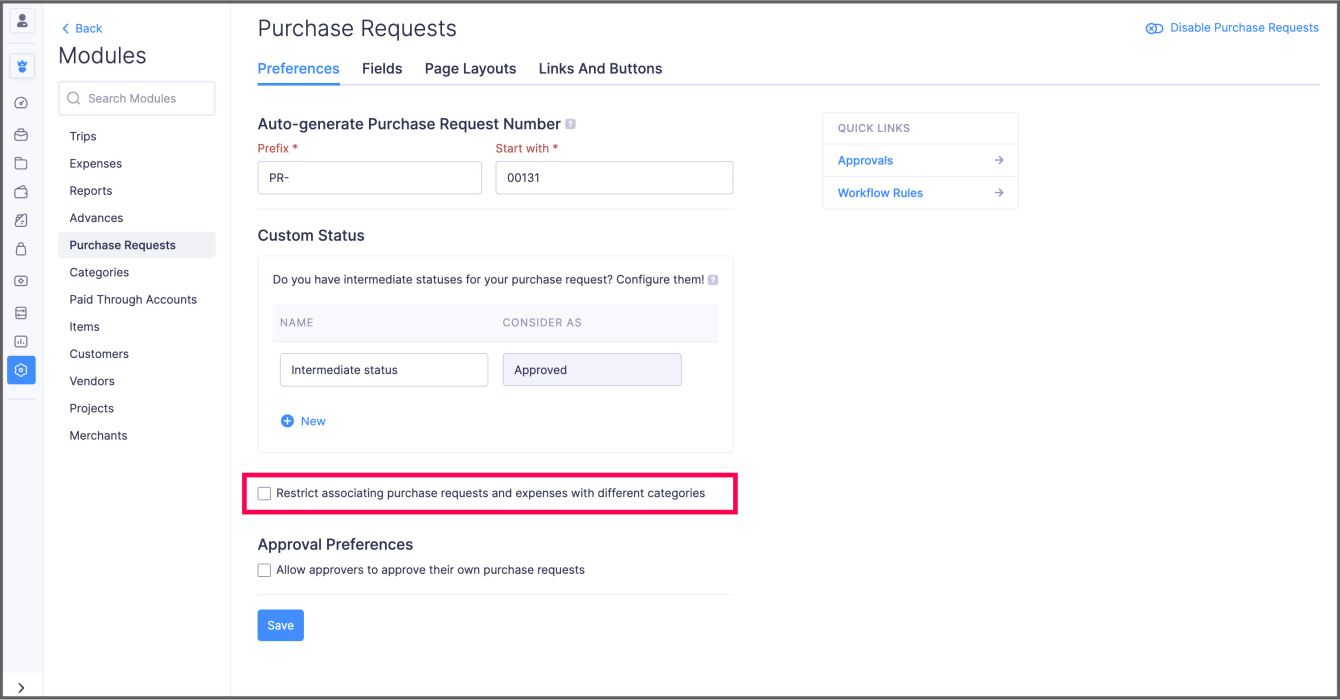
New preference for purchase request and expense association
We've introduced a new preference for Purchase Requests, wherein you can restrict users from creating an expense with a category different from that of the associated purchase request item. For instance, if the category of the expense is "Meals and Entertainment," then the purchase request item you're associating with the expense should also have "Meals and Entertainment" as the category. In this way, you can ensure your users associate appropriate purchase request items with their expenses.
To enable this preference: Go to Admin View > Settings > Modules > Purchase Requests. Enable the option and click Save.
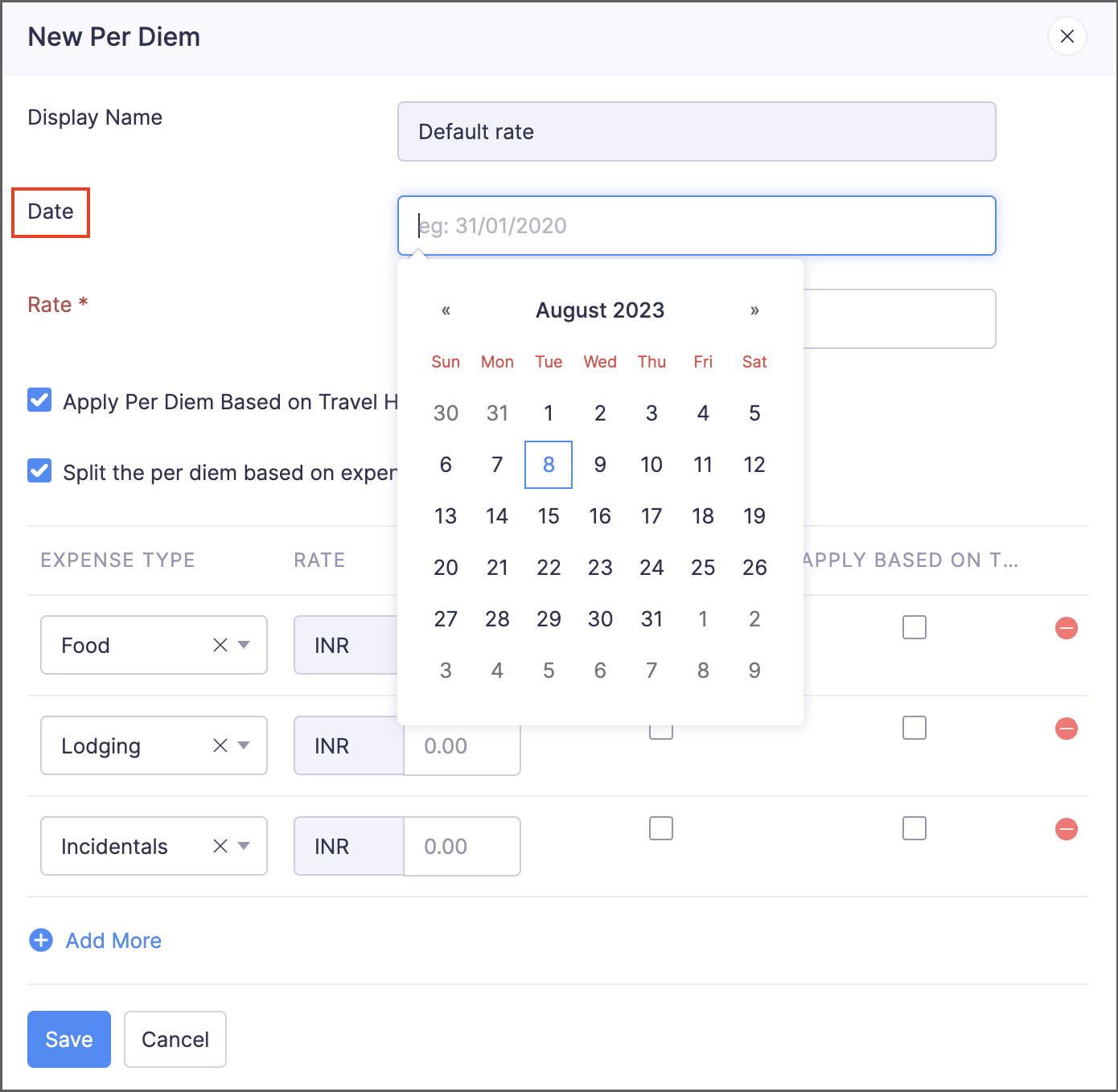
Effective date for per diem default rates
In addition to configuring effective dates for per diem rates you've configured for each location, you can now configure effective dates for default per diem rates, as well. If you have multiple default rates, this feature will come in handy by applying the default rate based on its effective date.
To add an effective date for a default rate: Go to Admin View > Settings > Policies. Select a policy and navigate to the Per Diem tab. Click the More icon in the right corner of a default rate and select Edit. Enter the date and click Save.
View expired travel documents inside trips
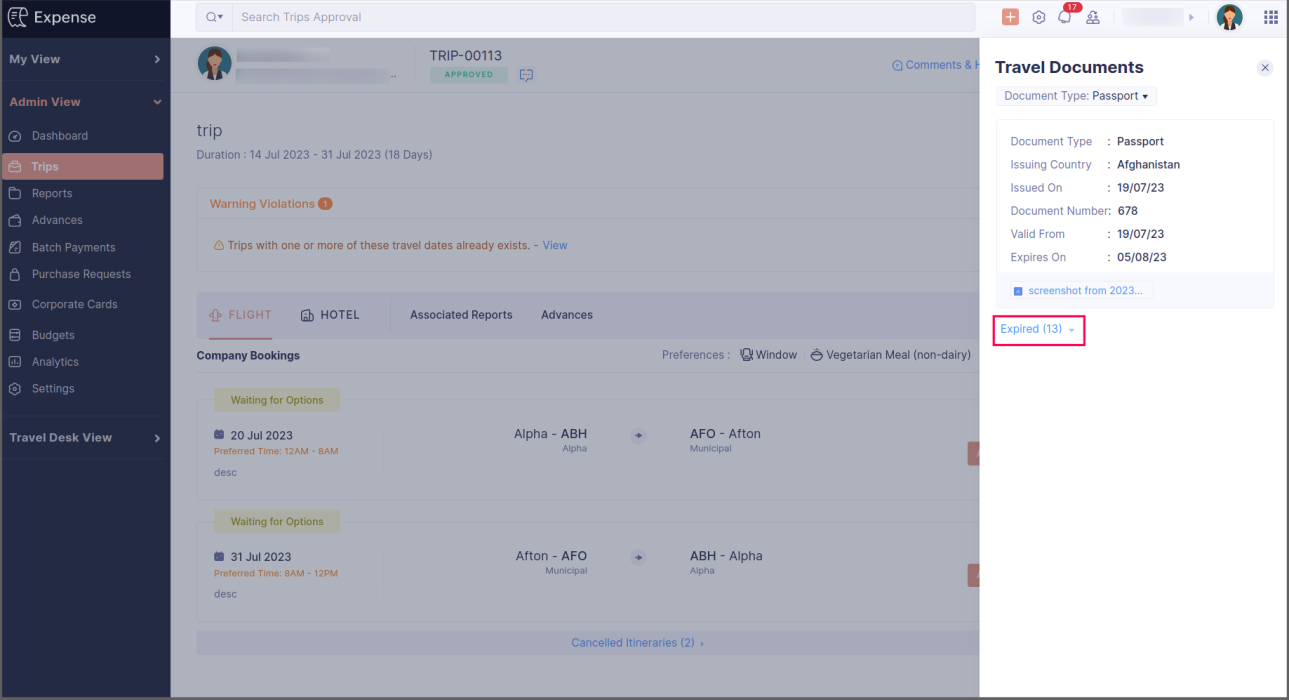
Currently, admins can view an employee's travel documents directly within the employee's trip requests in the admin view. They can also filter documents based on their type and view them inside the trip. In addition to displaying all travel documents, to ensure full compliance, we've now introduced a dedicated section to display expired travel documents. This will keep admins informed about the validity of each employee's travel documentation.
To view the expired travel documents: Go to Admin View > Trips. Click the trip for which you want to view the documents and click Travel Documents on the right side of the screen. Click Expired to view the expired documents.
Android app updates
- Users can now autoscan receipts from the report details screen to create new expenses that will be added to the report.
- Users can now switch to the free plan using the Android app.
iOS app updates
- You can now request free-of-cost items in your purchase requests using the iOS app.
We hope you're excited to try these new features. Let us know what you think in the comments below. Be sure to keep an eye out for more updates and enhancements in the coming months. If you have any questions, please contact support@zohoexpense.com.
Regards,
Zoho Expense
Topic Participants
Vidhya G S
Sticky Posts
Zoho Finance Workshop 2023 is coming to the USA. Meet the experts, get exclusive training on Zoho Finance apps and more.
Hello all, We'd like to invite you to our biggest Zoho Finance workshop in the United States. After a brief break, we are excited to be back. This year, we're bringing together our customers and community members for two days of curated hands-on sessions,
Recent Topics
Resend Client Portal Invitation + View Email Delivery Status
Hi Zoho Team, We hope you are doing well. We would like to request two important enhancements related to the Zoho Creator Client Portal invitation process. At the moment, when we add a user to the Client Portal, Zoho Creator automatically sends an invitationGet user last login
1. Is there a way to programmatically get the last user login to trigger certain workflows? 2. Is there a way to programmatically access the custom fields on a user's account?Seeking Zoho Creator Expert (Delivery Management App / Logistics Ops) — Built & Deployed Before
Hi everyone, We’re building a Delivery Management App (focused on delivery operations for now) using Zoho Creator. We’re looking for a Zoho Creator expert who has already developed and deployed a similar delivery/workflow system and can assist us withZoho Expense Import Reports Won't Work Because Default Accounts Already Exist
Im trying to import reports from another Zoho expense account to mine and im getting errors that won't allow the import to happen The account name that you've entered 'Ground Transportation' already exists. Enter another name for the account and try again.zAdding Multiple Files to a Zoho Vault Entry
There is a old blog post talking about adding multiple file attachments to one Zoho Vault Secret: https://www.zoho.com/blog/vault/introducing-new-features-in-zoho-vault-powerful-password-sharing-wider-storing.html Is that still possible, I can see howFNB South Africa Bank Feed
I should've thought this wouldn't work. As suspect, Zoho claims to be able to pull bank feeds from First National Bank (South Africa), but fails everytime. I suppose Xero (or even Sage One) is the way to go? If they (miraculously) get it to work again,Dropshipping Address - Does Not Show on Invoice Correctly
When a dropshipping address is used for a customer, the correct ship-to address does not seem to show on the Invoice. It shows correctly on the Sales Order, Shipment Order, and Package, just not the Invoice. This is a problem, because the company beingZoho unreliable
Some mails are delivered, others not. How can I trust Zoho any more? Some friends get my e-mail, some don't. Same with receiving e-mails: Some I get, some not. If I use Google, everything works well. But Zoho?!!! How to solve this problem? I already reported this problem before, but didn't get any reply. Thanks, Kimthe custom domain forwards by default to the old career site / how to switch it off??
dear friends, how to switch off the old version of the career site?? The set up custom domain forwards directly to the old site, so that I cant publish it... Any ideas? Thank you! KR, VictoriaPreserve Ticket Issue Mapping When Migrating from Jira to Zoho Projects
Hello Zoho Projects Team, We hope you are doing well. We are currently exploring a full migration from Jira to Zoho Projects, and we identified a critical limitation during the migration process involving Zoho Desk integration. Current Situation: We useRecording Shopify/Amazon fees in Zoho Books - Zoho Inventory
We are currently flushing out the connections between Shopify/Amazon and Zoho Inventory. For other users of Zoho Books - Zoho Inventory, where and at what point do you record the merchant fees associated with theses channels? I have gotten mixed responsesPre-fill webforms in Recruit
I don't want to use the career site portal (as I have my own already), but I would like to direct users to the application forms for each role, from my website job pages. Is there a way to pre-fill fields in Recruit application forms, so that I only haveFunction #8: Add additional charges to invoices
Here goes one of the highly sought-after custom functions in Zoho Books. If you find yourself needing to apply additional charges to customers on their invoices (say credit card surcharges, or fuel charges applicable to customers from a certain region,Taxes Payable Adjustment
I am from Canada and I need to make an adjustment to my Taxes Payable (HST) account. Basically I need to take a portion of the amount within Taxes Payable and expense that portion to another account. The adjusting entry would like like the following:ASAP Widget Not showing "My Tickets"ed
Hello Team, I have created a ZOHO ASAP Widget and embedded to my portal app.clearvuiq.com , widget renders ok and I can open tickets from widget. However I want my opened tickets to be visible in the widget. How can I achieve that?Bug Causing Major Sync & SO Access Failures in Zoho POS
We are experiencing critical and recurring issues in Zoho POS that all trace back to role-permission handling defects in the latest POS app version. These issues directly affect syncing, login ability, and Sales Order access for role-restricted usersHow to view CRM Sales Orders in Desk
What's the usual way to view all CRM sales orders linked to a contact, when viewing a ticket in Desk? I don't want to have to open a new tab to see the order in CRM. And the Desk CRM sidebar doesn't seem to be configurable. Would I have to use an extensionKaizen #219: Actions API - Webhooks APIs - Part 1
Hello all!! Welcome back to a fresh Kaizen week. In the previous weeks, we covered Workflow Rules APIs, Actions APIs - Email Notification APIs, Tasks Update API, and Field Update API. This week, we will continue with another Actions API - Webhooks APIPricing Strategies: #3 Services never Stop with just Plans
"Hey, while you're here, could you also take a look at the vegetable patch?" Aaron hears that line almost every week. He runs a small gardening service, the kind where customers subscribe to a simple monthly plan that includes basic maintenance, mowing,Cropping Photos for Zoho Sites
Hi, I'm wondering if there is a built in crop tool for zoho sites for my photos so I can crop them and see what the crop looks like on the site?bulk edit records and run internal logic
hi there is few logics in manner "it this than that" logics work well when i edit entry openning it one by one (via workflow "on add/edit - on success" , for custom field "on update/on user input") but when i try bulk edit records - logic does not work. how can i turn on logic to work as programmed - for mass editing records via bulk edit?Possible for first Signer of Sign Form to specify the next signer in the sequence
We have many use cases where multiple signers need sign the same document. We'd love to be able to use sign forms, where the a signer who uses the Sign Form link can specify the name and email address for the next person in the sequence.BUG: Can't copy-paste data outside Sheet
Currently I can't paste data copied from inside any of my Zoho Sheet files to any other app. Copy-paste works inside the sheet It does NOT work between two different sheets These sheets are built from automation templates Everything works fine if I createZoho CRM Community Digest - November 2025 | Part 1
Hello Everyone! Here’s what came through in the first half of November: new updates and a few helpful community discussions with real, notable solutions. Product Updates: Android App Update: Inctroducing Swipe Actions You can now swipe left or right onUpload own Background Image and set Camera to 16:9
Hi, in all known online meeting tools, I can set up a background image reflecting our corporate design. This doesn't work in Cliq. Additionally, Cliq detects our cameras as 4:3, showing black bars on the right and left sides during the meeting. WhereTruesync for Linux
Is Truesync available on linux ?Hidding/excluding specific picklist options from filter
Hi. Is it possible to hide/exclude specific picklist options from this filter? I don't want them to be shown when someone tries to filter in the leads moduleSubforms to Capture Multi-Row Data in Job Sheets
Subforms transform your job sheets from simple checklists to powerful, data-rich forms. In field service work — whether maintenance, inspection, installation, or repair — a single job can involve multiple repeatable entries: readings, parts used, activitiesAdd "Fetch Composite Item" Action for Inventory
I want to make a Flow that uses information returned in the GET call for Composite Items, and it's not currently available in Zoho Flow. Please consider adding this functionality.Adress Labels for sending of the oder und barcode
We want to print with my address labels to stick on the order of the ware can. there are these options?printing individual labels - Dymo LabelWriter
I am trying to print individual labels to my Dymo LabelWriter - has anyone done this? Latest Update (December 2025): The Canvas Print View is now available! We encourage you all to try it out and share your feedback with us. Learn more here: Zoho CRMZoho Creator for Agriculture
Greetings, I am starting to work on Zoho Creator specifically for the agricultural field, any recommendations, tips or ideas that might be helpful ? Also, if you are interested by any means in working on such project, kindly contact me. The project isCustom Print Layout
I would like to create a custom print layout of a Lead or Contact. Is there a way to do that? What I mean is that if I'm viewing a specific lead or contact I'd like to be able to print or export that lead/contact and only print and/or export certain information.Print View
Nothing happens when I'm in a module , ie; Contacts, and I hit the Print View Button. Even when it does come up and say "loading", nothing loadsGet Holiday ready with Zoho Mail's Offline mode
With the holiday season right around the corner, this is the perfect time to get ready to unplug, relax, and enjoy a well-deserved break. In addition to preparing yourself, you can also make sure your organization members are set for their time away fromSolution to Import PST File into Office 365.
MailsDaddy OST to Office 365 Migration Tool is an outstanding solution to recover OST files and migrate them into Office 365 without any hassle. Using this software users can multiple OST files into Office 365 with complete data security. It offers usersZoho CRM Kiosk issues
Firstly this is for a system on the AU servers if that makes a difference. Issues are as follows (For Kiosk): 1. Re-ordering fields in the screen builder is broken. The fields seem to be re-ordering themselves, unless you order everything by moving theEmail Template Edits Not Saving
I can make an edit, click save, and see the blue bar annimation at the top, but the edits don't actually save. Important, because my email templates are now broken and clients are receiving bad emails. Tried on Chrome, Firefox and IE.Default Ticket View - Table?
Guys, We mostly use the table view to queue tickets. Maybe I am missing it - but how can I set that view as 'default" for all our agents? Thanks JVCan I have different users see different pick list values for Potential Stage?
We have some users focusing on new business and others focusing on existing business, and they follow different sales processes/cycles, so we would like them to see different pick list values for Stage (eventually leading up to Closed Won/Lost in both cases). And just to keep it interesting - some of these users will of course do a combination, so would need to see one pick list for their New business potentials and a different pick list for their Existing business ones. Salesforce does thisNext Page