Hello all!!
Welcome back to a fresh Kaizen week.
This week, we will continue with another Actions API -
Webhooks API in Zoho CRM.
Webhooks in Zoho CRM
A webhook allows Zoho CRM to send real-time information to another application the moment something important happens. Webhooks let CRM push data instantly to an external URL whenever the workflow condition is met.
Webhooks do not notify on every record event by default. They trigger only when specific automations, such as a Workflow Rule you configure, are executed. This helps for specific real-time automation needs, such as sending high-value leads to an external validation service.
Use case
Zylker, an IT solutions provider, uses Zoho CRM to manage all incoming leads. But not every new lead is ready for the Sales team right away. Not all leads need immediate follow-ups. For leads with a high Profit Score (80+), it usually means strong buying intent, but they may contain fake information.
Why does Zylker use Zoho CRM and send these leads to an external validation application?
Before Sales reaches out, Zylker wants to make sure these high-value leads have valid information. While CRM keeps the lead data organized, a specialized third-party validation systems check any fraudulent activities and confirm whether the email, phone number, or other details are real.
To do this quickly, Zylker uses Webhooks in Zoho CRM. The moment a lead crosses the 80+ score, Zoho CRM automatically sends the lead’s data to Zylker’s external validation system. This lets Zylker verify the lead in real time and send back a clean, accurate, sales-ready profile for the Sales team to follow up on.
From here, we will explain every part of Webhooks by showing how it looks in the Zoho CRM UI and how to do the same using the API. Each step will be shown side-by-side, so you can clearly see how the UI setup translates into the API request.
Configuring Webhooks for Zylker’s Use Case - UI Method
- Go to Setup
- Navigate to Automation
- Choose Actions -> Webhooks
- Click Configure Webhook
You will see the window shown below.
Webhook - UI view
The following sections explain what each field means in three parts:
- Basic fields to configure Webhook.
- Configuring Headers
- Configuring Body
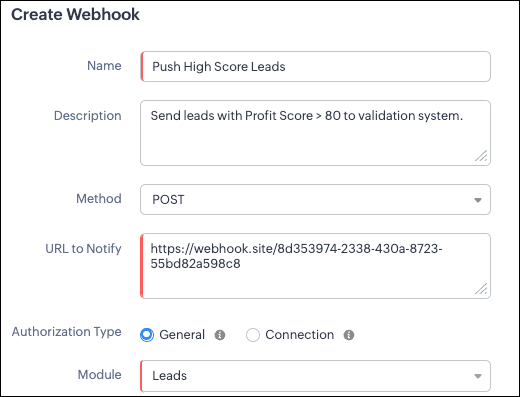
Filling the basic Webhook details via UI
Filling the basic Webhook details via Create Webhook API
Request URL: {{api-domain}}/crm/v8/settings/automation/webhooks
Request Method: POST
Input JSON
{ "webhooks": [ { "name": "Push High Score Leads", "description": "Send leads with Profit Score > 80 to validation system.", "module": { "api_name": "Leads", "id": "5725767000000002175" }, "authentication": { "type": "general" }, "http_method": "POST" } ] }
|
Keys explanation
- name (mandatory): Name of your webhook.
- description: Add a short note about what this webhook does.
- module (mandatory): Select the module from where the external application listens the changes. In our case, select Leads module to push high-score leads.
- url (mandatory): Specify the external endpoint where CRM will send the data. This lets the external application see what CRM sends.
- Note: In this post, we have used an endpoint from Webhook.site
- authentication (mandatory): Specify authentication type for the webhook endpoint.
- Possible types:
- general: The receiving system does not require OAuth. You can pass OAuth tokens manually in headers.
- connections:
- OAuth-based integrations: Systems that use Zoho’s Connections.
- For our Zylker use case, we select General.
Note: In
Zoho CRM API V8, Webhooks currently support only General authentication. Connection-based authentication will be available in a future update.
- http_method (mandatory): Select a HTTP method that allows you to send structured data.
Possible values: POST, GET, PUT, DELETE
In our case, we use POST to create a new record in the external app with the necessary lead details, allowing the external system to run its validation checks.
HTTP methods and their supported parameters - Headers, Body, URL Parameters
HTTP Method | Headers | Body | URL Parameters |
POST | Module parameters Custom parameters
| Type: form-data
Module parameters Custom parameters User-defined parameters
Formats: null
Type: raw
Formats: Text, JSON, HTML, XML | Not Supported |
PUT | Module parameters Custom parameters
| Type: form-data
Module parameters Custom parameters User-defined parameters
Formats: null
Type: raw
Formats: Text, JSON, HTML, XML | Not Supported |
GET | Not Supported | Not Supported | - Module parameters
- Custom parameters
- User-defined parameters
|
DELETE | Not Supported | Not Supported | Module parameters Custom parameters User-defined parameters
|
Each HTTP method supports different parameter types. The above table shows which methods support Headers, Request Body, and URL Parameters. Detailed explanations of these parameter types are provided in the following section.
Creating a Webhook with Headers, Body, and URL Parameters
When a webhook is triggered in Zoho CRM, the data is sent to the external application as part of the HTTP request.
The data can be sent in three places:
- Headers
- Body (Form-Data or Raw)
- URL Parameters
Each part serves a different purpose.
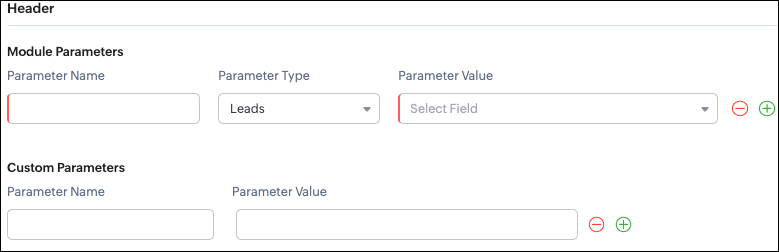
Configuring Headers
UI - Configuration

Headers allow you to send
extra information along with your webhook request. These help when the external app needs extra data like auth tokens or CRM field values.
Zoho CRM supports two types of headers:
- Module Parameters - Dynamic values from CRM fields
- Custom Parameters - Static values you define
Module Parameters - dynamic CRM data
Module parameters allow you to send values from CRM fields inside the header. These values change depending on the record that triggered the webhook.
A module parameter consists of:
- Parameter Name - A unique header key that you define. It does not have to match the CRM field API name.
- Parameter Type - Defines the source of the data you are mapping. It can come from the selected CRM module such as Leads and Contacts, lookup fields, User fields such as Lead Owner, or Organization fields.
- Parameter Value - The merge field value. Example, ${!Leads.Created_By.id}
Note: If you decide to use Headers, then you must add at least one module_parameter. Otherwise CRM will show an error.
Example:
Parameter Name | Parameter Type | Parameter Value |
Lead_Email | Leads | Email |
Annual_Revenue | Leads | Annual Revenue |
Profit_Score | Leads | Profit Score |
Created_By | Created By | User Id |
Custom Parameters - static values
Custom parameters are key-value pairs that never change.
These are useful for:
- API version
- Tags like “zylker-crm”
Name | Value |
source | zylker-crm |
version | v1 |
Request URL: {{api-domain}}/crm/v8/settings/automation/webhooks
Request Method: POST
Input JSON
{ "webhooks": [ { . . . "http_method": "POST", "headers": { "module_parameters": [ { "name": "Lead_Email", "value": "${!Leads.Email}" }, { "name": "Annual_Revenue", "value": "${!Leads.Annual_Revenue}" }, { "name": "Profit_Score", "value": "${!Leads.Profit_Score}" }, { "name": "Created_By", "value": "${!Leads.Created_By.id}" } ], "custom_parameters": [ { "name": "source", "value": "zylker-crm" }, { "name": "version", "value": "v1" } ] } } ] }
|
When should Zylker use Headers?
For the 80+ Profit Score validation use case, Zylker can include module parameters such as Lead Email, Profit Score, and Lead ID, which are helpful for fraud-detection tools.
Similarly, Zylker can include custom parameters like source=zylker-crm and api_version=v1 to help the external system identify where the webhook originated.
Configuring the Body of a Webhook - form-data & raw formats
After setting up the basic details and Headers, the next step is to configure the Body.
The Body is where the main CRM record data is sent, which is different from the Header section that only carries metadata like auth tokens or quick identifiers.
Depending on your needs, the Body can be either Form-Data or Raw. The list below shows the supported options for each format.
- Form-Data:
- Module parameter
- Custom parameter
- User-defined format.
- Raw:
- Text - plain messages
- JSON - structured API payload
- HTML - formatted messages
- XML - traditional enterprise systems
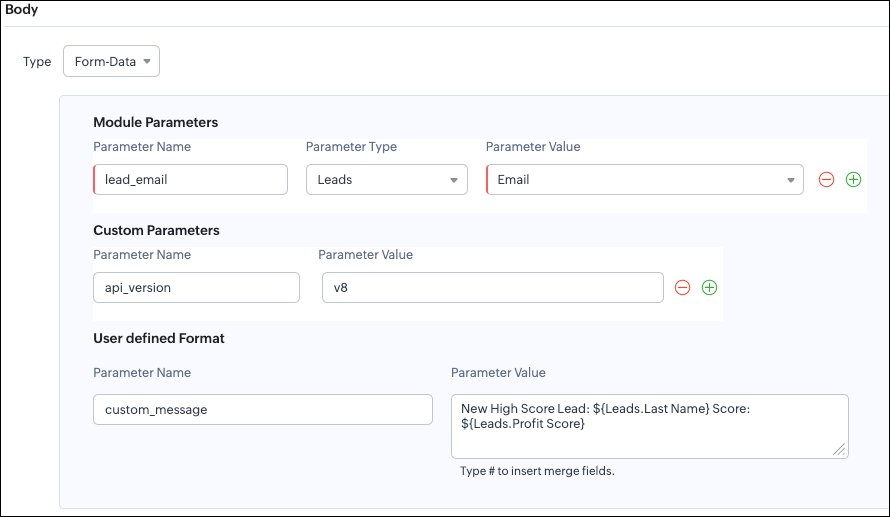
Form-Data Body: key-value
UI - Configuration
Zoho CRM lets you build Form-Data using three types of parameters:
- Module Parameters
- Custom Parameters
- User Defined Parameters
Use Form-Data when the external app expects key-value pairs - similar to how HTML forms submit data.
Note:
- Headers are for sending supporting information that helps the external system understand the request - this can include auth details, source identifiers, or key CRM fields like email or score that help with quick categorization or filtering.
Why do Module and Custom parameters appear again in Form-Data?
The same Module Parameters and Custom Parameters are available in the Body because:
- Headers - Provide supporting details such as identifiers or quick-check values. For example, Lead ID, or source tags that help the external system check and route the request.
- Body - Contains the complete lead information that the external validation system needs to process.
Although the parameter names look the same (Module, Custom), their purpose changes:
Where parameters are used | Purpose | Example |
Headers | Metadata - OAuth,tags, and context | source: zylker-crm |
Form-Data (Body) | Main record data - actual lead details sent to the app. | lead_email=patricia@zylker.com |
So Zoho CRM gives you the same structure, but used differently depending on where the data is placed.
User-Defined Parameters
User-Defined parameters let you build custom, human-readable messages or templates. This parameter is available only in the Body, not in Headers.
Parameter Name | Parameter Value |
custom_message | New high-score lead: ${Leads.First Name}${Leads.Last Name} (Score: ${Leads.Profit Score}) |
This is very helpful if your external app expects a text message, notes, or a description field.
Configuring the Body of a Webhook - form-data via Create Webhook API
Request URL: {{api-domain}}/crm/v8/settings/automation/webhooks
Request Method: POST
Input JSON
{ "webhooks": [ { . . . "body": { "form_data_content": { "module_parameters": [ { "name": "Lead_Email", "value": "${!Leads.Email}" }, { "name": "Annual_Revenue", "value": "${!Leads.Annual_Revenue}" }, { "name": "Profit_Score", "value": "${!Leads.Profit_Score}" }, { "name": "Created_By", "value": "${!Leads.Created_By.id}" } ], "custom_parameters": [ { "name": "source", "value": "zylker-crm" }, { "name": "version", "value": "v1" } ], "user_defined_parameters": { "name": "custom_message", "value": "New high-score lead: ${!Leads.First_Name}${!Leads.Last_Name} (Score: ${!Leads.Profit_Score})" } }, "type": "form_data" }, . . . } ] }
|
Raw Body - JSON / XML / HTML / Text
Zoho CRM’s Webhook Body section allows you to send data to an external application in a Raw format. This is useful when the receiving system expects structured data in the following structure.
You can choose:
- Raw + Text
- Raw + JSON
- Raw + HTML
- Raw + XML
Raw + Text:

Text format is the simplest. You can type any text and insert merge fields.
UI - Configuration
When to use Text?
- When sending a simple message.
- When the external app only expects plain text.
Configuring the Body of a Webhook - Raw - "Text" via Create Webhook API
Request URL: {{api-domain}}/crm/v8/settings/automation/webhooks
Request Method: POST
Input JSON
{ "webhooks": [ { . . . "body": { "raw_data_content": "New high score lead: ${!Leads.First_Name} ${!Leads.Last_Name}, ${!Leads.Email}, ${!Leads.Annual_Revenue}, ${!Leads.Phone}, ${!Leads.Industry}, ${!Leads.Owner}", "format": "Text", "type": "raw" }, . . . } ] }
|
Raw + JSON:
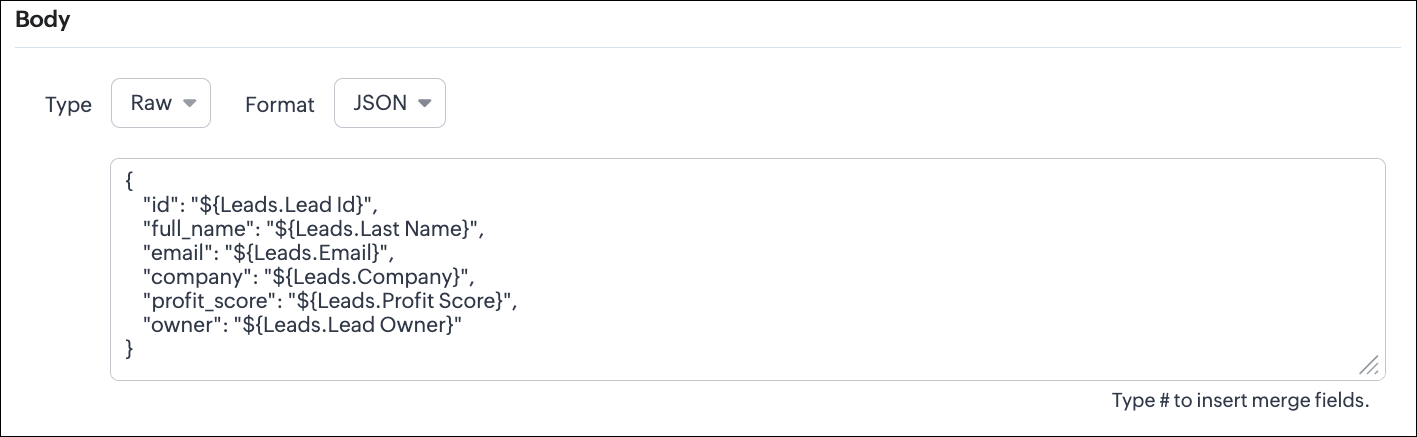
This is the most common format for APIs. Use this when the receiving system expects structured JSON data.
UI - Configuration
Configuring the Body of a Webhook - Raw - "JSON" via Create Webhook API
Request URL: {{api-domain}}/crm/v8/settings/automation/webhooks
Request Method: POST
Input JSON
{ "webhooks": [ { . . . "body": { "raw_data_content": "{\n \"id\": \"${!Leads.id}\",\n \"full_name\": \"${!Leads.Last_Name}\",\n \"email\": \"${!Leads.Email}\",\n \"company\": \"${!Leads.Company}\",\n \"profit_score\": \"${!Leads.Profit_Score}\",\n \"owner\": \"${!Leads.Owner}\"\n}", "format": "JSON", "type": "raw" }, . . . } ] }
|
When to use JSON?
- When the external system expects structured data
- Easier validation
Raw + HTML:
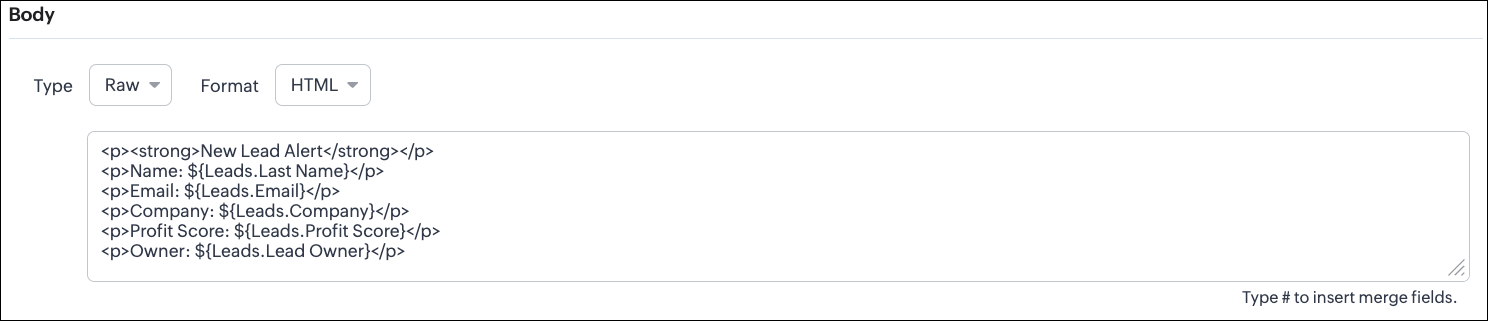
HTML format is useful for sending stylized messages or formatted content.
UI - Configuration
Configuring the Body of a Webhook - Raw - "HTML" via Create Webhook API
Request URL: {{api-domain}}/crm/v8/settings/automation/webhooks
Request Method: POST
Input JSON
{ "webhooks": [ { . . . "body": { "raw_data_content": "<p><strong>New Lead Alert</strong></p>\n<p>Name: ${!Leads.Last_Name}</p>\n<p>Email: ${!Leads.Email}</p>\n<p>Company: ${!Leads.Company}</p>\n<p>Profit Score: ${!Leads.Profit_Score}</p>\n<p>Owner: ${!Leads.Owner}</p>", "format": "HTML", "type": "raw" }, . . . } ] }
|
When to use HTML?
- If the external system displays formatted output
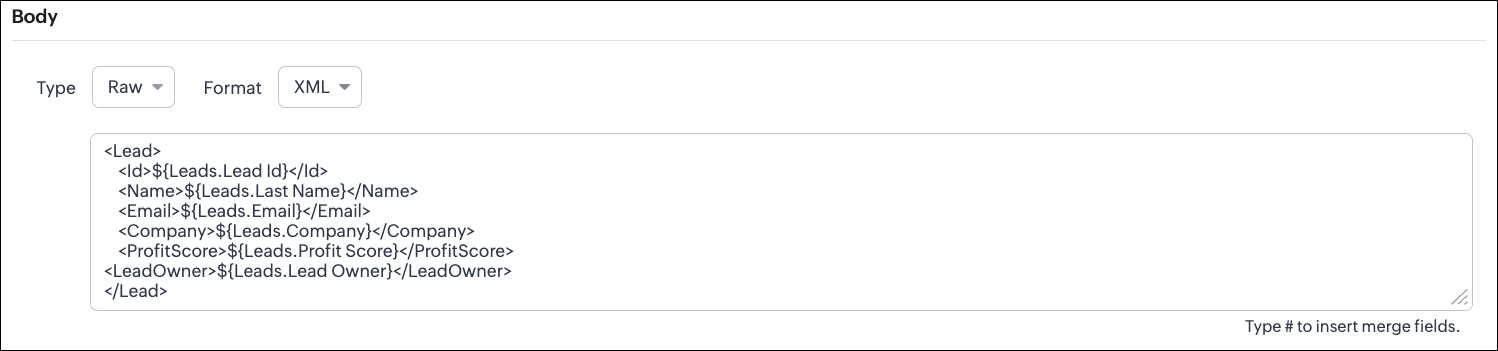
Raw + XML:
Some legacy systems or enterprise applications prefer XML.
UI - Configuration
Configuring the Body of a Webhook - Raw - "XML" via Create Webhook API
Request URL: {{api-domain}}/crm/v8/settings/automation/webhooks
Request Method: POST
Input JSON
{ "webhooks": [ { . . . "raw_data_content": "<Lead>\n <Id>${!Leads.id}</Id>\n <Name>${!Leads.Last_Name}</Name>\n <Email>${!Leads.Email}</Email>\n <Company>${!Leads.Company}</Company>\n <ProfitScore>${!Leads.Profit_Score}</ProfitScore>\n<LeadOwner>${!Leads.Owner}</LeadOwner>\n</Lead>", "format": "XML", "type": "raw" }, . . . } ] }
|
When to use XML?
- With older systems
- When the receiving system only supports XML
Note:
- When you switch the webhook method in the UI, Zoho CRM changes the options you can configure:
GET Method
- Only URL Parameters are available
- Headers are hidden
- Body is hidden
- Because GET requests always send data through the URL and cannot carry a body.
DELETE Method
- Headers are available
- URL Parameters are available
- Body is still not supported
- DELETE requests can include headers, but Zoho CRM does not allow sending a body for DELETE webhooks.
- Date-time format:
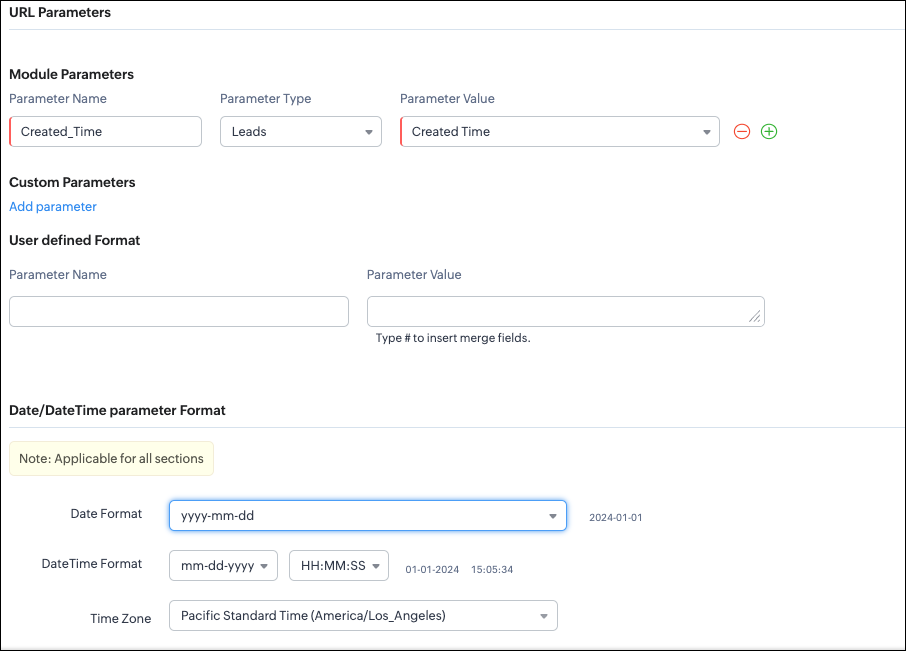
Zoho CRM will format any Date or DateTime fields in your webhook according to the format you select.
UI - Configuration
API - Configuration
{ "webhooks": [ { "module": { "api_name": "Leads", "id": "5725767000000002175" }, "url_parameters": { "module_parameters": [ { "name": "Created_Time", "value": "${!Leads.Created_Time}" } ] }, "description": "Send leads with Profit Score > 80 to validation system.", "http_method": "GET", "name": "Push High Score Leads", "date_time_format": { "datetime_format": "mm-dd-yyyy HH:MM:SS", "date_format": "yyyy-mm-dd", "time_zone": "America/Los_Angeles" }, "authentication": { "connection_name": null, "type": "general" } } ] }
|
With this, we have covered what a
Webhook is in Zoho CRM, how to configure a basic Webhook, how to configure a Webhook with Headers, Body, and URL Parameters, how each component works, how to configure them using the UI, and how the same setup can be created through the
POST Webhooks API.
In Part 2, we will explain
- How to manage Webhooks using the GET, PUT, and DELETE Webhook APIs
- How to associate a Webhook with a Workflow
- How to perform real-time testing by creating records
- How an external application receives data from Zoho CRM via Webhook.
We hope this post helps you understand how to use Webhooks through the Zoho CRM Actions API -
Webhooks API.
Try it out, and let us know your experience in the comments section or reach out to us at
support@zohocrm.com.
Stay tuned for more insights in our upcoming Kaizen posts!
Cheers!
Recent Topics
abou arattai
I want to use the Arattai app for business purposes, so please convert my account to a business account.I have my own invoice app, and I want to link it with the Arattai app for direct messaging.
IF Statement in Zoho CRM Formula Field
Hi, I am attempting to write a formula field that will give me one result if one statement AND another statement are true, then a different value if the first statement AND a different statement are true, else 0. Stated differently: if account = destination
Sending automated messages that appear in the ticket's conversation thread
Good morning, esteemed Zoho Desk community, warm greetings Today I am here to raise the following problem, seeking a solution that I can implement: I need to implement an automation that allows me to send reminder messages to customers when I am waiting
Configurable Zoho Cliq Notifications for Zoho People Alerts
Hello Zoho People Product Team, Greetings and hope you are doing well. We would like to request an enhancement to Zoho People notifications, enabling a native delivery via Zoho Cliq with admin-level control, similar to the notification settings available
Overlapping Reports in Dashboards
It's rare, but occasionally it would be a good feature if I were able to overlap reports, either fully or partially in the Dashboards. Also, then having the ability to move objects to the front or rear, or make them transparent/translucent would be good
PDF Annotation is here - Mark Up PDFs Your Way!
Reviewing PDFs just got a whole lot easier. You can now annotate PDFs directly in Zoho Notebook. Highlight important sections, add text, insert images, apply watermarks, and mark up documents in detail without leaving your notes. No app switching. No
Looking back at Zoho Calendar in 2025
Hello Zoho Calendar Community, As we step into a brand-new year, we’d like to take a moment to thank you for being an active and valued part of the Zoho Calendar community. Your trust, feedback, and continued engagement motivate us to keep evolving and
Why hybrid project management might be the best fit for you?
Project management techniques are designed to equip teams with proven methods for easy and efficient project execution. While management teams may have apprehensions about adopting the hybrid method of project management, we’ve compiled the top reasons
How create a draft via workflow?
I wish to create a workflow rule for specific emails that creates a draft response - not an automatic email reply, but just a draft with a set response ready to be verified by an agent who can then manually select recipients. Alternatively, the workflow
Add a way of clearing fields values in Flow actions
It would be great if there was an option to set a field as Null when creating flows. I had an instance today where I just wanted to clear a long integer field in the CRM based on an action in Projects but I had to write a custom function. It would be
There was an error while connecting to GSTN
I am trying to file GSTR1. Everything flows smoothly until I reach the final step of filing the return. After I enter the PAN and OTP for filing it raises the error "There was an error while connecting to GSTN"
Zoho Books Extension: What Happens If Custom Fields Already Exist?
When developing Zoho Books extensions, what happens if the target Zoho Books organization already has a custom field with the same API name as one defined in the extension? I’m asking because we originally created an on-Books version of this functionality,
Internal Server Error (500) When Attempting to View Banking Transactions
I am experiencing an Internal Server Error (500) when attempting to view transactions across all of my banking accounts. Despite multiple attempts to resolve this, I have received little more than runaround from support, and the issue remains unresolved.
How do I add a blank line to the Organisation Address Format?
I'd like to have my VAT number, for example, shown prominently by having a clear gap between it and the address block above, but any blank lines in the address format get ignored in PDF outputs.
Automatic Invoice Number generation for createRecord
Hello, while testing some custom Buttons in my Zoho Books application, I noticed that I get an error that previously did not occur. After some further digging I found that the automatic transaction numbering of invoices no longer work in my organization.
Adding number of days to an estimate.
I need both QTY of item and "number of days hire" in my estimates at the line item level. Any clues as to how this is done would be greatly appreciated. It needs to calculate. Thanks J
Books Api: listing expenses created after certain dates
Is there any parameter I can add to the List Expenses endpoint that will let me look up expenses by when they were created?
Why can't we change the Account type from an Expense to an Asset?
Like the question. Why in QuickBooks for example if I mistakenly created an account as an expenses and I already captured information in those accounts, I can just change the account type from expense to asset
Nueva edición de "Ask The Expert" en Español Zoho Community
¡Hola Comunidad! ¿Te gustaría obtener respuestas en directo sobre Zoho CRM, Zoho Desk u otra solución dentro de nuestro paquete de CX (Experiencia del Cliente? Uno de nuestros expertos estará disponible para responder a todas tus preguntas durante nuestra
Highlight a candidate who is "off limits"
Hello: Is there a way to highlight a candidate who is "off limits"? I would like to have the ability to make certain candidate and / or Client records highlighted in RED or something like that. This would be used for example when we may have placed a candidate somewhere and we want everyone in our company to quickly and easily see that they are off limits. The same would apply when we want to put a client or former client off limits so no one recruits out of there. How can this be done? Cheers,
Is it possible to do validation for the Actions added to Reports?
We have an all-around On Validate function that checks all the possibilities before the Created/Edited form submissions. We want to have a button in the report view, so we can change records without entering. We are able to add this button, and it does
Why Sharing Rules do Not support relative date comparison???
I am creating a Sharing Rule and simply want to share where "Last Day of Coverage" (Date field) is Greater than TODAY (Starting Tomorrow). However, sharing rules don't have the option to compare a date field to a relative date (like today), only to Static
Ability to Edit Ticket Subject when Splitting a Ticket
Often someone will make an additional or new request within an existing ticket that requires we split the ticket. The annoying part is that the new ticket maintains the subject of the original ticket after the split so when the new ticket email notification
How to loop through Multiple Upload and Display Actual File Name
I have been reading the help on the File Upload Control and reviewed the Deluge help on files and I can not figure out how to loop through the uploaded files and do anything but get the automatically created file names. The code below will run but each
[Free Webinar] Environments in Zoho Creator - Creator Tech Connect
Hello Everyone, We’re delighted to kick off the 2026 edition of the Zoho Creator Tech Connect Series and are excited to continue this learning journey with you. The Creator Tech Connect series is a free monthly webinar featuring deep-dive technical sessions
Zoho Voice API SMS
I made a post request in Zapier to try to send an SMS. Authentication appears to be configured correctly. I followed the documentation and I'm getting a 400 Error "Internal Server Error". Not helpful at all. Anyways, I could not find any information on
How do I change (error) display messages
Hi! I would like to edit display messages like "invalid entries" and "enter a value for Nome" and so on into Italian language messages. How can I do that? Already tried on Validate on form submit. Where I am failing? Thanks in advance.
Report grouping
I have added a grouping in a report but it is not working how i had expected. I wanted to group a summary on a field named Size but when i add the grouping the report is still showing me each record and making a summary at the bottom of the report. What
Record Overseas Transactions Along with CC charges
Hi All, We receive payments via stripe in multiple currencies and stripe takes around 2.5% fees. The amount is settled in INR into our local bank. What should be the currency of the income account used for Stripe payments? Here is a sample flow that we
Easier onboarding for new users with stage descriptions
Greetings, I hope all of you are doing well. We're happy to announce a recent enhancement we've made to Bigin. You can now add descriptions to the stages in your pipeline. Previously, when creating a pipeline, you could only add stages. With this update,
Pieds de page personnalisé - Document Zoho Writer
Bonjour à tous, Je rencontre un souci avec l’ajout d’un pied de page personnalisé dans un document Zoho Writer. Je souhaite insérer les informations de mon entreprise (notamment un logo + adresse) dans le pied de page. Le problème, c’est que lorsque j’ajoute
Zoho Trident Windows - Streams Not Visible
Namaste We’re having an issue with Streams not being visible in Trident (Windows), which is important for us as we share many emails internally. It appears that the feature to show Streams above the Inbox folder, as seen in the default mailbox view, is
Subforms and automation
If a user updates a field how do we create an automation etc. We have a field for returned parts and i want to get an email when that field is ticked. How please as Zoho tells me no automation on subforms. The Reason- Why having waited for ever for FSM
Permissions on Views
Having the option of any agent creating custom views is firing back and got a situation where there are a hundred different views across the team and tickets are not being dealt in the most efficient of ways. Tickets seems to be missed by some agents,
Credit card transactions are backwards after importing statements
I am new to Zoho Books so I'm importing my firm's bank and credit card statements in. My credit card statements have a single column with negative numbers so that is the option I chose. But when I went to categorize the credit card transactions, I can
import data from Apollo.ai into zoho crm via zoho flow
I might be asking this question in the wrong forum. We use Apollo.ai to find potential new leads for our business, there are around 10000 leads that we have initially found. We have an Apollo.ai account but just to do searches, we dont use it as a crm.
MS Teams for daily call operations
Hello all, Our most anticipated and crucial update is finally here! Organizations using Microsoft Teams phone system can now integrate it effectively with Zoho CRM for tasks like dialling numbers and logging calls. We are enhancing our MS Teams functionality
Knowledgebase SEO
We have a custom-domain mapped help center that is not restricted via login. I have some questions: a) will a robots.txt file still allow us to control indexing? b) do we have the ability to edit the sitemap? c) do category URLs get indexed by search
Filter contacts based on selected category in Zoho Desk ticket
Hello community, I’m setting up the Tickets module in Zoho Desk and I need help implementing the following: When a category is selected in a ticket, I want the Contact field to be filtered so that it only displays contacts that are related to that category.
Adding Markdown text using Zoho Desk API into the Knowledge Base
Hi Zoho Community members, We currently maintain the documentation of out company in its website. This documentation is written in markdown text format and we would like to add it in Zoho Knowledge Base. Do you know if there is REST API functionality
Next Page