What's New - March 2025 | Zoho Backstage

What's New - March 2025 | Zoho Backstage

Hello there,
 
We’re thrilled to introduce a much-awaited lineup of powerful features and enhancements designed to fulfill your event management needs. Here's a round-up of the latest updates that will enhance your experience with Zoho Backstage this month.

Offer Tickets 

Early bird and limited-time offers are powerful tools to boost ticket sales and generate early revenue. With the new Offer Tickets feature, you can create multiple offers as tiers within a single ticket class, making the process more streamlined and automated.

Previously, you had to create separate ticket classes for each offer and manually manage their availability. Now, you can:
  • Add multiple offers under a single ticket class
  • Automate the offer start and stop conditions
  • Reduce manual intervention
Key benefits
 
  • Increased marketing impact: Time-sensitive discounts create a sense of urgency, encouraging faster ticket purchases.
  • Early revenue and cash flow: Early sales provide immediate cash flow to cover event expenses like venue deposits, marketing, and logistics.
  • Leverage Psychological Triggers:
    • FOMO (Fear of Missing Out): Limited-time availability compels attendees to act quickly.
    • Perceived Savings: Attendees feel they are getting a deal, making them more likely to buy.
How to use
 
Setting up offers


You can add offers as tiers within a ticket class and configure their availability based on:
  • Time: Set specific start and end dates for the offer.
  • Quantity: Define the number of tickets available at the offer price.
Flexible offer progression
 
From the second offer onward, you can choose to automatically start the next offer when the previous one ends. Or, set a custom start date for the new offer.

Customizing offer display

You can customize how offers are displayed on your event website using the Website Designer. The offer card can show:


  • Current Offer
  • Previous Offer
  • Next Offer
  • Both Previous and Next Offers
This flexibility helps you highlight the most relevant deals and enhance visibility.
 
Good to know 
  • During the ticket purchase process, the offer name appears alongside the ticket class name. The order summary clearly displays the applied offer.
  • After attendees purchase their tickets, the "Your Orders" section displays the offer name along with the ticket class name. The invoice also reflects the offer name for transparency.
  • When manually adding an order, any valid offers associated with the ticket class are applied automatically. There's no need for manual price adjustments.
  • During check-in, only the original ticket class amount is displayed.
  • Offer-tiered tickets cannot be selected during manual check-in.
Click here to learn more. 

Tax Rules - Canada (Early access)

Accurate tax calculation is essential for ensuring compliance and transparency in event management. With the new Tax Rules feature for Canada, you can automatically apply the correct tax rates based on your event location, making tax management simpler and more efficient. Zoho Backstage now allows you to create tax rules for all 10 provinces and 3 territories, which can be selected and applied to an event automatically, ensuring the correct tax rates are applied without manual adjustments. This feature supports in-person, hybrid, and online events, offering flexibility and accuracy.
 
The Canadian tax rule engine covers 10 provinces, 3 territories, multiple tax agencies, and 12 sales tax rates, providing a comprehensive solution for handling event-related taxes.


How do taxes work on Canadian events?  
 
For in-person and hybrid events, the tax rate is determined by the event’s physical location, based on the Place of Supply, in compliance with Canada Revenue Agency (CRA) regulations. This ensures attendees are charged the appropriate tax rate according to the province or territory where the event takes place.
 
For online events, where no physical venue exists, the tax is calculated based on the attendee’s location. This ensures the correct sales tax is applied, even when attendees purchase tickets from different provinces or countries.
 
How to use
 
To enable Canada Tax Rules, configure your organization’s location:
  1. Go to Portal Settings > Payments and Tax.
  2. Select Canada as the organization location. 
Once configured, the system automatically populates:
  • 12 default tax rates covering all provinces and territories.
  • 13 tax rules (one for each region).
  • A default rule for online events, applying the correct tax based on the attendee’s location.
  • 5 tax agencies for accurate tax handling. 
You can create new tax rates, groups, and authorities to meet your event’s specific needs. Additionally, you can add custom tax rules for both in-person/hybrid and online events, giving you full control over how taxes are applied.
 
Applying Tax Rules to In-Person and Hybrid events  
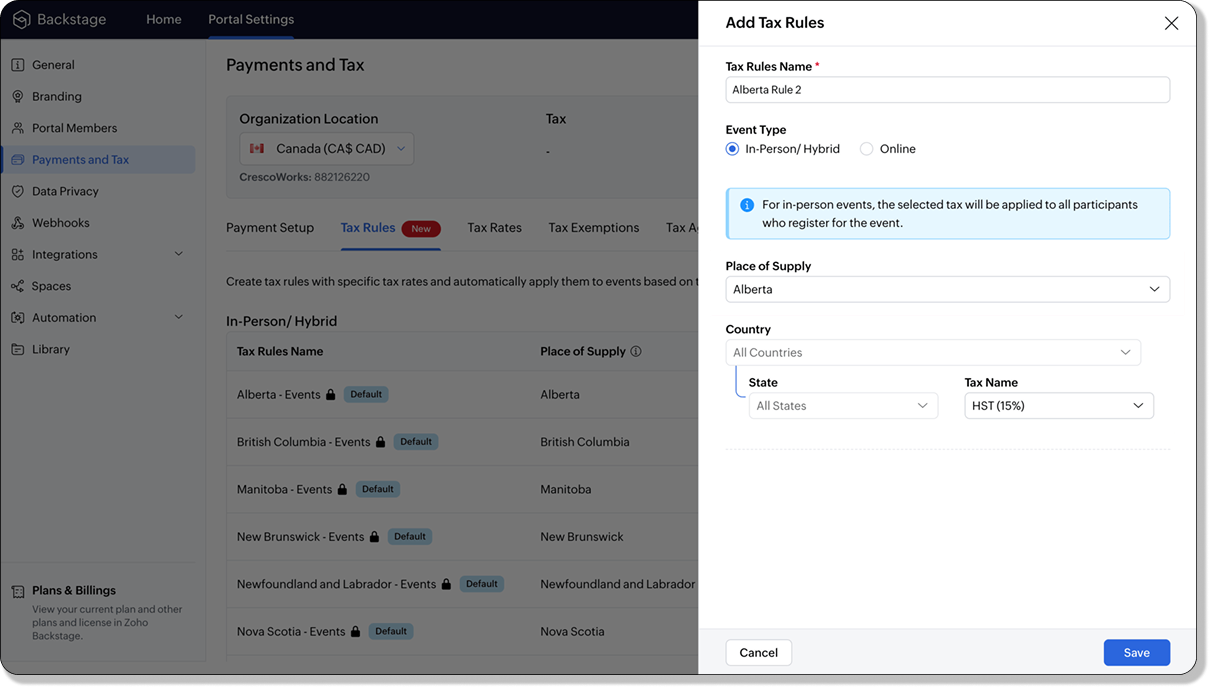

 
For in-person and hybrid events, Zoho Backstage automatically suggests tax rules based on the event location. The 13 default tax rules cover all Canadian provinces and territories. If the event location changes, the system automatically updates the relevant tax rules to reflect the new region’s rates.
 
You can also create custom tax rules by selecting a specific province or territory and applying a custom tax rate, offering greater flexibility for managing event taxes.
 
Applying Tax Rules to Virtual events
 
For online events, the system uses a default tax rule that covers all Canadian provinces and territories. Taxes are applied based on the attendee's location.
 
Canadian attendees are charged the applicable provincial tax rate.
International attendees are assigned a zero tax rate by default.
 
If you need to apply taxes to international attendees, you can create new tax rules tailored for online events, ensuring compliance with international tax regulations.
Info
  • Tax rules in Zoho Backstage are flexible and dynamic. You can modify them at any time during your event setup. However, changes will only apply to new transactions. Existing transactions will retain the original tax rule, ensuring previous purchases remain unaffected.
  • If you select a non-Canadian location for your event, the Canada Tax Rule will not be applied. This ensures taxes are only charged where applicable, preventing errors in cross-border events.

Event Category  


Categorize and filter events based on custom classifications for organizers and attendees to find and manage events easily. This new addition is aimed at improving event management by giving organizers the flexibility to create, manage, and filter events using custom categories. Organizers can now create up to 100 custom categories when setting up an event, giving them the freedom to define categories that suit their specific needs.
 
Previously, categories selected in Event Info were not utilized elsewhere, and there was no option to add new/manage categories.
Now, organizers can tailor categories to their specific needs and filter them on the Event Directory.

To access: 
  • While Creating an Event: On the Event Info page.
  • For Category Management: Under Portal Settings > Branding > Event Category.
Permissions:
 
Portal Owners & Admins:
  • Add, edit, and delete custom categories.
  • Cannot edit or delete default categories.
Event Organizers:
  • Can only add new categories.
  • Cannot edit or delete existing custom or default categories.


Other Enhancements 

Floor plan Focus Area 


The Focus Area in the floor plan refers to designated spaces within the event venue that are visually highlighted to draw attention to specific sections, such as booths, stages, or key locations. These areas allow organizers to emphasize important spots, making navigation easier for attendees and improving the overall flow of the event. Focus areas help guide visitors to essential parts of the venue, enhancing their event experience.

Custom Dates for  ticket classes (Early access)

In cases where smaller sessions or events (like welcome events, after-event parties, etc.) occur before or after the main event, this feature allows organizers to assign specific dates to separate ticket classes, ensuring tickets are only valid for the selected dates.
Info
Custom dates can be set within 30 days before or after the main event.

New WhatsApp triggers and templates 

The WhatsApp Integration, designed to enhance communication and engagement with all event stakeholders, now includes new triggers and templates to facilitate messaging and ensure timely updates for everyone.
 
For Purchasers:
  • Send Registration Confirmation: Instantly confirm registration to enhance the attendee experience.
  • Order Canceled: Notify purchasers promptly in case of any order cancellations.
For Speakers:
  • Welcome Speaker: Extend a warm welcome to our speakers and set a positive tone for their participation.
  • Speaker Added to a Session: Inform speakers when they’re added to a session, ensuring they are well-prepared.
  • Speaker Removed from a Session: Provide timely updates should there be any changes to their session involvement.
For Sponsors:
  • Thank a Sponsor Before Website is Live: Show appreciation early on, fostering positive relationships with sponsors.
  • Welcome and Thank Sponsor After Website is Live: Acknowledge sponsors publicly once the event website goes live.
  • Deny Sponsor Proposal: Deliver sensitive information with professionalism and clarity.
  • Acknowledge Sponsor Proposal: Confirm receipt of sponsor proposals, keeping communication open and transparent.
For Participants:
  • Event Canceled: Quickly inform participants in the event of cancellations, ensuring they’re kept in the loop.
We are continuously refining Zoho Backstage to make your event management experience even more powerful and intuitive. Stay tuned for more updates in the coming months!
 

If you have any questions, please contact support@zohobackstage.com
    • Recent Topics

    • Dropshipping Address - Does Not Show on Invoice Correctly

      When a dropshipping address is used for a customer, the correct ship-to address does not seem to show on the Invoice. It shows correctly on the Sales Order, Shipment Order, and Package, just not the Invoice. This is a problem, because the company being
    • Conditional Email Forwarding

      How can I set conditional email forwarding of the users? For example: Mail should be forwarded to a address only if it comes from a particular sender. So, I want such email forwarding, which forwards mails based on particular conditions, like the incoming
    • Series Label in the Legend

      My legend reads 'Series 1' and 'Series 2'. From everything I read online, Zoho is supposed to change the data names if it's formatted correctly. I have the proper labels on the top of the columns and the right range selected. I assume it's something in
    • Printing from Zoho Creator hosted on my own server to printers hosted on my clients local network

      Hello. Fairly new to Zoho Creator and looking for best options to be able to print from my application hosted on my own server to any printer hosted on my clients own local network. Any advice is welcome. Thank you.
    • Dependent drop-downs... how?

      Good day. I have 2 different situations where I need a dependent drop-down field. First is for a subform, where I want to show related fields for a specific customer on the main form. In my case it is a parent whose children make use of our school transport
    • Add System Pre-Defined Lookup Field to Subform?

      Hi there! New to using Zoho, so this may already exist, but I'm having trouble figuring it out. Is there a way to get the system pre-defined Account Lookup field (in our case, renamed to Company Name), as the starting point for a subform? In our company,
    • Incoming emails not appearing in Inbox

      Hello, I have an issue with incoming emails sent from my website (domain: h2ostop.si). Emails are visible in the Sent folder, which means they are successfully sent through Zoho SMTP, but they never appear in my Inbox. Nothing arrives in Inbox, Spam,
    • Zoho CRM for Everyone's NextGen UI Gets an Upgrade

      Hello Everyone We've made improvements to Zoho CRM for Everyone's Nextgen UI. These changes are the result of valuable feedback from you where we’ve focused on improving usability, providing wider screen space, and making navigation smoother so everything
    • Automatic Matching from Bank Statements / Feeds

      Is it possible to have transactions from a feed or bank statement automatically match when certain criteria are met? My use case, which is pretty broadly applicable, is e-commerce transactions for merchant services accounts (clearing accounts). In these
    • Zoho Creator integration with Sage 50

      Hi, Wondering if anyone has had any experience connecting Zoho to Sage 50 and could share any information on this matter. Thank you.
    • Is there any way to send an Excel received by email to Dataprep?

      Every day I receive an email alert with an Excel file that I want to process through a Dataprep pipeline. To do this, I need to: -Save the file to disk -Open the pipeline -Run the pipeline -Update the source -Several clicks to select and open the saved
    • Email Opt Out Question

      Has the problem where if a customer is emailed opt out prevents you sending standard emails? For me this feature is simply to stop any email marketing and should not block people from receiving emails via Zoho mobile, which makes no sense.
    • Can No Longer Access Zoho Email Accounts from iPhone or iPad Apple Mail Apps ,.

      Keeps asking for password, Says ID or password incorrect. Tried creating a new app specific password. Same result. Is this possibly related to the server maintenance. Have verified all email settings, userid and password. This has worked for years until
    • Latest update caused issue in using marathi typingzoho

      With latest update now marathi typing does Not work in zohonotebook. I preferred zoho over other because it was supporting marathi font without any distortion.. But after new update,keyborad simply does not work
    • Login verification emails never received.

      I can't login to my account. You send a verification email, but it never arrives. This is a common problem, frequently caused by some relay point out there classifying the sender as a spammer. Is there anything I can do to bypass this? Maybe get a text
    • Zoho Bigin - should be able to link a "contact" to multiple "companies"

      Hello Support, I called into telephone support and was told that a contact can only be linked to one company. We have situations were director are contacts of and directors of multiple companies so that seems a basic weakness in Bigin. When go to add
    • CRM: hosting a single html file in Zoho and displaying it as a widget

      I have seen that CRM offers the option of uploading a web project to Zoho itself and displaying it as a widget in CRM. The instructions then talk about setting a development environment with Node and developing an application to upload to Zoho. But I
    • Global lists for Multi select

      It would be great if I could select a global list to use for a multi select dropdown filed.
    • Hotmail is blocking the zoho mail IP

      Greetings, Since last Tuesday (5 days ago today) I wrote to Zoho support and I still haven't received a single response (Ticket ID: 2056917). Is this how you treat people who pay for your email service? I am making this public so that those who want to
    • Yahoo is rejecting e-mails sent from a Zoho server

      Diagnostic-Code: 4.7.0 [TSS04] Messages from 136.143.169.51 temporarily deferred due to unexpected volume or user complaints - 4.16.55.1; see https://postmaster.yahooinc.com/error-codes Remote-MTA: dns; mta5.am0.yahoodns.net
    • Yahoo blocks e-mail sent from Zoho servers

      Getting this for a bunch of Yahoo addresses. Do you know if some of your servers got blacklisted? Diagnostic-Code: 4.7.0 [TSS04] Messages from 136.143.169.51 temporarily deferred due to unexpected volume or user complaints - 4.16.55.1; see https://postmaster.yahooinc.com/error-codes
    • Working with dates and Function Field

      Hello friends! I'm trying to add days to a date, however the field function will always shows 00:00:00 after the resultant date. How can I display only the date, whithout the time? toDate(input.request_date.addDay(input.Prazo_acordado),"MM,d,yyyy") The code above will result something like "11-Feb-2020 00:00:00", but I want to display only "11-Feb-2020"
    • Painfully Slow Zoho mail

      Since yesterday Zoho Mail seems to have starting functioning very slowly and having a few bugs. It's slow to open mails, slow to send, slow to change between email accounts. Sometimes clicking on a particular folder (eg Sent folder) stops working and
    • What's New in Zoho Analytics - November 2025

      We're thrilled to announce a significant update focused on expanding your data connectivity, enhancing visualization capabilities, and delivering a more powerful, intuitive, and performant analytics experience. Here’s a look at what’s new. Explore What's
    • Unable to send message;Reason:550 5.4.6 Unusual sending activity detected. Please try after sometime.

      Please help my account got blocked automatically, can you help me how to avoid it? Thanks so much
    • Accessing shared mailboxes through Trident (Windows)

      Hi, I have a created a couple of shared mailboxes. The mailboxes are showing up on the browser based Zoho workplace, but I cannot seem to figure out how to access my shared inboxes through Trident (Windows). Am I missing something or is this feature not
    • Unusual activity detected from this IP. Please try again after some time

      When i try to create new addresses on my account i am getting this error, it has been 24 hours now and i am still getting this error can anyone help
    • temporary system errorlouis

      J'essaye d'envoyer des mails avec mes 2 adresses mail qe nous avons sur le compte arthur@lepunch.fr et louis@lepunch.fr mais j'ai toujours le message temporaire system error, je reçois les mails mais impossible d'en envoyer a qui que ce soit
    • How to Cancel/Delete Queued Mail Merge?

      Hi. I just tried to do a mail merge before realizing there's a limit on number of sends. I accidentally sent one of my lists twice, and all of those emails are currently queued. Is there any way to cancel or delete a queued mail merge? Would love to be
    • Need to add a new admin for my domain

      Hello Zoho Support, I am the owner of the domain localeistanbul.com. The current super admin account (admin@localeistanbul.com) is not accessible. I do not want to reset or delete the existing account because I need to keep all existing emails. Please
    • Possible Fraud Site.

      Hello. I received a text with the sender's name as zoho, claiming that my account was at risk and that I should sign in at https://verify.zohomails.ru/signin to verify my account. I signed in on the web address above, and a few days later someone hacked
    • Zoho mail to Teaminbox

      Hello, We're searching for new mail program. Now I'm testing a bit with zoho mail and team inbox. My findings in the research: Pop mail throught zoho mail is almost instant. Any pop or imap via external provider takes a couple minutes to 15 minutes before
    • Crear tarea CRM con recordatorio desde Zoho Flow

      Hola, estoy intentando crear desde Zoho Flow una tarea en CRM. Lo he logrado hacer pero sin recordatorio, ya que no se como se debe escribir el string adecuado. He probado varias alternativas, pero ninguna me funcionó hasta ahora. - FREQ=NONE;ACTION=EMAIL;TRIGGER=DATE-TIME:${FechaVto}
    • Tip of the week #16 - Search and filter threads based on criteria

      Zoho TeamInbox lets you search and filter threads with any information that you have about the thread. You just have to input the criteria and Zoho TeamInbox will list all the threads that match the condition.   Firstly, there is a global search you can
    • Inquiry Regarding Automated Assignment of Zoho TeamInbox Messages using Zoho Flow and Deluge

      Hello, Our company is currently using Zoho TeamInbox, and we are interested in automating the assignment of responsible parties using tools such as ZOHO Flow and Deluge. Is it possible to achieve this? Allow me to provide more details. Currently, when
    • Customizing Global Search Settings for All Users

      Hi Our team use the brilliant global search functionality within CRM many many times daily. But, we struggle with the out-of-the box columns that CRM gives you. We are always telling users to customize this look to more suit our business, to show the
    • Qwen to be the default open source Generative AI model in Zoho Desk

      Hello everyone, At Zoho Desk, we will make the latest Qwen (30B parameters) the default LLM for our Generative AI features, including Answer Bot, Reply Assistant, and others. As a subsequent step, we will discontinue support for Llama (8B parameters).
    • Condition based aggregate fields in subforms

      Hello everyone, We're excited to inform you about the latest enhancements made to our aggregate field capabilities in subforms; create aggregate fields based on conditions! An aggregate field is a column on which a mathematical function has been applied.
    • Upgrade Zoho Desk Agent-Side Answer Bot to GenAI

      Hello Zoho Desk Team, We hope you're doing well. Following the recent announcements and rollout of the GenAI-based Answer Bot in Zoho SalesIQ (Nova '25), we’d like to formally request a similar upgrade for the Answer Bot used by agents inside Zoho Desk.
    • Marketers' Space: The importance of warming up your sender domain

      Hello Marketers, Welcome back to yet another post! Today, we'll talk about why warming up your sender domain matters. Imagine you've recently started a business and want to share the news with your customers. You've designed a great email campaign using
    • Next Page