Zoho CRM's new Homepage component: See all your activities in one powerful view!

Zoho CRM's new Homepage component: See all your activities in one powerful view!

Hello everyone,

We’re excited to introduce a new feature to your CRM dashboards: the Homepage Open Activity Component! Now you can effortlessly track all your open activities—including tasks, meetings, calls, and appointments—in a unified view, tailored to your chosen timeline filter.

The classic homepage already includes dedicated components for tasks, meetings, and appointments, allowing you to view all your customer-related activities in separate components.

Now, with the introduction of the activity component, you get a consolidated view that lets you effortlessly track and manage these activities in one place. This feature is designed to help you view all customer-related activities together, reducing the chances of missing important calls, meetings, or appointments.

What does this new feature offer?

  • Unified activity view : View all your customer interactions—tasks, calls, meetings, and appointments—in one place, in specific timeframes (e.g., today, this week, next week, next seven days).
  • Perform actions on activities : Click on any activity to get more details and perform quick actions—like rescheduling or marking activities as completed—directly from the dashboard. Also, choose what information should be displayed for activities via customizable preferences.


Let's dive into the details below!

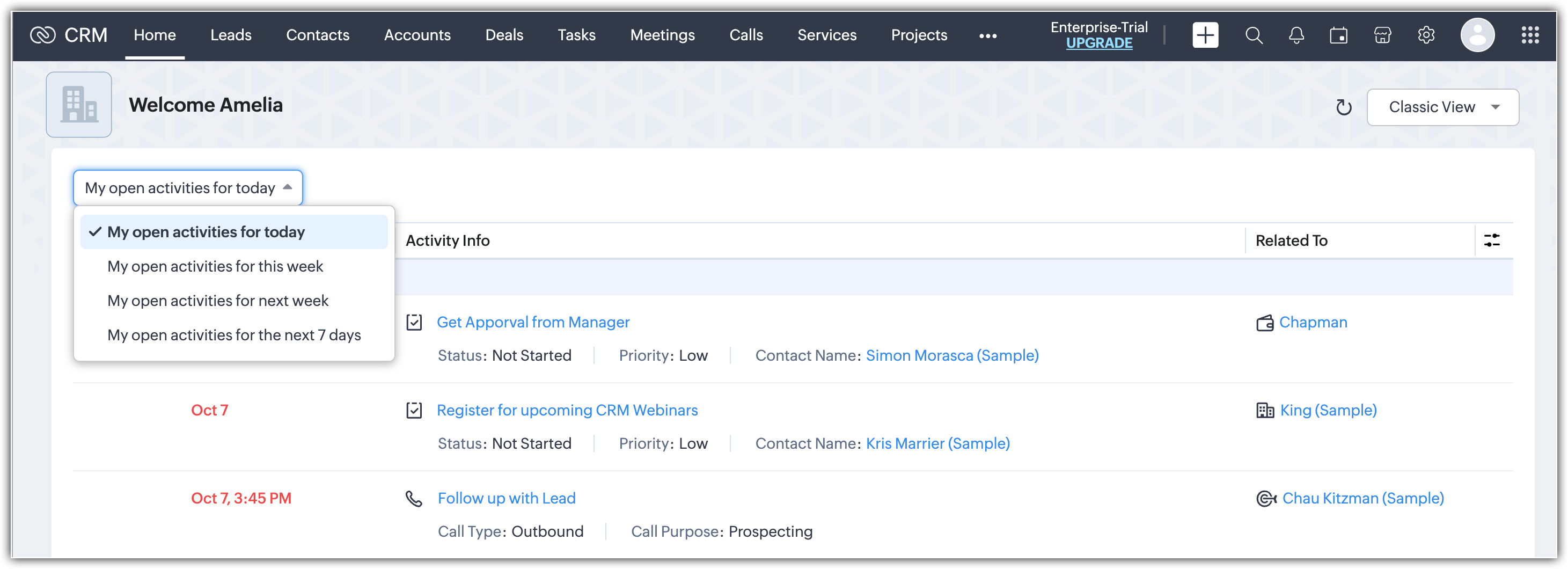
You can access the Activity component from your dashboard's classic view. Information about all your open activities, along with "overdue activities" or "all-day meetings and tasks," can be viewed in this component. It lists the following:
  • The date and time for each activity
  • Activity information
  • The record to which the activity is related
  • Preferences to alter to customize the component

How can you view activities in this component?

You can view your activities over a selected timeline and decide which ones should be displayed in the component using Preferences.

Filter by time frame

View tasks, calls, meetings, and appointments that have been set up in your account over different time frames.
  • My open activities for today: Displays daily activities to be carried out.
  • My open activities for this week: Displays activities scheduled for the current week.
  • My open activities for next week: Displays activities scheduled for next week.
  • My open activities for the next 7 days: Displays activities scheduled over the next seven days.
Preferences

Filter how you want to view your open activities, overdue activities, and all-day meetings and tasks by clicking the Preference icon in the top-right corner of the component. You can hide or show all overdue activities, show all overdue activities at the bottom or top, and show all-day meetings and tasks at the bottom or top. Please note that overdue activities will always be displayed at the top by default.

Customize activity information

Customize what activity information you want displayed in the component from the Preferences section under Manage Fields. In the Column Field Customization pop-up, you can choose which fields to display in the component for your activities.

Perform immediate actions

Hover over an activity to edit, delete, reschedule, cancel, or mark it as completed right from the dashboard.

This update will help you achieve the following:

  • Get a full activity overview: Get a clear and organized view of all customer interactions and internal tasks over a selected period.
  • Improve productivity: With everything in one place, you can quickly assess what’s been completed and what still needs attention; no more missed meetings or overlooked tasks!
  • Customize it to fit your needs: Whether you're focusing on a specific time period or activity type, the timeline filter makes it easy to stay organized and efficient.

For more information about this update, please refer to this help resource.


We're confident that this new addition to your dashboard will enhance your CRM experience. If you have any questions, please reach out to us in the comments below.

Thanks and have a great day!


    • Recent Topics

    • CRM HAS BEEN SOOO SLOW For Days 05/15/25

      I have fantastic Wifi speed and have zero issues with other websites, apps, or programs. It takes an excruciatingly amount of time to simply load a record, open an email, compose an email, draft a new template, etc. Am I in a subset/region of subscribers
    • Approvals in Zoho Creator

      Hi, This is Surya, in one of  my creator application I have a form called job posting, and I created an approval process for that form. When a user submits that form the record directly adding to that form's report, even it is in the review for approval.
    • Zoho Writer for Proposals

      Hi, one of the things we've struggled with since moving to Zoho ecosystem is our proposal software Qwilr does not integrate well. It surprises me Zoho doesn't have proposal software but given all the capabilities of Zoho Writer, I'm wonder if anyone is
    • How to Create a Fixed Sliding Time Window (D-45 to D-15) in Zoho Analytics ?

      Hello, I would like to create a report in Zoho Analytics based on a sliding time window between D-45 and D-15, with a fixed snapshot of that specific period. The data displayed should strictly reflect activity recorded between D-45 and D-15 only, without
    • How exactly does "Reply assistance" work in Zoho Desk? What context is sent to the LLM?

      Hi, Im trying to better understand the technical behavior of the feature "Reply assistance" in Zoho Desk, and I couldn’t find detailed information in the current documentation. Specifically, I have questions about what data is actually being sent to the
    • How Does Knowledge Base Search and Article Recommendation Work?

      Hello, I would like to understand how the Knowledge Base search engine works. Specifically, does it search based on: The article title only? The full article content? Both, the article and the content? Keywords? Tags? Also, how does the system determine
    • View Answer Bot conversations?

      We are trialing Zia and are experimenting with Answer Bot on our knowledge base. So far so good! Management asks me if it is possible to view Answer Bot conversations, the purpose being to look over its shoulder and confirm that it is working as des
    • Train Zia answer bot on only part of Knowledge Base?

      We are trialing Zia answer bot and hope to use it on the knowledge base to help our users find the information they are looking for. I have found how to train Zia on the entirety of our knowledge base. But is there a way to train it on only certain categories
    • 🚀 WorkDrive 6.0 (Phase 1): Empowering Teams with Content Intelligence, Automation, Accessibility, and Control

      Hello, everyone! WorkDrive continues to evolve from a robust file management solution into an intelligent, secure, and connected content collaboration platform for modern businesses. Our goal remains unchanged: to simplify teamwork, strengthen data security,
    • Zoho Campaigns: An Outstanding Email Marketing Tool

      Introducing Zoho Campaigns! A product designed by Zoho, the Zoho Campaigns is made to create, deliver, and manage integrated email campaigns that can help in boosting the sales of a company and its customer base. Zoho Campaigns is actually an email marketing
    • Zoho Creator Developer Console | Improved Distribution and Lifecycle Management for apps

      Hello everyone, We're excited to introduce new enhancements now in the Zoho Creator Developer Console. These updates strengthen private app distribution through licensing controls and extend environment support across all installed apps, helping teams
    • Anchor Links in Dashboards

      Hello,  Our dashboards frequently have multiple sections that would be more easily skipped between using anchor links. Please consider adding an anchor link feature to the text widget? This could be done by adding an anchor link option to the text widget next to the "remove" option (see screenshot). The option would assign an ID to the <div> containing the text widget in the live dashboard. Then, the chosen ID could be linked using a traditional <a href="#link_id"> in the html section of the text
    • Zoho CRM for Everyone's NextGen UI Gets an Upgrade

      Hello Everyone We've made improvements to Zoho CRM for Everyone's Nextgen UI. These changes are the result of valuable feedback from you where we’ve focused on improving usability, providing wider screen space, and making navigation smoother so everything
    • Sync images with Shopify/Cart

      Hello, sync images with shopify or other cart, it cuts out the double work of having to upload to shopify/cart and zoho. Thanks
    • Allow selection of select inactive users in User data fields

      Hello, We sometimes need to select a previous employee that has an inactive account in the User data field. For example, when doing database cleanup and indicating actions are done by a certain employee that weren't filled out when they were part of the
    • Is it Possible to Modify Standard Report Urls

      Is there a way to permanently modify standard report Urls? Use case: Suppose I have a Products report. Showing list as timeline, calendar, or kanban doesn't make sense. Want to hide that from users by adding #Report:Products?zc_ShowAs=false&zc_Print=false
    • Assessment Answered - Automation (Related List)

      Hello everyone, We have linked a candidate assessment to our job posting. When someone applies, they are required to answer all the assessment questions. However, some candidates submit their applications without completing the questions. In such cases,
    • Smarter holiday planning with yearly-specific Holiday Lists

      Hello everyone! Managing holidays and business hours is now easier and more efficient. Holiday Lists now support holidays that fall on different dates every year, while business hours now supports more than one holiday list. This helps businesses manage
    • External User onboarding for zoho connect is not really intuitive.

      So the external user is sent an invite, which has a button that directs them to login to zoho to view the invite, but if they don't have a zoho account, they cannot access that invite, which seems kinda silly, as there is not real way on for them to create
    • Having trouble fetching contents of Zoho Connect Feeds using the API, requesting alternative API documentation.

      I'm trying to retrieve feed/post data from Zoho Connect using the API but facing challenges with the current documentation. What I've tried: OAuth authentication is working correctly (getting 200 OK responses) Tested multiple endpoints: /pulse/nativeapi/v2/feeds,
    • How to upload file to Connect using API?

      Hi there. I looked at the API documentation and nowhere did it mention how to use the API method to upload a file even though it is mentioned that it is possible to be done so. Please help.
    • Select the task view on the board in the Zoho Connect iPhone app

      Hello. How do I select the task view on the board in the Zoho Connect iPhone app? The Android app has this functionality.
    • The power of workflows in Zoho Marketing Automation - Video Webinar

      In this Zoho Marketing Automation video webinar, our experts walk you through: Why you may want to create marketing workflows How to create marketing workflows Use Zoho CRM data and apply workflows to automate your marketing strategy How workflows can
    • Auto tagging

      Some of the articles I enter into Notebook get there when I enter them in Raindrop.io and IFTTT copies the articles in Notebook. When this happens the notes are tagged but instead of useful one word tags with topic the tag pertains to the specific article
    • Constant refresh required in lots of Zoho tabs

      "Hey Zoho, if you can sync my notification bell across 15 tabs using a BroadcastChannel, why can't you send a 'Data Refresh' signal the same way? We don't need a browser reload—we just need the data to sync without us clicking F5 like it's 1999." "PS:
    • What's New in Zoho Billing | January 2026

      Excited about the latest enhancements in Zoho Billing? Our January updates bring an intelligent AI assistant, smarter subscription management, and improved tax compliance, saving you time and reducing manual work. Dive into the details below to see how
    • Cliq iOS can't see shared screen

      Hello, I had this morning a video call with a colleague. She is using Cliq Desktop MacOS and wanted to share her screen with me. I'm on iPad. I noticed, while she shared her screen, I could only see her video, but not the shared screen... Does Cliq iOS is able to display shared screen, or is it somewhere else to be found ? Regards
    • Inserting images into Articles or Knowledgebase

      Hi, Are there any plans in improving the Knowledgebase text editor so it would allow inserting images through Windows clipboard via copy-paste? Say for example I took a screenshot using the snipping tool in Windows and I'd like to insert that image to
    • Links not functioning in Zoho mail

      Links that are included in emails I receive are not activating. Nothing at all happens when I click on them. I have researched FAQs and this forum to no avail. Any suggestions?
    • Zoho Mail iOS app update: Manage folders and tags

      Hello everyone! In the most recent version of the Zoho Mail iOS app, we have brought in support to manage(create, edit and delete) the folders and tags. Create folders Create Tags Edit/ Delete folder In addition to this, we have also brought in support
    • Zoho Social API for generating draft posts from a third-party app ?

      Hello everyone, I hope you are all well. I have a question regarding Zoho Social. I am developing an application that generates social media posts, and I would like to be able to incorporate a feature that allows saving these posts as drafts in Zoho Social.
    • [Important announcement] Zoho Writer will mandate DKIM configuration for automation users

      Hi all, Effective Dec. 31, 2024, configuring DKIM for From addresses will be mandatory to send emails via Zoho Writer. DKIM configuration allows recipient email servers to identify your emails as valid and not spam. Emails sent from domains without DKIM
    • Create an Eye-Catching Announcement Widget for Your Help Center

      Hello Everyone! In this week’s edition, let’s explore how to keep your customers updated with exciting news in the Help Center. See how ZylkerMobile wowed their customers by bringing updates right to their portal. ZylkerMobile, the renowned brand for
    • UI issue with Organize Tabs

      When looking at the organize Tabs window (bellow) you can see that some tabs are grayed out. there is also a "Add Module/Web Tab" button. When looking at this screen it's clear that the grayed out tabs can not be removed from the portal user's screen
    • Super Admin Logging in as another User

      How can a Super Admin login as another user. For example, I have a sales rep that is having issues with their Accounts and I want to view their Zoho Account with out having to do a GTM and sharing screens. Moderation Update (8th Aug 2025): We are working
    • Task list flag Internal/External for all phases

      Phases are commonly used in projects to note milestones in the progression of a project, while task lists can be used to group different types of tasks together. It makes sense to be able to define a task list as either internal or external however the
    • Zoho CRM Feature Requests - SMS and Emails to Custom Modules & Time Zone Form Field

      TLDR: Add Date/Time/Timezone form field, and be able to turn off auto timezone feature. Allow for Zoho Voices CRM SMS Extension to be able to be added to custom modules, and cases. Create a feature that tracks emails by tracking the email chain, rather
    • Our Review Of Zoho CRM after 60 Days

      The purpose of this is to just share with Zoho why I love their product, but ultimately why I could not choose Zoho CRM for our next CRM. About two months ago we begun a CRM exploration process for our financial planning firm, based in Texas. We already
    • Link Purchase Order to Deal

      Zoho Books directly syncs with contacts, vendors and products in Zoho CRM including field mapping. Is there any way to associate vendor purchase orders with deals, so that we can calculate our profit margin for each deal with connected sales invoices
    • Extend the Image Choice Field

      Hi, The New Yes/No field is great for what it does, and the Image Choice Field is good but could be better with some functions from the Yes/No field. Take an example, rather than just Yes/No you want Yes/No/Maybe (Or more than 3 choices), but unlike the
    • Next Page