¡Muchas gracias por participar a los Meetups de Usuarios de Zoho! Y Novedades del ecosistema Zoho
¡Hola Comunidad de Zoho en Español! 👋
Después de un breve lapso de tiempo, volvemos con una nueva edición de nuestro Community Digest, donde te contamos las novedades de los productos de Zoho en los últimos meses. Estas mejoras se centran en nuestros productos como CRM, Projects, Forms y Commerce, y refuerzan tres pilares clave del ecosistema Zoho: la IA, la automatización y la experiencia de usuario.
Meetup de Usuarios de Zoho
Primero, queremos agradecer a la comunidad de usuarios de Barcelona y Valencia por una sesión muy productiva: durante nuestro Meetups de usuarios de Español Zoho Community, hablamos de funcionalidades clave de SalesIQ y CRM, descubrimos nuevas formas de optimizar procesos y además aprovechamos para hacer networking. ¡Todo un lujo de jornada en la mejor compañía!


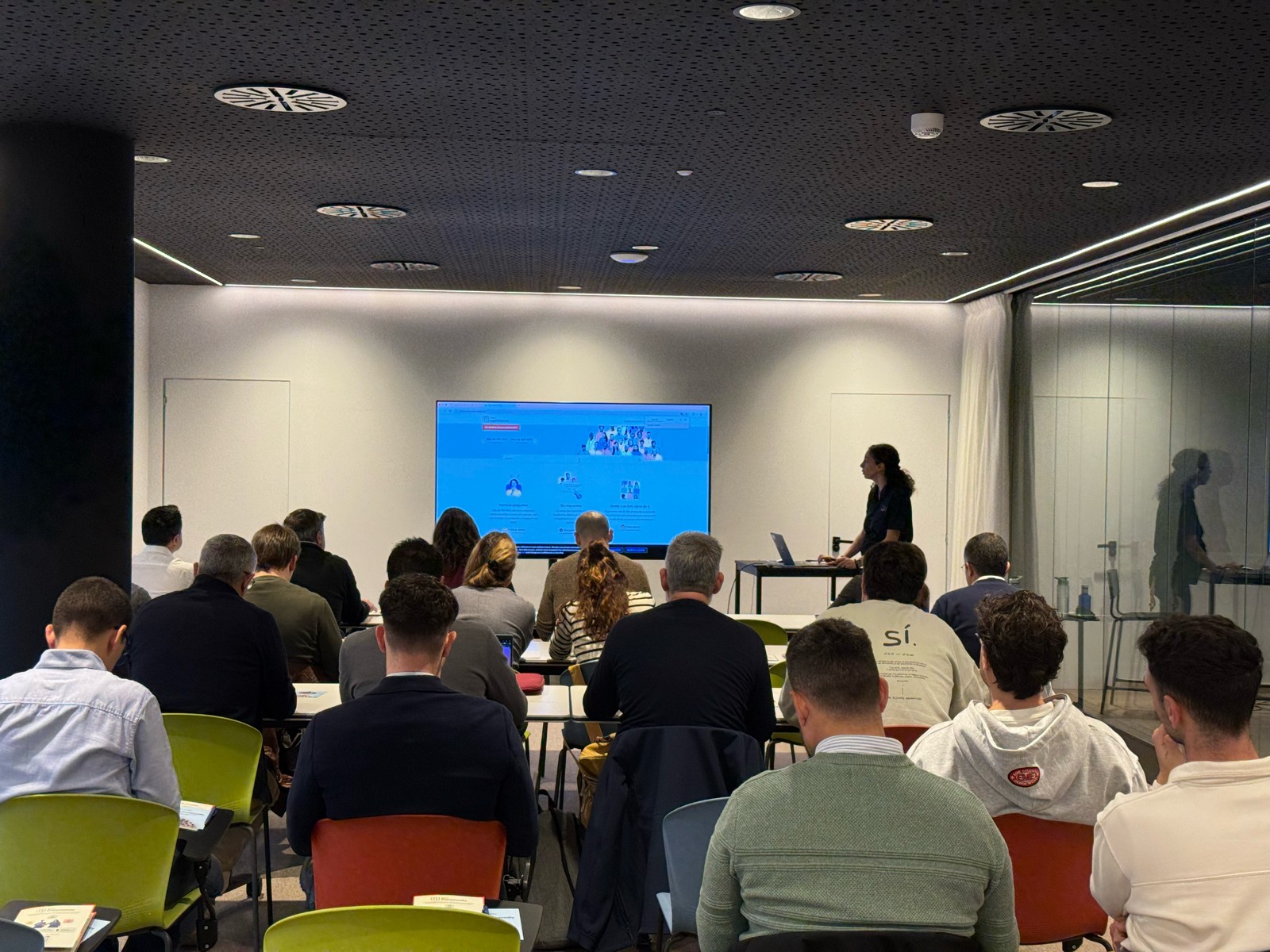

Y ahora sí, vamos con las novedades de nuestras herramientas. Prepárate, porque en estos últimos 6 meses han pasado muchas cosas:
1) Zoho CRM: Más inteligencia, más control y más flexibilidad
Nuestro producto estrella ha presentado algunas mejoras muy relevantes para una mejor gestión de los datos de clientes y de tu ecosistema Zoho:
- CommandCenter 2.0. Para que puedas automatizar mejor tus recorridos, CommandCenter ha presentado las siguientes actualizaciones: 1) Una nueva interfaz más visual e intuitiva. 2) El uso de “signals”, que te permiten activar transiciones basadas en eventos provenientes de diversas fuentes. 3) Los “stages” ya no dependen de un único módulo, sino que permiten transversalidad entre varios.
- Zia LLM: Nuestra IA también se ha actualizado y ahora ZIA te ofrece sugerencias más seguras y rápidas y funciones de IA generativa integradas para no depender de de inteligencia artificial proveedores externos.
- Control de visibilidad: Ahora puedes dar permisos basados en los perfiles de los usuarios para gestionar quién puede ver la línea de tiempo y el historial de interacciones.
- Canvas mejorado: Hemos añadido un nuevo componente en formato cuadrícula para organizar datos de manera más flexible. Y Soporte para layouts responsivos mediante “breakpoints”.
- CRM for Everyone: Llevamos ya tiempo anunciando CRM for everyone, y desde el Q2 ya está aquí. Descubre una nueva forma de habilitar a tus equipos de marketing, atención al cliente o finanzas para que puedan colaborar dentro del CRM de forma más ágil.
- Integración con Microsoft Graph API: Ahora aseguramos una mejor conectividad con Outlook/Microsoft 365 mediante la conexión con Graph API.
2) Zoho Projects: Mejor control y mayor claridad en la gestión del trabajo
En los últimos meses, Zoho Projects ha introducido mejoras directamente relacionadas con productividad, permisos y organización.
- Access Control en Time Logs: Gracias a la jerarquía de usuarios ahora puedes definir quién puede ver, añadir, editar o eliminar registros de tiempo dentro de su equipo y realizar acciones masivas para borrar time logs propios.
- Campos URL ampliados: Los campos URL en layouts de tareas ahora admiten hasta 1.000 caracteres, permitiendo enlaces más completos.
- Reutilización de listas de tareas: Puedes utilizar listas de tareas ya existentes dentro de tus plantillas, agilizando la creación de nuevos proyectos.
- Integración mejorada con Zoho Flow: Ahora puedes usar Zoho Flow para automatizar acciones desde reglas de workflow o blueprints dentro de Projects.
3) Zoho Forms: Mejor accesibilidad en tus formularios, ahora más modernos y conectados
Zoho Forms también ha presentado una gran cantidad de novedades durante estos últimos meses:
- Diseño en cuadrícula (grid layout): Ya puedes organizar tus formularios en 1, 2 o 3 columnas, mejorando su estética y su legibilidad.
- Verificación OTP integrada: Los formularios pueden solicitar OTP (para email/teléfono) sin salir de la pantalla.
- Múltiples cuentas de WhatsApp Business (para Zoho One) : Hemos ampliado la compatibilidad en cuanto a las cuentas de Whatsapp para aquellos equipos que manejan más de un canal de WhatsApp Business.
- Accesibilidad WCAG 2.2 AA : Zoho Forms ahora cumple con el estándar de accesibilidad WCAG 2.2 nivel AA, haciendo los formularios más inclusivos.
- Configuraciones mejoradas de Data Push: Ahora es posible enviar datos de campos específicos mediante configuraciones más precisas en “Post Submission Tracking”.
4) Zoho Commerce 2.0: Más rápido, más global, más personalizable
Hemos presentado oficialmente Commerce 2.0, una actualización de alto impacto que mejora rendimiento, diseño y capacidades globales:
- 15+ temas profesionales: Ahora puedes elegir entre más de 15 temas totalmente personalizables para construir tiendas modernas sin necesidad de utilizar código.
- Rendimiento optimizado: Ahora puedes hacer uso de CDN (Content Delivery Network) y además hemos implementado un código más ligero, reduciendo los tiempos de carga.
- Nuevas integraciones de envío
- Checkout multimoneda: Te facilitamos vender fácilmente en distintos mercados internacionales con el checkout multimoneda.
- Nuevos informes y auditoría: Informes más detallados (p. ej., ventas por cupón) y activity Logs / Audit Trail para un seguimiento completo de acciones en la tienda.
Es increíble todo lo que avanza la tecnología en 6 meses, y nuestras mejoras siguen enfocadas a hacer mejor uso de la automatización, la colaboración entre equipos y la creación de experiencias más inteligentes y ágiles, sin perder el foco en el uso de la IA.
¿Qué te parecen estas actualizaciones? ¿Hay alguna que vayas a implementar? ¡Cuéntanoslo en comentarios!
¡Nos vemos en el próximo Digest!
Topic Participants
Lorenza Pasca
Recent Topics
Automated Dismissal of Specific Notifications and Centralized Control of Toast Notification Settings
Dear Zoho Team, I hope this message finds you well. We would like to request two enhancements related to notification handling within Zoho Desk: Automatic Dismissal of Specific Notifications: Currently, when certain actions are taken in the ticket listShow field in spreadsheet view depending on other field value
Hello. Not sure if this is possible but let's say i have spreadsheet view in Creator with four different fields Field A, B, C and D Then i have a field named Response which for one record could contain only one of the pre-definde choices below A, B, CIntergrating multi location Square account with Zoho Books
Hi, I have one Square account but has multiple locations. I would like to integrate that account and show aggregated sales in zoho books. How can I do that? thanks.Zoho Learn Zapier Integration
Hello all, Is there any plan to integrate Zoho Learn with Zapier? It seems almost all Zoho products are in Zapier, with the exception of Learn and Marketing Automation.Notice: SalesIQ integration paused on Zoho Sites
I have this notice on my Zoho Sites in the SalesIQ integration setup. Can someone assist? "This integration has been temporarily paused for users. Reconnecting SalesIQ after disconnection will not be possible until we provide further updates." thankDifferences between Zoho Books and Zoho Billing
Without a long drawn out process to compare these. If you were looking at these Books and Billing, what made you opt for one and not the other. ThanksNew Feature : Copying tickets with all the contents such as conversations/history/attachments etc
Sometimes our customers and distributors do create tickets (or send emails) which contain more than one incident in them and then also some of the further conversations which are either created by incorrect new tickets or replies to old tickets are being created as combined tickets. In such cases we require to "COPY" the contents of the tickets into separate tickets and merge them into their corresponding original tickets. The "CLONE" feature doesn't copy the contents (especially the conversationsComo se agregan los empleados
Necesito saber si para agregar empleados los mismos necesitan tener licenciasDeluge Error Code 1002 - "Resource does not exist."
I am using the following script in a Custom Button on a Sales Return. Basically, the function takes the information in the sales return (plus the arguments that are entered by the user when the button is pushed) and creates a return shipping label viaAdding multiple Attendee email addresses when adding a Zoho Calendar event in Zoho Flow
I am trying to integrate Notion and Zoho Calendar via Zoho Flow. However, the Attendee email address supported by Zoho Calendar - Create event only supports one email address, so I am having difficulty implementing automation to automatically registerGraceful Handling of Exceeded Option Limits
Hi Zoho SalesIQ team. I would like to submit a feature request to deal with a bug in salesIQ Current Behavior (Bug): When a dynamic list passed to the Single Select Option Card contains more than 20 options, the Zobot stops responding (freezes/hangs)System default SLA descriptions can't be modified
The system default SLAs have identical descriptions for all SLA levels, but their settings differ. However, I am facing an issue where I cannot modify these descriptions and save the changes. The content of the description box can be edited but the changesAdding non-Indian billing address for my Zoho subscription
Hey Need help with adding a non-Indian billing address for my Zoho subscription, trying to edit the address to my Singapore registered company. Won't let me change the country. Would appreciate the help. Regards, RishabhVendor legal and DBA names for USA users
I would like to hear how Zoho Books users are handling DBA names in the vendor profile. If the Company name in the vendor profile has to be the legal name (line 1 of the W-9), whare are you entering the DBA name (the name that checks are made out to)How to create one ZohoCRM organisation out of a multi-organization?
Hi, we have a multi-org including two different Zoho CRM organizations for two companies using respectively EUR and USD as default currency. I was wondering if there is any easy way to merge the two organizations into just one, so that users may accessGray screen while signing documents
We are all getting a "gray" screen when trying to sign documents in Zoho sign. Anyone else having issues?Projects custom colors replaced by default orange
Since yesterday, projects uploaded to Zoho, to which I had assigned a custom color, have lost the customization and reverted to the default color (orange). Has anyone else had the same problem? If so, how did you resolve it?Interview booked through Invite but no Notifications
We have a workflow that was developed through a developer/partner that was tested and worked. Today, we pushed a candidate through the process and invited them to an in-office interview. They were sent the booking link (as usual and as tested before successfully)WebDAV support
I need WebDAV support so that I can upload/download (and modify) documents from my local file system. Is anything planned in his direction?Automatiser la gestion des SLA dans Zoho Desk avec Zoho Contracts
Les équipes du service client s’efforcent d’assurer un support rapide, régulier et fiable pour garantir la satisfaction de chaque client. Les accords de niveau de service (SLA) permettent de clarifier les engagements en définissant les termes et conditionsiOS App doesn't refresh for Document Creation
Hello Zoho team, I have created a workflow to be used on a mobile iOS device which starts in Zoho Creater and ends with a murge and store function that then opens the newly created document within the Zoho Writer app. This process is working great howeverUploading a signed template from Sign to Creator
Good day, Please help me on how to load a signed document back into Creator after the process has been completed in Sign. Below is the code that I am trying, pdfFile = response.toFile("SignedDocument_4901354000000372029.pdf"); info pdfFile; // AttachZoho DataPrep and File Pattern configuration
I'm using Zoho data prep to ingest data from One Drive into Zoho Analytics... The pipeline is super simple but I can't any way to get all the files that I need. Basically I need to bring all the files with a certain pattern and for that I'm using a regexAssistance needed: Activation of a domain
Hello Zoho Support, I purchased the .com domain "primesolva.com" via Zoho 6 days ago. The domain is still pending, and I cannot access the DNS panel to add the TXT verification for domain ownership. Please confirm the registration status and help me activateOperation not permitted
I am trying to add an email address to the list of user but I am getting error Operation not permittedRequest to Permanently Delete Email User (info@mehbobgulf.com ) from Old Organization
Please permanently delete the user email info@mehbobgulf.com It is still associated with my old Zoho organization. I cannot delete it because it shows ‘You cannot delete email. Zoho host’. I need to use this email in a new Zoho account.”Client host [89.36.170.5] blocked using Spamhaus
Hello please make make actions for delist ..... "Client host [89.36.170.5] blocked using Spamhaus"Suggestion: Option to Re-run a migration
As I'm going through a migration process, I like the IMAP migration tool, but it would be better if there were an option to re-run the same migration as configured. There's not even an option to copy/edit one that's already there. Just run if it hasn'tIssue with "Add Your Mobile Number"
Hello, I am trying to sign up for email service for a domain name, and I cannot finish the authentication. When I enter my mobile number, I receive the message "We’re unable to send OTP to this mobile number. Please contact support-as@zohocorp.com". Izoho mail non vérifié
Bonjour, Il y'a un jour que j'ai acheté un domaine et toute les tentatives pour l'associé a mon compte shopify son vaine. j'ai essayé TXT sans suite après, j'ai essayer avec CNAME sans suite. j'aurais besoin de votre assistance pour associé mon mail.Unable to send message;Reason:553 Relaying disallowed. Invalid Domain
i have facing the issue "Unable to send message;Reason:553 Relaying disallowed. Invalid Domain" if i verify domain evertthing i did but still face the same error.ZohoMail is so close to being Perfect BUT
Why don’t you have HILIGHTING???!! I've been trying to find a substitute for Edison Mail but I want & need hilighting (preferably in more than just yellow)! Is this even on your To Do list? I’m so disappointed. 🙄Override Auto Number field?
We are preparing to migrate from Salesforce. In Salesforce, we auto-generate a unique number on our Opportunities (Potentials). If the Opportunity results in a contract, we use that unique number as the Contract number. There are some situations whereUsing a third party service provider want to move directly with Zoho
Hi good day I’m currently using Zoho but I’m using a third party service provider I want to move directly with you guys I’m using Zoho email and invoices and my domain please let me know if it’s possible to move away from the third party provider my emailRequest for Assistance Regarding Email Sending Issue (554 5.1.8 - Email Outgoing Blocked)
Dear Zoho Support Team, I hope this message finds you well. I am writing to request assistance with an issue we are currently facing regarding our Zoho Mail account. Our email account, admin@tuyensinhcanuoc.com, is encountering the following error whenZoho Mail API returns empty inbox (0 messages) but webmail shows 37 unread emails
Hello, I'm experiencing a discrepancy between Zoho Webmail and the Mail API (EU region). **Setup:** - Account: EU datacenter (mail.zoho.eu) - API: Self Client OAuth2 via api-console.zoho.eu - Scopes: ZohoMail.messages.READ, ZohoMail.messages.UPDATE, ZohoMail.folders.READ,ShipStation and Zoho Inventory
Hello, I am looking to sync zoho inventory with shipstation ZOHO INVENTORY SHIP STATION Sales Order ==> create ORDERS INVOICE <== Shipments What exactly does BETA mean on the Shipstation connector? This is required for me to sign-on in the next month. Thanks in advance for your effortsE
We are trying to add our Zoho Form embed in our Elementor Page Builder. After adding Zoho Forms widget in elementor page builder it’s displaying in backend page builder but it’s giving 403 error while trying to save, as it’s not reflecting in front end.Connecting Zoho Inventory to ShipStation
we are looking for someone to help connect via API shipStation with Zoho inventory. Any ideas? Thanks. Uricustom module import.
Is there a way to import data into a custom module? Thanks RudyNext Page