【開催報告】東京 ユーザー交流会 Vol.4 | Zoho CRM 自動化のコツ ・Bookings のビジネス活用シーンとおすすめ機能を紹介
ユーザーの皆さま、こんにちは。コミュニティチームの藤澤です。
11月28日(金)に新橋で「東京 ユーザー交流会 Vol.4」を開催しました。ご参加くださったユーザーの皆さま、ありがとうございました。ユーザー交流会の年内開催は、今回が最後でした。
この投稿では、当日のセッションの様子や使用した資料を紹介しています。残念ながら当日お越しいただけなかった方も、ぜひチェックしてみてください😊

ユーザー活用事例セッション:関数やクライアントスクリプトまで、CRMをもっと便利に


Zoho CRM には、ワークフローやブループリントなど、さまざまな自動化に役立つ標準機能が備わっています。さらに、関数(Deluge)のようにスクリプトを記述して高度な自動化を実現することもできます。
そのため「どの自動化機能や手法を、どの場面で使うべきか」迷われる方も多いのではないでしょうか。
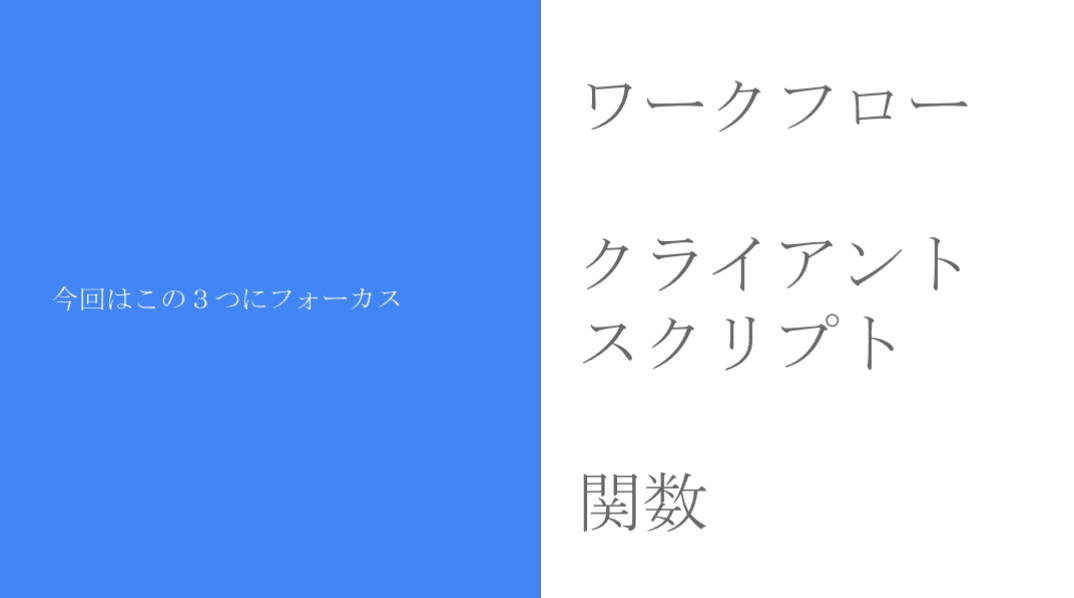
本セッションでは、私自身の経験をもとに、ワークフロー/クライアントスクリプト/関数の3つにフォーカスし、それぞれの特徴と活用シーンをご紹介しました。
今回取り上げる自動化機能 / 手法
それぞれの使用用途と場面
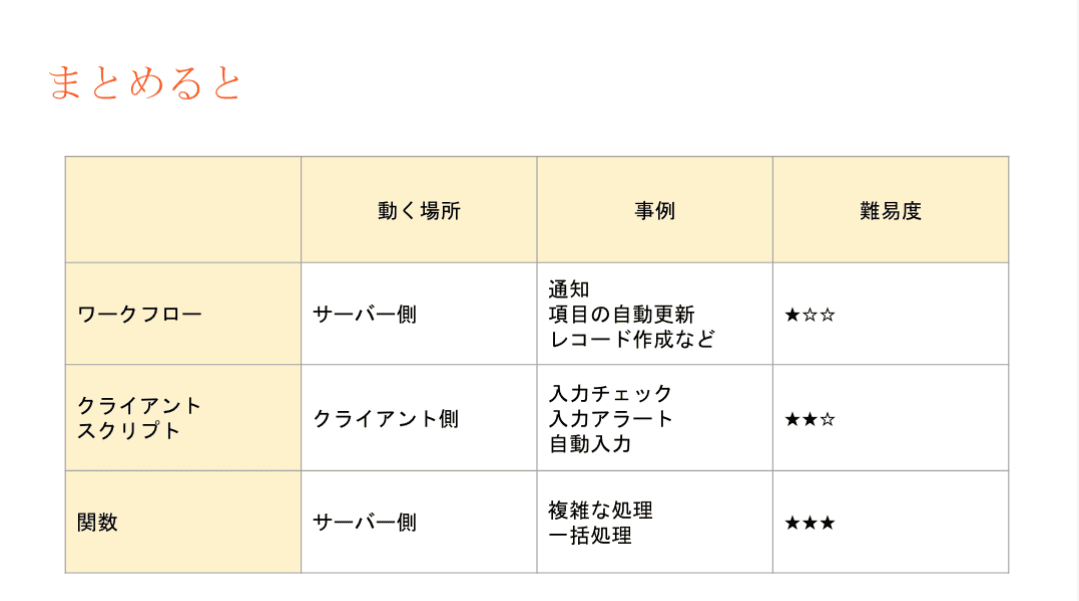
- ワークフロー:設定後も「設定担当者以外の人が見たとしても、直感的に理解しやすい」です。詳細な自動化の設定には最適では無いケースがあります。
- 設定例:CRMで取引先が作成されたら、メールが自動送信されるようにする。
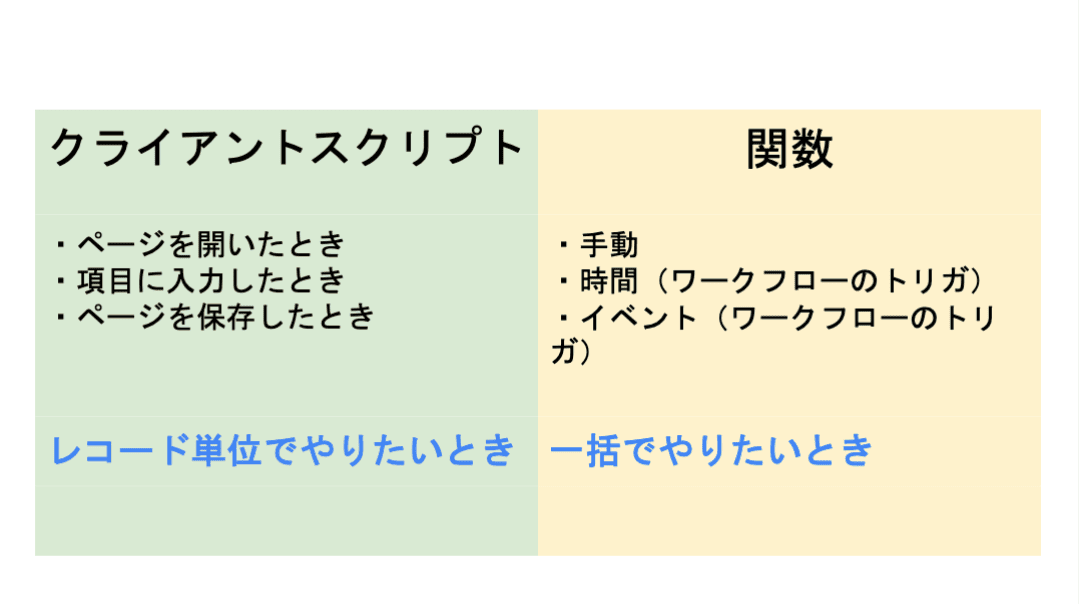
- クライアントスクリプト:設定内容の要件が、画面操作だけで済む場合は本機能を利用します。
- 設定例:CRMの操作画面に、アラート表示を出すことで、記入漏れ等を防ぐ。
- 関数(Deluge):最終手段。ワークフローでも、クライアントスクリプトでも実装できない場合に本機能を活用することで、希望要件の内容で設定できる可能性が出てきます。
- 設定例:添付ファイルを一括アップロードできるようにする。(基本は1ファイルごと手動で添付操作が必要)
ワークフロー:設定後も「設定担当者以外の人が見たとしても、直感的に理解しやすい」です。詳細な自動化の設定には最適では無いケースがあります。
- 設定例:CRMで取引先が作成されたら、メールが自動送信されるようにする。
クライアントスクリプト:設定内容の要件が、画面操作だけで済む場合は本機能を利用します。
- 設定例:CRMの操作画面に、アラート表示を出すことで、記入漏れ等を防ぐ。
関数(Deluge):最終手段。ワークフローでも、クライアントスクリプトでも実装できない場合に本機能を活用することで、希望要件の内容で設定できる可能性が出てきます。
- 設定例:添付ファイルを一括アップロードできるようにする。(基本は1ファイルごと手動で添付操作が必要)
3点の違い
設定の際の気をつけるべきポイント
関数の設定でつまずきやすいポイントのひとつが、「ワークフローとの連携」です。
引数が間違っていると、ワークフロー自体の設定が正しくても、うまく動作しないという事象が発生します。「何度やってもなぜか動かない…」と感じたときは、ぜひ一度、引数を確認してみてください。
投影資料はこちら
グループワーク:Zoho で"見える化"した / したい、自社の数字
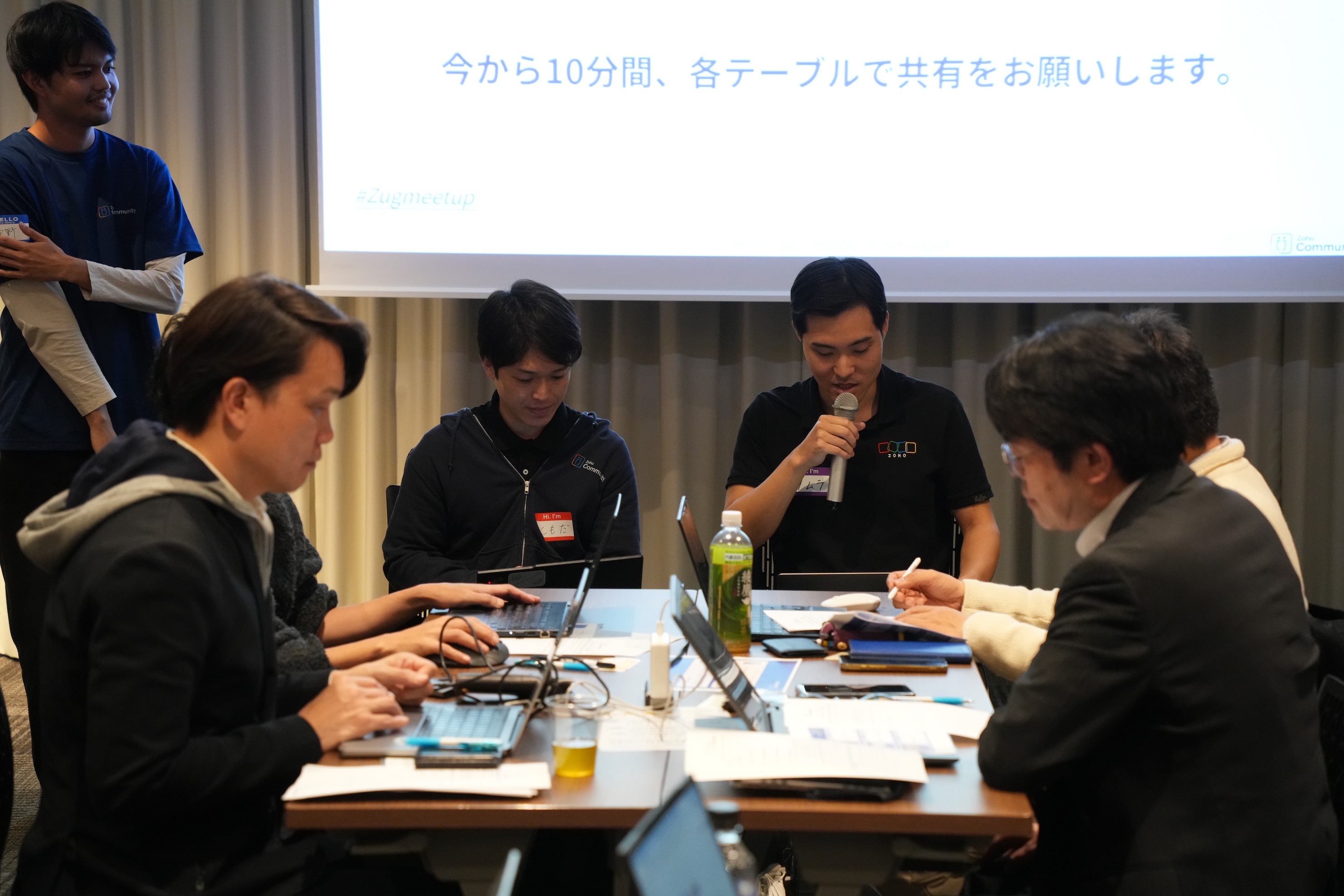
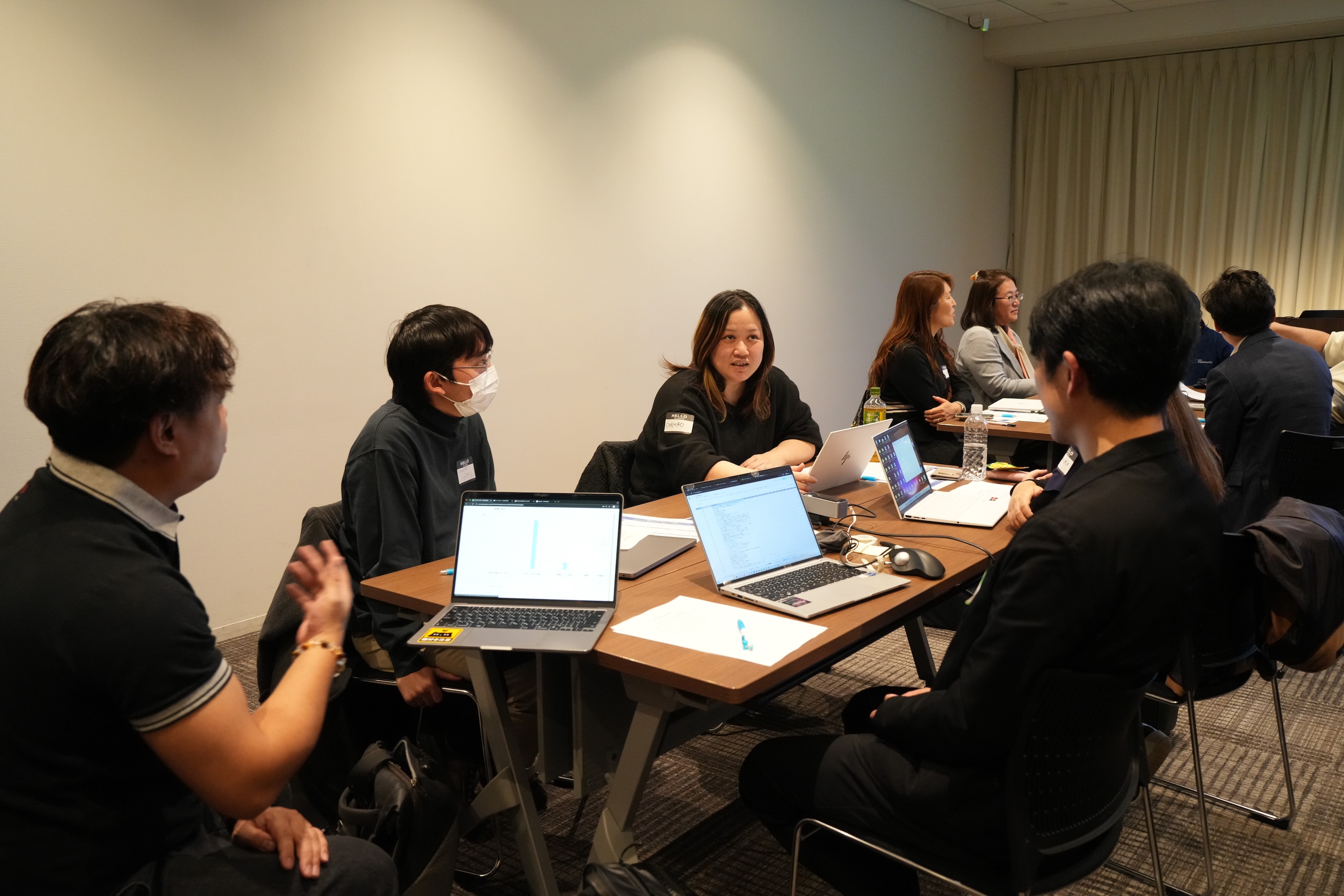
11月に3都市で本テーマのグループワークを実施し、いずれの回も大いに盛り上がりました。ここでは、当日ご参加の皆さまから共有された内容の一部をご紹介します。
- Campaigns や Forms から CRMへデータを取り込み、見込み客がどのような経路でコンタクトしてきたのかを、よりわかりやすく可視化した。
CRM上 で見積書や受注書を作成することで、朝礼の際にiPadなどで簡単に共有・確認ができるようにした。
オフサイトで開催したイベントにかかった費用(展示会など)の参加費・ブース設置費・人件費などをCRMのサブフォームで管理していた。1イベント=1レコードとしてイベントタブにデータを貯蓄することで、各イベントごとの売上や費用対効果を確認できるようになった。

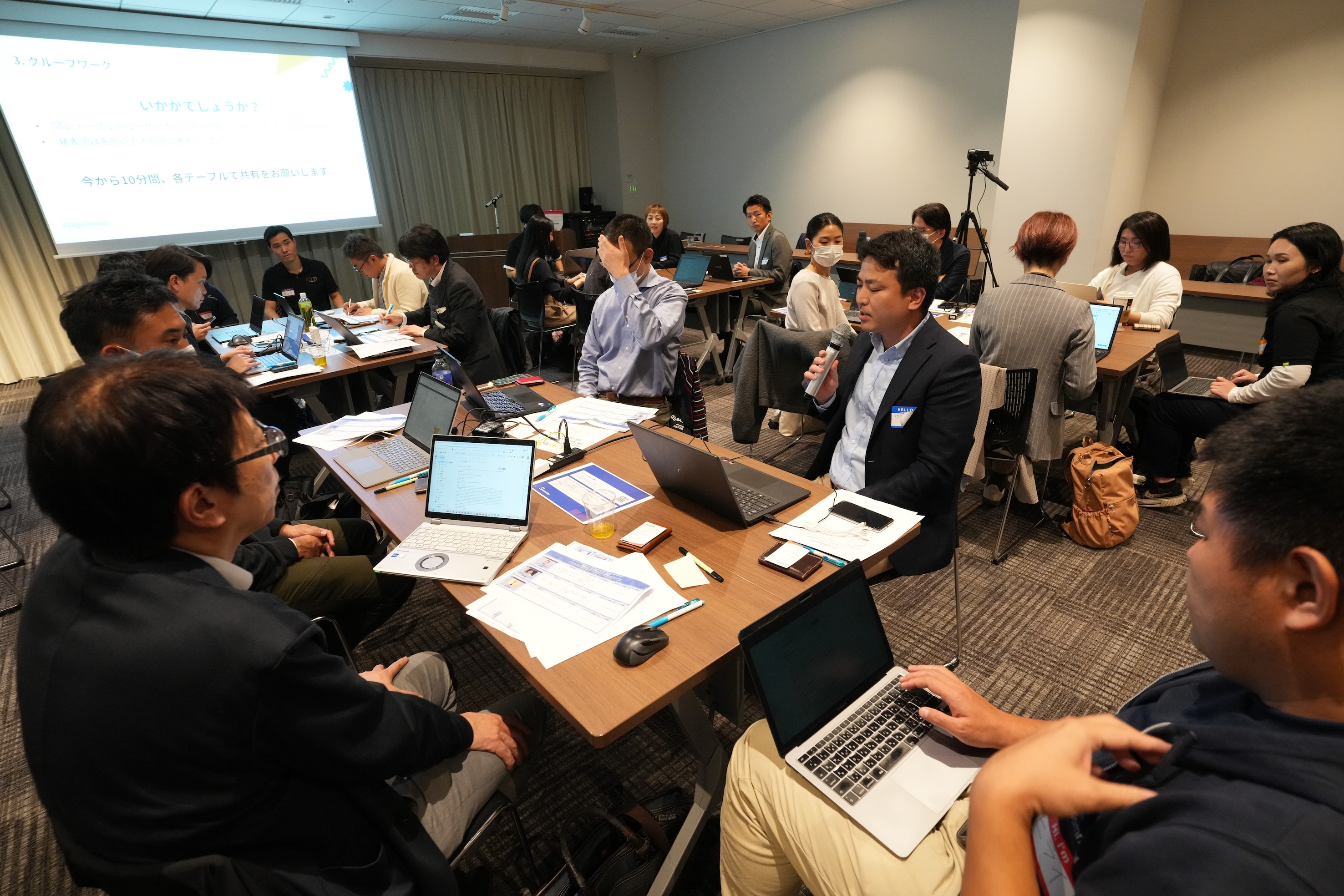
Zoho社員セッション:顧客との日程調整を自動化!Zoho Bookings で営業・サポート対応をスムーズに
11月に3都市で開催したユーザー交流会で本セッションを実施し、ゾーホージャパン技術部の田村より、Zoho Bookings の概要からデモによる活用例までご紹介しました。以下は当日の一部の様子です。


Zoho Bookingsについて
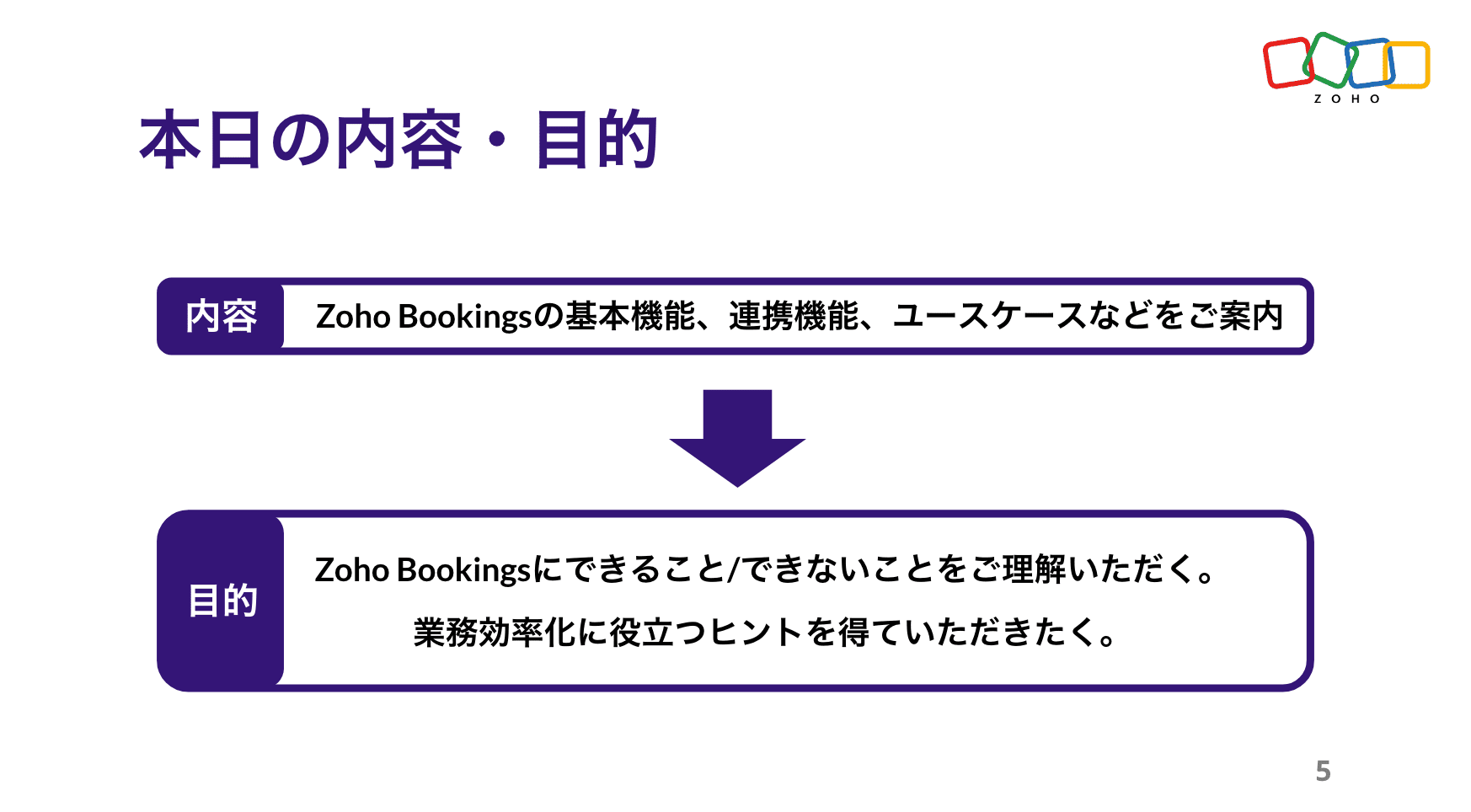


Zoho Bookings の設定について(資料の記載内容を一部抜粋)
Bookings の予約枠は、前後の間隔や時間・期間・営業日、1日あたりの上限などを柔軟に設定できます。
予約ページのデザインも、用途に応じて自由にカスタマイズ可能です。


予約の一覧/カレンダー表示、ステータスについて
※以降は主にデモ動画を投影して説明しました。詳細は、次ページ以降の投影資料をご覧ください。


Zoho Bookings まとめ
Bookingsでは人や物の予約は可能ですが、レストランや宿泊などの日付をまたぐ予約には対応していません。

投影資料はこちら
懇親会の様子
参加者同士で交流されたり、Zoho社員に日頃の悩みや仕様の質問をされたりと、いつも以上に大盛り上がりのイベントでした 😊


お知らせ
2025年度のユーザー交流会は今回で最後です!2026年度の開催予定は、オンラインフォーラムやメールでお知らせします!
※スマートフォンでは、下にスクロールすると「フォロー」ボタンが表示されます。
今後とも、Zoho ユーザーコミュニティをよろしくお願いいたします!
ゾーホージャパン コミュニティチーム


Topic Participants
Emiri Fujisawa
Fujikawa Katsuhiro
Tamura
Sticky Posts
【6/22〜6/24開催】Zoho CRM 管理者向けトレーニングのご案内
「Zoho CRMを導入したばかりで、初期設定や基本操作に不安がある」、「短期間で基礎から理解を深め、運用開始までをスムーズに行いたい」「Zoho CRMを基礎から再度学び直したい」といった課題や要望をお持ちの管理者に向け、Zoho CRM 管理者向けオンライントレーニングを実施します。 2022年6月の開催回よりトレーニング内容を刷新し、有償にて実施いたします。 ─────────────────────────────────── >詳細・お申し込みはこちら:https://www.zoho.com/jp/crm/crmtraining/【12/17(金)Meetup開催】参加者にはノベルティプレゼント!Zoho サービス相談会/情報交換会もあります
こんにちは、Zoho Japan コミュニティチームの今成です。 12月17日(金)16:00から、今年最後のMeetup(ユーザー交流会)を開催します! ●詳細はこちら:https://www.zohomeetups.com/ZohoJapanCommunityMeetup2021vol4/ 前半は今年9月にZoho サービスを導入したユーザー様のセッションとして、現状の利用状況とこれからどのようにZoho サービスを利用していくか、これからの構想談をお話いただきます。 後半では、Zoho CRM【6/29(火) 初心者向け】カスタム関数勉強会のご案内
先日のMeetupでも告知しましたが、以前より多くのユーザーさまからご要望いただいていたZoho の「カスタム関数」に関する基本の勉強会を6/29(火) 17:00に、開催します! 関数の基本的な書き方や、Zoho CRM で活用できる関数例のデモなどについて、Zoho の技術メンバーがわかりやすく解説します。 関数の基本を掴みたい方はぜひ、ご参加くださいませ。 >>申し込みはこちら:attend.zoho.com/luy0 以下詳細です。 ーーーーーーーーーーー 日時:6月29日(火) 17:00~【3/19(金)】Meetup(ユーザー交流会)開催のご案内。Zoho CRM ユーザー事例やZoho Sign の紹介、Zoho CRM 相談会など
こんにちは、Zoho Japan コミュニティチームの今成です。 2021年1回目となるMeetupを、3月19日(金)16:00~ 開催いたします! ●詳細はこちら:https://www.zohomeetups.com/ZohoJapanOnlineMeetup2021vol1 毎回好評のZoho ユーザーさまによる活用事例をはじめ、Zoho の電子署名ツール「Zoho Sign」の製品デモや、グループディスカッションをご用意しています。 前半/後半のみのご参加も可能ですので、お気軽にご参加ください!【12/17(木) 16:00-】ユーザー同士で情報交換を行う、グループディスカッションもあります。オンラインMeetup Vol.4 開催のお知らせ
Zoho コミュニティチームの今成です。最近寒くなってまいりましたが、みなさまいかがお過ごしですか? Zoho Japan Communityでは、今年最後のオンラインMeetup(ユーザー交流会)を開催いたします!以下、詳細のご案内です。 ーーーーーーーーーーーーーーーーーーーーー <日時>2020年12月17日(木) 16:00-18:00 <参加費>無料 <開催方法>オンライン <概要> 前半(16:00〜17:00) 自社活用事例「Zoho 社員は、1日の中でどのサービスをどれくらい使っているのか」(ゾーホージャパン株式会社 コミュニティチーム)
Recent Topics
Automation in Zoho Sprints
Hi. I have a Sprints board with the following statuses: ToDo, InProgress, CodeReview, Testing, Preprod, Live When a ticket is moved from e.g. Testing to Preprod, the following tags should be modified: remove 'tested OK' remove 'ready for Preprod' addExport Purchase orders as Excel
Is it possible to export purchase orders as excel rather than PDF? Our suppliers don't want orders made in PDF, they need it to be excelDraft & Schedule Emails Directly in Bigin
Greetings, I hope all of you are doing well. We're happy to announce a few recent enhancements we've made to email in Bigin. We'll go over each one in detail, but here's a quick overview: Previously, you couldn't draft or schedule emails in Bigin, butCreate CRM Deal from Books Quote and Auto Update Deal Stage
I want to set up an automation where, whenever a Quote is created in Zoho Books, a Deal is automatically created in Zoho CRM with the Quote amount, customer details, and some custom fields from Zoho Books. Additionally, when the Sales Order is convertedSend email template "permission denied to access the api"
Hello, Per the title, I'm trying to send a Zoho CRM Email template based on the advice given here: https://help.zoho.com/portal/en/community/topic/specify-an-email-template-when-sending-emails-in-custom-functions (I'd prefer to send right from DelugeZia’s AI Assist now helps you write clearer notes — in seconds
After helping recruiters craft job descriptions, emails, and assessments, Zia’s AI Assist is now stepping in to make note-taking effortless too. Whether you’re recording feedback after an interview or sharing quick updates with your team, you can nowShortcut to fill a range of cells
Good evening: I'm writing because I haven't been able to find a feature that allows you to select a range of cells, type in one of them, and then use a key combination to type in all of them. In Excel, the keyboard shortcut is Ctrl+Enter. I haven't foundIntroducing Dark Mode / Light Mode : A New Look For Your CRM
Hello Users, We are excited to announce a highly anticipated feature - the launch of Day, Night and Auto Mode implementation in Zoho CRM's NextGen user interface! This feature is designed to provide a visually appealing and comfortable experience forObject required error
Hi, I am getting an 'Object required' error on the line Call HideColumnsOutsideRange(ws, startOfWeek, endOfWeek) when I run the ShowCurrentWeek macro but not when I run the ShowCurrentMonth macro. Any ideas? Regards, GW Option Explicit Sub HideColumnsOutsideRange(wsZoho CRM - Rename "Estimates" in CRM Finance Suite Integration to "Quotes"
I'm not sure if it's been 2 or 3 years now since Zoho Books renamed Estimates to Quotes. I still see "Estimates" in the Zoho CRM integration. Could this be added to Translation settings so that some customisation could be made on an account by accountIts 2022, can our customers log into CRM on their mobiles? Zoho Response: Maybe Later
I am a long time Zoho CRM user. I have just started using the client portal feature. On the plus side I have found it very fast and very easy (for someone used to the CRM config) to set up a subset of module views that make a potentially extremely usefulNew Series Announcement - Ecommerce Marketing Tips
Running an online business is more than just having a website. It’s about getting the right customers to discover you, trust you, and keep coming back. To support your growth journey, we’re launching a weekly Marketing Tips series right here on Zoho CommerceMarketing Tip #7: Add a blog to your online store
A blog is more than content. It’s a magnet for new customers. Sharing product guides, styling tips, or industry insights through blog posts builds trust and helps you rank higher on search engines. Try this today: Write one blog post answering a commonKanban view on Zoho CRM mobile app!
What is Kanban? The name doesn't sound English, right? Yes, Kanban is a Japanese word which means 'Card you can see'. As per the meaning, Kanban in CRM is a type of list view in which the records will be displayed in cards and categorized under the givenAllow Regular Users to Directly Transfer Ownership of Files & Folders
Hi Zoho WorkDrive Team, Hope you are doing well. We would like to request an important enhancement related to file and folder ownership management in Zoho WorkDrive. At the moment, a regular user cannot directly transfer ownership of their files or foldersTriggering rules on lead conversion
There is no field on the Rule list for rule conversion to trigger an alert on liead conversion to a potential. I assigned a rule to file on any creation or update of a lead. The lead was changed a lead to a potential but no rule was fired. Rajesh BhadraCustomised Funnel
We are running the standard plan for our ZOHO CRM. I have been asked if there is a way to combine data from the Calls module, Deals module and Contact Module into 1 funnel, similar to the view you can get when viewing Deals By Stages, you can see theTrigger Zapier on Deluge Insert Into Function?
Hello, To get around the limitation of not being able to trigger a Zapier Zap on Record Update(this would be extremely useful to be able to do btw), I have created a Deluge script to copy the data from Form A to a Trigger Form B using the Insert Into expression from a Custom Action button on a Report from Form A. This action does not trigger the Zapier Zap whereas manually adding a record or duplicating an existing record does trigger the Zap. Is Insert Into not the same as a manual Add in the contextCan you inject JS in an HML+CSS+Deluge Page?
I have an HTML + CSS + Deluge page and need just a little vanilla JS functionality. However, it seems like Zoho Creator does not allow that. I'm required to create a JS widget. Is this correct? If so: 1. Won't this quickly consume my API limit if thereDisplay Client Name in Zoho Creator Client Portal Dashboard
Hello Zoho Creator Team, We hope you are doing well. Zoho Creator recently introduced the option to set a client’s display name in the Client Portal settings, which is very helpful for providing a personalized portal experience. However, there is currentlyZoho unified inbox
The new changes have definitely improved things for switching between accounts. But zoho still desperately needs a unified inbox. It sucks to have to enter filters and folders for each and every inbox. This seems like such a simple thing, i wonder why Zoho hasn't done it?Marketer’s Space - Multi-Channel Campaigns for the Biggest Shopping Week with Zoho Marketing Automation
Hello marketers, Welcome back to another post in Marketers Space! The biggest shopping week of the year is almost here, and it’s your moment to shine without the stress. With Black Friday and Cyber Monday just around the corner, being present across email,Is there a problem with sharing workdrive files with links since last night?
As per title, we can't access folders/files through share links since last night. I created ticket but we need quick solution and didn't hear back from the support yet. The files are still accessible by the main account but all zoho files that we areEnable Screen Recording in Zoho WorkDrive Mobile Apps (Android & iOS)
Hi Zoho WorkDrive Team, How are you? We are enthusiastic Zoho One users and rely heavily on Zoho WorkDrive for internal collaboration and content sharing. The screen-recording feature in the WorkDrive web app (similar to Loom) is extremely useful- however,Production Management Tool (MRP / BOM)
Hi Guys, is there any recommended App available that works with zoho and covers the needed applications for a production? What we need is a system that covers the BOM (bill of materials), MRP (material ressources planning), MRP II (manufacturing ressourcesFunction #53: Transaction Level Profitability for Invoices
Hello everyone, and welcome back to our series! We have previously provided custom functions for calculating the profitability of a quote and a sales order. There may be instances where the invoice may differ from its corresponding quote or sales order.Bug in Zoho Cliq Signup Flow – "%s" Placeholder Visible Instead of Product Name
Hi Zoho Team, I would like to report a UI bug in the Zoho Cliq signup/enable flow. During the step where Cliq asks to enable the product for the company, the following text appears: Great! Your company is already available in Zoho, so you just have toZoho Invoice Customer Login Portal
Are there any plans for a customer portal to Zoho Invoice, ala Freshbooks? I would like customers that I invoice to be able to login to review invoices and invoice history. I have not switched from Freshbooks for this very reason.Exporting tickets
I went to Setup -> Organization -> Import/Export in order to export tickets but found 2 issues: 1. The email body never gets exported. 2. There are some large numbers (like 5.57E+16) under certain columns of the exported CSV file. I could not find any export options. Please can you help with this?Editing the Ticket Properties column
This is going to sound like a dumb question, but I cannot figure out how to configure/edit the sections (and their fields) in this column: For example, we have a custom "Resolution" field, which parked itself in the "Ticket Information" section of thisCopy field information to clipboard
I need to be able to transfer some field information in to the clipboard, so that I can then paste it in to our helpdesk system. Is there a way I could add a button to a detail report that does this?Issuing reconciling a bank statement
HELP! I'm trying to reconcile a bank statement. The prior month reconciled perfectly. Beginning balance is correct yet I'm off by the same amount each time. Both myself and my office manager, separately and together, have tried to complete this reconciliationUnknown table or alias 'A1'
I would like to create a subquery but i am getting the following error: Unknown table or alias 'A1' used in select query. This is the sql statement: SELECT A1.active_paying_customers, A1.active_trial_customers, A1.new_paying_signup, date(A1.date_active_customers),Detect and ignore bots in visitors
The SalesIQ visitor numbers are basically useless to us because there is no bot detection. We get the same bots coming in from the same countries looking at the same pages every day. It can't be that difficult to tell the difference between an actualAdd Real-Time Microphone Audio-Level Indicator During Screen Recording
Hi Zoho WorkDrive Team, Hope you are doing well. We would like to request an important enhancement to the Zoho WorkDrive screen-recording experience. Current Limitation: During a recording session, there is no visual indication that the microphone isZero Personalization of the File Sharing Experience
By now (2025) this is the maximum level of personalization available for a Zoho sharing link. We gently asked Zoho if we could modify at least the background, and they replied that it cannot be customized. We're truly disappointed – and surprised everyTwo factor authentication for helpdesk users
The company i work for wants use the helpdesk site in Zoho desk, as a place for their distribution partners to ask question and look for information about our product. The things there is suppose to go up there is somewhat confidential between my companyKiosk can't merge picklist or multiselect
There is no ability to load a multiselect or picklikst field into a kiosk with the values that have been previously selected. So, I essentially have 3 unacceptable options: 1.)Load the value into a text string and include instructions like this: "PicklistAGE field from DATE OF BIRTH Field.
HI! I have a field called date of birth in my CRM (LEADS, CONTACT etc…) How can I know the AGE today I would like to create a field AGE. I now how to create a field but I don´t which calculation (CUSTOM FUCTION) to make ¿ANY HELP?How to update/remove file in zoho creator widgets using javascript API
Hi Team, I have developed a widget which allows inserting and updating records I have file upload field with multiple file upload. Now while doing insert form record, I am using uploadFile API to upload files for that record. I am using updateRecord APINext Page