Automating Attendance Tracking with Zoho Cliq Developer Platform
I wish remote work were permanently mandated so we could join work calls from a movie theatre or even while skydiving! But wait, it's time to wake up! The alarm has snoozed twice, and your team has already logged on for the day.

How does this solution benefit a business?
- Real-time reminders reduce instances of ghost check-ins and ensure accurate recording of everyone's logged hours.
- Essential for attendance tracking, payroll accuracy, compliance with labour laws, and audits.
- The entire team stays informed, fostering a cohesive workflow that eliminates the need for micromanagement.
Before beginning to script the code below, we must create a connection in Cliq with Zoho People. Once a connection is created and connected, you can use it in Deluge integration tasks and invoke URL scripts to access data from the required service.
Create a Zoho People default connection with any unique name with the scopes - ZohoPeople.Attendance.ALL , ZohoPeople.forms.ALL and ZohoPeople.leave.ALL
ⓘ Document for reference : Connections in Cliq
How to obtain or locate the channel unique name in Cliq?
Navigate to the top right corner of the channel and locate the three dots. Click it.
In the menu that appears, select "Channel info" and a pop-up will open, displaying detailed channel information.
- After a successful login in Cliq, hover to the top right corner and click your profile. Post clicking, navigate to Bots & Tools > Schedulers.
- On the right, click the "Create Scheduler" button.
- To learn more about schedulers and their purposes, refer to the Introduction to Schedulers.
- Create a scheduler using your preferred name. Specify the following details: the scheduler name and a description.

- For the recurring period, choose the type "Weekly." Select Monday through Friday and set the time of execution to 11 AM or any other time that aligns with your company's check-in time, or customise the recurring period based on your specific use case.
- Finally, click "Save & edit code" and paste the following code.
- currentDate = zoho.currentdate;
- currentDateString = currentDate.toString("dd-MMM-yyyy");
- fromIndex = 1;
- toIndex = 200;
- // Get all active users
- users = zoho.people.getRecords("employee",fromIndex,toIndex,{},"{CONNECTION_LINK_NAME}");
- usersList = List();
- usersList.addAll(users);
- iterations = {1,2,3,4,5,6,7,8,9,10,11,12,13,14,15,16,17,18,19,20,21,22,23,24,25};
- // Get All Employees ( 4000 MAX )
- if(users.size() == 200)
- {
- for each iteration in iterations
- {
- fromIndex = fromIndex + toIndex;
- toIndex = toIndex + 200;
- users = zoho.people.getRecords("employee",fromIndex,toIndex,{},"{CONNECTION_LINK_NAME}");
- if(users.size() > 0 && users.size() == 200)
- {
- usersList.addAll(users);
- }
- else if(users.size() > 0 && users.size() < 200)
- {
- usersList.addAll(users);
- break;
- }
- else
- {
- break;
- }
- }
- }
- // Get all the employees checkedin from the morning.
- getAttendenceEntries = invokeurl
- [
- url :"https://people.zoho.com/api/attendance/fetchLatestAttEntries?duration=240"
- type :GET
- connection:"{CONNECTION_LINK_NAME}"
- ];
- latestAttendanceRecords = getAttendenceEntries.get("response").get("result");
- checkedInUsers = List();
- for each userRecord in latestAttendanceRecords
- {
- checkedInEmployeeEmail = userRecord.get("emailId");
- checkedInUsers.add(checkedInEmployeeEmail);
- }
- // Get all the employees who applied for leave both approved and pending ( Remove PENDING to exclude only the leave approved employees )
- leaveApprovedEmployees = invokeurl
- [
- url :"https://people.zoho.com/api/v2/leavetracker/leaves/records?from=" + currentDateString + "&to=" + currentDateString + "&dateFormat=dd-MMM-yyyy&approvalStatus=[APPROVED,PENDING]"
- type :GET
- connection:"{CONNECTION_LINK_NAME}"
- ];
- info leaveApprovedEmployees;
- leaveApprovedEmployeesList = List();
- for each member in leaveApprovedEmployees.get("records")
- {
- leaveApprovedEmployeesList.add(member.get("EmployeeId"));
- }
- info leaveApprovedEmployeesList;
- // Add the users to yet to checkin list if they are not checked from the morning and not applied for leave
- usersYetToCheckIn = list();
- for each user in usersList
- {
- employeeEmail = user.get("EmailID");
- employeeId = user.get("EmployeeID");
- employeeStatus = user.get("Employeestatus");
- if(!checkedInUsers.contains(employeeEmail) && !leaveApprovedEmployeesList.contains(employeeId) && employeeStatus.equals("Active"))
- {
- usersYetToCheckIn.add(employeeEmail);
- }
- }
- // Mention the list of users in the channel.
- if(usersYetToCheckIn.size() == 0)
- {
- info "No users were found yet to checked-in at 11 PM today. Great to see everyone wrapping in on time! ✅";
- }
- else
- {
- usersYetToCheckInString = "";
- for each user in usersYetToCheckIn
- {
- usersYetToCheckInString = usersYetToCheckInString + "[" + user + "](mail:" + user + ") \n";
- }
- usersYetToCheckInString = usersYetToCheckInString.subString(0,usersYetToCheckInString.length() - 2);
- response = Map();
- card = Map();
- card.put("title","Employees who haven’t checked in yet ( " + usersYetToCheckIn.size() + " )");
- card.put("thumbnail","https://i.pinimg.com/originals/85/e9/f3/85e9f3f5ac31fc5aab586e208297f43d.gif");
- card.put("theme","modern-inline");
- response.put("card",card);
- response.put("text",usersYetToCheckInString);
- info zoho.cliq.postToChannel("{CHANNEL_UNIQUE_NAME}",response);
- }
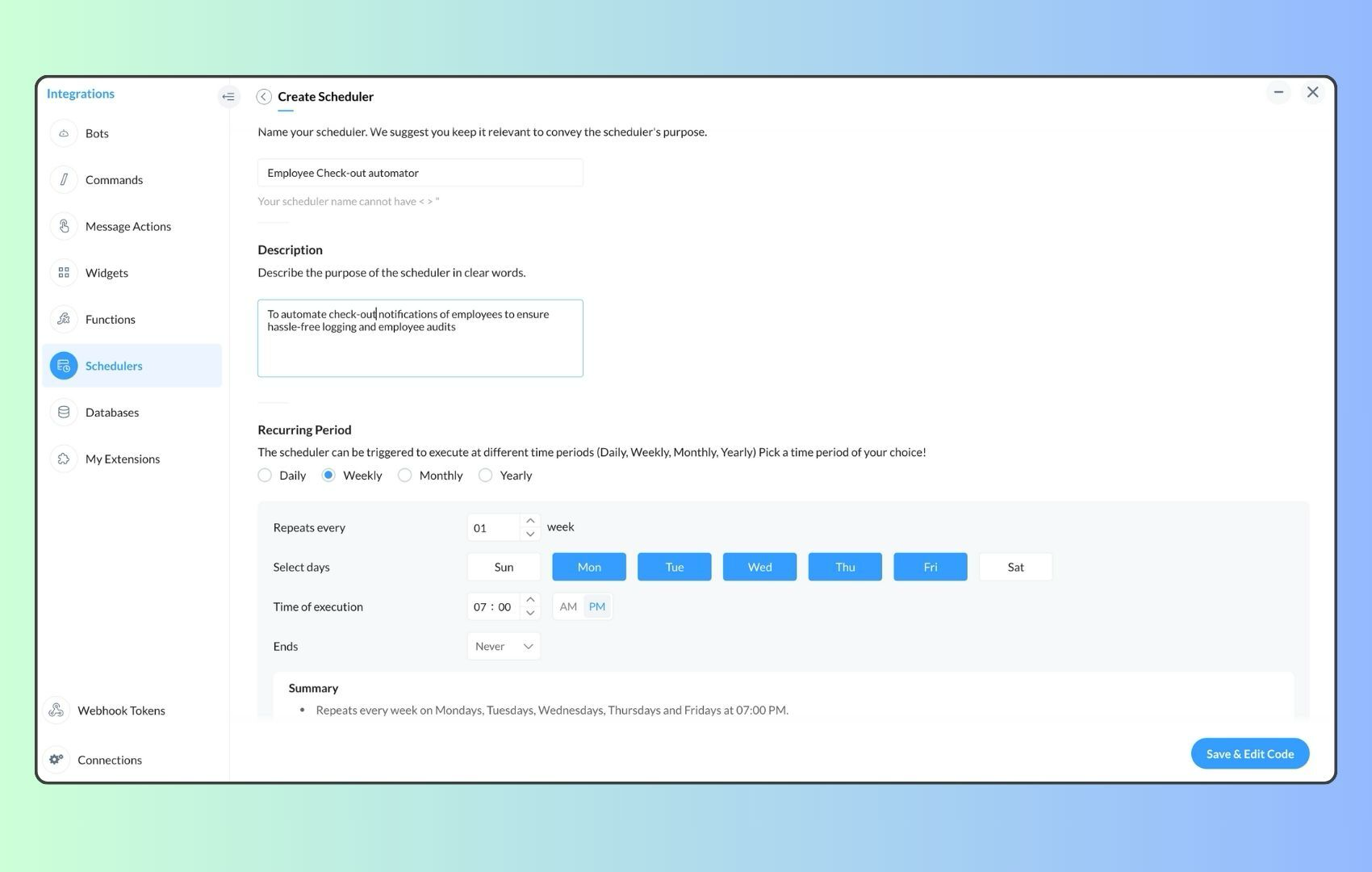
- Now, let's follow the same steps and create a scheduler for checkout reminders. Under the recurring period, choose the type as "Weekly." Select Monday through Friday and set the time of execution to 7 PM or any other time that aligns with your company's checkout time, or customise the recurring period based on your specific use case.
- Click "Save & edit code" and paste the following code.
- attendanceResponse = invokeurl
- [
- url :"https://people.zoho.com/api/attendance/fetchLatestAttEntries?duration=600"
- type :GET
- connection:"{CONNECTION_LINK_NAME}"
- ];
- info attendanceResponse;
- todayDate = zoho.currenttime.toString("YYYY-MM-dd");
- latestAttendanceRecords = attendanceResponse.get("response").get("result");
- usersWithoutCheckout = list();
- if(latestAttendanceRecords.size() > 0)
- {
- for each userRecord in latestAttendanceRecords
- {
- userEmail = userRecord.get("emailId");
- dailyEntries = userRecord.get("entries");
- for each dailyEntry in dailyEntries
- {
- if(dailyEntry.containsKey(todayDate))
- {
- todayEntryDetails = dailyEntry.get(todayDate);
- attendanceLogs = todayEntryDetails.get("attEntries");
- for each logEntry in attendanceLogs
- {
- if(!logEntry.containsKey("checkOutTime"))
- {
- usersWithoutCheckout.add("{@" + userEmail + "}");
- }
- }
- }
- }
- }
- }
- usersWithoutCheckoutString = usersWithoutCheckout.toString("\n");
- if(usersWithoutCheckoutString.trim().length() == 0){
- usersWithoutCheckoutString = "No users were found checked-in after 7 PM today. Great to see everyone wrapping up on time! ✅";
- }
- response = Map();
- card = Map();
- card.put("title","List of users who remain checked in ( " + usersWithoutCheckout.size() + " )");
- card.put("thumbnail","https://media.tenor.com/Hd8nLZZTPRYAAAAi/alarm-clock-alarm.gif");
- card.put("theme","modern-inline");
- response.put("card",card);
- response.put("text",usersWithoutCheckoutString);
- info zoho.cliq.postToChannel("{CHANNEL_UNIQUE_NAME}",response);
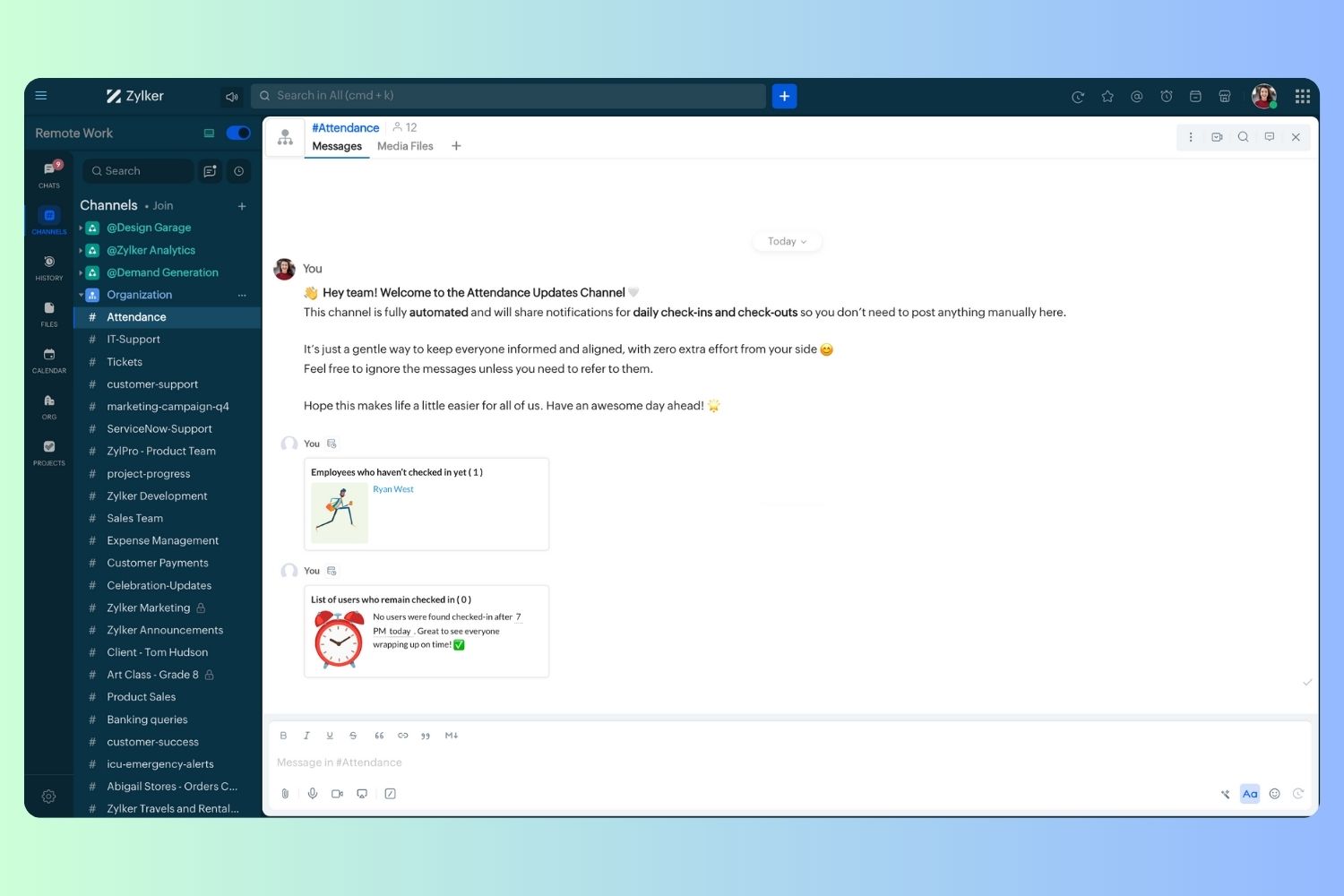
Wrapping up and checking out for the day, hopefully
Topic Participants
Harsha SS
Ram Freedman
Sticky Posts
Automate attendance tracking with Zoho Cliq Developer Platform
I wish remote work were permanently mandated so we could join work calls from a movie theatre or even while skydiving! But wait, it's time to wake up! The alarm has snoozed twice, and your team has already logged on for the day. Keeping tabs on attendanceAutomating Employee Birthday Notifications in Zoho Cliq
Have you ever missed a birthday and felt like the office Grinch? Fear not, the Cliq Developer Platform has got your back! With Zoho Cliq's Schedulers, you can be the office party-cipant who never forgets a single cake, balloon, or awkward rendition ofCustomer payment alerts in Zoho Cliq
For businesses that depend on cash flow, payment updates are essential for operational decision-making and go beyond simple accounting entries. The sales team needs to be notified when invoices are cleared so that upcoming orders can be released. In contrast,Accelerate Github code reviews with Zoho Cliq Platform's link handlers
Code reviews are critical, and they can get buried in conversations or lost when using multiple tools. With the Cliq Platform's link handlers, let's transform shared Github pull request links into interactive, real-time code reviews on channels. ShareApp Spotlight : PagerDuty for Zoho Cliq
App Spotlight brings you hand-picked apps to enhance the power of your Zoho apps and tools. Visit the Zoho Marketplace to explore all of our apps, integrations, and extensions. In today's fast-paced world, seizing every moment is essential for operational
Recent Topics
Spilt Axis for stacked column and line graph
Each month around this time I prepare a business review deck. One of the biggest annoyances I have with Zoho, also happens to be something that most other platforms have provided for a long time now, and that is being able to create a chart with stackedPin a note on top
Dear Zoho Notebook Team, Please highly consider adding ability to pin a note on top and arrange pinned notes. I have a lot of notes that I want to pin important ones on top and this feature is missing badly. Thank you.Windows 11 app ver 2.2.8
I have been trialing Zoho Notes syncing between my PC and iphone. No problems with iphone but the Windows 64 bit app ver 2.2.8 was very buggy and would lock up completely, needing a Control Alt Delete etc to close it down. It seemed to be connected toDeluge Script: Onboarding → Access Form
Hello everyone, Edit: Sorry, I think I put this topic in the wrong section. I’ve recently run into an issue that’s been giving me a bit of a headache for the past few weeks. Context: This is my first time using Deluge to create a script, but it’s notWindows Device Authentication
We have recently started using ManageEngine, and my boss saw a device management feature in the Zoho One directory. We thought it would either help give us more intergration into Zoho one through bringing ManageEngine services through Zoho one. Or, itHow can I change spell check language?
I cannot find the way to change spell check language. My "display language" is English, and I want to have the same one for Spell Check, but it is Russian!!! How can I change it? In one of your explanations you mentioned that I have to choose it fromMail is so slow - doesn't even work!
Mail has been getting slower and slower - and today it's not even pulling up emails in either Inbox or Unread. This is beyond frustrating since email is a big part of business. Sent a request through the useless help portal - no response. Called the uselessUser marked as SPAMMER. Mail Fetch has also been disabled for any active POP accounts.
I am the administrator for joelles.com One of our accounts has been blocked saying this: User marked as SPAMMER. Mail Fetch has also been disabled for any active POP accounts. I cannot change the disabled account in the control panel as it says that itIs there a way to sync Tags between CRM and Campaigns/Marketing Hub?
I wonder if there is a way to synch the tags between CRM and Marketing-Hub / Campaigns?how to see if a specific contact opened an email in zoho campaign?
how to see if a specific contact opened an email in zoho campaign?Revenue Management: #8 Revenue Recognition in Educational & Training Institutions
Educational Institutions and training centres typically collect course fees at the time of enrolment, sometimes for a one-day workshop and sometimes for a year-long certification course. You might also charge separately for course materials or evaluation.Maximum file limit in zoho people LMS
Dear Team, I am having approximately 4.9 GB of material, including PPTs and videos for uploading in zoho people LMS course. May I know what is the maximum limit limit for the course files Thanking you, With regards, Logeswar V Executive _ OperationsDynamically prefill ticket fields
Hello, I am using Zoho Desk to collect tickets of our clients about orders they placed on our website. I would like to be able to prefill two tickets fields dynamically, in this case a readonly field for the order id, and a hidden field for the sellerOptimize your Knowledge Base for better visibility by allowing search engine crawling and indexing
All you need to know about no-follow and no-index in KB. What are article crawlability and indexability? Crawlability and indexability are vital for making an article visible and accessible to search engines. When a search engine crawls an article, itHas anyone created a public ASAP Guide that I can check out?
I am thinking of adding an ASAP guide to my web application, but I have noticed that the ASAP widget itself can be really slow to load sometimes. Has anyone created a public ASAP Guide that I can check to see how performant it is? I don't want to spendWhat’s New in Zoho Analytics – September 2025
Hello Users!! In this month’s update, we’re raising the bar across multiple touchpoints, from how you bring in data, plan and track projects to how you design and brand your dashboards. We’ve added the all-new Gantt chart for project visualization, expandedZoho MCP has no tools for Creator or 3rd Party Apps?
I don't see a Zoho MCP community forum so putting this here. Two big problems I see: 1) Although Zoho advertises "over 950 3rd party apps" as available through their MCP, when I go to "Add Tools" there are ZERO 3rd party apps available to choose from.Zoho Forms - Zoho Drive connection - Shared Drives not supported
Hello i am stuck with Google Drive Connection There is no supported shared drives Connection is not support shared drives boolean Query Parameters - supportsAllDrives=true&supportsTeamDrives=true to activate fetch files from the shared drives. Ahat needCan't create package until Bill created?
I can't understand why we cannot create a package until a Bill is created? We are having to created draft Bills to create a package when the item is received, but we may not have received a Bill from the supplier. Also, Bill # is required, but we normallyWhats the Time out Limit for API Calls from Deluge?
Hi Creator Devs, We are making API calls to third party server via Deluge. Getting this error message: Error at line : 24, The task has been terminated since the API call is taking too long to respond. Please try again after sometime. Whats the defaultHow to get the authorization code for domain transfer from Zoho?
I have transferred my domain from zoho to godaddy, and that needs a authorization code. I haven't got any mail containing that. How to get the authorization code from domain transfer? Thanks, ArunHow can I optimize a Zoho Site page for SEO when embedding external menu or restaurant links?
Hi everyone, I’m experimenting with building small content hubs on Zoho Sites and want to make sure I’m doing it in an SEO-friendly way. For example, I tried creating a page that highlights restaurant menu items and linked out to a resource like this:Diff signature for compose new email and replies
Hi, How do i have different signature for replies and new emails. its inconvenient to have one large signature for replies. Usually on Outlook we have the option to keep separate signatures for new emails and for replies.Zoho Website Site Speed Up & Setting
We are experiencing slow loading speeds on our Zoho website and would like assistance in optimizing its performance. Kindly review the site and suggest or implement necessary improvements to enhance speed, especially related to: > Caching mechanisms >No option for pick up in Zoho Books / Inventory but yes on commerce
Is it planned to release soon on books/inventory?Accessing Zoho form enteries via API
Hi As a user I can view enteries to a form at: https://forms.zoho.com/<myOrganisation>/report/<myReportName>/records/web How do I access these entries via API? I don't have any problem with scope and getting tokens. But I have no idea what the API callBlueprint Issue - Being able to set a subform field as mandatory
I'm creating a blueprint. My record involves a subform which is only shown once field is set but the field gets set in step two of the process. My problem - I can't save the record as the subform field is set to mandatory - If I unset the mandatory field,Blueprint - Mandatory file upload field
Hi, File upload (as we as image upload) field cannot be set as mandatory during a blueprint transition. Is there a workaround? Setting attachments as mandatory doesn't solve this need as we have no control over which attachments are added, nor can weZoho Books - Include Quote Status in Workflow Field Triggers
Hi Zoho Books team, I recently tried to create a Workflow rule based on when a Quote is Accepted by the customer. This is something which I thought would be very easy to do, however I discovered that Status is not listed as a field which can be monitoredZoho Books - Show Related Sales Orders on Quotes
Hi Books team, I've noticed that the Quotes don't show show the related Sales Order. My feature request is to also show related Sales Orders above the Quote so it's easy to follow the thread of records in the sales and fulfilment process. Below screenshotAdd VAT/Tax line to bank adjustments
When categorising transactions and matching bank feeds with transactions such as customer payments, we use the "Add Adjustment" to add things like fees/bank fees. It would be useful to choose a VAT/Tax rate here. Whilst there is a bank charges option when adding a payment, this goes into the default bank charges account. We use the adjustments so that we can choose the account and separate our fees. We use different card providers and Worldpay charges VAT so we are stuck. We cannot integrate withNew Menu Layout Feedback
I'd really like to see the banking item back on the top of the menu. I'm sure part of it is just because that's what I'm accustomed to. However, for a bookkeeping program, I think there's a logic to having banking be on top. Not a giant issue, but somethingForm Accessibility
Hi, is there an update on the accessibility standard of Zoho forms? Are the forms WCAG 2.1 AA compliant?Cannot schedule report delivery
The only 'send option' available when exporting reports is 'immediately' The option to schedule the report is missing.adding attachment in sendmail script where attachment is in a CRM field
Hi all, I have a custom field of type 'File Upload' in one of my modules in my CRM. I want to include the file in that field as an attachment to an email - which is done from a button on the 'Results' module. I have created a script and a button to initiate an email from that module. The Deluge scripting window has allowed me to add arguments for all the fields I need to use except for the one file upload type field. My script currently looks like the below (content of the email omitted). As you[Free Webinar] Learning Table Series - AI-Enhanced Insurance Claim Management in Zoho Creator
Hello Everyone! We’re excited to invite you to another edition of Learning Table Series, where we showcase how Zoho Creator empowers industries with innovative and automated solutions. Struggling with lengthy claim processes, a lack of visibility intoNot sure how to use credits to my account
Hi I have a $50 credit to my account. I'm just wondering how I can apply that to either a current invoice or to try a new service. Any advice would be great, thanks. Kind Regards ChrisControl who sees Timeline and Interactions in Zoho CRM through Profiles
The feature has been enabled for all DCs (except US, EU, and IN DCs). We will be rolling it out to the other DCs in the upcoming days. Dear All, In a CRM, not all users would require access to the history of a record. For instance, a Marketing OperationsZoho Desk Integration - Add the option to send the estimate from the Zoho Desk Ticket Integration
Hi, Currently in the Zoho Desk integration, the user is able to create an estimate from a ticket, once the estimate is created the user can see the estimate under the ticket (see screenshot below), but is not able to send that estimate from Zoho Desk.CRM Validation Rules Support Only Single Condition
Simply put, CRM validation rules support only a single condition for each field on "All Records". You also cannot specify additional validation rules on the same field because it has already been used in an existing validation rule. The ONLY solutionNext Page