Bidirectional sync between Zoho Bookings and Zoho CRM - Part 2
Hey community members,
Welcome again!
This post continues our discussion of the bidirectional sync between Zoho Bookings and Zoho CRM, focusing on how to reschedule appointments in Zoho Bookings from Zoho CRM. If you've arrived at this community post directly, we recommend checking out Part 1 of this topic for a better understanding. You can access Part 1 through the following link: Bidirectional sync between Zoho Bookings and Zoho CRM - Part 1
How we're approaching this reschedule action:
Whenever a meeting initially scheduled through the Zoho Bookings application is rescheduled either within the Meetings module or through the CRM calendar, the changes are recorded and the corresponding appointment within Zoho Bookings is also rescheduled.
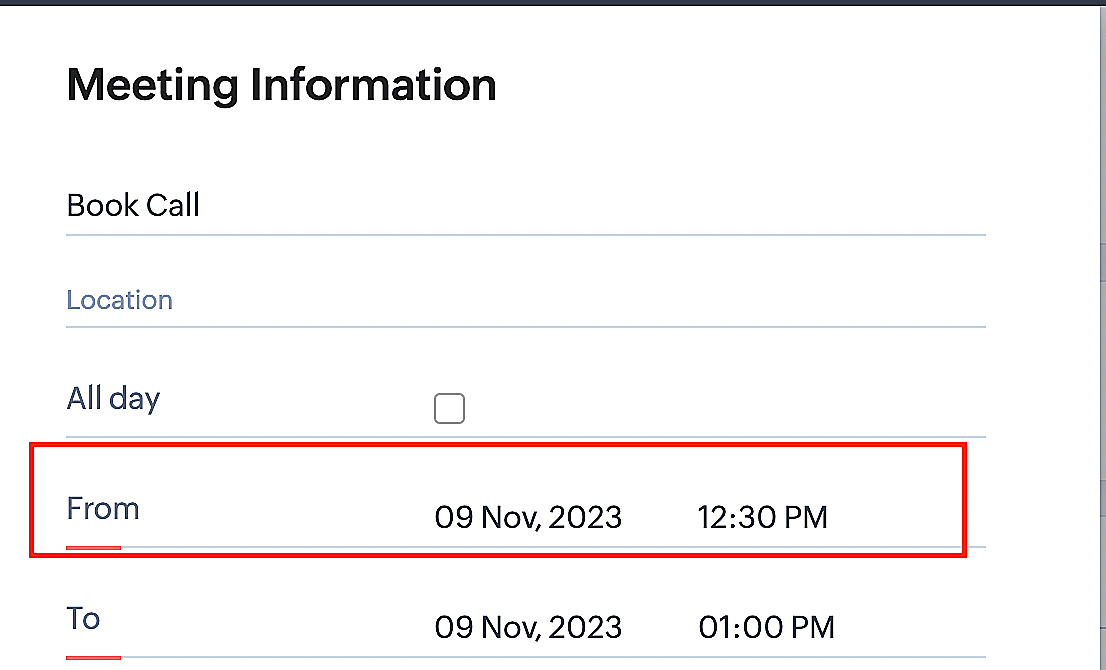
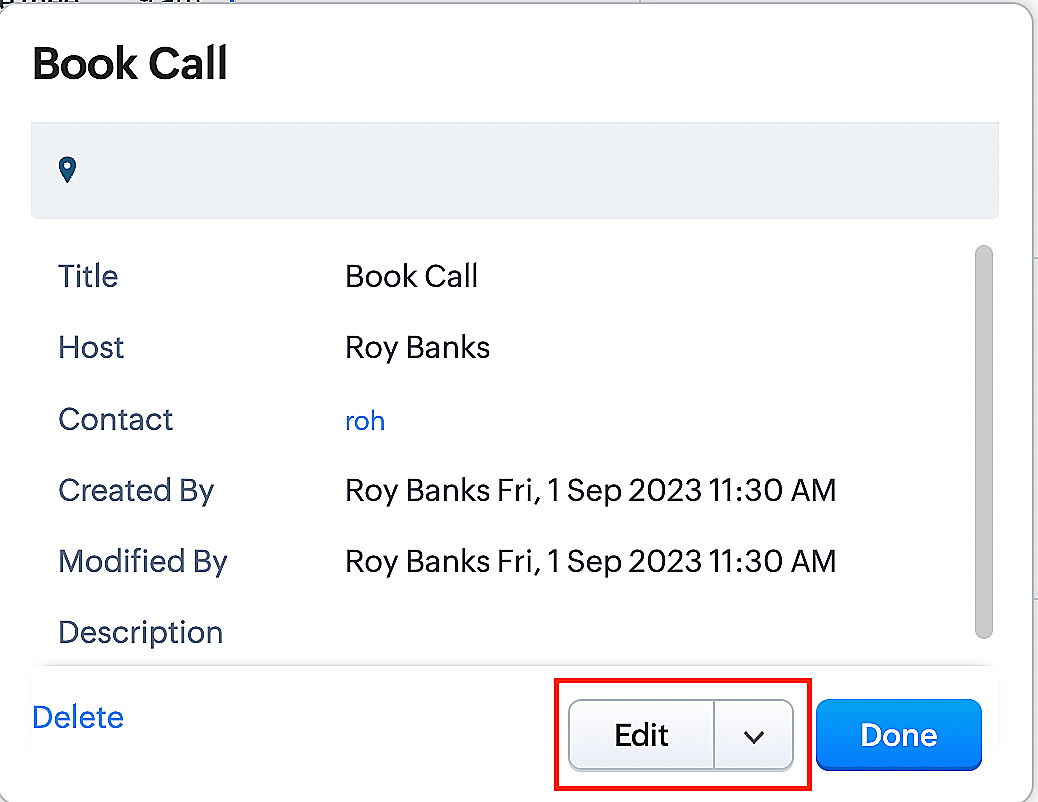
Create a function for rescheduling appointments
Complete these steps in Zoho CRM.
Step 1: Creating connections
You don't need to create a separate connection for the reschedule action. You can utilize the same connection name that we established in Part 1 of the Zoho Bookings - Zoho CRM bidirectional sync.
Step 2: Creating functions
Configuring a function that reschedules appointments differs slightly from the functions we discussed in Part 1 of the Zoho Bookings - Zoho CRM bidirectional sync.
Note: Here, we'll fetch the time zone in which the customer scheduled the appointment so that when we reschedule the booking, it will be rescheduled within the same time zone the customer initially chose.
Here are the steps:
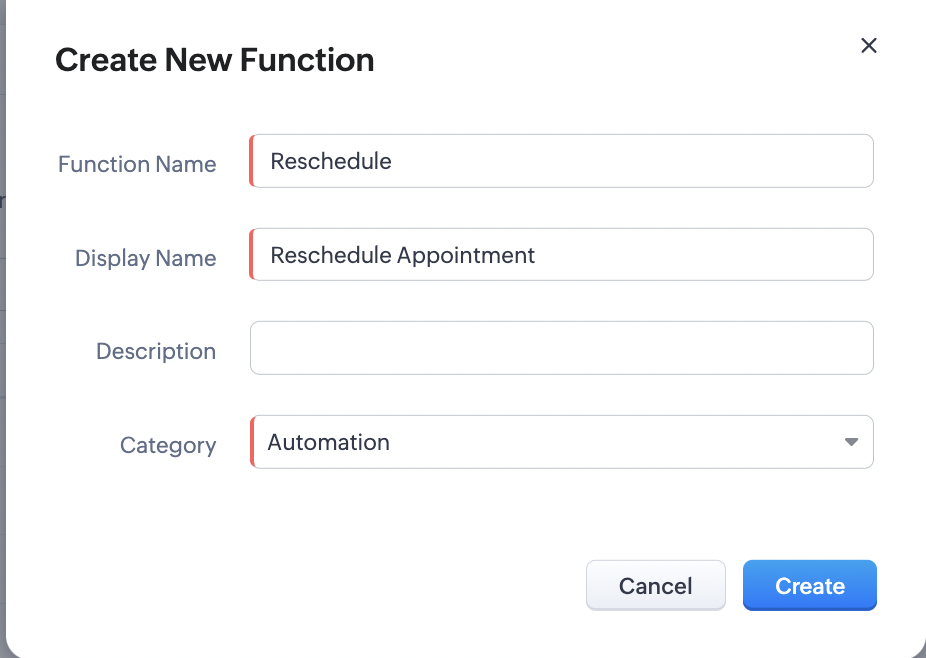
1. Go to Setup > Developer Space > Functions.
2. In the Functions page, click + Create New Function.

3. Configure the function name, display name, and description.
4. Set the category as automation.
Reference
Reference
5. Next, configure the function's arguments. For the reschedule function, we'll have to pass two arguments: bookingID
as a string, and from as a date.
a. Click on Edit Arguments on the Deluge script page.

b. Set the Parameter Name as bookingID. (Please note that the "bookingID" value is case sensitive and must match
the term used in the code).
c. Set the type as string.
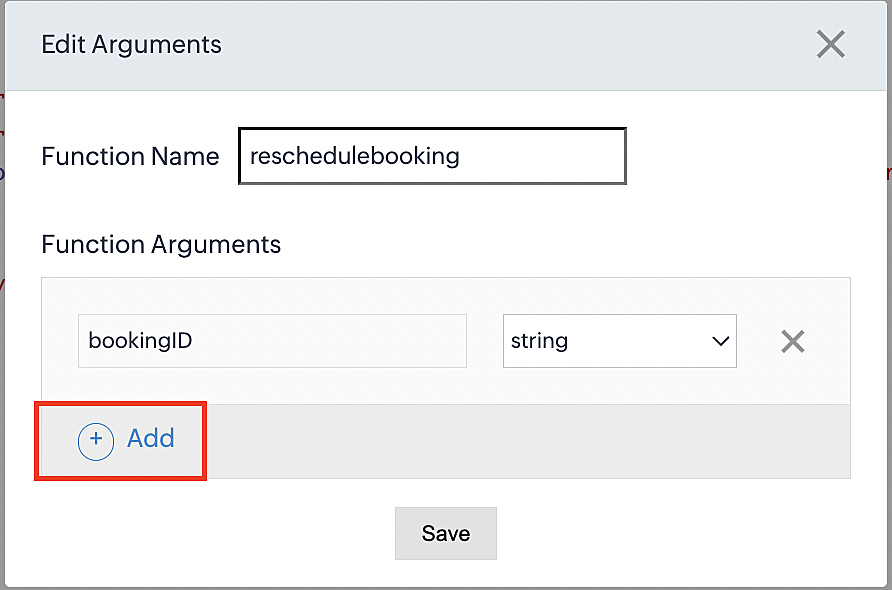
d. Click the +Add button to add a second argument.
e. Set the Parameter Name as from and its type as date.
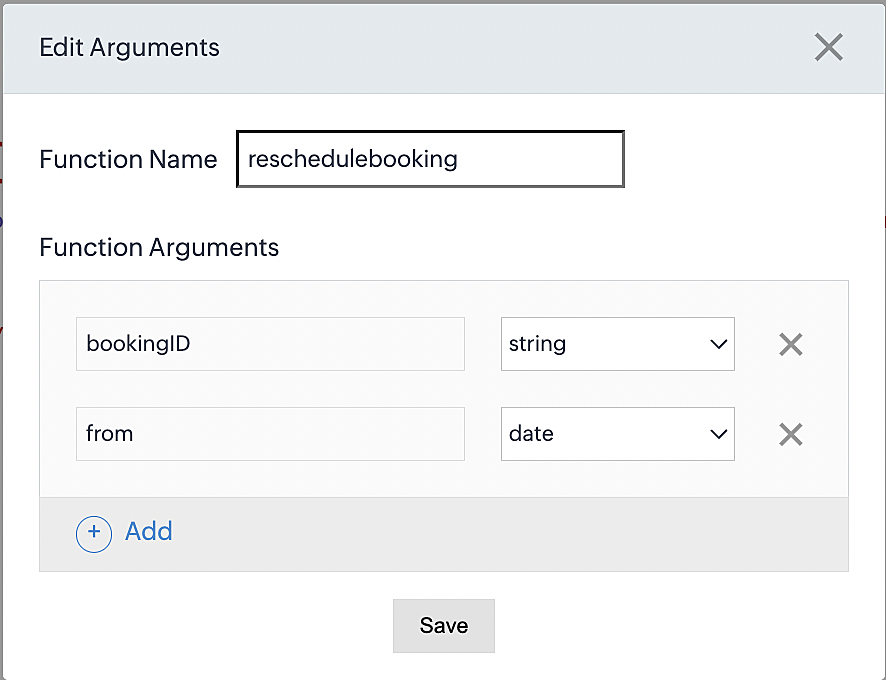
Here, we're using the reschedule appointment API. The term "from" specifically denotes the appointment's start time. In the reschedule API, the booking ID is a required parameter, and we must provide either the staff ID or the start time. Given that we're rescheduling based on the start time, we'll pass the start time as an argument and use "from" as the reference point.
More details: Reschedule Appointment API
Please configure the following code on the Deluge script page.
Code link: Rescheduling an appointment
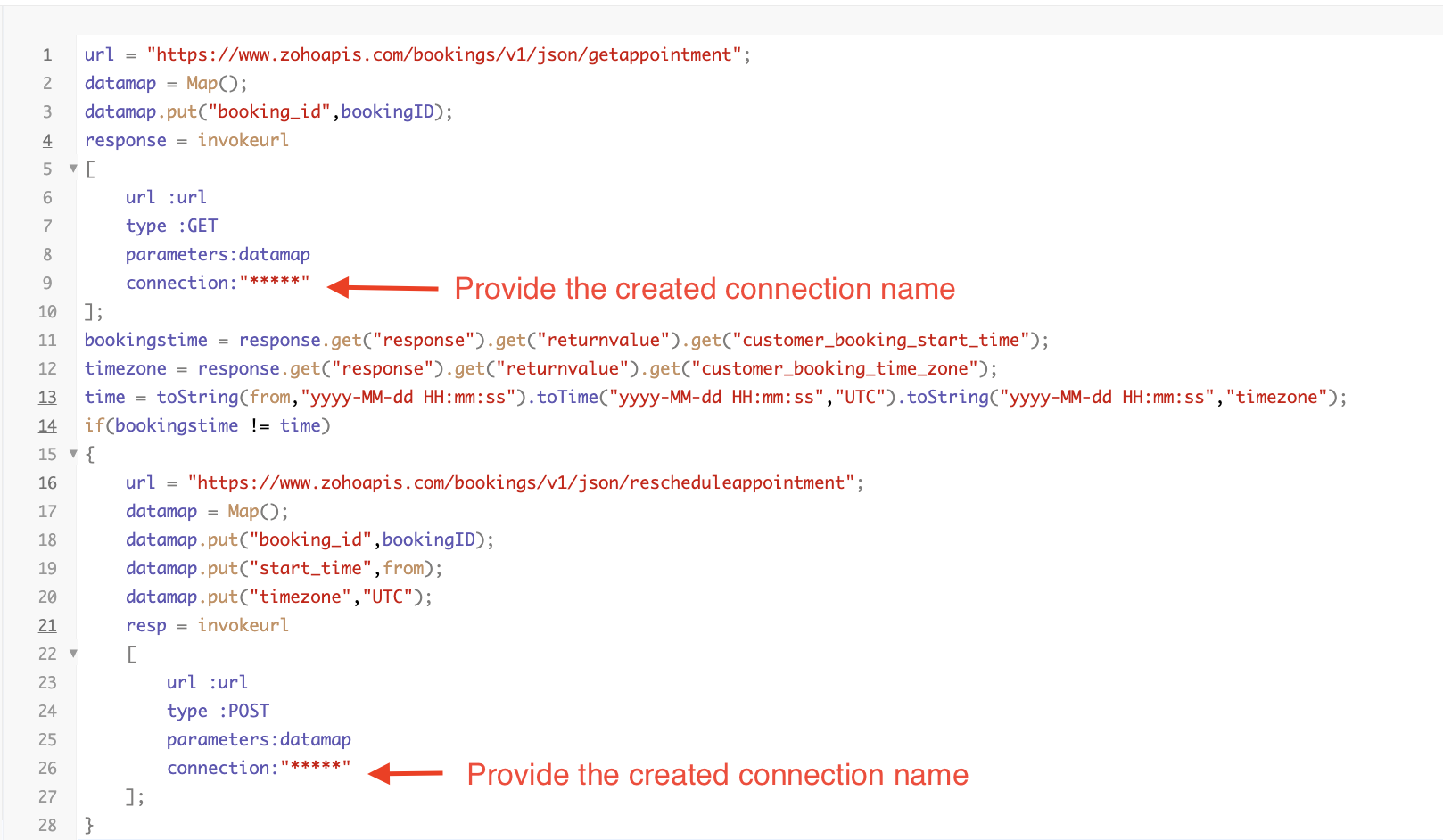
Here's an explanation of the code used for the reschedule function, split into three parts for purposes of clarity:
Lines 1-10 serve to invoke the "get appointment" API to retrieve the relevant booking ID and obtain the associated details. The purpose behind fetching this booking data is to access the actual booking start time and the time zone in which the customer initially scheduled the appointment using the Zoho Bookings application. This information is essential for comparing it with the rescheduled date and time.
- Line 1: Based on the Zoho Bookings account's data center, we'll set up the API endpoint URL configuration. More
details: Domain-specific API URLs
- Line 3: To obtain appointment details, we utilize the GET Appointment API. In this API, the booking ID is a mandatory
field, so we retrieve the booking ID from the Meetings module and subsequently pass it into the code to
retrieve the corresponding booking details.
- Lines 4-10: We use the invokeURL task for API calls. To learn more about the invokeURL task, please refer to the
following document: InvokeURL task for API calls
In lines 11-13, we execute booking data retrieval and date-time format conversion operations.
- Line 11: Here, we're fetching the booking's exact start time as scheduled by the customer.
- Line 12: Here, we're fetching the time zone in which the customer scheduled the appointment.
- Line 13: We perform the date-time format conversion to ensure compatibility with the reschedule appointment API. This API requires the appointment's start time to be in the format dd-MMM-yyyy HH:mm:ss. We retrieve the start time from the Zoho CRM Meetings module, match it to your CRM application's date and time format, and convert it to the format Zoho Bookings' reschedule appointment API supports.
Lines 14-27 serve to perform comparison and rescheduling operations.
- Line 14: Here, we're implementing an "if" condition to compare the actual booking start time (bookingstime) and the rescheduled time (time). We do this in order to execute the reschedule API function only if there is any change in the appointment's start date and time. If we don't implement the "if" condition to compare both inputs, the reschedule API function would enter a loop, continuously executing and potentially exceeding the API count limit.
- Lines 15-27: We use the reschedule appointment API, which requires the booking ID as a mandatory parameter, along with either the staff ID or start time. In this case, as we're rescheduling appointments based on the start time, we provide both the booking ID and the start time. The reschedule appointment API functions similarly to the APIs we've previously discussed, such as the cancel, mark as completed, and no-show APIs.
By reaching the end of these final steps, we've successfully created a function that executes rescheduling actions.
Now, let's proceed with creating a workflow and linking the reschedule function to it. This enables us to automate the syncing of appointment rescheduling actions from Zoho CRM to Zoho Bookings.
Creating a workflow
Create a workflow that handles appointment rescheduling in Zoho Bookings whenever a corresponding meeting is rescheduled within the Zoho CRM application
Part 1: Creating the rule
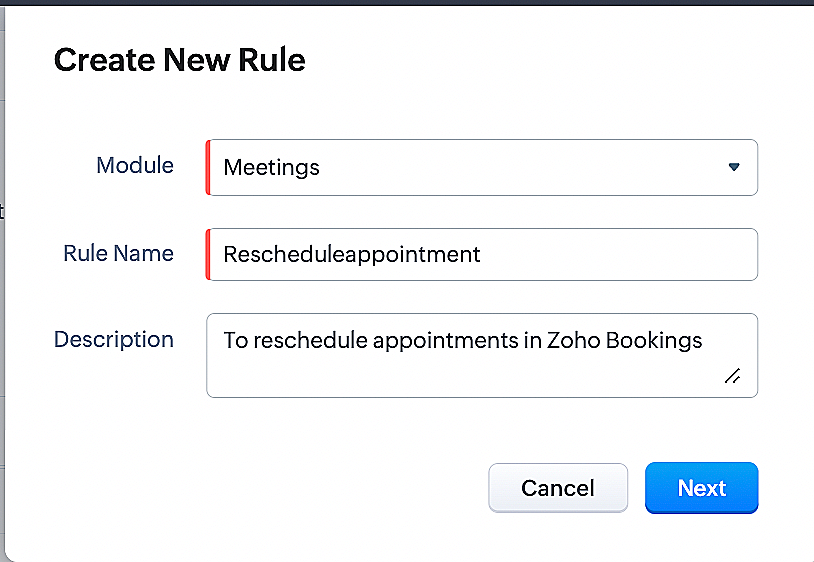
1. Go to Setup > Automation > Workflow Rules.
2. In the Workflow Rules page, click Create Rule.

3. Select Meetings under Module and configure the rule name and description as required.
Reference:
Part 2: Specifying the rule trigger
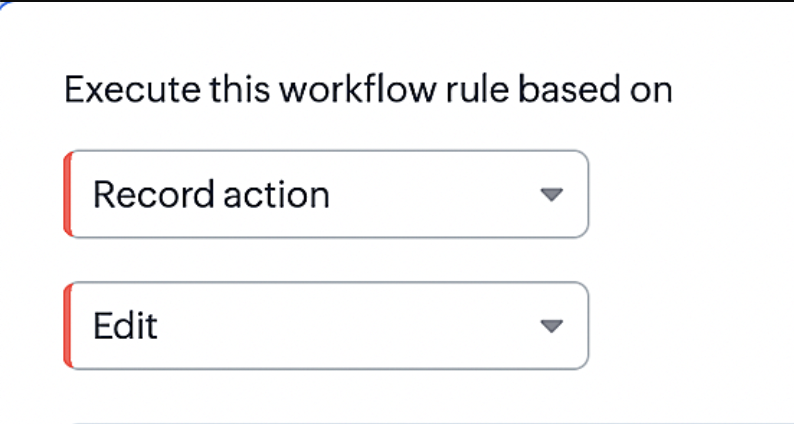
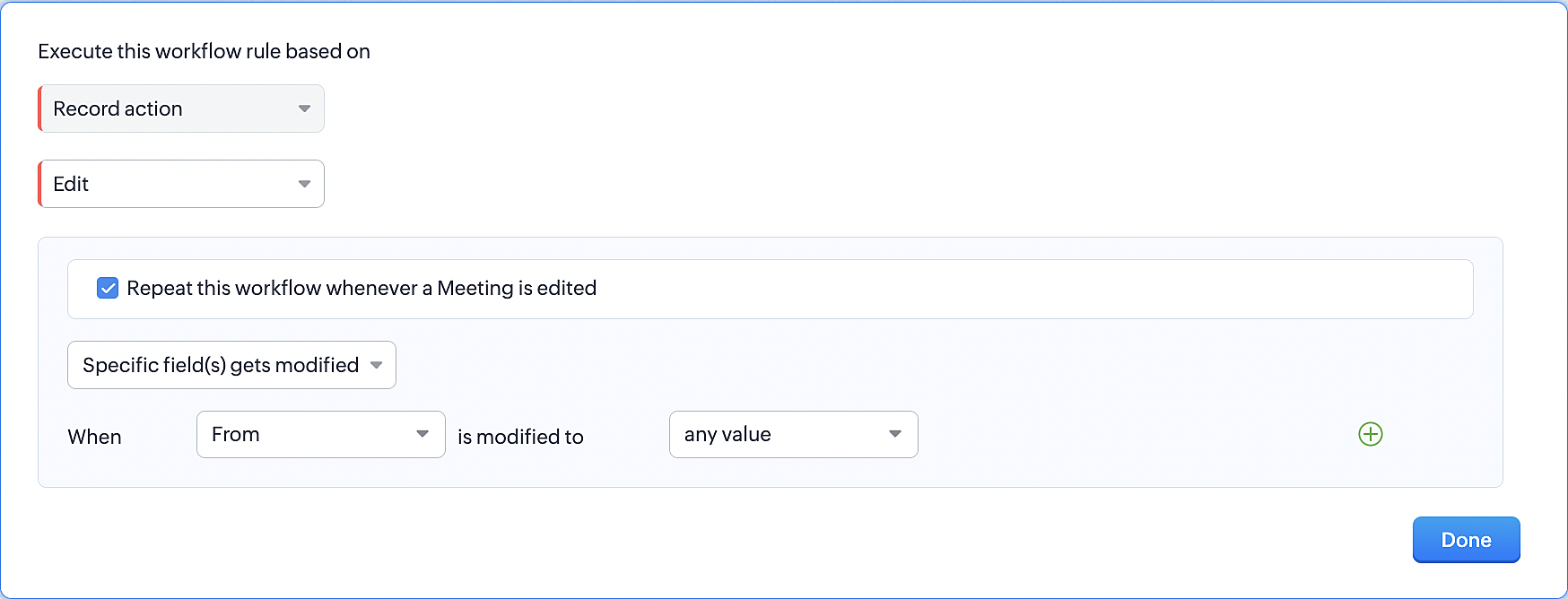
1. Record Action > Edit.
2. Enable the Specific field(s) gets modified setting and configure it per the screenshot below.
This serves to ensure that the workflow is executed only when the "From" field of the meeting is edited.
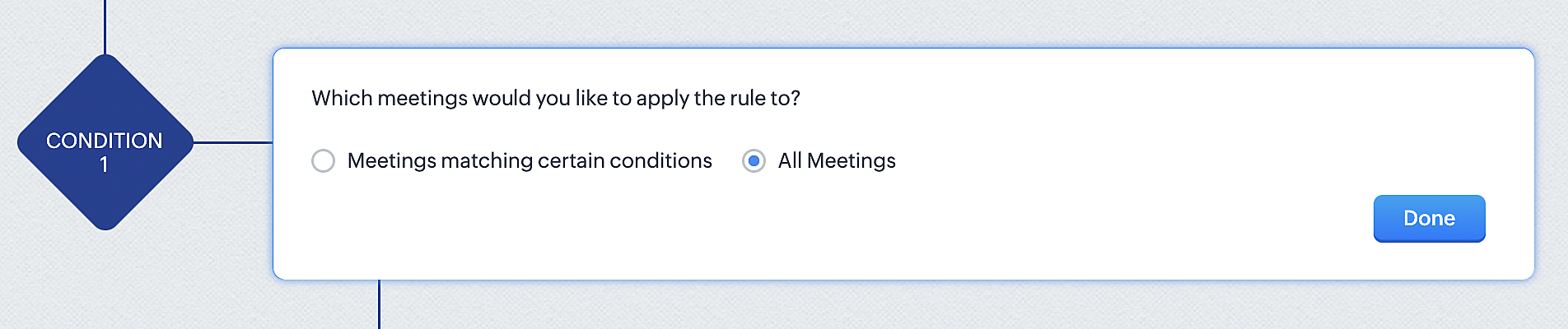
3. Configure condition > All Meetings.
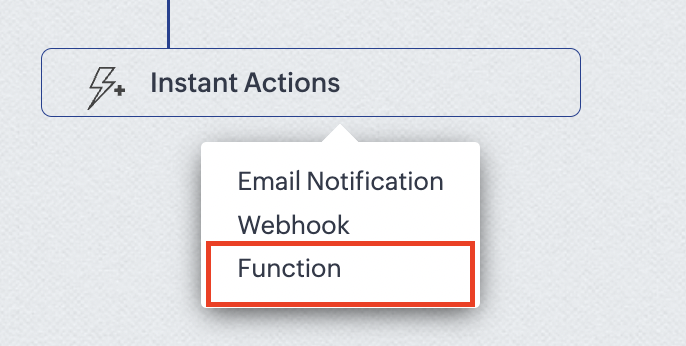
4.Instant Actions > Function.
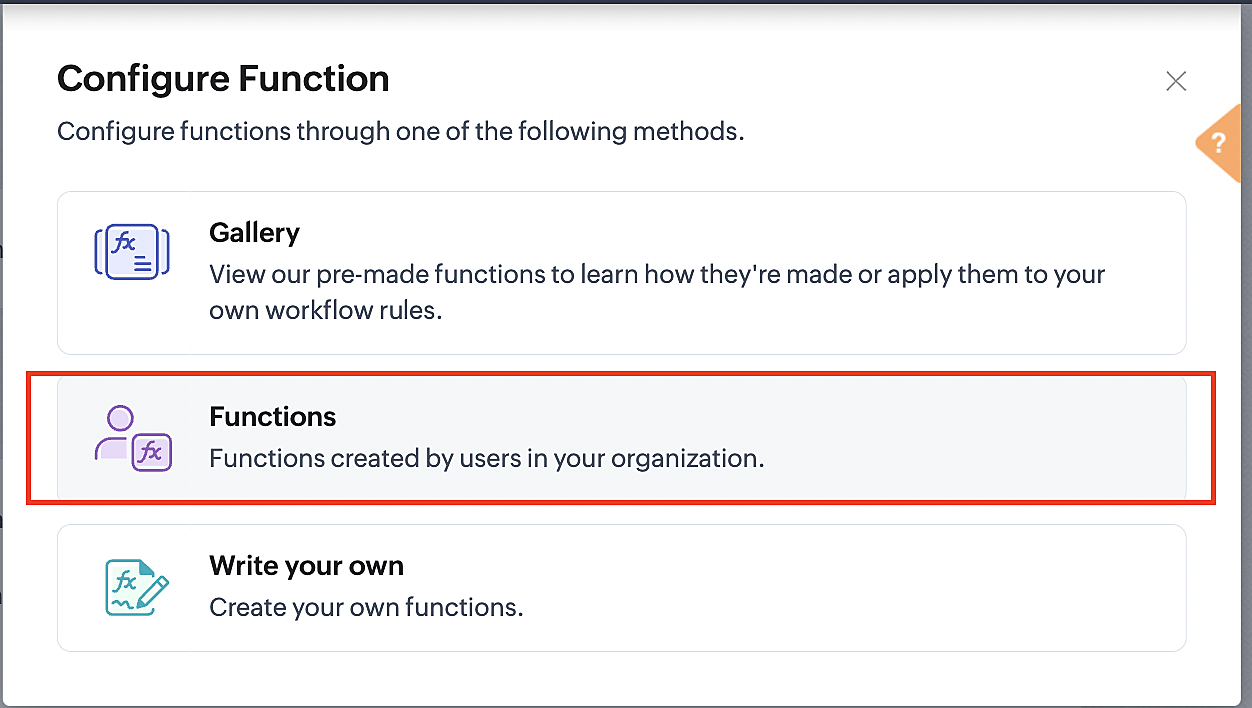
5. Click the New Function button.

6. In the Configure custom function page, select the "reschedule" function you created from among the functions users in your organization have created.
More details: Specify rule triggers
Part 3: Argument mapping
1. Press # to choose an argument value.
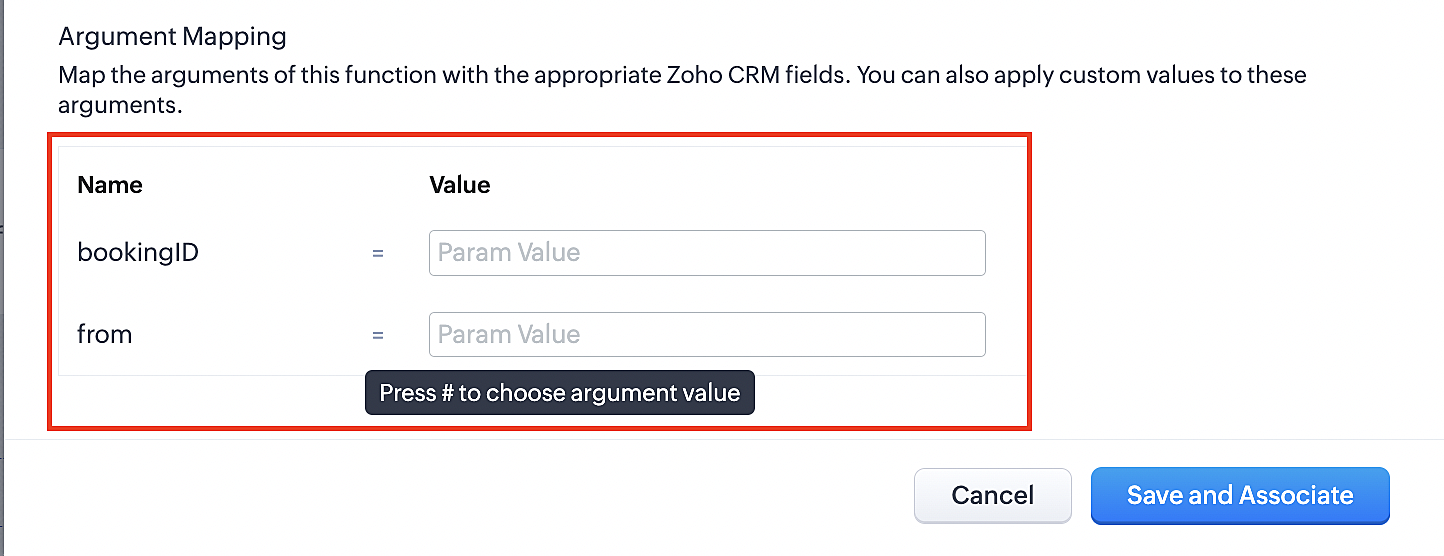
2. Select Meetings under Module and configure the field as "BookingId".
3. Select Meetings under Module and configure the field as "From".
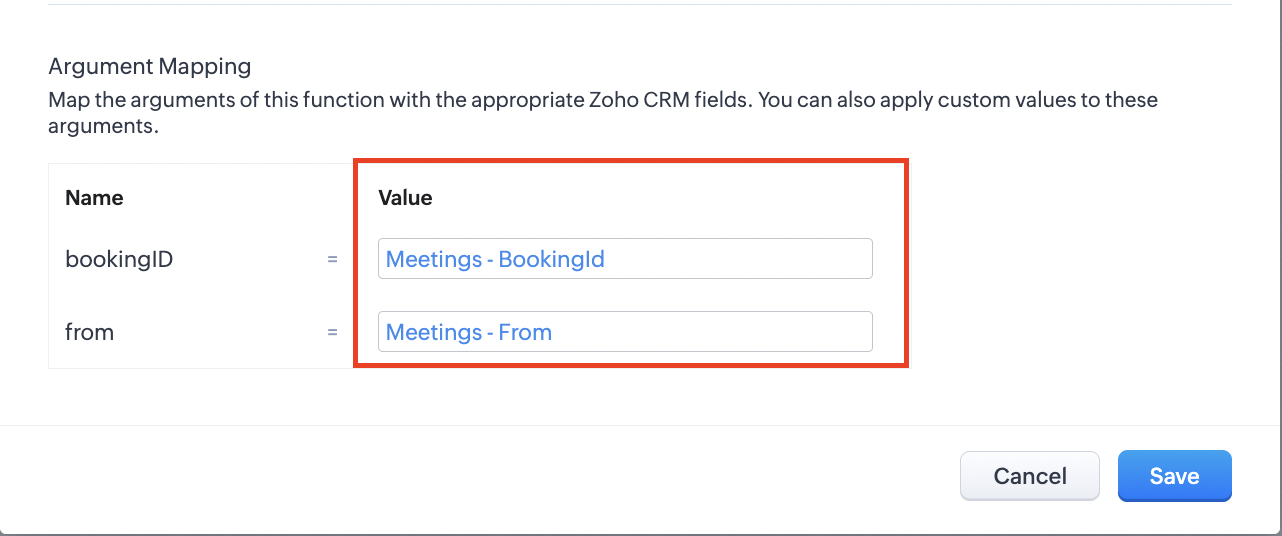
4. Click the Save and Associate button.
Reference:
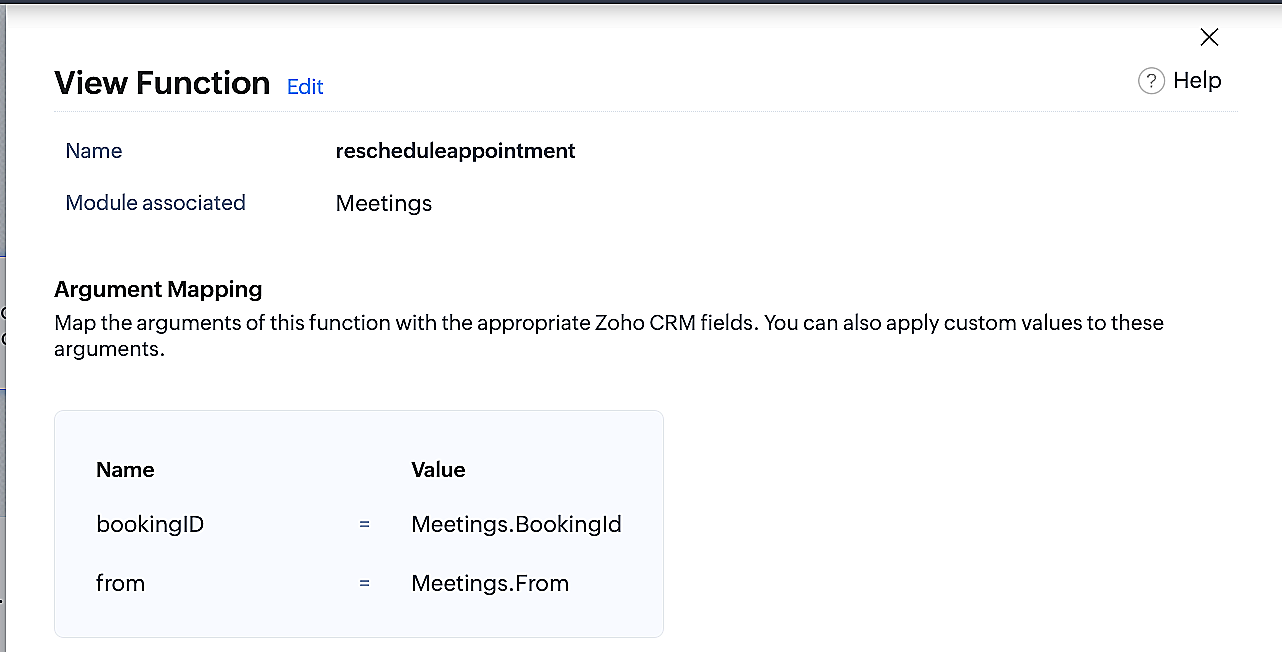
Below is the final flow of the reschedule appointment workflow:
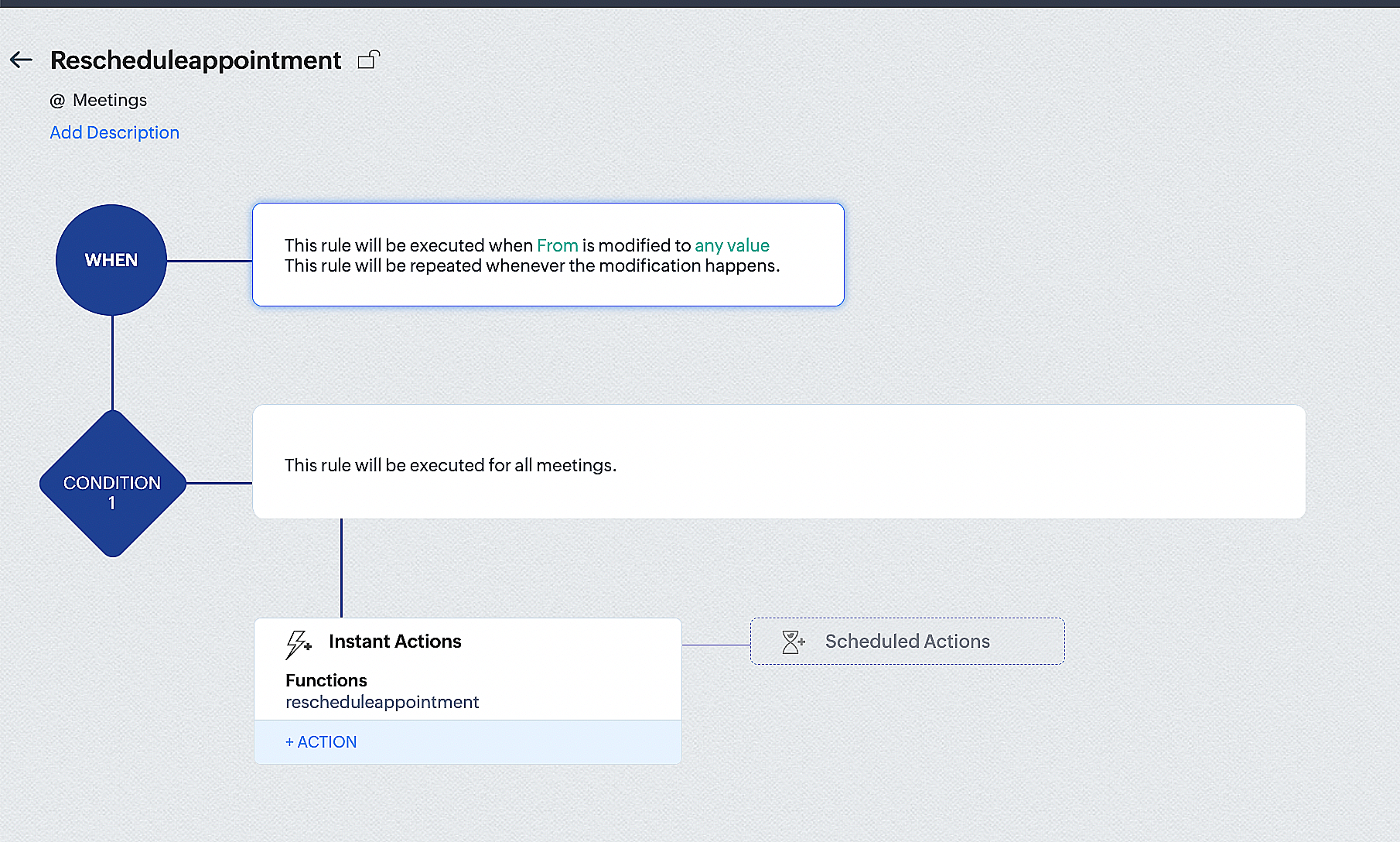
By the end of this process, we will have created a workflow that automatically executes when the "From" field in the Zoho CRM Meetings module is edited with a new date and time. As a result, this workflow will also reschedule the associated bookings for that meeting to the new date and time in Zoho Bookings.
Conclusion
We've arrived at the end of the community post. As mentioned in Part 1 of the Zoho Bookings—Zoho CRM bidirectional sync community post, with all of these configurations in place, you'll be able to book, cancel, reschedule, and update the status of appointments in Zoho Bookings directly from your Zoho CRM application. Which will make your appointment management easier.
If you have any questions or need assistance with your configuration, please email us at hello@zohobookings.com or support@zohobookings.com.
Topic Participants
Kaushik S
Recent Topics
New Toolbar in Zoho Sheet
We have revamped our toolbar design in this new version of Zoho Sheet. Below are some screenshots to help you get accustomed to this new interface. Click on the picture below to view the animated image in its original size. Scroll down this post to learn about the changes. Highlight of Changes: The previous format tab is now split into 2 tabs - Home and Format. The Home tab contains the commonly used functions and the Format tab holds formatting related options. Under the Home tab towards the farZoho inbuilt Telephony made a lot of issues!
Hi there, I am a user that I am working with zoho inbuilt telephony around 1 month. Non of my colleagues are happy with this app! most of the time customer cannot hear my customer service team, customers say our voice is breaking. whenever Telephony supportSending workflow notifications using popular chat services
Hello everyone, We have introduced instant and scheduled notifications on some of the most popular chat platforms to facilitate easy collaboration, quick action, and wider reach. Workflow notifications can be sent to the following chat platforms: ZohoAdding Images to a Quote in Zoho CRM
We are currently preparing to use Quotes in Zoho CRM and we are building out our Quote templates. We came across an issue of not being to add Images of the products to the Quote - specifically in the body of the Quote templates. This is a problem,Applications built with Zoho Creator
Hi, I’m really interested in seeing how others have built their application using Zoho Creator, especially those designed for external users (clients, vendors, or the public). If you’ve developed something along those lines and don’t mind sharing, I’dIs it posssible to add Asap Widget on Wordpress?
I have tried to add the ASAP widget so users could iniciate chats and see the KB information but nothings seems to work. I have tried to add the script using a php snippet that adds the to the footers and also tried one for the header in the functioRequire ticket resolution
Hi Zoho team, Is there a way to require resolution even if an agent did not use a blueprint? for example, our blueprint has a "resolve" transition but what if agent revoked blueprint and manually set the status of ticket to closed? Is there a way whereTables from ZohoSheets remove images when updated from source
I have a few tables from a ZohoSheet in a ZohoWriter document that will remove the images in the cells when I refresh from the source. The source still has the images in the table when I go to refresh. After updating from the source, as you can see theAPI Pagination Error: 'from' Parameter Limit
Hello, I am encountering an error while paging through the Zoho Desk API results: Status code: 422 - {"errorCode":"UNPROCESSABLE_ENTITY","message":"The value passed for field 'from' exceeds the range of '0-4999'."} Is 5000 the maximum number of recordsHow to go to the next open ticket in the queue when agents closes ticket
Zoho Desk When agent closes a ticket - eg when they choose 'Send and Close" - where is the setting that automatically redirects them to the next open ticket in the queue?CRM verify details pop-up
Was there a UI change recently that involves the Verify Details pop-up when changing the Stage of a Deal to certain things? I can't for the life of me find a workflow or function, blueprint, validation rule, layout rule ect that would randomly make itCustom templates for calendar report
What about being able to design custom templates for the calendar report, as well as for other types of reports? I think more users are waiting for this.Disable payment thank-you emails
Hello, can someone please tell me how to disable sending of the "Payment Thank-You" emails?Maximum tags possible in Contacts Records
I read in some documentation that Zoho allows a total of 200 tags across all records. Is this correct? So is it not possible to have one tag per record for 500 records?Any way to "Pay with Check" or "Refund with Check" for Credit Notes?
When we have a Bill in Zoho Books, we can select the "Pay with Check" option which then allows us to print/cut the check directly out of Zoho Books. When we created a Credit Note and want to refund the customer, is there any way to Refund with Check,CRM Mobile reports
When our engineers finish a job they like to email the customer a job report. This is best done todate as an email template but we can find no way to include an image field from that module. Is there any other options?When Zoho Tables Beta will be open to EU data center
Hello all, We in EU are looking at you all using and testing and are getting jealous :) When we will be able to get into the beta also? We don't mind testing and playing with beta software. Thank you!Start Form on a different page (i.e., hide form pages)?
I have a Zoho form that uses the `Field Alias - Prefill URL` feature. My goal is to have a pre-filled field that directs the user to a specific starting page in the form. For example: The URL will have a field alias that will auto-populate a field withHow can we disable "My Requests"?
We are not using this functionality in our system at all and our users get confused.PayPal payment received recording problem
Hi, A little while back one of our customers used the PayPal payment option to pay an invoice For some reason though the payment is showing up twice within the Payments section of the invoice! Instead of setting the invoice value to ZERO, it now shows a negative value Anyone else face this problem? I've checked PayPal and there is only 1 payment in reality... A bug? Actonia ps: for anyone from Zoho Customer Service or tech team, its Invoice 785 in our accountserver response: 451.4.7.1
Good day. Some email clients of our domain receive an error about sending and receiving letters. while for the rest everything works fine. access to the mail made by pop protocol. Bless the mistakes: "server response: 451.4.7.1 System error".string(87) "{"code":"INVALID_TOKEN","details":{},"message":"invalid oauth token","status":"error"} " grtting this error
Using access token i am trying to add sales orders through api but it is throwing errors like the above i have mentioned. Please help me for thatHow to mute chat notification sound by default in Zoho SalesIQ?
We’ve recently embedded the Zoho SalesIQ chatbot on our website, and we’ve noticed that notification sounds sometimes play even when the visitor hasn’t interacted with the chat widget yet. We’re trying to understand two things: Why do these sounds occurKanban View for Projects.
At our organization, we describe active projects with various statuses like "In Proofing" or "Printing" or "Mailing". In the Projects view, one can set these project statuses by selecting from the appropriate drop-down. While this works, it's difficult to view and comprehend the progress of all of your projects relative to each other in a table. Creating a Kanban view for projects where I can move them from one status to another allows me to see where each project is in the order of our workflow.How to Hide Article Links in SalesIQ Answer Bot Responses
I have published an article in SalesIQ, and the Answer Bot is fetching the data and responding correctly. However, it is also displaying the article link, which I don’t want. How can I remove the link so that only the message is shown?Add RECURRING option when adding email to calendar events
When you add an email to a calendar event, there is no option to make that new calendar event into a recurring event. It is counterproductive to make an event from your email to then have to go to your calendar, find the event, and make it recurring.LINE Auto Message Connect to Zoho
When I integrated LINE into the CRM, I was prompted to disable “Chat,” “Auto Response,” and “Greeting Messages,” and to enable the webhook. However, since I have already set up some auto-reply features in LINE, including Rich Messages and greeting automation,Option to block bookings from specific email address or ip adresss in zoho booking
Sometime few of our client keep booking irrelevant booking service just to resolve their queries and they keep booking it again and again whenever they have queries. Currently its disturbing our current communication process and hierarchy which we haveThreaded conversations for emails sent via automation
Hi Guys, I hope you are doing well. Don't you guys think we should have an option in a workflow to notify users either as a new email or the previous email thread. For example, if you have one deal in the process and there are 10 different stages duringCreate folder is fetch fails
coming from zapier... zapier has a google drive task that searches for a specific folder in google drive, and if it fails to find the folder it will create a folder based on the search criteria, and contine along the singluar path of the flow. TryingMeetups de Usuarios de Zoho - Noviembre 2025
¡Hola, Comunidad! Durante el mes de noviembre celebraremos los Meetups de usuarios de Zoho, encuentros presenciales pensados para quienes queráis mejorar vuestras estrategias de lead nurturing y aprender a sacar el máximo partido a herramientas como ZohoIntroducing 8 New Connectors in Zoho DataPrep!
We’ve just made data management even easier - Zoho DataPrep now supports 8 new external connectors to help you build more robust, scalable ETL pipelines. Why it matters: ✅ Broader data access ✅ More automation, less manual work ✅ Smarter pipelines, betterFirst day of trying FSM in the field.
What we found. 1. with out a network connection we were unable to start a service call? 2. if you go to an appointment and then want to add an asset it does not seem possible. 3. disappointed not to be able to actually take a payment from within the appHow to Automate Email Sequence
I'm having trouble trying to set up a workflow to automate an email sequence. Once a group of emails in a Task has been tagged by a certain tag, I want an instant email template to be sent. After 7 days with no response, another email template would beZoho Sprints Android v2.0.4 app update: Item reminders, archive Epics, Kanban projects, Epic progress
Hello everyone! In the latest version(v2.0.4) of the Zoho Sprints Android app update, we have introduced various new features. Let's take a look at what's new! Item Reminder Stay organized and never miss an important date with the all-new Item ReminderCredit Management: #3 Setting Credit Limit for Customers
Think about that one familiar customer of yours who always buys on credit. They usually pay on time, maybe a little late here and there, but not alarming. So, you are fine saying, "Sure, pay later." Then, one day, they place a significantly bigger orderUpdate on the client portal URL for Guest users
We’re updating the way Guest users access their Connect network. As part of this change, all client organization portals used by Guest users will now be accessible through a dedicated domain specific to each data center. The access URLs mentioned hereUnable to see Zoho contacts in Zoho app on ios
Hi Support Team, I am a new user, I have created my account and installed zohomail app on iOS 16 which works. I was also able to import my Gmail contacts into Zoho Contacts, which I can see. The problem is that I can’t see these imported cobalts in ZohomailTask Due Date greater than 10 years.
We use recurring tasks in Projects where every week, month, year etc Some of our projects are greater than 10 years and we are unable to set a new due date because the difference between start date and due date is greater than 10 years. As an exampleExternal User onboarding for zoho connect is not really intuitive.
So the external user is sent an invite, which has a button that directs them to login to zoho to view the invite, but if they don't have a zoho account, they cannot access that invite, which seems kinda silly, as there is not real way on for them to createNext Page