Bidirectional sync between Zoho Bookings and Zoho CRM - Part 2
Hey community members,
Welcome again!
This post continues our discussion of the bidirectional sync between Zoho Bookings and Zoho CRM, focusing on how to reschedule appointments in Zoho Bookings from Zoho CRM. If you've arrived at this community post directly, we recommend checking out Part 1 of this topic for a better understanding. You can access Part 1 through the following link: Bidirectional sync between Zoho Bookings and Zoho CRM - Part 1
How we're approaching this reschedule action:
Whenever a meeting initially scheduled through the Zoho Bookings application is rescheduled either within the Meetings module or through the CRM calendar, the changes are recorded and the corresponding appointment within Zoho Bookings is also rescheduled.
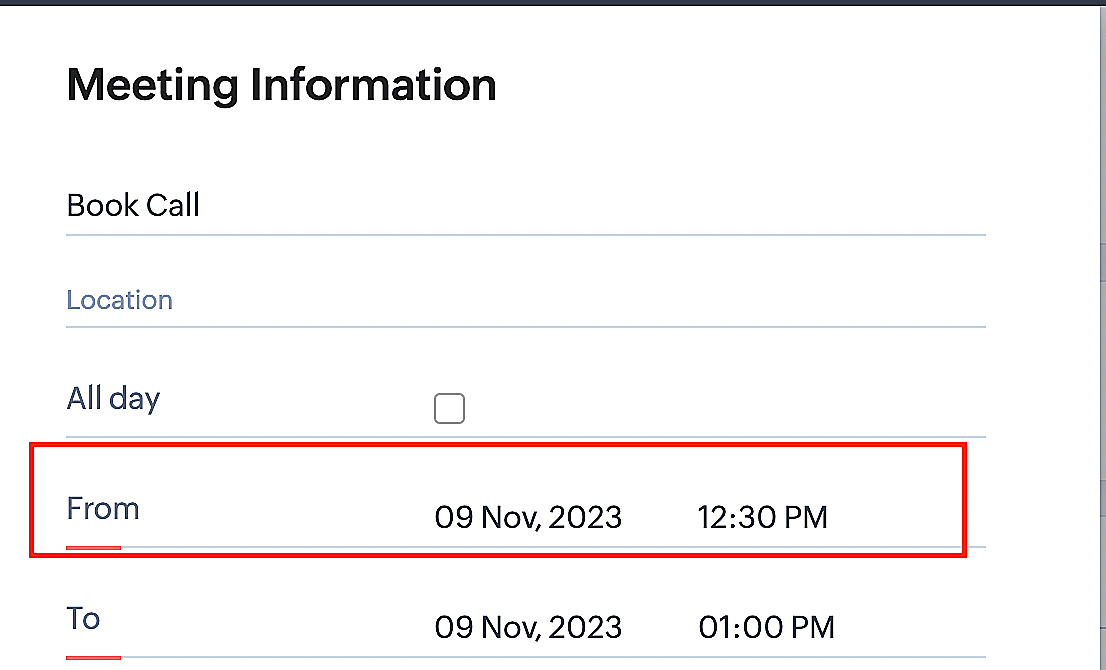
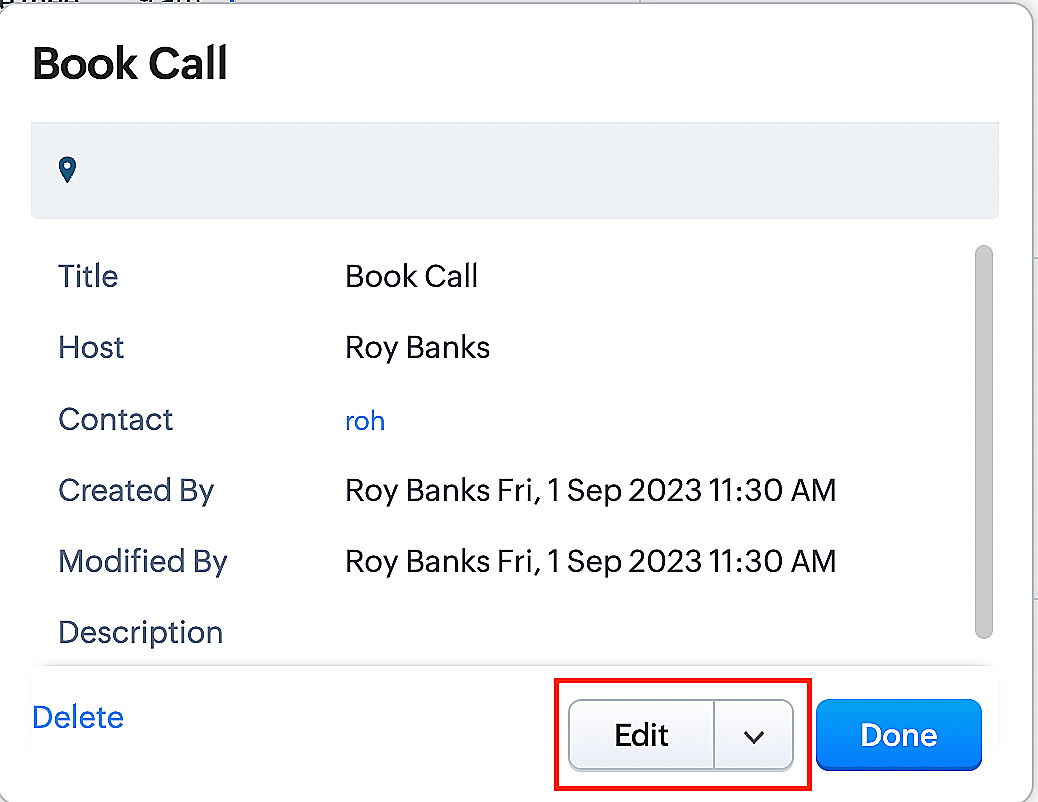
Create a function for rescheduling appointments
Complete these steps in Zoho CRM.
Step 1: Creating connections
You don't need to create a separate connection for the reschedule action. You can utilize the same connection name that we established in Part 1 of the Zoho Bookings - Zoho CRM bidirectional sync.
Step 2: Creating functions
Configuring a function that reschedules appointments differs slightly from the functions we discussed in Part 1 of the Zoho Bookings - Zoho CRM bidirectional sync.
Note: Here, we'll fetch the time zone in which the customer scheduled the appointment so that when we reschedule the booking, it will be rescheduled within the same time zone the customer initially chose.
Here are the steps:
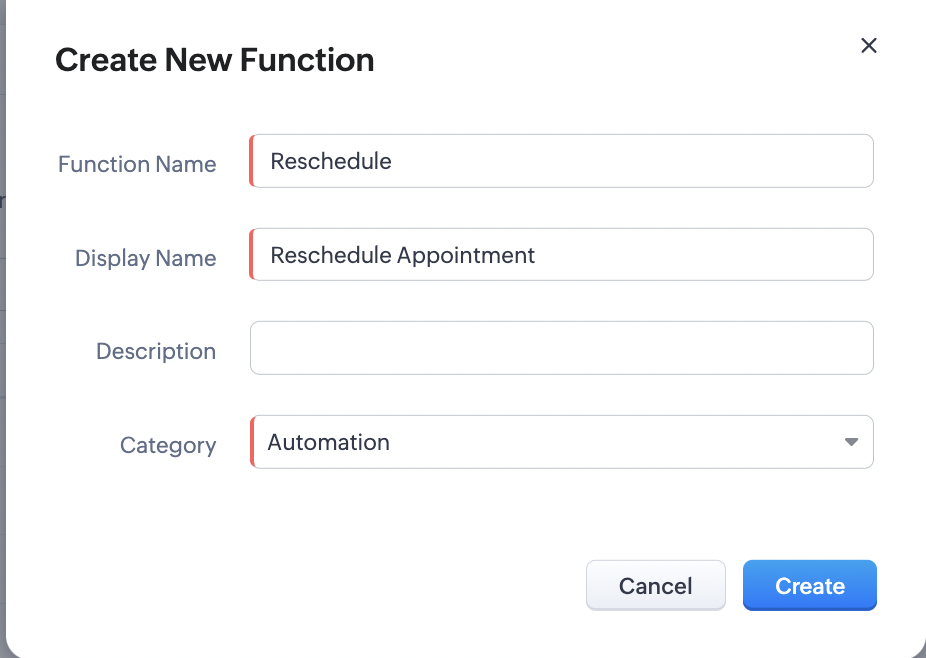
1. Go to Setup > Developer Space > Functions.
2. In the Functions page, click + Create New Function.

3. Configure the function name, display name, and description.
4. Set the category as automation.
Reference
Reference
5. Next, configure the function's arguments. For the reschedule function, we'll have to pass two arguments: bookingID
as a string, and from as a date.
a. Click on Edit Arguments on the Deluge script page.

b. Set the Parameter Name as bookingID. (Please note that the "bookingID" value is case sensitive and must match
the term used in the code).
c. Set the type as string.
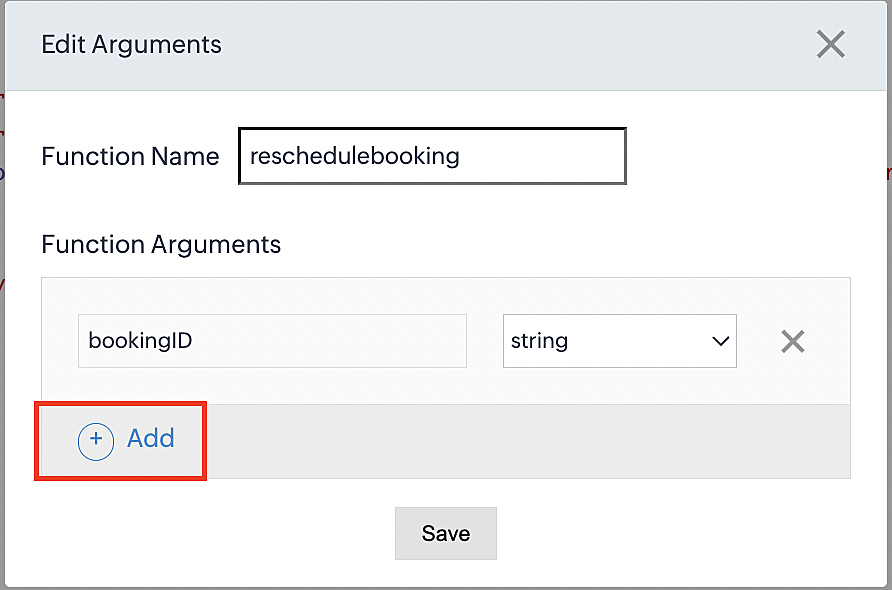
d. Click the +Add button to add a second argument.
e. Set the Parameter Name as from and its type as date.
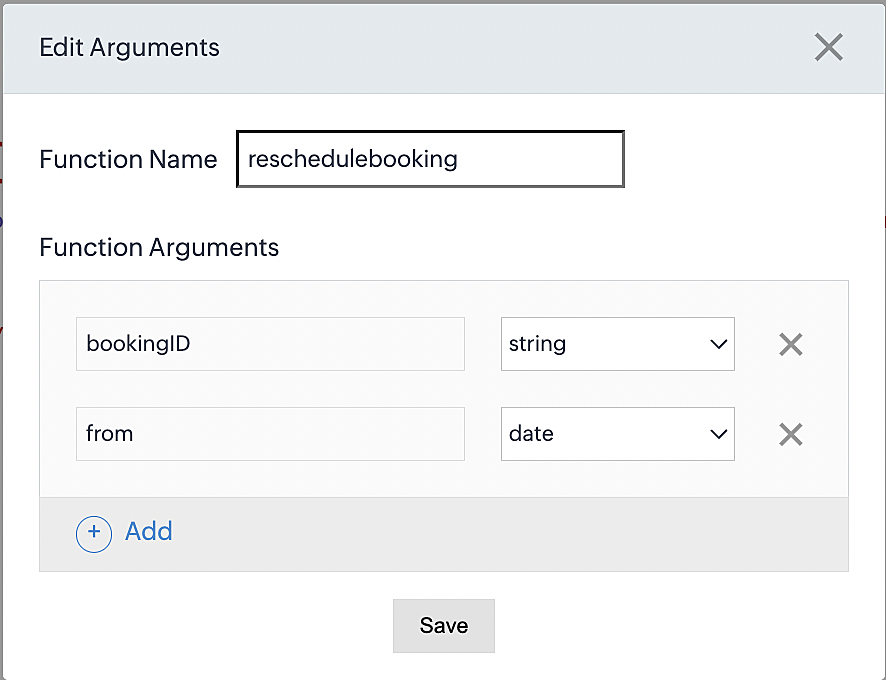
Here, we're using the reschedule appointment API. The term "from" specifically denotes the appointment's start time. In the reschedule API, the booking ID is a required parameter, and we must provide either the staff ID or the start time. Given that we're rescheduling based on the start time, we'll pass the start time as an argument and use "from" as the reference point.
More details: Reschedule Appointment API
Please configure the following code on the Deluge script page.
Code link: Rescheduling an appointment
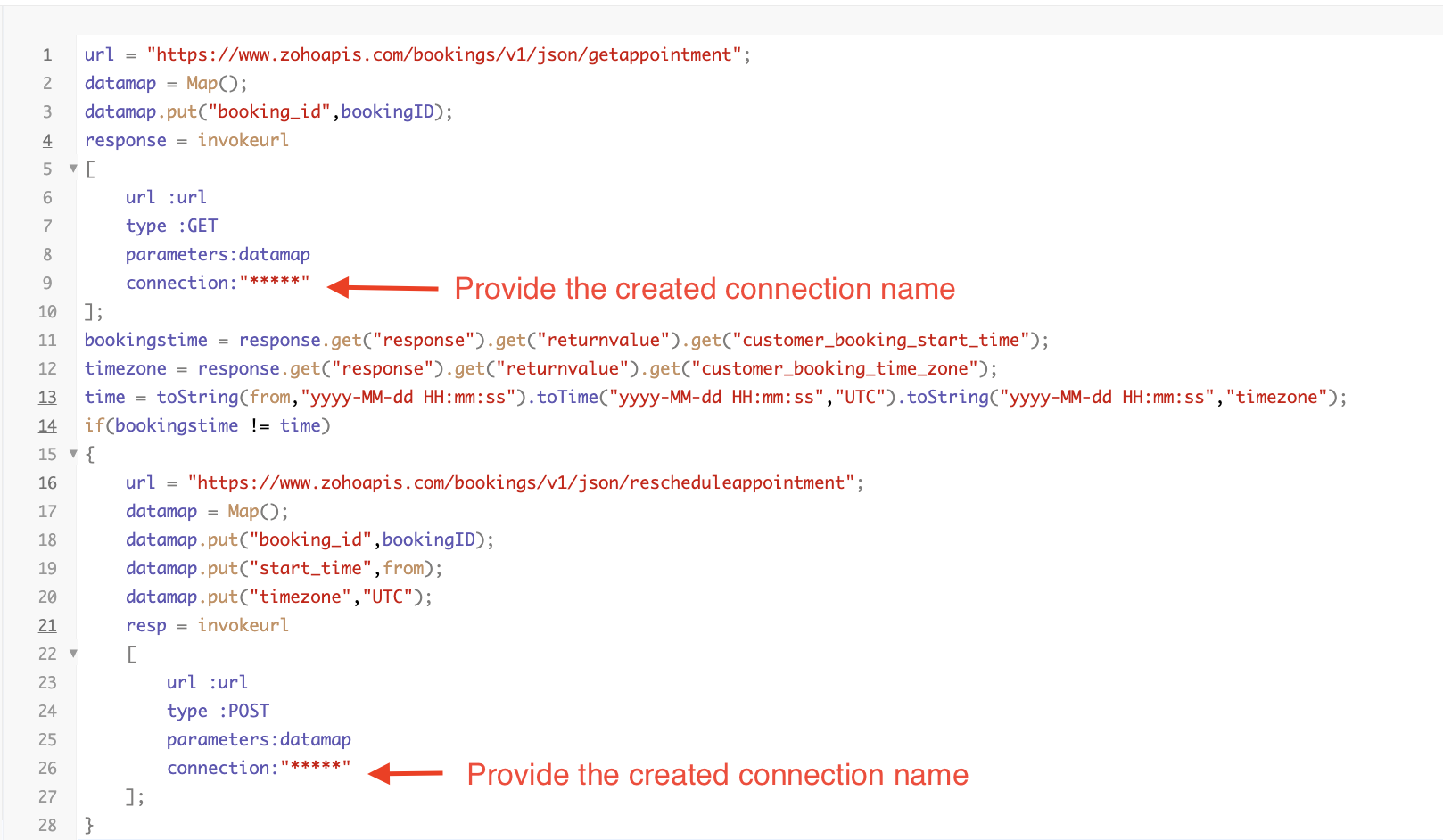
Here's an explanation of the code used for the reschedule function, split into three parts for purposes of clarity:
Lines 1-10 serve to invoke the "get appointment" API to retrieve the relevant booking ID and obtain the associated details. The purpose behind fetching this booking data is to access the actual booking start time and the time zone in which the customer initially scheduled the appointment using the Zoho Bookings application. This information is essential for comparing it with the rescheduled date and time.
- Line 1: Based on the Zoho Bookings account's data center, we'll set up the API endpoint URL configuration. More
details: Domain-specific API URLs
- Line 3: To obtain appointment details, we utilize the GET Appointment API. In this API, the booking ID is a mandatory
field, so we retrieve the booking ID from the Meetings module and subsequently pass it into the code to
retrieve the corresponding booking details.
- Lines 4-10: We use the invokeURL task for API calls. To learn more about the invokeURL task, please refer to the
following document: InvokeURL task for API calls
In lines 11-13, we execute booking data retrieval and date-time format conversion operations.
- Line 11: Here, we're fetching the booking's exact start time as scheduled by the customer.
- Line 12: Here, we're fetching the time zone in which the customer scheduled the appointment.
- Line 13: We perform the date-time format conversion to ensure compatibility with the reschedule appointment API. This API requires the appointment's start time to be in the format dd-MMM-yyyy HH:mm:ss. We retrieve the start time from the Zoho CRM Meetings module, match it to your CRM application's date and time format, and convert it to the format Zoho Bookings' reschedule appointment API supports.
Lines 14-27 serve to perform comparison and rescheduling operations.
- Line 14: Here, we're implementing an "if" condition to compare the actual booking start time (bookingstime) and the rescheduled time (time). We do this in order to execute the reschedule API function only if there is any change in the appointment's start date and time. If we don't implement the "if" condition to compare both inputs, the reschedule API function would enter a loop, continuously executing and potentially exceeding the API count limit.
- Lines 15-27: We use the reschedule appointment API, which requires the booking ID as a mandatory parameter, along with either the staff ID or start time. In this case, as we're rescheduling appointments based on the start time, we provide both the booking ID and the start time. The reschedule appointment API functions similarly to the APIs we've previously discussed, such as the cancel, mark as completed, and no-show APIs.
By reaching the end of these final steps, we've successfully created a function that executes rescheduling actions.
Now, let's proceed with creating a workflow and linking the reschedule function to it. This enables us to automate the syncing of appointment rescheduling actions from Zoho CRM to Zoho Bookings.
Creating a workflow
Create a workflow that handles appointment rescheduling in Zoho Bookings whenever a corresponding meeting is rescheduled within the Zoho CRM application
Part 1: Creating the rule
1. Go to Setup > Automation > Workflow Rules.
2. In the Workflow Rules page, click Create Rule.

3. Select Meetings under Module and configure the rule name and description as required.
Reference:
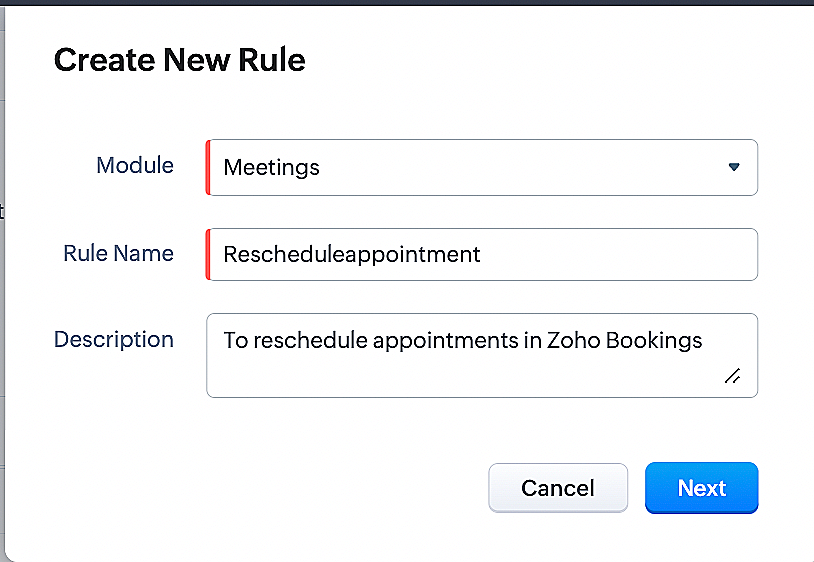
Part 2: Specifying the rule trigger
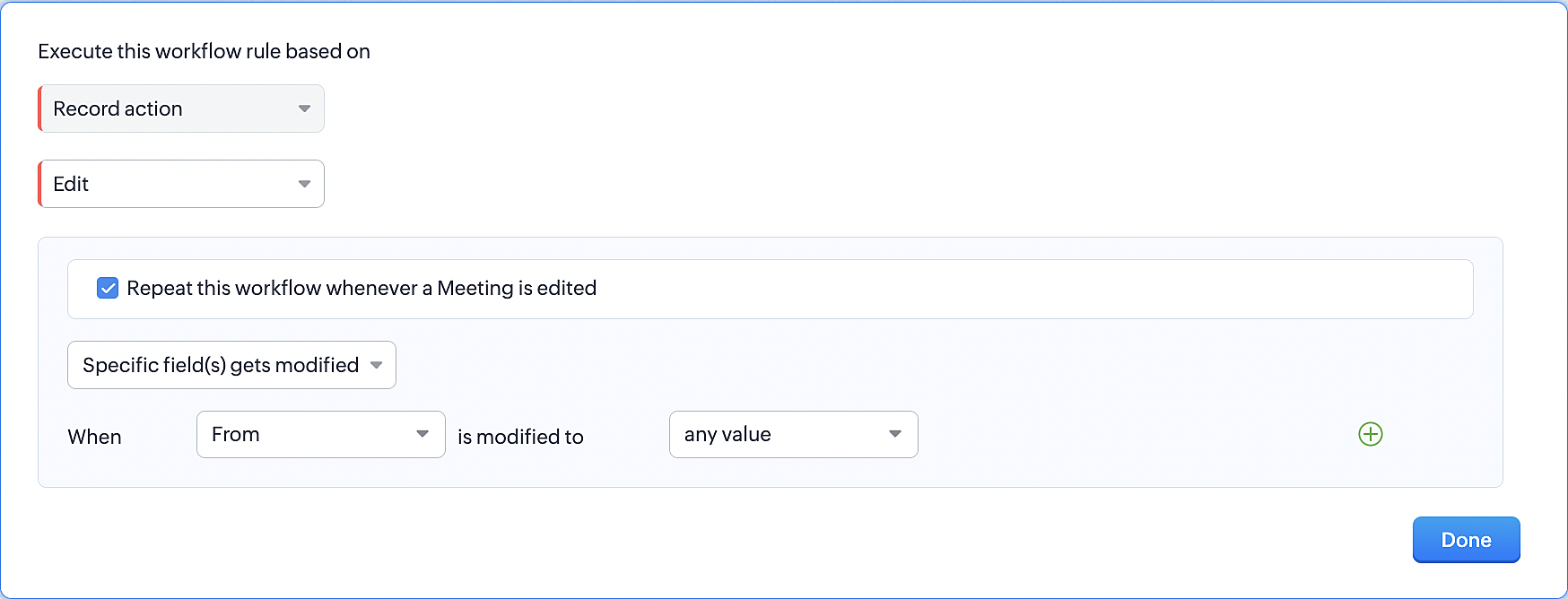
1. Record Action > Edit.
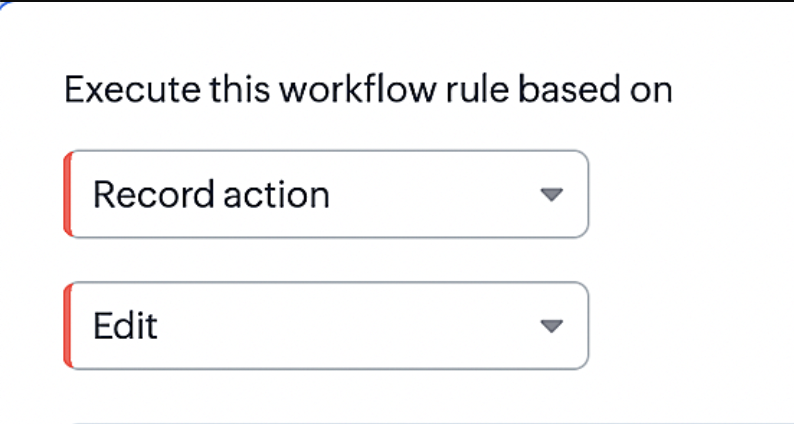
2. Enable the Specific field(s) gets modified setting and configure it per the screenshot below.
This serves to ensure that the workflow is executed only when the "From" field of the meeting is edited.
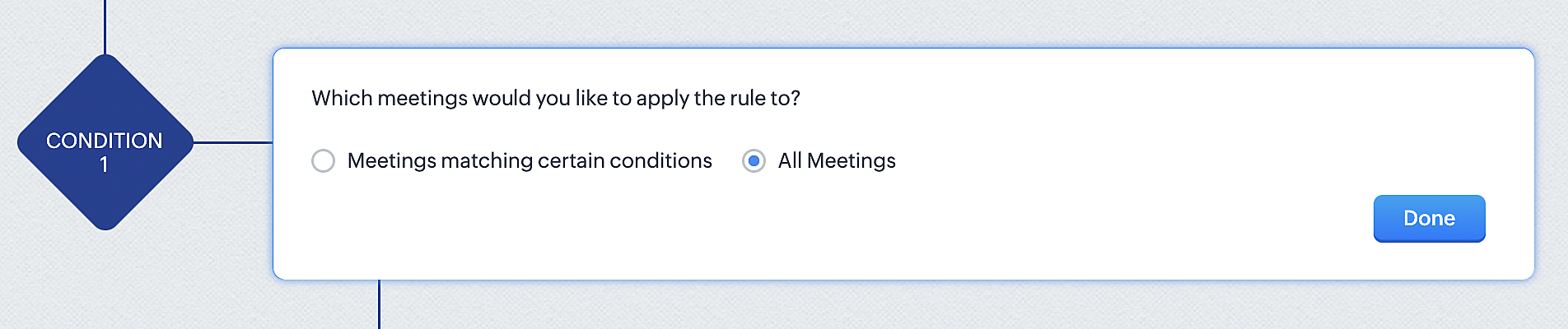
3. Configure condition > All Meetings.
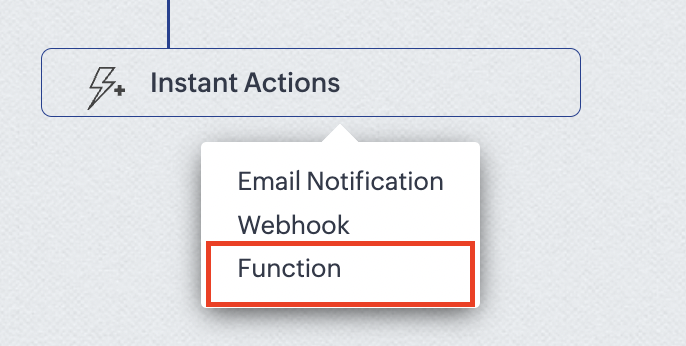
4.Instant Actions > Function.
5. Click the New Function button.

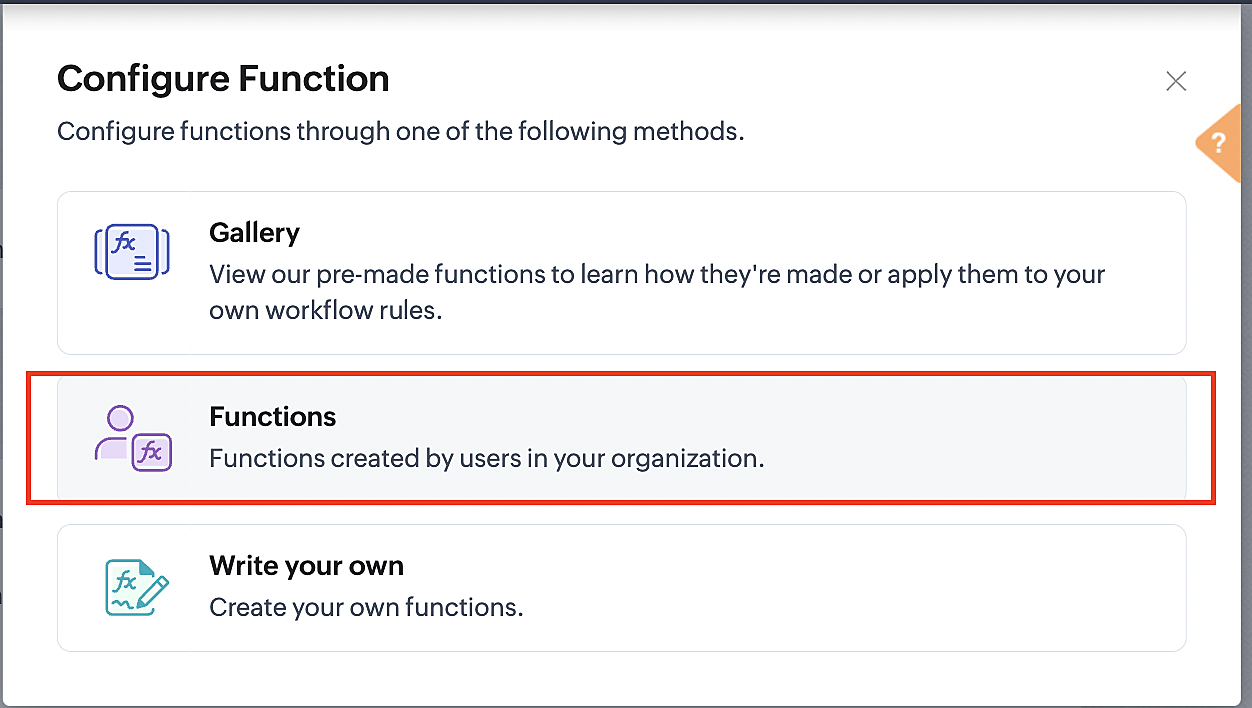
6. In the Configure custom function page, select the "reschedule" function you created from among the functions users in your organization have created.
More details: Specify rule triggers
Part 3: Argument mapping
1. Press # to choose an argument value.
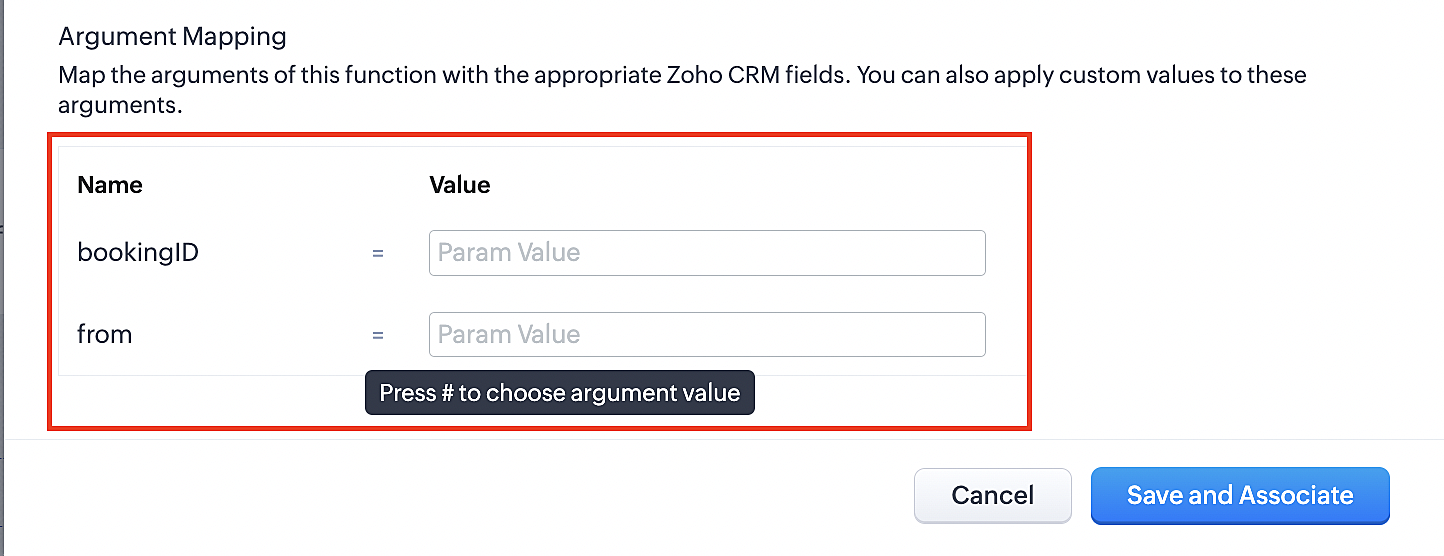
2. Select Meetings under Module and configure the field as "BookingId".
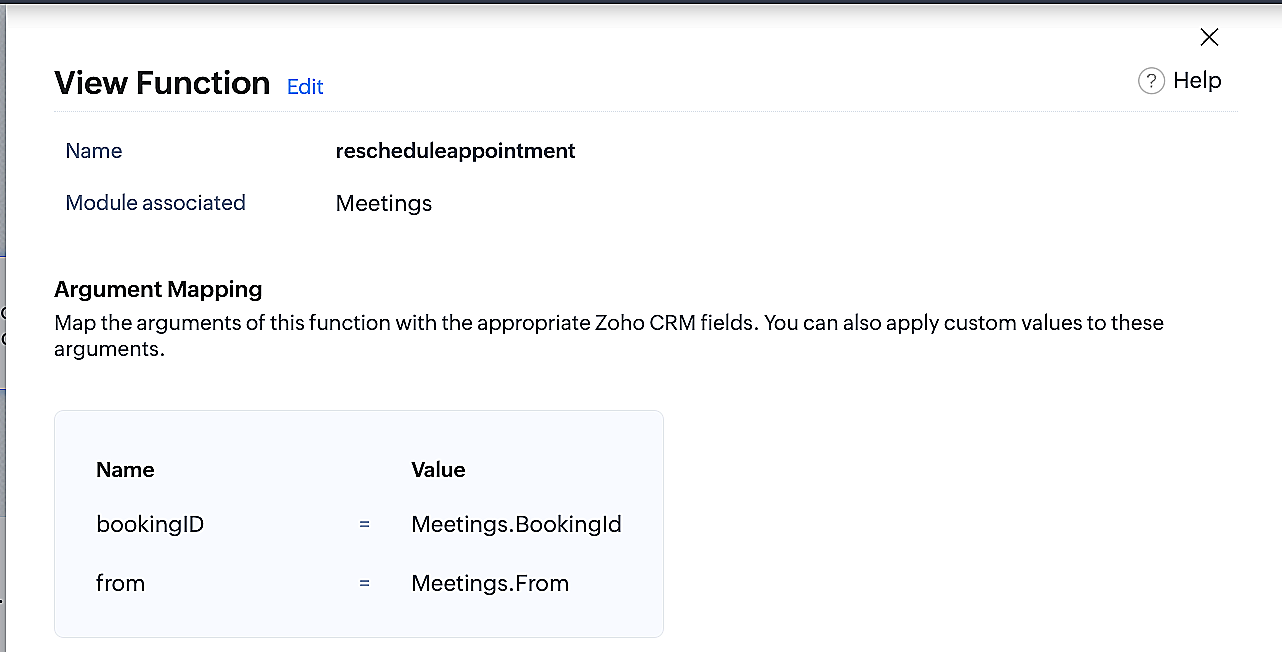
3. Select Meetings under Module and configure the field as "From".
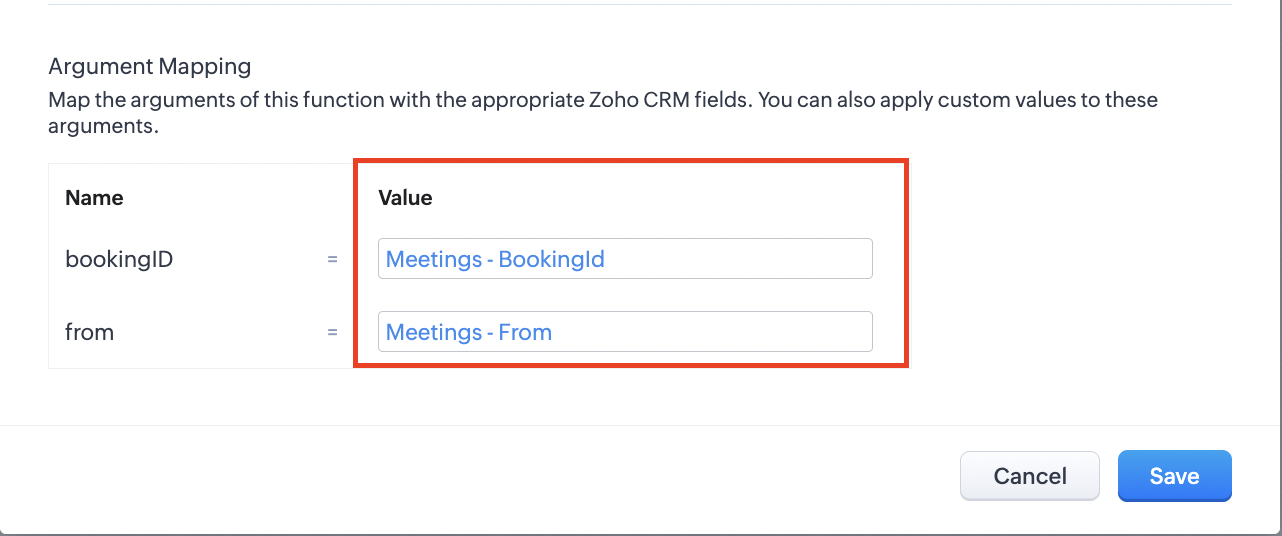
4. Click the Save and Associate button.
Reference:
Below is the final flow of the reschedule appointment workflow:
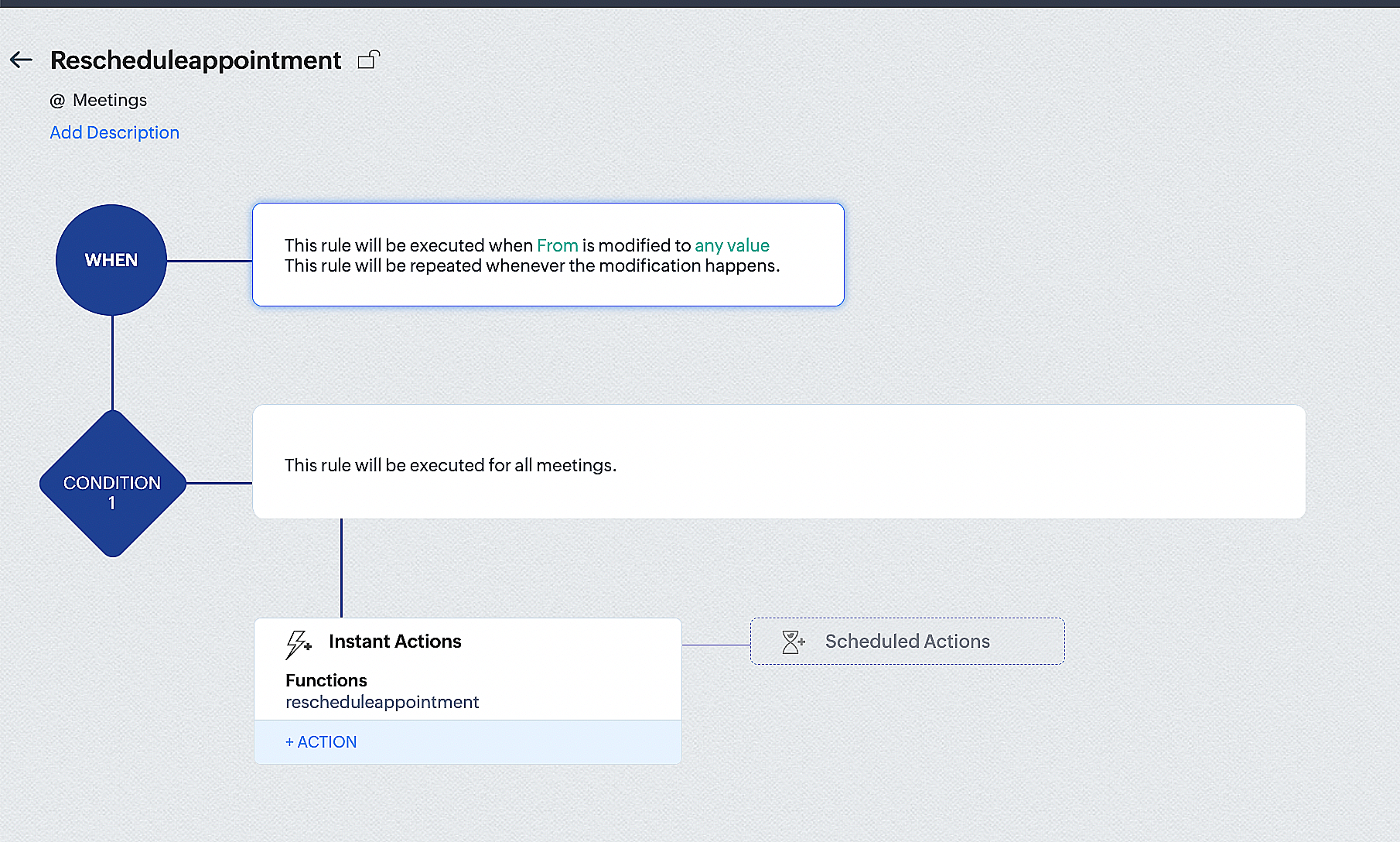
By the end of this process, we will have created a workflow that automatically executes when the "From" field in the Zoho CRM Meetings module is edited with a new date and time. As a result, this workflow will also reschedule the associated bookings for that meeting to the new date and time in Zoho Bookings.
Conclusion
We've arrived at the end of the community post. As mentioned in Part 1 of the Zoho Bookings—Zoho CRM bidirectional sync community post, with all of these configurations in place, you'll be able to book, cancel, reschedule, and update the status of appointments in Zoho Bookings directly from your Zoho CRM application. Which will make your appointment management easier.
If you have any questions or need assistance with your configuration, please email us at hello@zohobookings.com or support@zohobookings.com.
Topic Participants
Kaushik S
Recent Topics
Ability to Add YouTube Video to Playlist During Publishing
Hi Zoho Social Team, How are you? While publishing YouTube videos through Zoho Social, we noticed that the platform currently does not allow selecting a playlist at the time of publishing. Instead, we can only add the video to a playlist after it hasIntroducing Zoho Creator's 2025 Release Projection 2
Hello Creators! I'm Prakash, from the Creator product management team, and today I'm delighted to unveil our next set of features as part of Release Projection 2 for 2025. With thoughtful analysis and planning, we've curated powerful new capabilitiesSharing Form Ownership Among Multiple Users
I would really like the ability to share form ownership among multiple users. It's frustrating to me that if a co-worker wants to make an edit to a form, I have to transfer ownership to them. It would be great if forms could act like google forms, where multiple people can edit a form and view responses.Marketer’s Space - Ace Your Spooky-Season Marketing with Pre-designed Templates in Zoho Campaigns
Hello marketers, Welcome back to another post in Marketer’s Space! We’re in Q4, which means that you have endless opportunities to connect with your audience, starting with Halloween campaigns! In this post, we’ll show you how to design the perfect HalloweenZia expands to China with native features and DeepSeek-powered generative AI features
Hello everyone, We are glad to support Zia native features and Zia generative AI features for our customers in China. From hereon, all AI-features in Desk will be accessible in China data center with the integration of DeepSeek generative AI model. DeepSeekEmail in each module
We have a contact ,module which then has a link to customer assets which in turn the asset has a multiple link to service visits. When we link assets to customers we choose by name and it brings over the associate email via the lookup. Great feature.Introducing Skill-Based Ticket Assignment
The goal of every support team is to provide great support, and to do so as fast as they can. To make this possible, it is important that agents spend their time judiciously, especially when they're dealing with a large number of tickets of varying urgencyKaizen #213 - Workflow APIs - Part 1
Welcome to another week of Kaizen! If you have ever managed complex business processes, you know that Workflows are the quiet backbone of any well-run business process. They keep things moving; assigning owners, sending alerts, keeping deals on track,Browser and address bar hide
Hi, How i can do hide the address bar with browser headline when i am working on the sheet, because i am using (freeze panes) which i want visible for full work. For your reference here i am attached the screen shot and marked yellow lines which reallyCells Border
Hi I am using Zoho Sheet on S Tab , is there any option to make all border of any cell at once. I think this is very basic which we are missing. This is available in mobile but not in tab or suggest if i am missing this function. And for Tab can you giveZobot and Sales IQ
What will happen to the Zoho Sales IQ being integrated to the website after creating the Zobot on the website tooHelp Center and SEO: Any Benefit to My Domain-Mapped Website Ranking?
First of, I love the Help Center which I've just decided to integrate into my website to replace its old-fashioned FAQs. So much more to achieve there now! Lots of new benefits to the site visitors and to me in terms of organizing and delivering all theSupport french language options
Greetings, I want to use Zoho with the french language portal, however the supplied translation is not very good (google translate). There are many basic mistakes on the main most important sections (my requests, submit a request). Is there a way forAutomation #7 - Auto-update Email Content to a Ticket
This is a monthly series where we pick some common use cases that have been either discussed or most asked about in our community and explain how they can be achieved using one of the automation capabilities in Zoho Desk. Email is one of the most commonlyIntroducing the Workflow and Actions APIs for Zoho CRM
We are absolutely thrilled to announce the release of Workflow APIs and Actions APIs in Zoho CRM’s v8 API suite! This powerful new set of endpoints gives developers unprecedented programmatic control over business automation. For years, Workflow RulesZoho Form URL displays incorrect name
Hi, I have a form I created called "Design Request form". It displays this way everywhere I look. However, in the URL, it shows up as "DesignJobRequestFormFINAL011325PROOFV1B" and I'm not sure why. I can't find where to fix this. Does anyone have anyConsumers are talking about your business. Are you listening?👂
A loyal customer might be praising your product in a forum. A frustrated user could be posting a harsh review on a public site. An excited partner may have left a comment on your campaign. A domain expert might be deconstructing your product. A prospectWhat counts as a Temp for Billing Purposes in Workerly
I'm considering trying this product but am not sure how the temp count is used for billing purposes. For example, if we keep a large data base of 500 potential workers.....are we billed for that or only if they are assigned to a client at a given pointCold emails not allowed?
I planned to use Zoho Mail to send businesses some cold emails to offer my freelance writing services, but I noticed that the anti-spam policy is very strict -- no commercial emails whatsoever without prior permission from the recipient? I would be veryForm name incorrectly displayed in URL
Hi, I have a form I created called "Design Request form". It displays this way everywhere I look. However, in the URL, it shows up as "DesignJobRequestFormFINAL011325PROOFV1B" and I'm not sure why. I can't find where to fix this. Does anyone have anyI can't receive mail
Hello, I can't receive e-mail. I no longer receive e-mails to the e-mail I received for my site. I also edited the DNS settings, but it doesn't work at all.1‑to‑1 invite missing post-setup (needs re-invite) vs channel invite auto-joins without business prompt
1. Zoho Cliq 1‑to‑1 external invite The inviter sent a 1‑to‑1 invite to an invitee who didn’t have a Cliq account. After the invitee completed account setup and created a business/organization, the website redirected them to Cliq, where they opened Cliq【開催報告】東京 ユーザー交流会 Vol.3 2025/10/17 Zoho サービスの活用促進を外部ツールとの連携で実現!
ユーザーの皆さま、こんにちは。コミュニティチームの藤澤です。 10月17日(金)に新橋で「東京 ユーザー交流会 Vol.3」を開催しました。ご参加くださったユーザーの皆さま、ありがとうございました! この投稿では、当日のセッションの様子や使用した資料を紹介しています。残念ながら当日お越しいただけなかった方も、ぜひチェックしてみてください😊 ユーザー活用事例セッション:Zoho Flowと決済システムの連携 あみろくの岡島さんに、Zoho サービスの活用事例として、Zoho Flow を活用した外部サービスとの連携事例をご共有いただきました。received email opens in a new tab every time I log in
as per the title: since about when I first made my email account, every single time Ive logged in to view my inbox, a new tab opens for an email I viewed once as if restoring a closed session. I thought I just didnt understand the "starting up" settingsEngage with your customers at scale using WhatsApp Marketing Template messages
Hi everyone, To make it easier for organizations to communicate with customers, Desk now allows you to send individual, mass, and bulk WhatsApp template messages from both the Ticket and Contact modules. How is this going to benefit your business? WhatsAppImportation Tickets error
Hi, I'm newbie here 🤓 So, i'm importing data from csv, but when I try advance to mapping fields the importer tool show this message: Previously I try import, other data, and not show errors in this step. Some ideas? Best Regards,Showing description in timesheet and timelogs.
I am wondering if it’s possible in version 5 of Zoho People to have the description show by default or with a manipulation on the user’s part. Let me show you what I mean. As you can see this is the view for the users. Now if they want to see the fullWorkaround: openURL in Blueprints - An alternate approach
There is a roundabout way to open a URL in blueprints after a save event. By using the 'onBeforeMandatoryFormSave' in Client Script, you can open an external URL. Now, the problem is, this is designed to be run BEFORE the blueprint is saved, not after,MTD SA in the UK
Hello ID 20106048857 The Inland Revenue have confirmed that this tax account is registered as Cash Basis In Settings>Profile I have set ‘Report Basis’ as “Cash" However, I see on Zoho on Settings>Taxes>Income Tax that the ‘Tax Basis’ is marked ‘Accrual'Migrate file from Single File Upload to Multi File Upload
Dears, I have created a new field Multi File Upload to replace the old Single File Upload field. I'd like to ask you guys what is the best way to migrate the files to the new field?Open "Live Chat" from a hyperlink?
Hi, I often write paragraphs and text on our company website, and usually say you can get in touch with us via live chat. Can the chat window be triggered to pop open without clicking the chat graphic in the bottom window, and use it in a hyperlink? ie:Zoho Sites search box
Is there a Search box that can be added to a Zoho site? It would be for searching within the site only.What stops me from packaging and shipping an order when the inventory is negative?
It seems if the inventory value is negative, that Zoho Inventory should not allow me to create a Package and Ship it. But, there seems to be nothing to stop me from doing that other than when I go to physically package the item and realize that there is no stock. There also seems to be nothing on the screen that even indicates to me that I should not package and ship. To me this is the fundamental point of an inventory system. Am I doing something wrong?Conditional formatting based on another field
Hi I have two fields on my form stage 1 complete and stage 1 deadline. I am trying to setup conditional formatting so that if stage 1 complete is after stage 1 deadline the record is highlighted in red. I need both stage 1 complete and stage 1 deadlineThe sending IP (136.143.188.15) is listed on spamrl.com as a source of spam.
Hi, it just two day when i am using zoho mail for my business domain, today i was sending email and found that message "The sending IP (136.143.188.15) is listed on https://spamrl.com as a source of spam" I hope to know how this will affect the deliveryChanging a Single-Line Text field into a Multi-line Field without losing data
Is it possible to change a Single-Line Text field into a Multi-line Field without losing data. I have a module with data for which I would like to change a single-line field into a multi-line field but I'm worried it might delete the pre-existing daWebhook - Google Sheets
I have 2 forms that are both integrated with Google Sheets. I've set up a webhook to pull form 1 data from Google Sheets to prefill data in Form 2. The issue I have is that the forms name fields are First Name & Last Name but the Google sheets integrationVerified Mark Certificate
Hello Dears, Can anyone help and check my mail or direct me to the desired person who can add the verification tag to my mail https://www.zoho.com/blog/mail/email-authentication-with-bimi.htmlAppointment booking is temporarily unavailable
Embeded Zoho booking page in my WordPress website. When someone starts a booking, after choosing time and date, an error appears before payment - "Appointment booking is temporarily unavailable due to restricted settings." Used the embeded code givenCannot connect to 365 business calendar and Teams, says personal but it is not.
hi I have a number of users connected to their 365 business accounts. Adding a new user and it thinks hes got 365 personal edition. He does not.... Anyone know what's going on. Trying for days now. Bookings go into his MS calendar but as its thinks itsNext Page