Boost Customer Experience: Let Visitors Choose Their Preferred IM Channel in Your Chat Widget

Boost Customer Experience: Let Visitors Choose Their Preferred IM Channel in Your Chat Widget

We have an exciting enhancement coming your way. Pushing the perimeter has always been our thing, and we have come up with yet another enhancement for your Zoho SalesIQ live chat. Did you know your live chat can support more than chats and calls? That's right, you can integrate your Instant Messaging channels into your live chat widget, offering visitors the flexibility to choose their preferred communication platform.


Why is this a game-changer?  

SalesIQ supports six Instant Messaging channelsFacebook, Instagram, WhatsApp, Line, WeChat, and Telegram. With this update, you can add these IM options to your widget using custom CSS. When users click on their preferred channel, they will be redirected to your page on the chosen IM channel and can initiate a chat, which will then appear as an incoming chat in SalesIQ.

If you have chatbots enabled in your channels, your bot (Zobot) will engage with visitors, providing instant responses, answering queries, and ensuring seamless interaction, significantly enhancing customer experience and reducing response times.

How does this benefit your customers?  

  • All-in-one widget – Provide diverse communication options within a single SalesIQ live chat interface.

  • Enhanced customer experience – Give visitors the freedom to communicate on their preferred platform, improving engagement and satisfaction.  

  • Effortless management – Handle all IM and website chat conversations from one centralized dashboard.

  • Automated conversation with Bots – Leverage Zobot to automate visitor interactions, provide instant responses, and improve efficiency.

Additionally, boost marketing and sales using  personalized widgets to highlight offers, discounts, promotions, and upcoming product launches, driving customer engagement and conversions.

How to implement this?  

First, add the CSS to the brand settings and update the installation script with additional code.

Adding CSS to the brand settings:

  • Navigate to Settings > Brands > Personalization > Chat Widget in your SalesIQ dashboard.

  • Scroll down to Upload custom CSS, click on New, and upload the downloaded file.

Info
Note: The CSS file includes a background pattern. To customize the background, update the image URL in line #5 of the .css file.

Installation code changes:

  • In the script/code, make the necessary changes.

  • Choose the IM channels you want to display [line #6-11]:

    • Comment out the channels you don’t need by adding // at the beginning of the line.

    • Update the redirection URLs to match your respective channels links.

  • Choose your preferred display style [line #13]:

    • Horizontal format – Best for 3 or more channels.

    • Rectangular button format – Ideal for 1 or 2 channels.

  • Update your widget code [line #41]:

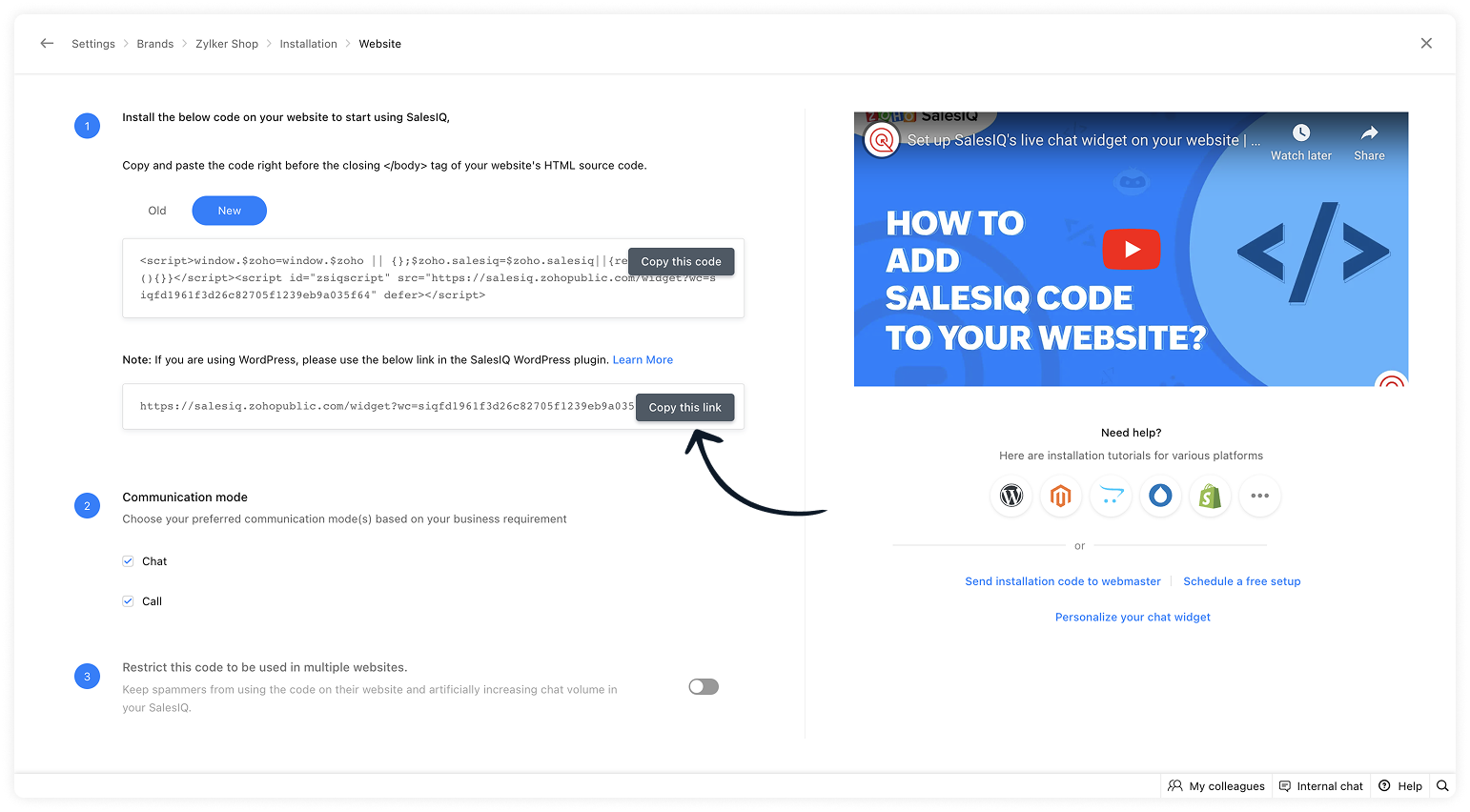
    • Navigate to Settings > Brands > Installation and copy the updated widget URL.

    • Paste the URL into the downloaded script and add it to your website's HTML source code, just as you did with the installation script earlier. Then, publish the changes.

Alert
Note: If you're using any JavaScript APIs, add them to line #3 of the script.


Make your SalesIQ widget more powerful, interactive, and actionable with this enhancement! Don't miss out on this opportunity to enhance visitor engagement and streamline multi-channel communication.

We hope this helps! If you have any questions, feel free to drop a comment.


    • Recent Topics

    • error while listing mails

      I can't access email in any of my folders: Oops, an error occurred - retry produces the second error response: error while listing mails (cannot parse null string). I've signed in and out of Zoho, restarted my iMac.
    • Unlocking New Levels: Zoho Payroll's Journey in 2025

      Every year brings its own set of challenges and opportunities to rethink how payroll works across regulations and teams. In 2025, Zoho Payroll continued to evolve with one clear focus: giving businesses more flexibility, clarity, and control as they grow.
    • Introducing Connected Records to bring business context to every aspect of your work in Zoho CRM for Everyone

      Hello Everyone, We are excited to unveil phase one of a powerful enhancement to CRM for Everyone - Connected Records, available only in CRM's Nextgen UI. With CRM for Everyone, businesses can onboard all customer-facing teams onto the CRM platform to
    • Send Supervisor Rule Emails Within Ticket Context in Zoho Desk

      Dear Zoho Desk Team, I hope this message finds you well. Currently, emails sent via Supervisor Rules in Zoho Desk are sent outside of the ticket context. As a result, if a client replies to such emails, their response creates a new ticket instead of appending
    • form data load issue when saving as duplicate record is made

      Hello. I have a form with a lookup when a value is selected the data from the corresponding record is filled into all of the fields in the form. But the form is loaded in such a state that if any value is changed it will take all of the values pre loaded
    • CRM project association via deluge

      I have created a workflow in my Zoho CRM for closing a deal. Part of this workflow leverages a deluge script to create a project for our delivery team. Creating the project works great however, after or during the project creation, I would like to associate
    • Zoho Browser??

      hai guys, this sounds awkward but can v get a ZOHO BROWSER same as zoho writer, etc. where i can browse websites @ home and continue browsing the same websites @ my office, as v have the option in Firefox, once i save and close the browser and again when i open it i will be getting the same sites. If u people r not clear with my explanation, plz let me know. Thanks, Sandeep  
    • Where can we specify custom CSS in Zoho Forms custom theme ?

      I'm using a form with a dark theme. The OTP popup window is unreadable, because for some reason, the OTP popup background fixes color to white, but still takes the font color specified in the custom theme. This ends up as white on white for me, rendering
    • MCP no longer works with Claude

      Anyone else notice Zoho MCP no longer works with Claude? I'm unable to turn this on in the claude chat. When I try to toggle it on, it just does nothing at all. I've tried in incognito, new browsers, etc. - nothing seems to work.
    • Enable History Tracking for Picklist Values Not Available

      When I create a custom picklist field in Deals, the "Enable History Tracking for Picklist Values" option is not available in the Edit Properties area of the picklist. When I create a picklist in any other Module, that option is available. Is there a specific reason why this isn't available for fields in the Deals Module?
    • The reason I switched away from Zoho Notebook

      My main reason for switching to Zoho was driven by three core principles: moving away from US-based products, keeping my data within India as much as possible, and supporting Indian companies. With that intent, I’ve been actively de-Googling my digital
    • Add RTL and Hebrew Support for Candidate Portal (and Other Zoho Recruit Portals)

      Dear Zoho Recruit Team, I hope you're doing well. We would like to request the ability to set the Candidate Portal to be Right-to-Left (RTL) and in Hebrew, similar to the existing functionality for the Career Site. Currently, when we set the Career Site
    • Ability to Edit YouTube Video Title, Description & Thumbnail After Publishing

      Hi Zoho Social Team, How are you? We would like to request an enhancement to Zoho Social that enables users to edit YouTube video details after the video has already been published. Your team confirmed that while Zoho Social currently allows editing the
    • Free Webinar : Unlock AI driven business insights with Zoho Inventory + Zoho Analytics

      Are you tired of switching between apps and exporting data to build customized reports? Say hello to smarter & streamlined insights! Join us for this exclusive webinar where we explore the power of the Zoho Inventory–Zoho Analytics integration. Learn
    • Critical Issue: Tickets Opened for Zoho Support via the Zoho Help Portal Were Not Processed

      Hi everyone, We want to bring to your attention a serious issue we’ve experienced with the Zoho support Help Portal. For more than a week, tickets submitted directly via the Help Portal were not being handled at all. At the same time no alert was posted
    • Hide/Show Subform Fields On User Input

      Hello, Are there any future updates in Hide/Show Subform Fields "On User Input"?
    • Cloning Item With Images Or The Option With Images

      Hello, when I clone an item, I expect the images to carry over to the cloned item, however this is not the case in Inventory. Please make it possible for the images to get cloned or at least can we get a pop up asking if we want to clone the images as
    • Archiving Contacts

      How do I archive a list of contacts, or individual contacts?
    • WorkDrive and CRM not in sync

      1/ There is a CRM file upload field with WorkDrive file set as the source: 2/ Then the file is renamed in WorkDrive (outside CRM): 3/ The File in CRM is not synced after the change in WorkDrive; the file name (reference) in CRM record is not updated (here
    • Custom validation in CRM schema

      Validation rules in CRM layouts work nicely, good docs by @Kiran Karthik P https://help.zoho.com/portal/en/kb/crm/customize-crm-account/validation-rules/articles/create-validation-rules I'd prefer validating data input 'closer to the schema'
    • Adding Default Module Image into mail merge field

      As with most people finding their way to these forums i have a specific requirement that doesn't seem to be supported by Zoho I have created 2 custom modules to suit my purpose 1 is an inventory type module that lists aluminium extrusions, and all relevant
    • Sync Data from MA to CRM

      Currently, it's a one-way sync of data from the CRM to MA. I believe we should have the ability to select fields to sync from MA to the CRM. The lead score is a perfect example of this. In an ideal world we would be able to impact the lead score of a
    • Is it possible to roll up all Contact emails to the Account view?

      Is there a way to track all emails associated with an Account in one single view? Currently, email history is visible when opening an individual Contact record. However, since multiple Contacts are often associated with a single Account, it would be beneficial
    • Update CRM record action

      Currently, MA only offers a "Push Data" action to push data to a CRM module. This action is built to cover the need to both create a new record and update an existing record. Because it has been implemented this way all required fields on the CRM module
    • Notes badge as a quick action in the list view

      Hello all, We are introducing the Notes badge in the list view of all modules as a quick action you can perform for each record, in addition to the existing Activity badge. With this enhancement, users will have quick visibility into the notes associated
    • What's new in Zoho One 2025

      Greetings! We hope you have all had a chance by now to get hands-on with the new features and updates released as part of ZO25. Yes, we understand that you may have questions and feedback. To ensure you gain a comprehensive understanding of these updates,
    • Good news! Calendar in Zoho CRM gets a face lift

      Dear Customers, We are delighted to unveil the revamped calendar UI in Zoho CRM. With a complete visual overhaul aligned with CRM for Everyone, the calendar now offers a more intuitive and flexible scheduling experience. What’s new? Distinguish activities
    • Add deluge function to shorten URLs

      Zoho Social contains a nice feature to shorten URLs using zurl.co. It would be really helpful to have similar functionality in a Deluge call please, either as an inbuilt function or a standard integration. My Creator app sends an email with a personalised
    • Edit default "We are here to help you" text in chat SalesIQ widget

      Does anyone know how this text can be edited? I can't find it anywhere in settings. Thanks!
    • Quick way to add a field in Chat Window

      I want to add Company Field in chat window to lessen the irrelevant users in sending chat and set them in mind that we are dealing with companies. I request that it will be as easy as possible like just ticking it then typing the label then connecting
    • How to create a two way Sync with CRM Contacts Module?

      Newbie creator here (but not to Zoho CRM). I want to create an app that operates on a sub-set of CRM Contacts - only those with a specific tag. I want the app records to mirror the tagged contacts in CRM. I would like it to update when the Creator app
    • Zoho Sheet for Desktop

      Does Zoho plans to develop a Desktop version of Sheet that installs on the computer like was done with Writer?
    • Allow Manual Popup Canvas Size Control

      Hello Zoho PageSense Team, We hope you're doing well. We would like to request an enhancement to the PageSense popup editor regarding popup sizing. Current Limitation: Currently, the size (width and height) of a popup is strictly controlled by the selected
    • Where is the settings option in zoho writer?

      hi, my zoho writer on windows has menu fonts too large. where do i find the settings to change this option? my screen resolution is correct and other apps/softwares in windows have no issues. regards
    • How to set page defaults in zoho writer?

      hi, everytime i open the zoho writer i have to change the default page settings to - A4 from letter, margins to narrow and header and footer to 0. I cannot set this as default as that option is grayed out! so I am unable to click it. I saved the document
    • Develop and publish a Zoho Recruit extension on the marketplace

      Hi, I'd like to develop a new extension for Zoho Recruit. I've started to use Zoho Developers creating a Zoho CRM extension. But when I try to create a new extension here https://sigma.zoho.com/workspace/testtesttestest/apps/new I d'ont see the option of Zoho Recruit (only CRM, Desk, Projects...). I do see extensions for Zoho Recruit in the marketplace. How would I go about to create one if the option is not available in sigma ? Cheers, Rémi.
    • How to import data from PDF into Zoho Sheet

      I am looking to import Consolidated Account Statement (https://www.camsonline.com/Investors/Statements/Consolidated-Account-Statement) into zoho sheet. Any help is appreciated. The pdf is received as attachment in the email, this document is password
    • Zoho Projects Android app: Integration with Microsoft Intune

      Hello everyone! We’re excited to announce that Zoho Projects now integrates with Microsoft Intune, enabling enhanced security and enterprise app management. We have now added support for Microsoft Intune Mobile Application Management (MAM) policies through
    • Cant't update custom field when custom field is external lookup in Zoho Books

      Hello I use that : po = zoho.books.updateRecord("purchaseorders",XXXX,purchaseorder_id,updateCustomFieldseMap,"el_books_connection"); c_f_Map2 = Map(); c_f_Map2.put("label","EL ORDER ID"); c_f_Map2.put("value",el_order_id); c_f_List.add(c_f_Map2); updateCustomFieldseMap
    • Wrapping up 2025 on a high note: CRM Release Highlights of the year

      Dear Customers, 2025 was an eventful year for us at Zoho CRM. We’ve had releases of all sizes and impact, and we are excited to look back, break it down, and rediscover them with you! Before we rewind—we’d like to take a minute and sincerely thank you
    • Next Page