Bulk user onboarding for Cliq Channels in a jiffy

Bulk user onboarding for Cliq Channels in a jiffy

As developers, we frequently switch between coding, debugging, and optimizing tasks. The last thing we want is to be burdened by manual user management. Adding users one by one to a channel is tedious and prone to errors, taking up more time than we could devote to actual development. 


Let's explore how to create a custom workflow using Cliq's platform components to streamline the process of bulk-adding users to a channel via a Zoho Sheet or CSV file. This approach facilitates a smooth onboarding experience without the need for manual effort.

Pre-requisite :

Before beginning to script the code below, we must create a connection with Zoho Cliq. Once a connection is created and connected, you can use it in Deluge integration tasks and invoke URL scripts to access data from the required service.

Create a Zoho Oauth default connection with any unique name and the scopes -  ZohoCliq.Channels.All and ZohoSheet.dataApi.ALL

Refer to the below links to learn more :

Step 1  : Creation of slash command

  • After a successful login in Cliq, hover to the top right corner and click your profile. Post clicking, navigate to Bots & Tools > Commands.
  • At your right, click the button - Create Command.
  • To know more about slash commands and their purposes, refer to Introduction to slash commands.
  • Create a slash command using your preferred name. Specify the following details: the command name, a hint (to give users an idea of what the command is for), and the access level.
  • Finally, click "Save & edit code".

  1. inputs = List();
  2. inputs.add({"name":"channels","label":"Pick a channel","placeholder":"Choose a channel where you need to add members","max_selections":"1","multiple":false,"mandatory":true,"type":"native_select","data_source":"channels"});
  3. inputs.add({"name":"headername","label":"Header name","placeholder":"Email ID","hint":"In which the Email ID is present","min_length":"0","max_length":"25","mandatory":true,"type":"text"});
  4. inputs.add({"type":"radio","label":"Import type","name":"import_Type","hint":"Choose a type that you need to import users","options":[{"label":"CSV","value":"csv"},{"label":"Zoho sheet","value":"zohosheet"}],"trigger_on_change":"true"});
  5. return {"name":"addbulkuser","type":"form","title":"Add bulk users","hint":"To add maximum of upto 1000 users in a channel.","button_label":"Add Users","inputs":inputs,"action":{"type":"invoke.function","name":"addbulkusers"};

Step 2  : Scripting form function

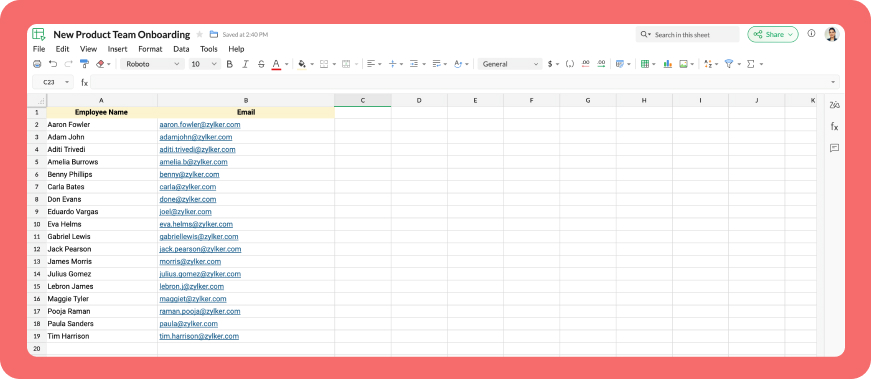
  • We need to create a function for the form that manages submission responses, including the Zoho Sheet link or CSV file, the name of the column containing the email addresses, and the channel details where users should be added in bulk.
  • Hover to the top right corner and click your profile. After clicking, navigate to Bots & Tools > Functions.
  • To your right, click the Create Function button.
  • Name the function "addbulkusers," provide a description as desired, and select "form" as the function type. Then, click "Save and edit code," and paste the following code.
  1. emailIdList = list();
  2. successlist = list();
  3. failedlist = list();
  4. try 
  5. {
  6. info form;
  7. formValues = form.get("values");
  8. columnName = formValues.get("headername");
  9. headerName = formValues.get("headername");
  10. if(formValues.get("import_Type").get("value") == "zohosheet")
  11. {
  12. url = formValues.get("url");
  13. spreadSheetId = url.getPrefix("?").getSuffix("open/");
  14. sheetName = url.getSuffix("?").getPrefix("&").getSuffix("=");
  15. worksheetname = sheetName.replaceAll(" ","%20");
  16. columnName = columnName.replaceAll(" ","%20");
  17. allDatas = list();
  18. params = Map();
  19. params.put("column_names",columnName);
  20. params.put("method","worksheet.records.fetch");
  21. params.put("worksheet_id",sheetName + "#");
  22. sheetDetails = invokeurl
  23. [
  24. url :"https://sheet.zoho"+environment.get("tld")+"/api/v2/" + spreadSheetId
  25. type :GET
  26. parameters:params
  27. connection:"addbulkusers"
  28. ];
  29. info sheetDetails;
  30. if(sheetDetails.get("status") == "success" && sheetDetails.get("records").size() <= 1000)
  31. {
  32. allDatas.addAll(sheetDetails.get("records"));
  33. }
  34. else if(sheetDetails.get("status") == "success" && sheetDetails.get("records").size() > 1000)
  35. {
  36. return {"type":"form_error","text":"I can only able to add 1000 user. Kindly try passing with 1000 records in the sheet!!!"};
  37. }
  38. else
  39. {
  40. return {"type":"form_error","text":"I can't find any email ids. Kindly re-check the column name and header row!!!"};
  41. }
  42. info "allData: " + allDatas.size();
  43. if(allDatas.size() > 1000)
  44. {
  45. return {"type":"form_error","text":"I can only able to add 1000 user. Kindly try passing with 1000 records in the sheet!!!"};
  46. }
  47. for each  data in allDatas
  48. {
  49. if(data.get(formValues.get("headername")) == null)
  50. {
  51. return {"type":"form_error","text":"I can't find any email ids. Kindly re-check the column name and header row!!!"};
  52. }
  53. emailIdList.add(data.get(formValues.get("headername")));
  54. if(emailIdList.size() == 100)
  55. {
  56. channelID = formValues.get("channels").get("id");
  57. params = {"email_ids":emailIdList};
  58. info "Params: " + params;
  59. addUsers = invokeurl
  60. [
  61. url :environment.get("base_url") + "/api/v2/channels/" + channelID + "/members"
  62. type :POST
  63. parameters:params.toString()
  64. detailed:true
  65. connection:"addbulkusers"
  66. ];
  67. info "Adduser: " + addUsers;
  68. if(addUsers.get("responseCode") == "204")
  69. {
  70. successlist.addAll(emailIdList);
  71. }
  72. else
  73. {
  74. failedlist.addAll(emailIdList);
  75. }
  76. info "100: " + emailIdList.size();
  77. emailIdList = list();
  78. }
  79. }
  80. if(emailIdList.size() > 0)
  81. {
  82. channelID = formValues.get("channels").get("id");
  83. params = {"email_ids":emailIdList};
  84. info "Params: " + params;
  85. addUsers = invokeurl
  86. [
  87. url :environment.get("base_url") + "/api/v2/channels/" + channelID + "/members"
  88. type :POST
  89. parameters:params.toString()
  90. detailed:true
  91. connection:"addbulkusers"
  92. ];
  93. info "Adduser: " + addUsers;
  94. if(addUsers.get("responseCode") == "204")
  95. {
  96. successlist.addAll(emailIdList);
  97. }
  98. else
  99. {
  100. failedlist.addAll(emailIdList);
  101. }
  102. info "Email id: " + emailIdList;
  103. }
  104. info "Successlist: " + successlist;
  105. info "Failedlist: " + failedlist;
  106. if(successlist.size() > 0 && failedlist.size() > 0)
  107. {
  108. postMessage = {"text":"Successfully added " + successlist.size() + " member(s) and failed for " + failedlist.size() + " Member(s)"};
  109. }
  110. else if(successlist.size() > 0 && !failedlist.size() > 0)
  111. {
  112. postMessage = {"text":"Successfully added " + successlist.size() + " member(s)"};
  113. }
  114. else if(!successlist.size() > 0 && failedlist.size() > 0)
  115. {
  116. postMessage = {"text":"Adding members in channel failed for " + failedlist.size() + " member(s)"};
  117. }
  118. info zoho.cliq.postToChat(chat.get("id"),postMessage);
  119. }
  120. else
  121. {
  122. csvFile = formValues.get("csvFile");
  123. csvFile = csvFile.getfilecontent();
  124. allDatas = csvFile.toList("\n");
  125. i = 0;
  126. indexValue = 0;
  127. indexBoolean = false;
  128. for each  data in allDatas
  129. {
  130. if(i == 0)
  131. {
  132. headers = data.toList(",");
  133. for each  header in headers
  134. {
  135. info header;
  136. if(headerName == header)
  137. {
  138. indexBoolean = true;
  139. indexValue = headers.indexOf(headerName);
  140. }
  141. }
  142. if(indexBoolean == false)
  143. {
  144. return {"type":"form_error","text":"I can't find any email ids. Kindly re-check the column name and header row!!!"};
  145. }
  146. }
  147. else 
  148.             {
  149. emailIdList.add(data.get(indexValue));
  150.             }
  151. i = i + 1;
  152. if(emailIdList.size() == 100)
  153. {
  154. channelID = formValues.get("channels").get("id");
  155. params = {"email_ids":emailIdList};
  156. info "Params: " + params;
  157. addUsers = invokeurl
  158. [
  159. url :environment.get("base_url") + "/api/v2/channels/" + channelID + "/members"
  160. type :POST
  161. parameters:params.toString()
  162. detailed:true
  163. connection:"addbulkusers"
  164. ];
  165. info "Adduser: " + addUsers;
  166. if(addUsers.get("responseCode") == "204")
  167. {
  168. successlist.addAll(emailIdList);
  169. }
  170. else
  171. {
  172. failedlist.addAll(emailIdList);
  173. }
  174. info "100: " + emailIdList.size();
  175. emailIdList = list();
  176. }
  177. }
  178. if(emailIdList.size() > 0)
  179. {
  180. channelID = formValues.get("channels").get("id");
  181. params = {"email_ids":emailIdList};
  182. info "Params: " + params;
  183. addUsers = invokeurl
  184. [
  185. url :environment.get("base_url") + "/api/v2/channels/" + channelID + "/members"
  186. type :POST
  187. parameters:params.toString()
  188. detailed:true
  189. connection:"addbulkusers"
  190. ];
  191. info "Adduser: " + addUsers;
  192. if(addUsers.get("responseCode") == "204")
  193. {
  194. successlist.addAll(emailIdList);
  195. }
  196. else
  197. {
  198. failedlist.addAll(emailIdList);
  199. }
  200. }
  201. info "Successlist: " + successlist;
  202. info "Failedlist: " + failedlist;
  203. if(successlist.size() > 0 && failedlist.size() > 0)
  204. {
  205. postMessage = {"text":"Successfully added " + successlist.size() + " member(s) and failed for " + failedlist.size() + " Member(s)"};
  206. }
  207. else if(successlist.size() > 0 && !failedlist.size() > 0)
  208. {
  209. postMessage = {"text":"Successfully added " + successlist.size() + " member(s)"};
  210. }
  211. else if(!successlist.size() > 0 && failedlist.size() > 0)
  212. {
  213. postMessage = {"text":"Adding members in channel failed for " + failedlist.size() + " member(s)"};
  214. }
  215. info zoho.cliq.postToChat(chat.get("id"),postMessage);
  216. }
  217. }
  218. catch (e)
  219. {
  220. info e;
  221. return {"type":"form_error","text":"I can't find any email ids. Kindly re-check the column name and header row!!!"};
  222. }
  223. return Map();

Step 3  : Configuring form change handler

  • After copying and pasting the code into the form submission handler, navigate to the form change handler for the created form function.
  • You can find this in the top left corner of the editor, where you will see an arrow next to the form submission handler. Clicking on this arrow will display the form change handler in a dropdown menu.
  • Click it to edit the code in the form change handler, which is necessary for real-time modifications to a form's structure or behaviour based on user input in a specific field. 
  1. targetName = target.get("name");
  2. info targetName;
  3. inputValues = form.get("values");
  4. info inputValues;
  5. actions = list();
  6. if(targetName.containsIgnoreCase("import_Type"))
  7. {
  8. fieldValue = inputValues.get("import_Type").get("value");
  9. info fieldValue;
  10. if(fieldValue == "csv")
  11. {
  12. actions.add({"type":"add_after","name":"import_Type","input":{"label":"CSV File","name":"csvFile","placeholder":"Please upload a zCSV File","mandatory":true,"type":"file"}});
  13. actions.add({"type":"remove","name":"url"});
  14. }
  15. else if(fieldValue == "zohosheet")
  16. {
  17. actions.add({"type":"add_after","name":"import_Type","input":{"name":"url","label":"Enter the sheet url","placeholder":"https://sheet.zoho.com/sheet/open/6xhgb324f142e91d845e5b4b472f7422379c9","min_length":"0","max_length":"400","mandatory":true,"type":"text","format":"url"}});
  18. actions.add({"type":"remove","name":"csvFile"});
  19. }
  20. }
  21. return {"type":"form_modification","actions":actions};
Business use cases:

  • HR onboarding: Seamlessly add new employees to internal communication channels.
  • Event management: Quickly invite attendees to event-specific channels.
  • Education platforms: Enroll students in course groups in one go.
  • Community building: Grow large communities by importing member lists effortlessly.

Bottom line

Bulk user addition in Cliq channels through Zoho Sheet or CSV files allows us to eliminate tedious tasks, reduce errors, and manage large-scale data effortlessly. Is onboarding consuming too much of your valuable development time? If so, it might be time to shake things up with a customized workflow!

We're here to help, so don't hesitate to reach out to support@zohocliq.com with any questions or if you need assistance in crafting even more tailored workflows.

    • Sticky Posts

    • Add Claude in Zoho Cliq

      Let’s add a real AI assistant powered by Claude to your workspace this week, that your team can chat with, ask questions, and act on conversations to run AI actions on. This guide walks you through exactly how to do it, step by step, with all the code
    • Zoho Cliq REST APIs v3 : A complete guide to what's changed and why 

      APIs are not just consumed by a developer with numerous automations and a series of open browser tabs. They are parsed by LLMs, fed into agent pipelines, and auto-completed by AI coding assistants that have zero tolerance for inconsistency. A verb tucked
    • Cliq Bots - Post message to a bot using the command line!

      If you had read our post on how to post a message to a channel in a simple one-line command, then this sure is a piece of cake for you guys! For those of you, who are reading this for the first time, don't worry! Just read on. This post is all about how
    • Automating Real-Time Zoho Bookings Alerts in Zoho Cliq

      Enable your teams to respond in seconds by bridging the gap between booking confirmation and team notification. No sticky notes, no calendar nudges and no follow-up frenzies. For businesses that rely on scheduled appointments, real-time visibility is
    • Automate attendance tracking with Zoho Cliq Developer Platform

      I wish remote work were permanently mandated so we could join work calls from a movie theatre or even while skydiving! But wait, it's time to wake up! The alarm has snoozed twice, and your team has already logged on for the day. Keeping tabs on attendance
    • Recent Topics

    • zoho desk

      Hello, Did Zoho Desk have any issues today? Are tickets coming in late? I have an email account linked, and messages seem to be arriving with a delay—some email threads aren't coming through completely, and so on.
    • Is Zoho Assist Secure Connect even practical for 1 person shop?

      I was gun ho with Zoho Assist to replace my existing Remote Access product I have been using but I need to implement MFA on each unattended connection. Right now each of these connections in my other product has a rotating token that I have enter off
    • An important update for Zoho Cliq desktop users

      The latest version of the Zoho Cliq desktop app (v1.8.0) will no longer be supported on macOS 10.15 Catalina and earlier versions. This is because the framework we use (Electron) no longer supports some older macOS versions. If you’re using macOS 10.15
    • Simplify eSignatures: Automate document workflows with Zoho WorkDrive

      Hello everyone, We’re excited to invite you to our upcoming live webinar, where Zoho WorkDrive and Zoho Sign will come together to show you how to simplify and automate document workflows. From creating and collaborating on documents to approvals, e-signatures,
    • Function #7: Fetch a value from Deal in Zoho CRM to the related Estimate in Zoho Books

      We're here with another function for those using the integration with Zoho CRM. You know that potentials can be linked to transactions in Zoho Books. But if you're including additional details about a Deal (potential) in Zoho CRM and you want to inherit
    • Turn off workflow Applied pop-up

      hi We are new to Desk. I have a rule to set to "waiting for customer" when agent sends reply. This comes up every time. How to i turn off? Or am i seeing as admin.
    • Smarter holiday planning with yearly-specific Holiday Lists

      Hello everyone! Managing holidays and business hours is now easier and more efficient. Holiday Lists now support holidays that fall on different dates every year, while business hours now supports more than one holiday list. This helps businesses manage
    • Workflows being applied and the Large unwanted popup

      When a workflow is being applied do to an action, then the Agent is left with a large Window asking if they would like the see the changes this workflow did. Is there any way to disable this prompt from appearing?
    • Maintenance notice for Zoho CommunitySpaces US data centers on August 23, 2026

      Dear customers, We have scheduled a maintenance activity for Zoho CommunitySpaces in our United States (US) data centers on August 23, 2026, from 1:30 a.m. to 2:00 a.m. During this 30-minute maintenance window, Zoho CommunitySpaces will be temporarily
    • Knowledge base: The nitty-gritty of SEO tags

      A well-optimized knowledge base with great SEO can benefit your company by allowing customers to find help articles and support resources using search engines. This enables customers to quickly and efficiently find the information they need without direct
    • zoho desk: Can tickets be created from Microsoft Teams messages?

      I am trying to see if there is a way to integrate Microsoft teams with zohodesk. we have a few customers who prefer to communicate requests through Teams, and it would be great to create tickets when they do.
    • ´´Send Email Reply´´ action does not work when the message body contains placeholders.

      Hi Community, I am working on a workflow where the Customer contact is notified via email when their ticket status goes On Hold. To do that, I chose the Send Email Reply action, and the minute I add a placeholder, the workflow does not work and the ticket´s
    • Zoho ERP | Product updates | July 2026

      Hello users, We're back with another round of updates to help you streamline your operations. This month's release brings new features and enhancements designed to help you work more efficiently. Read on to discover everything that's new in Zoho ERP this
    • Zoho Forms Spam Submissions

      Hello community! It seems that after updating the Recaptcha settings on our newsletter form (Zoho Forms), we keep getting low quality spam emails subscriptions. I first used 0.5 treshold on invisible google captcha, then raised it to 0.7 but to no avail.
    • Migration from Hosted Exchange Server

      I am looking for documentation on how to migrate from a hosted version of Microsoft Exchange to Zoho Mail.  The existing material is very good for non-hosted Exchange or local Outlook account but I have been unable to locate information to move from a hosted Exchange environment. This is complicated by not being able to have access to the Exchange Server (other than login credentials) and the lack of a local PST file (local Outlook uses OST files). I am to the point that all I need to do is migrate
    • Subform edits don't appear in parent record timeline?

      Is it possible to have subform edits (like add row/delete row) appear in the Timeline for parent records? A user can edit a record, only edit the subform, and it doesn't appear in the timeline. Is there a workaround or way that we can show when a user
    • Unable to view existing or create new WhatsApp IM templates on Zoho Desk

      Hi there, Is there a issue with WhatsApp templates in Zoho Desk currently [17 Aug 2026]? I am unable to view existing or create new WhatsApp IM templates. It's saying "Oops, something went wrong. Please try again later."
    • WhatsApp Business Calling API

      Dear Zoho SalesIQ Team, I would like to request a feature that allows users to call WhatsApp numbers directly via Zoho SalesIQ. This integration would enable sending and receiving calls to and from WhatsApp numbers over the internet, without the need
    • WhatsApp Calling Integration via Zoho Desk

      Dear Zoho Desk Team, I would like to request a feature that allows users to call WhatsApp numbers directly via Zoho Desk. This integration would enable sending and receiving calls to and from WhatsApp numbers over the internet, without the need for traditional
    • Automating CRM backup storage?

      Hi there, We've recently set up automatic backups for our Zoho CRM account. We were hoping that the backup functionality would not require any manual work on our end, but it seems that we are always required to download the backups ourselves, store them,
    • Zoho CRM Kiosk Upload Files

      Hello all, We are trying out Kiosks at the moment to see where it can fit best in our business. We are still a bit off in the application but lets say we will sort this out. My question is the following - when I create a Kiosk I can add "File Upload"
    • Add Support to Upload Inventory Items with Categories or Enable Separate Upload for Inventory Categories

      Currently, Zoho Inventory does not support uploading new items along with their parent and sub inventory categories using the item import feature. This creates challenges for businesses with structured inventory hierarchies when trying to upload items
    • About products & categories URL

      hello guys, I'm trying to migrate date from Magento 2 to Zoho Commerce and I have some doubt about URL. In my M2 for product I have "Url Key" field with value like this: "product-url" and page appear like this: "www.sitename.com/product-url.html" In ZC
    • Which Zoho CRM tasks would you want an AI assistant to handle?

      I’ve started delegating my Zoho CRM work to AI – and many tasks now take me half the time. It has been so useful that we’re now working to make it available to everyone. Instead of clicking through records and tabs, I simply describe what needs to be
    • Export Campaign to another document?

      How can I export my Campaign to Word and PDF? I want to create a PDF archive on my website with old campaigns /Peter
    • Filter isn't

      The ability to filter the history of a given flow to a specific status however it would be great to have the ability to filter to a status that isn't something for example if i want to find all history that isn't complete.
    • Zoho CRM Functions: Redesigned Interface, Rich Analytics, and Multi-Language Support

      Hello everyone! We have given Functions in Zoho CRM a major overhaul with a new interface that makes it easier to build, organize, monitor, and troubleshoot your functions throughout their lifecycle. As part of this revamp, we have also introduced a unified
    • Gemini Action - Add "inineData" Support

      Thank you guys for adding a Gemini action. I like Gemini models for the "grunt work" of AI, as they have the cheapest tokens of the trustworthy providers One thing that's missing in the action, though, is the ability to pass file data. If you pass a base64-encoded
    • LinkedIn RSC is now live in Zoho Recruit

      LinkedIn Recruiter System Connect (RSC) is here. Your Zoho Recruit data (candidates, jobs, notes, stage updates, resume attachments, and more) now syncs with LinkedIn in real time. Note: LinkedIn RSC is included with your LinkedIn Recruiter Corporate
    • What's New in Zoho Inventory | April & May 2026

      Hello users, We're excited to roll out the latest Zoho Inventory updates for April and May 2026. These enhancements are designed to make your daily operations smoother and more efficient, from advanced inventory management and flexible pricing to automated
    • Old Gmail inbox migration to Zoho mail

       Hi, I have been checking Zoho products for a while. This week finally decided to migrate my company mail accounts from Gmail to Zoho. I was looking for sometime and could not found a way to perform this; only found the way to take a backup of my old account into Zoho connecting throught pop3 server; but I'm not looking for that, I want that in my new Zoho Mail inbox appear all my mail messages and conversations as I see it in Gmail. Searching in Google and in Zoho Mail docs the workaround begun
    • Zoho CRM Copilot Connector

      Hello, Are there plans to release a connector for Zoho CRM and Copilot? I'm in the early research stages of potentially switching our CRM solution to Microsoft Dynamics because of its out of the box integration with Copilot. The advantage being that we
    • 100 Rows in a Subform is too limited

      We have a custom Module in CRM called Price Sheets, when we get a PO from a client we add the items from the PO to it and then check with our vendors for pricing and add our margin etc And after it is complete we have setup custom scripts to create a
    • Drop Down Menu - Adding up values

      I have a form that has 22 drop down fields each having a value of 0-10 to choose from. Is it possible to have it add up the total value of those selected numbers and have it tally it up in another field at the end? So example: if each of the 22 fields
    • Global Sets for Multi-Select pick lists

      When is this feature coming to Zoho CRM? It would be very useful now we have got used to having it for the normal pick lists.
    • [Webinar] Conversational AI: The new paradigm for agentic analytics

      From hard coding to powerful agents, data and analytics is undergoing a tectonic shift, and conversational agents are at the forefront of this transformation. This goes beyond democratizing business intelligence; it's about accelerating the path from
    • Make Rich Text fields available in Canva Print Views

      Everything is on the title. I don't really understand why this is not already possible as Rich Text Fields are available in Canva Detailed Views for example.
    • How to RSVP an invite using the Zoho API

      Perhaps I am missing something, but I don't see any way to use the Zoho API to RSVP an Invite. This what I've tried: PATCH https://calendar.zoho.com/api/v1/calendars/{cal}/events/{event} ?attendeedata={"attendees":[{"email":"me@example.com","status":"ACCEPTED"}],
    • FSM service call view

      "Why can't we sort by assigned service resource in the service call view?"
    • Zia Agents looks promising, but I still cannot deploy my first agent or connect WhatsApp after weeks of support tickets

      Hi Everyone, I am posting here because I am stuck and need practical help from someone who has successfully deployed a Zia Agent with WhatsApp. Zia Agents looks like a very promising product. I have watched the platform expand quickly, and I have noticed
    • Next Page
