Client Script | Update - Client Script Support For Custom Buttons
Hello everyone!
We are excited to announce one of the most requested features - Client Script support for Custom Buttons. This enhancement lets you run custom logic on button actions, giving you greater flexibility and control over your user interactions. This support is now available across all DCs.
Custom Buttons enables you to extend your Zoho CRM and perform a predefined set of actions based on your requirements.
What you can do with this new capability?
With Client Script support for custom buttons, you unlock a whole new level of control, interactivity, and speed within Zoho CRM. Here is what this powerful enhancement enables:
- Trigger record-specific logic instantly, based on where and what you're viewing.
- Auto-fill fields and suggest values intelligently for faster input.
- Cut down clicks and complete tasks faster with in-context buttons.
- Run guided multi-step flows that adapt to user input.
- Prompt users for confirmation before taking action - prevent mistakes and keep control in their hands
- Dynamically control a field’s visibility and properties, such as mandatory status, read-only state, and more
- Act in place - no tab-switching, no disruptions, just smooth execution and much more
How to configure this new capability?
You can now create a custom button and add Client Script for the created button by following these steps.
You can now create a custom button and add Client Script for the created button by following these steps.
- Go to Setup → Modules and Fields under Customization.
- Select a Module (e.g., Leads, Deals).
- Click on Buttons → Then click + New Button.
- Enter Button Name and select Action Type as "Client Script"
- Choose Button Position and Layout details.
- Click Create in Configured Client Script, enter the script, and click Add.
- Select the profiles for which these buttons should be visible.
- Click Save.

Note
The Client Script you intend to link with the button will be saved only after the custom button is saved.
Details of Custom Button Configuration with Client Script
- Event Type - Button
- Event Name - onClick
- Argument - context
The context differs based on where the button is placed.
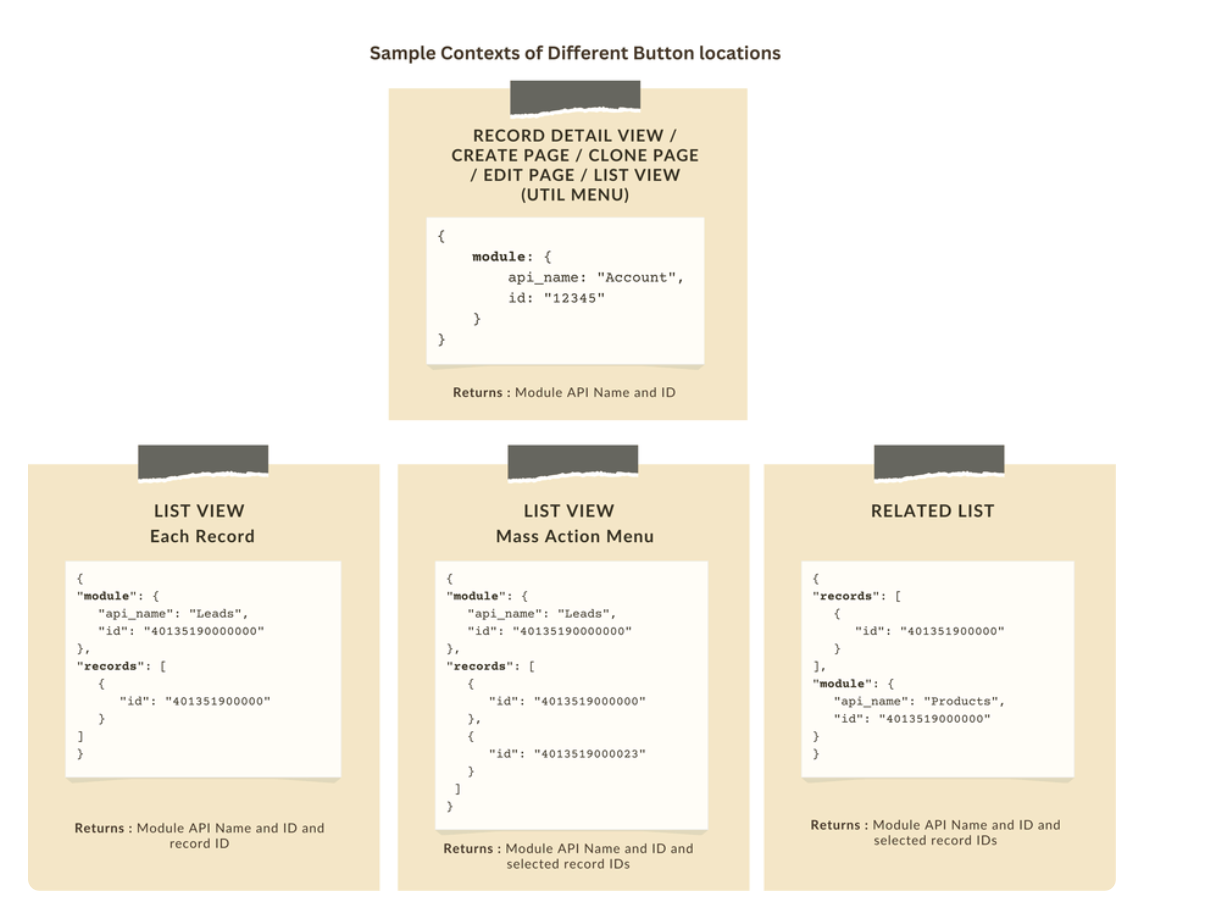
Let's explore how to implement this through the following use cases.
Use case 1: Add Notes instantly from List View or Bulk push notes to multiple records with a click!
Zylker’s sales team often needs to add notes while reviewing or after campaigns. Currently, they must open each record individually, making the process slow and inefficient. To streamline this, the admin wants to:
a. Include an "Add Notes" option directly from the List View for individual records, allowing sales reps to add notes without opening each record.
b. Add a "Add Bulk Notes" option, allowing users to select multiple records and add a common note to all selected records at once.
a) Here is the implementation of "Add Notes" in the List Page.

b) Here is the implementation of "Add Bulk Notes" in the List view page.

Use case 2 : Import product details effortlessly from Zoho Sheet and populate the Subform with a single click!
Zylker manufactures medical instruments, and its sales representatives manage bulk orders from distributors and hospitals. Product details are typically provided in a sheet, which the sales reps must manually enter into the subform on the Order Creation Page(Create Page). To streamline this time-consuming process, the admin wants to add a custom button named "Import Products" to the Order Creation Page. When clicked, it should
- Prompt for the Sheet ID.
- Fetch order details (product names, quantities, and prices) from the specified Zoho Sheet.
- Populate the Product list Subform in Zoho CRM.

Code Sample link
Use case 3 - Send bulk emails to selected students directly from the Course Module's Related List with ease!
Zylker’s managers often need to reach out to multiple students enrolled in a course - whether to share updates, newsletters, or important announcements. Currently, they have to open each student record individually to send an email, which is time-consuming.
To simplify this process, the admin wants to provide a "Send bulk mail" option in the Student Related List under the Course record, allowing managers to select multiple students and send a personalized email to all selected students in one go.

Note
- Client Script can be configured only from the Buttons page. The setup page displays existing scripts. Once a script is created, it can be edited and updated from the Client Script setup page.
- Mobile support will be available in Q3, 2025.
This support will be rolled out soon. We hope you find this incredibly beneficial!

Happy Client Scripting!
Topic Participants
Maadhari M
Subhash Kumar
Haiku Technical Support
Pablo Silva Osorio
Ishwarya SG
Sticky Posts
Kaizen #198: Using Client Script for Custom Validation in Blueprint
Nearing 200th Kaizen Post – 1 More to the Big Two-Oh-Oh! Do you have any questions, suggestions, or topics you would like us to cover in future posts? Your insights and suggestions help us shape future content and make this series better for everyone.Kaizen #226: Using ZRC in Client Script
Hello everyone! Welcome to another week of Kaizen. In today's post, lets see what is ZRC (Zoho Request Client) and how we can use ZRC methods in Client Script to get inputs from a Salesperson and update the Lead status with a single button click. In thisKaizen #222 - Client Script Support for Notes Related List
Hello everyone! Welcome to another week of Kaizen. The final Kaizen post of the year 2025 is here! With the new Client Script support for the Notes Related List, you can validate, enrich, and manage notes across modules. In this post, we’ll explore howKaizen #217 - Actions APIs : Tasks
Welcome to another week of Kaizen! In last week's post we discussed Email Notifications APIs which act as the link between your Workflow automations and you. We have discussed how Zylker Cloud Services uses Email Notifications API in their custom dashboard.Kaizen #216 - Actions APIs : Email Notifications
Welcome to another week of Kaizen! For the last three weeks, we have been discussing Zylker's workflows. We successfully updated a dormant workflow, built a new one from the ground up and more. But our work is not finished—these automated processes are
Recent Topics
Tip #60- Exploring Technician Console: Screen Resolution- 'Insider Insights'
Hello Zoho Assist Community! Have you ever started a remote session and felt the screen quality wasn’t sharp enough for detailed work? A new user recently explored Zoho Assist after installing the trial version and running a few initial tests. While theRight Moment, Right Message, Right Operator: Never Miss a High-Intent Lead
Ever been on a website or app, thinking “Should I buy this or not?” and suddenly a friendly message “Hi! How can I help you?” pops up at the perfect moment? That’s not luck. That’s timing done right. Engaging right visitors at the right moment, with theZoho CRM Workflow Automation: Activate & Deactivate Workflows Using API
Zoho has now enabled: ✅ Activate / Deactivate workflows using API ✅ Schedule workflow activation & deactivation This is extremely useful for real-world automation use cases 💡 🧩 My Use Case I created a scheduled automation that: ☀️ Activates workflowsFunction #53: Transaction Level Profitability for Invoices
Hello everyone, and welcome back to our series! We have previously provided custom functions for calculating the profitability of a quote and a sales order. There may be instances where the invoice may differ from its corresponding quote or sales order.[Free Webinar] Zoho RPA - OCR, PDF Automation, & More
Hello Everyone! Greetings from the Zoho RPA Training Team! We’re excited to invite you to our upcoming webinar on the latest release updates for Zoho RPA, where we’ll unveil powerful new capabilities designed to make your automation journey smarter, faster,Zobot Execution Logs & Run History (Similar to Zoho Flow)
Dear Zoho SalesIQ Team, We would like to request an enhancement for Zoho SalesIQ Zobot: adding an execution log / run history, similar to what already exists in Zoho Flow. Reference: Zoho Flow In Zoho Flow, every execution is recorded in the History tab,Global Search Settings
I'd love a way to remove some modules from being included in the global search. This would allow use to provide a better user experience, limiting the global search to only those modules that are regularly used removing any models used for backgroundCard Location in Zobot
Hello, when using the “Location” card in a codeless builder Zobot, the behavior in WhatsApp is inconsistent. When asking the user to share their location, they can type a message, which will return the message “Sorry, the entered location is invalid.Automation Series: Auto-create Dependent Task on Status Change
In Zoho Projects, you can automatically create and assign a dependent task when a task’s status is updated. This helps teams stay aligned, ensures reviews happen on time, and reduces manual effort. In this post, we’ll walk through an easy setup usingLanguages in Zobot
Hello, I have found a list of supported languages for the Zobot. The information specifies the languages are supported in the following 3 features: SalesIQ supports 34 different languages in the following features. Resources (Articles, FAQs, Small Talks)Function #6: Calculate Commissions for paid invoices
Zoho Books helps you automate the process of calculating and recording commissions paid to sales persons using custom functions. We've written a script that computes the commission amount based on the percentage of commission you enter and creates anAction required: Reauthorizing your Google account in Zoho Sign for automatic cloud backup to Google Drive
This is applicable to users who have already configured automatic cloud backup to Google Drive. Hi there! Google has mandated reauthorization of all preconfigured third-party integrations to ensure only the necessary scopes are shared as an improved securityZoho CRM Layouts
I have customised all our modules, Leads, Contacts and deals, and within them, I have created lots of different layouts depending on the type of Lead or contact, for example. Since the new Zoho UI came out, they have all disappeared. I have gone intoWhatsApp IM in Zoho Desk always routes to Admin instead of assigned agent
Hello Zoho Experts, I connected WhatsApp IM to my Zoho Desk account. I only assigned my Customer Service (CS) agent to the WhatsApp channel, and I did NOT include Admin in this channel. However, every new WhatsApp conversation automatically gets assignedhide resolution from help centre
to my surprise, i just found out that the resolution text is public in the helpcenter, even if 'notify customer' is off. is there a workaround to that? how do others deal with this? How zoho support does this and I don't think its used by Zoho in the first place. the resolution is meant to be private, not publicZoho Analytics + Facebook Ads: Performance Alerts for Active Campaigns
Is it possible with integration of Zoho Analytics with Facebook Ads and set up alerts or notifications for active campaigns when performance drops? For example, triggering a notification if CTR goes below a defined threshold or if other key metrics (likeMultiple upload field CRM
I desperately need the functionality to add more than one upload field to web to contacts form. How can I do this?Sort by age
It would be very helpful if there was a way to sort by age in the Age column. Please add this function if possible. Thanks!Lookup Field Option Not Available in Customization
Hello, I am trying to customize different modules (e.g., Work Orders, Systems, and others), but I am unable to find the Lookup field option in the layout customization. When I go to: Setup → Customization → Modules and Fields → Add Field The Lookup fieldScheduled sending of a poll and its results
Is there a way to schedule sending a poll to all my users and have the results sent separately to the team?Integrating Zoho Suite and apps more with Linux
I just got introduced with Zoho just couple of months ago, and I've already planned to contribute to it, even though it's not an open-source software. Still I have found it's potential to beat the tech giants and still being respective towards data privacyStore Submitted Forms as PDF
Hi there, Is there a method to store Form submissions as a PDF in workdrive for archival? I set the form to email the submission to the user and an internal inbox but I'd really love to store the final form as PDF in workdrive automatically. I can't seemSeparate Items & Services
Hi, please separate items and services into different categories. Thank youCRM->INVENTORY, sync products as composite items
We have a product team working in the CRM, as it’s more convenient than using Books or Inventory—especially with features like Blueprints being available. Once a product reaches a certain stage, it needs to become visible in Inventory. To achieve this,Add an option to disable ZIA suggestions
Currently, ZIA in Zoho Inventory automatically provides suggestions, such as sending order confirmation emails. However, there is no way to disable this feature. In our case, orders are automatically created by customers, and we’ve built a custom workflowFeature Request - Gift Cards or Gift Voucher Capability in Zoho Commerce
Hi Zoho Commerce team, I'm comming accross more and more retail businesses who sell gift cards. As there is currently no way to manage this in Zoho Commerce, it is a blocker to addoption. This is particularly popular in Europe and North America. I recentlyHighlight a candidate who is "off limits"
Hello: Is there a way to highlight a candidate who is "off limits"? I would like to have the ability to make certain candidate and / or Client records highlighted in RED or something like that. This would be used for example when we may have placed a candidate somewhere and we want everyone in our company to quickly and easily see that they are off limits. The same would apply when we want to put a client or former client off limits so no one recruits out of there. How can this be done? Cheers,Closing off tasks automatically based on project status
Is there a way to close off all open tasks when a project is set as Cancelled?[Free webinar] Understanding connections and datasources in Zoho Creator - Creator Tech Connect
Hello everyone, We’re excited to invite you to another edition of the Creator Tech Connect webinar. About Creator Tech Connect The Creator Tech Connect series is a free monthly webinar featuring in-depth technical sessions designed for developers, administrators,UK payroll entries
Hey guys, Nett payroll payments are imported direct into the bank, using an external payroll system (will be glad for Zoho to have a UK payroll app) At present I have monthly recurring bills for HMRC which are auto entered & paid when due. This seemsBridge the Gap Between your Service and Finance Teams
In field service, the most expensive distance isn’t the drive to a customer’s home—it’s the gap between a finished job and a paid invoice. Zoho FSM leverages the power of Zoho Invoice to handle and manage billing operations. It enables you to: InstantlyDirect URL to "View Record"
I would like to create a button (Deluge Script) to jump to the "view record" without passing by the record menu, but I can not aford to find the right url. I don't want the "view record" as a single page. I want the "view record" in the application like the picture below: Thanks in advance for your helpLive Chat for user
Hi everyone, I’m new to Zoho Creator and wanted to ask if it’s possible to add a live chat option for all logged-in portal users so they can chat internally. I’m trying to create a customer portal similar to a service desk, but for vehicle breakdowns,SalesIQ Chat Owner to CRM Lead Owner Mapping
There is no proper mapping between the SalesIQ chat owner and the CRM lead owner. When a chat is assigned to an agent, the lead created in CRM is often assigned to a different user, forcing admins to manually change ownership every time. This createsProduct line search in quotes
Is there a way to change the search setting when you add a product line to a quote. We have created a field in products called 'Part Number' and I would like when I'm adding a product line to the quote that I can search on that field. At the moment it only searches on product description. In products I can search on the 'Part Number' field Any help welcome.Storage Limits
Hello, What is the storage limitations for each user on professional edition? Thanks, MekkiPower Pivot and Data Modeling functionality in Zoho Sheet
When will MS Excel functionalities like Power Pivot and Data Modeling functionalities be available in Zoho Sheet?Global Search placement in the new UI
Having a hard time with the global search placement in the UI redesign. Surely I can't be the only one. Previously global search placement was perfect. A bar at the top/center of the page. Exactly where you would expect it to be. Since the new UI hasWhat's New - January 2026 | Zoho Backstage
Welcome to 2026! If you thought last year was big, buckle up. We’re stepping into this year with a singular focus: unimaginable growth, elite scalability, and performance benchmarks that leave the old ways of event management in the rearview mirror. AsCliq on your mobile phone
Some of the employees in my company get their cliq on their mobile phones but it will not let them answer the call. The employee has to go to their laptop to access it.Next Page