CRM gets location smart with the all new Map View: visualize records, locate records within any radius, and more
Hello all,
We've introduced a new way to work with location data in Zoho CRM: the Map View. Instead of scrolling through endless lists, your records now appear as pins on a map.
Built on top of the all-new address field and powered by Mappls (MapMyIndia), the Map View turns your records into an interactive map for smarter planning, faster visits, and better field execution.
Why Map View?
Until now, even if addresses were stored in Zoho CRM, users had to search through lists manually or run broad filters to find location insights. There was no quick way to spot nearby leads, contacts, or other opportunities while traveling, or to plan visits efficiently.
Map View solves this by plotting records on an interactive map based on the coordinates available in the address field. You can zoom in, filter for records within a radius, sort by distance, and launch navigation—all without leaving the module.
You can enable Map View via Setup > Modules and Fields > Preferences.
Once enabled, Map View appears in the module's view selector.
What will this update offer?
1. Create, plot, and manage records with geographic coordinates
Map View plots every record with coordinates as a pin on the map. A quick glance shows you exactly where your customers, leads, or deals are.
Records without coordinates appear in the left pane, ready for updates.
You can add or correct coordinates in multiple ways, each designed to save time and improve accuracy:
- Type with auto-suggestions
Start entering an address and select from the suggestions provided. The system captures the complete address along with the coordinates in your address field, reducing the occurrence of typos and misplaced pins. - Drop a pin on the map
In cases when the exact address is unclear or unavailable, you can mark the correct spot directly, ensuring the record reflects the actual location without manual entry. - Import pre-mapped data
When large sets of records already contain latitude and longitude, importing them ensures pins are placed correctly at scale, avoiding the need for future manual updates. - Update through APIs
Integrations can keep coordinates in sync with external systems. This prevents mismatches and ensures map data remains reliable over time.
You can also move a pin to update only the geo-coordinates instead of the entire address.
These controls keep both the visual map and the address field aligned, and reduce the need for users to manually rearrange pins later.
2. Apply nearby filters and sort by distance
Custom views and smart filters now include a "nearby" condition that helps narrow down records based on proximity. You can instantly focus on the records that matter most.
Simply choose your reference location and then set a radius (preset or custom).
You can choose the reference point in different ways:
- Current device location
Use your live position to see which records are closest while you're on the move—say, when you're traveling between meetings and client visits. This makes it easy to fit in additional visits without backtracking. - Typed address
Enter a specific location to filter around. This is useful for planning ahead from the office or targeting records near a branch, warehouse, or event venue. - Point on the map
Select any location directly on the map and set a radius. This provides flexibility in targeting areas without formal street addresses, like localities or industrial zones.
When a nearby filter is applied, a radius circle appears on the map, and a distance column is added in the list view. You can also choose to display this distance on map pin cards. These details help prioritize visits, deliveries, or follow-ups based on how far records are from your chosen point.
3. Customize the view for quick decisions
You can decide which fields are shown both in the left pane and on the map pins. This ensures the most useful information is always visible at a glance.
- Left pane highlights
Along with the primary field, you can choose two additional fields. This makes it easier to scan records in the list to spot deal value, industry, or upcoming activities without opening each record. - Map pin card details
Each pin can display one field from the layout. Showing a critical value directly on the map—such as deal size—helps you decide which locations to prioritize during a route. - Clustering records at the same address
If you have multiple records at the same address—like clients from the same company or businesses located at the same IT park—they'll be clustered into a single pin. Upon clicking on the clustered pin, you can see the list of available contacts (or records).
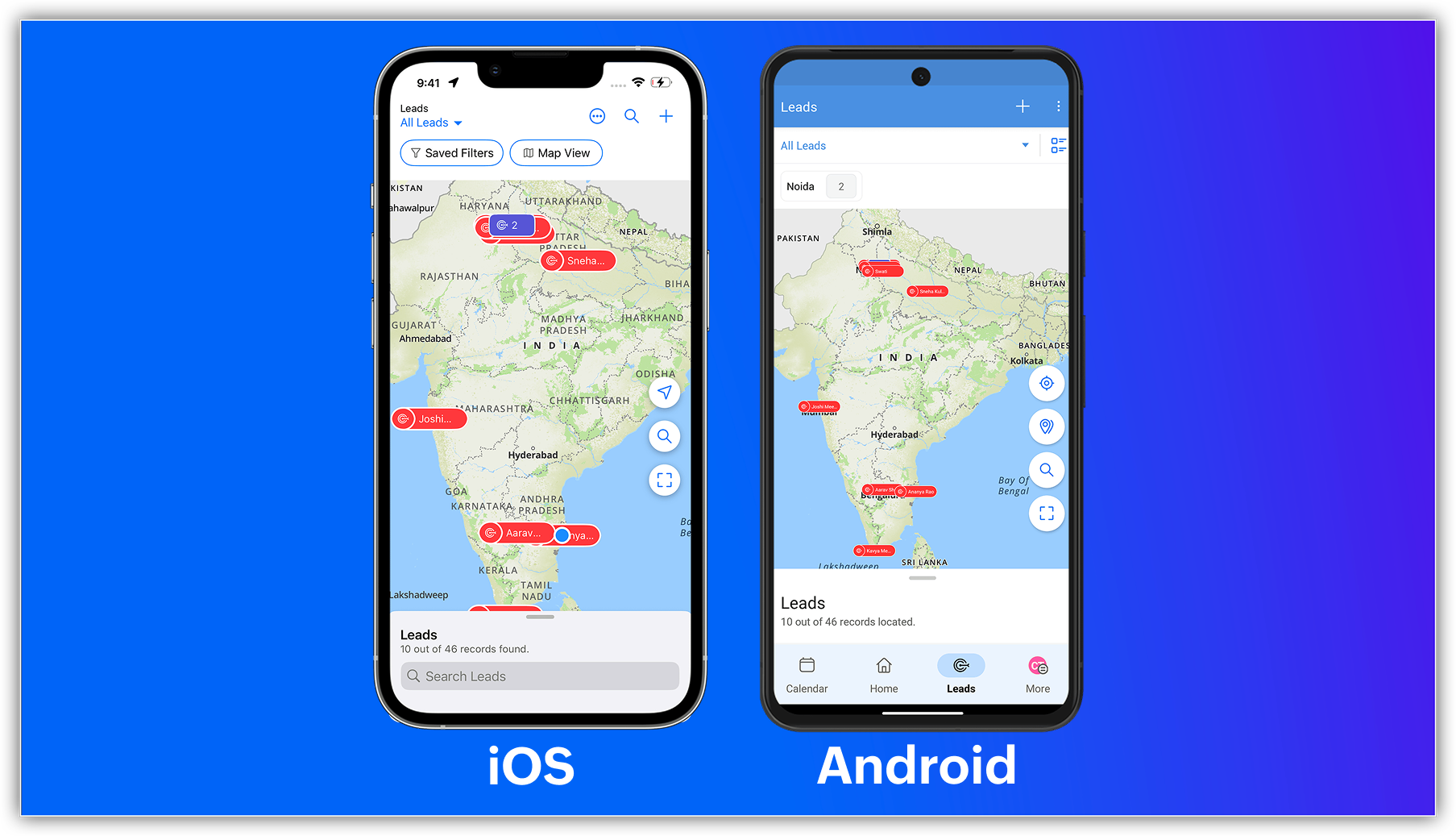
New map view in mobile apps
The capabilities of Zoho CRM's all-new address field and map view aren't just limited to your web app; they're now supported in the mobile app as well.
Previously, you could use the Near Me mobile feature in the map view, which uses Google Maps (Android and iOS) or Apple Maps (iOS) to show records within a 100 KM radius of your current location or a custom location.
With the latest enhancements, you can now access the Mappls-powered map view in Zoho CRM's mobile app. Simply enable the map view and address suggestions for the address field in the web app, and turn on the in-app map view from the app's map settings.
Once enabled, you can:
- View your record's location as a pin on the map.
- Group pins (available for Android).
- See location suggestions while searching.

Feature availability and limits
- Editions supported: All paid editions.
- Modules supported: Any module with at least one address field.
- Availability: Only the IN DC.

Resources: Help Documentation (CRM New UI)
 P.S. Map View is currently available for users in the IN DC.
Topic Participants
Nizamuddin Sohel SK
Nathan Carpenter
Scott Elliott
Toca Travel
Sunderjan Siddharth
Sticky Posts
Introducing Multiple Sandbox Types and Support for Module's Data Population
Register here for the upcoming Focus Group webinar on Multiple Sandbox | Help documentation to learn more about the new enhancements Hello everyone, Sandbox in CRM is a testing environment for users to create and test new configurations like workflowGood news! Calendar in Zoho CRM gets a face lift
Dear Customers, We are delighted to unveil the revamped calendar UI in Zoho CRM. With a complete visual overhaul aligned with CRM for Everyone, the calendar now offers a more intuitive and flexible scheduling experience. What’s new? Distinguish activitiesVoC in Zoho CRM is now data savvy: Explore response drilldown, summary components and participation in CRM criteria
VoC has all the goods when it comes to customer intelligence—which is why we're constantly enhancing it. We recently added the following: A customer drilldown component that shows you the list of prospects and customers behind a chart's attribute ExpandedWrapping up 2025 on a high note: CRM Release Highlights of the year
Dear Customers, 2025 was an eventful year for us at Zoho CRM. We’ve had releases of all sizes and impact, and we are excited to look back, break it down, and rediscover them with you! Before we rewind—we’d like to take a minute and sincerely thank youPresenting ABM for Zoho CRM: Expand and retain your customers with precision
Picture this scenario: You're a growing SaaS company ready to launch a powerful business suite, and are looking to gain traction and momentum. But as a business with a tight budget, you know acquiring new customers is slow, expensive, and often delivers
Recent Topics
bouncing emails
My recurring invoices have bounced backProbable Scam / Phising attempt from email pretending to be Zoho
I think this is a scam email right? It says "zohCworkplace.com". I'm on the Mail Free plan The link in the CTA button seems to go to a redirect. Just wanted to bring it up to the security team.Feature Request: Ability to set Default Custom Filters and apply them via URL/Deluge
I've discovered a significant gap in how Zoho Creator handles Custom Filters for reports, and I'm hoping the Zoho team can address this in a future update. This limitation has been raised before and continues to be requested, but remains unresolved. TheEmail Address Search in "To" Field Search is broken, Zoho refuses to fix it
Typing a part of the email address string other than the beginning of the string does NOT work, I kindly urge Zoho to fix this. Let's say you remember writing an email so someone called "smith" from company "corp.com", but can't remember their first name,Emails not being received by @hotmail.com, @outlook.com and a few others
When I try to send emails from zoho mail to people with email addresses ending @outlook.com and @hotmail.com (and a few others), I get a 'delayed' automatic email and then a few hours later, an 'undelivered' automatic email. This has started a few monthsscroll bar for far left of screen
I am unable to even see the scroll bar to the right of "inbox" etc on the left; it is stuck at "streams" and I can't get to inbox or anything else. It would help if it could be made a lighter color as the black or dark grey can't bee seen.OUt of office every friday
Hi, I tryed to configure my out of office, because i'm not working or emailing on fridays. But when i select only friday as unavailable day, the out of office still sets for the whole week. What am I doing wrong?Signature line
How do I set signature line in emailZoho email
I cannot send email to mail.ru【参加無料】東京 Zoho ユーザ交流会 NEXUS ー CRMで始めるマーケティング事例 / AI活用法(Zia Agents)
ユーザーの皆さま、こんにちは。コミュニティチームの藤澤です。 3月27日(金)に東京、新橋で東京 Zoho ユーザー交流会 NEXUS を開催します! 昨年度までより、さらにパワーアップして戻ってきました! ユーザー活用事例は、2人のユーザーさんからお話しいただきます。Zoho サービスの活用の幅を広げたい方や、他のユーザーの利用法を気軽に知りたい方など、多くの方にとって学びのあるセッションになること間違いなしです✨ また今年は、これまで以上に、AI機能にも焦点を当てて行く予定です。 初回として、Zoho社員からZohoIssue Exporting Data – CSRF Token Invalid Error
Dear Zoho Team, We are experiencing an issue when exporting data from our Analytics workspace. Whenever we attempt to export data from our analytical pool, the system displays the following alert message: Alert Message: The CSRF token is invalid. It couldDeluge Learning Series – Client functions in Deluge | January 2026
We’re excited to kick-start the first session of the 2026 Deluge Learning Series (DLS) with Client functions in Deluge. For those who are new to DLS, here’s a quick overview of what the series is all about: The Deluge Learning Series takes place on theZoho Mail 505 error I can not send email
Hi, I’m having issues sending emails from my custom domain email address. When I send emails to Outlook addresses, I receive an “Undeliverable 505” error. However, emails send and receive correctly when I use Gmail. This is important for my business,Multiple MFA Methods
With SMS-based MFA methods being discontinued, there is now no way to have mutliple MFA methods. I'd like to add my zoho account on two seperate phones using the Google Authenticator app. In the https://accounts.zoho.com/home#multiTFA/modes you can onlyReuse Standalone Function
I noticed that there's a missing information in documentation to reuse a standalone function and it is because the parameters require an argument. Here is my code and it is working. response = invokeurl [ url: "https://people.zoho.com/api/v3/function/sample/execute"Domain renewals
Need to know how hoe to renew the domainMX shopify problem
hello, i added all MX values in my shopify DNS - it shows those values on the shopify panel + your toolkit. I tried to send some email and it works, however on my gmail it says they cant verify this email. When i try to answer into my domain's email -Best Way to Manage Email Notifications While Running a Strategy Website
I am currently managing a content-based website, and I use Zoho Mail for handling contact forms, user queries, and collaboration emails. One challenge I am facing is organizing incoming emails efficiently, especially when messages come from differentWhat is the maximum email domains ?
I help manage about 20 associations and I'm looking for a way to centralize them in one place. Does Zoho Mail pro or enterprise support 20-30 domains for 3-5 users each?Add to Workdrive filter
I'm trying to create a filter that will upload attachments in emails and the e-mail body to a folder in workdrive. I am able to do one or the other (attachment, or e-mail content), but not both. I first tried it using the "Email (EML) + attachment" option.Forgot my admin Panel Id and password
Sir, I have an account , where a domain mycityestate.in is added for Zoho email , now it is hard for me to manage email because i have forgotten the Email account and password registered with Admin Panel of Zoho. Just need email name which is registeredMCP no longer works with Claude
Anyone else notice Zoho MCP no longer works with Claude? I'm unable to turn this on in the claude chat. When I try to toggle it on, it just does nothing at all. I've tried in incognito, new browsers, etc. - nothing seems to work.Knowledgebase SEO
We have a custom-domain mapped help center that is not restricted via login. I have some questions: a) will a robots.txt file still allow us to control indexing? b) do we have the ability to edit the sitemap? c) do category URLs get indexed by searchProblem with CRM Connection not Refreshing Token
I've setup a connection with Zoom in the CRM. I'm using this connection to automate some registrations, so my team doesn't have to manually create them in both the CRM and Zoom. Connection works great in my function until the token expires. It does not refresh and I have to manually revoke the connection and connect it again. I've chatted with Zoho about this and after emailing me that it couldn't be done I asked for specifics on why and they responded. "The connection is CRM is not a feature toNew Features: Repeat Last Action, Insert Cut/Copied Rows/Columns and Hyperlink
You might have noticed the constant updates to Zoho Sheet of late. Here are 3 more features that have been added to Zoho Sheet recently: F4 - Repeat Last Action Insert Cut/Copied Rows and Columns Insert Hyperlink Here is a screen cast demonstrating each of these features. Read further below to learn more about these new features. F4 - Repeat Last Action: You can now repeat the last action you made on your spreadsheet by using the keyboard shortcut, F4. It is quite handy and helps you get your workNeed help getting my mail on iPhone and Tablet
I need to access my Zoho mail via the iPhone Mail app. I have entered the login name, password and the incoming and outgoing servers, which my Mail Settings page says are imappro.zoho.com and smtppro.zoho.com. The iPhone keeps saying it cannot authenticate.Add an background image to an email template in CRM
Hi all, We wants to put an background image behind all our email templates. Is there a way to import this thru html. If i put the option background image in <body style="background-image:...</body> and i look to the preview it shows our background, butIs there a way to show contact emails in the Account?
I know I can see the emails I have sent and received on a Contact detail view, but I want to be able to see all the emails that have been sent and received between all an Accounts Contacts on the Account Detail view. That way when I see the Account detailHow do I bulk archive my projects in ZOHO projects
Hi, I want to archive 50 Projects in one go. Can you please help me out , How can I do this? Thanks kapilCopy contents of File Upload Field into Workdrive
Hello, I have set up our CRM so that a Workdrive folder is automatically created for each Deal via workflow, this adds the id of the folder into a dedicated field. We also have a field on each Deal called 'Approved Layout', which is a file upload field.Deleting a memorized email address
How can I delete a memorized email address? Even though the address has been deleted from Contacts, Zoho mail still auto suggests the address when typing it into the TO field. Thanks!ZeptoMail API
Hello Since today, we experience issues with the ZeptoMail API. When trying to send e-mails using: https://api.zeptomail.eu/v1.1/email we receive the error: (503) Site unavailable due to a traffic surge. Please try again shortly. I kindly ask you to identify553 Relaying disallowed. Invalid Domain - gzkcompany.ro
Hi there, Can you please assist me in getting the right domain settings? I just renewed my domain subscription, after expired and i got error: 553 Relaying disallowed. Invalid Domain - gzkcompany.ro Zoho mail can receive emails, but its impossible toNot able to receive emails for a while
I am not able to receive emails for a while now.Confirmation requested: eligibility and process to downgrade to Forever Free — tenant bigbanghawking.com
Thank you for your reply. I am testing Zoho Mail from Brazil with the tenant bigbanghawking.com (endpoint: mail.zoho.com) and we are currently on the Premium trial that expires 21/01/2026. Before deciding whether to pay or cancel, I need written confirmationZoho API v2.0 - get ALL users from ALL projects
Hello, I've been trying to work on an automatization project lately and I find it difficult to work with this strict structure. To be more explicit, if i would like to get all users participating in a project i would need to get all projects first. Same thing with projects. If i want to get all projects, I would need to get all portals first. The problem with this aproach is that it consumes a lot of time and resources. I want to ask if there is another way of gettingالموقع لا يقوم بالسداد
السلام عليكم ورحمة الله وبركاته وبعد من أمس وانا احاول السداد للدومين YELLOWLIGHT ولا اتمكن من السداد اقوم بتعبئة جميع البيانات ولكن دون جدوى يطلع لى حدث خطأ ماNew in Office Integrator: Enhanced document navigation with captions and cross references
Hi users, We're pleased to introduce captions, table of tables and figures, and cross-references in the document editor within Zoho Office Integrator. These features allow you to structure documents efficiently and simplify document navigation for yourWhere Do I set 24h time format in Cliq?
Where Do I set 24h time format? Thanks🎉 ¡Seguimos trayendo novedades a Español Zoho Community! 🎉 Confirmada la agenda y ubicación para los Workshops Certificados
Si todavía no te has hecho con tu entrada para nuestros Workshops Certificados del próximo 26 y 27 de marzo o, por el contrario, estabas esperando que confirmáramos dónde los celebraremos, ¡este post es para ti! 📍¿Dónde nos vemos?📍 Nuestros WorkshopsNext Page