Enhanced duplicate check for Leads in CRM

Enhanced duplicate check for Leads in CRM

Hello Everyone,

We are excited to announce that you can now check for duplicate entries in leads by comparing them with similar records in the Contacts Module.
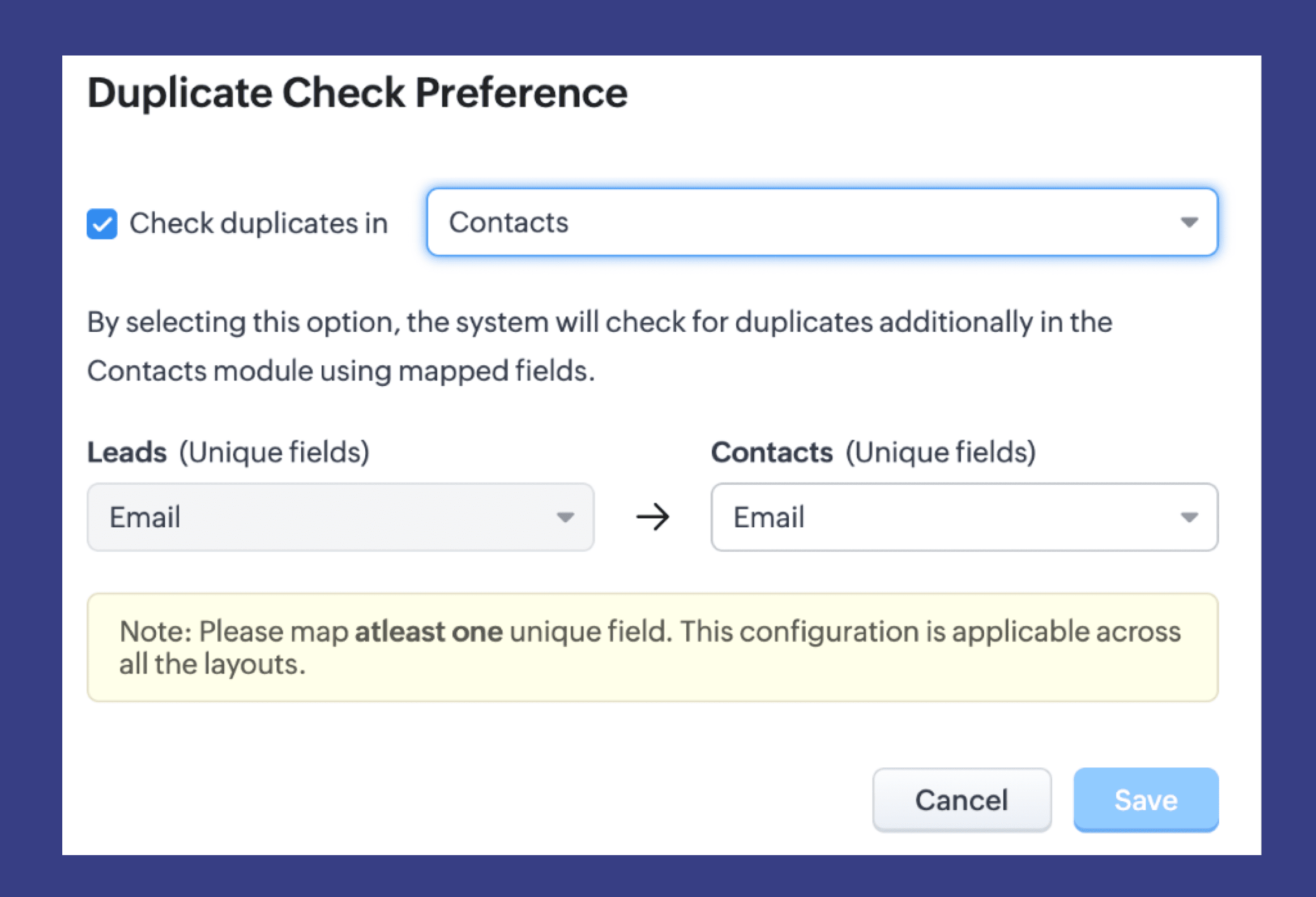

Previously, when you added a lead, only the converted leads were checked for duplicates. This left a gap where directly added contacts could slip through without being checked for duplicates.

But now, with this update, the CRM users will be able to directly check for duplicates within the Contacts module. This can be done by selecting 'Contacts' in the Duplicate Check Preference drop-down menu, and by specifying which unique field should be used for comparison.
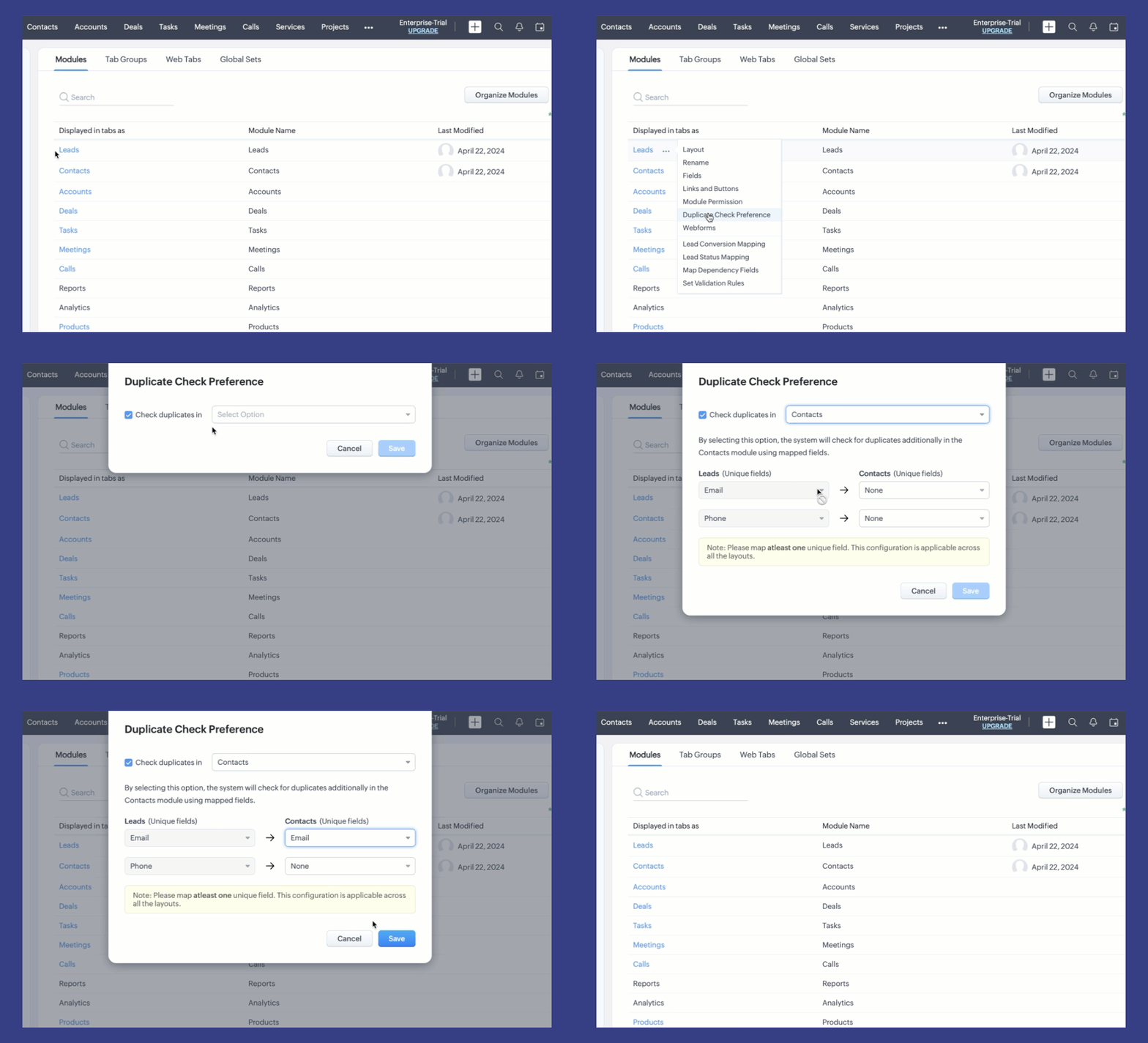


Let's look at a scenario, where, John, a Sales Rep, adds a potential customer named Emily into the system as a lead. The system automatically checks if this lead is unique by comparing it with converted leads in the database. However, if Emily is already linked as a contact by John's team due to a recent purchase made, he might unintentionally duplicate his efforts by proceeding with the lead nurturing process. 

To prevent duplicates as well as redundant efforts, John can now check across contacts. This enables the system to search for exact matching records in both Contacts and Leads, thereby preventing duplicate entries when a record already exists. 

This enhancement significantly reduces the risk of duplicate records and ensures data integrity within both your Leads and Contacts modules.

Learn more about Checking Duplicate Records in Zoho CRM here

Happy organizing!

Editions available: The feature is available for all users in all DCs.

What's Next:
  1. Duplicate Detection Rule: Configure different rules for a module to identify and eradicate duplicates.
  2. Combinational value matches: Find duplicates based on combination values. 
  3. Similar Matches: Fuzzy matching techniques to view similar records.

    • Recent Topics

    • Display a field of an Account on the Ticket view

      Hi there, We would like to display of the Account of the user submitting a ticket on the ticket view. See for example: How can this be achieved? It doesn't really matter where it will be placed as long as it is shown there. Thanks, Snir
    • Have a Zoho Desk PDF Attachment Show on the Ticket Screen rather than having to download it.

      We are using a system that emails out a report in PDF format to Zoho Desk for our staff to review but it's difficult to have to download the PDF attachment each time, we would like for there to be some sort a viewer below the ticket that shows the contents
    • Approval - Report/Views

      Hi, On Zoho Desk - Is there a way to report on pending approvals, or a view or similar?
    • PDF attachments no longer preview in Zoho Desk

      We are experiencing a new issue in Zoho Desk with PDF attachments. Until a few days ago, clicking a PDF attachment within a ticket opened the PDF for preview. Now clicking the same type of attachment automatically downloads the PDF to the computer instead
    • Is there a way to allow users to preview ticket attachments from clients or view in the browser?

      It's very time-consuming and takes away from the elegance of a web-based system to have to download the attachments to view them. Our clients often send spreadsheets and PDFs as attachments that must be viewed in order to answer the ticket, but they do not need to be downloaded. Zoho docs allows users to view in browser without downloading - this functionality would be ideal for Tickets. 
    • New Style for multilevel list numbering

      Hi, in my country most of legal contracts are numbered in top level as First, Second.. (Primero, Segundo, Tercero...). I suggest include this style for multilevel lists. Thanks in advance.
    • Export current view on timesheet bug?

      When you export current view on timesheet, which is a welcome change, it states: Only the current view with its visible columns will be exported from Zoho Books in CSV or XLS format.". However when this is done, the current view is not fully exported.
    • Client Portal Not Accessible

      I am new to Zoho Books and am just starting to experiment. I sent myself an invoice at a personal test email address, which I paid. When I go back to the email I received and click "View Invoice", I get taken to a zohosecurepay page which shows the paid
    • Change sender email in Zoho Finance for a Sales Order

      Using Zoho Finance to send Sales Orders. There is a "From" drop-down field on the "Send Email" prompt. How can I add another company email to the list of "From" options? It currently only shows my email, even though another employee, who has full admin rights, is the owner of the Sales Order.
    • Subforms and automation

      If a user updates a field how do we create an automation etc. We have a field for returned parts and i want to get an email when that field is ticked. How please as Zoho tells me no automation on subforms. The Reason- Why having waited for ever for FSM
    • The reason I switched away from Zoho Notebook

      My main reason for switching to Zoho was driven by three core principles: moving away from US-based products, keeping my data within India as much as possible, and supporting Indian companies. With that intent, I’ve been actively de-Googling my digital
    • Feature Request – Per-Channel Pre-Chat Form Controls

      We'd like the ability to enable/disable the pre-chat form on a per-channel basis, rather than having a single global setting. On the website widget, asking for name and email before chat starts makes sense. On WhatsApp, however, email isn't necessary
    • Zoho Finance Triggers

      I would like to propose that Flows triggered by a Zoho Finance app (Books, Inventory, etc.) have the option to be triggered by the same action taken in any Zoho Finance app, not just the one chosen. Problem: Currently, Flow automations can only be triggered
    • Flow Needs "Digital Employee" Analog

      Zia Agents have the ability to perform tasks under their own identity when set up as a "Digital Employee". One of the stated benefits of this is audit visibility; actions taken by the Zia Agent can be distinguished in logs from actions taken by the owner
    • Copying a Document with its Citations

      When I copy a document that contains citations using File>Make a Copy from the document's menu the text copies but the citations do not (according to Google they should). Is this the correct way to make a complete copy of a document with its citations
    • Trigger Workflow Rules from subform row actions

      Hello all, Previously, workflow rules could only be configured at the module level, which meant subform data had to be tracked and managed manually. With this update, workflow rules can now be triggered directly by actions within subform rows, giving
    • Connect ZOHO social with Google Data Studio and download data from ZOHO social

      Dear ZOHO team, I am writing this message to enquire about how to connect ZOHO social with Google data studio since our company would like to use Google data studio to generate reports. Is it a way to download data from ZOHO social? Best regards, Chris
    • Best way to setup Inventory bin tracking for products with multiple boxes/crates

      Hi - we need some advice from the community on setting up Items in the Inventory for products with multiple crates. We have large products in our warehouse where the product is delivered as two large (double pallet) crates. We've setup the Items for these
    • how to differentiate if whatsapp comes from certain landing page?

      I create a Zobot in SalesIQ to create a Whatsapp bot to capture the lead. I have 2 landing pages, one is SEO optimized and the other want is optimized for leads comes from Google Ads. I want to know from which landing page this lead came through WhatsApp
    • Zoho Sign / Prefill By You - Editable by Them!

      Zoho Sign seems to have two field options available - an empty field for signer(s) to complete or a field that has been prefilled by you, that becomes read only once sent.  What I would like is an option on the pre-filled by you fields, to leave them
    • Out of Stock items showing in Commerce

      I have over 6000 items and most are not in stock, but all items are showing up in Commerce whether they are inventory or not. What option or feature can you use to hide items in Commerce at zero or negative quantities? I currently am using Commerce for
    • Facturation électronique 2026 - obligation dès le 1er septembre 2026

      Bonjour, Je me permets de réagir à divers posts publiés ici et là concernant le projet de E-Invoicing, dans le cadre de la facturation électronique prévue très prochainement. Dans le cadre du passage à la facturation électronique pour les entreprises,
    • Need complete Zoho Commerce theme ZIP example and safe staging workflow

      I want to build a complete custom Zoho Commerce storefront through Edit Code, including: • Global header and footer • Responsive homepage • Category, search and filter pages • Product cards and product-detail pages • Cart and checkout wrapper • Mobile
    • CRM wants to access other apps and services on this device (Documents area)

      Did anyone else see this today? It only seemed to popup in the Documents area. Blocking it did not stop the ability to upload files there... Why is this coming up and what apps/services is it requesting in the background? Also, is it applicable elsewhere
    • Date Field & Date Picker Problem

      The Date Fields in Fillable Fields are not working properly. The Date Picker is putting out the incorrect values.
    • What's New in Zoho Inventory | June 2026

      Hello users, June 2026 introduces a range of exciting enhancements to Zoho Inventory. With the full rollout of the Zoho Inventory Windows application, the launch of Terminal Payments, and new tracking combinations in Advanced Inventory Tracking, you can
    • How do I set the value of a Lookup field in SlyteUI?

      I am using the "crm-field" component in a SlyteUI project (code attached) https://www.zohocrm.dev/explore/slyteui/ui-components/crm-field/api#Properties The client would like to have this field pre-populated with a value. When I try to input the record
    • Items (products) Export to PDF Feature as a Catalog Generator

      Would like to request a product catalog feature where the admin can export "items" along with selected attributes (e.g.: product name, size, price, etc) in a professional template as a PDF document.  Since product pictures and the product attributes are already saved in our system DB, it would be a natural extension to just export it out as a catalog for customers.  I've been duplicating this feature in other apps to make a product catalog.  Having a central repository of "items" makes good sense,
    • DYK 11: Blueprint Import

      Did you know you can import task blueprint into Zoho Projects instead of building it from scratch? Tasks can sometimes have multiple stages and move through several stakeholders before completion. Without a defined process, task changes can happen without
    • Tip #87 – Stop Describing, Start Showing with Annotation – 'Insider Insights'

      Hello Zoho Assist Community! A new employee needs help getting set up on the internal tools their team uses. The IT technician jumps on a remote session, but walking through an unfamiliar interface verbally only goes so far. "The icon at the top, no,
    • Building extensions #7: Storing and managing module-specific data in Zoho Sprints extensions

      Storing and handling data related to Zoho Sprints modules is a key necessity when managing an extension. In this post, we'll look at the advantages of data storage and how it can be used with an example demonstration. Data storage An introduction In general,
    • sending a Daily nag reminder email?

      I'm wondering if it's possible to set up nag reminders, if a task/case/deal is overdue then i want send a daily email until it's either closed, or the due date is updated. A date based workflow automation looks like it will only trigger once, and not
    • Can I hide some products from a particular customer

      HI I want ot give a customer access to the portal but I need to hide some products from them that are not available for them to buy- is this possible ?
    • CNIL - Suivi de Pixel

      Bonjour à tous, À la suite de la nouvelle recommandation de la CNIL sur les pixels de suivi dans les e-mails, savez-vous si Zoho Campaigns permet : de conditionner le suivi des ouvertures au consentement de chaque contact ; de proposer un lien permettant
    • Master Zoho Desk through the Virtual Classroom Training (VCRT)

      Hello Everyone, This month's Virtual Classroom Training (VCRT) is for Zoho Desk users in APAC and India. Zoho Desk offers an expert-led 4-day Virtual Classroom Training (VCRT). The training covers configurations, automations, and ways to streamline Zoho
    • Discount Per Item / Option Removed

      Hi, I was using Zoho Books for three years now and very saticfied. Now, as we try to add an invoice, we founds that the discount option per item was takn away, and a discount from total was implemented. However, we have cases when we add a diffrent discount to each item. Was this option removed permanently? Thanks, 
    • What is a realistic turnaround time for account review for ZeptoMail?

      On signing up it said 2-3 business days. I am on business-day 6 and have had zero contact of any kind. No follow-up questions, no approval or decline. Attempts to "leave a message" or use the "Contact Us" form have just vanished without a trace. It still
    • UI for requestor

      can you assist me on how to access as reque
    • Bank Transaction Rules Link Under Each Bank Account

      Hello, can you'll move the "transaction rules" button or link back under each bank account? It is now on Bank Overview, if I am working on a specific bank account, I don't want to go out to overview to check the rules. That button displays rules for all
    • Zoho ERP | Product updates | August 2026

      Hello users, What’s new in Zoho ERP this month? From Account Registers to new reports, we’ve packed this release with updates worth checking out. Take a look at what’s new and see what’s in store for your business. Introducing Account Registers Account
    • Next Page