Important Update: Mandatory Email Domain Verification for Zoho Analytics Users
To enhance the security and reliability of email notifications, we are implementing an important update. Starting February 1, 2025, verifying your email domain will be mandatory to continue sending email notifications via Zoho Analytics.
Failure to verify your domain will result in disruptions to critical email services, including:
- Alerts
- Export Notification Emails
- Sharing Emails
- Invitation Emails
- Add User/Role Change Notifications
- Group Invitation/Removal Emails
To avoid any interruptions, please follow the steps below to verify your domain:
Why Domain Verification is Necessary
- Improved Email Deliverability - Verifying your domain ensures your emails are delivered directly to recipients' inboxes and not flagged as spam.
- Enhanced Security - Protects your domain from unauthorized use, spoofing, and phishing attacks.
- Compliance with Industry Standards - Aligns with email authentication protocols like SPF and DKIM, ensuring your emails are trusted and authenticated.
How to Verify Your Email Domain
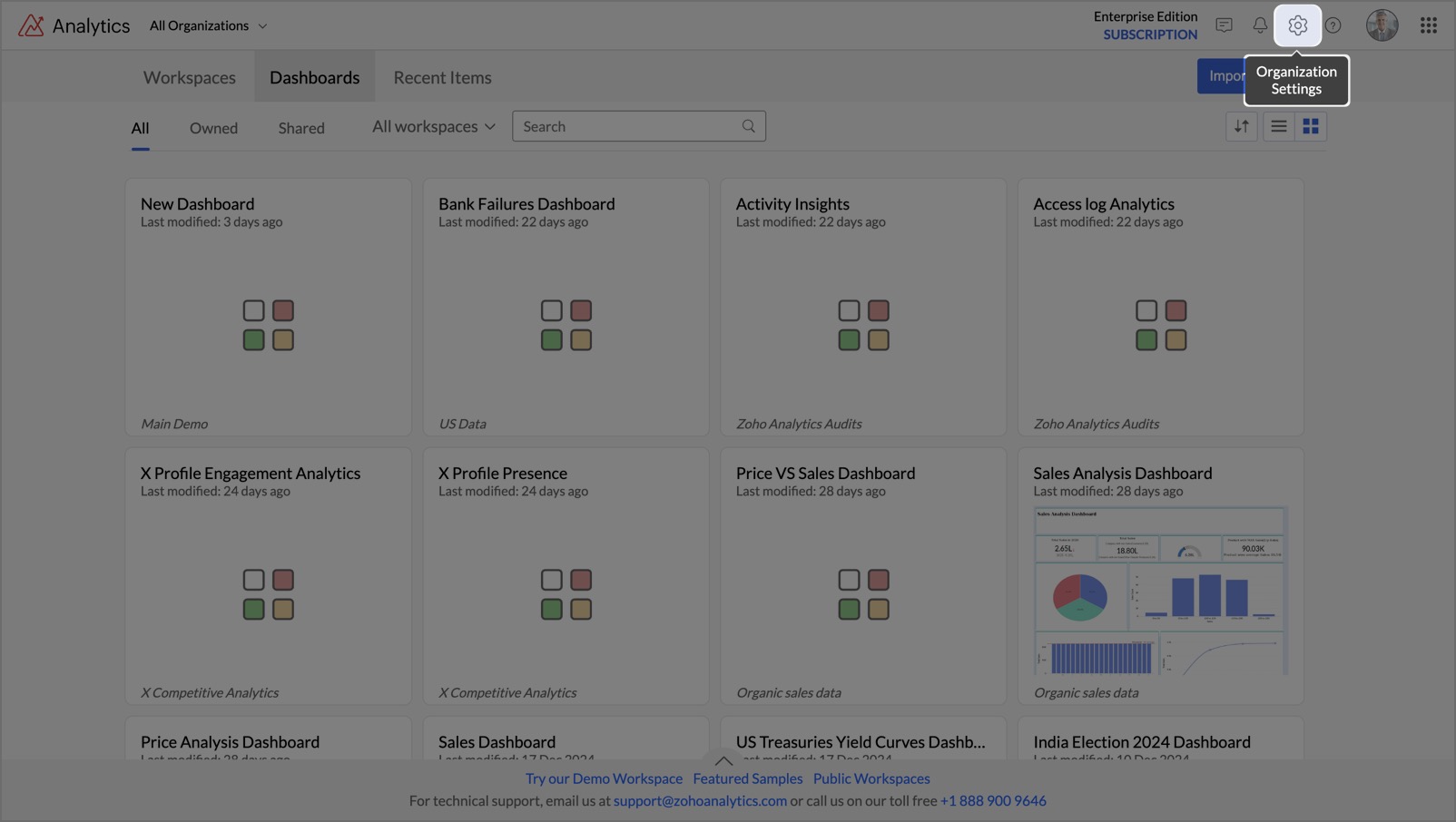
Login to Zoho Analytics
- Access your account and click the Settings icon at the top right.
Add Your Domain
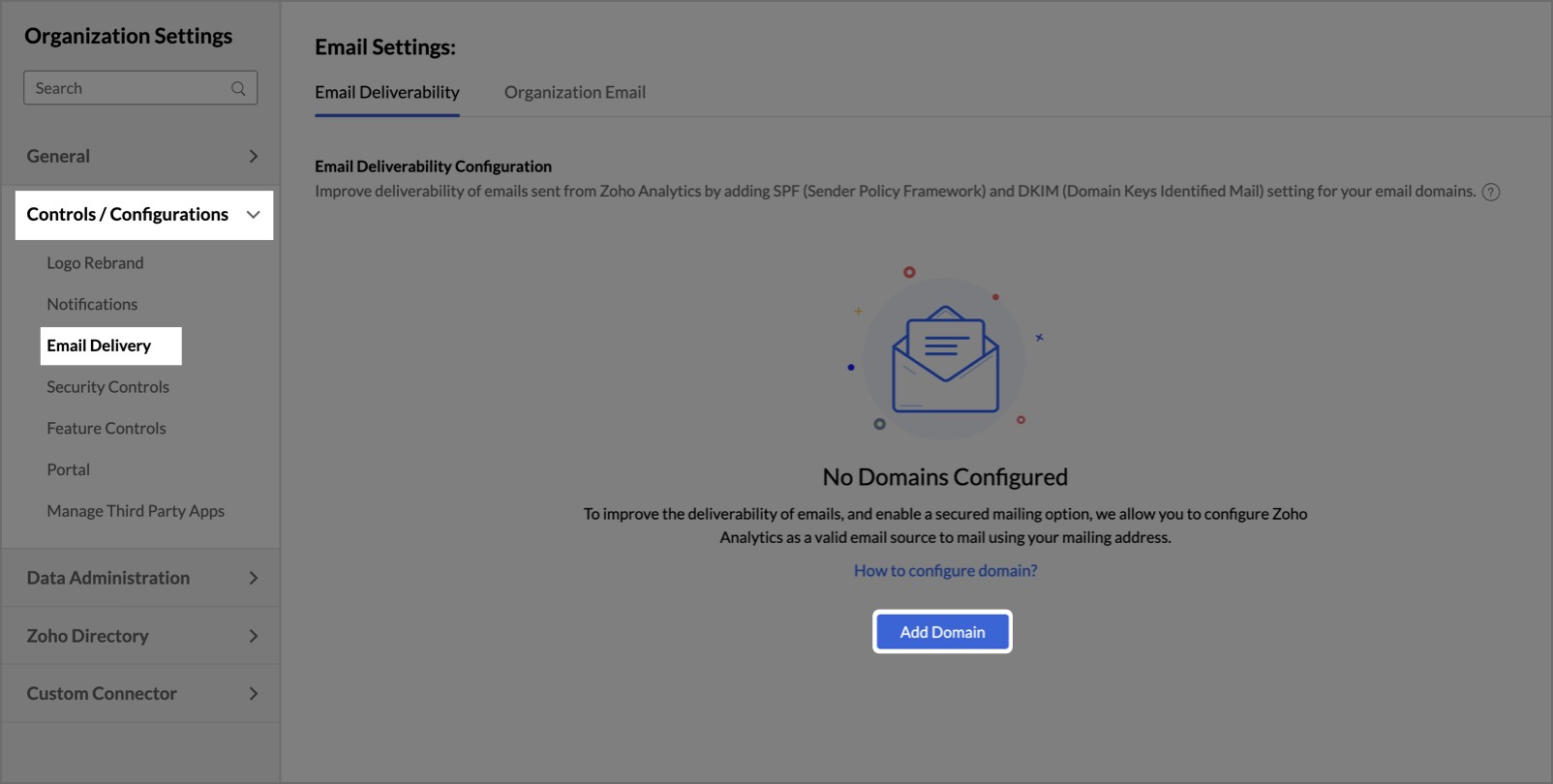
- Navigate to Controls / Configurations and select Email Delivery.
- Click Add Domain, enter your Domain Name, and click Add.
Get Validation Codes
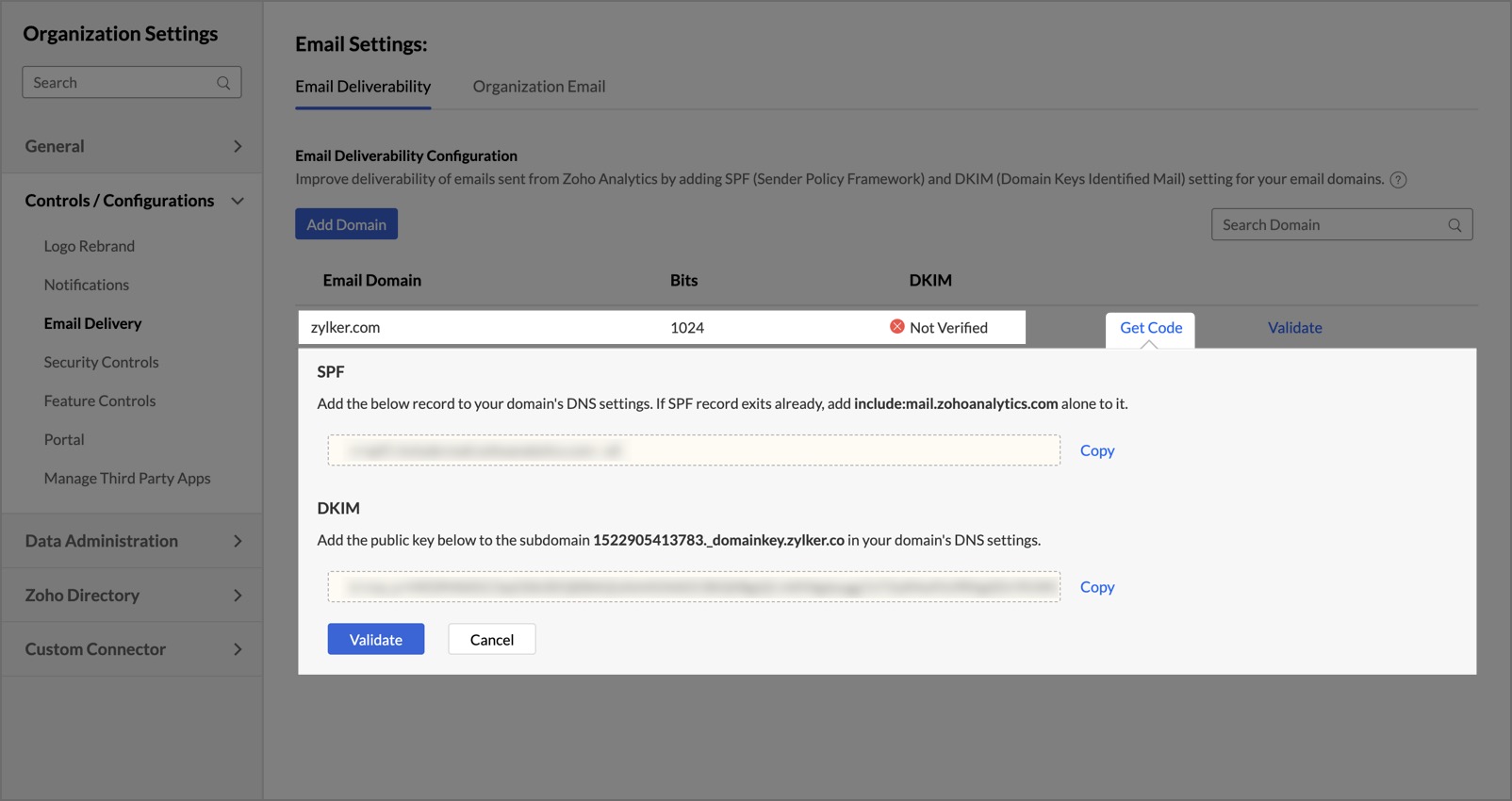
- Click Get Code to generate the SPF and DKIM (DomainKeys Identified Mail) validation codes.
- Copy these codes and add them to your DNS settings. Learn how to configure DNS settings.
Validate Your Domain
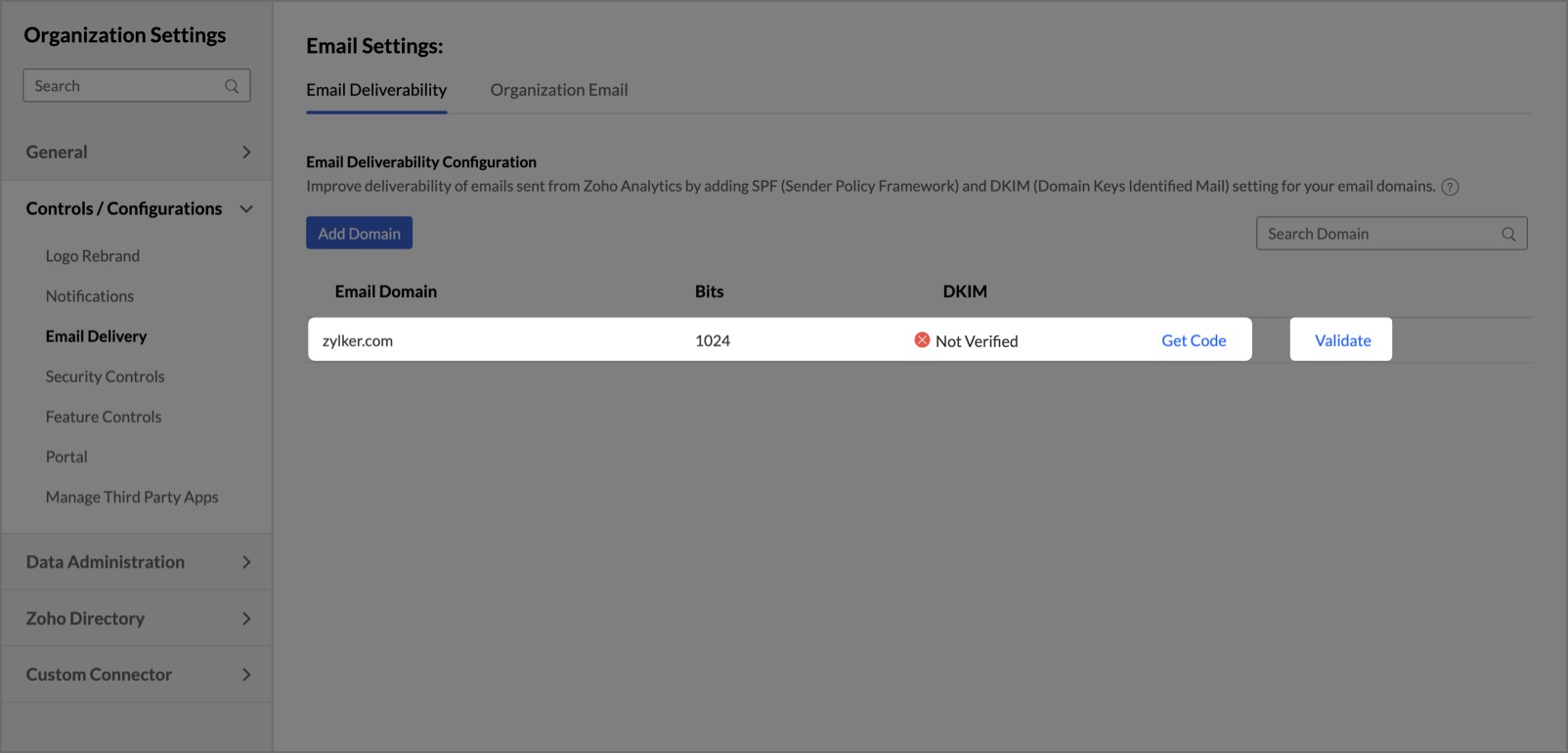
- After updating your DNS settings, return to the Email Settings page in Zoho Analytics and click Validate.
- Once verified, you can send data alerts and reports directly from Zoho Analytics without emails landing in spam folders.
For Non-Business Email Domains
Use notifications@zohoanalytics.com to send email notifications if you do not have a business domain.
Complete the verification process by February 1, 2025, to avoid any service interruptions.
Thank you for your prompt attention and cooperation!
Topic Participants
Rakesh Ramkumar B
Shaltaf
SRAVAN KUMAR
Sticky Posts
What's New in Zoho Analytics - February 2026
Hello Users! We're back with another round of updates for Zoho Analytics. This month's release focuses on giving you greater flexibility in how you visualize, manage, and act on your data - with new features like custom visualizations, remote MCP server,What's New in Zoho Analytics - January 2026
Hello Users! We are starting the year with a strong lineup of updates, marking the beginning of many improvements planned to enhance your analytics experience. Explore the latest improvements built to boost performance, simplify analysis, and help youWhat's New in Zoho Analytics - November 2025
We're thrilled to announce a significant update focused on expanding your data connectivity, enhancing visualization capabilities, and delivering a more powerful, intuitive, and performant analytics experience. Here’s a look at what’s new. Explore What'sWhat's New in Zoho Analytics - October 2025
Hello Users! We're are back with a fresh set of updates and enhancements to make data analysis faster and more insightful. Take a quick look at what’s new and see how these updates can power up your reports and dashboards. Explore What's New! ExtremeWhat’s New in Zoho Analytics – September 2025
Hello Users!! In this month’s update, we’re raising the bar across multiple touchpoints, from how you bring in data, plan and track projects to how you design and brand your dashboards. We’ve added the all-new Gantt chart for project visualization, expanded
Recent Topics
Extend GitHub Commit Integration to Tasks in Zoho Projects
Hello Zoho Projects Team, We hope you are doing well. We would like to submit a feature request regarding the current GitHub integration in Zoho Projects, specifically the ability to link commit information. Current Limitation: As of now, Zoho ProjectsHow to reduce inventory valuation when not tracking individual items?
We purchase clothing items wholesale, embroider them with a company's logo, then resell. The garment style, size, color, etc. changes according to a customer's desire, so we don't track the individual item's purchase within Zoho Inventory unless there'sMerge tag didn't work in the campaign sent to test email list
Hello, I just sent out a campaign to my list of test emails (including my personal one). The merge tag that's supposed to put a first name of the contact $[UD:FIRST_NAME||]$ didn't work. Where the first name of the contact should be displayed there'sAdd Camera Background Blur During Recording
Hi Zoho WorkDrive Team, Hope everything is well. We would like to request an enhancement to the video recording feature in Zoho WorkDrive. Currently, the camera preview displayed during a recording does not support background blur. This is an essentialSync Data from MA to CRM
Currently, it's a one-way sync of data from the CRM to MA. I believe we should have the ability to select fields to sync from MA to the CRM. The lead score is a perfect example of this. In an ideal world we would be able to impact the lead score of aHow can I transfer data from Production to Development environment?
Hi, I am using Creator V6 and would like to bring all the data in production to the Development and Testing environments? Is there an easy way of doing that or I have to export and import each table?filter on sheets mobile (iOS, iPadOS) does not work
re-posting this as a question because reporting as a problem netted zero responses... I have this issue on every spreadsheet, whether imported or created natively in Zoho Sheets. I can use on desktop without issue: but on iOS the filter dropdowns areHow to map fields from Zoho Recruit to Zoho People
I've got these fields from my Job Offer that I'm trying to map to the Work information fields in Zoho People, but they arent showing up. For example, how do I get the department name field (in the job post) to map to the work information field in ZohoMass email from Report output
Hi, I'd like to send a mass email based on a report output. The report is pulling multiple information from linked modules. Each line of the report ends up with a contact name, email and multiple field values pulled from the linked modules (some are customIntroducing SlyteUI : From Idea to a Working Interface in Minutes
Hello everyone! Are you spending hours building basic UIs? Does even the smallest customization feel like a major task? CRM customization should feel intuitive and straightforward, not time consuming or exhausting. SlyteUI makes this possible by simplifyingAdd Comprehensive Accessibility Features to Zoho Writer
Hello Zoho Writer Team, We hope you are doing well. We would like to submit a feature request to enhance Zoho Writer with a full set of accessibility tools, similar to the accessibility options already available in the Zoho Desk agent interface. 🚧 CurrentHow to see Tickets that require a response
When an agent checks his work he should be able to see a list of tickets that he has to reply to. Currently he can only see if the ticket is closed or open. However the ticket might be open but we are waiting for the customers reply, so there is nothingZoho Books' 2025 Wrapped
Before we turn the page to a new year, it’s time to revisit the updates that made financial management simpler and more intuitive. This annual roundup brings together the most impactful features and enhancements we delivered in 2025, offering a clear[Free webinar] Integrations in Zoho Creator - Creator Tech Connect
Hello everyone, We’re excited to invite you to another edition of the Creator Tech Connect webinar. About Creator Tech Connect The Creator Tech Connect series is a free monthly webinar featuring in-depth technical sessions designed for developers, administrators,Issue with attaching files to a task through the API
Hello! I've implemented a function that creates a task for every new bill that is created but I haven't been able to attach to the task the files which are attached to the bill. I have encountered multiple errors but the most common one is error 33003:Trigger workflows from SLA escalations in Zoho Desk?
Hey everyone, I’m currently working with SLA escalation rules in Zoho Desk and ran into a limitation that I’m hoping someone here has solved more elegantly. As far as I can tell, SLA escalations only support fairly limited actions (like changing the ticketCan I hide empty Contact fields from view?
Some contacts have a lot of empty fields, others are mostly filled. Is there a way I can hide/show empty fields without changing the actual Layout? I would like to de-clutter my view, and also be able to add information later as I am able. I would beAgents permission per department
Hi Team, can I setup permission for each agent what they can do in each department, for example I want account department agents to only have view access to support department tickets and not allowed to assign or reply to clients. I am sure this wouldAsk the Experts - Live Q&A webinar
Hello Community, We’re excited to host our very first Ask the Experts session! Join us on 7 April 2026 from 11 a.m. to 12 p.m. (IST) for this live webinar Q&A session, where you will have an opportunity to connect directly with our product experts, gainCliq iOS can't see shared screen
Hello, I had this morning a video call with a colleague. She is using Cliq Desktop MacOS and wanted to share her screen with me. I'm on iPad. I noticed, while she shared her screen, I could only see her video, but not the shared screen... Does Cliq iOS is able to display shared screen, or is it somewhere else to be found ? RegardsPrevent Automatic Milestone Inheritance for Newly Created Task Lists
Hello Zoho Projects Team, We hope you are doing well. We would like to request an enhancement regarding how new task lists inherit Milestone association in Zoho Projects. Current Behavior: At the moment, when a new task list is created below an existingHiding / removing Currency field from Layout
Hello, I'm working on the LEAD standard layout of Zoho CRM. I like to have it as minimal as possible for our team. I could remove most of the field, but Currency is not possible. As lead, I don't quite understansd the necessity to have Currency as mandatory.Updating Sales orders on hold
Surely updating irrelevant fields such as shipping date should be allowed when sales orders are awaiting back orders? Maybe the PO is going to be late arriving so we have to change the shipment date of the Sales order ! Not even allowed through the api - {"code":36014,"message":"Sales orders that have been shipped or on hold cannot be updated."}Can we have Backorder Management ?
Can we have Backorder Management ?Accept credit card payment for multiple invoices
We have a problem with Zoho Books. While we can charge a customer's credit card for an individual customer invoice, we cannot charge a customer's credit card for more than one invoice. In our business, it is common for a client to phone up and say, "HereAnyone in Australia using Zoho Books AND has their account with NAB?
Hi I have an account with both NAB and Suncorp. Suncorp transaction come in the next day however NAB transactions take 4-5 business days to appear. eg: A deposit made today in my Suncorp will be imported into Zoho tomorrow. A deposit made today to the NAB account will be imported maybe Saturday (Friday overnight). I have contacted both Zoho and NAB but noone seems to know why. I was just wondering if anyone else in Australia uses NAB and has this issue (or doesn't) maybe we could compare notes andNewby Questions - Vendors, Customers, and Income vs. Other Income Clarifications
Q1. For Deposits, there does not seem to be an option for "Income". "Other Income" is an option however. What is the process to add the option to assign a deposit to type "Income"? Q2. In many cases Vendors and Customer are the same. Vendors may purchaseISO 3166-2 Compliant Country and Regions
Zoho should consider implementing ISO 3166-2 standards for countries and regions in address dropdowns. It adds a lot of noise in the data when items added programmatically conform to ISO 3166-2 (e.g., TX for Texas, CA for Canada, etc.), but the few itemsTax on Imported goods charged by Shipping Company
Hi Folks, I imported goods from outside Canada, for better understanding I will give an example data. imported goods value: 2000$ The shipping company sent me an invoice containing the following information: Custom duty on imported goods: 400$ AdministrationInvoice Import Error: "Either Tax or Tax Exemption Reason is required" - Recurring Across All Attempts
Issue Description: I'm experiencing a critical issue with invoice imports in Zoho Books. Every import attempt fails with the same error message, regardless of the tax data provided: Either Tax or Tax Exemption Reason is required. This error is blockingZia Agents in Zoho CRM: a better way to set up digital employees
Hello everyone, If you've been using Zia Agents in Zoho CRM, so far using Connections was the only deployment method you're familiar with. You create an agent in Zia Agents (define its objective, write instructions, use tools, add knowledge base) andAmazon FBA integration - Handle invoice reconciliation under different GSTINs,
Dear Zoho Community, Thank you for the clarification regarding the Amazon FBA integration, default warehouse, and GSTIN mapping in Zoho Inventory. I understand that Zoho currently supports only one warehouse for Amazon FBA, and that all FBA orders areZoho CRM Copilot Connector
Hello, Are there plans to release a connector for Zoho CRM and Copilot? I'm in the early research stages of potentially switching our CRM solution to Microsoft Dynamics because of its out of the box integration with Copilot. The advantage being that weZoho Sheet for Desktop
Does Zoho plans to develop a Desktop version of Sheet that installs on the computer like was done with Writer?Automation Series: Notify Admin When User Accepts an Invitation
In Zoho Projects, a portal is an organisational-level workspace where user can manage multiple projects. To join a portal, a user will have to accept the portal invitation. However, it is important for admins to be in the loop when a user accepts theLimitation in Using Images or Icons within Dropdown Options in Zoho Survey
Zoho Survey does not support the inclusion of images or icons within dropdown (select box) options. Dropdown question types are limited to text-only choices, which restricts the ability to present visually rich options such as product images or icons.Zoho Bookings - Feature Request - Services Which Include A Resource and Consultant
Hi Bookings Team, My feature request is to have the ability to add Consultants and Resources to Services. Use case: Your business provides first aid training and there are certain equpment you require to provide the half day training. There are only specificWhat's New in Zoho Invoice | January – March 2026
Hello everyone! We're back with the latest updates and enhancements we've rolled out in Zoho Invoice from January to March 2026. Here's what's new this quarter: Compact Bilingual Template [GCC Editions] Tax Calculation on MRP for Tobacco Products [IndiaWhat is a realistic turnaround time for account review for ZeptoMail?
On signing up it said 2-3 business days. I am on business-day 6 and have had zero contact of any kind. No follow-up questions, no approval or decline. Attempts to "leave a message" or use the "Contact Us" form have just vanished without a trace. It stillcan change deal colors in bigin?
can be super useful if we can change colors deals process any way to do it?Next Page