Introducing Data Bars: Graphically represent changes in data within the cells
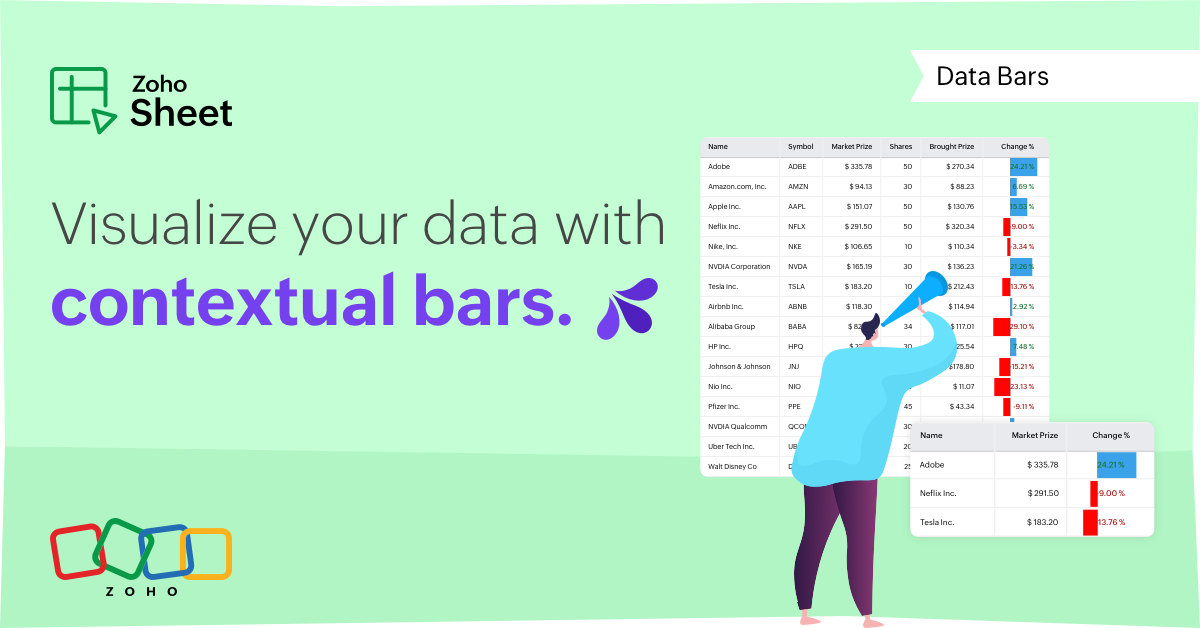
Conditional formatting has helped millions of spreadsheet users analyze and highlight their data more efficiently. In addition to the classic rules, color scales, and icon sets available in Zoho Sheet, you can now apply Data Bars, a convenient method of visually analyzing the values in a cell range.
What are Data Bars?
Data Bars are cell-level bars that can be used to visually represent the position of a value in a given range, with longer bars representing higher values. This helps users summarize data sets at a glance. Let's say you have a monthly sales report and wish to see which months have the highest and lowest sales figures. Find these results in an instant using Data Bars!
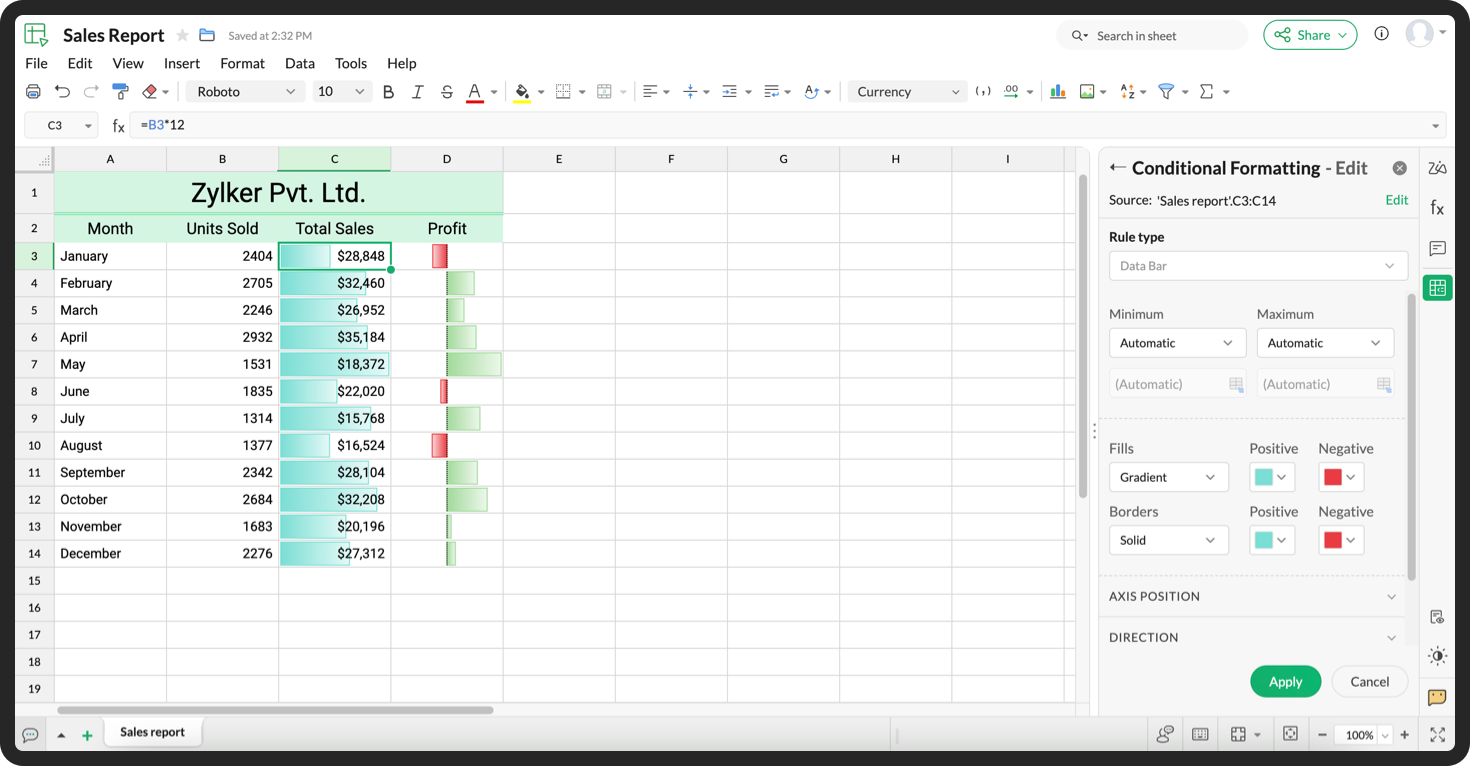
Customizations
Customize your data bars, by adjusting the border, color, and gradient of your bars. You can also choose the direction of the bars and the axis position in the cell, and hide cell content so that only your bars are displayed.
You can also use Data Bars in combination with other conditional formats, like color scales, to analyze your data. Not sure how to get started? Zia now offers suggestions on conditional formatting too!
Read more
Topic Participants
Jaya Shankari S
Aashok Kumar Sharma
Murugalakshmi S
Sticky Posts
Slicers are now available in Zoho Sheet—filter your data interactively
At Zoho Sheet, we diligently track user requests and feedback. In line with this, based on extensive user requests, we've integrated Slicers to pivot tables and are delighted to announce its release. Slicers are interactive visual filters that have add,Introducing Data Bars: Graphically represent changes in data within the cells
Conditional formatting has helped millions of spreadsheet users analyze and highlight their data more efficiently. In addition to the classic rules, color scales, and icon sets available in Zoho Sheet, you can now apply Data Bars, a convenient methodFeature enhancement: Highlight rows based on a cell value
Hello Sheet users, We're excited to announce a new feature enhacement, shaped directly by your valuable feedback! As you might know, conditional formatting is a great tool for anyone dealing with large data sets. Previously, if you’ve ever wanted to drawWork seamlessly with Sheet's shortcuts without affecting the browser
Navigating your worksheets and performing specific actions should be a quick and easy process. That's where keyboard shortcuts come in. Shortcut keys help you accomplish tasks more efficiently, eliminating the need to move away from the keyboard. WhatZia in Zoho Sheet now makes suggestions on conditional formats, picklists, and checkboxes
Zia, Zoho's popular AI assistant, has been helping users succeed across Zoho applications since inception. In Zoho Sheet, Zia helps users efficiently build reports and analyze data with recommendations about data cleaning, charts, and pivot table. Also,
Recent Topics
Zoho Sprints - Q2 updates for 2025
Hello everyone! We’re excited to share the latest updates from Zoho Sprints for Q2 2025! This quarter, we rolled out a few highly-requested features designed to enhance collaboration and time management across your projects. Here's a look back at theCRM Email Insights Not Working - Status not Changing
I used to be able to see if a customer opened/read an email in CRM, but I no longer get those status changes inside their record. I have everything enabled and I am sending the email from CRM. The experience center has the status' enabled as well. AnyThe use of Ticket statuses
When your support team mark a ticket "Closed" before I had a time to check what your team has done on the ticket - I have to consider this as you consider the ticket closed even if I dont consider it closed. Which automatically produce a negative sentiment."Replace" an existing version of CRM
Hi all, I have a question, I saw an article about this once, but I now cannot find it. I am working with a client who has had their CRM in Zoho One built and extensively modified. But it is non-functional now, and rather than try and unpick the system,Data Import From a private PostgreSQL RDS Instance
Hello All, I feel like the problem I am experiencing has been seen before; however, I am having a difficult time finding any solutions. Hoping the community has some insights. I am trying to import data from a PostgreSQL RDS instance that is behind anAssistance Required: Authentication Error When Sending Credit Application Form
Hi, I'm encountering an error message that states: "Authentication unsuccessful – the user credentials were incorrect." This occurs when I attempt to send the credit application form to our customers. I've attached the form I’m trying to send for yourMissing Fields in Lead Conversion Mapping
I’ve been using Zoho CRM since 2013 to manage leads and convert them into contacts and jobs. When I convert a lead to a customer, I create a new contact and a job. Previously, this process automatically transferred key information from the lead to theAllow selection of select inactive users in User data fields
Hello, We sometimes need to select a previous employee that has an inactive account in the User data field. For example, when doing database cleanup and indicating actions are done by a certain employee that weren't filled out when they were part of theConnection to Zoho One
My org has a Zoho One account, which includes Zoho Social. We are wanting to try linkthread. However, I want to make sure it is set up properly from an account perspective, as I have accidentally created Zoho accounts separate from Zoho One when I didn'tTicket Automatically Created from Closed Chat
Is there a way to prevent a ticket being create for every chat.... or at the very least have it automatically closed.IMPORT INVOICES CSV
Hi, Impossible to import invoices in Zoho books with a csv file. I have also tried with the template. My topic keeps getting closed but I did not get any answer Is there an issue with this fonctionnality ?Related Lists in Email Templates
Hi Zoho team, I would love to see a feature where related list information can easily be added to an email template (instead of mail merge). I have a client who books flights for their customers. They do this through a Flights module so all booked flightsOutlook plugin funktioniert nicht.
DAs Outlook Plugin funktioniert nicht mehr. Ich werde aufgefordert, mich mit der App "OneAuth" anzumelden Intelligente Anmeldung per OneAuth funktioniert nicht zufreidenstellend. Nach erfolgreicher Anmeldungung mittels QR Code lande ich wieder beim QRiOS App Version 3.0 - Customer list gone?
Not sure when this changed, but I seem to have been updated to 3.0 for the phone app (on iOS). I'm pretty sure that I used to have a Customers button that allowed me, for example, to see what appointments a customer has. Has this disappeared or am I justZoho Signature, "For Demo Purpose Only Powered by Zoho Sign"
How to disable this text on the documents for signature. "For Demo Purpose Only Powered by Zoho Sign"Add Resource variable to notification email customisation for Event Type
The notification email customisation feature for Event Type does not include a variable for the Resource field. Without this field, Zoho Bookings cannot be used by any business for resource-based services or event types e.g. room bookings, equipment bookings.Can't find add role button, is iet st because I have the free subscription
Trying to add my accountant in Zoho Books if I press the add accountant button, I get stuck as it says no such role exists, and won't let me continue, I can't find the add roles button, so I am stuck. Is it because I have the free subscription? Also can'tCalendar view all appointments in workspace
In the Calendar page, add the ability to view all appointments in the Workspace. The Manage Calendars filter requires me to select at least one user or resource, and it only lets me select up to five of them. There's no filter option to view the entireTip #13: Identify where your bookings come from with Source Tracking
Source tracking is the practice of identifying where your bookings originated. This is important, because online bookings come from a wide variety of sources like social media platforms, your website, email and ad campaigns, partner websites, organicUnable to Add Notes
I've had a user report that they are unable to add notes to account records. I attempted and found the same issue. There is no option to save the note.Workflow Rule Alert Not Working
I have a workflow rule set (that I've been using for years) that suddenly stopped working. Module - Leads Execute on - Create Alerts - Email Active - Yes When I create my lead I no longer receive my email notification.Can zoho sign collect data feeding Zoho Sign?
I m sending contracts to client who are not in my zoho CRM database yet. Can the data they enter in Zoho sign contract I send them, (that includes...) official company name address first name second name etc, ...Create or update a contact / accountIMAP ACCOUNT ACCESS PROBLEM
Hi! I moved from Gmail some time ago to ZOHO. It works fine and it worked till yesterday. I found out that on my MAC OSX mail client I can not receive emails from ZOHO using IMAP. Gmail is set to IMAP and works OK. My company email account uses POP and works good as well. Is there anybody else who has such problem or this might be something with my email client...? I didi check for the settings but everything is as it was from the beginning. Honestly, I didn't change anything recently. It just stopped.Modified approved time log
I can’t seem to find a way to make change to approve time log entry. The case is the following. We pay the employees every 2 weeks, so employe A enter is time for the 2 weeks and then submit his timesheet. Now is superior approve the time he worked viaI want to Show the product list based on the drop Down
in quotation app , amc form form i have Department drop down field and in subform i have loop up field item description taken from the anothe app PRO I want to show the product list look up based on the deparment selected example if they selected deparmentInventory Barcode Creation - Add Picture of Item
Hi I am trying to set up bar code labels and include a picture of the item on the label - any idea on how to add that field to the barcode generator?Shared Snippets Everyone
Hi, Now that the Shared Snippets have been released and I think will be the most used feature implemented in 2023 :) Creating and Using Snippets in Ticket Responses - Online Help | Zoho Desk Maintain consistency in ticket responses with shared snippetsTopics assigned to Contacts in Campaigns
I have yet to find an efficient way to assign topics to contacts in campaigns with the new system in place. We have daily contacts added to our system through various forms and we have to manually go in and add topics to contacts before each email campaignZoho CRM email formatting issues
I have been having a hard time with formatting email templates. It feels like Zoho email is "fighting my edits." It refuses to change size, font, etc. Sometimes, the template looks great, then when the email gets sent, it looks completely different- someWeekly Tips : Seamlessly collaborate with Share Drafts in Zoho Mail
Ever found yourself stuck wondering how to get input on an important email draft without actually sending it? Maybe you want a teammate’s feedback or approval from your manager—without exposing sensitive info. Or perhaps you are working across differentHow to Share a workdrive folder outside organization ?
Hi, Earlier we were using Google Suite and were able to share the google drive folders with external organization ( Auditors , marketing collaterals ) as most of them had a personal gmail account they were able to access it without any issue. How canZoho CRM Account Duplication via Credit Application Form
Hi, We send a credit application link to our customers via email, which is managed through Zoho Campaigns. When a customer submits the form, it automatically creates a new account in Zoho CRM. We would like to know how to stop this from creating duplicateFlexible Milestone Invoicing
If your Zoho Projects portal is integrated with Zoho Invoice/Books, you can now create an invoice for your milestones. You can enable it under Integration Preference and invoice milestones regardless of the project's billing type. For instance, considerThe get records i am getting produts that show in the show in the sub form item list field
The get records i am getting produts that show in the show in the sub form item list field if(input.Department != null) { // Get filtered records once creator_ptid = zoho.creator.getRecords("harshadgroup","item-master","All_Products","Department == \""Add Zoho Form Submission as Attachment to Zoho CRM Deal using Zoho Deal ID
Hi Zoho team, I have a Zoho Form in which one of the fields will be hidden but will be defaulted with the Zoho Deal ID. Once the form is submitted, I want to reattach the submitted form (and another uploaded file field) into Zoho CRM Deals record. The crazy part is that Deal Name and Stage are the only two fields available for mapping. I have the actual Deal ID. Why can't I just use that. Can you please fix it so that I can properly attach the submission using Zoho Deal ID instead of name/stage (whichPayment link showing as malicious
We've had a few customers who have been unable to pay invoices as the payment link (the domain is zohosecurepay.eu) is showing as a malicious website in their browser. Could anyone help with this please?Side bar menu
It would be great if you could stop the auto collapse of expanded menus when selecting a different module. It would save a lot of mouse clicks for a lot of users that frequently switch between sales & purchases as we do, it's easier to collapse them manually when not required !Add Microsoft Entra ID to Zoho One
Hi! Have anyone tried the Zoho connection to Microsoft Entra ID (https://help.zoho.com/portal/en/kb/one/admin-guide/directory-stores/articles/add-microsoft-azure-to-zoho-one?action=kbArticleFollow&actionId=4014605732522 ) This is a big operation and youMultiple Respondents for One Survey Submission?
Does anyone know of a way to allow multiple respondents to complete only one survey and then also see (while completing the survey) the responses for their fellow colleagues who already answered that question? The situation is that our new customers have within their own organization, multiple employees that will need to assist in the one survey response. Since we don't always know which new respondent is the "who" that will have the answer, we need multiple respondents to be able to view the responseCan you remove the title from the forms?
I am placing the iframes for my forms on my website. Is it possible to remove or hide the title of the form so that it doesn't show up on the website? Is it possible to place text in the form like "clicking submit will take you to paypal." thanksNext Page