Introducing the all-new email parser!
Greetings,
We are pleased to introduce to you, a brand-new, upgraded version of the Zoho CRM Email Parser, which is packed with fresh features and has been completely redesigned to meet latest customers needs and their business requirements.
On that note, the Old Email Parser will reach end-of-life on June 1, 2023. After EOL, old email parser will not be available in your CRM account. In the spirit of preparing for this deprecation, we encourage all of you to try the all-new email parser at the earliest. In this post, we will discuss key pointers on the following:
— the improvements made in the New Email Parser
— how to prepare for deprecation of the Old Email Parser
What is the email parser?
Email parser is a data extraction tool in Zoho CRM that helps an organization in various business functions such as lead generation and information updates. It is designed to automate the process of adding records to Zoho CRM by extracting information from incoming emails.
Now, let's have a detailed look at the functionalities that we have brought with this enhancement.
Enhancements in the New Email Parser
The following are the enhancements you can now see when you switch to the latest version of the email parser:
1. Single parser email ID for all parser rules
Previously, for each parser rule there was a different parser address. It was often tedious to assign and keep track of a new parser ID for each individual vendors. The logistics involved in tracking and maintaining these parser IDs was itself often time-consuming. However, in the new version of the email parser, there's only a single, common parser email ID for all rules, meaning that regardless of how many vendors you're working with or how many rules you create, you can use one parser ID for all. This makes working with the email parser much easier and cuts down your setup and maintenance time significantly.
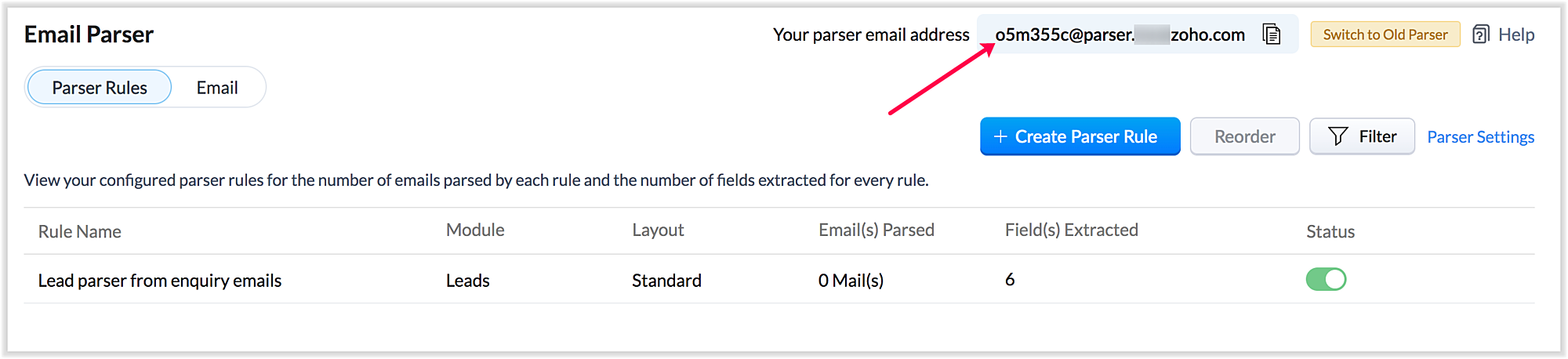
Also, a maximum of five approved parser addresses can be set up in common for all rules early on during the configuration.
2. A more powerful and intuitive configuration interface
In the latest version of email parser, the entire configuration interface allows free parsing and is highly intuitive, powerful, and, most importantly, user-friendly—unlike the previous version, which demanded rigid adherence to delimiters.
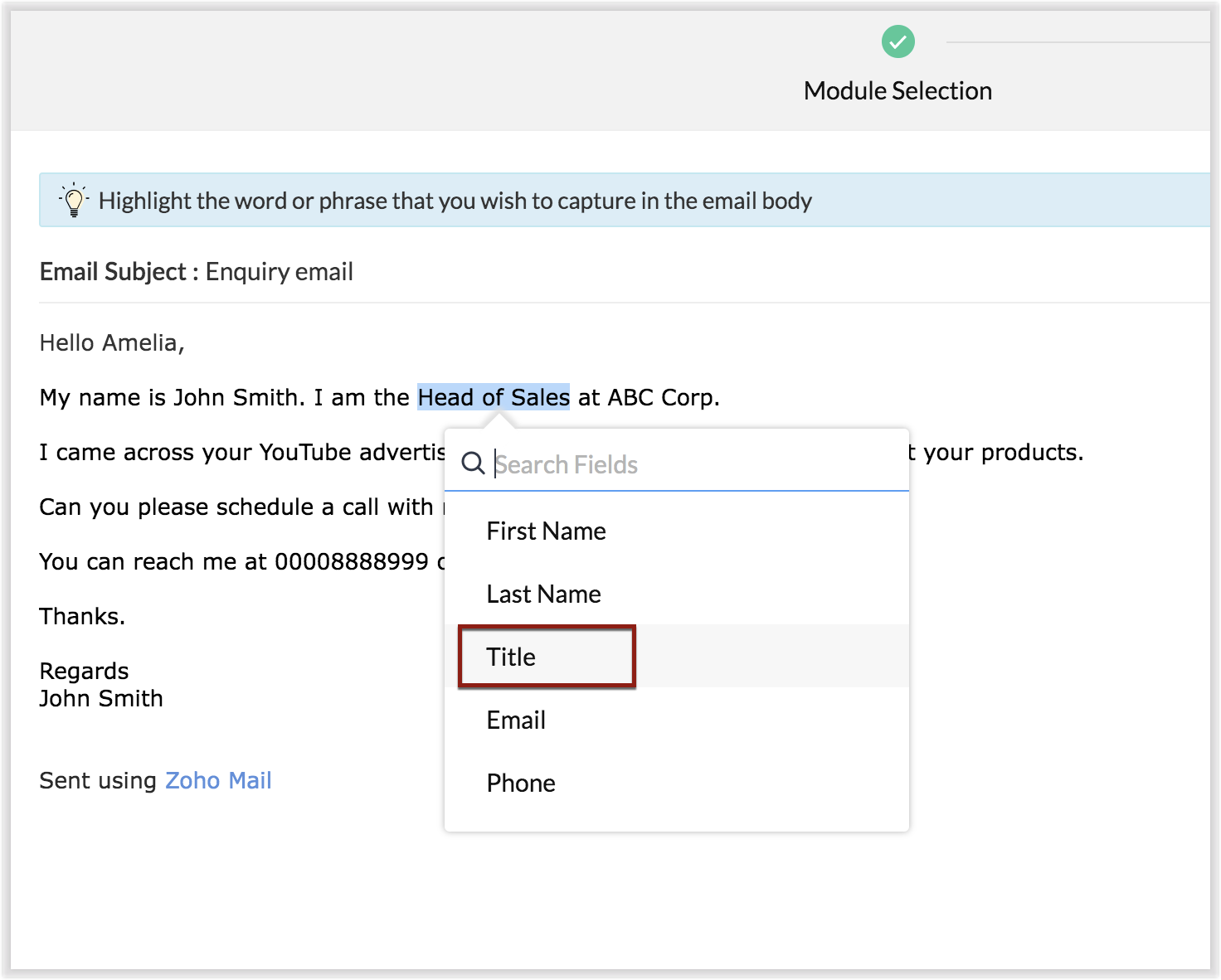
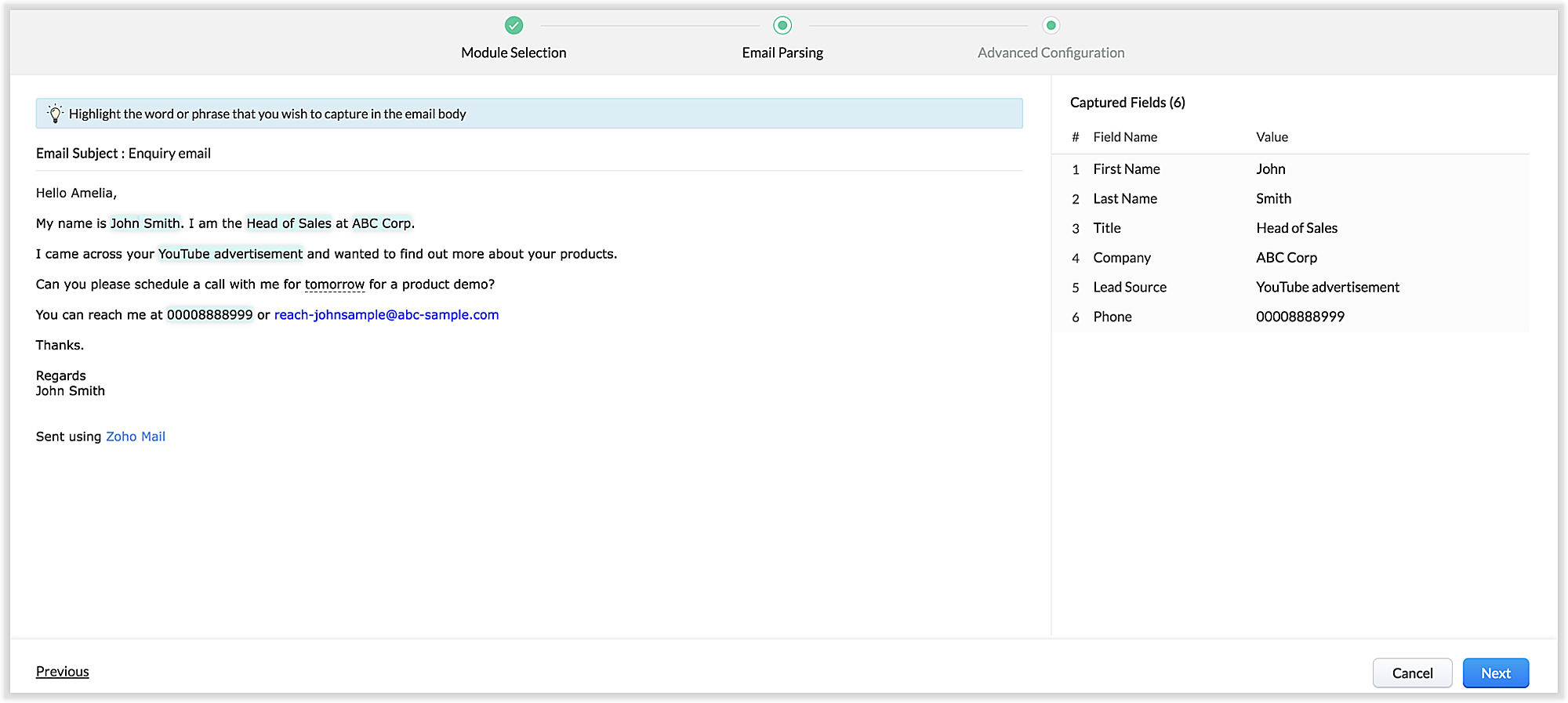
The email parser interface automatically gives you a preview of the parsed data on the same screen where the field mapping occurs, so it's easier to get a snapshot of all the fields that are being parsed.
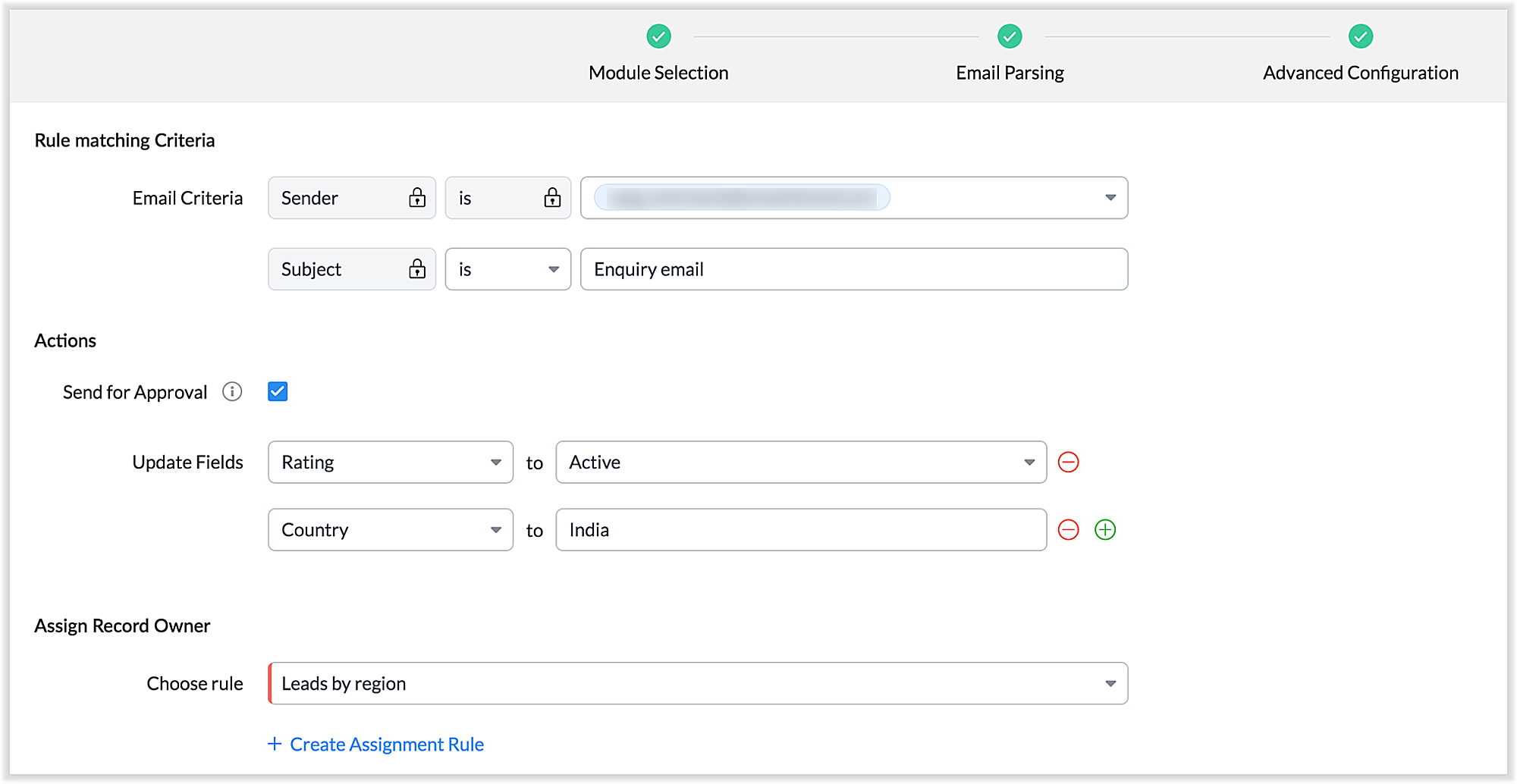
There's also an advanced configuration tab which involves options for filtering emails applicable to the parser based on criteria and associating automated actions, such as sending for approval, updating fields, and assigning records to certain users based on assignment rules.
You can also parse HTML emails directly, as opposed to converting them to plain text emails first—which was necessary for the old parser. You can also create email parser rules for each layout in a module.
3. Custom functions: Configure the email parser without associating a module
The new email parser now supports the execution of custom functions based on parsed data. In this case, the parser rule is not associated with a particular module. Using custom functions helps you with extensibility and interoperability in Zoho CRM. You can extend the email parser function to more than one module within Zoho CRM, and even to connect with other Zoho services. You can also perform ad hoc actions in third-party applications based on the parsed data.
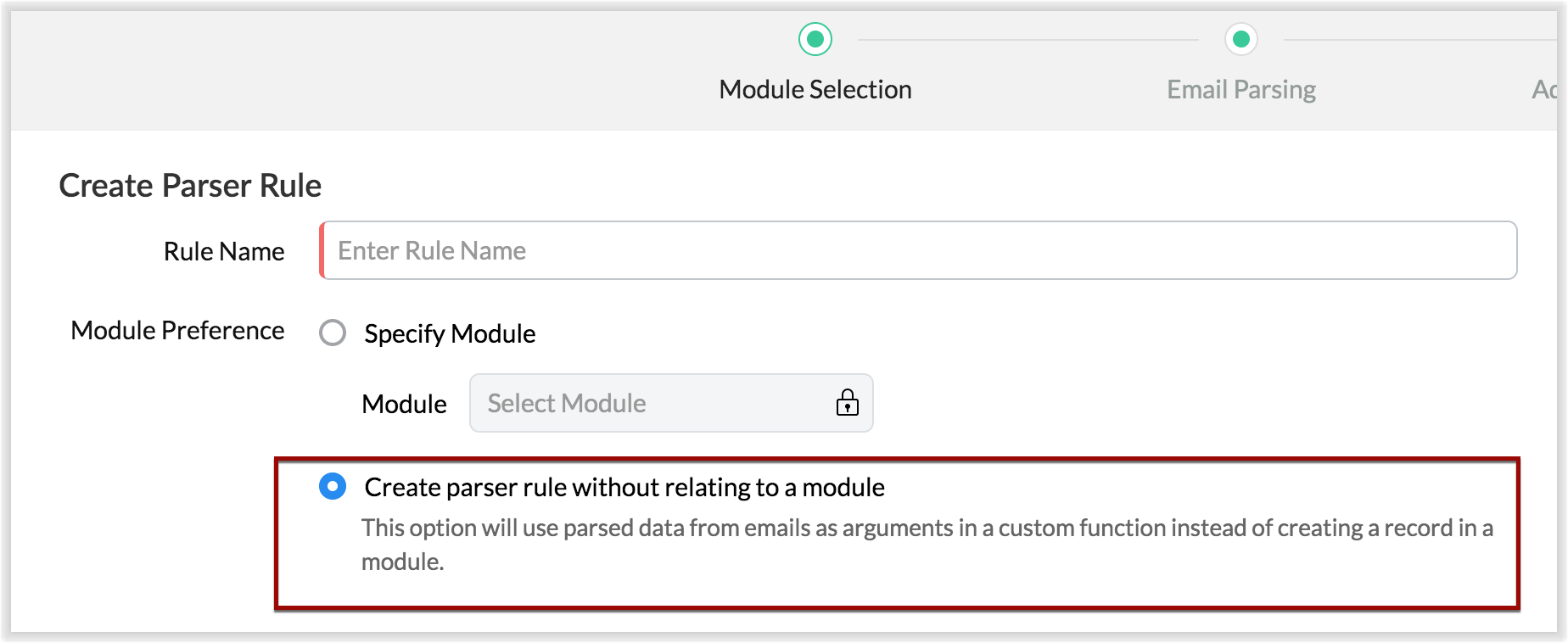
- For example, let's say that based on an incoming email inquiry, a property management company called Zylker wishes to update both Contact and Account records in CRM. The email sender's name, phone number, and address will go to the Contacts module, whereas their company information will go to the Accounts module.
- Let's say also that the same company has another requirement: Based on an incoming email from a customer regarding the status of their property, they want to update corresponding information on a third-party listing website automatically. They can achieve this by using the email parser to execute custom functions.
Once you have the required custom functions written, you can associate them to the parser rule and have the action executed for subsequent incoming emails.
4. Update records and send them for approval
Update Record is a function by which you can update the latest information on a record from an incoming parsed email.
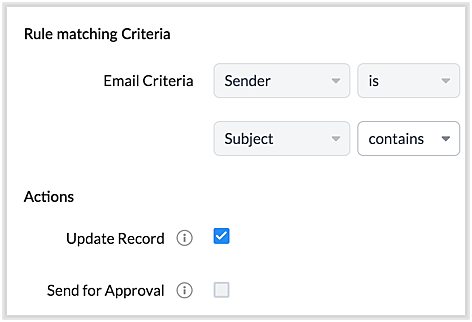
For example, say you receive an incoming email from a prospect named Jane Evans. Normally, a new lead record would be created for a new inquiry email, but if Jane is already in the CRM system, you want the CRM to update Jane's information on the same record as opposed to creating a duplicate record. If this is your expectation, you can check the Update Record option in the parser rule's Advanced Configuration settings.
Note: CRM will use the email field to detect duplicate records. For the Update Record option to show up, you must have first mapped the "Email" field from the email content, which serves as the primary identifier, or a "unique field" for a record.
You can also choose the Send for Approval option—in which case, records parsed via email parser need to be reviewed and approved from the Waiting for Approval tab in the selected module in order to become a part of the CRM system.
5. Informative parser reports
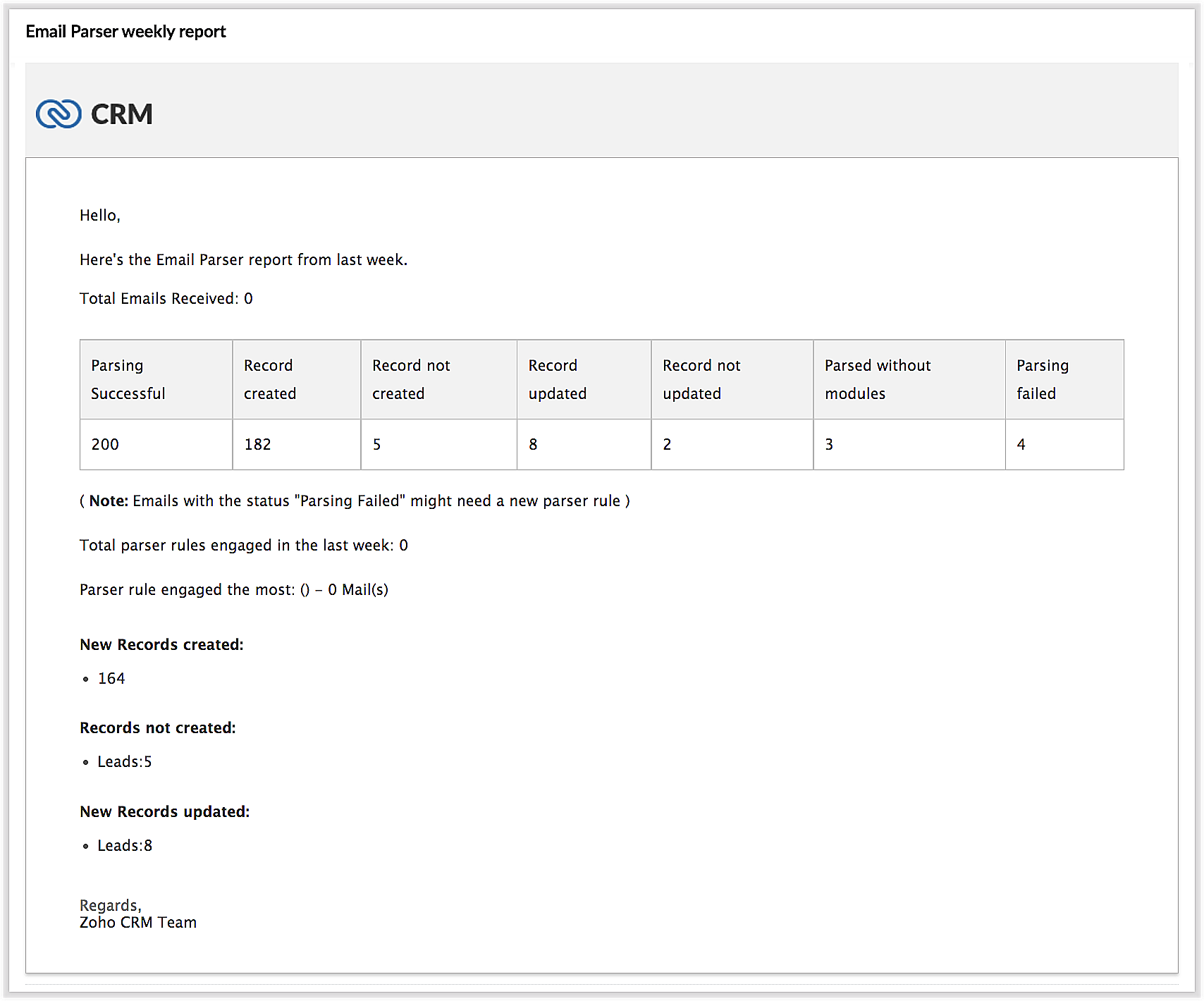
In the new version of the email parser, you're presented with accurate, detailed insights on the number of emails being parsed per rule, the fields extracted, and a list of customized actions associated with the records the parser has created. This detail summary gives you a clear picture of how effective your rules have been and indicates the revisions you may need to make to those rules based on those insights.
Detailed weekly performance reports can be sent to the creator of these rules or a custom email ID. Email reports are also sent upon record creation failure so that the appropriate users can take immediate action.
6. Reorder and filter
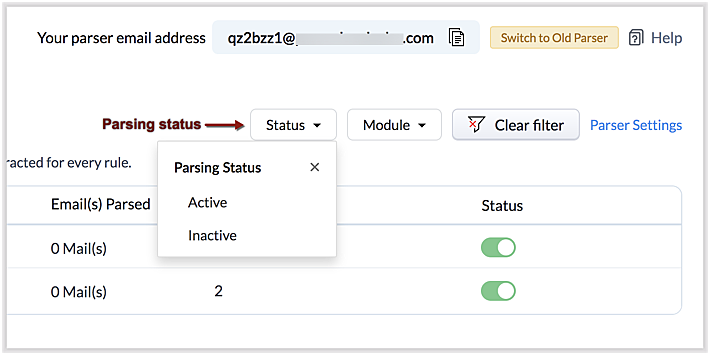
You now have an option to reorder the list of parser rules based on your preferred order. This is important because the email parser system is designed to execute only the very first rule whose criteria an incoming email meets. Therefore, the order of the parser rules becomes essential for effective email parser performance.
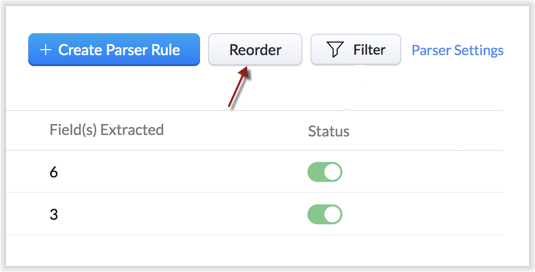
You can also filter rules by status (active/inactive) and also by module.
7. Contextual access to parsed emails
You can view not only the Configuration Info for each parser rule, but also insights based on parsed emails.
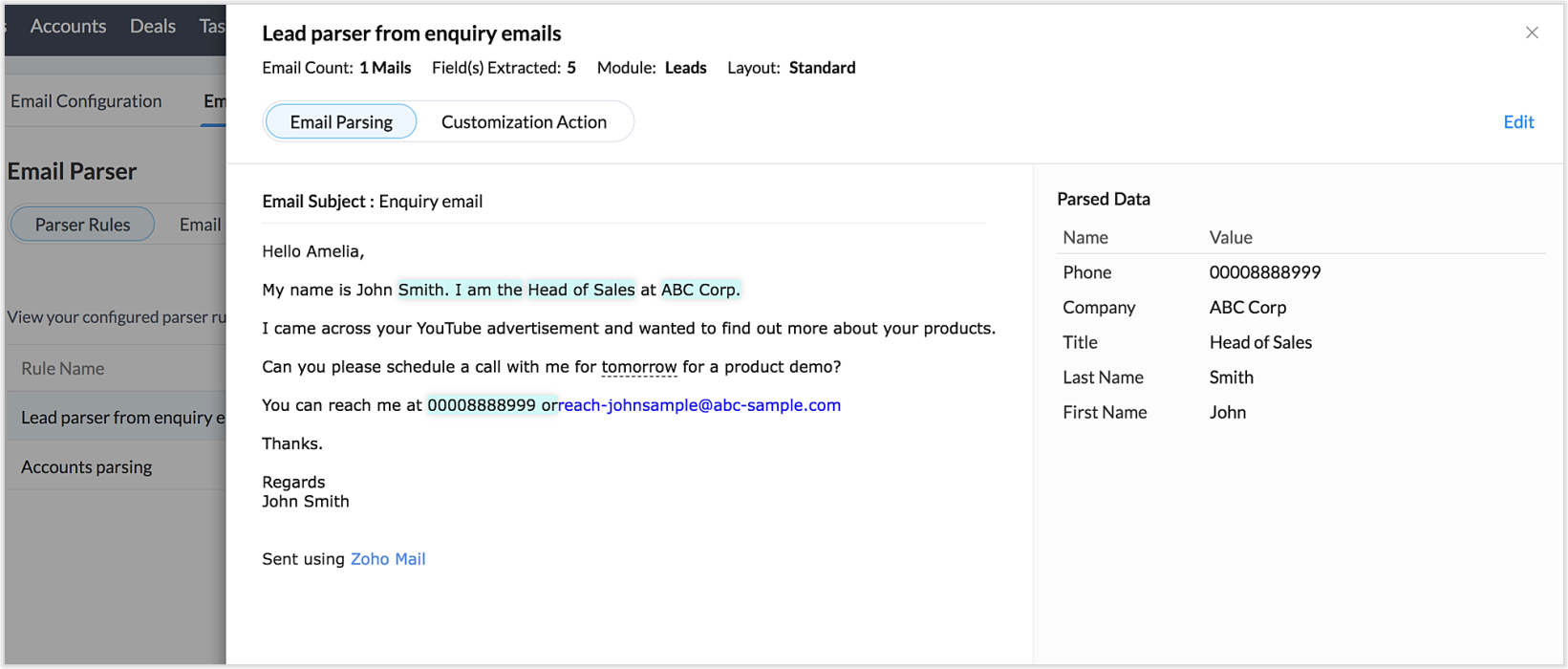
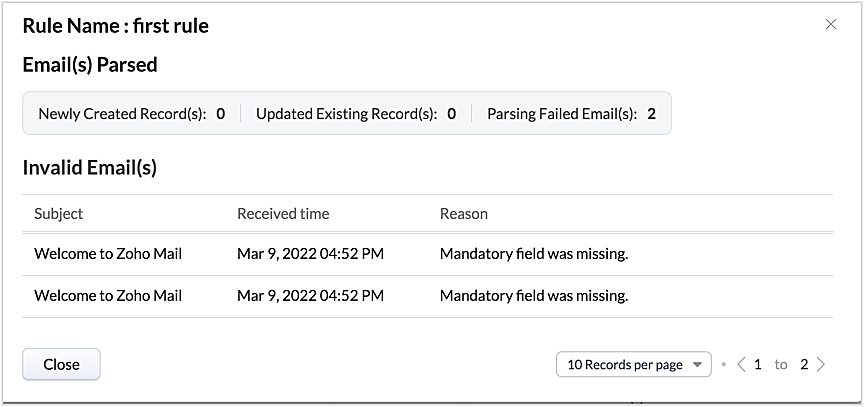
This way, from the perspectives of both parser rules and parsed emails, you can derive useful insights.
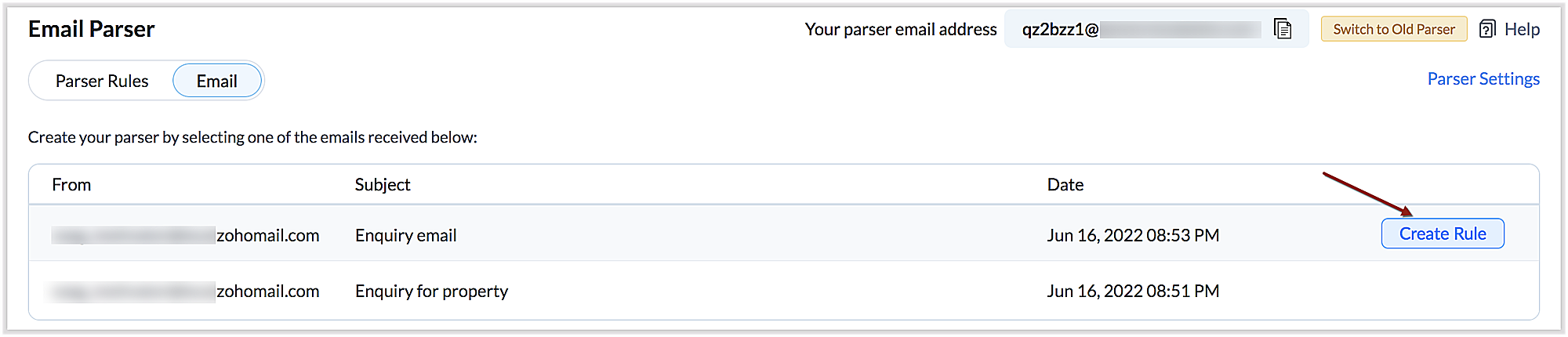
The "Email" tab lists the most recent email in your parser inbox, where you can check properties like parsing status, the rule used to parse it, and more. If the email has not met any rule, you may also create a new parser rule contextually from this email page.
You can also re-run an email in the event of parser failure if there's no match found, as well as parse emails in bulk. (Note that this is applicable only for the emails that have a template match and for which the parsing was unsuccessful.)
Preparing for deprecation of the Old Email Parser
For existing users:
Existing users, who have not already switched to the new parser can do so by clicking on the Switch to New Parser button. Rules available in both the parsers will be working simultaneously until the Old parser is deprecated, but the rules available in the Old parser will not be displayed in the New parser view, and vice versa.

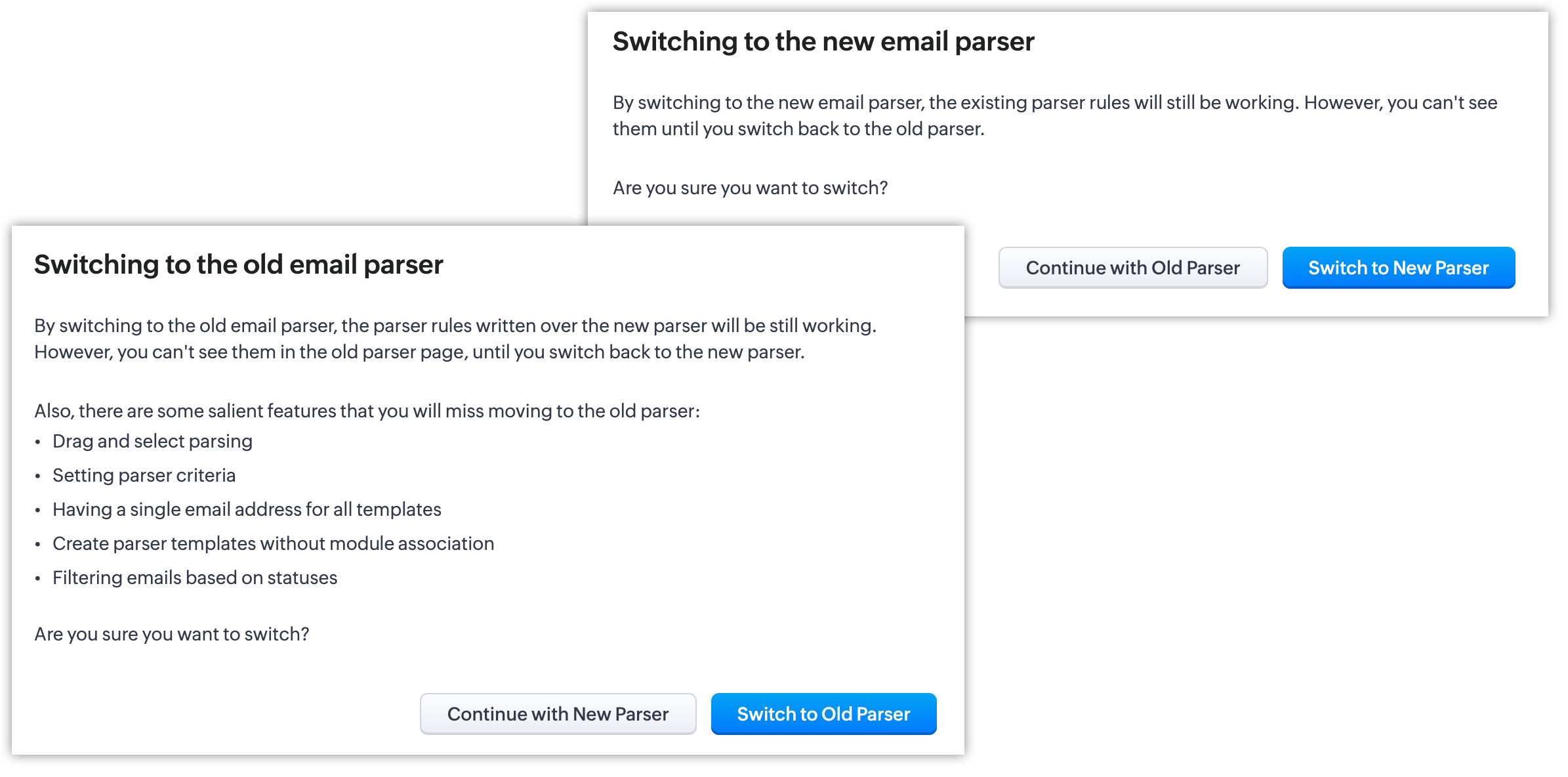
It's essential to manually create the existing rules in the New parser because once the Old parser is deprecated, only the rules present in the new parser will function. Since there won't be any rules from the previous parser available, the new parser will require that you create all rules from scratch.
Please note:
- Until the deprecation of the Old Email Parser on June 1, 2023, both the old and new versions will co-exist, after which, the New Email Parser will become the default version. .
- The rules in the Old Email Parser parser won't be available once it has been deprecated. Therefore, if no rules are added to the New Email Parser , there won't be a parser to run. So be sure to write rules in the New Email Parser before the deprecation. Additionally, keep in mind that once your old rules have become obsolete, they cannot be recovered.
For new signups
For new signups, only the new parser will be available as the default feature, and not the old parser. There is no action required from users in new signups.
Further reading
Thanks, have a great day.
Regards,
Sai Shree | Zoho CRM
Sai Shree | Zoho CRM
Topic Participants
Saishree T K
Ian Imamura
Sunderjan Siddharth
Krizia Tenorio
Emily Bridges
Sticky Posts
Enhancement to ICR’s field prompting: Preferred data extraction using advanced field prompting
Dear Customers, We hope you’re well A quick background Intelligent Character Recognition (ICR) comes as part of Zia’s optical recognition capability called Zia Vision. When we introduced it last April, the data extraction was training-based and was applicableGood news! Calendar in Zoho CRM gets a face lift
Dear Customers, We are delighted to unveil the revamped calendar UI in Zoho CRM. With a complete visual overhaul aligned with CRM for Everyone, the calendar now offers a more intuitive and flexible scheduling experience. What’s new? Distinguish activitiesAccessibility in Zoho CRM: Not just a feature—a way to empower
For instructions on setting up these controls, please check this help document: Configuring accessibility controls. Hello everyone, Today (December 3, 2024), on the International Day of Persons with Disabilities, we begin our journey towards a CRM thatScaling the customer journey: What's new in CommandCenter
Dear Customers, The last time we connected about CommandCenter, it was about the tool's new controls and revamped UI. Personally, the overhaul of the UI from the last update, still excites me. Today, we're here with news about its scalability and addedZoho CRM's sales trend and sales follow-up trend dashboards are now customizable
Dear Customers, We're here with good news! Sales trend and sales follow-up trend are two system-defined dashboards that help you understand trends and anomalies in your sales outreach and conversion efforts. They use Zia's intelligence to identify patterns
Recent Topics
Introducing Radio Buttons and Numeric Range Sliders in Zoho CRM
Release update: Currently out for CN, JP, AU and CA DCs (Free and standard editions). For other DCs, this will be released by mid-March. Hello everyone, We are pleased to share with you that Zoho CRM's Layout Editor now includes two new field formats—Reassign Partially Saved Entries
Hi, I would like to be able to go to Partially Saved Entries and like the option to delete them I would like the option to multi-select and be able to reassign them to another user to complete (Such as when a user has left the company). Thanks DanCan we rely on order of returned ids when inserting multiple records?
Hello! API https://www.zoho.com/crm/developer/docs/api/v8/insert-records.html does not mention that the response array will match the input array*, keeping this important information implicit and someone might have doubts to rely on it. (*the responseDisplaying only unread tickets in ticket view
Hello, I was wondering if someone might be able to help me with this one. We use filters to display our ticket list, typically using a saved filter which displays the tickets which are overdue or due today. What I'd really like is another filter thatWhat is a realistic turnaround time for account review for ZeptoMail?
On signing up it said 2-3 business days. I am on business-day 6 and have had zero contact of any kind. No follow-up questions, no approval or decline. Attempts to "leave a message" or use the "Contact Us" form have just vanished without a trace. It stillBest Way to Manage Approvals Within Blueprint Stages?
Hi, I am working on a requirement involving Blueprint and approval logic in Zoho CRM and would appreciate some guidance. I understand that approval processes do not trigger when a record is currently within a blueprint, which makes it challenging to implementZoho Books: tax is not automatically pulled from product-data anymore - why?
Hi, until a short time ago, you could set a default taxrate for each product/item. This taxrate automatically appeared each time the item was chosen in an invoice or quote. Why does this not work anymore? The field is still there at the product record,Issue creating a YTD report with last years numbers
I am looking to create a widget to compare the YTD leads we have in 2023 to the YTD leads we had in 2022. I'm having issues with the aggregate formula creation to gain access to the 2022 Leads YTD data point. Feeling like this is a common view of dataBrand Studio Projects in Analytics
Hi All, Currently pulling my hair out over trying to link together some social media posts for a reporting dashboard in Analytics, so I thought I'd see if anyone on here had a solution. Our Marketing Team created a LinkedIn campaign in Zoho Brand Studio,Manage Testing Process in Zoho Sprints
Agile framework supports a robust quality assurance system that incorporates continuous testing throughout the development lifecycle of the product. The agile testing team focuses on planning the testing around the development, identifying defects earlyAnnouncing the Zohotshots of the ZDC Hackathon 2025
Hey everyone, The wait is finally over! After weeks of building, experimenting, and pushing creative boundaries, we’re excited to announce the winners of the second edition of the ZDC Hackathon. This edition brought together an incredible community ofMajor journey crash and not loading. Zoho Marketing Automation
Hi all. Last night (19MAR, 2026) Marketing Automation for a specific journey completely crashed, and since the crash the specific journey has failed to load at all (blank journey canvas, no journey appears, no menu accessible) but other separate journey'sCRM x WorkDrive: File storage for new CRM signups is now powered by WorkDrive
Availability Editions: All DCs: All Release plan: Released for new signups in all DCs. It will be enabled for existing users in a phased manner in the upcoming months. Help documentation: Documents in Zoho CRM Manage folders in Documents tab Manage filesDynamic image in form works in the app but not on the customer portal.
img = frm_Fichas[ID == input.Nombre].Foto; imgno = Nophoto[ID2 = 1].Image; if(len(img) > 1) { img = img.replaceAll("/sharedBy/appLinkName/",zoho.appuri); img = img.replaceAll("viewLinkName","Fichas_de_personal_public"); img = img.replaceAll("fieldName","Foto");Candidate Assessments, no workflows.
I have an issue where I would like to trigger a workflow based on a candidate assessment being completed. Sometimes a returning candidate will complete a second assessment, on completion the status of the candidate will be updated to "Unqualified" ifMail Merge in Zoho Desk
Hello Team, Do we have an option of mail merge within Zoho Desk like we have in Zoho CRM? We have a requirement to generate some pdf file in the form of mail merge doc from the ticket.Workdrive backup and default storage selection
Hi community, I have been informed by Zoho that workdrive will be the default storage mechanism for crm and projects. These 2 Apps seem to have different design on how they interact with workdrive for storage. 1. Crm: seems to have files saves at theSync your CRM Tasks with Zoho Projects
Zoho Projects integration with Zoho CRM helps you manage your tasks more efficiently. You can create all project related activities right inside your CRM using this integration. Create new portal or associate an existing portal, add projects to the portal,Tax in Quote
Each row item in a quote has a tax value. At the total numbers at the bottom, there is also a Tax entry. If you select tax in both of the (line item, and the total), the tax doubles. My assumption is that the Tax total should be totalling the tax fromZoho vault filling in a form it's not supposed to fill in
Hey there, I have a problem with ZOHO Vault autofill. In a software package, we have these options: For some reason zoho vault always replaces what's in the top option and fills a 2fa password in there, and then saves that value.. Meaning whatever wasZoho Booking Integration with Desk
Just wanting to share something in case it helps someone else who may run into a similar use case as we did. Issue: Currently, the Zoho Booking integration with desk will drop a comment into the ticket when a customer books a time, however it won't changeLet us view and export the full price books data from CRM
I quote out of CRM, some of my clients have specialised pricing for specific products - therefore we use Price Books to manage these special prices. I can only see the breakdown of the products listed in the price book and the specialised pricing forWorkDrive issues with Windows Explorer Not Responding
We are using WorkDrive to collaborate on editing video content. We have a lot of files and quite a few are a few gigs. Recently anytime I try and work with the files Explorer freezes for a couple minutes whether it's dragging the files into Premiere orSyncing calendar with Google Calendar doesn't work when events are sent to auto repeat
Hi... The ZOHO CRM -- GOOGLE CALENDAR sync is broken. If I create a single event on either side, sync works, but if I create an event with auto repeat on either side it doesn't work. Furthermore, events created before the sync don't show up in the calendar.Organization wide Account and Contacts Visibility/Sharing Capabilities?
Has anyone figured out a way to make visibility or sharing of Accounts and Contacts to be available across the entire organization without having to have every individual user edit their Sharing permissions? For our sales folks they need to be able toWhen Does WorkDrive integrate with Books?
When Does WorkDrive integrate with Books?Quickbooks Integrations Stopped Working
All of our Quickbooks integrations have stopped working. I am checking in to see if: a) this is a known issue b) if anyone else is having this issue. As usual, Zoho support is unavailable.Notification of Interaction Assignment
If a user is assigned an interaction, they should be notified via email. These are almost useless because if I assign an interaction for someone to respond to, they dont know that I assigned it to them without me telling them or them logging in and discoveringCountries List Global Set- Complete with Phone Country Code and Continent.
Dear Zoho Team I saw your recent addition to the Global Sets regarding the Countries list and states. While working on it, why didn't you also add things like Continent and Phone Country Code? Also, some ISO codes from some Countries/regions are misCustom Display Field for Lookup Dropdowns in Zoho CRM
Could Zoho CRM support changing the display field in lookup dropdowns, like Zoho Creator does? This would make it much easier to select the right record by showing a more useful field instead of only the default one. It would improve speed, clarity, andMessage as bot
I would like to be able to send a Cliq message truly as a bot. the current implementation of this function, while it sends the message as a bot it sends that message inside a chat from the user how authenticated the flow cliq connection instead of directlyCustom Button makes scroll bar go down in report
I have a report with a Custom button called Completed. A colleague mentionned to me that when he pressed this custom button it scrolled down the page which is annoying since he want to stay at the same space on the repoort. There is no reload linked toCRM x WorkDrive: We're rolling out the WorkDrive-powered file storage experience for existing users
Release plan: Gradual rollout to customers without file storage add-ons, in this order: 1. Standalone CRM 2. CRM Plus and Zoho One DCs: All | Editions: All Available now for: - Standalone CRM accounts in Free and Standard editions without file storageBooks <-> CRM synchronisation with custom Fields
Hello, We are synchronising Books Customers with CRM Accounts. In CRM Accounts I set up last year a "segments" multiselect field shown below In Books, I set up a custom multi-select field with the same value as in the CRM And set up the synchronisation inside Books. Want to synchronise the Books Segments with the CRM Segments, but the later doesn't exist, and another non-existing is there ?! First, I don't understand where the field Segmentation is coming from. Second, I set CRM Segmentation to syncTrouble with using Apostrophe in Name of Customers and Vendors
We have had an ongoing issue with how the system recognizes an apostrophe in the name of customers and vendors. The search will not return any results for a name that includes the mark; ie one of our vendors names is "L'Heritage" and when entering theRecording overpayment?
So a customer just overpaid me and how do I record this? I can't enter an amount that is higher than the invoice amount. Eg. Invoice is $195 and he sent $200. He's a reccuring customer so is there a way to record so that he has a $5 advance for future invoice?Introducing the New Zoho Assist Quick Support Plugin
We are thrilled to announce the new Zoho Assist Quick Support Plugin, the upgraded and enhanced version of the Zoho Assist Customer Plugin. This new plugin allows organizations and IT administrators to deploy it directly onto their customers’ devices,Automate your signing workflows with Zoho Sign + n8n
Hello! We're excited to announce that Zoho Sign is now available as a community node on n8n, a popular open-source workflow automation platform used by tens of thousands of teams worldwide. n8n lets you connect apps, APIs, and services through a visualAsk the Experts 27: Onboarding and managing agents
Hello everyone, We are back with our Ask the Experts (ATE) series for 2026. This year, we bring experts to help you address customer support challenges using Zoho Desk. For our first ATE, we are getting into the human side of customer support. "EveryRetainer invoice in Zoho Finance modlue
Hello, Is there a way of creating retainer invoices in the Zoho Finance module? If not can I request this is considered for future updates please.Next Page