iOS 18 is here! Discover the enhanced Bigin app with iOS 18, iPadOS 18 and macOS Sequoia.
Hello, everyone!
We are excited to be back with new features and enhancements for the Bigin app. Let us take a look at the new iOS 18 and iPadOS 18 features. The following is the list of features covered in this update:
- Control widgets.
- New app icons.
- In app translation.
- Contact provider.
- Lock screen camera capture.
- Limited contact access.
- Semantic Spotlight search.
- Floating tab bar in iPad.
- Pencil Pro actions for iPad.
- Compatible with macOS Sequoia.
Control widgets
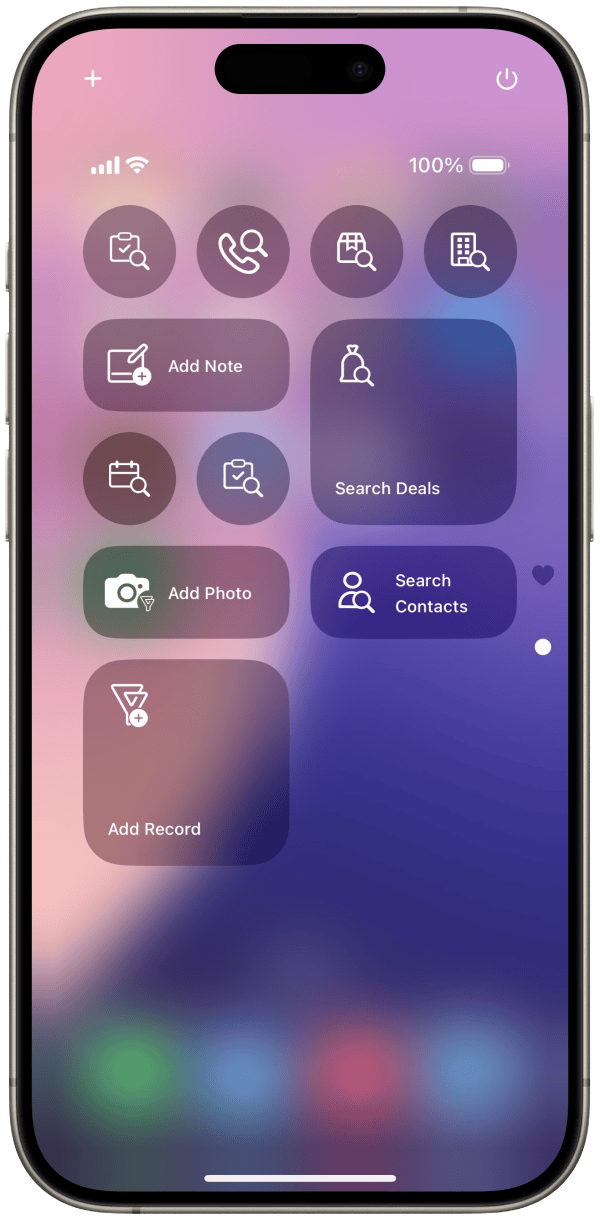
We have introduced Bigin control widgets on the Control Center. Using these control widgets, you can now create new records, search existing ones, add files and notes to the records in Bigin. You can also resize and position the widgets according to your preference.
New app icons
We have added a new app icon for the Bigin app. You can now have full control over the size and tint of the app icon, thus ensuring that it complements your layout and wallpaper.


In app Translation
Bigin app supports translation for content in emails. The translation icon will appear only if the content is in a language different from the app's default language. A total of 21 languages are supported for translation. Translated content can also be copied.

The translation option is also available for conversation of the records that are created using the Email-In topping. The translated content of the conversation can also be posted as a comment.

Contact Provider
Bigin contacts can be shared with the device and it can be accessed as a separate list in the Contacts app.
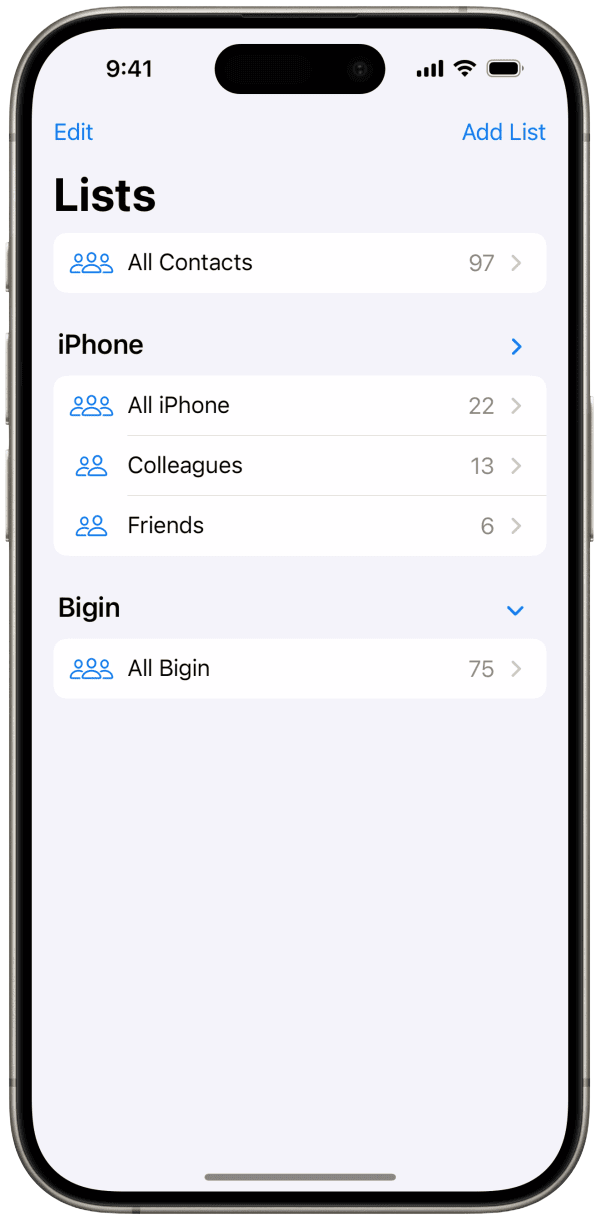
How to enable Contact Provider?
The contact provider can be enabled in any of the following three methods:
In the Contact Module: Go on to the Contacts module within the Bigin app> tap the more options(ellipsis icon) menu and select 'Enable Contact Provider'.
In App Settings: Go on to the settings module and enable the 'Contact Provider' option on the Bigin app settings.
In Phone Settings: Enable the Contact Provider by navigating to device Settings > Apps > Contacts > Providers > enable the toggle for the Bigin app.
Locked Camera Capture
The 'Add Photos' control widget on the lock screen acts as a locked camera capture tool. You can use this widget to take photos even when your device is locked. These photos can be attached to Bigin records later. In the widget view, you have the option to preview photos. You can also rename and delete photos taken during that session.

When there are photos taken via the lock screen widget, a banner will appear in the record list within the app. This banner indicates the presence of lock screen photos. Tapping the banner will open a photo list UI with options to select, delete, or rename the photos. You can choose the photos you need and attach them to a record. The banner will remain visible until all lock screen photos have been processed, either by being attached to records or deleted. The preview image in the banner will display the first two images from the drafts list view.

Limited Contacts Access
We have introduced an option for you to limit the device contacts access with the Bigin app. Now, Bigin will only have access to the device contacts that you choose to share.
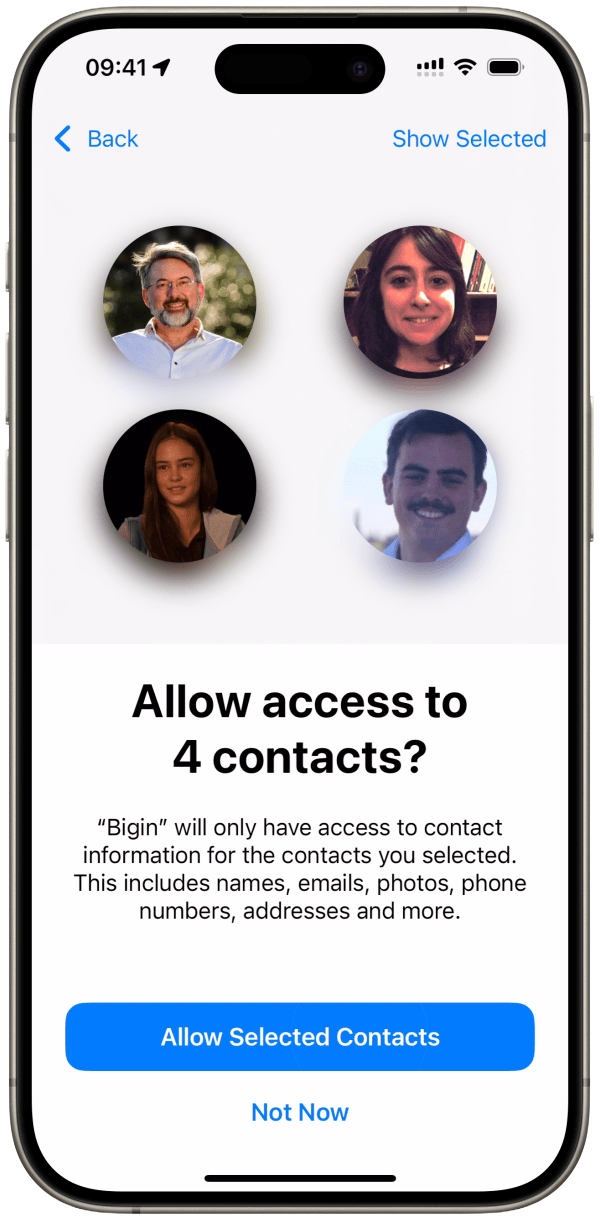
When Bigin is granted limited contact access, an informational banner will appear in the Import Contacts and Email Recipient's sections, with a 'Manage' option. Clicking the 'Manage' option will open the system UI and allows you to update Bigin's contact access settings. The device's contact list in the Import Contacts and Email Recipient's sections will be updated automatically whenever you modify your contact access via the 'Manage' option.

Semantic spotlight search
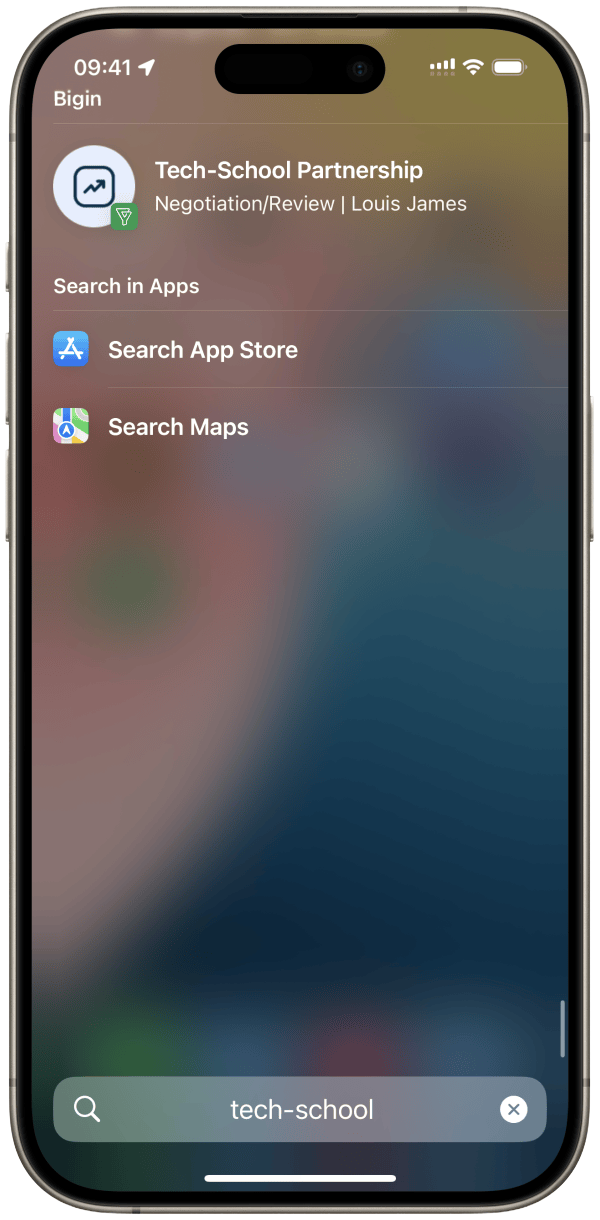
Pipeline records can be searched through Spotlight Search without launching the app. Simply click on the result in Spotlight to navigate directly to the detail view of the record.
Floating tab bar in iPad
In iPadOS 18, the bottom tab bar has been repositioned above the navigation bar. You can now reorder and remove items in the elevated tab bar.
Note: The changes in the tab bar order will not affect the sidebar or the bottom tab bar.

Pencil Pro actions
We are expanding the scope of what you can do with your Apple Pencil. You can add new records and search for existing ones, access all the tasks and calls scheduled for the day, and more, by simply squeezing your pencil.
You can also undo what you have written with a quick double tap. This feature is applicable in text fields within forms, emails, and notes.

Bigin in macOS Sequoia
Bigin is now compatible with macOS Sequoia devices.

Don't have the app yet? Download Bigin now directly from the App Store or using the link given below:
Feel free to explore the features and write to us at bigin@zohomobile.com anytime you need any assistance. You can also submit feedback within the app(go on to app settings > select 'Help & Support' > Submit Feedback). We will be happy to assist you.
Until next time,
Sneha
Topic Participants
Sneha Bharathi V
todd
Guhan A K
trinetdigital
vignesh v
Recent Topics
Zia Dashboard Insights : turn your dashboard into decisions
When you look at a chart or KPI in a dashboard, you would possibly see something like: Revenue: $2.4M ↓ 18% vs last month. It can be a positive growth or a negative one, or a dip in revenue, a spike in deals, a slowdown in renewals—all you usually seeTickets without registration
Hi, would it be possible to give customers the opportunity to be able to read their tickets without registration?Zoho Desk Answer Bot vs. Zia Agents – Knowledge Base & Ticket Access
Hi everyone, I’m currently evaluating AI options in Zoho Desk and ran into some limitations with the Answer Bot: Answer Bot limitations Only uses Knowledge Base articles No access to tickets Limited control over sources: Either one Help Center or allComo estruturar automações eficientes no Zoho Creator
Como estruturar automações eficientes no Zoho Creator Introdução No contexto de aplicações empresariais, automação não é apenas uma conveniência, é um fator crítico para ganho de produtividade, redução de erros e escalabilidade operacional. O Zoho CreatorChanging the status of a work-order
Is there a way to change the status of a work-order?Online Payment Fees
We don't take many online credit card payments so the merchant service provider (PayPal) charges us the 2.9% fee for processing the amount. I would like the ability for the fee to be automatically added to the total amount for "ease of payment". We'dWhat is a realistic turnaround time for account review for ZeptoMail?
On signing up it said 2-3 business days. I am on business-day 6 and have had zero contact of any kind. No follow-up questions, no approval or decline. Attempts to "leave a message" or use the "Contact Us" form have just vanished without a trace. It stillZia Agents in Zoho CRM: a better way to set up digital employees
Hello everyone, If you've been using Zia Agents in Zoho CRM, so far using Connections was the only deployment method you're familiar with. You create an agent in Zia Agents (define its objective, write instructions, use tools, add knowledge base) andBank Feeds
Since Friday my bank feeds wont work. I have refreshed feeds, deactivate and reactivate and nothing is workingLogged out
Hi, just been working on a sheet when a pop up box appeared telling me I'm going to be logged out in x number of seconds and if I reload I may lose any edits, or words to that effect. It did indeed log me out and I did indeed lose my last edits. Any ideaZoho API
I have little experience with API. I'm trying to get a Custom API working with Zoho creator. I have created a Custom API and created an Endpoint URL, but i get a 9400 error code "The provided HTTP method is not valid for this custom API". Based off the#157127950
Where did my initial question go?Zoho writer unable to merge documents to PDF with basic fonts in Hebrew or fonts from my computer
I created several forms that will be merged into PDF files through Zoho Writer and I am unable to receive the PDF in the basic fonts of the Hebrew language or in the fonts I have on my computer. The writer exports to PDF an exchange font that looks veryHow I Implemented Subscription-Based Access Control and Expiry Handling in Zoho Creator
I recently worked on a use case where users come into the application to request a service, but they should only be able to continue the process after completing a subscription. The challenge was not just controlling access, but also making sure thatZoho Forms API
Is there any way to get all form entry list using API? Looking forward to hear from youZoho Projects : Task should auto-update to 'In Progress' if timer started
Namaskaram. Right now, if a Task's timer is started, the Task stays in 'Not Started' status. One has to manually update it to 'In Progress'. From a #uxdesign standpoint, it is an unnecessarily two step process to start working on a task. It would be better that, if I start the timer on a task, it should automatically change to 'In Progress' status. Crafted with ❤️ Zoho Gurus | Zoho One Practice Team @ CubeYogi Zoho Authorised Partner | 7+ Yrs | 200+ Projects | 100+ CustomersLaatste facturen en betalingen niet zichtbaar in mijn account
Wij gebruiken ZOHO invoice al jaren, maar sinds afgelopen week is mijn laatst verzonden factuur niet zichtbaar in mijn account, en tevens de laatst betaalde facturen zie ik niet. Hoe kan dit? Ik heb de pagina al diverse keren gerefreshed.Undelivered Mail uncategorized-bounce errors when sending invoices
Recently we have been getting Undelivered Mail bounce notification when sending invoices. Reason: uncategorized-bounce Some go through no problem some bounce back. We recently sent 10 invoices, 6 received bounce notifications. After reaching out to theOption to Delete Chats in IM
Currently, there is no option to delete any chats in IM, regardless of their source.Can I import MSG files into Microsoft 365 without Outlook?
Yes, absolutely. You do not need Outlook installed to import MSG files into Microsoft 365. Aryson MSG file Converter is a dedicated tool that eliminates the Outlook dependency entirely, making the migration process simple and efficient for all users.Introducing Radio Buttons and Numeric Range Sliders in Zoho CRM
Release update: 1. 2 March 2026: Currently out for CN, JP, AU and CA DCs (Free and standard editions). For other DCs, this will be released by mid-March. 2. 26 March 2026: CA, SA, AU, JP, CN DCs - Free, Standard, Professional, Enterprise, Ultimate, CRMFeature Request - A Way To Search Item Groups
Hi Inventory Team, I can't find any way to filter or search by fields of Item Groups. It would be great to see that functionality added. I have a use case where a single product might come from 5 or more suppliers and each supplier's item is an Item inZoho Books/Inventory - Update Marketplace Sales Order via API
Hi everyone, Does anyone know if there is a way to update Sales Orders created from a marketplace intigration (Shopify in this case) via API? I'm trying to cover a scenario where an order is changed on the Shopify end and the changes must be reflectedTicket id issues
When I reply a ticket from desktop, it doesn't have ticket id in the subject and it's great. When I reply a ticket from Zoho desk mobile, Zoho adds ticket id in the subject and I don't want that. Please help in this matter.Advanced email configuration - agent's name vs. department name
We currently have all four Advanced Configuration options turned ON at the Global-level (Channels > Email > Advanced Configuration) - including the "Show Agent name in Ticket replies and outgoing emails" option. We also had that same option turned ONAdd Bounced as an Email Action / Notification for Bounced Emails
This is one of the hard requirements for the clients we're servicing. They want to get an internal email notification whenever the email they sent to their contacts have bounced, so that they can look into it and update the email address. Currently, theFiles Uploaded to Zoho WorkDrive Not Being Indexed by Search Engines
Hello, I have noticed that the files I upload to Zoho WorkDrive are not being indexed by search engines, including Google. I’d like to understand why this might be happening and what steps I can take to resolve it. Here are the details of my issue: Filenot able to convert pdf to jpg and other forms and vice versa.
i want to change my pdf to jpg, word, etc and some times jpg to pdf. i don't know how to do in this.What’s New in Zoho Analytics - March 2026
Hello Users! In this month's update, we bring improvements across integrations, security, reporting, and analytics capabilities to help you work with your data more efficiently and with greater control. Explore what’s new and see how these enhancementsZoho People > Performance Management > Appraisal cycle
Hello All I am using this 2 users to test out how it work on Performance Management User 1 - Reportee User 2 - Reporting Manager : Li Ting Haley User 1 : Self Appraisal Error How do i fix this error?SalesIQ Tip for Admins: Guide Operators in Real-time Without Interrupting the Chat
Consider this. You're a supervisor and you're looking through the active conversations. An associate is mid-chat with a high-value prospect. The prospect asks something unexpected, maybe about a tailor-made subscription plan or a bulk discount that’sEarly Access: Check Printing in Zoho Books
Hello Everyone, Are you constantly writing checks to pay your vendors? We've got a great news to share with you! You can now pay your vendors by writing and printing a check directly from Zoho Books. The feature is ready and we'll be rolling it out to our customers in phases. It is available in the US Edition of Zoho Books and also in the Global edition, where the country is selected as USA and the currency is USD. Here’s a summary of what’s possible: 1. Write and print a check. 2. MakeConnecting Zoho Inventory to ShipStation
we are looking for someone to help connect via API shipStation with Zoho inventory. Any ideas? Thanks. UriSyncing zoho books into zoho crm
I was wondering how I can use zoho books in crm as I have been using them separately and would like to sync the two. Is this possible and if so, how? ThanksZoho no support response.
Problem is Zoho support seems to be just a concept. Just completing my trial, am ready to purchae 3 user subscriptions pending answer to a question, submitted two suport request during my trial that weren't responded to. Gave up trying the 888 line. Hard to imagine my production data in hosting environment with no support response.Updating transaction number series for fiscal year 2026-2027 in Zoho POS
A fiscal year or financial year is a 12-month period that businesses follow to manage and track their financial activities such as expenses, revenue, and taxes. This doesn't need to match the calendar year (JAN-DEC) and varies based on region, and taxLack of Looping and Carry-Forward Functionality in Zoho Survey
Zoho Survey currently does not support looping or carry-forward functionality, meaning it is not possible to dynamically generate follow-up questions based on each option selected in a previous question or to pipe selected responses (such as {LoopingForecast in Zoho CRM Just Got Smarter with an upgraded Zia Intelligence
Hello Everyone, We are here with an interesting enhancement to Forecasts in Zoho CRM — Enhanced Zia Insights for your sales Forecast. Imagine a regional sales manager reviewing their team’s performance using forecasts in Zoho CRM. Instead of switchingUpdate TDS and TCS rates for Income Tax Act, 2025 (effective April 1, 2026)
Hello everyone, The Income-tax Rules, 2026 (G.S.R. 198(E), dated March 20, 2026) have been notified, marking a significant structural shift in India’s direct tax framework. From April 1, 2026, the Income Tax Act, 2025 replaces the Income Tax Act, 1961.Service line items
Hello Latha, Could you please let me know the maximum number of service line items that can be added to a single work order? Thanks, Chethiya.Next Page